Page 20 of 482

NOTE:If a programmed key is lost, see your authorized
dealer to have all remaining keys erased from the sys-
tem’s memory. This will prevent the lost key from
starting your vehicle. The remaining keys must then be
reprogrammed. All vehicle keys must be taken to an
authorized dealer at the time of service to be repro-
grammed.
General Information
The Sentry Key�System complies with FCC rules Part 15
and with RSS-210 of Industry Canada. Operation is
subject to the following conditions:
•This device may not cause harmful interference.
•This device must accept any interference that may be
received, including interference that may cause undes-
ired operation.
SECURITY ALARM SYSTEM — IF EQUIPPED
The Vehicle Security Alarm system monitors the vehicle
doors for unauthorized entry and the ignition switch for
unauthorized operation. If something triggers the alarm,
the system will prevent the vehicle from starting and
provide the following audible and visible signals: the
horn will pulse; the headlights will flash; the park lights
will flash; and the Vehicle Security Alarm Indicator Light
in the instrument cluster will flash.
Rearming of the System
If something triggers the alarm, and no action is taken to
disarm it, the system will turn the horn off after three
minutes, turn all of the visual signals off after 15 minutes,
and then the system will rearm itself.
18 THINGS TO KNOW BEFORE STARTING YOUR VEHICLE
Page 39 of 482
TRUNK LOCK AND RELEASE
The trunk lid can be released from inside the vehicle by
pressing the TRUNK RELEASE Button located on the
instrument panel to the left of the steering wheel.
NOTE:The transmission must be in PARK before the
switch will operate.The trunk lid can be released from outside the vehicle by
pressing the TRUNK button on the Remote Keyless Entry
(RKE) transmitter twice within five seconds.
With the ignition switch in the ON position, the Trunk
Open symbol will display in the instrument cluster
indicating that the trunk is open. The odometer display
will reappear once the trunk is closed.
With the ignition switch in the LOCK position or the key
removed from the ignition switch, the Trunk Open sym-
bol will display until the trunk is closed.
TRUNK RELEASE Button
THINGS TO KNOW BEFORE STARTING YOUR VEHICLE 37
2
Page 106 of 482

•After the�Ready�prompt and the following beep, say
�Setup Confirmations.�The UConnect�system will
play the current confirmation prompt status and you
will be given the choice to change it.
Phone and Network Status Indicators
If available on the radio and/or on a premium display
such as the instrument panel cluster, and supported by
your cell phone, the UConnect�system will provide
notification to inform you of your phone and network
status when you are attempting to make a phone call
using UConnect�. The status is given for roaming, net-
work signal strength, phone battery strength, etc.
Dialing Using the Cellular Phone Keypad
You can dial a phone number with your cellular phone
keypad and still use the UConnect�system (while dial-
ing via the cell phone keypad, the user must exercise
caution and take precautionary safety measures). By
dialing a number with your paired Bluetooth�cellularphone, the audio will be played through your vehicle’s
audio system. The UConnect�system will work the same
as if you dial the number using voice recognition.
NOTE:Certain brands of mobile phones do not send the
dial ring to the UConnect�system to play it on the
vehicle audio system, so you will not hear it. Under this
situation, after successfully dialing a number the user
may feel that the call did not go through even though the
call is in progress. Once your call is answered, you will
hear the audio.
Mute/Un-Mute (Mute Off)
When you mute the UConnect�system, you will still be
able to hear the conversation coming from the other
party, but the other party will not be able to hear you. In
order to mute the UConnect�system:
•Press the “Voice Recognition” button.
•Following the beep, say�Mute.�
104 UNDERSTANDING THE FEATURES OF YOUR VEHICLE
Page 139 of 482
Fog Lights
The front FOG LIGHT switch is on the HEAD-
LIGHT switch below the dimmer control. To acti-
vate the front fog lights, turn ON the parking
lights or the low beam headlights and press the FOG
LIGHT switch.
An indicator light in the instrument cluster illuminates
when the fog lights are turned ON.
NOTE:The fog lights will operate with the low beam
headlights or parking lights on. However, selecting the
high beam headlights will turn off the fog lights.
Multifunction Lever
The multifunction lever controls the operation of the turn
signals, headlight beam selection, and passing lights. The
lever is located on the left side of the steering column.
Multifunction Lever
UNDERSTANDING THE FEATURES OF YOUR VEHICLE 137
3
Page 140 of 482

Turn Signals
Move the multifunction lever up or down and the
corresponding turn signal indicator in the instrument
cluster flashes to show proper operation of the front and
rear turn signal lights. You can also signal a lane change
by moving the lever partially up or down without
moving beyond the detent. Releasing the lever at the
detent will provide three flashes.
If either indicator has a very fast flash rate, check for a
defective outside light bulb. If an indicator fails to light
when the lever is moved, see your authorized dealer for
service.
NOTE:A “Turn Signal On” message will appear in the
EVIC and a continuous chime will sound if the vehicle is
driven more than 1 mi (1.6 km) with either turn signal on.
Highbeam/Lowbeam Select Switch
Push the multifunction lever away from you to switch
the headlights to HIGH beam. Pull the lever toward you
to switch the headlights back to LOW beam.
Flash to Pass
You can signal another vehicle with your headlights by
lightly pulling the multifunction lever toward you. This
will cause the headlights to turn on at high beam and
remain on until the lever is released.
Overhead Console Map/Reading Lights
These lights are mounted between the sun visors on the
overhead console. Each light is turned ON by pressing
the lens. Press the lens a second time to turn OFF the
light. These lights also turn on when a door is opened, or
when the UNLOCK button on the Remote Keyless Entry
(RKE) transmitter is pressed, or when the dimmer control
is turned fully upward, past the second detent.
138 UNDERSTANDING THE FEATURES OF YOUR VEHICLE
Page 153 of 482

To Activate
Push and release the ON/OFF button located
on the end of the speed control lever. The
indicator light in the instrument cluster will
illuminate to show that the speed control sys-
tem is ON. To turn the system OFF, push and release the
ON/OFF button again. The system and the indicator
light will turn off.
WARNING!
Leaving the electronic speed control system on when
not in use is dangerous. You could accidentally set
the system or cause it to go faster than you want. You
could lose control and have an accident. Always
leave the system OFF when you aren’t using it.
To Set At A Desired Speed
When the vehicle reaches the speed desired, push the
lever downward to SET DECEL and release. Remove
your foot from the accelerator pedal and the vehicle will
operate at the selected speed.
NOTE:
•Speed control will only function in 3rd, 4th, or 5th gear
when in the Autostick�mode (if equipped).
•The speed control may not engage if a different size
tire is installed on one wheel, such as the compact
spare tire.
UNDERSTANDING THE FEATURES OF YOUR VEHICLE 151
3
Page 164 of 482
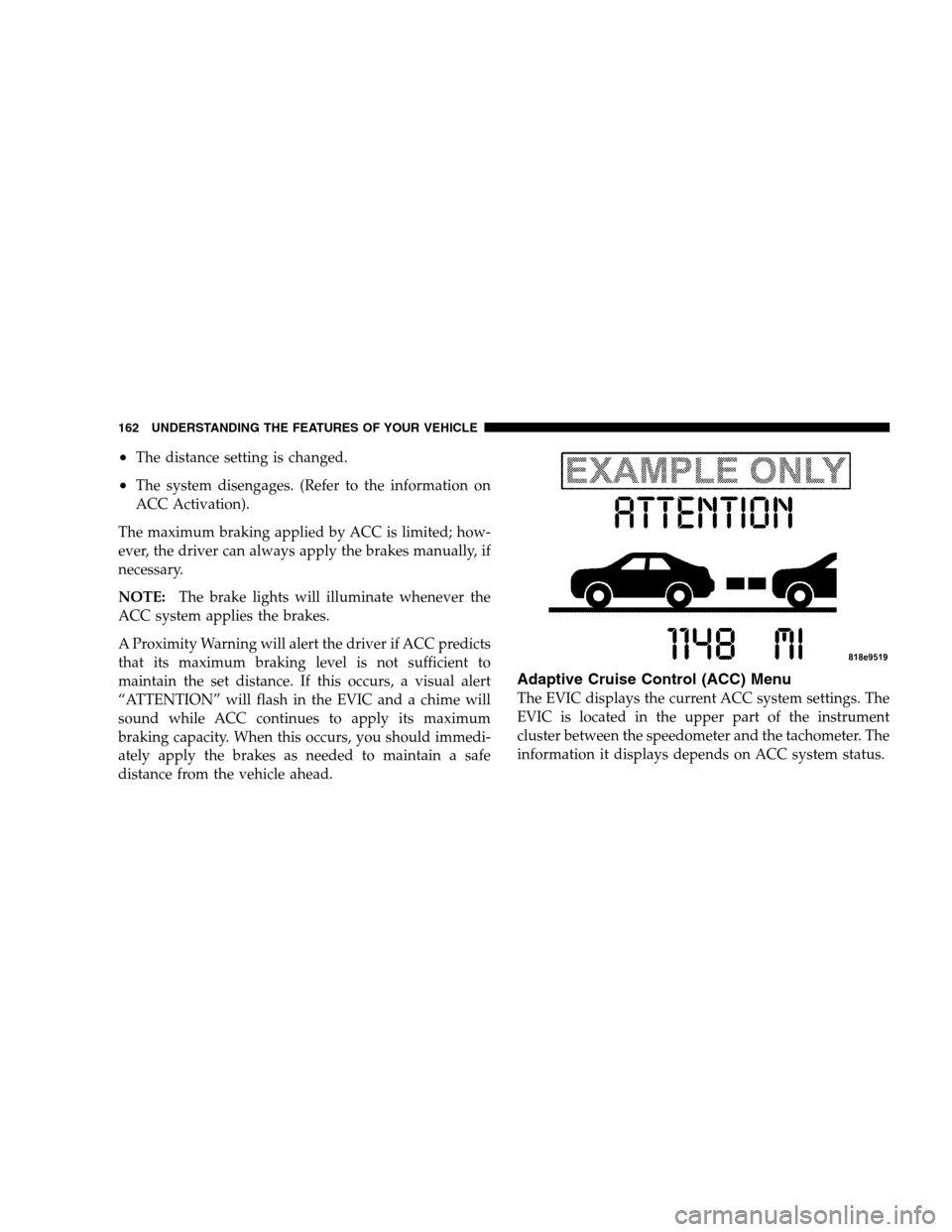
•The distance setting is changed.
•The system disengages. (Refer to the information on
ACC Activation).
The maximum braking applied by ACC is limited; how-
ever, the driver can always apply the brakes manually, if
necessary.
NOTE:The brake lights will illuminate whenever the
ACC system applies the brakes.
A Proximity Warning will alert the driver if ACC predicts
that its maximum braking level is not sufficient to
maintain the set distance. If this occurs, a visual alert
“ATTENTION” will flash in the EVIC and a chime will
sound while ACC continues to apply its maximum
braking capacity. When this occurs, you should immedi-
ately apply the brakes as needed to maintain a safe
distance from the vehicle ahead.
Adaptive Cruise Control (ACC) Menu
The EVIC displays the current ACC system settings. The
EVIC is located in the upper part of the instrument
cluster between the speedometer and the tachometer. The
information it displays depends on ACC system status.
162 UNDERSTANDING THE FEATURES OF YOUR VEHICLE
Page 195 of 482
UNDERSTANDING YOUR INSTRUMENT PANEL
CONTENTS
�Instrument Panel And Controls.............197
�Premium Instrument Cluster...............198
�Instrument Cluster Descriptions............199
�Electronic Vehicle Information Center (EVIC) . . . 209
▫Electronic Vehicle Information Center (EVIC)
Displays............................211
▫Trip Functions.......................215
▫Performance Pages — If Equipped.........217
▫Compass Display.....................220▫Telephone — If Equipped...............222
▫Navigation — If Equipped...............224
▫Driver-Selectable Surround Sound (DSS) –
If Equipped.........................225
▫System Warnings (Customer Information
Features)...........................225
▫Personal Settings (Customer Programmable
Features)...........................226
�Setting The Analog Clock.................231
�Radio General Information................2314


