Page 179 of 482

These lights also turn on when a door is opened, or when
the UNLOCK button on the Remote Keyless Entry (RKE)
transmitter is pressed, or when the dimmer control is
turned fully upward, past the second detent.
Sunglasses Storage
At the rear of the console, a compartment is provided for
the storage of a pair of sunglasses.
The storage compartment access is a�push/push�design.
Push on the raised bar on the compartment door to open.
Push on the raised bar to close.
GARAGE DOOR OPENER — IF EQUIPPED
HomeLink�replaces up to three remote controls (hand-
held transmitters) that operate devices such as garage
door openers, motorized gates, lighting, or home security
systems. The HomeLink�unit operates off your vehicle’s
battery.The HomeLink�buttons are located in the overhead
console, and contain one, two, or three dots/lines desig-
nating the different HomeLink�channels.
NOTE:HomeLink�is disabled when the Vehicle Secu-
rity Alarm is active.
HomeLink�Buttons
UNDERSTANDING THE FEATURES OF YOUR VEHICLE 177
3
Page 198 of 482
▫Kicker�13-Speaker High Performance Sound
System With Driver-Selectable Surround
(DSS) – If Equipped...................276
▫Kicker�Mobile Surround (KMS1)�–
If Equipped.........................276
�Universal Consumer Interface (UCI) —
If Equipped...........................277
▫Connecting The iPod�Device............277
▫Controlling The iPod�Using Radio Buttons . . . 278
▫Play Mode..........................278
▫List Or Browse Mode..................280�Remote Sound System Controls —
If Equipped...........................281
�CD/DVD Disc Maintenance...............283
�Radio Operation And Cellular Phones........283
�Climate Controls.......................283
▫Automatic Temperature Control...........284
▫Operating Tips.......................289
�Rear Window Features...................292
▫Electric Rear Window Defroster...........292
196 UNDERSTANDING YOUR INSTRUMENT PANEL
Page 212 of 482
•UConnect�hands-free communication system dis-
plays (if equipped),
•Navigation system screens (if equipped),
•Audio mode display,
•Surround Sound modes (if equipped with Driver-
Selectable Surround [DSS]), and
•Performance Pages (if equipped).
The system allows the driver to select information by
pressing the following buttons mounted on the steering
wheel.
Press and release the MENU button and the
mode displayed will change between Trip
Functions, Performance Pages (if equipped),
Navigation (if equipped), System Warnings,
System Status, Personal Settings, Telephone (if
equipped), and Surround Sound (if equipped).Press the FUNCTION SELECT button to accept
a selection. The FUNCTION SELECT button
also functions as a remote sound system con-
trol. Refer to “Remote Sound System Controls”
in this section.
Press the SCROLL button to scroll through Trip
Functions, Performance Pages (if equipped),
Navigation (if equipped), System Status Mes-
sages, and Personal Settings (Customer Pro-
grammable Features). The SCROLL button also
functions as a remote sound system control.
Refer to “Remote Sound System Controls” in this section.
MENU
Button
FUNC-
TION
SELECT
Button
SCROLL
Button
210 UNDERSTANDING YOUR INSTRUMENT PANEL
Page 243 of 482

NOTE:Turn the TUNE/SCROLL control knob to scroll
through the entries. Push the AUDIO/SELECT button to
select an entry and make changes.
•DVD Enter -When the disc is in DVD Menu mode,
selecting DVD Enter will allow you to play the current
highlighted selection. Use the remote control to scroll
up and down the menu (if equipped).
•DISC Play/Pause -You can toggle between
playing the DVD and pausing the DVD by
pushing the SELECT button (if equipped).
•DVD Play Options -Selecting the DVD Play Options
will display the following:
•Subtitle – Repeatedly pressing SELECT will switch
subtitles to different subtitle languages that are
available on the disc (if equipped).
•Audio Stream – Repeatedly pressing SELECT will
switch to different audio languages (if supported on
the disc) (if equipped).
•Angle – Repeatedly pressing SELECT will change
the viewing angle if supported by the DVD disc (if
equipped).
NOTE:The available selections for each of the above
entries varies depending upon the disc.
NOTE:These selections can only be made while playing
a DVD.
•VES™ Power -Allows you to turn VES™ ON and
OFF (if equipped).
•VES™ Lock -Locks out rear VES™ remote controls (if
equipped).
UNDERSTANDING YOUR INSTRUMENT PANEL 241
4
Page 245 of 482

Subtitles — If Equipped
Selecting this item allows you to choose between subtitle
Off or On.
Audio DRC — If Equipped
Selecting this item allows you to limit maximum audio
dynamic range. The default is set to�High,�and under
this setting, dialogues will play at 11 db higher than if the
setting is�Normal.�
Aspect Ratio — If Equipped
Selecting this item allows you to choose between wide
screen, pan scan, and letter box.
AutoPlay — If Equipped
When this is set to On and a DVD video is inserted, it will
bypass the DVD menu screen and automatically play the
movie. In some rare cases, the DVD player may notauto-play the main title. In such cases, use the MENU
button on the remote control to select desired title to play.
NOTE:The user will have to set these defaults before
loading a disc. If changes are made to these settings after
a disc is loaded, changes will not be effective. Also, the
defaults are effective only if the disc supports the
customer-preferred settings.
AM and FM Buttons
Press the buttons to select AM or FM Modes.
SET Button — To Set the Pushbutton Memory
When you are receiving a station that you wish to
commit to pushbutton memory, press the SET button.
The symbol SET 1 will now show in the display window.
Select the button (1-6) you wish to lock onto this station
and press and release that button. If a button is not
selected within five seconds after pressing the SET but-
ton, the station will continue to play but will not be
stored into pushbutton memory.
UNDERSTANDING YOUR INSTRUMENT PANEL 243
4
Page 277 of 482
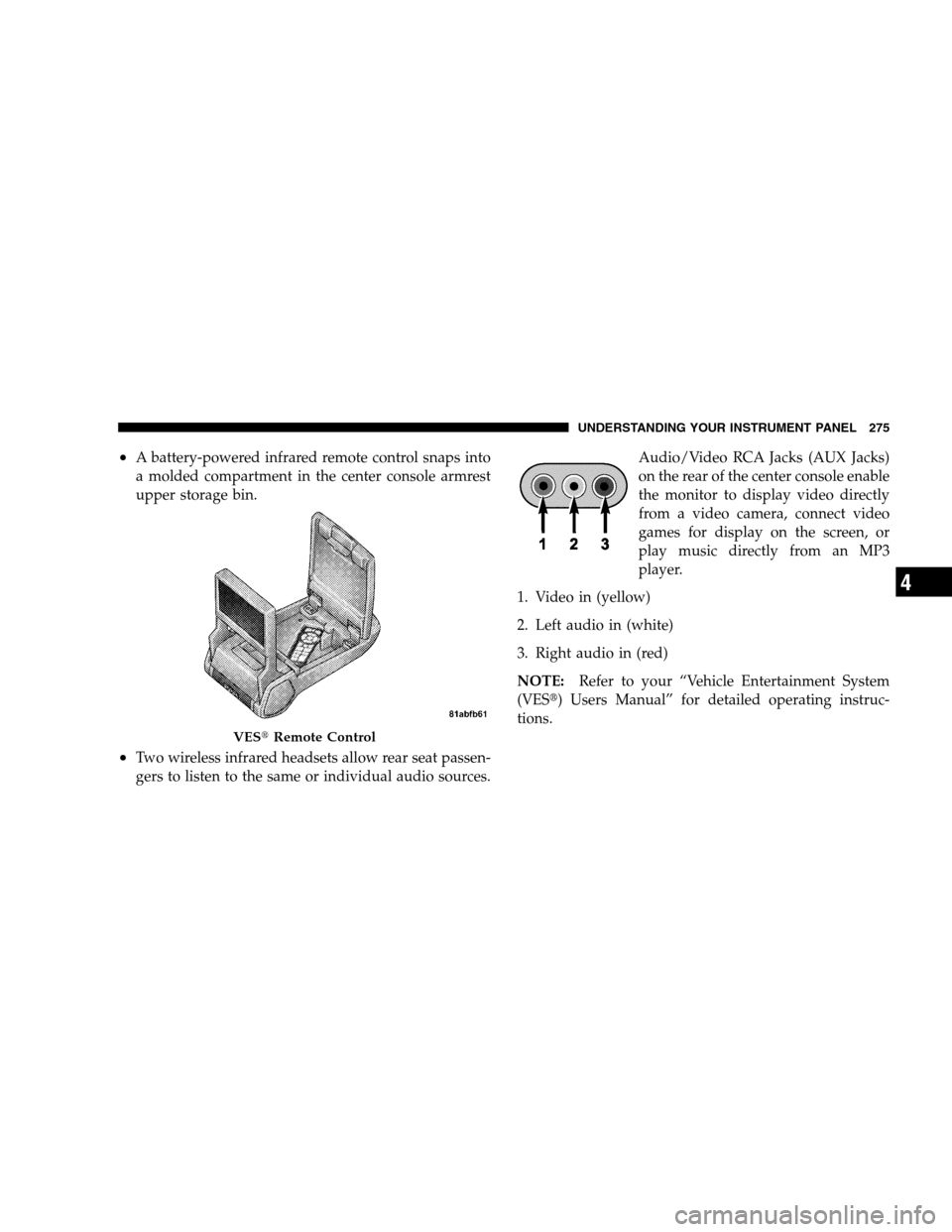
•A battery-powered infrared remote control snaps into
a molded compartment in the center console armrest
upper storage bin.
•Two wireless infrared headsets allow rear seat passen-
gers to listen to the same or individual audio sources.Audio/Video RCA Jacks (AUX Jacks)
on the rear of the center console enable
the monitor to display video directly
from a video camera, connect video
games for display on the screen, or
play music directly from an MP3
player.
1. Video in (yellow)
2. Left audio in (white)
3. Right audio in (red)
NOTE:Refer to your “Vehicle Entertainment System
(VES�) Users Manual” for detailed operating instruc-
tions.
VES�Remote Control
UNDERSTANDING YOUR INSTRUMENT PANEL 275
4
Page 283 of 482

After pressing a preset button, you will see the list you
are in on the top line and the first item in that list on the
second line.
To exit the List mode without selecting a track, press the
same preset button again to go back to Play mode.
LIST Button
Pressing the LIST button will take to the top level menu
of the iPod�. This takes you to the same top level menu
as on your iPod�. Turn the TUNE/SCROLL knob to list
the top menu item you wish to select and then press the
TUNE/SCROLL knob. This will take you to the next sub
menu list item of the iPod�and you can follow the same
steps to go to the desired track in that list. Not all iPod�
sub menu levels are available on this system.
MUSIC TYPE Button
The MUSIC TYPE button is another shortcut button to
the genre listing on your iPod�.REMOTE SOUND SYSTEM CONTROLS — IF
EQUIPPED
The remote sound system controls are located on the
surface of the steering wheel at the 3 and 9 o’clock
positions.
Electronic Vehicle Information Center
UNDERSTANDING YOUR INSTRUMENT PANEL 281
4
Page 464 of 482

Dealer Service.......................... 390
Deck Lid, Emergency Release................ 38
Deck Lid, Power Release................... 37
Defroster, Rear Window................... 292
Defroster, Windshield................... 77,288
Delay (Intermittent) Wipers................. 141
Diagnostic System, Onboard................ 387
Digital Video Disc (DVD) Player..........232,251
Dimmer Switch, Headlight................. 138
Dipsticks
Oil (Engine).......................... 391
Disabled Vehicle Towing................... 381
Disposal
Antifreeze (Engine Coolant)............... 407
Engine Oil........................... 393
Door Locks............................. 27
Door Locks, Automatic.................... 29
Door Opener, Garage..................... 177
DriveBelts ............................ 393Driving
On Slippery Surfaces.................... 312
Through Flowing, Rising, or Shallow
tanding Water.......................... 313
DVD Player (Video Entertainment System)...... 273
Electric Rear Window Defrost............... 292
Electric Remote Mirrors.................... 86
Electrical Power Outlets................... 187
Electronic Brake Control System............. 320
Electronic Power Distribution Center (Fuses).... 419
Electronic Speed Control (Cruise Control)....150,153
Electronic Stability Program (ESP)............ 323
Electronic Throttle Control Warning Light...... 205
Electronic Vehicle Information Center (EVIC).... 209
Emergency Deck Lid Release................ 38
Emergency, In Case of
FreeingVehicleWhenStuck ............... 380
Hazard Warning Flasher................. 370
462 INDEX