Page 63 of 482

Maintaining Your Airbag System
WARNING!
•Modifications to any part of the airbag system
could cause it to fail when you need it. You could
be injured because the airbags are not there to
protect you. Do not modify the components or
wiring, including adding any kind of badges or
stickers to the steering wheel hub trim cover or
the upper passenger side of the instrument
panel. Do not modify the front bumper, vehicle
body structure, or frame.
•You need proper knee impact protection in a
collision. Do not mount or locate any aftermarket
equipment on or behind the knee impact bolster.
•It is dangerous to try to repair any part of the
airbag system yourself. Be sure to tell anyone
who works on your vehicle that it has airbags.
NOTE:Perchlorate Material — special handling may ap-
ply. See www.dtsc.ca.gov/hazardouswaste/perchlorate.
Airbag Warning Light
You will want to have the airbags ready to
inflate for your protection in an impact. While
the airbag system is designed to be mainte-
nance free, if any of the following occurs, have
an authorized dealer service the system promptly:
•The Airbag Warning Light does not come on or flickers
during the six to eight seconds when the ignition
switch is first turned ON.
•The light remains on or flickers after the six to eight
second interval.
•The light flickers or comes on and remains on while
driving.
THINGS TO KNOW BEFORE STARTING YOUR VEHICLE 61
2
Page 79 of 482

Defroster
Check operation by selecting the defrost mode and place
the blower control on high speed. You should be able to
feel the air directed against the windshield. See your
authorized dealer for service if your defroster is inoper-
able.
Periodic Safety Checks You Should Make Outside
The Vehicle
Tires
Examine tires for excessive tread wear and uneven wear
patterns. Check for stones, nails, glass, or other objects
lodged in the tread. Inspect the tread and sidewall for
cuts and cracks. Check the wheel nuts for tightness.
Check the tires (including spare) for proper pressure.
Lights
Have someone observe the operation of exterior lights
while you work the controls. Check turn signal and high
beam indicator lights on the instrument panel.
Door Latches
Check for positive closing, latching, and locking.
Fluid Leaks
Check area under vehicle after overnight parking for fuel,
engine coolant, oil, or other fluid leaks. Also, if gasoline
fumes are detected or if fuel, power steering fluid, or
brake fluid leaks are suspected, the cause should be
located and corrected immediately.
THINGS TO KNOW BEFORE STARTING YOUR VEHICLE 77
2
Page 106 of 482

•After the�Ready�prompt and the following beep, say
�Setup Confirmations.�The UConnect�system will
play the current confirmation prompt status and you
will be given the choice to change it.
Phone and Network Status Indicators
If available on the radio and/or on a premium display
such as the instrument panel cluster, and supported by
your cell phone, the UConnect�system will provide
notification to inform you of your phone and network
status when you are attempting to make a phone call
using UConnect�. The status is given for roaming, net-
work signal strength, phone battery strength, etc.
Dialing Using the Cellular Phone Keypad
You can dial a phone number with your cellular phone
keypad and still use the UConnect�system (while dial-
ing via the cell phone keypad, the user must exercise
caution and take precautionary safety measures). By
dialing a number with your paired Bluetooth�cellularphone, the audio will be played through your vehicle’s
audio system. The UConnect�system will work the same
as if you dial the number using voice recognition.
NOTE:Certain brands of mobile phones do not send the
dial ring to the UConnect�system to play it on the
vehicle audio system, so you will not hear it. Under this
situation, after successfully dialing a number the user
may feel that the call did not go through even though the
call is in progress. Once your call is answered, you will
hear the audio.
Mute/Un-Mute (Mute Off)
When you mute the UConnect�system, you will still be
able to hear the conversation coming from the other
party, but the other party will not be able to hear you. In
order to mute the UConnect�system:
•Press the “Voice Recognition” button.
•Following the beep, say�Mute.�
104 UNDERSTANDING THE FEATURES OF YOUR VEHICLE
Page 126 of 482
Heated Seats
Heated seats provide comfort and warmth on cold days
and can help soothe sore muscles and backs. The heaters
provide the same heat level for both cushion and back.
The driver seat and front passenger seat are heated.
The controls for each heater are located near the bottom
center of the instrument panel. After turning on the
ignition, you can choose from High, Off, or Low heat
settings. Amber LEDs in the top portion of each switch
indicate the level of heat in use. Two LEDs will illuminate
for high, one for low, and none for off.
Press the switch once to select high level heating. Press
the switch a second time to select low level heating. Press
the switch a third time to shut OFF the heating elements.
If high level heating is selected, the system will automati-
cally switch to the low level after 30 minutes of continu-
ous operation. At that time, the number of illuminated
Front HEATED SEAT Switch
124 UNDERSTANDING THE FEATURES OF YOUR VEHICLE
Page 133 of 482
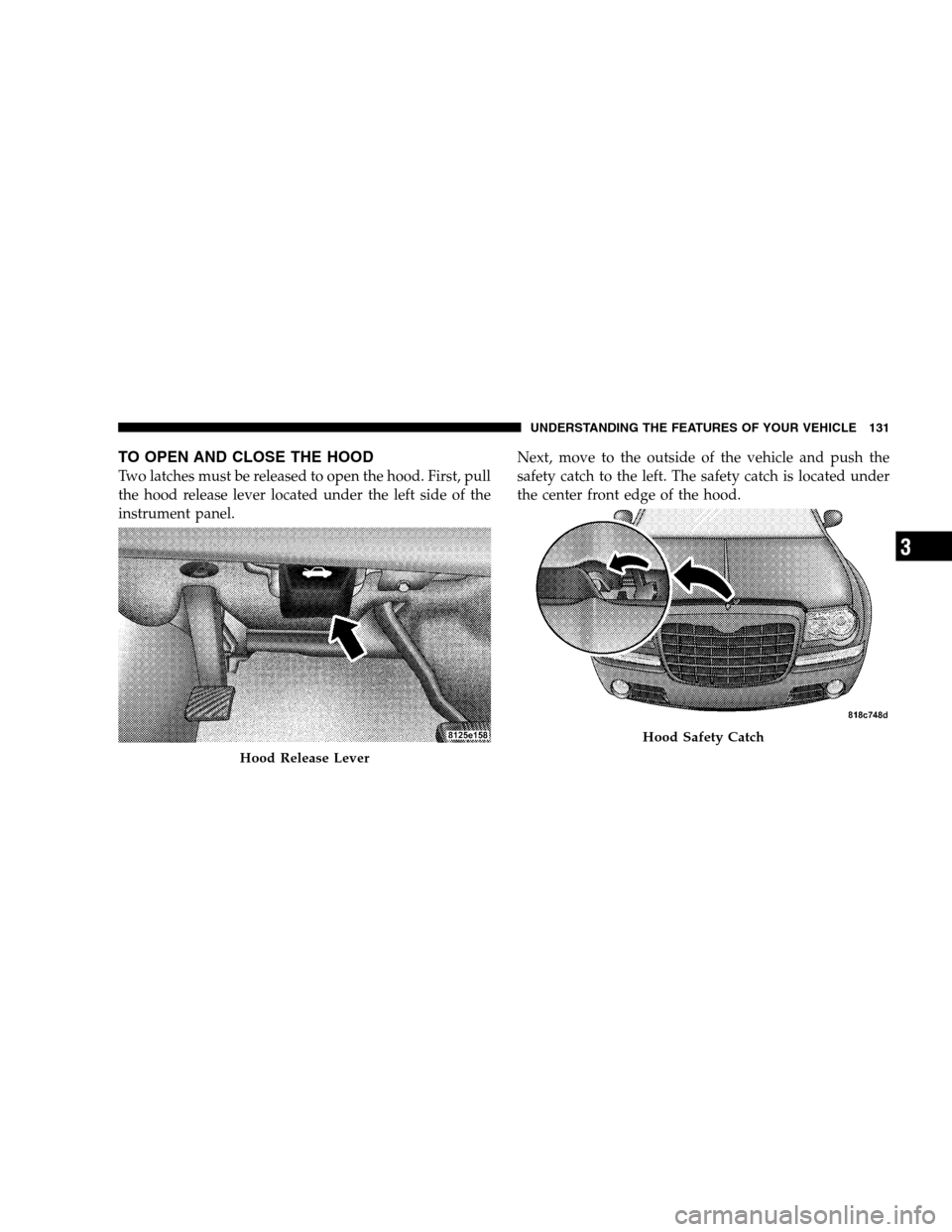
TO OPEN AND CLOSE THE HOOD
Two latches must be released to open the hood. First, pull
the hood release lever located under the left side of the
instrument panel.Next, move to the outside of the vehicle and push the
safety catch to the left. The safety catch is located under
the center front edge of the hood.
Hood Release Lever
Hood Safety Catch
UNDERSTANDING THE FEATURES OF YOUR VEHICLE 131
3
Page 134 of 482
Use the hood prop rod (if equipped) to secure the hood in
the open position.
To prevent possible damage, do not slam the hood to
close it. Lower the hood, until it is open approximately 6
in (15 cm), and then drop it. This should secure both
latches. Never drive your vehicle unless the hood is fully
closed, with both latches engaged.
WARNING!
If the hood is not fully latched, it could fly up when
the vehicle is moving and block your forward vision.
You could have a collision. Be sure all hood latches
are fully latched before driving.
LIGHTS
Headlight Switch
The HEADLIGHT switch is located on the left
side of the instrument panel. This switch controls
the operation of the headlights, parking lights,
instrument panel lights, instrument panel light dimming,
interior lights, and fog lights.
132 UNDERSTANDING THE FEATURES OF YOUR VEHICLE
Page 135 of 482
Rotate the HEADLIGHT switch clockwise to the first
detent for parking light and instrument panel light
operation. Turn it to the second detent for headlight,
parking light, and instrument panel light operation.
Automatic Headlights
This system automatically turns the headlights ON or
OFF according to ambient light levels. To turn the system
ON, rotate the HEADLIGHT switch counterclockwise to
the AUTO (A) position. When the system is on, the
headlight time delay feature is also on. This means the
headlights will stay on for up to 90 seconds after you turn
the ignition switch OFF. To turn the automatic system
OFF, move the HEADLIGHT switch out of the AUTO (A)
position.
HEADLIGHT Switch
UNDERSTANDING THE FEATURES OF YOUR VEHICLE 133
3
Page 141 of 482
Interior Lights
The interior lights come on when a door is opened.
To protect the battery, the interior lights will turn off
automatically 10 minutes after the ignition switch is
moved to the LOCK position. This will occur if the
interior lights were switched ON manually or are onbecause a door is open. This includes the glove box light,
but not the trunk light. To restore interior light operation,
either turn the ignition switch ON or cycle the light
switch.
Dimmer Control
The dimmer control is part of the
HEADLIGHT switch and is located on
the left side of the instrument panel.
With the parking lights or headlights
on, rotating the dimmer control up-
ward will increase the brightness of
the instrument panel lights and, if so
equipped, the lighting in the door map pockets and
cupholders.
Overhead Console
UNDERSTANDING THE FEATURES OF YOUR VEHICLE 139
3