Page 153 of 476
Overhead Console (With Rail)
If your vehicle is equipped with an overhead console, it
may contain the following:
Reading lamps. SeeFront Reading Lamps on
page 3-19orRear Reading Lamps on page 3-19.
Switchbank. SeeOverhead Console Switchbank on
page 3-21.
OnStar®System buttons. SeeOnStar®System on
page 2-47.
Universal Home Remote buttons. SeeUniversal
Home Remote System on page 2-51.
See your dealer to purchase additional items for the rail
system.
Storage Bin
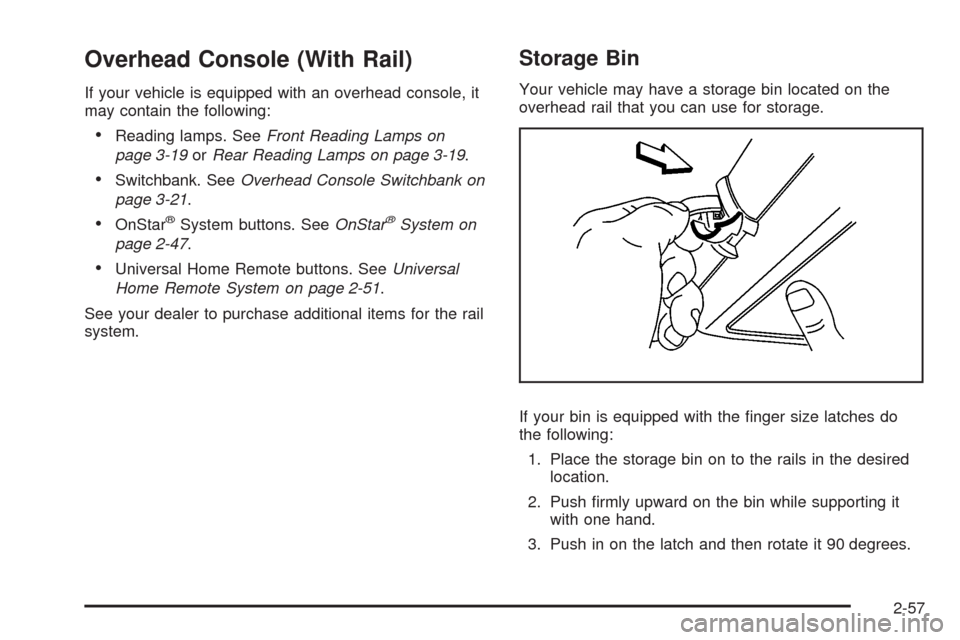
Your vehicle may have a storage bin located on the
overhead rail that you can use for storage.
If your bin is equipped with the nger size latches do
the following:
1. Place the storage bin on to the rails in the desired
location.
2. Push rmly upward on the bin while supporting it
with one hand.
3. Push in on the latch and then rotate it 90 degrees.
2-57
Page 156 of 476
Replacing the Center Console
{CAUTION:
A second row center console that is not locked
into place properly can move around in a
crash or sudden stop. People in the vehicle
could be injured. Be sure to lock the console
into place properly when installing it.
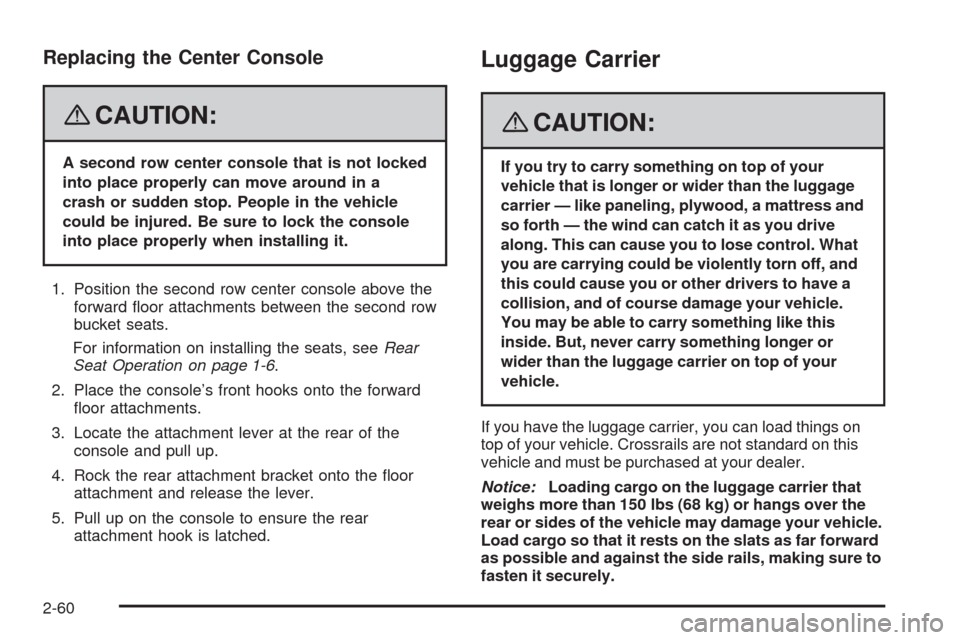
1. Position the second row center console above the
forward oor attachments between the second row
bucket seats.
For information on installing the seats, seeRear
Seat Operation on page 1-6.
2. Place the console’s front hooks onto the forward
oor attachments.
3. Locate the attachment lever at the rear of the
console and pull up.
4. Rock the rear attachment bracket onto the oor
attachment and release the lever.
5. Pull up on the console to ensure the rear
attachment hook is latched.
Luggage Carrier
{CAUTION:
If you try to carry something on top of your
vehicle that is longer or wider than the luggage
carrier — like paneling, plywood, a mattress and
so forth — the wind can catch it as you drive
along. This can cause you to lose control. What
you are carrying could be violently torn off, and
this could cause you or other drivers to have a
collision, and of course damage your vehicle.
You may be able to carry something like this
inside. But, never carry something longer or
wider than the luggage carrier on top of your
vehicle.
If you have the luggage carrier, you can load things on
top of your vehicle. Crossrails are not standard on this
vehicle and must be purchased at your dealer.
Notice:Loading cargo on the luggage carrier that
weighs more than 150 lbs (68 kg) or hangs over the
rear or sides of the vehicle may damage your vehicle.
Load cargo so that it rests on the slats as far forward
as possible and against the side rails, making sure to
fasten it securely.
2-60
Page 157 of 476
Do not exceed the maximum vehicle capacity when
loading your vehicle. For more information on vehicle
capacity and loading, seeLoading Your Vehicle on
page 4-21.
To prevent damage or loss of cargo as you are driving,
check now and then to make sure the cargo is still
securely fastened.
Convenience Net (With Rear
Convenience Center)
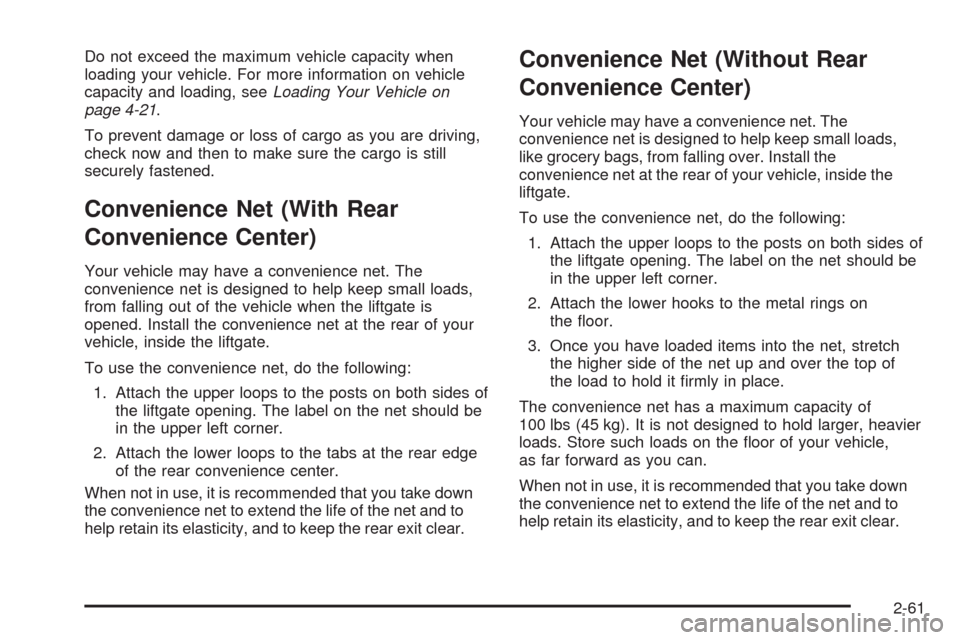
Your vehicle may have a convenience net. The
convenience net is designed to help keep small loads,
from falling out of the vehicle when the liftgate is
opened. Install the convenience net at the rear of your
vehicle, inside the liftgate.
To use the convenience net, do the following:
1. Attach the upper loops to the posts on both sides of
the liftgate opening. The label on the net should be
in the upper left corner.
2. Attach the lower loops to the tabs at the rear edge
of the rear convenience center.
When not in use, it is recommended that you take down
the convenience net to extend the life of the net and to
help retain its elasticity, and to keep the rear exit clear.
Convenience Net (Without Rear
Convenience Center)
Your vehicle may have a convenience net. The
convenience net is designed to help keep small loads,
like grocery bags, from falling over. Install the
convenience net at the rear of your vehicle, inside the
liftgate.
To use the convenience net, do the following:
1. Attach the upper loops to the posts on both sides of
the liftgate opening. The label on the net should be
in the upper left corner.
2. Attach the lower hooks to the metal rings on
the oor.
3. Once you have loaded items into the net, stretch
the higher side of the net up and over the top of
the load to hold it rmly in place.
The convenience net has a maximum capacity of
100 lbs (45 kg). It is not designed to hold larger, heavier
loads. Store such loads on the oor of your vehicle,
as far forward as you can.
When not in use, it is recommended that you take down
the convenience net to extend the life of the net and to
help retain its elasticity, and to keep the rear exit clear.
2-61
Page 159 of 476
Replacing the Convenience Center
1. Make sure the third row seat is properly installed in
the vehicle. SeeThird Row Seat on page 1-18for
more information. If the third row seat is not in
the vehicle with the convenience center, the
convenience center will not be locked into the
correct position in the vehicle.
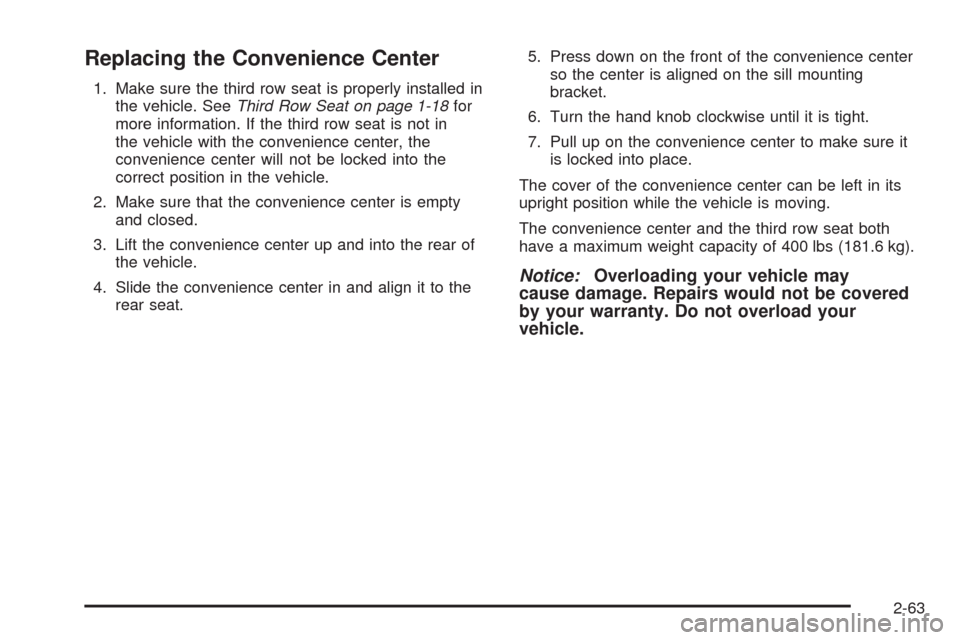
2. Make sure that the convenience center is empty
and closed.
3. Lift the convenience center up and into the rear of
the vehicle.
4. Slide the convenience center in and align it to the
rear seat.5. Press down on the front of the convenience center
so the center is aligned on the sill mounting
bracket.
6. Turn the hand knob clockwise until it is tight.
7. Pull up on the convenience center to make sure it
is locked into place.
The cover of the convenience center can be left in its
upright position while the vehicle is moving.
The convenience center and the third row seat both
have a maximum weight capacity of 400 lbs (181.6 kg).
Notice:Overloading your vehicle may
cause damage. Repairs would not be covered
by your warranty. Do not overload your
vehicle.
2-63
Page 165 of 476
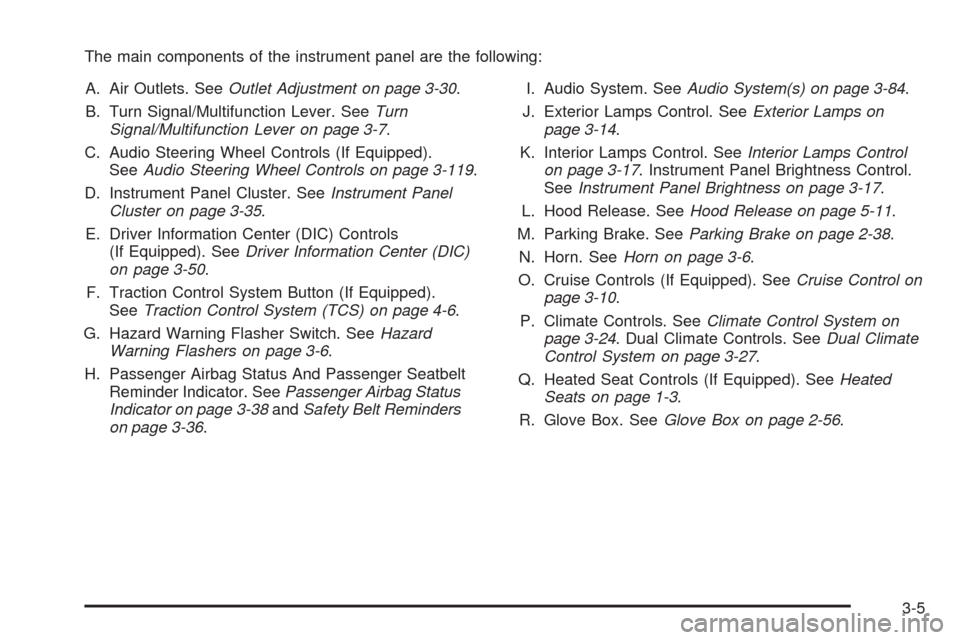
The main components of the instrument panel are the following:
A. Air Outlets. SeeOutlet Adjustment on page 3-30.
B. Turn Signal/Multifunction Lever. SeeTurn
Signal/Multifunction Lever on page 3-7.
C. Audio Steering Wheel Controls (If Equipped).
SeeAudio Steering Wheel Controls on page 3-119.
D. Instrument Panel Cluster. SeeInstrument Panel
Cluster on page 3-35.
E. Driver Information Center (DIC) Controls
(If Equipped). SeeDriver Information Center (DIC)
on page 3-50.
F. Traction Control System Button (If Equipped).
SeeTraction Control System (TCS) on page 4-6.
G. Hazard Warning Flasher Switch. SeeHazard
Warning Flashers on page 3-6.
H. Passenger Airbag Status And Passenger Seatbelt
Reminder Indicator. SeePassenger Airbag Status
Indicator on page 3-38andSafety Belt Reminders
on page 3-36.I. Audio System. SeeAudio System(s) on page 3-84.
J. Exterior Lamps Control. SeeExterior Lamps on
page 3-14.
K. Interior Lamps Control. SeeInterior Lamps Control
on page 3-17. Instrument Panel Brightness Control.
SeeInstrument Panel Brightness on page 3-17.
L. Hood Release. SeeHood Release on page 5-11.
M. Parking Brake. SeeParking Brake on page 2-38.
N. Horn. SeeHorn on page 3-6.
O. Cruise Controls (If Equipped). SeeCruise Control on
page 3-10.
P. Climate Controls. SeeClimate Control System on
page 3-24. Dual Climate Controls. SeeDual Climate
Control System on page 3-27.
Q. Heated Seat Controls (If Equipped). SeeHeated
Seats on page 1-3.
R. Glove Box. SeeGlove Box on page 2-56.
3-5
Page 167 of 476
Turn Signal/Multifunction Lever
The lever on the left side of the steering column
includes the following:
GTurn and Lane Change Signals. SeeTurn and
Lane-Change Signals on page 3-7.
53Headlamp High/Low-Beam Changer.
SeeHeadlamp High/Low-Beam Changer on
page 3-8.
Flash-to-Pass. SeeFlash-to-Pass on page 3-8.
NWindshield Wipers. SeeWindshield Wipers on
page 3-9.
LWindshield Washer. SeeWindshield Washer
on page 3-9.
ZRear Window Wiper. SeeWindshield Washer
on page 3-9.
=Rear Window Washer. SeeWindshield Washer
on page 3-9.
For information on the headlamps, seeExterior Lamps
on page 3-14.
Turn and Lane-Change Signals
The turn signal has two upward (for right) and
two downward (for left) positions. These positions
allow you to signal a turn or a lane change.
To signal a turn, move the lever all the way up or
down. When the turn is nished, the lever will return
automatically.
An arrow on the instrument
panel cluster will ash
in the direction of the
turn or lane change.
3-7
Page 168 of 476

To signal a lane change, just raise or lower the lever
until the arrow starts to ash. Hold it there until you
complete your lane change. The lever will return by
itself when you release it.
As you signal a turn or a lane change, if the arrow
ashes faster than normal, a signal bulb may be burned
out and other drivers will not see your turn signal.
If a bulb is burned out, replace it to help avoid an
accident. If the arrows do not go on at all when you
signal a turn, check for burned-out bulbs and check the
fuse. SeeBulb Replacement on page 5-42andFuses
and Circuit Breakers on page 5-100.
If you have a trailer towing option with added wiring for
the trailer lamps, the signal indicator will ash at a normal
rate even if a turn signal bulb is burned out. Check the
front and rear turn signal lamps regularly to make sure
they are working.
Turn Signal On Chime
If either turn signal is left on for more than
3/4 mile (1.2 km), a chime will sound to let the driver
know to turn it off. If you need to leave the signal on for
more than 3/4 mile (1.2 km), turn off the signal and then
turn it back on.
Headlamp High/Low-Beam Changer
To change the headlamps from low beam to high beam,
push the turn signal/multifunction lever away from you.
When the high beams are
on, this light will appear
on the instrument
panel cluster.
To change the headlamps from high beam to low beam,
pull the turn signal/multifunction lever toward you.
Flash-to-Pass
When the headlamps are off, pull the lever toward you
to momentarily turn on the high beams. This will signal
that you are going to pass. When you release the lever,
they will turn off.
3-8
Page 171 of 476
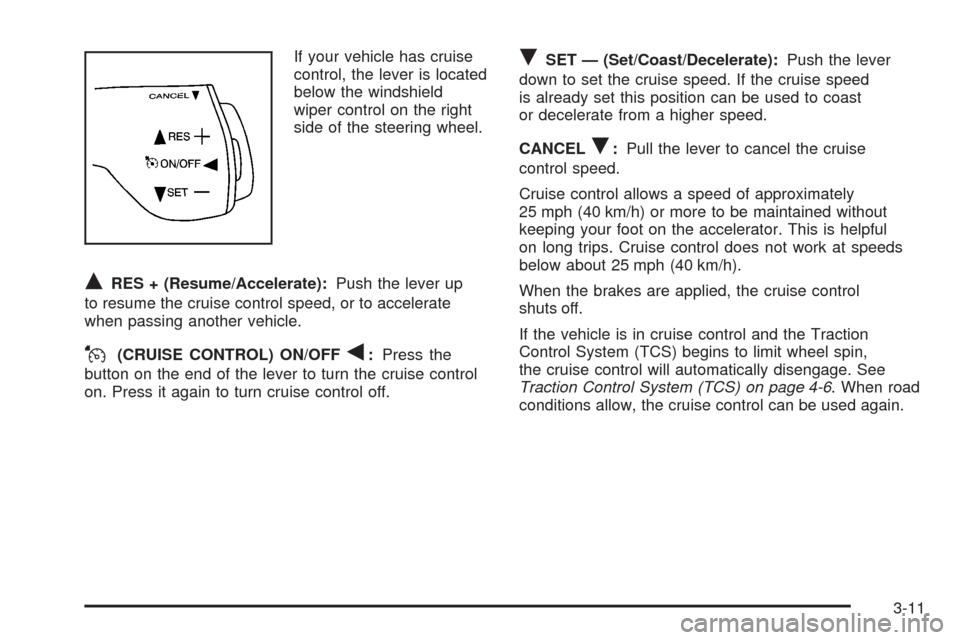
If your vehicle has cruise
control, the lever is located
below the windshield
wiper control on the right
side of the steering wheel.
QRES + (Resume/Accelerate):Push the lever up
to resume the cruise control speed, or to accelerate
when passing another vehicle.
J(CRUISE CONTROL) ON/OFFq:Press the
button on the end of the lever to turn the cruise control
on. Press it again to turn cruise control off.
RSET — (Set/Coast/Decelerate):Push the lever
down to set the cruise speed. If the cruise speed
is already set this position can be used to coast
or decelerate from a higher speed.
CANCEL
R:Pull the lever to cancel the cruise
control speed.
Cruise control allows a speed of approximately
25 mph (40 km/h) or more to be maintained without
keeping your foot on the accelerator. This is helpful
on long trips. Cruise control does not work at speeds
below about 25 mph (40 km/h).
When the brakes are applied, the cruise control
shuts off.
If the vehicle is in cruise control and the Traction
Control System (TCS) begins to limit wheel spin,
the cruise control will automatically disengage. See
Traction Control System (TCS) on page 4-6. When road
conditions allow, the cruise control can be used again.
3-11