2008 CHEVROLET UPLANDER lights
[x] Cancel search: lightsPage 272 of 476

To use the RSE OSD menu when using a CD or an
MP3, do the following:
Make sure that a CD or an MP3 is loaded in the RSE
system and that the system is not in auxiliary, then press
the
zbutton on the remote control, or faceplate if there
is no rear seat climate control. Once the menu is on the
screen, use the
q,Q,r,Rnavigation arrows and
the
rbutton to navigate the screen. This menu lets
you select default preferences for language and playback
settings. To exit this menu, press the
zbutton, or
the
qbutton on the remote control, or faceplate if
there is no rear seat climate control, or wait for the menu
to time out.
Battery Replacement
To change the remote control batteries, do the following:
1. Slide the rear cover back on the remote control.
2. Replace the two batteries in the compartment. Make
sure that they are installed correctly, using the
diagram on the inside of the battery compartment.
3. Replace the battery cover.
If the remote control is to be stored for a long period of
time, remove the batteries and keep them in a cool,
dry place.
Tips and Troubleshooting Chart
Problem Recommended Action
No power. The ignition might not be
in ACC/ACCESSORY,
ON/RUN, or Retained
Accessory Power (RAP).
Disc will not play. The system might be off.
The parental control
button might have been
pressed. The power
indicator lights ash.
The system might be in
auxiliary source mode.
Press the DVD AUX
button on the player
faceplate or the AUX
button on the remote to
switch between the DVD
player and the auxiliary
sources. The disc is
upside down or is not
compatible.
3-112
Page 274 of 476
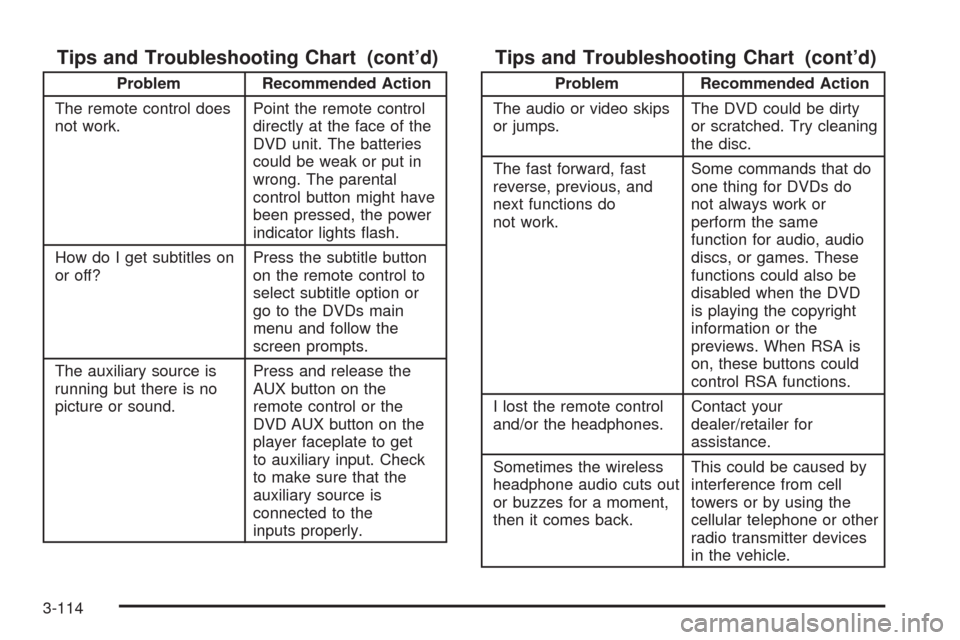
Tips and Troubleshooting Chart (cont’d)
Problem Recommended Action
The remote control does
not work.Point the remote control
directly at the face of the
DVD unit. The batteries
could be weak or put in
wrong. The parental
control button might have
been pressed, the power
indicator lights ash.
How do I get subtitles on
or off?Press the subtitle button
on the remote control to
select subtitle option or
go to the DVDs main
menu and follow the
screen prompts.
The auxiliary source is
running but there is no
picture or sound.Press and release the
AUX button on the
remote control or the
DVD AUX button on the
player faceplate to get
to auxiliary input. Check
to make sure that the
auxiliary source is
connected to the
inputs properly.
Tips and Troubleshooting Chart (cont’d)
Problem Recommended Action
The audio or video skips
or jumps.The DVD could be dirty
or scratched. Try cleaning
the disc.
The fast forward, fast
reverse, previous, and
next functions do
not work.Some commands that do
one thing for DVDs do
not always work or
perform the same
function for audio, audio
discs, or games. These
functions could also be
disabled when the DVD
is playing the copyright
information or the
previews. When RSA is
on, these buttons could
control RSA functions.
I lost the remote control
and/or the headphones.Contact your
dealer/retailer for
assistance.
Sometimes the wireless
headphone audio cuts out
or buzzes for a moment,
then it comes back.This could be caused by
interference from cell
towers or by using the
cellular telephone or other
radio transmitter devices
in the vehicle.
3-114
Page 278 of 476

Left Arrow– Press the left arrow while in AM/FM tuner,
or XM™ Satellite Radio Service to seek down. Press the
left arrow while sourcing the single CD player, or the
six-disc CD player to go to the previous track.
Right Arrow– Press the right arrow while in AM/FM
tuner, or XM™ Satellite Radio Service to seek up. Press
the right arrow while sourcing the single CD player, or the
six-disc CD player to go to the next track.
43(Wired Headphone Volume):Press this button
to select the correct headphone. Then press the left
or right navigation arrows to increase or decrease the
headphone volume.
rj(Parental Control):This button is located behind
the video screen next to the auxiliary and headphone
jacks. Press this button while using RSA, or when a DVD
or CD is playing to blank the video screen and to mute
the audio. The power indicator lights on the DVD player
ashes. Turning on the parental control also disables all
other button operations from the remote control and the
DVD player, except for the eject button. Press this button
again to restore operation of the RSA, DVD player, and
remote control.This button can also be used to turn the DVD player
power on and automatically resume play if the vehicle is
on and a disc is in the player. If no disc is in the player
then the system powers up in auxiliary mode.
Theft-Deterrent Feature
THEFTLOCK®is designed to discourage theft of your
vehicle’s radio. The feature works automatically by
learning a portion of the Vehicle Identication Number
(VIN). If the radio is moved to a different vehicle, it does
not operate and LOC, LOCK, or LOCKED could display.
With THEFTLOCK
®activated, the radio does not
operate if stolen.
3-118
Page 469 of 476

J
Jump Starting.................................................5-37
K
Keyless Entry System....................................... 2-4
Keys............................................................... 2-3
L
Labeling, Tire Sidewall.....................................5-49
Lamps
Cargo........................................................3-19
Dome........................................................3-18
Front Reading.............................................3-19
Rear Reading.............................................3-19
Lap-Shoulder Belt...........................................1-36
LATCH System
Child Restraints...........................................1-53
Level Control..................................................4-28
License Plate Lamps.......................................5-46
Liftgate
Carbon Monoxide........................................2-22
Light
Airbag Readiness........................................3-37
Antilock Brake System Warning.....................3-42
Brake System Warning.................................3-41
Charging System.........................................3-40Light (cont.)
Cruise Control.............................................3-48
Highbeam On.............................................3-48
Low Fuel Warning.......................................3-49
Malfunction Indicator....................................3-44
Oil Pressure...............................................3-47
Passenger Airbag Status Indicator..................3-38
Safety Belt Reminders..................................3-36
Security.....................................................3-48
TCS Warning Light......................................3-42
Tire Pressure..............................................3-43
Traction Control System (TCS) Warning..........3-42
Lighting
Delayed.....................................................3-18
Entry.........................................................3-18
Exit...........................................................3-19
Lights
Exterior Lamps............................................3-14
Flash-to-Pass............................................... 3-8
High/Low Beam Changer................................ 3-8
On Reminder..............................................3-15
Loading Your Vehicle.......................................4-21
Lockout Protection..........................................2-13
Locks
Automatic Door Lock....................................2-12
Delayed Locking..........................................2-12
Door..........................................................2-10
Lockout Protection.......................................2-13
Power Door................................................2-11
Programmable Automatic Door Unlock............2-13
7
Page 476 of 476

W
Warning Lights, Gages and Indicators................3-34
Warnings
DIC Warnings and Messages........................3-58
Hazard Warning Flashers............................... 3-6
Other Warning Devices.................................. 3-6
Safety and Symbols......................................... iii
Vehicle Damage.............................................. iv
Wheels
Alignment and Tire Balance..........................5-68
Different Size..............................................5-66
Replacement...............................................5-68
Where to Put the Restraint...............................1-52
Windows.......................................................2-24
Manual Rear Quarter...................................2-26
Power........................................................2-25
Power Rear Quarter.....................................2-26Windshield
Backglass, and Wiper Blades, Cleaning..........5-95
Washer........................................................ 3-9
Washer Fluid..............................................5-32
Wiper Blade Replacement.............................5-47
Wiper Fuses...............................................5-99
Wipers......................................................... 3-9
Windshield, Rear Washer/Wiper........................3-10
Winter Driving................................................4-17
Wiper Activated Headlamps..............................3-15
X
XM Radio Messages.....................................3-101
XM™ Satellite Radio Antenna System..............3-121
Y
Your Vehicle and the Environment....................... 6-2
14