2008 CHEVROLET UPLANDER remote start
[x] Cancel search: remote startPage 183 of 476
Power Outlet 115 Volt Alternating
Current
Your vehicle may have a power outlet that can be used
to plug in electrical equipment that uses a maximum
limit of 150 watts.
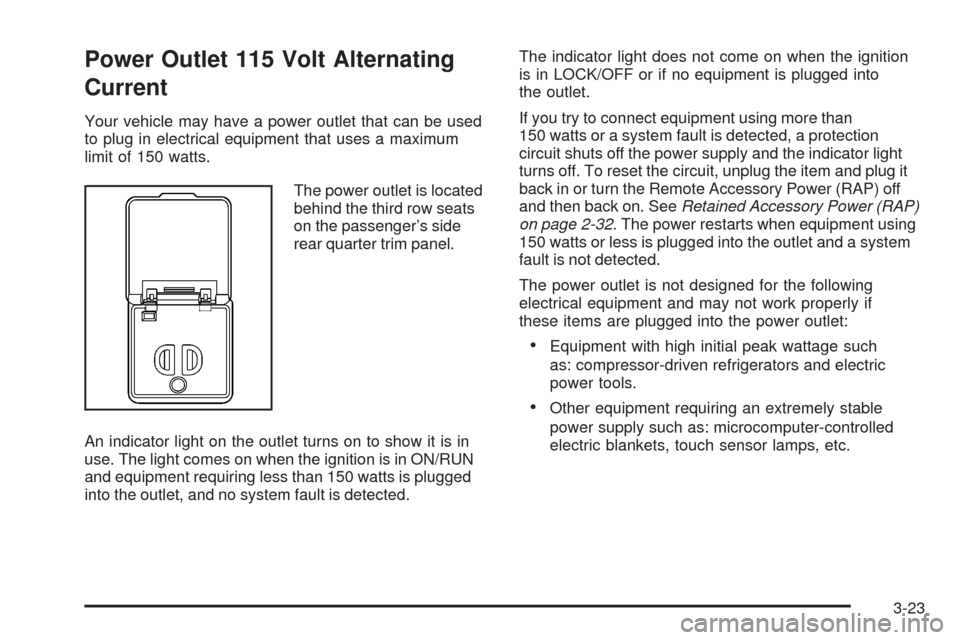
The power outlet is located
behind the third row seats
on the passenger’s side
rear quarter trim panel.
An indicator light on the outlet turns on to show it is in
use. The light comes on when the ignition is in ON/RUN
and equipment requiring less than 150 watts is plugged
into the outlet, and no system fault is detected.The indicator light does not come on when the ignition
is in LOCK/OFF or if no equipment is plugged into
the outlet.
If you try to connect equipment using more than
150 watts or a system fault is detected, a protection
circuit shuts off the power supply and the indicator light
turns off. To reset the circuit, unplug the item and plug it
back in or turn the Remote Accessory Power (RAP) off
and then back on. SeeRetained Accessory Power (RAP)
on page 2-32. The power restarts when equipment using
150 watts or less is plugged into the outlet and a system
fault is not detected.
The power outlet is not designed for the following
electrical equipment and may not work properly if
these items are plugged into the power outlet:
Equipment with high initial peak wattage such
as: compressor-driven refrigerators and electric
power tools.
Other equipment requiring an extremely stable
power supply such as: microcomputer-controlled
electric blankets, touch sensor lamps, etc.
3-23
Page 198 of 476

If the airbag readiness light stays on after you start the
vehicle or comes on when you are driving, your airbag
system may not work properly. Have your vehicle
serviced right away.
{CAUTION:
If the airbag readiness light stays on after you
start your vehicle, it means the airbag system
may not be working properly. The airbags in
your vehicle may not inate in a crash, or they
could even inate without a crash. To help
avoid injury to yourself or others, have your
vehicle serviced right away if the airbag
readiness light stays on after you start
your vehicle.
The airbag readiness light should ash for a few
seconds when you start the engine. If the light does
not come on then, have it xed immediately. If there
is a problem with the airbag system, an airbag Driver
Information Center (DIC) message may also come
on. SeeDIC Warnings and Messages on page 3-58
for more information.
Passenger Airbag Status Indicator
Your vehicle has the passenger sensing system.
Your instrument panel has a passenger airbag status
indicator.
When you start the vehicle, the passenger airbag status
indicator will light ON and OFF, or the symbol for on and
off, for several seconds as a system check. If you use
remote start to start your vehicle from a distance, if
equipped, you may not see the system check. Then, after
several more seconds, the status indicator will light either
ON or OFF, or either the on or off symbol to let you know
the status of the right front passenger’s frontal and
seat-mounted side impact airbags (if equipped).
If the word ON or the on symbol is lit on the passenger
airbag status indicator, it means that the right front
passenger’s frontal airbag and seat-mounted side
impact airbag (if equipped) are enabled (may inate).United States
Canada
3-38
Page 223 of 476

HOOD AJAR
If your vehicle has the remote start feature, this
message displays when the hood is not closed
properly. Make sure that the hood is closed completely.
SeeHood Release on page 5-11.
This message displays while the ignition is in ON/RUN.
Press any of the DIC buttons to acknowledge this
message and to clear it from the screen.
This message continues to display for two seconds
if it has not been acknowledged when the engine
is turned off. It also re-displays for two seconds if the
message has been acknowledged, but the condition
still exists when the engine is turned off.
If the condition still exists, the message re-appears
when the engine is turned on.
KEY FOB BATTERY LOW
This message displays when the battery in the Remote
Keyless Entry (RKE) transmitter needs to be replaced.
To replace the battery, see “Battery Replacement” under
Remote Keyless Entry (RKE) System Operation on
page 2-5.This message displays while the ignition is in ON/RUN.
Press any of the DIC buttons to acknowledge this
message and to clear it from the screen.
This message continues to display for two seconds
if it has not been acknowledged when the engine
is turned off. It also re-displays for two seconds if the
message has been acknowledged, but the condition
still exists when the engine is turned off.
If the condition still exists, the message re-appears
when the engine is turned on.
KEY IN IGNITION
This message displays and a chime sounds
continuously when the driver’s door is open and
the key is in ACC/ACCESSORY or LOCK/OFF.
This message cannot be acknowledged.
This message disappears and the chiming stops when
the key is removed from the ignition.
3-63
Page 228 of 476

REDUCED POWER STOP WHEN SAFE
This message displays when your vehicle is in an
overheated engine operating mode. This operating mode
allows your vehicle to be driven to a safe place in an
emergency. In this mode, you will notice a signicant
loss in power and engine performance. SeeOverheated
Engine Protection Operating Mode on page 5-25for
more information. Anytime this message is on, the
vehicle should be taken to your dealer/retailer for
service as soon as possible.
This message displays and a chime sounds only
when the ignition is in ON/RUN. Press any of the
DIC buttons to acknowledge this message and to
clear it from the screen.
This message continues to display for two seconds
if it has not been acknowledged when the engine
is turned off. It also re-displays for two seconds if the
message has been acknowledged, but the condition
still exists when the engine is turned off.
If the condition still exists, the message re-appears
when the engine is turned on.
REMOTE START DISABLED
If your vehicle has the remote start feature, this message
displays if a remote start attempt is unsuccessful. This
may be caused if any of the following conditions are true
when a remote start attempt is made:
The remote start system is disabled through the DIC.
The key is in the ignition.
The hood or the doors are not closed.
There is an emission control system malfunction.
The engine coolant temperature is too high.
The oil pressure is low.
The hazard warning ashers are turned on.
The maximum number of remote starts or remote
start attempts between ignition cycles has been
reached.
The content theft-deterrent alarm is on while
attempting to remote start the vehicle.
See “REMOTE START” underDIC Vehicle
Personalization (Uplevel Only) on page 3-76and
“Remote Vehicle Start” underRemote Keyless Entry
(RKE) System Operation on page 2-5for more
information.
3-68
Page 229 of 476

REMOTE START ON
If your vehicle has the remote start feature, this
message displays when a remote start is initiated. See
“Remote Vehicle Start” underRemote Keyless Entry
(RKE) System Operation on page 2-5for more
information.
RIGHT FRONT TURN LAMP OUT
This message displays when the right front turn signal
bulb needs to be replaced. SeeHeadlamps and
Sidemarker Lamps on page 5-42.
This message displays while the ignition is in ON/RUN.
Press any of the DIC buttons to acknowledge this
message and to clear it from the screen.
This message continues to display for two seconds
if it has not been acknowledged when the engine
is turned off. It also re-displays for two seconds if the
message has been acknowledged, but the condition
still exists when the engine is turned off.
If the condition still exists, the message re-appears
when the engine is turned on.
RIGHT REAR TURN LAMP OUT
This message displays when the right rear turn signal
bulb needs to be replaced. SeeTaillamps, Turn Signal,
Stoplamps and Back-up Lamps on page 5-44.
This message displays while the ignition is in ON/RUN.
Press any of the DIC buttons to acknowledge this
message and to clear it from the screen.
This message continues to display for two seconds
if it has not been acknowledged when the engine
is turned off. It also re-displays for two seconds if the
message has been acknowledged, but the condition
still exists when the engine is turned off.
If the condition still exists, the message re-appears
when the engine is turned on.
3-69
Page 236 of 476
DIC Vehicle Personalization
(Uplevel Only)
Your vehicle may have customization capabilities that
allow you to program certain features to one preferred
setting. Customization features can only be programmed
to one setting on the vehicle and cannot be programmed
to a preferred setting for two different drivers.
The customization features include the following:
Exterior lighting delay
Interior lighting delay
Delayed locking
Content theft
Remote keyless entry feedback
Remote start
Rear park chime
Your vehicle may also have personalization capabilities
that allow you to program certain features to a preferred
setting for up to two drivers. The rst personalized key
corresponds to driver 1 and the second personalized
key corresponds to driver 2. The driver number also
corresponds to the numbers, 1 or 2, on the back of
the Remote Keyless Entry (RKE) transmitters.The personalization features include the following:
Radio station presets
Auto door unlock preferences
Remote keyless entry unlock preferences
All of the customization and personalization options
may not be available on your vehicle. Only the options
available will be displayed on your DIC.
The default settings for the customization and
personalization features were set when your vehicle left
the factory, but may have been changed from their
default setting since then.
The customization preferences are automatically
recalled.
The driver’s personalization preferences are recalled
by using the key programmed for driver 1 or 2. The
driver number also corresponds to the numbers, 1 or 2,
on the back of the RKE transmitters.
To change customization and personalization
preferences, use the following procedure.
3-76
Page 241 of 476
REMOTE START
If your vehicle has remote start, this feature allows
the remote start to be turned OFF or ON. The remote
start feature allows you to start the engine from outside
of the vehicle using the RKE transmitter. SeeRemote
Vehicle Start on page 2-8for more information.
Press the menu button until REMOTE START appears
on the DIC display. Press the set/reset button to
scroll through the following choices:
OFF:The remote start feature will be disabled.
ON (default):The remote start feature will be enabled.
To select a setting and move on to the next feature,
press the menu button while the desired setting is
displayed on the DIC.
REAR PARK CHIME
If your vehicle has the Ultrasonic Rear Parking Assist
(URPA) system, this feature allows the URPA system’s
chime to be turned OFF or ON. SeeUltrasonic Rear
Parking Assist (URPA) on page 2-44for more
information.
Press the option button until REAR PARK CHIME
appears on the DIC display. Press the set/reset button
to scroll through the following choices:
OFF:The URPA system’s chime will be disabled.
ON (default):The URPA system’s chime will be
enabled.
To select a setting and move on to the next feature,
press the menu button while the desired setting is
displayed on the DIC.
3-81
Page 268 of 476

MENU (Disc):Press this button to view the main DVD
menu. The menu is different on every disc. Use the up,
down, right, and left arrow buttons to move the cursor
around the menu. After making a selection, press the
enter button.
r(Enter/Select):Press this button to select the
choice that is highlighted in any menu.
z(Display Control Button):For vehicles without rear
seat climate control, this button can take the place of the
fan/temp button. For vehicles with rear seat climate
control, this button is also found on the remote control.
Press this button to open the RSE On-Screen Display
(OSD) menus to adjust the color, tint, brightness,
contrast, and display modes.
Playing a Disc
To play a disc, gently insert the disc, with the label side
up, into the loading slot. The DVD player continues
loading the disc and the player automatically starts if
the vehicle is in ACC/ACCESSORY, ON/RUN, or RAP.
If a disc is already in the player, make sure that the
DVD player is on, then press the
r/jbutton on
the player faceplate or on the remote control. Press
the DVD AUX button on the player faceplate, or the CD
AUX button on the radio faceplate until RSE displays,
to start playing a disc.Some DVDs do not allow fast forwarding or skipping
of the copyright information or previews. Some
DVDs begins playing after the previews have nished.
If the DVD does not begin playing at the main title, refer
to the on-screen instructions.
To stop playing a disc, press and release
the
c/Ybutton on the DVD player faceplate
or the remote control.
To resume playback, press the
r/jbutton on
the DVD player faceplate or the remote control.
The movie should resume play from where it was
last stopped if the disc has not been ejected.
If the disc has been ejected, the disc resumes play at
the beginning of the disc.
Ejecting a Disc
Press thec/Ybutton on the DVD player faceplate,
when the disc is stopped, to eject the disc. There is
no eject button on the remote control.
If a disc is ejected from the player, but not removed,
the DVD player reloads the disc after a short period
of time.
3-108