2008 CHEVROLET SUBURBAN buttons
[x] Cancel search: buttonsPage 163 of 538

Universal Home Remote System
Operation (With Three Round LED)
This vehicle may have the Universal Home Remote
System. If there are three round Light Emitting
Diode (LED) indicator lights above the Universal Home
Remote buttons, follow the instructions below.
This system provides a way to replace up to three
remote control transmitters used to activate devices
such as garage door openers, security systems,
and home automation devices.Do not use this system with any garage door opener
that does not have the stop and reverse feature.
This includes any garage door opener model
manufactured before April 1, 1982.
Read the instructions completely before attempting to
program the transmitter. Because of the steps involved,
it may be helpful to have another person assist with
programming the transmitter.
Be sure to keep the original remote control transmitter
for use in other vehicles, as well as, for future
programming. Only the original remote control
transmitter is needed for Fixed Code programming.
The programmed buttons should be erased when the
vehicle is sold or the lease ends. See “Erasing Universal
Home Remote Buttons” later in this section.
Park the vehicle outside of the garage when
programming a garage door. Be sure that people and
objects are clear of the garage door or gate that is being
programmed.
2-63
Page 164 of 538
Programming Universal Home
Remote — Rolling Code
For questions or help programming the Universal
Home Remote System, call 1-866-572-2728 or
go to www.learcar2u.com.
Most garage door openers sold after 1996 are
Rolling Code units.
Programming a garage door opener involves
time-sensitive actions, so read the entire procedure
before starting. Otherwise, the device will time out
and the procedure will have to be repeated.
To program up to three devices:
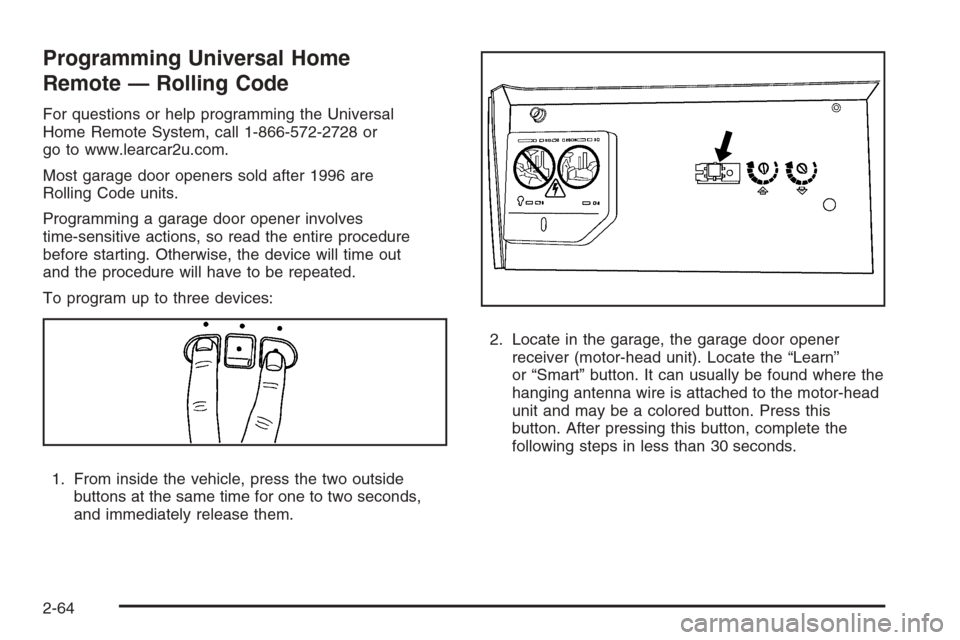
1. From inside the vehicle, press the two outside
buttons at the same time for one to two seconds,
and immediately release them.2. Locate in the garage, the garage door opener
receiver (motor-head unit). Locate the “Learn”
or “Smart” button. It can usually be found where the
hanging antenna wire is attached to the motor-head
unit and may be a colored button. Press this
button. After pressing this button, complete the
following steps in less than 30 seconds.
2-64
Page 168 of 538
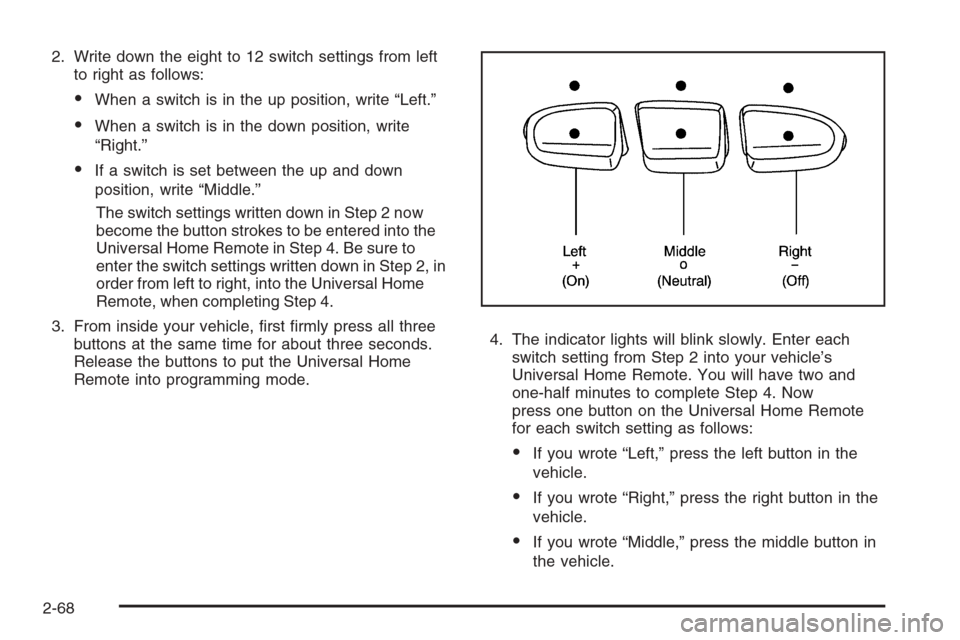
2. Write down the eight to 12 switch settings from left
to right as follows:
When a switch is in the up position, write “Left.”
When a switch is in the down position, write
“Right.”
If a switch is set between the up and down
position, write “Middle.”
The switch settings written down in Step 2 now
become the button strokes to be entered into the
Universal Home Remote in Step 4. Be sure to
enter the switch settings written down in Step 2, in
order from left to right, into the Universal Home
Remote, when completing Step 4.
3. From inside your vehicle, rst rmly press all three
buttons at the same time for about three seconds.
Release the buttons to put the Universal Home
Remote into programming mode.4. The indicator lights will blink slowly. Enter each
switch setting from Step 2 into your vehicle’s
Universal Home Remote. You will have two and
one-half minutes to complete Step 4. Now
press one button on the Universal Home Remote
for each switch setting as follows:
If you wrote “Left,” press the left button in the
vehicle.
If you wrote “Right,” press the right button in the
vehicle.
If you wrote “Middle,” press the middle button in
the vehicle.
2-68
Page 169 of 538
5. After entering all of the switch positions, again,
rmly press and release all three buttons at the
same time. The indicator lights will turn on.
6. Press and hold the button that will be used to
control the garage door until the garage door
moves. The indicator light above the selected button
should slowly blink. This button may need to be
held for up to 55 seconds.
7. Immediately release the button when the garage
door moves. The indicator light will blink rapidly
until programming is complete.
8. Press and release the same button again. The
garage door should move, conrming that
programming is successful and complete.
To program another Fixed Code device such as an
additional garage door opener, a security device,
or home automation device, repeat Steps 1-8, choosing
a different button in Step 6 than what was used for
the garage door opener.
Using Universal Home Remote
Press and hold the appropriate button for at least half of
a second. The indicator light will come on while the
signal is being transmitted.
Reprogramming Universal Home
Remote Buttons
Any of the three buttons can be reprogrammed by
repeating the instructions.
Erasing Universal Home Remote
Buttons
The programmed buttons should be erased when the
vehicle is sold or the lease ends.
To erase either Rolling Code or Fixed Code on the
Universal Home Remote device:
1. Press and hold the two outside buttons at the same
time for approximately 20 seconds, until the
indicator lights, located directly above the buttons,
begin to blink rapidly.
2. Once the indicator lights begin to blink, release both
buttons. The codes from all buttons will be erased.
For help or information on the Universal Home Remote
System, call the customer assistance phone number
underCustomer Assistance Offices on page 7-6.
2-69
Page 176 of 538
Oil Pressure Gage........................................3-47
Oil Pressure Light.........................................3-48
Security Light...............................................3-48
Fog Lamp Light............................................3-48
Cruise Control Light......................................3-49
Highbeam On Light.......................................3-49
Tow/Haul Mode Light....................................3-49
Fuel Gage...................................................3-49
Low Fuel Warning Light.................................3-50
Driver Information Center (DIC).......................3-51
DIC Operation and Displays
(With DIC Buttons)....................................3-51
DIC Operation and Displays
(Without DIC Buttons)................................3-56
DIC Warnings and Messages.........................3-59
DIC Vehicle Customization (With DIC Buttons). . . .3-67Audio System(s).............................................3-75
Setting the Clock..........................................3-76
Radio(s) (MP3).............................................3-78
Using an MP3 (Radio with CD
or Six-Disc CD Player)...............................3-95
Using an MP3 (Radio with CD
and DVD Player).......................................3-99
XM Radio Messages...................................3-104
Navigation/Radio System..............................3-105
Rear Seat Entertainment (RSE) System.........3-105
Rear Seat Audio (RSA)................................3-114
Theft-Deterrent Feature................................3-116
Audio Steering Wheel Controls......................3-116
Radio Reception.........................................3-117
Rear Side Window Antenna..........................3-118
XM™ Satellite Radio Antenna System............3-118
Section 3 Instrument Panel
3-2
Page 179 of 538

A. Air Outlets. SeeOutlet Adjustment on page 3-30.
B. Turn Signal/Multifunction Lever. SeeTurn
Signal/Multifunction Lever on page 3-7.
C. Instrument Panel Cluster. SeeInstrument Panel
Cluster on page 3-35.
D. Hazard Warning Flasher Button. SeeHazard
Warning Flashers on page 3-6.
E. Shift Lever. SeeAutomatic Transmission Operation
on page 2-30.
F. Tow/Haul Selector Button (If Equipped). See
Tow/Haul Mode on page 2-36.
G. Driver Information Center Controls. SeeDriver
Information Center (DIC) on page 3-51.
H. Audio System. SeeAudio System(s) on page 3-75.
I. Exterior Lamps Control. SeeExterior Lamps on
page 3-14.
J. Dome Lamp Override Button. SeeDome Lamp
Override on page 3-19. Instrument Panel Brightness
Control. SeeInstrument Panel Brightness on
page 3-18. Fog Lamp Button (If Equipped). SeeFog
Lamps on page 3-17.
K. Automatic Transfer Case Control. (If Equipped). See
Four-Wheel Drive on page 2-36.
L. Cruise Control Buttons. SeeCruise Control on
page 3-12.M. Tilt Wheel Lever. SeeTilt Wheel on page 3-6.
N. Horn. SeeHorn on page 3-6.
O. Audio Steering Wheel Controls. SeeAudio Steering
Wheel Controls on page 3-116.
P. Climate Controls. SeeClimate Control System on
page 3-22or Dual Automatic Climate Controls
(If Equipped). SeeDual Automatic Climate Control
System on page 3-24.
Q. Accessory Power Outlets. SeeAccessory Power
Outlet(s) on page 3-20. Cigarette Lighter (If
Equipped). SeeAshtray(s) and Cigarette Lighter on
page 3-21.
R. StabiliTrak
®Button (If Equipped). SeeStabiliTrak®
System on page 4-6. Pedal Adjust Button (If
Equipped). SeeAdjustable Throttle and Brake Pedal
on page 2-28. Rear Park Assist Disable Button (If
Equipped). SeeUltrasonic Rear Parking Assist
(URPA) on page 2-56. Heated Windshield Washer
Fluid Button (If Equipped). SeeWindshield Washer
on page 3-10. Power Running Boards Disable
Button (If Equipped). SeePower Running Boards on
page 2-17.
S. Glove Box. SeeGlove Box on page 2-70.
3-5
Page 186 of 538
Cruise Control
{CAUTION:
Cruise control can be dangerous where you
cannot drive safely at a steady speed. So, do
not use your cruise control on winding roads
or in heavy traffic.
Cruise control can be dangerous on slippery
roads. On such roads, fast changes in tire
traction can cause excessive wheel slip, and
you could lose control. Do not use cruise
control on slippery roads.
With cruise control, a speed of about 25 mph (40 km/h)
or more can be maintained without keeping your foot
on the accelerator. This can really help on long
trips. Cruise control does not work at speeds below
about 25 mph (40 km/h).
When the brakes are applied, cruise control is turned off.
For vehicles with the StabiliTrak
®system that begins to
limit wheel spin while you are using cruise control,
the cruise control will automatically disengage. See
StabiliTrak
®System on page 4-6. When road conditions
allow the cruise control to be safely used again, it
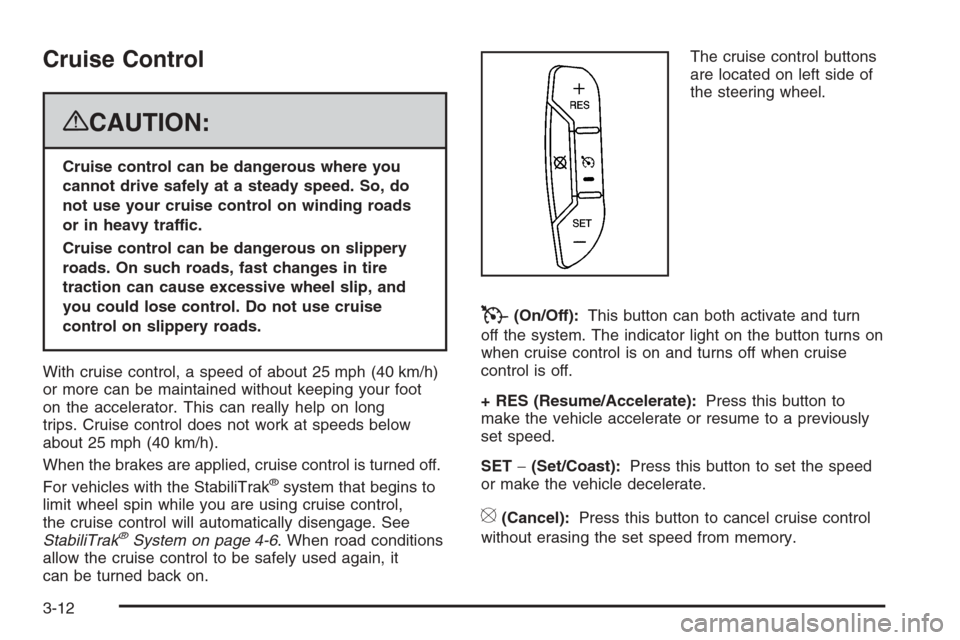
can be turned back on.The cruise control buttons
are located on left side of
the steering wheel.
T(On/Off):This button can both activate and turn
off the system. The indicator light on the button turns on
when cruise control is on and turns off when cruise
control is off.
+ RES (Resume/Accelerate):Press this button to
make the vehicle accelerate or resume to a previously
set speed.
SET−(Set/Coast):Press this button to set the speed
or make the vehicle decelerate.
[(Cancel):Press this button to cancel cruise control
without erasing the set speed from memory.
3-12
Page 191 of 538
If the vehicle is started in a dark garage, the automatic
headlamp system will come on immediately. Once
the vehicle leaves the garage, it takes approximately
one minute for the automatic headlamp system to
change to DRL if it is bright enough outside. During
that delay, the instrument panel cluster may not be
as bright as usual. Make sure the instrument panel
brightness control is in the full bright position.
SeeInstrument Panel Brightness on page 3-18.
To idle the vehicle with the automatic headlamp
system off, turn the control to the off position.
The headlamps will also stay on after you exit the
vehicle. This feature can be programmed using the
Driver Information Center (DIC). SeeDIC Vehicle
Customization (With DIC Buttons) on page 3-67.
The regular headlamp system can be turned on
when needed.Fog Lamps
-(Fog Lamps):If your vehicle has fog lamps, the
control is located next to the exterior lamps control on
the instrument panel, to the left of the steering
column.
The ignition must be in the ON/RUN position for the fog
lamps to come on.
Press the button to turn the fog lamps on or off. A light
will come on in the instrument panel cluster.
When the fog lamps are turned on, the parking lamps
automatically turn on.
When the headlamps are changed to high-beam, the
fog lamps also go off. When the high-beam headlamps
are turned off, the fog lamps will come on again.
Some localities have laws that require the headlamps to
be on along with the fog lamps.
3-17