2008 CHEVROLET SUBURBAN heating
[x] Cancel search: heatingPage 201 of 538
yNz(Mode):Press the mode up and down
buttons to manually change the direction of the airow
in the vehicle. Repeatedly press the button until the
desired mode appears on the display. Pressing one of
these buttons when the system is off will change air
delivery mode without turning the system on. Pressing
one of these buttons when in automatic control will place
the mode under manual control.
The air delivery mode setting will be displayed and the
AUTO light will turn off. The fan will remain under
automatic control.
H(Vent):This setting will deliver air to the instrument
panel outlets.
)(Bi-Level):This mode directs half of the air to the
instrument panel outlets and half to the oor outlets.
The ow can be divided between vent and oor outlets
depending upon where the knob is placed between
the settings. A little air is directed towards the windshield
and side window outlets. Cooler air is directed to the
upper outlets and warmer air to the oor outlets.
6(Floor):This mode directs most of the air to the
oor outlets, with some of the air directed to the
windshield, side window outlets, and second row oor
outlets. In this mode, the system automatically
selects outside air.
-(Defog):See “Defogging and Defrosting” later in
this section.
@(Recirculation):Press this button to turn the
recirculation mode on. When the button is pressed,
an indicator light comes on.
This mode keeps outside air from entering the vehicle.
It can be used to reduce outside air and prevent
odors from entering the vehicle. Recirculation may also
help cool the air inside the vehicle more quickly once
the temperature inside the vehicle is less than the
outside temperature.
The recirculation mode cannot be used with oor,
defrost, or defogging modes. If you try to select
recirculation in one of those modes, the indicator will
ash three times and turn off. The air conditioning
compressor will also come on when this mode is
activated. While in recirculation mode the windows may
fog when the weather is cold and damp. To clear the
fog, select either the defog or defrost mode and increase
the fan speed. Recirculation mode can be turned off
by pressing the button again, or turning off the engine.
AUX:For vehicles with the rear heat and air
conditioning controls. Press the AUX button to turn the
rear climate control system on or off. SeeRear Air
Conditioning and Heating System and Electronic Climate
Controls on page 3-32.
3-27
Page 204 of 538
Rear Window Defogger
The rear window defogger uses a warming grid to
remove fog from the rear window.
<(Rear Window Defogger):Press this button to
turn on the rear window defogger. It will automatically
turn off several minutes after it has been activated.
The defogger can also be turned off by pressing
the button again or by turning off the engine. Do not
drive the vehicle until all the windows are clear.
If your vehicle has heated outside rearview mirrors, the
mirrors will heat to help clear fog or frost from the
surface of the mirror when the rear window defog button
is pressed.
Notice:Do not use a razor blade or sharp object to
clear the inside rear window. Do not adhere
anything to the defogger grid lines in the rear glass.
These actions may damage the rear defogger.
Repairs would not be covered by your warranty.
Outlet Adjustment
Use the air outlets located in the center and on the side
of your instrument panel to direct the airow.
Operation Tips
Keep the hood and front air inlets free of ice, snow,
or any other obstruction (such as leaves). The
heater and defroster will work far better, reducing
the chance of fogging the inside of your windows.
When you enter a vehicle in cold weather, press the
fan up button to the maximum fan level before
driving. This helps clear the intake ducts of snow
and moisture, and reduces the chance of fogging
the inside of your window.
Keep the air path under the front seats clear of
objects. This helps air to circulate throughout
your vehicle.
Adding outside equipment to the front of your
vehicle, such as hood-air deectors, may affect the
performance of the heating and air conditioning
system. Check with your dealer before adding
equipment to the outside of your vehicle.
3-30
Page 205 of 538
Rear Air Conditioning and Heating
System
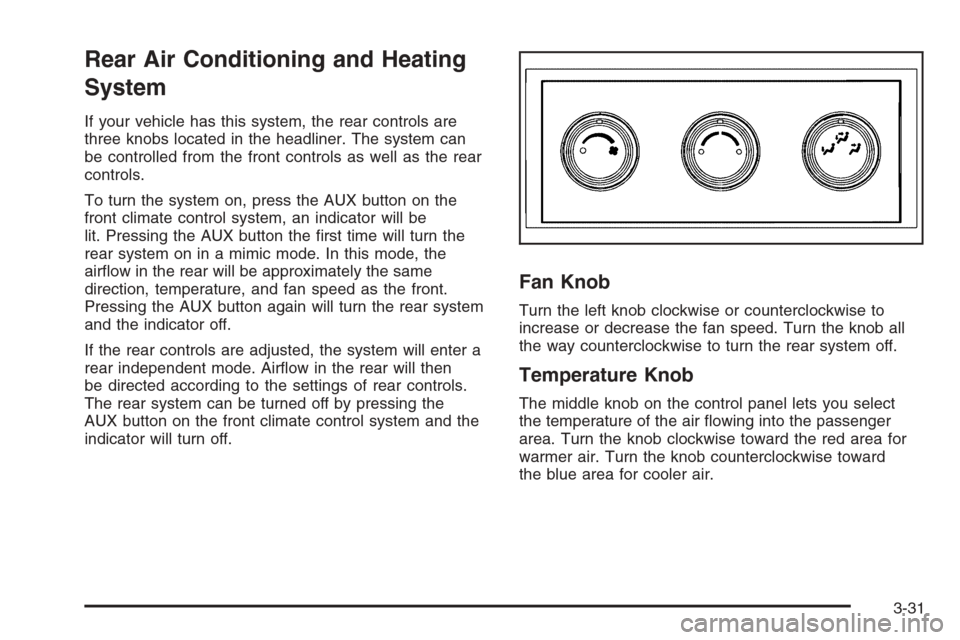
If your vehicle has this system, the rear controls are
three knobs located in the headliner. The system can
be controlled from the front controls as well as the rear
controls.
To turn the system on, press the AUX button on the
front climate control system, an indicator will be
lit. Pressing the AUX button the rst time will turn the
rear system on in a mimic mode. In this mode, the
airow in the rear will be approximately the same
direction, temperature, and fan speed as the front.
Pressing the AUX button again will turn the rear system
and the indicator off.
If the rear controls are adjusted, the system will enter a
rear independent mode. Airow in the rear will then
be directed according to the settings of rear controls.
The rear system can be turned off by pressing the
AUX button on the front climate control system and the
indicator will turn off.
Fan Knob
Turn the left knob clockwise or counterclockwise to
increase or decrease the fan speed. Turn the knob all
the way counterclockwise to turn the rear system off.
Temperature Knob
The middle knob on the control panel lets you select
the temperature of the air owing into the passenger
area. Turn the knob clockwise toward the red area for
warmer air. Turn the knob counterclockwise toward
the blue area for cooler air.
3-31
Page 206 of 538
Mode Knob
The right knob on the control panel allows you to
choose the direction of air delivery.
H(Vent):This setting directs the air through the
headliner outlets.
)(Bi-Level):Air is delivered through the oor outlets
as well as the headliner outlets. The rear system
oor outlets are located directly behind the second row
seats. The ow can be divided between vent and
oor outlets depending upon where the knob is placed
between the settings.
6(Floor):This setting directs most of the air through
the oor outlets. The rear system oor outlets are
located directly behind the second row seats.
Rear Air Conditioning and Heating
System and Electronic Climate
Controls
For vehicles with the rear heat and air conditioning
controls, they are integrated with the rear seat audio
controls located in the center console. The system can
be controlled from the front controls as well as the
rear controls.
To turn the system on, press the AUX button on the
front climate control system, an indicator will be
lit. Pressing the AUX button the rst time will turn the
rear system on in a mimic mode. In this mode, the
airow in the rear will be approximately the same
direction, temperature, and fan speed as the front.
Pressing the AUX button again turns the rear system
and the indicator off.
If the rear controls are adjusted, the system enters a
rear independent mode. Airow in the rear will then
be directed according to the settings of rear controls.
The rear system can be turned off by pressing the
AUX button on the front climate control system and the
indicator will turn off.
If the indicator in the front AUX button is off, the rear
system is off.
3-32
Page 217 of 538
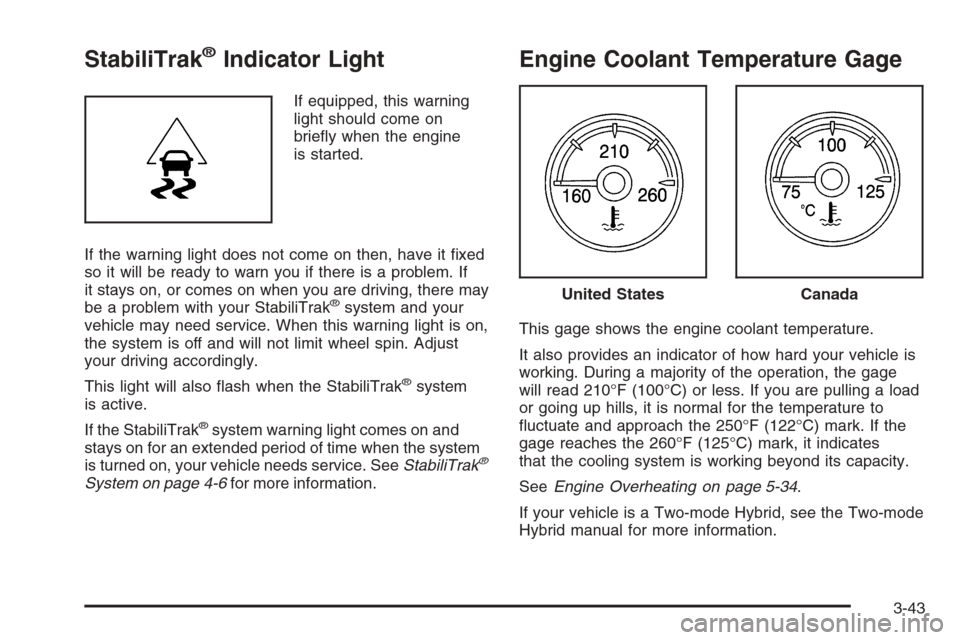
StabiliTrak®Indicator Light
If equipped, this warning
light should come on
briey when the engine
is started.
If the warning light does not come on then, have it xed
so it will be ready to warn you if there is a problem. If
it stays on, or comes on when you are driving, there may
be a problem with your StabiliTrak
®system and your
vehicle may need service. When this warning light is on,
the system is off and will not limit wheel spin. Adjust
your driving accordingly.
This light will also ash when the StabiliTrak
®system
is active.
If the StabiliTrak
®system warning light comes on and
stays on for an extended period of time when the system
is turned on, your vehicle needs service. SeeStabiliTrak
®
System on page 4-6for more information.
Engine Coolant Temperature Gage
This gage shows the engine coolant temperature.
It also provides an indicator of how hard your vehicle is
working. During a majority of the operation, the gage
will read 210°F (100°C) or less. If you are pulling a load
or going up hills, it is normal for the temperature to
uctuate and approach the 250°F (122°C) mark. If the
gage reaches the 260°F (125°C) mark, it indicates
that the cooling system is working beyond its capacity.
SeeEngine Overheating on page 5-34.
If your vehicle is a Two-mode Hybrid, see the Two-mode
Hybrid manual for more information.
United StatesCanada
3-43
Page 234 of 538
CHECK TIRE PRESSURE
This message displays when the pressure in one or
more of the vehicle’s tires needs to be checked.
This message also displays LEFT FRONT, RIGHT
FRONT, LEFT REAR, or RIGHT REAR to indicate which
tire needs to be checked. You can receive more than
one tire pressure message at a time. To read the other
messages that may have been sent at the same
time, press the set/reset button or the trip odometer
reset stem. If a tire pressure message appears on the
DIC, stop as soon as you can. Have the tire pressures
checked and set to those shown on the Tire Loading
Information label. SeeTires on page 5-66,Loading the
Vehicle on page 4-35, andInflation - Tire Pressure
on page 5-74. The DIC also shows the tire pressure
values. See “DIC Operation and Displays (With
DIC Buttons)” earlier in this section. If the tire pressure
is low, the low tire pressure warning light comes on.
SeeTire Pressure Light on page 3-44.
DRIVER DOOR OPEN
This message displays and a chime sounds if the driver
door is not fully closed and the vehicle is in a drive
gear. Stop and turn off the vehicle, check the door for
obstructions, and close the door again. Check to
see if the message still appears on the DIC.
ENGINE HOT A/C (Air Conditioning)
TURNED OFF
This message displays when the engine coolant
becomes hotter than the normal operating temperature.
SeeEngine Coolant Temperature Gage on page 3-43.
To avoid added strain on a hot engine, the air
conditioning compressor automatically turns off. When
the coolant temperature returns to normal, the air
conditioning compressor turns back on. You can
continue to drive your vehicle.
If this message continues to appear, have the system
repaired by your dealer/retailer as soon as possible
to avoid damage to the engine.
ENGINE OVERHEATED IDLE ENGINE
Notice:If you drive your vehicle while the engine
is overheating, severe engine damage may occur.
If an overheat warning appears on the instrument
panel cluster and/or DIC, stop the vehicle as soon
as possible. SeeEngine Overheating on page 5-34
for more information.
This message displays when the engine coolant
temperature is too hot. Stop and allow the vehicle to
idle until it cools down. SeeEngine Coolant
Temperature Gage on page 3-43.
SeeOverheated Engine Protection Operating Mode on
page 5-36for information on driving to a safe place
in an emergency.
3-60
Page 235 of 538
ENGINE OVERHEATED STOP ENGINE
Notice:If you drive your vehicle while the engine
is overheating, severe engine damage may occur.
If an overheat warning appears on the instrument
panel cluster and/or DIC, stop the vehicle as soon
as possible. SeeEngine Overheating on page 5-34
for more information.
This message displays and a chime sounds if the
engine cooling system reaches unsafe temperatures for
operation. Stop and turn off the vehicle as soon as it
is safe to do so to avoid severe damage. This message
clears when the engine has cooled to a safe operating
temperature.
ENGINE POWER IS REDUCED
This message displays and a chime sounds when the
cooling system temperature gets too hot and the engine
further enters the engine coolant protection mode.
SeeEngine Overheating on page 5-34for further
information.
This message also displays when the vehicle’s engine
power is reduced. Reduced engine power can affect the
vehicle’s ability to accelerate. If this message is on,
but there is no reduction in performance, proceedto your destination. The performance may be reduced
the next time the vehicle is driven. The vehicle may
be driven at a reduced speed while this message is on,
but acceleration and speed may be reduced. Anytime
this message stays on, the vehicle should be taken
to your dealer/retailer for service as soon as possible.
FUEL LEVEL LOW
This message displays and a chime sounds if the fuel
level is low. Refuel as soon as possible. SeeFuel Gage
on page 3-49andFuel on page 5-5for more
information.
HOOD OPEN
This message displays and a chime sounds if the hood is
not fully closed. Stop and turn off the vehicle, check the
hood for obstructions, and close the hood again. Check to
see if the message still appears on the DIC.
LEFT REAR DOOR OPEN
This message displays and a chime sounds if the driver
side rear door is not fully closed and the vehicle is in
a drive gear. Stop and turn off the vehicle, check
the door for obstructions, and close the door again.
Check to see if the message still appears on the DIC.
3-61
Page 239 of 538
SERVICE TRACTION CONTROL
If your vehicle has StabiliTrak®, this message displays
when there is a problem with the Traction Control
System (TCS). When this message displays, the system
will not limit wheel spin. Adjust your driving accordingly.
See your dealer/retailer for service. SeeStabiliTrak
®
System on page 4-6for more information.
STABILITRAK OFF
If your vehicle has StabiliTrak®, this message displays
when you turn off StabiliTrak®, or when the stability
control has been automatically disabled. To limit
wheel spin and realize the full benets of the stability
enhancement system, you should normally leave
StabiliTrak
®on. However, you should turn StabiliTrak®
off if your vehicle gets stuck in sand, mud, ice, or
snow and you want to rock your vehicle to attempt to
free it, or if you are driving in extreme off-road conditions
and require more wheel spin. SeeIf Your Vehicle is
Stuck in Sand, Mud, Ice, or Snow on page 4-33.
To turn the StabiliTrak
®system on or off, see
StabiliTrak®System on page 4-6.There are several conditions that can cause this
message to appear.
One condition is overheating, which could occur if
StabiliTrak®activates continuously for an extended
period of time.
The message also displays if the brake system
warning light is on. SeeBrake System Warning
Light on page 3-41.
The message could display if the stability system
takes longer than usual to complete its diagnostic
checks due to driving conditions.
The message displays if an engine or vehicle
related problem has been detected and the vehicle
needs service. See your dealer/retailer.
The message also displays if the vehicle is shifted
into 4LO.
The message turns off as soon as the conditions that
caused the message to be displayed are no longer
present.
3-65