2008 CHEVROLET SUBURBAN ECO mode
[x] Cancel search: ECO modePage 135 of 538
To use this feature, do the following:
1. Move the shift lever to the MANUAL MODE (M).
2. Press the plus/minus buttons, located on the
steering column shift lever, to select the desired
range of gears for your current driving conditions.
When MANUAL MODE (M) is selected a number
displays next to the M, indicating the current gear.
This number is the highest gear that can be used.
However, your vehicle can automatically shift to lower
gears as it adjusts to driving conditions. This means that
all gears below that number are available. When
FIFTH (5) is selected, FIRST (1) through FIFTH (5)
gears are automatically shifted by the vehicle, but
SIXTH (6) cannot be used until the plus/minus button
located on the steering column lever is used to change
to the gear.
Grade Braking is not available when the Range
Selection Mode is active. SeeTow/Haul Mode on
page 2-36While using the Range Selection mode feature, cruise
control and the Tow/Haul mode can be used.
Notice:Spinning the tires or holding the vehicle
in one place on a hill using only the accelerator
pedal may damage the transmission. The repair will
not be covered by your warranty. If you are stuck,
do not spin the tires. When stopping on a hill,
use the brakes to hold the vehicle in place.
Low Traction Mode
If your vehicle has the Allison Transmission®,orthe
Hydra-Matic®6-Speed Automatic Transmission, it has a
Low Traction Mode that assist in vehicle acceleration
when road conditions are slippery, such as with ice
or snow. While the vehicle is at a stop, select the second
gear range using the Range Selection system. This
will limit torque to the wheels after it detects wheel slip,
preventing the tires from spinning.
2-35
Page 137 of 538
Front Axle
The front axle engages and disengages automatically
when you shift the transfer case. Some delay for
the axle to engage or disengage is normal.
Automatic Transfer Case
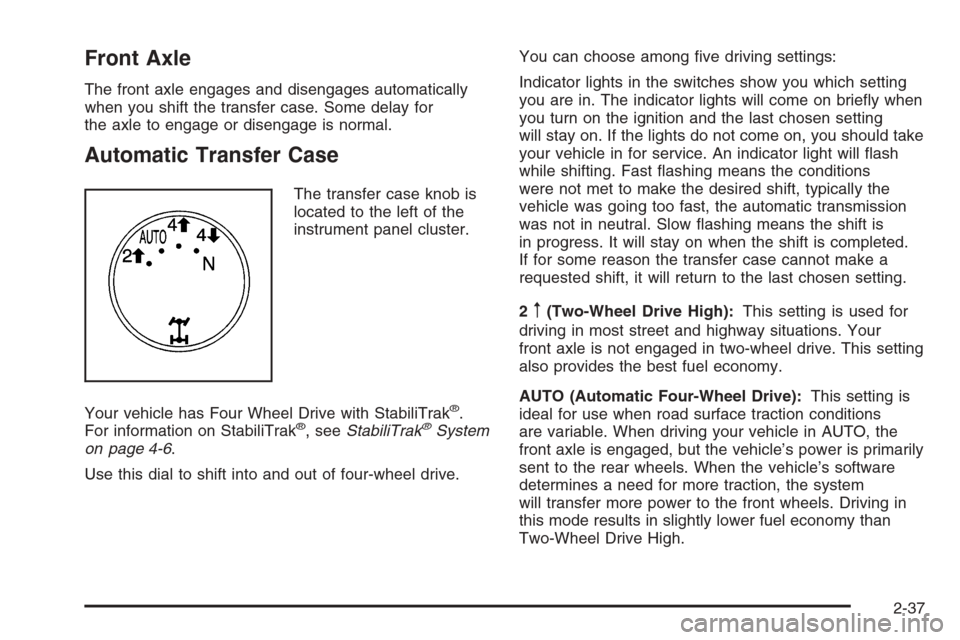
The transfer case knob is
located to the left of the
instrument panel cluster.
Your vehicle has Four Wheel Drive with StabiliTrak
®.
For information on StabiliTrak®, seeStabiliTrak®System
on page 4-6.
Use this dial to shift into and out of four-wheel drive.You can choose among ve driving settings:
Indicator lights in the switches show you which setting
you are in. The indicator lights will come on briey when
you turn on the ignition and the last chosen setting
will stay on. If the lights do not come on, you should take
your vehicle in for service. An indicator light will ash
while shifting. Fast ashing means the conditions
were not met to make the desired shift, typically the
vehicle was going too fast, the automatic transmission
was not in neutral. Slow ashing means the shift is
in progress. It will stay on when the shift is completed.
If for some reason the transfer case cannot make a
requested shift, it will return to the last chosen setting.
2
m(Two-Wheel Drive High):This setting is used for
driving in most street and highway situations. Your
front axle is not engaged in two-wheel drive. This setting
also provides the best fuel economy.
AUTO (Automatic Four-Wheel Drive):This setting is
ideal for use when road surface traction conditions
are variable. When driving your vehicle in AUTO, the
front axle is engaged, but the vehicle’s power is primarily
sent to the rear wheels. When the vehicle’s software
determines a need for more traction, the system
will transfer more power to the front wheels. Driving in
this mode results in slightly lower fuel economy than
Two-Wheel Drive High.
2-37
Page 139 of 538
Shifting Into Four-Wheel Drive High or
AUTO (Automatic Four-Wheel Drive)
Turn the knob to the Four-Wheel High or AUTO position.
This can be done at any speed, except when shifting
from Four-Wheel Drive Low. The indicator light will ash
while shifting. It will remain on when the shift is
completed.
Shifting Into Two-Wheel Drive High
Turn the knob to the Two-Wheel High position. This can
be done at any speed, except when shifting from
Four-Wheel Drive Low.
See shifting out of Four-Wheel Drive Low later in this
section for more information.
Shifting Into Four-Wheel Drive Low
When Four-Wheel Low is engaged, vehicle speed
should be kept below 45 mph. Extended high-speed
operation in 4L may damage or shorten the life of
the drivetrain.
To shift to the Four-Wheel Drive Low position, the
ignition must be in ON/RUN and the vehicle must be
stopped or moving less than 3 mph (5 km/h) with
the transmission in NEUTRAL (N). The preferred methodfor shifting into Four-Wheel Drive Low is to have your
vehicle moving 1 to 2 mph (1.6 to 3.2 km/h). Turn
the knob to the Four-Wheel Drive Low position. You
must wait for the Four-Wheel Drive Low indicator light to
stop ashing and remain on before shifting your
transmission in gear.
Notice:Shifting the transmission into gear before
the Four-Wheel Drive Low indicator light has stopped
ashing could damage the transfer case. To help
avoid damaging your vehicle, always wait for the
Four-Wheel Drive Low indicator light to stop ashing
before shifting the transmission into gear.
The vehicle may have signicant engagement noise and
bump when shifting between Four-Wheel Drive Low
and Four-Wheel Drive High ranges or from NEUTRAL
while the engine is running.
If the knob is turned to the Four-Wheel Drive Low position
when your vehicle is in gear and/or moving, the
Four-Wheel Drive Low indicator light will ash for
30 seconds and not complete the shift unless your
vehicle is moving less than 3 mph (5 km/h) and the
transmission is in NEUTRAL (N). After 30 seconds the
transfer case will shift to Four-Wheel Drive High mode.
2-39
Page 141 of 538
7. If the engine is running, verify that the transfer case
is in NEUTRAL (N) by shifting the transmission to
REVERSE (R) for one second, then shift the
transmission to DRIVE (D) for one second.
8. Turn the ignition to ACC/ACCESSORY, which will
turn the engine off.
9. Place the transmission shift lever in PARK (P).
10. Release the parking brake prior to moving
the vehicle.
11. Turn the ignition to LOCK/OFF.
Shifting Out of NEUTRAL
To shift out of NEUTRAL do the following:
1. Set the parking brake and apply the regular
brake pedal.
2. Shift the transmission to NEUTRAL (N) and turn the
ignition to ON/RUN with the engine off.3. Turn the transfer case dial to the desired transfer
case shift position (Two-Wheel Drive High,
Four-Wheel Drive High, AUTO).
After the transfer case has shifted out of NEUTRAL
the NEUTRAL light will go out.
4. Release the parking brake prior to moving the
vehicle.
Notice:Shifting the transmission into gear before
the Four-Wheel Drive Low indicator light has
stopped ashing could damage the transfer case.
To help avoid damaging your vehicle, always
wait for the Four-Wheel Drive Low indicator light to
stop ashing before shifting the transmission
into gear.
5. Start the engine and shift the transmission to the
desired position.
Excessively shifting the transfer case into or out of the
different modes may cause the transfer case to enter the
shift protection mode. This will protect the transfer case
from possible damage and will only allow the transfer
case to respond to one shift per 10 seconds. The transfer
case may stay in this mode for up to three minutes.
2-41
Page 149 of 538
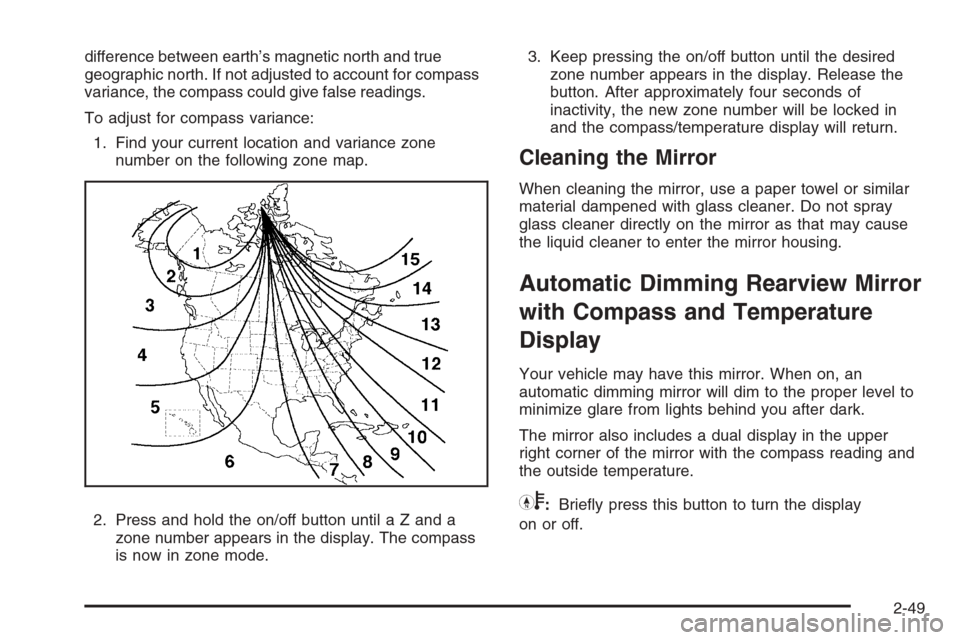
difference between earth’s magnetic north and true
geographic north. If not adjusted to account for compass
variance, the compass could give false readings.
To adjust for compass variance:
1. Find your current location and variance zone
number on the following zone map.
2. Press and hold the on/off button until a Z and a
zone number appears in the display. The compass
is now in zone mode.3. Keep pressing the on/off button until the desired
zone number appears in the display. Release the
button. After approximately four seconds of
inactivity, the new zone number will be locked in
and the compass/temperature display will return.
Cleaning the Mirror
When cleaning the mirror, use a paper towel or similar
material dampened with glass cleaner. Do not spray
glass cleaner directly on the mirror as that may cause
the liquid cleaner to enter the mirror housing.
Automatic Dimming Rearview Mirror
with Compass and Temperature
Display
Your vehicle may have this mirror. When on, an
automatic dimming mirror will dim to the proper level to
minimize glare from lights behind you after dark.
The mirror also includes a dual display in the upper
right corner of the mirror with the compass reading and
the outside temperature.
Yb:Briey press this button to turn the display
on or off.
2-49
Page 168 of 538
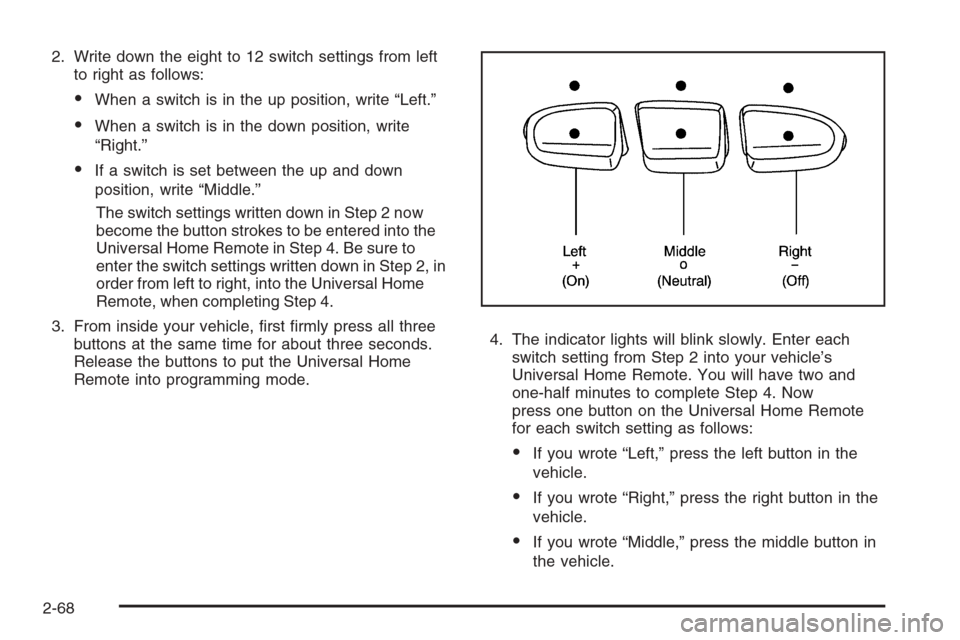
2. Write down the eight to 12 switch settings from left
to right as follows:
When a switch is in the up position, write “Left.”
When a switch is in the down position, write
“Right.”
If a switch is set between the up and down
position, write “Middle.”
The switch settings written down in Step 2 now
become the button strokes to be entered into the
Universal Home Remote in Step 4. Be sure to
enter the switch settings written down in Step 2, in
order from left to right, into the Universal Home
Remote, when completing Step 4.
3. From inside your vehicle, rst rmly press all three
buttons at the same time for about three seconds.
Release the buttons to put the Universal Home
Remote into programming mode.4. The indicator lights will blink slowly. Enter each
switch setting from Step 2 into your vehicle’s
Universal Home Remote. You will have two and
one-half minutes to complete Step 4. Now
press one button on the Universal Home Remote
for each switch setting as follows:
If you wrote “Left,” press the left button in the
vehicle.
If you wrote “Right,” press the right button in the
vehicle.
If you wrote “Middle,” press the middle button in
the vehicle.
2-68
Page 181 of 538
Turn Signal/Multifunction Lever
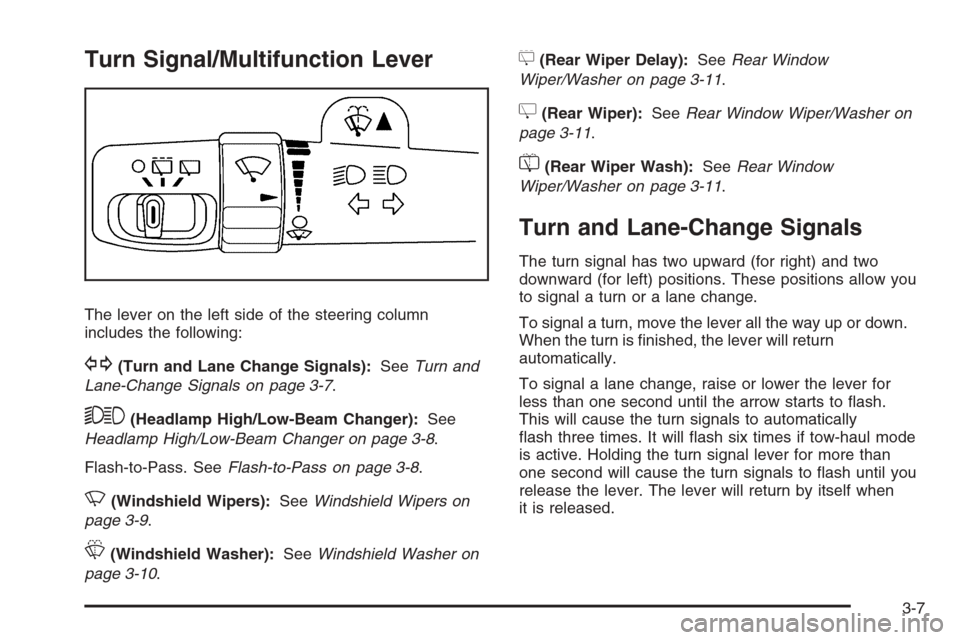
The lever on the left side of the steering column
includes the following:
G(Turn and Lane Change Signals):SeeTurn and
Lane-Change Signals on page 3-7.
53(Headlamp High/Low-Beam Changer):See
Headlamp High/Low-Beam Changer on page 3-8.
Flash-to-Pass. SeeFlash-to-Pass on page 3-8.
N(Windshield Wipers):SeeWindshield Wipers on
page 3-9.
L(Windshield Washer):SeeWindshield Washer on
page 3-10.
5(Rear Wiper Delay):SeeRear Window
Wiper/Washer on page 3-11.
Z(Rear Wiper):SeeRear Window Wiper/Washer on
page 3-11.
=(Rear Wiper Wash):SeeRear Window
Wiper/Washer on page 3-11.
Turn and Lane-Change Signals
The turn signal has two upward (for right) and two
downward (for left) positions. These positions allow you
to signal a turn or a lane change.
To signal a turn, move the lever all the way up or down.
When the turn is nished, the lever will return
automatically.
To signal a lane change, raise or lower the lever for
less than one second until the arrow starts to ash.
This will cause the turn signals to automatically
ash three times. It will ash six times if tow-haul mode
is active. Holding the turn signal lever for more than
one second will cause the turn signals to ash until you
release the lever. The lever will return by itself when
it is released.
3-7
Page 183 of 538
The high-beam indicator on the instrument panel cluster
will come on. Release the lever to return to normal
operation.
Windshield Wipers
Clear ice and snow from the wiper blades before using
them. If they are frozen to the windshield, gently
loosen or thaw them. Damaged wiper blades may not
clear the windshield well, making it harder to see
and drive safely. If the blades do become damaged,
install new blades or blade inserts. For more information,
seeWindshield Wiper Blade Replacement on page 5-64.
Heavy snow or ice can overload the wiper motor. A
circuit breaker will stop the motor until it cools down.
Clear away snow or ice to prevent an overload.
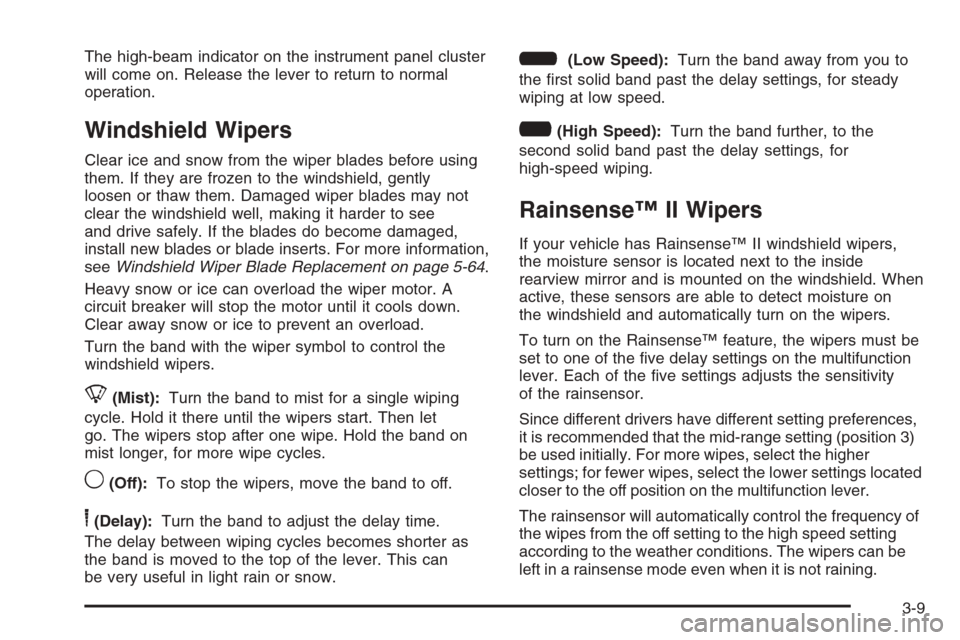
Turn the band with the wiper symbol to control the
windshield wipers.
8(Mist):Turn the band to mist for a single wiping
cycle. Hold it there until the wipers start. Then let
go. The wipers stop after one wipe. Hold the band on
mist longer, for more wipe cycles.
9(Off):To stop the wipers, move the band to off.
6(Delay):Turn the band to adjust the delay time.
The delay between wiping cycles becomes shorter as
the band is moved to the top of the lever. This can
be very useful in light rain or snow.
6(Low Speed):Turn the band away from you to
the rst solid band past the delay settings, for steady
wiping at low speed.
?(High Speed):Turn the band further, to the
second solid band past the delay settings, for
high-speed wiping.
Rainsense™ II Wipers
If your vehicle has Rainsense™ II windshield wipers,
the moisture sensor is located next to the inside
rearview mirror and is mounted on the windshield. When
active, these sensors are able to detect moisture on
the windshield and automatically turn on the wipers.
To turn on the Rainsense™ feature, the wipers must be
set to one of the ve delay settings on the multifunction
lever. Each of the ve settings adjusts the sensitivity
of the rainsensor.
Since different drivers have different setting preferences,
it is recommended that the mid-range setting (position 3)
be used initially. For more wipes, select the higher
settings; for fewer wipes, select the lower settings located
closer to the off position on the multifunction lever.
The rainsensor will automatically control the frequency of
the wipes from the off setting to the high speed setting
according to the weather conditions. The wipers can be
left in a rainsense mode even when it is not raining.
3-9