2008 CHEVROLET IMPALA steering
[x] Cancel search: steeringPage 138 of 400

Exterior Lamps
The exterior lamps control
is located on the
instrument panel to the left
of the steering wheel.
It controls the following systems:
Headlamps
Taillamps
Parking Lamps
License Plate Lamps
Instrument Panel Lights
Fog Lamps (If Equipped)The exterior lamps control has four positions:
O(Off):Briey turn the control to this position to
turn off the automatic light control. Briey turn to this
position again to turn automatic light control on again.
AUTO (Automatic):Turn the control to this position
to automatically turn on the headlamps at normal
brightness, together with the following:
Parking Lamps
Taillamps
License Plate Lamps
Instrument Panel Lights
;(Parking Lamps):Turn the control to this position to
turn on the parking lamps together with the following:
Taillamps
License Plate Lamps
Instrument Panel Lights
3-14
Page 140 of 400
Daytime Running Lamps (DRL)/
Automatic Headlamp System
Daytime Running Lamps (DRL) can make it easier for
others to see the front of your vehicle during the day.
DRL can be helpful in many different driving conditions,
but they can be especially helpful in the short periods
after dawn and before sunset. Fully functional daytime
running lamps are required on all vehicles rst sold
in Canada.
A light sensor on top of the instrument panel makes the
DRL work, so be sure it is not covered.
The DRL system’s automatic headlamp control will
make the low-beam headlamps come on at a reduced
brightness when the following conditions are met:
The ignition is in the ON/RUN position.
The exterior lamps control is in AUTO.
The engine is running.
When the DRL are on, only the low-beam headlamps, at
a reduced level of brightness, will be on. The headlamps,
taillamps, sidemarker, and other lamps will not be on.
The instrument panel and cluster will also not be lit.When it is dark enough outside, the low-beam
headlamps will turn off and the headlamps and parking
lamps will turn on. The other lamps that come on
with the headlamps will also come on.
When it is bright enough outside, the headlamps will go
off and the DRL will come on.
As with any vehicle, you should turn on the regular
headlamp system when it is needed.
Fog Lamps
-(Fog Lamps):If your vehicle has fog lamps,
the control is located on the exterior lamps control.
The exterior lamps control is located on the instrument
panel to the left of the steering column.
The ignition must be in the ON/RUN position for the
fog lamps to come on.
Press the exterior lamps button to turn the fog lamps on
or off. A light will come on in the instrument panel
cluster.
When the headlamps are changed to high-beam, the
fog lamps also go off.
Some localities have laws that require the headlamps to
be on along with the fog lamps.
3-16
Page 180 of 400
SERVICE A/C (Air Conditioning)
SYSTEM
This message displays when the electronic sensors that
control the air conditioning and heating systems are
no longer working. Have the climate control system
serviced by your dealer/retailer if you notice a drop in
heating and air conditioning efficiency.
SERVICE AIR BAG
This message displays when there is a problem with the
airbag system. Have your vehicle serviced by your
dealer/retailer immediately. SeeAirbag Readiness Light
on page 3-31for more information.
SERVICE BATTERY CHARGING
SYSTEM
This message displays when there is a problem with the
generator and battery charging systems. Driving with
this problem could drain the battery. Turn off all
unnecessary accessories. Stop and turn off the vehicle
as soon as it is safe to do so. Have the electrical
system checked by your dealer/retailer immediately.
SERVICE BRAKE SYSTEM
This message displays when service is required on the
brake system. Have the brake system serviced by
your dealer/retailer as soon as possible. The brake
system warning light also appears on the instrument
panel cluster when this message appears on the DIC.
SeeBrake System Warning Light on page 3-34.
SERVICE POWER STEERING
This message displays when a problem is detected with
the power steering system. When this message is
displayed, you may notice that the effort required to
steer the vehicle increases or feels heavier, but you will
still be able to steer the vehicle. Have your vehicle
serviced by your dealer/retailer immediately.
SERVICE STABILITRAK
If your vehicle has Electronic Stability Control (ESC),
this message displays if there has been a problem
detected with ESC. The ESC/TCS light also appears on
the instrument panel cluster. SeeElectronic Stability
Control on page 4-7for more information.
If this message turns on while you are driving, pull off the
road as soon as possible and stop carefully. Try resetting
the system by turning the ignition off and then back on.
3-56
Page 190 of 400

Audio System(s)
Determine which radio your vehicle has and then read the
pages following to familiarize yourself with its features.
{CAUTION:
This system provides you with far greater
access to audio stations and song listings.
Giving extended attention to entertainment
tasks while driving can cause a crash and you
or others can be injured or killed. Always keep
your eyes on the road and your mind on the
drive — avoid engaging in extended searching
while driving.
Keeping your mind on the drive is important for safe
driving. SeeDefensive Driving on page 4-2. Here are
some ways in which you can help avoid distraction
while driving.While your vehicle is parked:
Familiarize yourself with all of its controls.
Familiarize yourself with its operation.
Set up your audio system by presetting your
favorite radio stations, setting the tone, and
adjusting the speakers. Then, when driving
conditions permit, you can tune to your favorite
radio stations using the presets and steering wheel
controls if the vehicle has them.
Notice:Before adding any sound equipment to
your vehicle, such as an audio system, CD player,
CB radio, mobile telephone, or two-way radio, make
sure that it can be added by checking with your
dealer/retailer. Also, check federal rules covering
mobile radio and telephone units. If sound
equipment can be added, it is very important to do
it properly. Added sound equipment may interfere
with the operation of your vehicle’s engine,
radio, or other systems, and even damage them.
Your vehicle’s systems may interfere with the
operation of sound equipment that has been added.
Your vehicle has a feature called Retained Accessory
Power (RAP). With RAP, the audio system can be
played even after the ignition is turned off. SeeRetained
Accessory Power (RAP) on page 2-23for more
information.
3-66
Page 196 of 400

Storing a Radio Station as a Favorite
Drivers are encouraged to set up their radio station
favorites while the vehicle is in PARK (P). Tune to your
favorite stations using the presets, favorites button,
and steering wheel controls if the vehicle has this
feature. SeeDefensive Driving on page 4-2.
If your vehicle has XM™ and has a FAV button, a
maximum of 36 stations can be programmed as favorites
using the six pushbuttons positioned below the radio
station frequency labels and by using the radio favorites
page button (FAV button).
FAV (Favorites):Press to go through up to six pages
of favorites, each having six favorite stations available
per page. Each page of favorites can contain any
combination of AM, FM, or XM™ (if equipped)
stations. To store a station as a favorite, perform the
following steps:
1. Tune to the desired radio station.
2. Press the FAV button to display the page where
you want the station stored.
3. Press and hold one of the six pushbuttons until a
beep sounds. When that pushbutton is pressed
and released, the station that was set, returns.
4. Repeat the steps for each pushbutton radio station
you want stored as a favorite.The number of favorites pages can be setup using the
MENU button. To setup the number of favorites
pages, perform the following steps:
1. Press the MENU button to display the radio
setup menu.
2. Press the pushbutton located below the
FAV 1-6 label.
3. Select the desired number of favorites pages by
pressing the pushbutton located below the
displayed page numbers.
4. Press the FAV button, or let the menu time out, to
return to the original main radio screen showing the
radio station frequency labels and to begin the
process of programming favorites for the chosen
amount of numbered pages.
Setting the Tone
(Bass/Midrange/Treble)
BASS/MID/TREB (Bass, Midrange, or Treble):Your
radio may display some or all tones, such as BASS, MID,
and TREB. To adjust the tone settings, press the
fknob
until the tone control labels display. Press the pushbutton
positioned under the desired label, then turn the
fknob
clockwise or counterclockwise to adjust the highlighted
setting. The highlighted setting can also be adjusted
3-72
Page 210 of 400
Audio Steering Wheel Controls
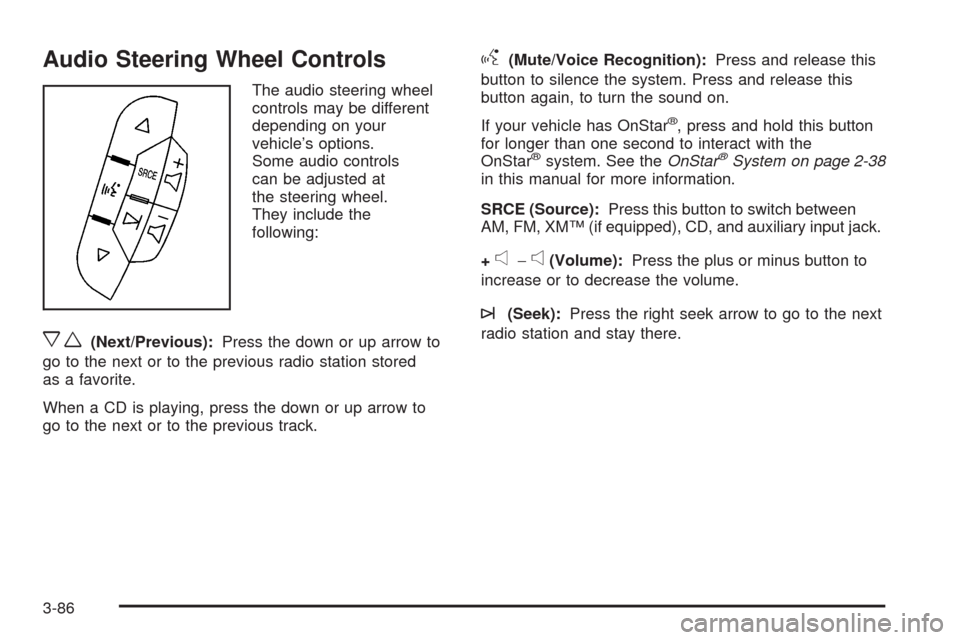
The audio steering wheel
controls may be different
depending on your
vehicle’s options.
Some audio controls
can be adjusted at
the steering wheel.
They include the
following:
xw(Next/Previous):Press the down or up arrow to
go to the next or to the previous radio station stored
as a favorite.
When a CD is playing, press the down or up arrow to
go to the next or to the previous track.
g(Mute/Voice Recognition):Press and release this
button to silence the system. Press and release this
button again, to turn the sound on.
If your vehicle has OnStar
®, press and hold this button
for longer than one second to interact with the
OnStar
®system. See theOnStar®System on page 2-38
in this manual for more information.
SRCE (Source):Press this button to switch between
AM, FM, XM™ (if equipped), CD, and auxiliary input jack.
+
e−e(Volume):Press the plus or minus button to
increase or to decrease the volume.
¨(Seek):Press the right seek arrow to go to the next
radio station and stay there.
3-86
Page 213 of 400
Your Driving, the Road, and Your Vehicle..........4-2
Defensive Driving...........................................4-2
Drunk Driving.................................................4-2
Control of a Vehicle........................................4-3
Braking.........................................................4-3
Antilock Brake System (ABS)...........................4-4
Braking in Emergencies...................................4-5
Traction Control System (TCS).........................4-6
Electronic Stability Control...............................4-7
Steering........................................................4-9
Off-Road Recovery.......................................4-11
Passing.......................................................4-11
Loss of Control.............................................4-12
Driving at Night............................................4-13Driving in Rain and on Wet Roads..................4-13
Before Leaving on a Long Trip.......................4-14
Highway Hypnosis........................................4-14
Hill and Mountain Roads................................4-15
Winter Driving..............................................4-16
If Your Vehicle is Stuck in Sand, Mud, Ice,
or Snow...................................................4-20
Rocking Your Vehicle to Get It Out.................4-20
Loading Your Vehicle....................................4-21
Towing..........................................................4-26
Towing Your Vehicle.....................................4-26
Recreational Vehicle Towing...........................4-26
Towing a Trailer...........................................4-27
Section 4 Driving Your Vehicle
4-1
Page 215 of 400
{CAUTION:
Drinking and then driving is very dangerous.
Your reexes, perceptions, attentiveness,
and judgment can be affected by even a small
amount of alcohol. You can have a serious — or
even fatal — collision if you drive after drinking.
Do not drink and drive or ride with a driver
who has been drinking. Ride home in a cab; or
if you are with a group, designate a driver who
will not drink.
Control of a Vehicle
The following three systems help to control your vehicle
while driving — brakes, steering, and accelerator.
At times, as when driving on snow or ice, it is easy to ask
more of those control systems than the tires and road can
provide. Meaning, you can lose control of your vehicle.
SeeTraction Control System (TCS) on page 4-6.
Adding non-dealer/non-retailer accessories can affect
your vehicle’s performance. SeeAccessories and
Modifications on page 5-3.
Braking
SeeBrake System Warning Light on page 3-34.
Braking action involves perception time and reaction
time. First, you have to decide to push on the brake
pedal. That is perception time. Then you have to bring
up your foot and do it. That is reaction time.
Average reaction time is about three-fourths of a
second. But that is only an average. It might be less
with one driver and as long as two or three seconds or
more with another. Age, physical condition, alertness,
coordination, and eyesight all play a part. So do alcohol,
drugs, and frustration. But even in three-fourths of a
second, a vehicle moving at 60 mph (100 km/h) travels
66 feet (20 m). That could be a lot of distance in an
emergency, so keeping enough space between
your vehicle and others is important.
And, of course, actual stopping distances vary greatly
with the surface of the road, whether it is pavement
or gravel; the condition of the road, whether it is wet,
dry, or icy; tire tread; the condition of the brakes;
the weight of the vehicle; and the amount of brake
force applied.
4-3