2008 CHEVROLET HHR recommended oil
[x] Cancel search: recommended oilPage 180 of 430
OIL LIFE
Press the information button until OIL LIFE displays.
The engine oil life system shows an estimate of the oil’s
remaining useful life. It shows 100% when the system
is reset after an oil change. It alerts you to change the oil
on a schedule consistent with your driving conditions.
In addition to the engine oil life system monitoring the oil
life, additional maintenance is recommended in the
Maintenance Schedule in this manual. SeeEngine Oil
on page 5-15andScheduled Maintenance on page 6-4.
Always reset the engine oil life system after an oil
change. See “How to Reset the Engine Oil Life System”
underEngine Oil Life System on page 5-19.
COOLANT
Press the information button until COOLANT displays.
This mode shows the temperature of the engine coolant
in either degrees Fahrenheit (°F) or degrees Celsius (°C).
Tire Pressure
If your vehicle has a Tire Pressure Monitor System
(TPMS), the pressure for each tire can be viewed in the
DIC. The tire pressure is shown in either pounds per
square inch (psi) or kilopascals (kPa). Press the
information button until LF ## PSI (kPa) ## RF displays
for the front tires. Press the information button again
until LR ## PSI (kPa) ## RR displays for the rear tires.If a low tire pressure condition is detected by the system
while driving, a message advising you to check the tire
pressure appears in the display. SeeInflation - Tire
Pressure on page 5-60andDIC Warnings and Messages
on page 3-48for more information.
DIC Warnings and Messages
These messages appear if there is a problem detected
in one of your vehicle’s systems.
A message clears when the vehicle’s condition is no
longer present. To acknowledge a message and clear it
from the display, press and hold any of the DIC
buttons. If the condition is still present, the warning
message comes back on the next time the vehicle is
turned off and back on. With most messages, a warning
chime sounds when the message displays. Your
vehicle may have other warning messages.
AUTO (Automatic) LIGHTS OFF
This message displays if the automatic headlamp
system is disabled with the headlamp switch. See
Automatic Headlamp System on page 3-17for more
information.
3-48
Page 186 of 430

DIC Vehicle Personalization
Your vehicle has personalization capabilities that allow
you to program certain features to a preferred setting.
All of the features listed may not be available on
your vehicle. Only the features available will be
displayed on the DIC.
The default settings for the features were set when your
vehicle left the factory, but may have been changed
from their default state since that time.
To change feature settings, use the following procedure:
Entering Personalization Menu
1. Turn the ignition on while the vehicle is stopped.
To avoid excessive drain on the battery, it is
recommended that the headlamps are turned off.
2. Press and hold the information and reset buttons at
the same time for one second, then release to enter
the personalization menu.
If the vehicle speed is greater than 2 mph (3 km/h),
only the UNITS menu will be accessible.
3. Press the information button to scroll through the
available personalization menu modes.
Press the reset button to scroll through the available
settings for each mode.
If you do not make a selection within ten seconds,
the display will go back to the previous information
displayed.
Personalization Menu Modes
OIL LIFE RESET
When this feature is displayed, you can reset the engine
oil life system. To reset the system, seeEngine Oil
Life System on page 5-19. See “OIL LIFE” underDIC
Operation and Displays on page 3-46for more
information.
UNITS
This feature allows you to select the units of
measurement in which the DIC will display the vehicle
information. When UNITS appears on the display, press
and hold the reset button for at least one second to
scroll through the available settings:
ENGLISH (default in United States):All information
will be displayed in English units.
METRIC (default in Canada):All information will be
displayed in metric units.
To select a setting and move on to the next feature,
press the information button while the desired setting is
displayed on the DIC.
3-54
Page 232 of 430
Before Leaving on a Long Trip
To prepare your vehicle for a long trip, consider having
it serviced by your dealer/retailer before departing.
Things to check on your own include:
Windshield Washer Fluid:Reservoir full? Windows
clean — inside and outside?
Wiper Blades:In good shape?
Fuel, Engine Oil, Other Fluids:All levels checked?
Lamps:Do they all work and are lenses clean?
Tires:Are treads good? Are tires inated to
recommended pressure?
Weather and Maps:Safe to travel? Have
up-to-date maps?
Highway Hypnosis
Always be alert and pay attention to your surroundings
while driving. If you become tired or sleepy, nd a
safe place to park your vehicle and rest.
Other driving tips include:
Keep the vehicle well ventilated.
Keep interior temperature cool.
Keep your eyes moving — scan the road ahead
and to the sides.
Check the rearview mirror and vehicle instruments
often.
Hill and Mountain Roads
Driving on steep hills or through mountains is different
than driving on at or rolling terrain. Tips for driving
in these conditions include:
Keep your vehicle serviced and in good shape.
Check all uid levels and brakes, tires, cooling
system, and transmission.
Going down steep or long hills, shift to a
lower gear.
4-20
Page 261 of 430
Fuels in Foreign Countries
If you plan on driving in another country outside the
United States or Canada, the proper fuel might be hard
to nd. Never use leaded gasoline or any other fuel
not recommended in the previous text on fuel. Costly
repairs caused by use of improper fuel would not
be covered by your warranty.
To check the fuel availability, ask an auto club, or
contact a major oil company that does business in the
country where you will be driving.
Filling the Tank
{CAUTION:
Fuel vapor burns violently and a fuel re can
cause bad injuries. To help avoid injuries to
you and others, read and follow all the
instructions on the pump island. Turn off your
engine when you are refueling. Do not smoke
if you are near fuel or refueling your vehicle.
Do not use cellular phones. Keep sparks,
ames, and smoking materials away from fuel.
CAUTION: (Continued)
CAUTION: (Continued)
Do not leave the fuel pump unattended when
refueling your vehicle. This is against the law
in some places. Do not re-enter the vehicle
while pumping fuel. Keep children away from
the fuel pump; never let children pump fuel.
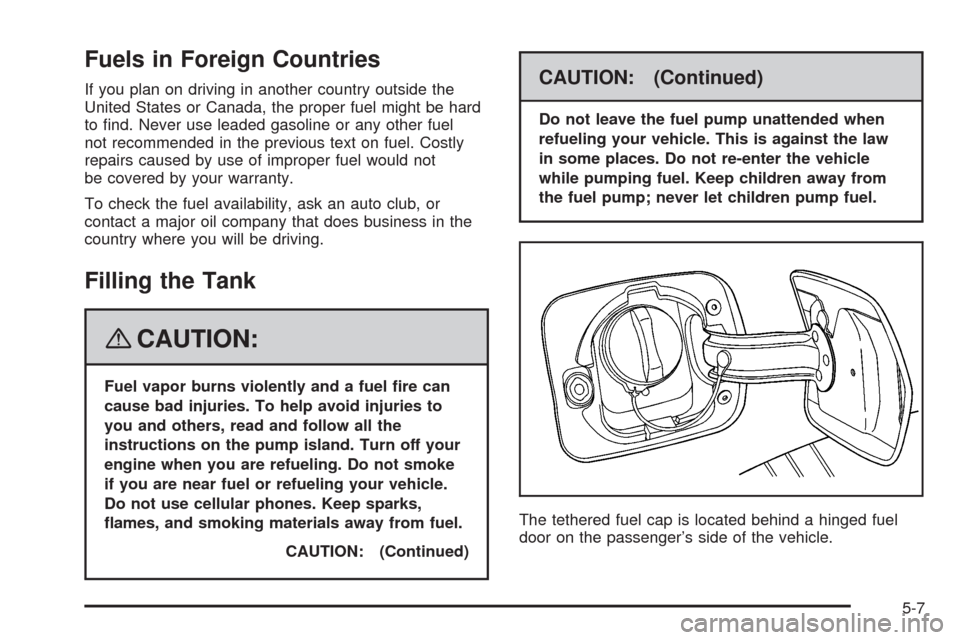
The tethered fuel cap is located behind a hinged fuel
door on the passenger’s side of the vehicle.
5-7
Page 269 of 430

A. Pressure Cap. SeePressure Cap on page 5-26.
B. Engine Air Cleaner/Filter. SeeEngine Air
Cleaner/Filter on page 5-20.
C. Windshield Washer Fluid Reservoir. See “Adding
Washer Fluid” underWindshield Washer Fluid
on page 5-33.
D. Coolant Recovery Tank. See “Checking Coolant”
underEngine Coolant on page 5-24.
E. Engine Oil Dipstick. See “Checking Engine Oil”
underEngine Oil on page 5-15.
F. Engine Oil Fill Cap. See “When to Add Engine Oil”
underEngine Oil on page 5-15.
G. Brake Master Cylinder Reservoir. See “Brake Fluid”
underBrakes on page 5-34andHydraulic Clutch
on page 5-23.
H. Underhood Fuse Block. SeeEngine Compartment
Fuse Block on page 5-122.
I. Remote Negative (−) Terminal. SeeJump Starting
on page 5-38.
J. Remote Positive (+) Terminal. SeeJump Starting on
page 5-38.Engine Oil
Checking Engine Oil
It is a good idea to check the engine oil every time you
get fuel. In order to get an accurate reading, the oil
must be warm and the vehicle must be on level ground.
The engine oil dipstick handle is a yellow loop.
SeeEngine Compartment Overview on page 5-12for
the location of the engine oil dipstick.
1. Turn off the engine and give the oil several minutes
to drain back into the oil pan. If you do not do this,
the oil dipstick might not show the actual level.
2. Pull out the dipstick and clean it with a paper towel
or cloth, then push it back in all the way. Remove it
again, keeping the tip down, and check the level.
When to Add Engine Oil
If the oil is below the MIN (minimum) mark, add
at least one quart/liter of the recommended oil.
5-15
Page 271 of 430

SAE 5W-30
As shown in the viscosity chart, SAE 5W-30 is best
for your vehicle.
These numbers on an oil container show its
viscosity, or thickness. Do not use other viscosity
oils such as SAE 20W-50.
Oils meeting these
requirements should
have the starburst
symbol on the container.
This symbol indicates
that the oil has
been certied by the
American Petroleum
Institute (API).
Look for this information on the oil container, and
use only those oils that are identied as meeting
GM Standard GM6094M and have the starburst symbol
on the front of the oil container.Notice:Use only engine oil identied as meeting
GM Standard GM6094M and showing the American
Petroleum Institute Certied For Gasoline Engines
starburst symbol. Failure to use the recommended
oil can result in engine damage not covered by
your warranty.
If you are in an area of extreme cold, where the
temperature falls below−20°F (−29°C), it is
recommended that you use either an SAE 5W-30
synthetic oil or an SAE 0W-30 oil. Both provide easier
cold starting and better protection for the engine at
extremely low temperatures.
5-17
Page 273 of 430
Your vehicle’s engine is lled at the factory with a
synthetic oil which meets all requirements for your
vehicle.
Substitute Engine Oil: When adding oil to maintain
engine oil level, oil meeting GM Standard GM4718M
may not be available. You can add substitute oil
designated SAE 5W-30 with the starburst symbol at all
temperatures. Substitute oil not meeting GM Standard
GM4718M should not be used for an oil change.
Engine Oil Additives
Do not add anything to the oil. The recommended oils
with the starburst symbol that meet GM standards are all
you need for good performance and engine protection.
Engine Oil Life System
When to Change Engine Oil
Your vehicle has the Engine Oil Life System, a computer
system that lets you know when to change the engine
oil and lter. This is based on engine revolutions
and engine temperature, and not on mileage.Based on driving conditions, the mileage at which
an oil change will be indicated can vary considerably.
For the oil life system to work properly, you must
reset the system every time the oil is changed.
When the system has calculated that oil life has been
diminished, it will indicate that an oil change is
necessary. A CHANGE OIL SOON message will come
on. SeeDIC Warnings and Messages on page 3-48.
Change the oil as soon as possible within the next
600 miles (1 000 km). It is possible that, if you are
driving under the best conditions, the oil life system
might not indicate that an oil change is necessary
for over a year. However, the engine oil and lter must
be changed at least once a year and at this time the
system must be reset. Your dealer/retailer has trained
service people who will perform this work using genuine
parts and reset the system. It is also important to
check the oil regularly and keep it at the proper level.
If the system is ever reset accidentally, you must
change the oil at 3,000 miles (5 000 km) since the last
oil change. Remember to reset the oil life system
whenever the oil is changed.
5-19
Page 277 of 430
Automatic Transmission Fluid
It is not necessary to check the transmission uid
level. A transmission uid leak is the only reason for
uid loss. If a leak occurs, take your vehicle to a
dealer/retailer and have it repaired as soon as possible.
Change the uid and lter at the intervals listed in
the Maintenance Schedule. SeeScheduled Maintenance
on page 6-4. Be sure to use the transmission uid
listed inRecommended Fluids and Lubricants on
page 6-12.
Notice:Use of the incorrect automatic transmission
uid may damage your vehicle, and the damages
may not be covered by your warranty. Always
use the automatic transmission uid listed in
Recommended Fluids and Lubricants on page 6-12.
Manual Transmission Fluid
It is not necessary to check the manual transmission
uid level. A transmission uid leak is the only reason
for uid loss. If a leak occurs, take the vehicle to a
dealer/retailer for service. Have it repaired as soon as
possible. You may also have your uid level checked by
your dealer/retailer when you have your oil changed.
SeeRecommended Fluids and Lubricants on page 6-12
for the proper uid to use.
Hydraulic Clutch
The hydraulic clutch linkage in your vehicle is
self-adjusting. This system does not have its own
reservoir. It receives uid from the brake master
cylinder reservoir.
SeeBrakes on page 5-34for more information.
5-23