2008 CHEVROLET HHR glove box
[x] Cancel search: glove boxPage 80 of 430
Mirrors...........................................................2-39
Manual Rearview Mirror.................................2-39
Automatic Dimming Rearview Mirror with
OnStar
®and Compass...............................2-39
Automatic Dimming Rearview Mirror with
Compass.................................................2-41
Outside Power Mirrors...................................2-43
Outside Convex Mirror...................................2-43
OnStar
®System.............................................2-44Storage Areas................................................2-47
Glove Box...................................................2-47
Cupholder(s)................................................2-47
Instrument Panel Storage...............................2-47
Floor Console Storage Area...........................2-47
Rear Storage Area........................................2-48
Rear Compartment Storage Panel/Cover..........2-48
Roof Rack System........................................2-50
Convenience Net..........................................2-51
Hideaway Rear Storage Bins..........................2-51
Sunroof.........................................................2-52
Section 2 Features and Controls
2-2
Page 122 of 430
OnStar®System
OnStar uses several innovative technologies and live
advisors to provide you with a wide range of safety,
security, information, and convenience services. If your
airbags deploy, the system is designed to make an
automatic call to OnStar Emergency advisors who can
request emergency services be sent to your location.
If you lock your keys in the vehicle, call OnStar at
1-888-4-ONSTAR and they can send a signal to unlock
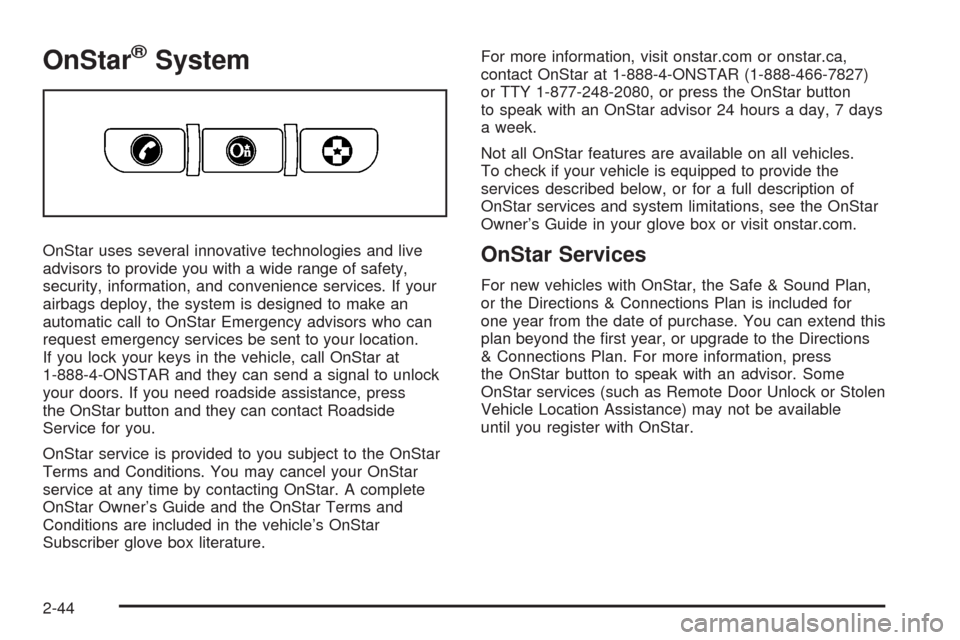
your doors. If you need roadside assistance, press
the OnStar button and they can contact Roadside
Service for you.
OnStar service is provided to you subject to the OnStar
Terms and Conditions. You may cancel your OnStar
service at any time by contacting OnStar. A complete
OnStar Owner’s Guide and the OnStar Terms and
Conditions are included in the vehicle’s OnStar
Subscriber glove box literature.For more information, visit onstar.com or onstar.ca,
contact OnStar at 1-888-4-ONSTAR (1-888-466-7827)
or TTY 1-877-248-2080, or press the OnStar button
to speak with an OnStar advisor 24 hours a day, 7 days
a week.
Not all OnStar features are available on all vehicles.
To check if your vehicle is equipped to provide the
services described below, or for a full description of
OnStar services and system limitations, see the OnStar
Owner’s Guide in your glove box or visit onstar.com.OnStar Services
For new vehicles with OnStar, the Safe & Sound Plan,
or the Directions & Connections Plan is included for
one year from the date of purchase. You can extend this
plan beyond the rst year, or upgrade to the Directions
& Connections Plan. For more information, press
the OnStar button to speak with an advisor. Some
OnStar services (such as Remote Door Unlock or Stolen
Vehicle Location Assistance) may not be available
until you register with OnStar.
2-44
Page 123 of 430
Available Services with Safe & Sound Plan
Automatic Notication of Airbag Deployment
Advanced Automatic Crash Notication (AACN)
(If equipped)
Link to Emergency Services
Roadside Assistance
Stolen Vehicle Location Assistance
AccidentAssist
Remote Door Unlock/Vehicle Alert
OnStar Vehicle Diagnostics
GM Goodwrench®On Demand Diagnostics
OnStar Hands-Free Calling with 30 complimentary
minutes
OnStar Virtual Advisor (U.S. Only)
Available Services included with Directions
& Connections Plan
All Safe and Sound Plan Services
Driving Directions - Advisor delivered or OnStar
Turn-by-Turn Navigation (If equipped)
RideAssist
Information and Convenience Services
OnStar Hands-Free Calling
OnStar Hands-Free Calling allows eligible OnStar
subscribers to make and receive calls using voice
commands. Hands-Free Calling is fully integrated into
the vehicle, and can be used with OnStar Pre-Paid
Minute Packages. Hands-Free Calling may also
be linked to a Verizon Wireless service plan in the U.S.
or a Bell Mobility service plan in Canada, depending
on eligibility. To nd out more, refer to the OnStar
Owner’s Guide in the vehicle’s glove box, visit
www.onstar.com or www.onstar.ca, or speak with an
OnStar advisor by pressing the OnStar button or calling
1-888-4-ONSTAR (1-888-466-7827).
OnStar Virtual Advisor
OnStar Virtual Advisor is a feature of OnStar
Hands-Free Calling that uses your minutes to access
location-based weather, local traffic reports, and
stock quotes. By pressing the phone button and giving
a few simple voice commands, you can browse
through the various topics. See the OnStar Owner’s
Guide for more information (Only available in the
continental U.S.).
2-45
Page 125 of 430
Your Responsibility
Increase the radio volume if you cannot hear the OnStar
advisor. If the light next to the OnStar buttons is red,
this means that your system is not functioning properly
and should be checked by your dealer/retailer. If the
light appears clear (no light is appearing), your OnStar
subscription has expired. You can always press the
OnStar button to conrm that your OnStar equipment
is active.
Storage Areas
Glove Box
To open the glove box, lift up on the lever.
Cupholder(s)
There are two cupholders located in the oor console
between the front seats. There is also a cupholder
for the rear seat passenger located at the rear of the
oor console.If your vehicle is an SS model, the automatic
transmission vehicles have a cupholder in front of the
shifter.
Cupholders have inserts that can be removed for
cleaning.
Instrument Panel Storage
Your vehicle has a storage compartment on the
instrument panel above the air vents. Push the button
on the compartment to open the lid.
Floor Console Storage Area
There are two small storage compartments on the oor
console, one at the front under the window switches
and one next to the parking brake lever.
For the SS model, automatic transmission vehicles have
a storage bin on the right side of the automatic shifter.
Manual transmission vehicles have storage bins in
front of and behind the manual shifter.
Rubber liners can be removed for cleaning.
2-47
Page 137 of 430
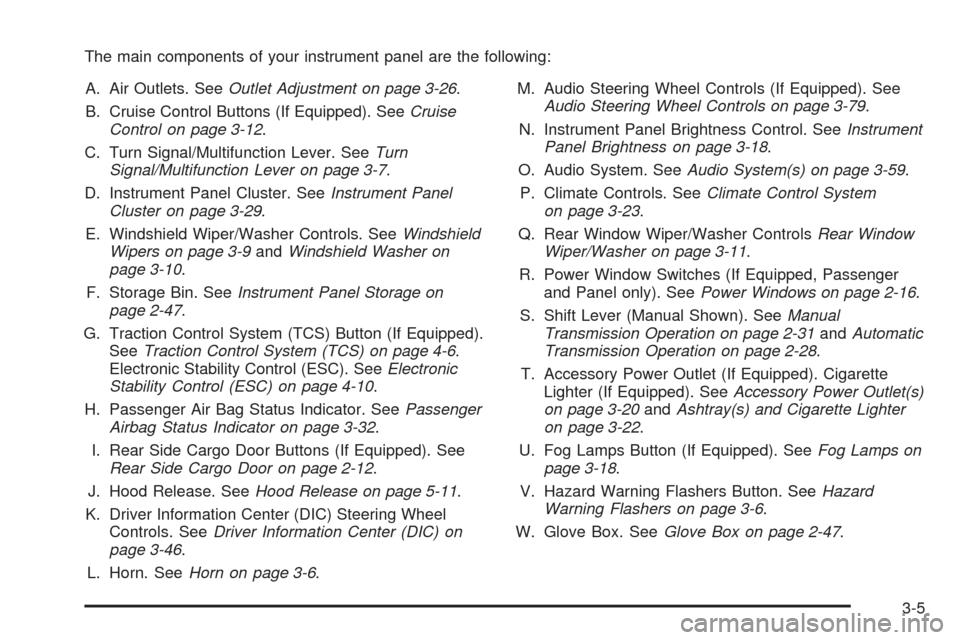
The main components of your instrument panel are the following:
A. Air Outlets. SeeOutlet Adjustment on page 3-26.
B. Cruise Control Buttons (If Equipped). SeeCruise
Control on page 3-12.
C. Turn Signal/Multifunction Lever. SeeTurn
Signal/Multifunction Lever on page 3-7.
D. Instrument Panel Cluster. SeeInstrument Panel
Cluster on page 3-29.
E. Windshield Wiper/Washer Controls. SeeWindshield
Wipers on page 3-9andWindshield Washer on
page 3-10.
F. Storage Bin. SeeInstrument Panel Storage on
page 2-47.
G. Traction Control System (TCS) Button (If Equipped).
SeeTraction Control System (TCS) on page 4-6.
Electronic Stability Control (ESC). SeeElectronic
Stability Control (ESC) on page 4-10.
H. Passenger Air Bag Status Indicator. SeePassenger
Airbag Status Indicator on page 3-32.
I. Rear Side Cargo Door Buttons (If Equipped). See
Rear Side Cargo Door on page 2-12.
J. Hood Release. SeeHood Release on page 5-11.
K. Driver Information Center (DIC) Steering Wheel
Controls. SeeDriver Information Center (DIC) on
page 3-46.
L. Horn. SeeHorn on page 3-6.M. Audio Steering Wheel Controls (If Equipped). See
Audio Steering Wheel Controls on page 3-79.
N. Instrument Panel Brightness Control. SeeInstrument
Panel Brightness on page 3-18.
O. Audio System. SeeAudio System(s) on page 3-59.
P. Climate Controls. SeeClimate Control System
on page 3-23.
Q. Rear Window Wiper/Washer ControlsRear Window
Wiper/Washer on page 3-11.
R. Power Window Switches (If Equipped, Passenger
and Panel only). SeePower Windows on page 2-16.
S. Shift Lever (Manual Shown). SeeManual
Transmission Operation on page 2-31andAutomatic
Transmission Operation on page 2-28.
T. Accessory Power Outlet (If Equipped). Cigarette
Lighter (If Equipped). SeeAccessory Power Outlet(s)
on page 3-20andAshtray(s) and Cigarette Lighter
on page 3-22.
U. Fog Lamps Button (If Equipped). SeeFog Lamps on
page 3-18.
V. Hazard Warning Flashers Button. SeeHazard
Warning Flashers on page 3-6.
W. Glove Box. SeeGlove Box on page 2-47.
3-5
Page 159 of 430
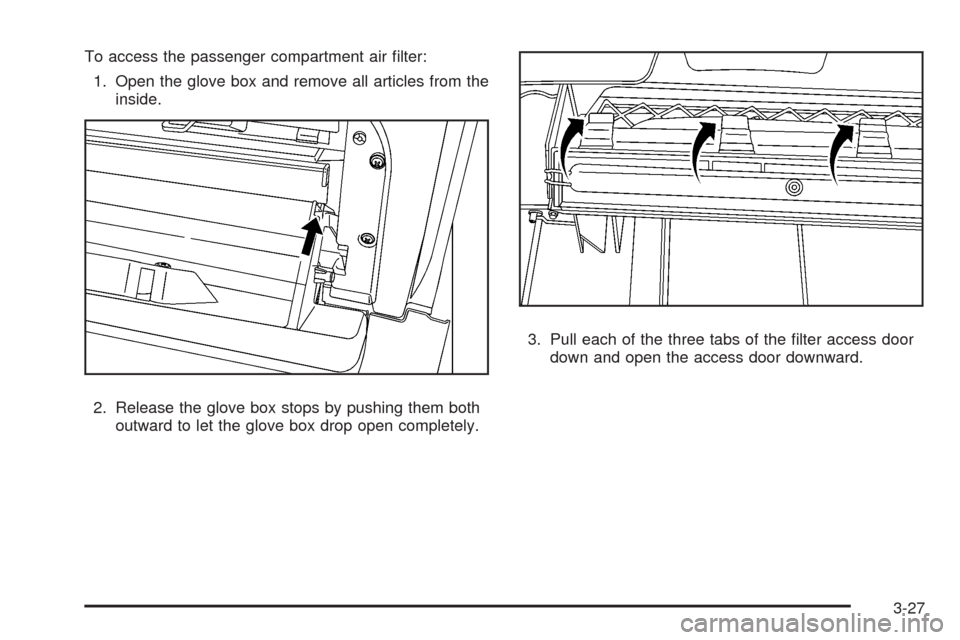
To access the passenger compartment air lter:
1. Open the glove box and remove all articles from the
inside.
2. Release the glove box stops by pushing them both
outward to let the glove box drop open completely.3. Pull each of the three tabs of the lter access door
down and open the access door downward.
3-27
Page 160 of 430
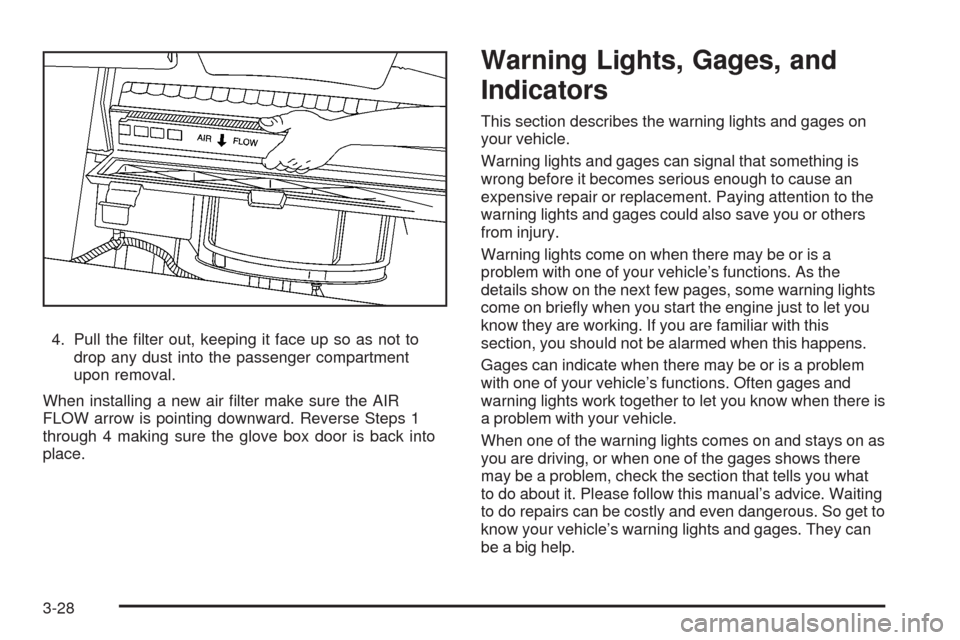
4. Pull the lter out, keeping it face up so as not to
drop any dust into the passenger compartment
upon removal.
When installing a new air lter make sure the AIR
FLOW arrow is pointing downward. Reverse Steps 1
through 4 making sure the glove box door is back into
place.
Warning Lights, Gages, and
Indicators
This section describes the warning lights and gages on
your vehicle.
Warning lights and gages can signal that something is
wrong before it becomes serious enough to cause an
expensive repair or replacement. Paying attention to the
warning lights and gages could also save you or others
from injury.
Warning lights come on when there may be or is a
problem with one of your vehicle’s functions. As the
details show on the next few pages, some warning lights
come on briey when you start the engine just to let you
know they are working. If you are familiar with this
section, you should not be alarmed when this happens.
Gages can indicate when there may be or is a problem
with one of your vehicle’s functions. Often gages and
warning lights work together to let you know when there is
a problem with your vehicle.
When one of the warning lights comes on and stays on as
you are driving, or when one of the gages shows there
may be a problem, check the section that tells you what
to do about it. Please follow this manual’s advice. Waiting
to do repairs can be costly and even dangerous. So get to
know your vehicle’s warning lights and gages. They can
be a big help.
3-28
Page 372 of 430
Vehicle Identication
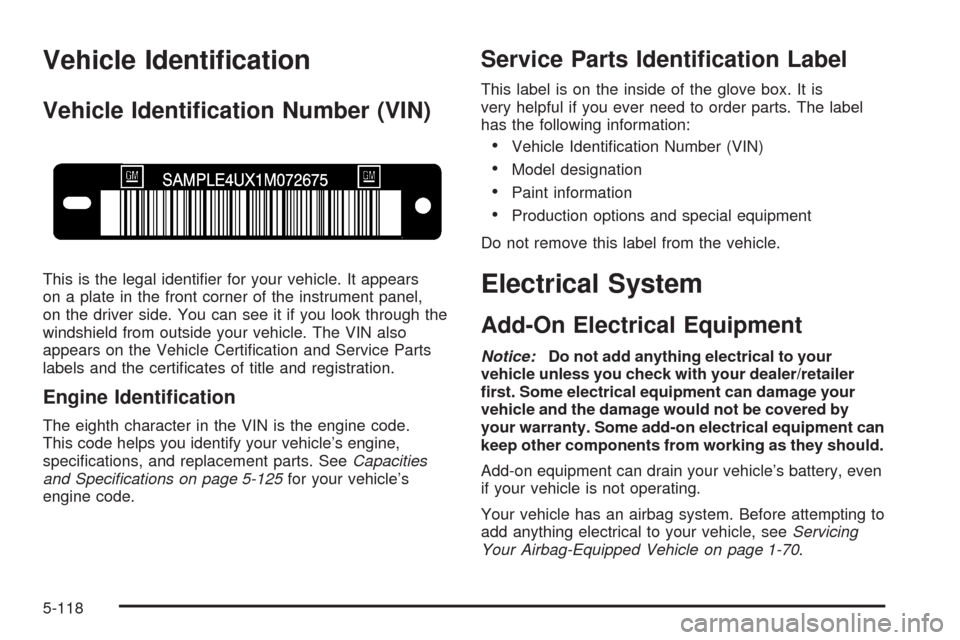
Vehicle Identication Number (VIN)
This is the legal identier for your vehicle. It appears
on a plate in the front corner of the instrument panel,
on the driver side. You can see it if you look through the
windshield from outside your vehicle. The VIN also
appears on the Vehicle Certication and Service Parts
labels and the certicates of title and registration.
Engine Identication
The eighth character in the VIN is the engine code.
This code helps you identify your vehicle’s engine,
specications, and replacement parts. SeeCapacities
and Specifications on page 5-125for your vehicle’s
engine code.
Service Parts Identication Label
This label is on the inside of the glove box. It is
very helpful if you ever need to order parts. The label
has the following information:
Vehicle Identication Number (VIN)
Model designation
Paint information
Production options and special equipment
Do not remove this label from the vehicle.
Electrical System
Add-On Electrical Equipment
Notice:Do not add anything electrical to your
vehicle unless you check with your dealer/retailer
rst. Some electrical equipment can damage your
vehicle and the damage would not be covered by
your warranty. Some add-on electrical equipment can
keep other components from working as they should.
Add-on equipment can drain your vehicle’s battery, even
if your vehicle is not operating.
Your vehicle has an airbag system. Before attempting to
add anything electrical to your vehicle, seeServicing
Your Airbag-Equipped Vehicle on page 1-70.
5-118