2008 CADILLAC XLR automatic transmission
[x] Cancel search: automatic transmissionPage 127 of 470
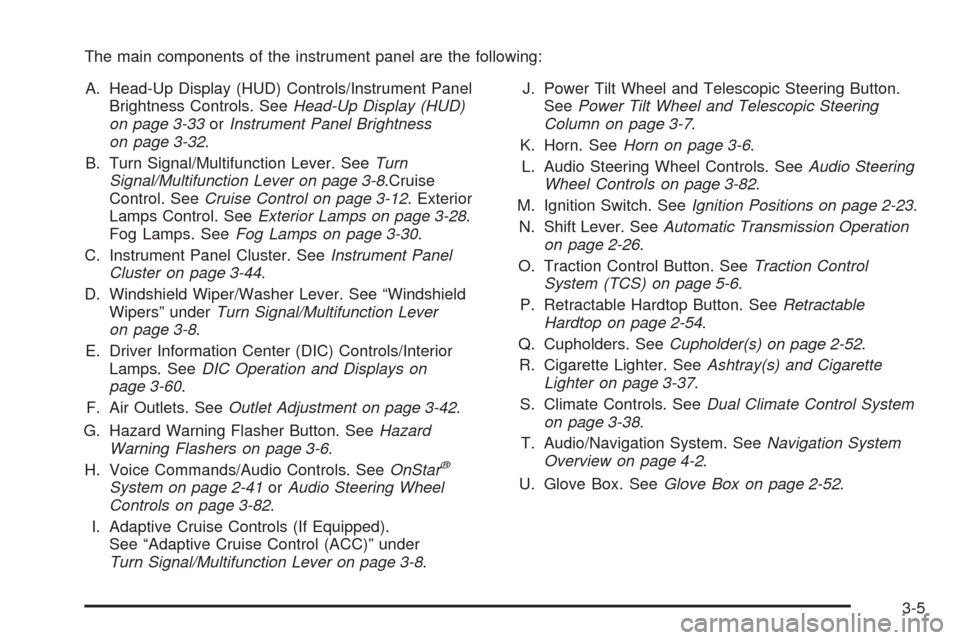
The main components of the instrument panel are the following:
A. Head-Up Display (HUD) Controls/Instrument Panel
Brightness Controls. SeeHead-Up Display (HUD)
on page 3-33orInstrument Panel Brightness
on page 3-32.
B. Turn Signal/Multifunction Lever. SeeTurn
Signal/Multifunction Lever on page 3-8.Cruise
Control. SeeCruise Control on page 3-12. Exterior
Lamps Control. SeeExterior Lamps on page 3-28.
Fog Lamps. SeeFog Lamps on page 3-30.
C. Instrument Panel Cluster. SeeInstrument Panel
Cluster on page 3-44.
D. Windshield Wiper/Washer Lever. See “Windshield
Wipers” underTurn Signal/Multifunction Lever
on page 3-8.
E. Driver Information Center (DIC) Controls/Interior
Lamps. SeeDIC Operation and Displays on
page 3-60.
F. Air Outlets. SeeOutlet Adjustment on page 3-42.
G. Hazard Warning Flasher Button. SeeHazard
Warning Flashers on page 3-6.
H. Voice Commands/Audio Controls. SeeOnStar
®
System on page 2-41orAudio Steering Wheel
Controls on page 3-82.
I. Adaptive Cruise Controls (If Equipped).
See “Adaptive Cruise Control (ACC)” under
Turn Signal/Multifunction Lever on page 3-8.J. Power Tilt Wheel and Telescopic Steering Button.
SeePower Tilt Wheel and Telescopic Steering
Column on page 3-7.
K. Horn. SeeHorn on page 3-6.
L. Audio Steering Wheel Controls. SeeAudio Steering
Wheel Controls on page 3-82.
M. Ignition Switch. SeeIgnition Positions on page 2-23.
N. Shift Lever. SeeAutomatic Transmission Operation
on page 2-26.
O. Traction Control Button. SeeTraction Control
System (TCS) on page 5-6.
P. Retractable Hardtop Button. SeeRetractable
Hardtop on page 2-54.
Q. Cupholders. SeeCupholder(s) on page 2-52.
R. Cigarette Lighter. SeeAshtray(s) and Cigarette
Lighter on page 3-37.
S. Climate Controls. SeeDual Climate Control System
on page 3-38.
T. Audio/Navigation System. SeeNavigation System
Overview on page 4-2.
U. Glove Box. SeeGlove Box on page 2-52.
3-5
Page 151 of 470

Wiper Activated Headlamps
This feature activates the headlamps and parking
lamps after the windshield wipers have been in use for
approximately six seconds and the multifunction lever is
in the AUTO position. SeeExterior Lamps on page 3-28.
When the exterior lamp control has been turned off or is
in the parking lamp position and the wiper control is
on delay, low speed or high speed, the HEADLAMPS
SUGGESTED message will appear on the Driver
Information Center (DIC).
When the ignition is turned off, the wiper-activated
headlamps will immediately turn off.
Headlamps on Reminder
A warning chime will sound if the exterior lamp control
is left on in either the headlamp or parking lamp position
and the driver’s door is opened with the ignition off.
Daytime Running Lamps (DRL)
Daytime Running Lamps (DRL) can make it easier for
others to see the front of your vehicle during the
day. DRL can be helpful in many different driving
conditions, but they can be especially helpful in the short
periods after dawn and before sunset. Fully functional
DRL are required on all vehicles rst sold in Canada.The DRL system makes the front turn signal lamps
come on when the following conditions are met:
It is still daylight and the ignition is on.
The exterior lamp control is in the off position.
The transmission is not in PARK (P).
When DRL are on, only the front turn signal lamps are
on. No other exterior lamps such as the parking lamps,
taillamps, etc. are on when the DRL are used. Your
instrument panel is not be lit up either.
When it is dark enough outside, the front turn signal
lamps turn off and normal low-beam headlamps turn on.
When it is bright enough outside, the regular lamps go off,
and the front turn signal lamps take over. If you start your
vehicle in a dark garage, the automatic headlamp system
comes on immediately. Once you leave the garage, it
takes about one minute for the automatic headlamp
system to change to DRL if it is light outside. During that
delay, the instrument panel cluster might not be as bright
as usual. Make sure the instrument panel brightness
knob is in the full bright position. SeeInstrument Panel
Brightness on page 3-32for more information.
If it is dark enough outside and the exterior lamp control
is off, a HEADLAMPS SUGGESTED message displays
on the Driver’s Information Center (DIC). This message
informs the driver that turning on the exterior lamps is
recommended. SeeDIC Warnings and Messages on
page 3-63.
3-29
Page 155 of 470

Battery Run-Down Protection
Your vehicle has a feature to help prevent the battery
from being drained, in case the underhood lamp, vanity
mirror lamps, cargo lamps, reading lamps, console, or
glove box lamps are accidentally left on, or something is
left plugged into the accessory power outlet or cigarette
lighter. If any of the accessory lamps are left on, they will
automatically time-out after about 10 minutes. To reset
the battery protection, all of the above lamps must be
turned off or the ignition must be in the Acc. position.
Head-Up Display (HUD)
{CAUTION:
If the HUD image is too bright, or too high in
your eld of view, it may take you more time to
see things you need to see when it is dark
outside. Be sure to keep the HUD image dim
and placed low in your eld of view.
The Head-Up Display (HUD) allows you to see some of
the driver information that appears on your instrument
panel cluster.The information may be displayed in English or metric
units and appears as an image focused out toward
the front of your vehicle. To change from English
to metric units, seeDriver Information Center (DIC)
on page 3-60.
The HUD consists of the following information:
Speedometer
Turn Signal Indicators
High-Beam Indicator Symbol
Tap-Up/Tap-Down Transmission Feature
Check Gages Icon
Adaptive Cruise Control Features and Indicators
Radio Features
3-33
Page 321 of 470

Service............................................................6-3
Accessories and Modications..........................6-3
California Proposition 65 Warning.....................6-3
California Perchlorate Materials Requirements......6-4
Doing Your Own Service Work.........................6-4
Adding Equipment to the Outside of
Your Vehicle..............................................6-4
Fuel................................................................6-5
Gasoline Octane............................................6-5
Gasoline Specications....................................6-5
California Fuel...............................................6-6
Additives.......................................................6-6
Fuels in Foreign Countries...............................6-7
Filling the Tank..............................................6-7
Filling a Portable Fuel Container.....................6-10
Checking Things Under the Hood....................6-10
Hood Release..............................................6-11
Engine Compartment Overview.......................6-12
Engine Oil...................................................6-16
Engine Oil Life System..................................6-20
Engine Air Cleaner/Filter................................6-22
Automatic Transmission Fluid.........................6-24
Engine Coolant.............................................6-24
Coolant Surge Tank Pressure Cap..................6-27Engine Overheating.......................................6-27
Overheated Engine Protection
Operating Mode........................................6-29
Cooling System............................................6-30
Power Steering Fluid.....................................6-35
Windshield Washer Fluid................................6-36
Brakes........................................................6-37
Battery........................................................6-40
Jump Starting...............................................6-41
Rear Axle.......................................................6-46
Headlamp Aiming...........................................6-47
Headlamp Vertical Aiming..............................6-48
Bulb Replacement..........................................6-50
Windshield Replacement.................................6-50
Windshield Wiper Blade Replacement..............6-50
Tires..............................................................6-52
Winter Tires (XLR-V).....................................6-53
Tire Sidewall Labeling...................................6-54
Tire Terminology and Denitions.....................6-56
Run-Flat Tires..............................................6-58
Ination - Tire Pressure.................................6-60
Tire Pressure Monitor System.........................6-61
Tire Pressure Monitor Operation.....................6-63
Section 6 Service and Appearance Care
6-1
Page 344 of 470

Automatic Transmission Fluid
How to Check Automatic Transmission
Fluid
It is not necessary to check the transmission uid level.
A transmission uid leak is the only reason for uid
loss. If a leak occurs, take the vehicle to the
dealer/retailer service department and have it repaired
as soon as possible.
There is a special procedure for checking and changing
the transmission uid. Because this procedure is difficult,
you should have this done at the dealer/retailer service
department. Contact your dealer/retailer for additional
information or the procedure can be found in the service
manual. To purchase a service manual, seeService
Publications Ordering Information on page 8-16.
Notice:Use of the incorrect automatic transmission
uid may damage your vehicle, and the damages
may not be covered by your warranty. Always
use the automatic transmission uid listed in
Recommended Fluids and Lubricants on page 7-11.
Change the uid and lter at the intervals listed in
Additional Required Services on page 7-5, and be sure
to use the uid listed inRecommended Fluids and
Lubricants on page 7-11.
Engine Coolant
The cooling system in your vehicle is lled with
DEX-COOL®engine coolant. This coolant is designed
to remain in your vehicle for ve years or 150,000 miles
(240 000 km), whichever occurs rst, if you add only
DEX-COOL
®extended life coolant.
The following explains your cooling system and how to
add coolant when it is low. If you have a problem with
engine overheating, seeEngine Overheating on
page 6-27.
A 50/50 mixture of clean, drinkable water and
DEX-COOL
®coolant will:
Giving freezing protection down to−34°F (−37°C).
Give boiling protection up to 265°F (129°C).
Protect against rust and corrosion.
Help keep the proper engine temperature.
Let the warning lights and gages work as they
should.
Notice:Using coolant other than DEX-COOL
®may
cause premature engine, heater core, or radiator
corrosion. In addition, the engine coolant may
require changing sooner, at the rst maintenance
service after each 30,000 miles (50 000 km) or
24 months, whichever occurs rst. Any repairs
would not be covered by your warranty. Always use
DEX-COOL
®(silicate-free) coolant in your vehicle.
6-24
Page 361 of 470

Jump Starting
If your vehicle’s battery has run down, you may want to
use another vehicle and some jumper cables to start
your vehicle. Be sure to use the following steps to
do it safely.
{CAUTION:
Batteries can hurt you. They can be dangerous
because:
They contain acid that can burn you.
They contain gas that can explode or
ignite.
They contain enough electricity to burn you.
If you do not follow these steps exactly, some or
all of these things can hurt you.Notice:If you try to start your vehicle by pushing
or pulling it, you could damage your vehicle. Do not
push or pull your vehicle to start it; instead, use
the jump starting procedure in this manual to start
your vehicle when the battery has run down.
1. Check the other vehicle. It must have a 12-volt
battery with a negative ground system.
Notice:If the other vehicle’s system is not a 12-volt
system with a negative ground, both vehicles can
be damaged. Only use vehicles with 12-volt systems
with negative grounds to jump start your vehicle.
2. Get the vehicles close enough so the jumper cables
can reach, but be sure the vehicles are not touching
each other. If they are, it could cause a ground
connection you do not want. You would not be able
to start your vehicle, and the bad grounding
could damage the electrical systems.
To avoid the possibility of the vehicles rolling, set
the parking brake rmly on both vehicles involved
in the jump start procedure. Put an automatic
transmission in PARK (P) or a manual transmission
in NEUTRAL before setting the parking brake.
6-41
Page 376 of 470

Tire Terminology and Denitions
Air Pressure:The amount of air inside the
tire pressing outward on each square inch of the
tire. Air pressure is expressed in pounds per
square inch (psi) or kilopascal (kPa).
Accessory Weight
:This means the combined
weight of optional accessories. Some examples of
optional accessories are, automatic transmission,
power steering, power brakes, power windows,
power seats, and air conditioning.
Aspect Ratio
:The relationship of a tire’s height
to its width.
Belt
:A rubber coated layer of cords that is located
between the plies and the tread. Cords may be
made from steel or other reinforcing materials.
Bead
:The tire bead contains steel wires wrapped
by steel cords that hold the tire onto the rim.
Bias Ply Tire
:A pneumatic tire in which the plies
are laid at alternate angles less than 90 degrees
to the centerline of the tread.
Cold Tire Pressure
:The amount of air pressure in
a tire, measured in pounds per square inch (psi) or
kilopascals (kPa) before a tire has built up heat
from driving. SeeInflation - Tire Pressure on
page 6-60.Curb Weight
:The weight of a motor vehicle with
standard and optional equipment including the
maximum capacity of fuel, oil, and coolant,
but without passengers and cargo.
DOT Markings
:A code molded into the sidewall
of a tire signifying that the tire is in compliance
with the U.S. Department of Transportation (DOT)
motor vehicle safety standards. The DOT code
includes the Tire Identication Number (TIN),
an alphanumeric designator which can also identify
the tire manufacturer, production plant, brand,
and date of production.
GVWR
:Gross Vehicle Weight Rating. SeeLoading
Your Vehicle on page 5-22.
GAWR FRT
:Gross Axle Weight Rating for the
front axle. SeeLoading Your Vehicle on page 5-22.
GAWR RR
:Gross Axle Weight Rating for the rear
axle. SeeLoading Your Vehicle on page 5-22.
Intended Outboard Sidewall
:The side of
an asymmetrical tire, that must always face
outward when mounted on a vehicle.
Kilopascal (kPa)
:The metric unit for air pressure.
Light Truck (LT-Metric) Tire
:A tire used on
light duty trucks and some multipurpose passenger
vehicles.
6-56
Page 394 of 470

Lifting Your Vehicle
{CAUTION:
Lifting a vehicle can cause an injury.
The vehicle can slip off the jack and roll over
you or other people. You and they could be
badly injured. Find a level place to lift your
vehicle. To help prevent the vehicle from
moving:
1. Set the parking brake rmly.
2. Put an automatic transmission shift lever
in PARK (P).
3. Turn off the engine.
To be even more certain the vehicle won’t move,
you can put blocks in front of and behind the
wheels.
{CAUTION:
Getting under a vehicle when it is jacked up is
dangerous. If the vehicle slips off the jack,
you could be badly injured or killed. Never get
under a vehicle when it is supported only by
a jack.
{CAUTION:
Raising your vehicle with the jack improperly
positioned can damage the vehicle or the
vehicle may fall and cause your or others
injury.
6-74