2008 CADILLAC CTS ignition
[x] Cancel search: ignitionPage 159 of 490
Headlamps
The exterior lamp control is located towards the end of
the turn signal/multifunction lever.
O(Exterior Lamp Control):Turn the band with this
symbol on it to operate the exterior lamps.
The exterior lamp control has four positions:
O(Off):This position turns off all lamps, except the
Daytime Running Lamps (DRL).
AUTO (Automatic):This position puts the headlamps
in automatic mode. AUTO mode turns the exterior
lamps on and off depending upon how much light is
available outside of the vehicle.
;(Parking Lamps):This position turns on the
parking lamps together with the following:
Sidemarker Lamps
Taillamps
License Plate Lamps
Instrument Panel Lights
5(Headlamps):This position turns on the headlamps,
together with the previously listed lamps and lights.
Wiper Activated Headlamps
This feature activates the headlamps and parking lamps
after the windshield wipers have been in use for about
six seconds. For this feature to work, the exterior lamp
control must be in AUTO.
The wiper-activated headlamps immediately turn off,
when the ignition is turned to LOCK/OFF or the
windshield wiper control is turned off.
Headlamps on Reminder
A warning chime will sound if the exterior lamp control
is left on in either the headlamp or parking lamp position
and the driver’s door is opened with the ignition off.
SeeLights On Reminder on page 3-46for additional
information.
3-17
Page 160 of 490

Daytime Running Lamps (DRL)
Daytime Running Lamps (DRL) can make it easier for
others to see the front of your vehicle during the
day. DRL can be helpful in many different driving
conditions, but they can be especially helpful in the short
periods after dawn and before sunset. Fully functional
daytime running lamps are required on all vehicles
rst sold in Canada.
The DRL system will make either the reduced intensity
low-beam headlamps or dedicated DRL’s come on
when the following conditions are met:
It is still daylight and the ignition is in ON/RUN or
START.
The exterior lamp control is in off or AUTO and the
headlamps are off.
The automatic transmission is not in PARK (P).
When DRL’s are on, only the reduced intensity
low-beam headlamps or dedicated DRL’s will be on.
No other exterior lamps will be on. The instrument panel
cluster will not be lit up either.When the exterior lamp control is in AUTO and it is dark
enough outside, the DRL turns off and the low-beam
headlamps will turn on. When it is bright enough outside,
the low-beam headlamps will go off, and the DRL will
turn back on. If the vehicle is started in a dark garage,
the automatic headlamp system comes on immediately.
Once the vehicle leaves the garage, it takes about
one minute for the automatic headlamp system
to change to DRL if it is light outside. During that delay,
the instrument panel cluster may not be as bright as
usual. Make sure the instrument panel brightness lever
is in the full bright position. SeeInstrument Panel
Brightness on page 3-20.
Turning the exterior lamp control to off or to the
low-beam headlamp position will turn off the DRL.
If the parking lamps or the fog lamps were turned on
instead, the DRL will still turn off.
This will work regardless of gear position and whether
or not the parking brake is set.
3-18
Page 161 of 490
Light Sensor
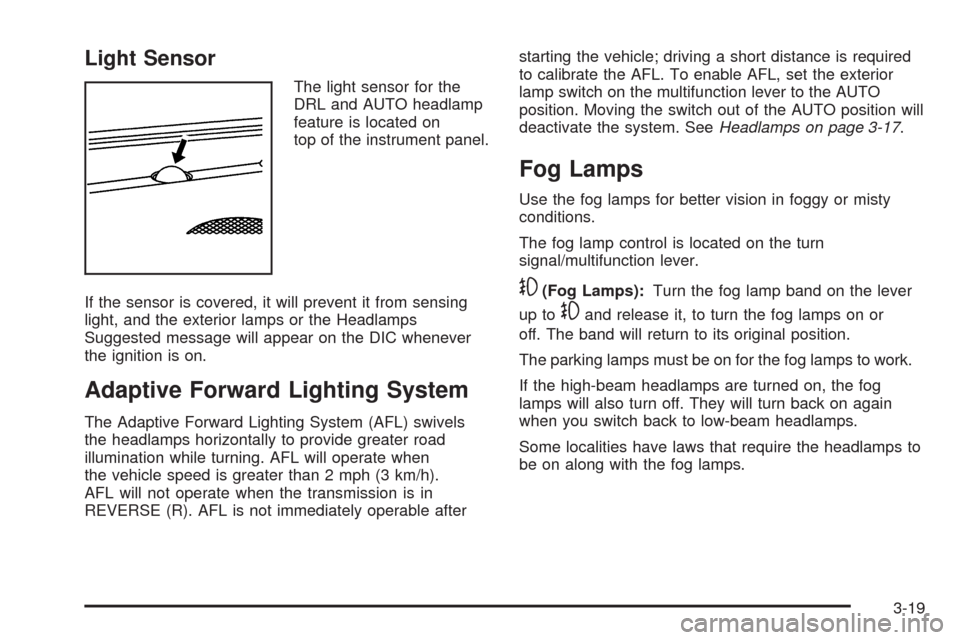
The light sensor for the
DRL and AUTO headlamp
feature is located on
top of the instrument panel.
If the sensor is covered, it will prevent it from sensing
light, and the exterior lamps or the Headlamps
Suggested message will appear on the DIC whenever
the ignition is on.
Adaptive Forward Lighting System
The Adaptive Forward Lighting System (AFL) swivels
the headlamps horizontally to provide greater road
illumination while turning. AFL will operate when
the vehicle speed is greater than 2 mph (3 km/h).
AFL will not operate when the transmission is in
REVERSE (R). AFL is not immediately operable afterstarting the vehicle; driving a short distance is required
to calibrate the AFL. To enable AFL, set the exterior
lamp switch on the multifunction lever to the AUTO
position. Moving the switch out of the AUTO position will
deactivate the system. SeeHeadlamps on page 3-17.
Fog Lamps
Use the fog lamps for better vision in foggy or misty
conditions.
The fog lamp control is located on the turn
signal/multifunction lever.
-(Fog Lamps):Turn the fog lamp band on the lever
up to
-and release it, to turn the fog lamps on or
off. The band will return to its original position.
The parking lamps must be on for the fog lamps to work.
If the high-beam headlamps are turned on, the fog
lamps will also turn off. They will turn back on again
when you switch back to low-beam headlamps.
Some localities have laws that require the headlamps to
be on along with the fog lamps.
3-19
Page 162 of 490

Exterior Lighting Battery Saver
The exterior lamps turn off about 10 minutes after the
ignition is turned to LOCK/OFF, if the parking lamps
or headlamps have been left on. This protects against
draining the battery. The battery saver does not
work if the headlamps are turned on after the ignition
is turned to LOCK/OFF.
To keep the lamps on for more than 10 minutes, turn
the lamps back on with the exterior lamp control.
Instrument Panel Brightness
The knob with this symbol
is located on the instrument
panel to the left of the
steering column.
Turn the knob clockwise or counterclockwise to brighten
or dim the lights.
Turn the knob completely clockwise to turn on the
interior lamps.
Entry Lighting
The entry lighting system turns on the reading and
dome lamps and the backlighting to the exterior lamp
control, when a door is opened or if the transmitter
unlock button is pressed. If activated by the transmitter,
the lighting stays on for about 25 seconds. The entry
lighting system uses the light sensor on the instrument
panel; so it must be dark outside in order for the
lamps to turn on. The lamps turn off about 25 seconds
after the last door is closed. They dim then turn
off if the ignition key is turned to ON/RUN. They
immediately turn off if the power locks are used.
Parade Dimming
This feature does not let the instrument panel backlight
dim during daylight hours while the key is in the
ignition and the headlamps are on. Parade dimming
automatically works with the light sensor, located on top
of the dashboard. If it is dark enough outside and the
parking lamps are on, the backlight on the instrument
panel can be adjusted by turning the instrument panel
brightness knob clockwise or counterclockwise to
brighten or dim the lighting. SeeInstrument Panel
Brightness on page 3-20.
3-20
Page 163 of 490

Reading Lamps
The reading lamps are located on the overhead console.
These lamps come on automatically when any door is
opened.
For manual operation, press the button next to each
lamp to turn it on or off.
If the reading lamps are left on, they automatically shut
off 10 minutes after the ignition has been turned off.
Electric Power Management
The vehicle has Electric Power Management (EPM) that
estimates the battery’s temperature and state of charge.
It then adjusts the voltage for best performance and
extended life of the battery.
When the battery’s state of charge is low, the voltage
is raised slightly to quickly put the charge back in.
When the state of charge is high, the voltage is lowered
slightly to prevent overcharging. If the vehicle has a
voltmeter gage or a voltage display on the Driver
Information Center (DIC), you may see the voltage
move up or down. This is normal. If there is a problem,
an alert will be displayed.The battery can be discharged at idle if the electrical
loads are very high. This is true for all vehicles.
This is because the generator (alternator) may not be
spinning fast enough at idle to produce all the power that
is needed for very high electrical loads.
A high electrical load occurs when several of the
following loads are on: headlamps, high beams, fog
lamps, rear window defogger, climate control fan at
high speed, heated seats, engine cooling fans, trailer
loads, and loads plugged into accessory power outlets.
EPM works to prevent excessive discharge of the
battery. It does this by balancing the generator’s output
and the vehicle’s electrical needs. It can increase
engine idle speed to generate more power, whenever
needed. It can temporarily reduce the power demands of
some accessories.
Normally, these actions occur in steps or levels, without
being noticeable. In rare cases at the highest levels
of corrective action, this action may be noticeable to
the driver. If so, a Driver Information Center (DIC)
message might be displayed, such as Battery Saver
Active or Service Battery Charging System. If this
message is displayed, it is recommended that the
driver reduce the electrical loads as much as possible.
SeeDIC Warnings and Messages on page 3-56.
3-21
Page 164 of 490

Battery Run-Down Protection
Your vehicle has a feature to help prevent battery drain
if accessory lamps are left on or something is left plugged
into the accessory power outlet or cigarette lighter, if the
vehicle has one. If accessory lamps such as the vanity
mirror, cargo, reading, console, or glove box are left on,
they automatically time-out after about 20 minutes.
To reset the battery protection, all of the above lamps
must be turned off or the ignition must be in the ACC/
ACCESSORY position.
Accessory Power Outlet(s)
Accessory power outlets can be used to connect
auxiliary electrical equipment, such as a cellular
telephone or CB radio.
There are three accessory power outlets. There is an
outlet located in the front storage area below the climate
control system, one inside the center console storage
bin, and one on the rear of the center console.
To use an outlet, remove the protective cap. When not
in use, always cover the outlet with the protective cap.
The accessory power outlet is operational at all times.Notice:If electrical devices are left plugged into a
power outlet, the battery may drain causing your
vehicle not to start or damage to the battery.
This would not be covered by the warranty.
Always unplug all electrical devices when turning
off your vehicle.
Certain electrical accessories may not be compatible
with the accessory power outlet and could result
in blown vehicle or adapter fuses. If you experience
a problem see your dealer/retailer for additional
information on accessory power outlets.
Notice:Adding any electrical equipment to the
vehicle can damage it or keep other components
from working as they should. The repairs would
not be covered by the vehicle warranty. Do not use
equipment exceeding maximum amperage rating
of 20 amperes. Check with your dealer/retailer before
adding electrical equipment.
Notice:Improper use of the power outlet can cause
damage not covered by your warranty. Do not
hang any type of accessory or accessory bracket
from the plug because the power outlets are
designed for accessory power plugs only.
3-22
Page 169 of 490

Defogging and Defrosting
Fog on the inside of windows is a result of high humidity
(moisture) condensing on the cool window glass.
This can be minimized if the climate control system
is used properly. There are two modes to clear fog
from the windshield. Use the defog mode to clear the
windows of fog or moisture and warm the passengers.
Use the defrost mode to remove fog or frost from
the windshield more quickly.
HG(Mode):Press the mode buttons until defog
appears on the display.
-(Defog):This mode directs the air between the
windshield, oor outlets and side windows. When this
mode is selected, the system turns off recirculation and
runs the air-conditioning compressor unless the outside
temperature is at or below freezing. If recirculation mode
is selected while in defog mode, it will be cancelled after
10 minutes.
0(Defrost):Pressing defrost directs most of the air
to the windshield, with some air directed to the side
windows. In this mode, the system automatically turns off
recirculation and runs the air-conditioning compressor,
unless the outside temperature is at or below freezing.
This mode may also cause the fan speed and air
temperature to increase.
Rear Window Defogger
The rear window defogger uses a warming grid to
remove fog or frost from the rear window.
The rear window defogger will only work when the
ignition is in ON/RUN.
=(Rear Window Defogger):Press this button to turn
the rear window defogger on or off. Be sure to clear
as much snow from the rear window as possible.
The rear window defogger turns off about 15 minutes
after the button is rst pressed if the vehicle is moving
at slower speeds. At higher speeds, the rear window
defogger may stay on continuously. With each additional
press, the defogger runs for about 10 minutes.
The defogger can also be turned off by pressing the
button again or by turning off the engine.
The heated outside rearview mirrors will heat to help
clear fog or frost from the surface of the mirror when
the rear window defogger button is on. SeeOutside
Heated Mirrors on page 2-51.
Notice:Do not try to clear frost or other material
from the inside of the front windshield and rear
window with a razor blade or anything else that is
sharp. This may damage the rear window defogger
grid and affect your radio’s ability to pick up
stations clearly. The repairs wouldn’t be covered by
your warranty.
3-27
Page 171 of 490

Passenger Compartment Air Filter
The passenger compartment air lter traps most of
the dust and pollen from the air entering the vehicle.
The lter will need to be changed periodically.
SeeScheduled Maintenance on page 6-4.
Using the climate control system without the passenger
air lter installed could let water or other debris enter
the system. This could cause a water leak or noises.
Make sure to install a new air lter after removing the
old one.
The passenger compartment air lter is located
underneath the hood below the windshield wiper arm
and the screen on the passenger side of the vehicle.
SeeEngine Compartment Overview on page 5-14
for more information on location.To replace the passenger compartment air lter:
1. Turn the ignition to ON/RUN with the engine off.
2. Turn on the windshield wipers and turn them
off again when the wipers are straight up on
the windshield.
This allows access to the leaf screen.
The passenger compartment air lter is
located under the screen.
3. Open the hood to access the engine compartment.
SeeHood Release on page 5-12for more
information.
4. Remove the three screws that hold the screen in
place and lift off the screen by lifting and sliding it
toward the center of the vehicle.
5. Pull out on the two tabs located on each end of the
lter cover.
6. Lift the lter cover off by pulling it straight up.
7. Remove the old lter and insert a new one.
SeeMaintenance Replacement Parts on page 6-16
for the correct part number for the lter.
8. Reverse Steps 1 through 6 to reinstall the cover.
3-29