2008 BUICK LUCERNE 3-1
[x] Cancel search: 3-1Page 194 of 434

To calibrate the compass, use the following procedure:
Compass Calibration Procedure
1. Before calibrating the compass, make sure the
compass zone is set to the variance zone in
which the vehicle is located. See “Compass
Variance (Zone) Procedure” earlier in this section.
Do not operate any switches such as window,
sunroof, climate controls, seats, etc. during
the calibration procedure.
2. Press the vehicle information button until PRESS
VTO CALIBRATE COMPASS displays.
3. Press the set/reset button to start the compass
calibration.
4. The DIC will display CALIBRATING: DRIVE IN
CIRCLES. Drive the vehicle in tight circles at
less than 5 mph (8 km/h) to complete the calibration.
The DIC will display CALIBRATION COMPLETE
for a few seconds when the calibration is complete.
The DIC display will then return to PRESS
V
TO CALIBRATE COMPASS.
DIC Warnings and Messages
Messages are displayed on the DIC to notify the driver
that the status of the vehicle has changed and that
some action may be needed by the driver to correct the
condition. Multiple messages may appear one after
another. Some messages may not require immediate
action, but you can press the set/reset button to
acknowledge that you received the message and clear it
from the DIC display. Pressing any of the DIC buttons
also acknowledges and clears any messages. Some
messages cannot be cleared from the DIC display
because they are more urgent. These messages require
action before they can be cleared. You should take
any messages that appear on the display seriously and
remember that clearing the messages will only make
the messages disappear, not correct the problem.
The following are the possible messages that can be
displayed and some information about them.
AUTOMATIC LIGHT CONTROL OFF
This message displays when the automatic headlamps
are turned off. SeeExterior Lamps on page 3-14for
more information.
AUTOMATIC LIGHT CONTROL ON
This message displays when the automatic headlamps
are turned on. SeeExterior Lamps on page 3-14for
more information.
3-56
Page 197 of 434
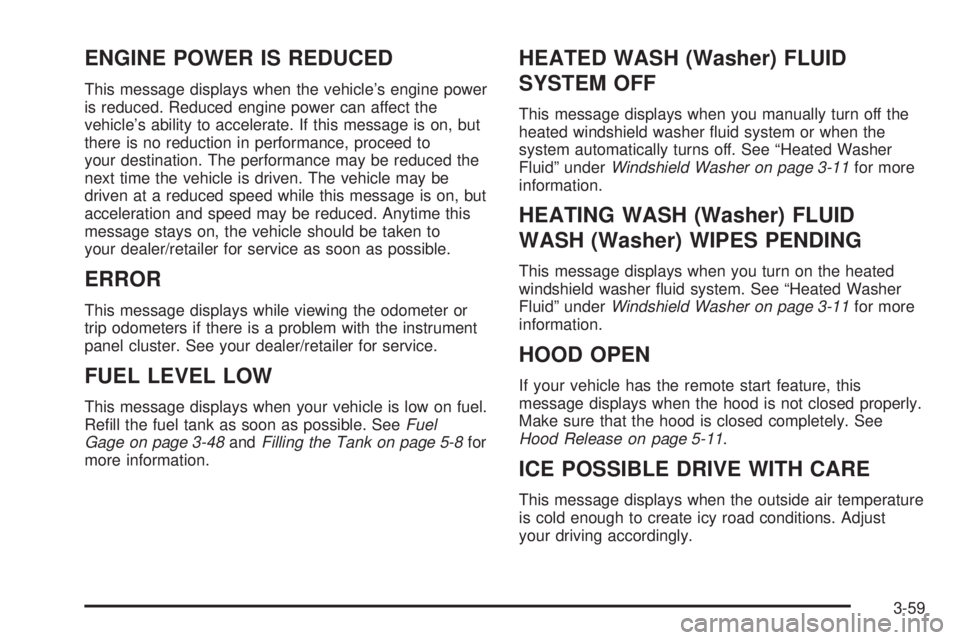
ENGINE POWER IS REDUCED
This message displays when the vehicle’s engine power
is reduced. Reduced engine power can affect the
vehicle’s ability to accelerate. If this message is on, but
there is no reduction in performance, proceed to
your destination. The performance may be reduced the
next time the vehicle is driven. The vehicle may be
driven at a reduced speed while this message is on, but
acceleration and speed may be reduced. Anytime this
message stays on, the vehicle should be taken to
your dealer/retailer for service as soon as possible.
ERROR
This message displays while viewing the odometer or
trip odometers if there is a problem with the instrument
panel cluster. See your dealer/retailer for service.
FUEL LEVEL LOW
This message displays when your vehicle is low on fuel.
Rell the fuel tank as soon as possible. SeeFuel
Gage on page 3-48andFilling the Tank on page 5-8for
more information.
HEATED WASH (Washer) FLUID
SYSTEM OFF
This message displays when you manually turn off the
heated windshield washer uid system or when the
system automatically turns off. See “Heated Washer
Fluid” underWindshield Washer on page 3-11for more
information.
HEATING WASH (Washer) FLUID
WASH (Washer) WIPES PENDING
This message displays when you turn on the heated
windshield washer uid system. See “Heated Washer
Fluid” underWindshield Washer on page 3-11for more
information.
HOOD OPEN
If your vehicle has the remote start feature, this
message displays when the hood is not closed properly.
Make sure that the hood is closed completely. See
Hood Release on page 5-11.
ICE POSSIBLE DRIVE WITH CARE
This message displays when the outside air temperature
is cold enough to create icy road conditions. Adjust
your driving accordingly.
3-59
Page 198 of 434

LANE DEPARTURE SYSTEM
UNAVAILABLE
If your vehicle has the Lane Departure Warning (LDW)
system, this message may display if the LDW system
does not activate due to a temporary condition.
SeeLane Departure Warning on page 2-44for more
information.
LEFT REAR DOOR OPEN
This message displays when the driver side rear door is
not closed properly. Make sure that the door is closed
completely.
OIL PRESSURE LOW STOP ENGINE
Notice:If you drive your vehicle while the engine
oil pressure is low, severe engine damage may
occur. If a low oil pressure warning appears on the
instrument panel cluster and/or DIC, stop the
vehicle as soon as possible. Do not drive the vehicle
until the cause of the low oil pressure is corrected.
SeeEngine Oil on page 5-15for more information.
This message displays when the vehicle’s engine
oil pressure is low. The oil pressure light also appears
on the instrument panel cluster. SeeOil Pressure
Light on page 3-46.Stop the vehicle immediately, as engine damage can
result from driving a vehicle with low oil pressure. Have
the vehicle serviced by your dealer/retailer as soon
as possible when this message is displayed.
PARK ASSIST OFF
If your vehicle has this feature, after the vehicle has
been started, this message will reminder the driver that
the Ultrasonic Rear Parking Assist (URPA) system
has been turned off. Press the set/reset button to
acknowledge this message and clear it from the DIC
display. To turn the URPA system back on, see
“Park Assist” underDIC Operation and Displays on
page 3-49. SeeUltrasonic Rear Parking Assist (URPA)
on page 2-39for more information.
PASSENGER DOOR OPEN
This message displays when the front passenger door
is not closed properly. Make sure that the door is closed
completely.
RAINSENSE WIPERS ACTIVE
If your vehicle has this feature, this message displays
while the Rainsense™ system is active. See
Rainsense™ II Wipers on page 3-10for more
information.
3-60
Page 241 of 434

ABS can change the brake pressure faster than any
driver could. The computer is programmed to make the
most of available tire and road conditions. This can
help you steer around the obstacle while braking hard.
As you brake, the computer keeps receiving updates
on wheel speed and controls braking pressure
accordingly.
Remember: ABS does not change the time you need to
get your foot up to the brake pedal or always decrease
stopping distance. If you get too close to the vehicle
in front of you, you will not have time to apply the brakes
if that vehicle suddenly slows or stops. Always leave
enough room up ahead to stop, even though you
have ABS.
Using ABS
Do not pump the brakes. Just hold the brake pedal
down rmly and let antilock work for you. You might hear
the antilock pump or motor operate, and feel the
brake pedal pulsate, but this is normal.
Braking in Emergencies
With ABS, you can steer and brake at the same time. In
many emergencies, steering can help you more than
even the very best braking.
Traction Control System (TCS)
Your vehicle has a traction control system that limits
wheel spin. This is especially useful in slippery
road conditions. The system operates only if it senses
that the front wheels are spinning too much or beginning
to lose traction. When this happens, the system works
the front brakes and reduces engine power (by
closing the throttle and managing engine spark) to limit
wheel spin.
The traction control system and StabiliTrak
®warning
light will ash when the traction control system is limiting
wheel spin. SeeTraction Control System (TCS)
Warning Light on page 3-40for more information. You
may feel or hear the system working, but this is normal.
If your vehicle is in cruise control when the traction
control system begins to limit wheel spin, the cruise
control will automatically disengage. When road
conditions allow you to safely use it again, you may
re-engage the cruise control. SeeCruise Control
on page 3-12for more information.
The SERVICE TRACTION CONTROL message, the
traction control system warning light and the StabiliTrak
®
warning light will come on to let you know if there is a
problem with the traction control system. SeeDIC
Warnings and Messages on page 3-56.
4-5
Page 403 of 434

STEP THREE — U.S. Owners:Both General Motors
and your dealer are committed to making sure you
are completely satised with your new vehicle. However,
in the United States, if you continue to remain
unsatised after following the procedure outlined in
Steps One and Two, you should le with the BBB Auto
Line Program to enforce your rights.
The BBB Auto Line Program is an out of court program
administered by the Council of Better Business
Bureaus to settle automotive disputes regarding vehicle
repairs or the interpretation of the New Vehicle
Limited Warranty. Although you may be required to
resort to this informal dispute resolution program prior to
ling a court action, use of the program is free of
charge and your case will generally be heard within
40 days. If you do not agree with the decision given in
your case, you may reject it and proceed with any other
venue for relief available to you.You may contact the BBB Auto Line Program using the
toll-free telephone number or write them at the
following address:
BBB Auto Line Program
Council of Better Business Bureaus, Inc.
4200 Wilson Boulevard
Suite 800
Arlington, VA 22203-1838
Telephone: 1-800-955-5100
This program is available in all 50 states and the District
of Columbia. Eligibility is limited by vehicle age,
mileage and other factors. General Motors reserves the
right to change eligibility limitations and/or discontinue
its participation in this program.
7-3
Page 422 of 434

Audio System(s).............................................3-78
Automatic Transmission
Fluid..........................................................5-21
Operation...................................................2-25
B
Backglass Antenna..........................................3-97
Battery..........................................................5-46
Electric Power Management..........................3-19
Exterior Lighting Battery Saver......................3-17
Inadvertent Power Saver..............................3-19
Run-Down Protection...................................3-20
Brake
Emergencies................................................ 4-5
Brakes..........................................................5-42
Panic Assist................................................. 4-7
System Warning Light..................................3-39
Braking........................................................... 4-3
Braking in Emergencies..................................... 4-5
Break-In, New Vehicle.....................................2-20
Bulb Replacement...........................................5-56
Halogen Bulbs............................................5-56
Headlamp Aiming........................................5-53
License Plate Lamps....................................5-58
Replacement Bulbs......................................5-59
Taillamps and Back-Up Lamps.......................5-57
Taillamps, Turn Signal, Stoplamps and
Sidemarker Lamps...................................5-56
Buying New Tires...........................................5-76
C
Calibration.............................1-11, 2-34, 2-36, 3-54
California Fuel.................................................. 5-6
California Perchlorate Materials Requirements....... 5-4
California Proposition 65 Warning....................... 5-4
Canadian Owners................................................ ii
Capacities and Specications..........................5-113
Carbon Monoxide...................2-13, 2-32, 4-15, 4-26
Care of
Safety Belts................................................5-97
CD, MP3 .......................................................3-89
Center Console Storage Area...........................2-56
Center Flex Storage Unit.................................2-57
Center Seat...................................................1-11
Chains, Tire...................................................5-82
Charging System Light....................................3-38
Check
Engine Light...............................................3-44
Checking Things Under the Hood......................5-10
Chemical Paint Spotting.................................5-102
Child Restraints
Child Restraint Systems...............................1-40
Infants and Young Children...........................1-36
Lower Anchors and Tethers for Children..........1-43
Older Children.............................................1-33
Securing a Child Restraint in a Rear Seat
Position..................................................1-50
2
Page 423 of 434

Child Restraints (cont.)
Securing a Child Restraint in the Center Front
Seat Position...........................................1-53
Securing a Child Restraint in the Right Front
Seat Position...........................................1-54
Where to Put the Restraint...........................1-42
Cleaning
Aluminum or Chrome-Plated Wheels.............5-100
Exterior Lamps/Lenses.................................5-98
Fabric/Carpet..............................................5-96
Finish Care.................................................5-99
Instrument Panel, Vinyl, and Other Plastic
Surfaces.................................................5-97
Interior.......................................................5-94
Leather......................................................5-96
Tires........................................................5-101
Underbody Maintenance.............................5-102
Washing Your Vehicle...................................5-98
Weatherstrips..............................................5-97
Windshield and Wiper Blades......................5-100
Climate Control System...................................3-21
Air Filter, Passenger Compartment.................3-30
Dual Automatic............................................3-24
Outlet Adjustment........................................3-30
Clock............................................................3-76
Collision Damage Repair..................................7-12
Compact Spare Tire........................................5-94
Compass...............................1-11, 2-34, 2-36, 3-54
Content Theft-Deterrent....................................2-17Control of a Vehicle.......................................... 4-3
Convenience Net............................................2-57
Coolant
Engine Temperature Gage............................3-43
Engine Temperature Warning Light.................3-42
Heater, Engine............................................2-24
Surge Tank Pressure Cap.............................5-28
Cooled Seats................................................... 1-5
Cooling System......................................5-30, 5-36
Cornering Lamps
............................................3-17
Courtesy Lamps.............................................3-17
Cruise Control................................................3-12
Cruise Control Light........................................3-47
Cupholder(s)..................................................2-56
Customer Assistance Information
Courtesy Transportation................................7-10
Customer Assistance for Text
Telephone (TTY) Users............................... 7-6
Customer Assistance Offices........................... 7-6
Customer Satisfaction Procedure..................... 7-2
GM Mobility Reimbursement Program............... 7-7
Reporting Safety Defects to General Motors....7-16
Reporting Safety Defects to the Canadian
Government............................................7-15
Reporting Safety Defects to the United States
Government............................................7-15
Roadside Assistance Program......................... 7-8
Service Publications Ordering Information........7-16
3
Page 424 of 434

DDaytime Running Lamps..................................3-16
Defensive Driving............................................. 4-2
Delayed Entry Lighting.....................................3-18
Delayed Exit Lighting.......................................3-18
Delayed Locking.............................................2-11
DIC Compass.................................................3-54
Disc, MP3......................................................3-89
Doing Your Own Service Work........................... 5-4
Door
Delayed Locking..........................................2-11
Locks........................................................2-10
Power Door Locks.......................................2-10
Programmable Automatic Door Locks.............2-11
Rear Door Security Locks.............................2-12
Driver Information Center (DIC).........................3-48
DIC Operation and Displays..........................3-49
DIC Vehicle Customization............................3-66
DIC Warnings and Messages........................3-56
Driving
At Night.....................................................4-11
Before a Long Trip......................................4-13
Defensive..................................................... 4-2
Drunken....................................................... 4-2
Highway Hypnosis.......................................4-13
Hill and Mountain Roads..............................4-14
In Rain and on Wet Roads...........................4-12
Rocking Your Vehicle to Get it Out.................4-19
Winter........................................................4-15
Dual Automatic Climate Control System.............3-24E
EDR .............................................................7-17
Electrical System
Add-On Equipment.....................................5-105
Fuses and Circuit Breakers.........................5-105
Power Windows and Other Power Options....5-105
Rear Underseat Fuse Block.........................5-108
Underhood Fuse Block...............................5-106
Engine
Air Cleaner/Filter.........................................5-20
Check and Service Engine Soon Light............3-44
Coolant......................................................5-24
Coolant Heater............................................2-24
Coolant Temperature Gage...........................3-43
Coolant Temperature Warning Light................3-42
Drive Belt Routing.......................................6-14
Engine Compartment Overview......................5-12
Exhaust.....................................................2-32
Oil .............................................................5-15
Oil Life System...........................................5-18
Overheated Protection Operating Mode...........5-30
Overheating................................................5-28
Running While Parked..................................2-33
Starting......................................................2-22
Entry Lighting.................................................3-18
Event Data Recorders.....................................7-18
Extender, Safety Belt.......................................1-32
Exterior Lamps...............................................3-14
Exterior Lighting Battery Saver..........................3-17
4