2008 BUICK LACROSSE windshi
[x] Cancel search: windshiPage 135 of 440

Telescoping Column
If the vehicle has a telescoping column on the steering
wheel it adjusts the distance of the steering wheel
to the driver without having to move the driver’s seat.
The lever that makes this
adjustment is located on
the left side of the steering
column and behind the
tilt lever, if the vehicle has
this feature.
To adjust the steering wheel, pull the steering wheel
column lever down and push or pull the steering wheel
to a comfortable position. Then pull the lever up to
lock the wheel in place.
Do not drive the vehicle unless the telescoping column
is locked.
Turn Signal/Multifunction Lever
The lever on the left side of the steering column
includes the following:
GTurn and Lane Change Signals. SeeTurn and
Lane-Change Signals on page 3-8.
2Headlamp High/Low-Beam Changer. See
Headlamp High/Low-Beam Changer on page 3-8.
Flash-to-Pass. SeeFlash-to-Pass on page 3-8.
NWindshield Wipers. SeeWindshield Wipers on
page 3-9.
LQWindshield Washer. SeeWindshield Washer
on page 3-9.
For information on the headlamps, seeExterior Lamps
on page 3-13.
3-7
Page 137 of 440

Windshield Wipers
Clear ice and snow from the wiper blades before using
them. If they are frozen to the windshield, gently
loosen or thaw them. Damaged wiper blades may not
clear the windshield well, making it harder to see
and drive safely. If the blades do become damaged,
install new blades or blade inserts. For more information,
seeWindshield Wiper Blade Replacement on page 5-62.
Heavy snow or ice can overload the wiper motor. A
circuit breaker will stop the motor until it cools down.
Clear away snow or ice to prevent an overload.
Turn the band with the wiper symbol to control the
windshield wipers.
8(Mist):Turn the band to mist for a single wiping
cycle. Hold it there until the wipers start. Then let
go. The wipers stop after one wipe. Hold the band on
mist longer, for more wipe cycles.
9(Off):To stop the wipers, move the band to off.
6(Delay):Turn the band to adjust the delay time. The
delay between wiping cycles becomes shorter as
the band is moved to the top of the lever. This can be
very useful in light rain or snow.
6(Low Speed):Turn the band away from you to
the rst solid band past the delay settings, for steady
wiping at low speed.
?(High Speed):Turn the band further, to the
second solid band past the delay settings, for
high-speed wiping.
Windshield Washer
LQ(Washer Fluid):There is a paddle marked
with the windshield washer symbol at the top of
the multifunction lever. To spray washer uid on the
windshield, push the paddle. The wipers will clear
the window and then either stop or return to your
preset speed.
{CAUTION:
In freezing weather, do not use your washer
until the windshield is warmed. Otherwise the
washer uid can form ice on the windshield,
blocking your vision.
3-9
Page 149 of 440

Operation
OFF:Turn the left knob to this position to turn the
climate control system off.
9(Fan):Turn the knob by this symbol, located on
the left side of the climate control panel, clockwise
or counterclockwise to increase or decrease the
fan speed. The fan speed will be temporarily reduced
between the transition to a new mode. The fan will
resume the original speed when the transition to the new
mode is complete.
Temperature Control:Turn the center knob clockwise
or counterclockwise to increase or decrease the
temperature inside your vehicle.Use the right knob to select from the following modes:
H(Vent):This mode directs outside air to the
instrument panel outlets. If driving in city traffic, and the
vehicle is stopped and idling, or the weather is hot,
turning on the recirculation mode helps to prevent the
air inside the vehicle from becoming stale. After ve
minutes recirculate will allow some outside air into the
vehicle.
)(Bi-Level):This mode directs half of the air to the
instrument panel outlets, and the remaining air to
the oor outlets. Some air may be directed toward the
windshield. Slightly cooler air is directed to the
instrument panel outlets and warmer air is directed to
the oor outlets.
6(Floor):This mode directs most of the air to the
oor outlets with some air directed toward the side
window outlets and a little air directed to the windshield.
In this mode, the system will automatically use outside
air. The air conditioning compressor will be engaged
unless the outside temperature is 40°F (4°C) or below.
3-21
Page 150 of 440

You can also select modes by using the following
buttons:
h(Recirculate):Press this button to recirculate
cabin air through the vehicle. It can be used to
help reduce the outside air and odors that enter your
vehicle or to help heat or cool the air inside your vehicle
quicker. An indicator light below the button will come
on in this mode. Operation in this mode during periods of
high humidity and cool outside temperatures may
result in increased window fogging. If window fogging is
experienced, select the defrost mode. To prevent the
air inside the vehicle from becoming stale, after
ve minutes recirculate will allow some outside air into
the vehicle.
#(Air Conditioning):Press this button to turn the
air conditioning system on or off. When this button
is pressed, an indicator light below the button will come
on to let you know the air conditioning is activated.
Air conditioning can be selected in any mode as long as
the fan switch is on. The indicator light will change
with each button press even when conditions prevent
operation.
On hot days during the vehicle’s initial start-up, open
the windows to let hot inside air escape; then close
them. This helps to reduce the time it takes for
the vehicle to cool down. It also helps the system to
operate more efficiently.For quicker cool down on hot days, do the following:
1. Select the vent air mode.
2. Select the recirculation mode.
3. Select the air conditioner.
4. Select the coolest temperature.
5. Select the highest fan speed.
The air conditioning system removes moisture from the
air, so you may sometimes notice a small amount of
water dripping underneath your vehicle while idling
or after turning off the engine. This is normal.
Using these settings together for long periods of time
may cause the air inside the vehicle to become too dry.
To prevent this, after ve minutes recirculate will
allow some outside air into the vehicle.
Defogging and Defrosting
Fog on the inside of the vehicle is a result of high humidity
causing moisture to condense on the cool window glass.
This can be minimized if the climate control system is
used properly. There are two modes to clear frost or fog
from the windshield. Use the defog mode to clear the
windows of condensation and to warm the vehicle’s
occupants. Use the defrost mode to remove frost or
condensation from the windshield quickly.
See “Rear Window Defogger” later in this section for
information on clearing the rear window of fog or ice.
3-22
Page 151 of 440
Turn the right knob to select the defog or defrost mode.
Do not drive the vehicle until all windows are clear.
-(Defog):This mode directs half of the air to
the windshield and the side window outlets and half to
the oor outlets. When you select this mode, the system
turns recirculation off and runs the air conditioning
compressor unless the outside temperature is near or
below freezing. Pressing the recirculation button
will have no effect other than turning on the indicator
light while in defog mode.
0(Defrost):This mode directs most of the air to the
windshield and the side window outlets, with some
air directed to the oor outlets. When you select this
mode, the system turns recirculation off and runs the air
conditioning compressor unless the outside temperature
is near or below freezing. Pressing the recirculation
button will have no effect other than turning on
the indicator light while in defrost mode.
Rear Window Defogger
The rear window defogger uses a warming grid to
remove fog from the rear window.
<(Rear):Press the button to turn the rear window
defogger on or off. An indicator light below the button will
come on to let you know that the rear window defogger
is activated.
The rear window defogger will only work when the ignition
is in ON/RUN. The rear window defogger will stay on for
about 20 minutes after the button is pressed. If turned on
again, the defogger will only run for about 20 minutes
before turning off. The defogger can also be turned off by
pressing the button again or by turning off the engine.
Do not drive the vehicle until all windows are clear.
Notice:Do not use anything sharp on the inside of
the rear window. If you do, you could cut or
damage the warming grid, and the repairs would not
be covered by your warranty. Do not attach a
temporary vehicle license, tape, a decal or anything
similar to the defogger grid.
3-23
Page 152 of 440
Dual Automatic Climate Control
System
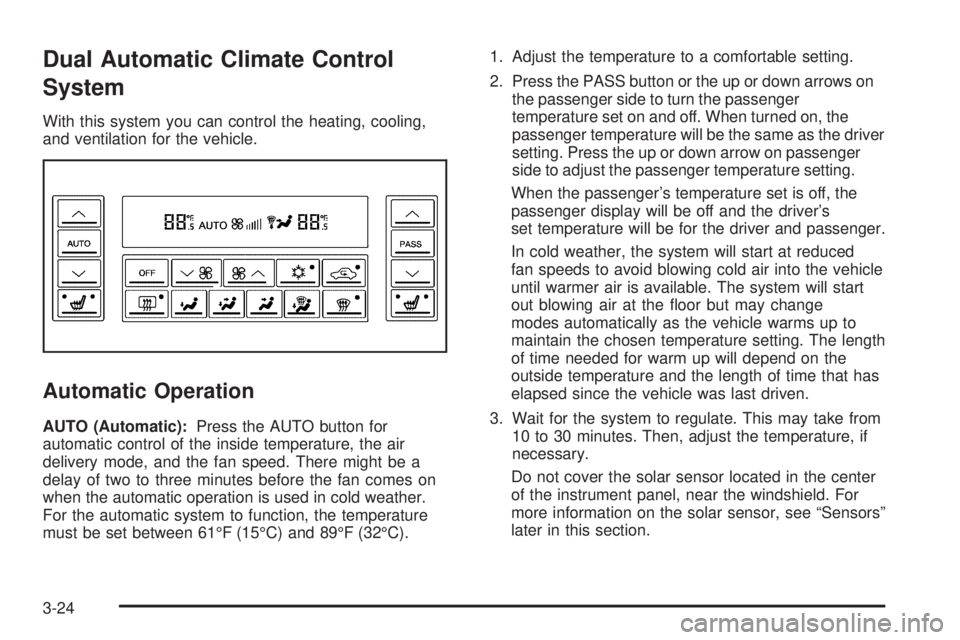
With this system you can control the heating, cooling,
and ventilation for the vehicle.
Automatic Operation
AUTO (Automatic):Press the AUTO button for
automatic control of the inside temperature, the air
delivery mode, and the fan speed. There might be a
delay of two to three minutes before the fan comes on
when the automatic operation is used in cold weather.
For the automatic system to function, the temperature
must be set between 61°F (15°C) and 89°F (32°C).1. Adjust the temperature to a comfortable setting.
2. Press the PASS button or the up or down arrows on
the passenger side to turn the passenger
temperature set on and off. When turned on, the
passenger temperature will be the same as the driver
setting. Press the up or down arrow on passenger
side to adjust the passenger temperature setting.
When the passenger’s temperature set is off, the
passenger display will be off and the driver’s
set temperature will be for the driver and passenger.
In cold weather, the system will start at reduced
fan speeds to avoid blowing cold air into the vehicle
until warmer air is available. The system will start
out blowing air at the oor but may change
modes automatically as the vehicle warms up to
maintain the chosen temperature setting. The length
of time needed for warm up will depend on the
outside temperature and the length of time that has
elapsed since the vehicle was last driven.
3. Wait for the system to regulate. This may take from
10 to 30 minutes. Then, adjust the temperature, if
necessary.
Do not cover the solar sensor located in the center
of the instrument panel, near the windshield. For
more information on the solar sensor, see “Sensors”
later in this section.
3-24
Page 154 of 440

9y(Fan):Press this button to increase the fan
speed. Pressing the arrows cancels the automatic
operation and places the system in manual or
semi-automatic mode. Press the AUTO button to return
to automatic operation. If the airow seems low when
the fan is at the highest setting, the passenger
compartment air lter may need to be replaced. For
more information seePassenger Compartment Air Filter
on page 3-29andScheduled Maintenance on page 6-4.
6(Floor):This mode directs most of the air to the
oor, with some air directed to the side window
outlets and a small amount to the windshield.
)(Bi-Level):This setting directs airow to the
instrument panel and oor outlets. A small amount of air
is also directed to the windshield and the side window
outlets.
Y(Vent):This mode directs air through the instrument
panel outlets.
h(Recirculation):Press this button to turn
recirculation mode on or off. This mode keeps outside
air from coming into the vehicle. It can be used to
help reduce the outside air and odors that enter your
vehicle or help cool the air inside the vehicle quicker.
Recirculation is not available while in the oor, defrost,
or oor/defog modes. Using recirculation for long
periods of time may cause the air inside your vehicle to
become too dry. Recirculation mode has a ve minute
timer after which the system allows for some fresh
outside air into the vehicle to maintain interior air quality.
#(Air Conditioning):Press this button to turn the
air conditioning compressor on and off. The indicator
light on the button will come on when the air conditioning
is on. The indicator light will change with each button
press even when conditions prevent operation.
((Heated Seats):Press this button to turn the driver
or passenger heated seats on and off. SeeHeated
Seats on page 1-3for additional information.
3-26
Page 155 of 440

Defogging and Defrosting
Fog on the inside of windows is a result of high humidity
(moisture) condensing on the cool window glass. This
can be minimized if the climate control system is
used properly. There are two modes to clear fog or frost
from your windshield. Use the oor/defog mode to
clear the windows of fog or moisture and warm
the passengers. Use defrost to remove fog or frost from
the windshield more quickly.
-(Floor/Defog):Press this button to direct the air
between the windshield, oor outlets and side windows.
When you select this mode, the system turns
recirculation off and runs the air conditioning compressor
unless the outside temperature is near or below
freezing. Pressing the recirculation button will have no
effect other than turning on the indicator light while
in oor/defog mode.
1(Defrost):Press this button to direct most of the
air to the windshield, with some air directed to the
side windows. In this mode, the system will automatically
turn off the recirculation and run the air conditioning
compressor, unless the outside temperature is near or
below freezing. Pressing the recirculation button will
have no effect other than turning on the indicator light
while in defrost mode.
Do not drive the vehicle until all windows are clear.
Sensors
The solar sensor on the vehicle monitors the solar heat
and the air inside of the vehicle. This information is
used to maintain the selected temperature by initiating
needed adjustments to the temperature, the fan
speed, and the air delivery system. The system may
also supply cooler air to the side of the vehicle facing the
sun. The recirculation mode will also be activated, as
necessary. Do not cover the solar sensor located in the
center of the instrument panel, near the windshield,
or the system will not work properly.
3-27