2008 BMW X6 service interval
[x] Cancel search: service intervalPage 19 of 288

At a glance
17Reference
Controls
Driving tips
Communications
Navigation
Entertainment
Mobility
Menu overview
Communication
>Telephone*
>BMW Assist* or TeleService*
Navigation or onboard information
>Navigation system*
>Onboard information, e.g. for displaying
the average fuel consumption
Entertainment
>Radio
>CD player and CD changer
*
>External audio device
Climate
>Vent settings
>Seat heater distribution
*
>Automatic programs
>Parked car ventilation
*
menu
>Switching off Control Display
>Tone and display settings
>Settings for traffic information
*
>Settings for your vehicle, e.g. for the central
locking system
>Display of maintenance intervals and dead-
lines for legally mandated inspections
>Settings for telephone
*
Operating principle
From radio readiness, refer to page56, the fol-
lowing message is shown on the Control Dis-
play:
To hide the message:
Press the controller.
This displays the start menu.
On vehicles with a single drive, the message
automatically disappears after approx. 10 sec-
onds.
Start menu
You can call up all the functions of iDrive using
five menu items.
Opening start menu
Press the button.
To open the start menu from the menu:
Press the button twice.
Page 171 of 288

Navigation
Entertainment
Driving tips
169Reference
At a glance
Controls
Communications
Mobility
Displaying additional information
With the digital stations, additional information
on the current track is displayed, e.g. the name
of the artist.
1.Select a station and press the controller.
2.Select "Details" and press the controller.
The information is displayed.
If a digital station is received again when the
station is changed, the additional information
will be displayed again following a brief interrup-
tion.
Weather news flashes*
Weather Radio is a service of the National Oce-
anic and Atmospheric Administration (NOAA)
of the US Department of Trade. Weather news
flashes are repeated every four to six minutes
and are routinely updated at intervals of one to
three hours, and more often when necessary.
Most stations operate 24 hours a day. In case of
a storm, the National Weather Service inter-
rupts the routine weather news and transmits
special warning messages instead. If you have a
question about NOAA Weather Radio, please
contact the nearest office of the National Weather Service. Details are also provided on
the Internet at www.nws.noaa.gov.
Calling up weather news flashes
1.Select "WB" and press the controller.
2.Select a station.
The station for weather news flashes may be
unavailable in some regions.
Page 245 of 288
Mobility
243Reference
At a glance
Controls
Driving tips
Communications
Navigation
Entertainment
Maintenance
BMW maintenance system
The BMW maintenance system supports the
preservation of the traffic and operating safety
of your BMW. The service schedule also
includes operations related to the vehicle's
comfort and convenience features, such as
replacement of the filters for the inside air.
The ultimate objective is to ensure economical
maintenance by providing the ideal service for
your vehicle.
Should the day come when you decide to sell
your BMW, a complete dealer service history
will prove to be an asset of inestimable value.
CBS Condition Based Service
Sensors and special algorithms take the differ-
ent driving conditions of your BMW into
account. Condition Based Service uses this to
determine the current and future service
requirements. By letting you define a service
and maintenance regimen that reflects your
own individual requirements, the system builds
the basis for trouble-free driving.
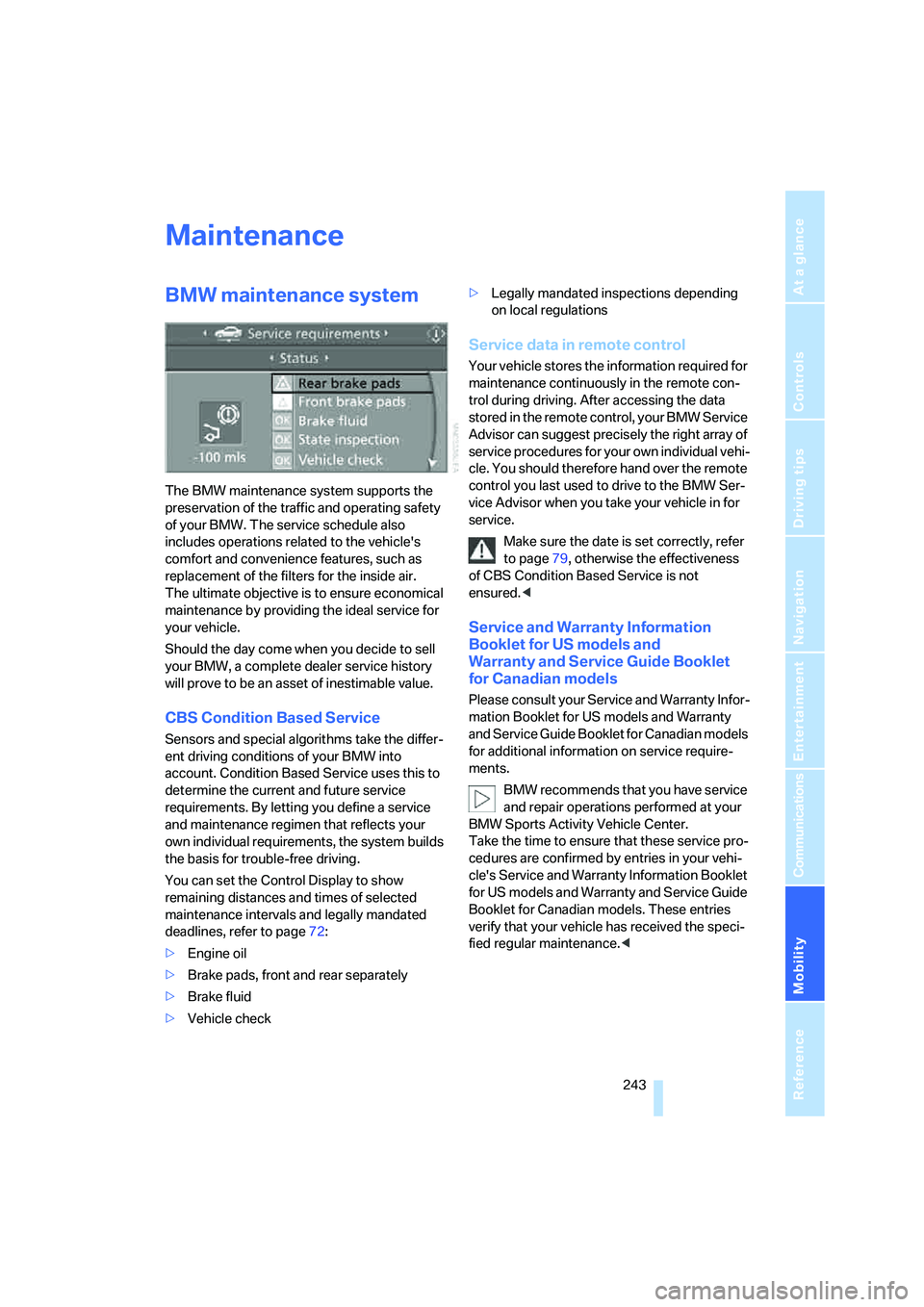
You can set the Control Display to show
remaining distances and times of selected
maintenance intervals and legally mandated
deadlines, refer to page72:
>Engine oil
>Brake pads, front and rear separately
>Brake fluid
>Vehicle check>Legally mandated inspections depending
on local regulations
Service data in remote control
Your vehicle stores the information required for
maintenance continuously in the remote con-
trol during driving. After accessing the data
stored in the remote control, your BMW Service
Advisor can suggest precisely the right array of
service procedures for your own individual vehi-
cle. You should therefore hand over the remote
control you last used to drive to the BMW Ser-
vice Advisor when you take your vehicle in for
service.
Make sure the date is set correctly, refer
to page79, otherwise the effectiveness
of CBS Condition Based Service is not
ensured.<
Service and Warranty Information
Booklet for US models and
Warranty and Service Guide Booklet
for Canadian models
Please consult your Service and Warranty Infor-
mation Booklet for US models and Warranty
and Service Guide Booklet for Canadian models
for additional information on service require-
ments.
BMW recommends that you have service
and repair operations performed at your
BMW Sports Activity Vehicle Center.
Take the time to ensure that these service pro-
cedures are confirmed by entries in your vehi-
cle's Service and Warranty Information Booklet
for US models and Warranty and Service Guide
Booklet for Canadian models. These entries
verify that your vehicle has received the speci-
fied regular maintenance.<
Page 278 of 288

Everything from A to Z
276 Mirror dimming feature51
Mirrors49
– automatic curb monitor50
– exterior mirrors49
– folding in and out50
– heating50
– interior rearview mirror50
– memory, refer to Seat, mirror
and steering wheel
memory44
"Missed calls"214
Missed calls215
Mobile phone
– accepted calls215
– adjusting volume212
– calling213
– ending call213
– installation location, refer to
Center armrest, front116
– missed calls215
– operation via iDrive212
– redialing215
– refer to separate operating
instructions
– Top 8215
– touch tone dialing216
Monitor, refer to iDrive16
Monitoring tire pressure, refer
to FTM Flat Tire Monitor89
"Monitor on / off"52
MP3, refer to Compressed
audio files173
Multifunction steering wheel,
refer to Buttons on steering
wheel11
Multifunction switch
– refer to Turn signals/
headlamp flasher/high
beams64
– refer to Washer/wiper
system64
Music track, refer to
Tracks174
"Mute on / off"52
N
"Navigation"70,136,142
Navigation destination
– entering manually137,139
– home address146
– selecting via map141
Navigation drive, installation
location134
Navigation DVD134
– player160
Navigation instructions, refer
to Switching voice
instructions on/off151
Navigation system134
– address book144
– changing route152
– destination entry136
– destination guidance in
assistance window134
– destination list143
– displaying current
position155
– displaying route149
– ending/continuing
destination guidance148
– entering a destination
manually137,139
– last destinations143
– navigation DVD134
– opening136
– route list150
– searching for a special
destination142
– selecting destination using
information142
– selecting destination via
map141
– selecting route criteria146
– starting destination
guidance148
– switching off, refer to
Ending/continuing
destination guidance148
– voice instructions151
– volume adjustment152"Navigation voice
instructions"52,135
Neck support, refer to Head
restraints46
"New address" for
navigation144
"New destination"137,141
New remote control28
"New route"152
New wheels and tires237
"Next entertainment
source"52
"No video signal" for DVD
system in rear201
Nozzles, refer to Windshield
washer nozzles65
"NTSC color" for DVD system
in rear202
Nylon rope, refer to Tow-
starting and towing254
O
OBD socket244
Octane ratings, refer to Fuel
specifications231
Odometer68
Oil
– additives, refer to Approved
engine oils241
– approved engine oils241
– consumption, refer to
Checking engine oil
level240
– level240
– refilling, refer to Adding
engine oil241
Oil change interval, refer to
Service requirements72
"On a new destination" for
navigation142
Onboard computer, refer to
iDrive16
"Onboard info"70
Onboard toolkit245
"On destination"142
"On location"142
Page 281 of 288

Reference 279
At a glance
Controls
Driving tips
Communications
Navigation
Entertainment
Mobility
Reverse gear, automatic
transmission with
Steptronic61
Road map150
"Roadside Assistance"222
Roadside Assistance253
Roadside assistance222
Roadside parking lamps101
Roller sun blinds115
Roof load capacity260
Roof-mounted luggage
rack130
Rope, refer to Tow-starting
and towing254
Rotary pushbutton, refer to
iDrive16
Route146
– changing152
– displaying149
– displaying arrow display149
– displaying map view150
– displaying roads and towns/
cities150
– displaying towns/cities150
– list150
– selecting146
– selecting criteria146
RSC Runflat System
Component, refer to Run-
flat tires237
Runflat System Component
RSC, refer to Run-Flat
Tires237
Run-flat tires237
– continuing driving with a
damaged tire90,92
– flat tire90,92
– new wheels and tires237
– tire inflation
pressure90,92,232
– tire replacement237S
Safety5
Safety belts47
– damage47
– sitting safely42
– warning lamp47
Safety belt tensioners
– refer to Airbags95
– refer to Safety belts47
Safety systems
– ABS Antilock Brake
System85
– airbags95
– driving stability control
systems85
– DSC Dynamic Stability
Control86
– safety belts47
Safety tires, refer to Run-flat
tires237
"SAT"161,170
Satellite radio170
– displaying additional
information171
– enabling170
– selecting channel171
– storing channel171
"Scan"
– for DVD system in rear197
– sampling stations with
radio165
– sampling tracks on CD175
Scan
– CD changer175
– CD player175
– radio165
"Scan all"
– DVD system in rear198
– in audio mode175
"Scan directory"
– for DVD system in rear198
– in audio mode175
Screen, refer to iDrive16
Screw thread for tow
fitting254
SDARS, refer to Satellite
radio170
"Seat heater distribution"48Seat heating48
Seats43
– adjusting43
– adjusting electrically43
– adjusting manually43
– backrest width44
– heating48
– lumbar support44
– memory, refer to Seat, mirror
and steering wheel
memory44
– shoulder support44
– sitting safely42
– storing the setting44
– thigh support43,44
– ventilation, refer to Active
seat ventilation and Seat
heating48
Securing load
– refer to Securing cargo130
– with ski bag, refer to
Securing cargo122
"Select as
destination"142,225
"Select current speed"77
Selecting audio source160
Selecting country for
navigation137
Selecting frequency
manually165
Selecting menu items19
Selecting new scale for
navigation150
Selector lever, automatic
transmission with
Steptronic61
Selector lever lock, refer to
Reverse gear61
Self-leveling suspension89
Service, refer to Roadside
Assistance253
Service and Warranty
Information Booklet for
US models243
"Service Info"73,223,240
Service interval indicator, refer
to Service requirements72
"Service Request"216,223