2008 BMW X6 brake
[x] Cancel search: brakePage 133 of 288
Driving tips
131Reference
At a glance
Controls
Communications
Navigation
Entertainment
Mobility
>If you want to drive on very steep uphill or
downhill gradients, make sure beforehand
that the engine oil and coolant levels are
near the MAX mark, refer to page240.
>On very steep downhill slopes, use Hill
Descent Control HDC, refer to page87.
>While driving, watch carefully for obstacles
such as rocks or holes. Try to avoid these
obstacles whenever possible.
>Please make sure that the undercarriage
does not touch the ground, for example on
crests and bumpy roads. The ground clear-
ance of the vehicle is a maximum of approx.
8 in/20 cm. Please note that the ground
clearance can vary depending on loading
and the driving conditions of the vehicle.
>Only drive through water on roads up to a
maximum depth of 18 in/45 cm and only at
walking speed, making sure not to stop in
the process.
>After driving through water at low speed,
lightly press the brake pedal several times
to dry the brakes and to prevent the braking
effect from being reduced by wetness.
>Depending on the condition of the surface,
it may be practical to briefly activate DTC,
refer to DTC Dynamic Traction Control on
page86.
>If the drive wheels spin on one side, depress
the accelerator pedal sufficiently so that the
driving stability control systems can distrib-
ute the drive forces to the individual wheels.
Please note the following points after driving on
poor roads to maintain the driving safety of your
BMW:
>Clean the coarsest dirt from the body.
>Clean mud, snow, ice etc. from the wheels
and tires and check the tires for damage.
Page 209 of 288

207
Entertainment
Reference
At a glance
Controls
Driving tips Communications
Navigation
Mobility
progress. If this happens, you must log off the
mobile phone from the vehicle if you wish to
place a call with the mobile phone.
Commissioning
Logging on mobile phone on vehicle
The following prerequisites must be met:
>Suitable mobile phone: the mobile phone
is supported by the full mobile phone prep-
aration package. Information on this subject
is also provided on the Internet at:
www.bmw.com
>The mobile phone is ready to operate.
>The Bluetooth link on the vehicle, refer to
page211, and on the mobile phone is
active.
>Depending on the mobile phone, it may be
necessary to adjust the presets of the
mobile phone, e.g. via the following menu
items:
>Bluetooth activated
>Connection not with confirmation
>Reconnect
>Depending on the mobile phone model, the
setting energy saving mode can, for exam-
ple, result in vehicle failing to detect the
paired mobile phone.
>For pairing, specify any desired number as
the Bluetooth passkey, e.g. 1. This Blue-
tooth passkey is no longer required follow-
ing successful logon.
>The ignition is switched on.
Only pair the mobile phone with the vehi-
cle stopped, otherwise the passengers
and other road users can be endangered due
to a lack of attentiveness on the part of the
driver.<
Switching on ignition
1.Insert the remote control as far as possible
into the ignition lock.
2.Switch on the ignition by pressing the Start/
Stop button without depressing the brake
pedal.
Preparation via iDrive
iDrive, for operating principle refer to page16.
3.Press the button to open the start
menu.
4.Press the controller to open the menu.
5.Select "Settings" and press the controller.
6.Select "Bluetooth" and press the controller.
Page 245 of 288
Mobility
243Reference
At a glance
Controls
Driving tips
Communications
Navigation
Entertainment
Maintenance
BMW maintenance system
The BMW maintenance system supports the
preservation of the traffic and operating safety
of your BMW. The service schedule also
includes operations related to the vehicle's
comfort and convenience features, such as
replacement of the filters for the inside air.
The ultimate objective is to ensure economical
maintenance by providing the ideal service for
your vehicle.
Should the day come when you decide to sell
your BMW, a complete dealer service history
will prove to be an asset of inestimable value.
CBS Condition Based Service
Sensors and special algorithms take the differ-
ent driving conditions of your BMW into
account. Condition Based Service uses this to
determine the current and future service
requirements. By letting you define a service
and maintenance regimen that reflects your
own individual requirements, the system builds
the basis for trouble-free driving.
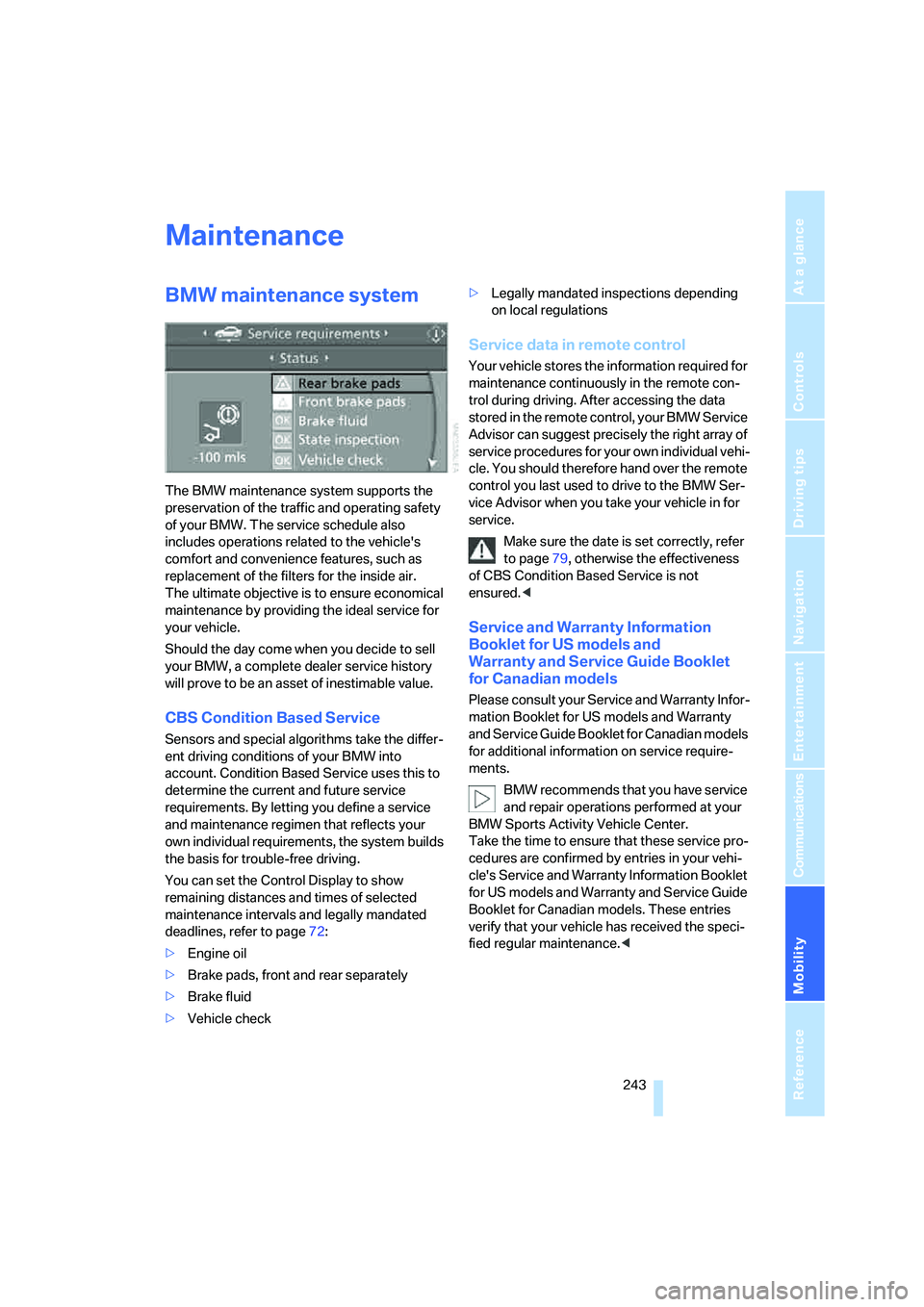
You can set the Control Display to show
remaining distances and times of selected
maintenance intervals and legally mandated
deadlines, refer to page72:
>Engine oil
>Brake pads, front and rear separately
>Brake fluid
>Vehicle check>Legally mandated inspections depending
on local regulations
Service data in remote control
Your vehicle stores the information required for
maintenance continuously in the remote con-
trol during driving. After accessing the data
stored in the remote control, your BMW Service
Advisor can suggest precisely the right array of
service procedures for your own individual vehi-
cle. You should therefore hand over the remote
control you last used to drive to the BMW Ser-
vice Advisor when you take your vehicle in for
service.
Make sure the date is set correctly, refer
to page79, otherwise the effectiveness
of CBS Condition Based Service is not
ensured.<
Service and Warranty Information
Booklet for US models and
Warranty and Service Guide Booklet
for Canadian models
Please consult your Service and Warranty Infor-
mation Booklet for US models and Warranty
and Service Guide Booklet for Canadian models
for additional information on service require-
ments.
BMW recommends that you have service
and repair operations performed at your
BMW Sports Activity Vehicle Center.
Take the time to ensure that these service pro-
cedures are confirmed by entries in your vehi-
cle's Service and Warranty Information Booklet
for US models and Warranty and Service Guide
Booklet for Canadian models. These entries
verify that your vehicle has received the speci-
fied regular maintenance.<
Page 248 of 288

Replacing components
246 Have work on the xenon light unit includ-
ing changing the bulb carried out only by
your BMW Sports Activity Vehicle Center or a
workshop that works according to BMW repair
procedures with correspondingly trained per-
sonnel. Due to the high voltage present in the
system, there is a danger of fatal injuries when
work is carried out improperly.<
Parking lamps, roadside parking
lamps, and daytime running lamps
35-Watt bulb, H8
The bulb is pressurized. Therefore, wear
safety glasses and protective gloves.
Otherwise there is a danger of injuries if the
bulb is accidentally damaged during replace-
ment.<
1.Turn the cover to the left and remove.
2.Left side of vehicle:
Rotate the bulb holder to the right, refer to
arrow, and remove.
Right side of vehicle:
Rotate the bulb holder to the left and
remove.
3.Disconnect plug and replace bulb.
4.Install in the reverse order.
Side marker lamps
5-Watt bulb, WY5W XLL
1.Rotate the bulb holder to the left and
remove.
2.Pull the bulb out of the bulb holder and
replace.
3.Install in the reverse order.
Turn signals, front
24-Watt bulb, PY24W
1.Rotate bulb holder to the left and remove it
along with the bulb.
2.Rotate the bulb to the right along with the
socket and replace.
3.Install in the reverse order.
Tail lamps
>Turn signal, backup lamps: 21-watt bulb,
H21W
>Brake lamps, brake force display: 21-watt
bulb, P21W
>Rear lamp: LED technology.
In case of a defect, please go to a BMW
Sports Activity Vehicle Center or a work-
shop that works according to BMW repair
Page 249 of 288

Mobility
247Reference
At a glance
Controls
Driving tips
Communications
Navigation
Entertainment
procedures with correspondingly trained
personnel.
Arrangement of tail lamps
1Brake force display/tail lamps
2Brake lamps/tail lamps
3Backup lamp
4Turn signal
Brake lamp
1.Open the side panel in the cargo bay.
2.Remove the first-aid kit
* and warning trian-
gle
* if necessary.
3.Rotate the relevant bulb socket to the left
and remove.
4.Apply gentle pressure to the bulb while
turning it to the left for removal and replace-
ment.
5.Install in the reverse order.
Turn signal
1.Open the side panel in the cargo bay.
2.Remove the first-aid kit
* and warning trian-
gle
* if necessary.3.Remove bulb holder along with bulb and
replace.
4.Install in the reverse order.
Backup lamp
1.Open the side panel in the cargo bay.
2.Remove the first-aid kit
* and warning trian-
gle
* if necessary.
3.Remove bulb holder along with bulb and
replace.
4.Install in the reverse order.
Brake force display
1.Carefully remove the cover in the liftgate
panel with a screwdriver.
Page 250 of 288

Replacing components
248 2.Rotate the bulb socket to the left and
remove.
3.Apply gentle pressure to the bulb while
turning it to the left for removal and replace-
ment.
4.Insert the bulb socket in the liftgate and
engage it.
5.Replace the cover.
License plate lamp
5-Watt bulb, C5W
1.Slide the lamp to the right with a screw-
driver, refer to arrow1.
2.Remove the lamp, arrow2.
3.Replace the bulb.
4.Reinstall the lamp.
Center brake lamp
This lamp uses LED technology for operation.
In case of a defect, please go to a BMW Sports
Activity Vehicle Center or a workshop that
works according to BMW repair procedures
with correspondingly trained personnel.
Changing wheels
Your BMW is equipped with run-flat tires as
standard. As a result, it is not necessary to
change the wheel immediately in the case of air
loss in the event of a breakdown.
To continue driving with a damaged tire:
>With Flat Tire Monitor, refer to Indication of
a flat tire page90
>With Tire Pressure Monitor, refer to Mes-
sage with low tire inflation pressure page92
You will recognize run-flat tires by a circular
symbol containing the letters RSC on the side
of the tire, refer to Run-flat tires, page237.
When mounting new tires, or changing from
summer to winter tires or vice versa, use run-flat
tires for your own safety. No spare tire is avail-
able in case of a flat tire. Your BMW Sports
Activity Vehicle Center will be happy to advise
you. Also refer to New wheels and tires,
page237.
Suitable tools for changing tires are avail-
able as accessories at your BMW Sports
Activity Vehicle Center.<
Jacking points for vehicle jack
The jacking points for the vehicle jack are
located in the positions shown.
Compact wheel*
Safety precautions in the event of a flat
tire or wheel change: park the vehicle as
far as possible from passing traffic and on solid
ground. Switch on the hazard warning flashers.
Set the parking brake and engage transmission
position P.
Have all vehicle occupants get out of the vehicle
Page 268 of 288

Everything from A to Z
266
Everything from A to Z
Index
"..." Identifies Control Display
texts used to select
individual functions, and
indicates where to find them
in the text.
A
ABS Antilock Brake
System85
Accessories6
Acoustic signal, refer to Check
Control75
Activated-charcoal filter108
"Activation time" for parked
car ventilation110
Active seat49
Active seat ventilation48
Active steering94
– warning lamp94
Adaptive brake lamps, refer to
Brake force display94
Adaptive Drive88
Adaptive fastening
system120
Adaptive Head Light101
"Add digits" for mobile
phone214
"Address book" for
navigation144
Address for navigation
– deleting145
– entering137,144
– selecting144
– storing144
– storing current position144
"Add to destination list"139
Adjusting confirmation signals
for locking and unlocking31
Adjusting temperature with
expanded-scope automatic
climate control105Adjusting the tone during
audio operation, refer to
Tone control161
Adjusting thigh
support43,44
"After door opened"45
"After unlocking"45
Airbags95
– sitting safely42
– warning lamp96
Air distribution
– automatic104,109
– manual105
Airing, refer to Ventilation107
Air recirculation106
– AUC Automatic
recirculated-air control106
– recirculated-air mode106
"Air recirculation on / off"52
Air vents103
– refer to Ventilation107
Air vents of automatic climate
control
103
Air volume105,109
AKI, refer to Fuel
specifications231
Alarm system35
– avoiding unintentional
alarms36
– interior motion sensor36
– switching off alarm35
– switching off tilt alarm
sensor and interior motion
sensor36
– tilt alarm sensor36
"All channels" on satellite
radio171
"All doors"30
All-season tires, refer to
Winter tires238
"All stations", displaying on
radio164All-wheel drive, refer to
xDrive87
Alterations, technical, refer to
For your own safety5
"AM", reception
range161,164
"Angle of view"
– DVD changer183
– DVD system in rear195
Antenna for mobile phone206
Antifreeze
– coolant242
– washer fluid65
Antilock Brake System
ABS85
Anti-theft system
– refer to Alarm system35
– refer to Central locking
system29
Approved axle loads, refer to
Weights260
Approved engine oils241
Approved gross vehicle
weight, refer to Weights260
Armrest, refer to Center
armrest, front116
Around the center console14
Around the steering wheel10
Arrival time
– refer to Computer70
– refer to Starting destination
guidance148
"Arrow display" for
navigation149
Arrow view for navigation
system149
Ashtray
– front117
– rear117
Assist, refer to separate
operating instructions
Page 270 of 288

Everything from A to Z
268 BMW maintenance
system243
"BMW Service settings"227
BMW website4
Bottle holder, refer to Cup
holders117
Brake assistant86
Brake force display94
Brake lamps
– brake force display94
– replacing bulbs246
Brake rotors128
Brakes
– ABS Antilock Brake
System85
– brake assistant86
– brake force display94
– breaking-in126
– CBC Cornering Brake
Control85
– electronic brake-force
distribution85
– parking brake57
– refer to Braking safely127
– warning lamp13
Brake system126
– brake pads126
– breaking-in126
– disk brakes128
Braking safely127
Breakdown, Flat Tire
Monitor89
Breakdown services, refer to
Roadside Assistance253
Breaking-in brake pads126
Breaking-in differential126
Break-in period126
"Brightness"79
– DVD changer182
– DVD system in rear194
Brightness
– of Control Display79
– of the rear view camera85
– on Head-Up Display97
"Brightness / Position"98
Button for starting engine56
Buttons on steering wheel11
Bypassing traffic
congestion155
C
Calibrating driver's seat47
California Proposition 65
Warning6
"Call"214,225
Call
– accepting212
– displaying accepted215
– ending213
– in absence215
– starting213
Calling
– from phone book214
– from Top 8 list215
– redialing215
– refer to telephone operating
instructions
Camera, refer to Rear view
camera83
"Camera picture and PDC"85
"Camera view: full screen"85
"Camera view: main
window"85
Can holder, refer to Cup
holders117
Capacities261
Capacity of cargo bay260
Car battery, refer to Vehicle
battery250
Car care, refer to Caring for
your vehicle brochure
Car-care products, refer to
Caring for your vehicle
brochure
"Car Data"70
Care244
– refer to Caring for your
vehicle brochure
Cargo
– refer to Loading128
– securing130
– securing with ski bag122
Cargo area, refer to Cargo
bay119Cargo bay
– capacity260
– emergency operation, refer
to Opening manually33
– expanding120
– opening/closing, refer to
Liftgate33
– opening from inside33
– opening from outside33
– opening with remote
control30
Caring for artificial leather,
refer to Caring for your
vehicle brochure
Caring for leather, refer to
Caring for your vehicle
brochure
Caring for light-alloy wheels,
refer to Caring for your
vehicle brochure
Caring for the carpet, refer to
Caring for your vehicle
brochure
Caring for the vehicle finish,
refer to Caring for your
vehicle brochure
Car key, refer to Keys/remote
control28
Car phone206
– installation location, refer to
Center armrest, front116
– refer to Mobile phone206
– refer to separate operating
instructions
Car radio, refer to Radio164
Car wash128
– also refer to Caring for your
vehicle brochure
– before driving in57
– with comfort access38
Catalytic converter, refer to
Hot exhaust system127
"Categories" on satellite
radio171
CBC Cornering Brake
Control85
CBS Condition Based
Service243