2008 BMW X6 navigation
[x] Cancel search: navigationPage 33 of 288

Controls
31Reference
At a glance
Driving tips
Communications
Navigation
Entertainment
Mobility
If pointed or sharp-edged objects could
strike the rear window while driving, be
sure to provide protection around all edges.
Failure to do so could result in damage to the
heating conductors of the rear window.<
Setting confirmation signals
You can activate or deactivate the confirmation
signals.
1.Press the button.
This opens the start menu.
2.Press the controller to open the menu.
3.Select "Settings" and press the controller.
4.Select "Vehicle / Tires" and press the con-
troller.
5.Change to upper field if necessary. Turn the
controller until "Door locks" is selected and
press the controller.
6.Select "Confirmation" and press the con-
troller.
7.Select the desired signal.
8.Press the controller.
The signal is activated.
Malfunctions
The remote control may malfunction due to
local radio waves. Should the remote control fail
to operate due to interference of this kind,
unlock and lock the vehicle via the door lock
using a key.
If it is no longer possible to lock the vehicle
using the remote control, then the battery is
discharged. Use this remote control during an
extended drive; this will recharge the battery,
refer to page28.
For US owners only
The transmitter and receiver units comply with
part 15 of the FCC/Federal Communication
Commission regulations. Operation is gov-
erned by the following:
FCC ID:
LX8766S
LX8766E
LX8CAS
LX8CAS2
Compliance statement:
This device complies with part 15 of the FCC
Rules. Operation is subject to the following two
conditions:
>This device must not cause harmful inter-
ference, and
>this device must accept any interference
received, including interference that may
cause undesired operation.
Any unauthorized modifications or
changes to these devices could void the
user's authority to operate this equipment.<
Opening and closing:
Using door lock
Do not lock the vehicle from the outside if
persons are inside because unlocking
from the inside is not possible without special
knowledge.<
When unlocking
1.Turning the key once unlocks the driver's
door and the fuel filler door.
2.Turning the key a second time unlocks the
remaining doors and the liftgate.
Page 35 of 288

Controls
33Reference
At a glance
Driving tips
Communications
Navigation
Entertainment
Mobility
when leaving the vehicle so that the vehicle can
then be opened from the outside.<
Doors
Automatic soft closing*
To close the doors, merely push them gently.
The closing process will then be carried out
automatically.
Make sure that the closing path of the
doors is clear; otherwise injuries may
result.<
Liftgate
During opening, the liftgate pivots back
and up. Ensure that adequate clearance is
available before opening.<
Opening from inside
Press the button: the liftgate opens somewhat
unless it has been locked.
Opening from outside
Press the button on the liftgate or the button
on the remote control for approx. 1 second:
The liftgate opens somewhat.
Opening height
You can open the liftgate to 2 heights.
Unlock the liftgate and lift it up into the lower
position.
To open all the way, pull the liftgate down
approx. 12 in/30 cm from the lower position and
then let go.
Adjusting opening height
You can set the liftgate to open immediately
into the upper position or to initially only open to
the lower position.
1.Open the liftgate all the way.
2.For the lower position, position 1:
Rotate the sleeves of the liftgate supports
to the right until they stop, refer to arrows1.
For the upper position, position 2:
Rotate the sleeves of the liftgate supports
to the left until they stop, refer to arrows2.
With automatic liftgate operation
* you
can set the opening height using iDrive,
refer to page34.<
Opening manually
In case of an electrical malfunction:
1.From inside the cargo bay, use a screw-
driver to push out the cover 1 on the liftgate.
Page 37 of 288

Controls
35Reference
At a glance
Driving tips
Communications
Navigation
Entertainment
Mobility
To stop the opening process:
>Press the button on the outside of the lift-
gate.
>Press and hold the button on the remote
control.
>Press the button on the inside of the lift-
gate.
>Press the button on the center console
again.
The opening process is interrupted if you
set the vehicle in motion.<
Closing liftgate
Make sure that the closing path of the lift-
gate is clear, otherwise injuries may
result.<
The liftgate closes automatically when you
press the button on the inside of the liftgate.
To stop the closing process:
>Press the button on the inside of the lift-
gate.
>Press the button on the outside of the lift-
gate.
Closing is not canceled when you put the
vehicle into motion.<
The liftgate also closes automatically
without the press of a button if it is
encumbered by additional weight of about
11 lbs./5 kg, such as when laden with snow or
ice.<
Alarm system
The concept
The vehicle alarm system responds:
>When a door, the hood, or the liftgate is
opened
>To movements in the vehicle: interior
motion sensor, refer to page36
>To changes in the vehicle's tilt if someone
attempts to steal the wheels or tow the
vehicle
>To interruptions in battery voltage
Unauthorized operations are briefly signaled by
the alarm system:
>with an acoustic alarm
>by switching on
the hazard warning flashers
>by flashing the high beams
Arming and disarming alarm system
When you lock or unlock the vehicle, either with
the remote control or at the door lock, the alarm
system is armed or disarmed at the same time.
The liftgate can also be opened with the system
armed using the button on the remote con-
trol, refer to page30. When the liftgate is
closed, it is locked and monitored again.
Switching off alarm
>Unlock the vehicle using the remote control,
refer to page30.
>Insert the remote control all the way into the
ignition lock.
Page 39 of 288

Controls
37Reference
At a glance
Driving tips
Communications
Navigation
Entertainment
Mobility
Comparison with ordinary remote
control
You can control the functions mentioned previ-
ously with the comfort access or by pressing
the buttons on the remote control. Therefore,
please familiarize yourself with the information
on opening and closing beginning on page28
beforehand.
The special features when using comfort
access are described in the following.
Should a short delay occur when opening
or closing the windows or the glass sun-
roof
*, the system is checking whether a remote
control is located in the vehicle. Please repeat
opening or closing if necessary.<
Unlocking
Completely grasp a door handle, arrow1.
This corresponds to pressing the button.
Locking
Touch the area highlighted in the picture,
arrow2, with your finger for approx. 1 second.
This corresponds to pressing the but-
ton.
Please make sure that all electronic sys-
tems/consumers are switched off before
locking to save the battery.<
Comfort closing
Hold a finger or the back of a hand on the sur-
face, arrow2.
The windows and the glass sunroof
* are
closed.Watch during the closing process to be
sure that no one is injured. Removing the
hand from the door handle immediately stops
the closing process.<
Opening liftgate
Press the button on the liftgate.
This corresponds to pressing the button.
If a remote control accidentally left in the
cargo bay is detected in the locked vehi-
cle after the liftgate is closed, then the liftgate
opens again. The hazard warning flashers flash
and a signal
* sounds.<
Switching on radio readiness
By briefly pressing the Start/Stop button, you
switch on the radio readiness, refer to page56.
When doing so, do not depress the brake
pedal, otherwise the engine will start.<
Starting engine
You can start the engine or switch on the igni-
tion if a remote control is located in the interior
of the vehicle. It need not be inserted in the igni-
tion lock, refer to page56.
As long as no remote control is detected in the
vehicle, it is only possible to restart the engine
within approx. 10 seconds after it is switched off
if no door has been opened.
Switching off engine
>Remote control not in ignition lock:
After switching off the engine, the transmis-
sion is automatically switched into trans-
mission position P.
>Remote control in ignition lock:
If transmission position N is engaged, the
transmission remains in this position after
the engine is switched off.
Page 41 of 288
Controls
39Reference
At a glance
Driving tips
Communications
Navigation
Entertainment
Mobility
Separate switches for the rear windows are
located in the rear.
For information on using convenience opera-
tion at the door lock or with the remote control,
refer to page30 or32.
For information on comfort closing with comfort
access, refer to page37.
After switching off ignition
You can still operate the windows with the
remote control removed or the ignition
switched off for approx. 1 minute, as long as
neither of the front doors has been opened.
Pinch protection system
If the closing force rises beyond a predefined
threshold during closing, the system will stop
moving the window prior to lowering it again
slightly.
Despite the pinch protection system,
inspect the window's travel path prior to
closing it, as the safety system might fail to
detect certain kinds of obstructions, such as
thin objects, and the window would continue
closing.
Do not install any accessories in the range of
movement of the windows, otherwise the pinch
protection system will be impaired.<
Closing without pinch protection
system
In case of danger from outside or if, for example,
ice on the window prevents normal closing, pro-
ceed as follows:
1.Pull the switch beyond the resistance point
and hold. The pinch protection system is
limited and the window opens slightly if the
closing force exceeds a certain value.
2.Pull the switch beyond the resistance point
and hold again within approx. 4 seconds.
The window closes without the pinch pro-
tection system.
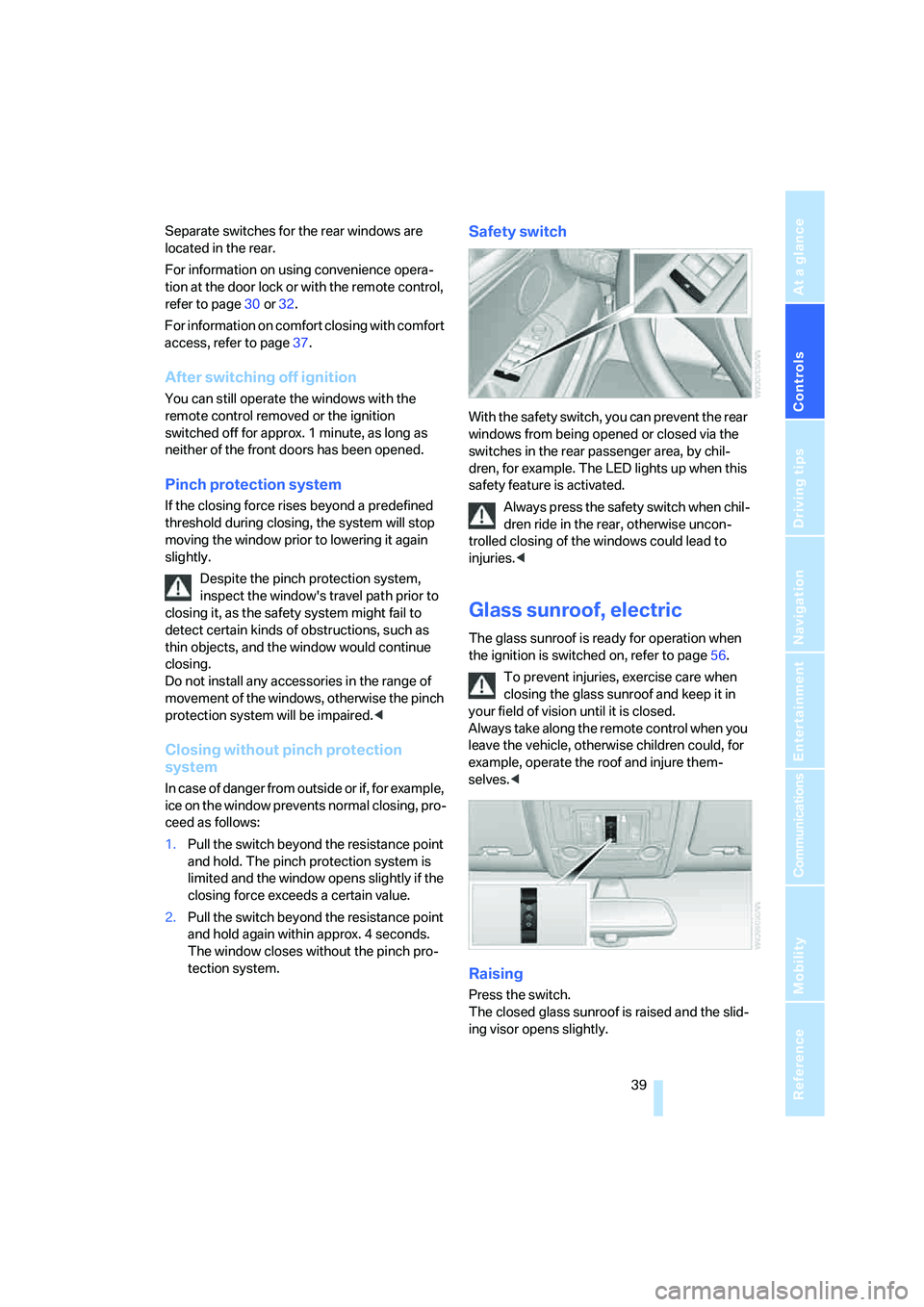
Safety switch
With the safety switch, you can prevent the rear
windows from being opened or closed via the
switches in the rear passenger area, by chil-
dren, for example. The LED lights up when this
safety feature is activated.
Always press the safety switch when chil-
dren ride in the rear, otherwise uncon-
trolled closing of the windows could lead to
injuries.<
Glass sunroof, electric
The glass sunroof is ready for operation when
the ignition is switched on, refer to page56.
To prevent injuries, exercise care when
closing the glass sunroof and keep it in
your field of vision until it is closed.
Always take along the remote control when you
leave the vehicle, otherwise children could, for
example, operate the roof and injure them-
selves.<
Raising
Press the switch.
The closed glass sunroof is raised and the slid-
ing visor opens slightly.
Page 43 of 288
Controls
41Reference
At a glance
Driving tips
Communications
Navigation
Entertainment
Mobility
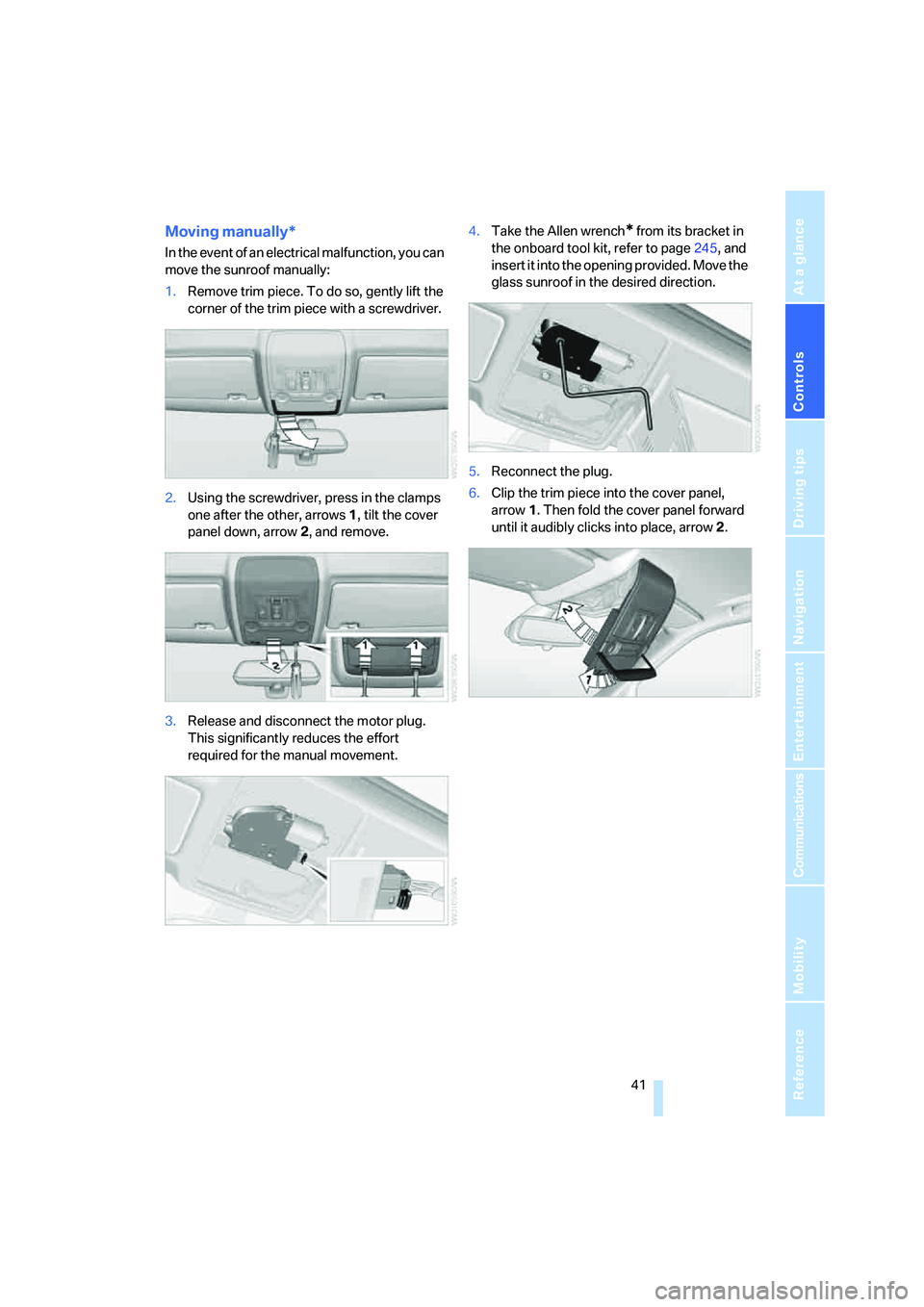
Moving manually*
In the event of an electrical malfunction, you can
move the sunroof manually:
1.Remove trim piece. To do so, gently lift the
corner of the trim piece with a screwdriver.
2.Using the screwdriver, press in the clamps
one after the other, arrows 1, tilt the cover
panel down, arrow 2, and remove.
3.Release and disconnect the motor plug.
This significantly reduces the effort
required for the manual movement.4.Take the Allen wrench
* from its bracket in
the onboard tool kit, refer to page245, and
insert it into the opening provided. Move the
glass sunroof in the desired direction.
5.Reconnect the plug.
6.Clip the trim piece into the cover panel,
arrow1. Then fold the cover panel forward
until it audibly clicks into place, arrow2.
Page 45 of 288

Controls
43Reference
At a glance
Driving tips
Communications
Navigation
Entertainment
Mobility
Seats
Note before adjusting
Never attempt to adjust or calibrate your
seat while the vehicle is moving. The seat
could respond with unexpected movement, and
the ensuing loss of vehicle control could lead to
an accident.
Never adjust manually adjustable seats while
the vehicle is moving, as otherwise the restrain-
ing effect of these seats during accidents could
be reduced.
Also on the passenger side, do not incline the
backrest too far to the rear while the vehicle is
being driven, otherwise there is a danger in the
event of an accident of sliding under the safety
belt, eliminating the protection normally pro-
vided by the belt.<
Also observe the information on damage to
safety belts on page47 and on the height of the
head restraints on page46.
Adjusting manually*
To ensure that the safety systems con-
tinue to provide optimized protection,
please observe the adjustment instructions on
page42.<
Pull the lever and slide the seat to the desired
position. After you release the lever, move the
seat forward or backward slightly so that it
engages fully.
Thigh support*
Pull the lever and adjust the thigh support in the
longitudinal direction.
Adjusting electrically
To ensure that the safety systems con-
tinue to provide optimized protection,
please observe the adjustment instructions on
page42.<
1Longitudinal direction
2Height
3Seat tilt
4Backrest
Page 47 of 288

Controls
45Reference
At a glance
Driving tips
Communications
Navigation
Entertainment
Mobility
3.Press the button:
The LED in the button lights up.
4.Press the desired memory button1 or2:
The LED goes out.
The positions of the driver's seat, the exte-
rior rearview mirrors, and steering wheel are
stored for the remote control currently in
use.
Calling up automatically
You can choose when the stored positions of
the driver's seat, exterior rearview mirrors, and
steering wheel are activated.
>Calling up when unlocking vehicle
>Calling up when opening driver's door
When using this feature, always make
sure that the footwell behind the driver's
seat is empty and unobstructed. Failure to do
so could cause injury to persons or damage to
objects behind the seat as a result of a rearward
movement of the seat.<
The system cancels the adjustment procedure
when you briefly press one of the seat adjust-
ment switches or one of the memory buttons.
Selecting calling up automatically
iDrive, for operating principle refer to page16.
1.Open the start menu.
2.Press the controller to open the menu.
3.Select "Settings" and press the controller.
4.Select "Vehicle / Tires" and press the con-
troller.
5.Change to upper field if necessary. Turn the
controller until "Door locks" is selected and
press the controller.6.Select "Central locking" and press the con-
troller.
7.Select "Last seat pos." and press the con-
troller.
8.Select "After unlocking" or "After door
opened".
9.Press the controller.
Deactivating calling up automatically
Select "Deactivated" and press the controller.
Calling up manually
Do not call up a position from the memory
while the vehicle is moving. There is a risk
of accident from unexpected movement of the
seat or steering wheel.<
Comfort mode
1.Open the driver's door after unlocking or
switch on radio readiness.
2.Briefly press the desired memory button1
or2.
The system cancels the adjustment procedure
when you briefly press one of the seat adjust-
ment switches or one of the memory buttons.
Safety feature
1.Close the driver's door and switch the igni-
tion on or off.
2.Press the desired memory button1 or2
and maintain pressure until the adjustment
process has been completed.
If the button was pressed inadvertently:
press the button again; the LED goes out.