2008 BMW X6 level
[x] Cancel search: levelPage 242 of 288
Under the hood
240
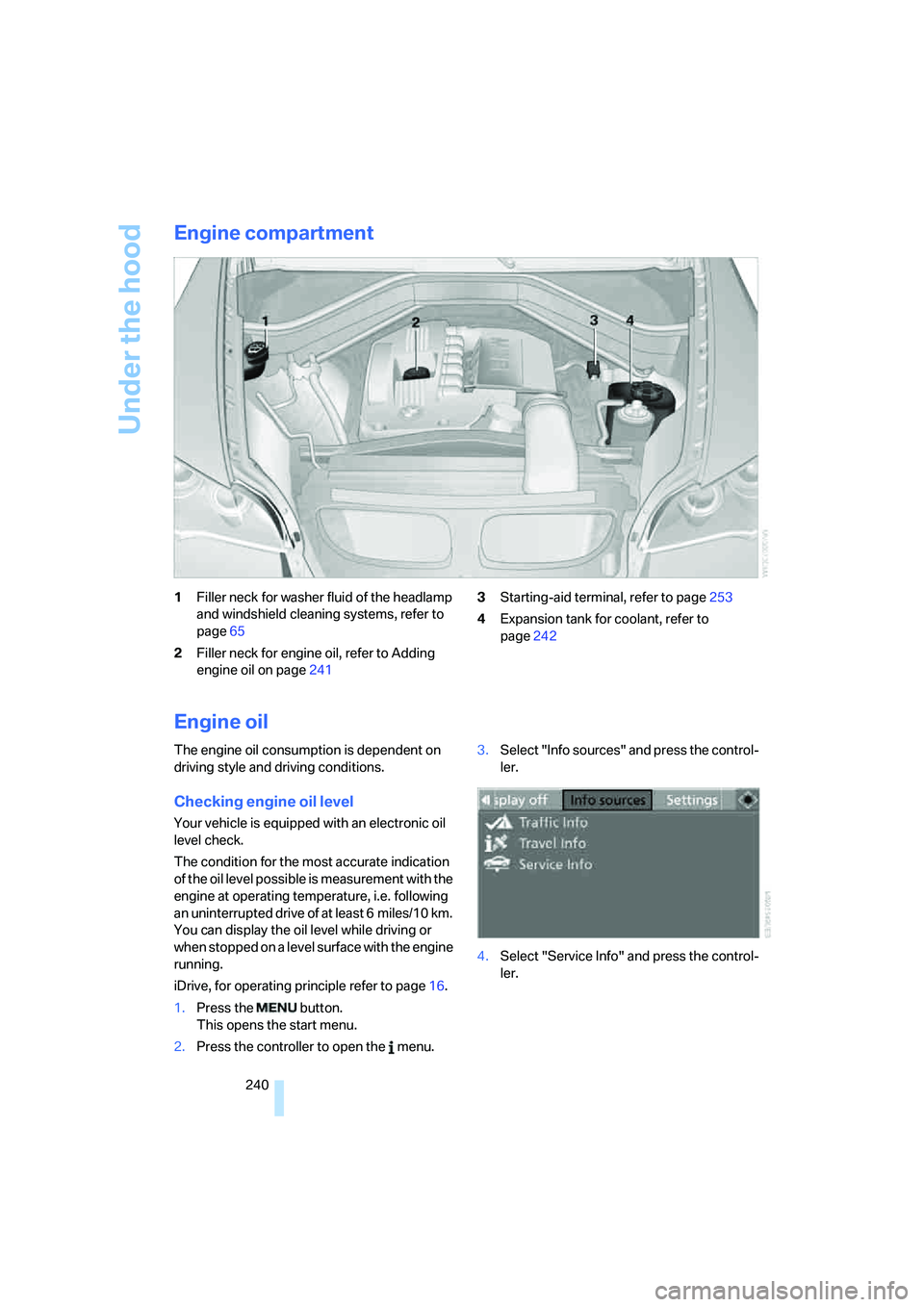
Engine compartment
1Filler neck for washer fluid of the headlamp
and windshield cleaning systems, refer to
page65
2Filler neck for engine oil, refer to Adding
engine oil on page2413Starting-aid terminal, refer to page253
4Expansion tank for coolant, refer to
page242
Engine oil
The engine oil consumption is dependent on
driving style and driving conditions.
Checking engine oil level
Your vehicle is equipped with an electronic oil
level check.
The condition for the most accurate indication
of the oil level possible is measurement with the
engine at operating temperature, i.e. following
an uninterrupted drive of at least 6 miles/10 km.
You can display the oil level while driving or
when stopped on a level surface with the engine
running.
iDrive, for operating principle refer to page16.
1.Press the button.
This opens the start menu.
2.Press the controller to open the menu.3.Select "Info sources" and press the control-
ler.
4.Select "Service Info" and press the control-
ler.
Page 243 of 288

Mobility
241Reference
At a glance
Controls
Driving tips
Communications
Navigation
Entertainment
5.Change to upper field if necessary. Turn the
controller until "Service requirements" is
selected and press the controller.
6.Change to the second field from the top if
necessary. Turn the controller until "Engine
oil level" is selected and press the control-
ler. The oil level is displayed.
Possible messages
>"Engine oil level O.K."
>"No measurement available: Updating
engine oil level measurement...":
Engine oil level is being measured. This
process can take approx. 3 minutes when
stopped on a level surface and approx.
5 minutes while driving.
>"Oil level at the minimum! Refill with 1 quart
of engine oil.":
Add 1 US quart/liter of engine oil at the next
opportunity.
>"Engine oil level too high":
Have the vehicle checked immedi-
ately, otherwise engine damage may
result if too much oil has been added.<
>"Please observe recalculated service inter-
val for engine oil":
Do not add engine oil. Before continuing to
drive, note the recalculated remaining mile-
age until the next oil change service, refer to
Service requirements on page72. Have the
system checked as soon as possible.
Adding engine oil
Do not add 1 US quart/liter of oil until a corre-
sponding message is shown on the Control Dis-
play.
Add oil within the next 125 miles/200 km,
otherwise the engine could be dam-
aged.<
Continuous exposure to used oil has
caused cancer in laboratory testing.
For this reason, any skin areas that come into
contact with oil should be thoroughly washed
with soap and water.
Keep oil, grease etc. out of reach of children and
observe the warnings on the containers to pre-
vent health risks.<
Oil change
Only have an oil change carried out by a BMW
Sports Activity Vehicle Center or a workshop
that works in accordance with BMW guidelines
and uses appropriately trained personnel.
Approved engine oils
The quality of the engine oil selected has critical
significance for the operation and service life of
an engine. BMW continuously approves spe-
cific oils after confirming their suitability for use
in its vehicles with extensive testing.
Do not use oil additives, as these may
result in engine damage.<
Only use approved BMW High Performance
Synthetic Oil.
If BMW High Performance Synthetic Oil is
unavailable, you can add small quantities of
other synthetic oils between oil changes. Only
use oils of the specification API SM or higher.
Page 244 of 288

Under the hood
242 Your BMW Sports Activity Vehicle Center
will be happy to answer detailed ques-
tions on BMW High Performance Synthetic Oil
or approved synthetic oils.<
You can also call BMW of North America at
1-800-831-1117 or visit the website at
www.bmwusa.com to obtain this information.
Viscosity grades
Viscosity is a measure of an oil's flow rating and
is specified in SAE grades.
The choice of the right SAE grade is based on
the climatic conditions in the region in which
you normally drive your BMW.
Approved oils belong to the SAE grades
5W-40 and 5W-30.<
These oils can be used for driving at all outside
temperatures.
Coolant
Do not add coolant to the cooling system
when the engine is hot. Escaping coolant
can cause burns.<
Coolant is composed of equal parts water and a
coolant additive. Not all commercially available
additives are suitable for your BMW. Your BMW
Sports Activity Vehicle Center can recommend
suitable additives.
Only use suitable additives, otherwise
engine damage may result. The additives
present a health hazard; observe the instruc-
tions on the containers.<
Comply with the appropriate environ-
mental protection regulations when dis-
posing of coolant additives.<
Checking coolant level
1.Do not open the hood until the engine has
cooled down.
2.Turn the cap of the expansion tank counter-
clockwise to allow any accumulated pres-
sure to escape, then continue turning to
open.3.The coolant level is correct when the cool-
ant level is between the MIN and MAX
marks, refer to the diagram adjacent to the
filler neck.
4.If the coolant is low, slowly add coolant up to
the specified level; do not overfill.
5.Turn the cap until there is an audible click.
6.Have the reason for the coolant loss elimi-
nated as soon as possible.
Page 251 of 288

Mobility
249Reference
At a glance
Controls
Driving tips
Communications
Navigation
Entertainment
and ensure that they remain outside the imme-
diate area in a safe place, such as behind a
guardrail.
If a warning triangle
* or portable hazard warning
lamp
* is r e q u ir e d , s e t i t up o n t h e ro a d s id e a t a n
appropriate distance from the rear of the vehi-
cle. Comply with all safety guidelines and regu-
lations.
Change the wheel only on a level, firm surface
which is not slippery. The vehicle or the jack
could slip to the side if you attempt to raise the
vehicle on a soft or slippery surface such as
snow, ice, tiles, etc.
Position the jack on a firm support surface.
Do not use a wooden block or similar object as a
support base for the jack, as this would prevent
it from extending to its full support height and
reduce its load-carrying capacity.
To avoid serious or fatal injury: never lie under
the vehicle, and never start the engine while it is
supported by the jack.<
What you will need
To avoid rattling noises later on, note the posi-
tions of the tools before removing them, then
return them to their initial positions after com-
pleting work.
The tools are located in the mount under the
floor panel flap.
1Vehicle jack
*
2Vehicle jack crank*
3Lug wrench*
Removing compact wheel
The compact wheel is located in the cargo bay
under the floor panel.
1.Remove the tool mount.
2.Unscrew the wing nut 1.
3.Remove the washer 2 laterally.
4.Remove the compact wheel.
Preparing wheel change
1.Observe the safety precautions above.
2.Loosen the lug bolts a half turn.
Jacking up vehicle
1.Position the vehicle jack at the jacking point
closest to the wheel so that the entire sur-
face of the jack base rests on the ground
perpendicularly beneath the jacking point.
The vehicle jack is designed for
changing wheels only. Do not attempt
to raise another vehicle model with it or to
raise any load of any kind. To do so could
cause accidents and personal injury.<
Page 272 of 288

Everything from A to Z
270 Convenience operation
– glass sunroof30,32
– glass sunroof with comfort
access37
– windows30,32
– windows with comfort
access37
– with comfort access37
Coolant242
– checking level242
– temperature69
Cooling, maximum106
Cornering Brake Control
CBC85
Courtesy lamps, refer to
Interior lamps102
Cradle for telephone or mobile
phone116
Cruise control66
Cruising range70
Cup holders117
Curb weight, refer to
Weights260
"Current position"155
Current position
– displaying155
– entering144
– storing144
"Customer
Relations"216,224
Cylinders, refer to Engine
data258
D
Dashboard, refer to
Cockpit10
Data258
– capacities261
– dimensions259
– engine258
– technical data258
– weights260
"Date"79
Date68
– display format79
– retrieving68
– setting79"Date format"79
"Daytime running lamps"100
Daytime running lamps100
"Deactivated"45
Decommissioning the vehicle,
refer to Caring for your
vehicle brochure
Defrosting windows105
Defrosting windows and
removing condensation105
Defrost position, refer to
Defrosting windows105
"Delete address book" for
navigation145
"Delete all numbers" on the
mobile phone215
"Delete data" for
navigation145
"Delete" for mobile
phone215
Destination address
– deleting145
– entering137,139
Destination for navigation
– destination list143
– entering136
– selecting from address
book144
– selecting using
information142
– selecting using voice139
– storing144
Destination guidance148
– canceling voice
instructions52
– changing specified
route146
– displaying route149
– distance and arrival148
– ending/continuing148
– starting148
– voice instructions151
– volume of voice
instructions152
Destination list for navigation
system
143Destinations recently driven
to143
"Details"
– DVD system in the rear198
– in audio mode188
"Dial" for mobile phone213
"Dial number"213
"Diamond button"52
Digital clock68
Digital compass114
Digital radio, refer to High
Definition Radio167
Digital Versatile Disc, refer to
– DVD changer179
– Player for navigation
DVD160
Dimensions259
Directional indicators, refer to
Turn signals64
Direction announcements,
refer to Voice
instructions151
Direction instructions, refer to
Voice instructions151
Directory for navigation, refer
to Address book144
Direct selection buttons21
Displacement, refer to Engine
data258
"Display"79
Display, refer to iDrive16
Displaying images198
Display lighting, refer to
Instrument lighting102
"Display off"21
Displays, refer to Instrument
panel12
"Display settings"79,97
Displays on the windshield,
refer to Head-Up Display97
Disposal
– battery of remote control
with comfort access38
– remote control battery192
– vehicle battery251
Distance, refer to
Computer70
Page 273 of 288

Reference 271
At a glance
Controls
Driving tips
Communications
Navigation
Entertainment
Mobility
"Distance to dest."71
Distance to destination, refer
to Computer70
Distance warning, refer to
PDC Park Distance
Control81
Door entry lighting102
Door key, refer to Keys/
remote control28
Door lock31
Door locking, confirmation
signals31
"Door locks"30,31,73
Doors
– manual operation32
– remote control29
DOT Quality Grades235
Downhill driving assistance,
refer to HDC87
Draft-free ventilation107
Drinks holder, refer to Cup
holders117
Drive for navigation DVDs160
"Driver's door only"30
Driver's seat, calibrating47
"Driver's seat climate"49
Driving lamps, refer to Parking
lamps/low beams99
Driving on poor roads130
Driving route, refer to
Displaying route149
Driving stability control
systems85
Driving through water127
Driving tips, refer to General
driving notes126
Dry air, refer to Cooling
function106
Drying the air, refer to Cooling
function106
DSC Dynamic Stability
Control86
– indicator lamp13,86
DTC Dynamic Traction
Control86
– activating86
– indicator lamp87"DVD"
– for DVD system in rear192
– in DVD changer180
DVD
– DVD changer179
– DVD system in rear190
– player for navigation
DVD160
DVD changer179
– adjusting brightness182
– adjusting contrast182
– adjusting tone182,185
– audio and video
playback180
– audio playback184
– chapter selection184
– controls179
– DVD audio content184
– DVD control181
– DVD country codes180
– DVD-specific menu183
– fast forward181
– filling179
– installation position179
– malfunctions180
– removing DVDs179
– reverse181
– selecting audio
language185
– selecting language182
– selecting subtitles183
– selecting track183
– selecting viewing angle183
– skip chapter181
– zoom182
"DVD format"
– for DVD system in rear195
– on DVD changer182
DVD for navigation134DVD system in rear190
– CD/DVD player191
– connecting headphones191
– controls190
– displaying images from CD/
DVD198
– DVD country codes192
– external device201
– information on CD/DVD
player200
– playing audio tracks from
CD/DVD196
– playing video from CD/
DVD192
– remote control191
– switching on/off192
Dynamic Performance
Control87
"Dynamic route" for
navigation147
Dynamic Stability Control
DSC86
Dynamic Traction Control
DTC86
E
Easy entry/exit51
Eject button, refer to Buttons
on the CD player160
Electrical malfunction
– automatic transmission with
Steptronic63
– door lock32
– driver's door32
– fuel filler door230
– glass sunroof, electric41
– parking brake60
Electric seat43
Electric steering wheel
adjustment51
Electronic brake-force
distribution85
Electronic oil level check240
Page 274 of 288

Everything from A to Z
272 Emergency operation, refer to
Manual operation
– door lock32
– driver's door32
– fuel filler door230
– transmission lock, automatic
transmission63
Emergency request252
Emergency services, refer to
Roadside Assistance253
"Enabled services"227
"Enable services"227
"End call"214
Engine
– breaking-in126
– data258
– oil temperature69
– overheated, refer to Coolant
temperature69
– speed258
– starting57
– starting, with comfort
access37
– switching off57
Engine compartment240
Engine coolant242
Engine oil
– adding241
– additives, refer to Approved
engine oils241
– approved engine oil241
– checking oil level240
– electronic oil level check240
– temperature69
"Engine oil level"241
Engine oil temperature69
Engine output, refer to Engine
data258
Engine overheating, refer to
Coolant temperature69
Engine speed258
Engine starting, refer to
Starting engine57
"Enter address"137
Entering country of
destination137
Entering destination137Entering house number or
intersection138
Entering intersection138
Entering street138
"Entertainment"160
Entertainment sound output
on/off161
"Equalizer", refer to Tone
control163
Equalizer, refer to Tone
control163
"ESN"170
ESP Electronic Stability
Program, refer to DSC
Dynamic Stability
Control86
Event Data Recorders244
Exhaust system, refer to Hot
exhaust system127
Exterior mirrors49
– adjusting49
– automatic dimming
feature51
– automatic heating50
– folding in and out50
– tilting down passenger-side
exterior mirror50
External audio device116
– refer to AUX-In
connection186
Eye for tow-starting and
towing, refer to Tow
fitting254
F
Fader, refer to Tone
control162
Failure messages, refer to
Check Control75
False alarm, refer to Avoiding
unintentional alarms36
Fastening safety belts, refer to
Safety belts47
– warning lamp47
Fastening system,
adaptive120Fastest route for
navigation146
Fast forward
– CD changer176
– CD player176
– DVD changer181
"Fast route" for
navigation146
Fault displays, refer to Check
Control75
Filler neck for washer fluid65
First aid, refer to First-aid
kit253
First-aid kit253
Flashing during locking/
unlocking, refer to Setting
confirmation signals31
Flashlight116
Flat tire
– changing wheels248
– compact wheel248
– Flat Tire Monitor89
– run-flat tires90,92,237
– TPM Tire Pressure
Monitor91
Flat Tire Monitor FTM89
Fluid reservoir, refer to Filler
neck for washer fluid65
"FM", reception
range161,164
FM, waveband164
Fog lamps101
– indicator lamp101
Folding display screen open/
closed, DVD system in
rear190
Folding rear seat backrest120
Footbrake, refer to Braking
safely127
Footwell lamps102
For your own safety5
4-wheel drive system, refer to
xDrive87
Front airbags95
Front passenger airbags95
– deactivating95
– refer to Exception of front
passenger seat
53
Page 278 of 288

Everything from A to Z
276 Mirror dimming feature51
Mirrors49
– automatic curb monitor50
– exterior mirrors49
– folding in and out50
– heating50
– interior rearview mirror50
– memory, refer to Seat, mirror
and steering wheel
memory44
"Missed calls"214
Missed calls215
Mobile phone
– accepted calls215
– adjusting volume212
– calling213
– ending call213
– installation location, refer to
Center armrest, front116
– missed calls215
– operation via iDrive212
– redialing215
– refer to separate operating
instructions
– Top 8215
– touch tone dialing216
Monitor, refer to iDrive16
Monitoring tire pressure, refer
to FTM Flat Tire Monitor89
"Monitor on / off"52
MP3, refer to Compressed
audio files173
Multifunction steering wheel,
refer to Buttons on steering
wheel11
Multifunction switch
– refer to Turn signals/
headlamp flasher/high
beams64
– refer to Washer/wiper
system64
Music track, refer to
Tracks174
"Mute on / off"52
N
"Navigation"70,136,142
Navigation destination
– entering manually137,139
– home address146
– selecting via map141
Navigation drive, installation
location134
Navigation DVD134
– player160
Navigation instructions, refer
to Switching voice
instructions on/off151
Navigation system134
– address book144
– changing route152
– destination entry136
– destination guidance in
assistance window134
– destination list143
– displaying current
position155
– displaying route149
– ending/continuing
destination guidance148
– entering a destination
manually137,139
– last destinations143
– navigation DVD134
– opening136
– route list150
– searching for a special
destination142
– selecting destination using
information142
– selecting destination via
map141
– selecting route criteria146
– starting destination
guidance148
– switching off, refer to
Ending/continuing
destination guidance148
– voice instructions151
– volume adjustment152"Navigation voice
instructions"52,135
Neck support, refer to Head
restraints46
"New address" for
navigation144
"New destination"137,141
New remote control28
"New route"152
New wheels and tires237
"Next entertainment
source"52
"No video signal" for DVD
system in rear201
Nozzles, refer to Windshield
washer nozzles65
"NTSC color" for DVD system
in rear202
Nylon rope, refer to Tow-
starting and towing254
O
OBD socket244
Octane ratings, refer to Fuel
specifications231
Odometer68
Oil
– additives, refer to Approved
engine oils241
– approved engine oils241
– consumption, refer to
Checking engine oil
level240
– level240
– refilling, refer to Adding
engine oil241
Oil change interval, refer to
Service requirements72
"On a new destination" for
navigation142
Onboard computer, refer to
iDrive16
"Onboard info"70
Onboard toolkit245
"On destination"142
"On location"142