2008 BMW X6 check engine
[x] Cancel search: check enginePage 252 of 288
Replacing components
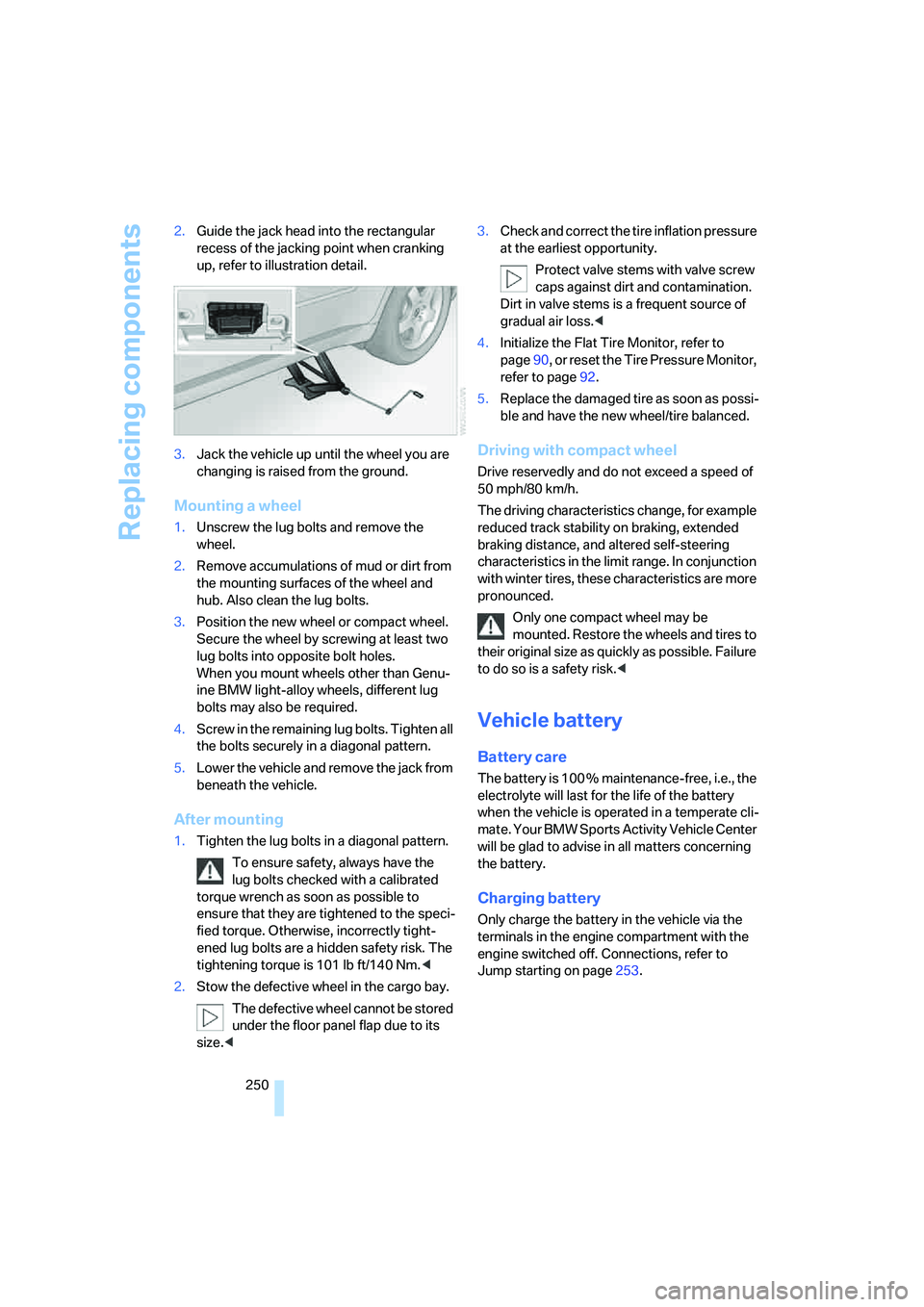
250 2.Guide the jack head into the rectangular
recess of the jacking point when cranking
up, refer to illustration detail.
3.Jack the vehicle up until the wheel you are
changing is raised from the ground.
Mounting a wheel
1.Unscrew the lug bolts and remove the
wheel.
2.Remove accumulations of mud or dirt from
the mounting surfaces of the wheel and
hub. Also clean the lug bolts.
3.Position the new wheel or compact wheel.
Secure the wheel by screwing at least two
lug bolts into opposite bolt holes.
When you mount wheels other than Genu-
ine BMW light-alloy wheels, different lug
bolts may also be required.
4.Screw in the remaining lug bolts. Tighten all
the bolts securely in a diagonal pattern.
5.Lower the vehicle and remove the jack from
beneath the vehicle.
After mounting
1.Tighten the lug bolts in a diagonal pattern.
To ensure safety, always have the
lug bolts checked with a calibrated
torque wrench as soon as possible to
ensure that they are tightened to the speci-
fied torque. Otherwise, incorrectly tight-
ened lug bolts are a hidden safety risk. The
tightening torque is 101 lb ft/140 Nm.<
2.Stow the defective wheel in the cargo bay.
The defective wheel cannot be stored
under the floor panel flap due to its
size.<3.Check and correct the tire inflation pressure
at the earliest opportunity.
Protect valve stems with valve screw
caps against dirt and contamination.
Dirt in valve stems is a frequent source of
gradual air loss.<
4.Initialize the Flat Tire Monitor, refer to
page90, or reset the Tire Pressure Monitor,
refer to page92.
5.Replace the damaged tire as soon as possi-
ble and have the new wheel/tire balanced.
Driving with compact wheel
Drive reservedly and do not exceed a speed of
50 mph/80 km/h.
The driving characteristics change, for example
reduced track stability on braking, extended
braking distance, and altered self-steering
characteristics in the limit range. In conjunction
with winter tires, these characteristics are more
pronounced.
Only one compact wheel may be
mounted. Restore the wheels and tires to
their original size as quickly as possible. Failure
to do so is a safety risk.<
Vehicle battery
Battery care
The battery is 100 % maintenance-free, i.e., the
electrolyte will last for the life of the battery
when the vehicle is operated in a temperate cli-
mate. Your BMW Sports Activity Vehicle Center
will be glad to advise in all matters concerning
the battery.
Charging battery
Only charge the battery in the vehicle via the
terminals in the engine compartment with the
engine switched off. Connections, refer to
Jump starting on page253.
Page 255 of 288

Mobility
253Reference
At a glance
Controls
Driving tips
Communications
Navigation
Entertainment
Warning triangle*
The warning triangle is located in the cargo bay.
Open the left-hand side panel.
Press the tab to release.
First-aid kit*
Some of the articles contained in the first-aid kit
have a limited service life. Therefore, check the
expiration dates of the contents regularly and
replace the contents concerned in good time if
necessary.
The first-aid kit is located in the cargo bay.
Open left side panel, remove warning triangle.
Roadside Assistance*
The BMW Roadside Assistance offers you
assistance in the event of a breakdown around
the clock, including on weekends and public
holidays.
The phone numbers of the Roadside Assis-
tance in your home country can be found in the
Contact brochure.With BMW Assist or TeleService, you can con-
tact BMW Roadside Assistance for assistance
in the event of a breakdown directly via iDrive,
refer to page222.
Jump starting
When your battery is discharged, you can use
two jumper cables to start your BMW with
power from the battery in a second vehicle. You
can also use the same method to help start
another vehicle. Use only jumper cables with
fully-insulated clamp handles.
To avoid the risk of potentially fatal injury,
always avoid all contact with electrical
components while the engine is running. Care-
fully adhere to the following sequence, both to
prevent damage to one or both vehicles, and to
guard against possible personal injuries.<
Preparation
1.Check whether the battery of the other
vehicle has a voltage of 12 Volts and
approximately the same capacitance in Ah.
This information can be found on the bat-
tery.
2.Switch off the engine of the assisting vehi-
cle.
3.Switch off any electrical systems and com-
ponents in both vehicles.
There must not be any contact between
the bodies of the two vehicles, otherwise
there is a danger of shorting.<
Connecting jumper cables
To avoid personal injury from sparks, fol-
low this sequence when connecting
jumper cables.<
On your BMW the so-called starting-aid termi-
nal in the engine compartment acts as the bat-
tery positive terminal, also refer to the engine
compartment overview on page240. The cover
cap is marked with +.
Page 256 of 288

Giving and receiving assistance
254 1.Fold open the cover of the BMW starting-
aid terminal. To do so, pull the tab.
2.Attach one end of the jumper cable plus/+
to the positive terminal of the battery or a
starting-aid terminal of the vehicle provid-
ing assistance.
3.Attach the second end of the cable to the
positive terminal of the battery or to a start-
ing-aid terminal of the vehicle to be started.
4.Attach one end of the jumper cable minus/–
to the negative terminal of the battery or to
an engine or body ground of the assisting
vehicle.
Your BMW has a special nut as body ground
or negative pole.
5.Attach the second end of the cable to the
negative terminal of the battery or to the
engine or body ground of the vehicle to be
started.
Starting engine
1.Start the engine on the assisting vehicle
and allow it to run at idle for several minutes
at slightly increased speed.
2.Start the engine on the other vehicle in the
usual way.
If the first starting attempt is not successful, wait a few minutes before another attempt
in order to allow the discharged battery to
recharge.
3.Let the engines run for a few minutes.
4.Disconnect the jumper cables by reversing
the connection sequence.
Check the battery and recharge if necessary.
Never use spray fluids to start the
engine.<
Tow-starting and towing
Observe applicable laws and regulations
for tow-starting and towing.<
Do not transport any passengers other
than the driver in a vehicle that is being
towed.<
Using tow fitting
The screw-on tow-fitting must always be car-
ried in the vehicle. It can be screwed in at the
front or rear of the BMW.
It is located in the toolkit under the floor panel
flap in the cargo bay, refer to page245.
Use only the tow fitting provided with the
vehicle and screw it all the way in. Use the
tow fitting for towing only on roads. Avoid lateral
loading of the tow fitting, e.g. do not lift the vehi-
cle by the tow fitting. Otherwise damage to the
tow fitting and the vehicle can occur.<
Access to screw thread
Cover panel on left and right side of bumper:
press on the arrow symbol on the cover panel.
Front
Page 268 of 288

Everything from A to Z
266
Everything from A to Z
Index
"..." Identifies Control Display
texts used to select
individual functions, and
indicates where to find them
in the text.
A
ABS Antilock Brake
System85
Accessories6
Acoustic signal, refer to Check
Control75
Activated-charcoal filter108
"Activation time" for parked
car ventilation110
Active seat49
Active seat ventilation48
Active steering94
– warning lamp94
Adaptive brake lamps, refer to
Brake force display94
Adaptive Drive88
Adaptive fastening
system120
Adaptive Head Light101
"Add digits" for mobile
phone214
"Address book" for
navigation144
Address for navigation
– deleting145
– entering137,144
– selecting144
– storing144
– storing current position144
"Add to destination list"139
Adjusting confirmation signals
for locking and unlocking31
Adjusting temperature with
expanded-scope automatic
climate control105Adjusting the tone during
audio operation, refer to
Tone control161
Adjusting thigh
support43,44
"After door opened"45
"After unlocking"45
Airbags95
– sitting safely42
– warning lamp96
Air distribution
– automatic104,109
– manual105
Airing, refer to Ventilation107
Air recirculation106
– AUC Automatic
recirculated-air control106
– recirculated-air mode106
"Air recirculation on / off"52
Air vents103
– refer to Ventilation107
Air vents of automatic climate
control
103
Air volume105,109
AKI, refer to Fuel
specifications231
Alarm system35
– avoiding unintentional
alarms36
– interior motion sensor36
– switching off alarm35
– switching off tilt alarm
sensor and interior motion
sensor36
– tilt alarm sensor36
"All channels" on satellite
radio171
"All doors"30
All-season tires, refer to
Winter tires238
"All stations", displaying on
radio164All-wheel drive, refer to
xDrive87
Alterations, technical, refer to
For your own safety5
"AM", reception
range161,164
"Angle of view"
– DVD changer183
– DVD system in rear195
Antenna for mobile phone206
Antifreeze
– coolant242
– washer fluid65
Antilock Brake System
ABS85
Anti-theft system
– refer to Alarm system35
– refer to Central locking
system29
Approved axle loads, refer to
Weights260
Approved engine oils241
Approved gross vehicle
weight, refer to Weights260
Armrest, refer to Center
armrest, front116
Around the center console14
Around the steering wheel10
Arrival time
– refer to Computer70
– refer to Starting destination
guidance148
"Arrow display" for
navigation149
Arrow view for navigation
system149
Ashtray
– front117
– rear117
Assist, refer to separate
operating instructions
Page 271 of 288

Reference 269
At a glance
Controls
Driving tips
Communications
Navigation
Entertainment
Mobility
"CD"161,173
– for DVD system in rear192
CD, refer to Playing audio
tracks, DVD system in
rear196
CD/DVD player, DVD system
in rear191
CD changer173
– compressed audio files173
– controls160
– fast forward/reverse176
– random sequence176
– repeating a track175
– sampling tracks175
– selecting a CD173
– selecting a track174
– switching on/off160
– tone control161
– volume161
CD player173
– compressed audio files173
– controls160
– fast forward/reverse176
– random sequence176
– repeating a track175
– sampling tracks175
– selecting a track174
– switching on/off160
– tone control161
– volume161
Cell phone, refer to Mobile
phone
Center armrest
– front116
– rear119
Center brake lamp248
Center console14
"Central locking"30
Central locking system29
– comfort access36
– from inside vehicle32
Changes, technical
– refer to For your own
safety5
– refer to Parts and
accessories6
Changing language on
Control Display80Changing tires237
Changing units of measure on
Control Display79
Changing wheels248
Check Control75
"Check Control
messages"76
Checking the air pressure,
refer to Tire inflation
pressure232
Children, transporting53
Child restraint fixing system
LATCH54
Child restraint systems53
Child-safety locks55
Child seats53
Chime, refer to Check
Control75
Chrome parts, care, refer to
Caring for your vehicle
brochure
Cigarette lighter, refer to
Lighter118
Cleaning, refer to Caring for
your vehicle brochure
"Climate"48
Clock68
– 12h/24h mode79
– setting time78
Closing
– from inside32
– using remote control29
Closing fuel filler cap230
Clothes hooks116
Cockpit10
Cold start, refer to Starting
engine57
"Color" for DVD system in
rear194
Comfort access36
– observe in car wash38
– replacing battery38
Comfort area, refer to Around
the center console14
Comfort start, refer to Starting
engine57
"Communica-
tion"212,222,223,224Compact Disc
– refer to CD changer173
– refer to CD player173
Compact wheel, wheel
change248
Compartment for remote
control, refer to Ignition
lock56
Compartments, refer to
Storage compartments116
Compass, digital114
Computer70
– displays in instrument
panel70
– displays on Control
Display70
– trip computer71
"Concierge"224
Concierge service224
Condition Based Service
CBS243
"Confirmation"31
Connecting car vacuum
cleaner, refer to Connecting
electrical devices118
Connecting headphones191
Consumption, refer to
Average fuel
consumption70
Consumption statistics, refer
to Average fuel
consumption70
"Continue guidance to
destination?"149
"Contrast"
– DVD changer182
– DVD system in rear194
Control Center, refer to
iDrive16
Control Display, refer to
iDrive16
– setting brightness79
Controller, refer to iDrive16
Controls
– DVD changer179
– DVD system in rear190
– refer to Cockpit10
Page 272 of 288

Everything from A to Z
270 Convenience operation
– glass sunroof30,32
– glass sunroof with comfort
access37
– windows30,32
– windows with comfort
access37
– with comfort access37
Coolant242
– checking level242
– temperature69
Cooling, maximum106
Cornering Brake Control
CBC85
Courtesy lamps, refer to
Interior lamps102
Cradle for telephone or mobile
phone116
Cruise control66
Cruising range70
Cup holders117
Curb weight, refer to
Weights260
"Current position"155
Current position
– displaying155
– entering144
– storing144
"Customer
Relations"216,224
Cylinders, refer to Engine
data258
D
Dashboard, refer to
Cockpit10
Data258
– capacities261
– dimensions259
– engine258
– technical data258
– weights260
"Date"79
Date68
– display format79
– retrieving68
– setting79"Date format"79
"Daytime running lamps"100
Daytime running lamps100
"Deactivated"45
Decommissioning the vehicle,
refer to Caring for your
vehicle brochure
Defrosting windows105
Defrosting windows and
removing condensation105
Defrost position, refer to
Defrosting windows105
"Delete address book" for
navigation145
"Delete all numbers" on the
mobile phone215
"Delete data" for
navigation145
"Delete" for mobile
phone215
Destination address
– deleting145
– entering137,139
Destination for navigation
– destination list143
– entering136
– selecting from address
book144
– selecting using
information142
– selecting using voice139
– storing144
Destination guidance148
– canceling voice
instructions52
– changing specified
route146
– displaying route149
– distance and arrival148
– ending/continuing148
– starting148
– voice instructions151
– volume of voice
instructions152
Destination list for navigation
system
143Destinations recently driven
to143
"Details"
– DVD system in the rear198
– in audio mode188
"Dial" for mobile phone213
"Dial number"213
"Diamond button"52
Digital clock68
Digital compass114
Digital radio, refer to High
Definition Radio167
Digital Versatile Disc, refer to
– DVD changer179
– Player for navigation
DVD160
Dimensions259
Directional indicators, refer to
Turn signals64
Direction announcements,
refer to Voice
instructions151
Direction instructions, refer to
Voice instructions151
Directory for navigation, refer
to Address book144
Direct selection buttons21
Displacement, refer to Engine
data258
"Display"79
Display, refer to iDrive16
Displaying images198
Display lighting, refer to
Instrument lighting102
"Display off"21
Displays, refer to Instrument
panel12
"Display settings"79,97
Displays on the windshield,
refer to Head-Up Display97
Disposal
– battery of remote control
with comfort access38
– remote control battery192
– vehicle battery251
Distance, refer to
Computer70
Page 274 of 288

Everything from A to Z
272 Emergency operation, refer to
Manual operation
– door lock32
– driver's door32
– fuel filler door230
– transmission lock, automatic
transmission63
Emergency request252
Emergency services, refer to
Roadside Assistance253
"Enabled services"227
"Enable services"227
"End call"214
Engine
– breaking-in126
– data258
– oil temperature69
– overheated, refer to Coolant
temperature69
– speed258
– starting57
– starting, with comfort
access37
– switching off57
Engine compartment240
Engine coolant242
Engine oil
– adding241
– additives, refer to Approved
engine oils241
– approved engine oil241
– checking oil level240
– electronic oil level check240
– temperature69
"Engine oil level"241
Engine oil temperature69
Engine output, refer to Engine
data258
Engine overheating, refer to
Coolant temperature69
Engine speed258
Engine starting, refer to
Starting engine57
"Enter address"137
Entering country of
destination137
Entering destination137Entering house number or
intersection138
Entering intersection138
Entering street138
"Entertainment"160
Entertainment sound output
on/off161
"Equalizer", refer to Tone
control163
Equalizer, refer to Tone
control163
"ESN"170
ESP Electronic Stability
Program, refer to DSC
Dynamic Stability
Control86
Event Data Recorders244
Exhaust system, refer to Hot
exhaust system127
Exterior mirrors49
– adjusting49
– automatic dimming
feature51
– automatic heating50
– folding in and out50
– tilting down passenger-side
exterior mirror50
External audio device116
– refer to AUX-In
connection186
Eye for tow-starting and
towing, refer to Tow
fitting254
F
Fader, refer to Tone
control162
Failure messages, refer to
Check Control75
False alarm, refer to Avoiding
unintentional alarms36
Fastening safety belts, refer to
Safety belts47
– warning lamp47
Fastening system,
adaptive120Fastest route for
navigation146
Fast forward
– CD changer176
– CD player176
– DVD changer181
"Fast route" for
navigation146
Fault displays, refer to Check
Control75
Filler neck for washer fluid65
First aid, refer to First-aid
kit253
First-aid kit253
Flashing during locking/
unlocking, refer to Setting
confirmation signals31
Flashlight116
Flat tire
– changing wheels248
– compact wheel248
– Flat Tire Monitor89
– run-flat tires90,92,237
– TPM Tire Pressure
Monitor91
Flat Tire Monitor FTM89
Fluid reservoir, refer to Filler
neck for washer fluid65
"FM", reception
range161,164
FM, waveband164
Fog lamps101
– indicator lamp101
Folding display screen open/
closed, DVD system in
rear190
Folding rear seat backrest120
Footbrake, refer to Braking
safely127
Footwell lamps102
For your own safety5
4-wheel drive system, refer to
xDrive87
Front airbags95
Front passenger airbags95
– deactivating95
– refer to Exception of front
passenger seat
53
Page 278 of 288

Everything from A to Z
276 Mirror dimming feature51
Mirrors49
– automatic curb monitor50
– exterior mirrors49
– folding in and out50
– heating50
– interior rearview mirror50
– memory, refer to Seat, mirror
and steering wheel
memory44
"Missed calls"214
Missed calls215
Mobile phone
– accepted calls215
– adjusting volume212
– calling213
– ending call213
– installation location, refer to
Center armrest, front116
– missed calls215
– operation via iDrive212
– redialing215
– refer to separate operating
instructions
– Top 8215
– touch tone dialing216
Monitor, refer to iDrive16
Monitoring tire pressure, refer
to FTM Flat Tire Monitor89
"Monitor on / off"52
MP3, refer to Compressed
audio files173
Multifunction steering wheel,
refer to Buttons on steering
wheel11
Multifunction switch
– refer to Turn signals/
headlamp flasher/high
beams64
– refer to Washer/wiper
system64
Music track, refer to
Tracks174
"Mute on / off"52
N
"Navigation"70,136,142
Navigation destination
– entering manually137,139
– home address146
– selecting via map141
Navigation drive, installation
location134
Navigation DVD134
– player160
Navigation instructions, refer
to Switching voice
instructions on/off151
Navigation system134
– address book144
– changing route152
– destination entry136
– destination guidance in
assistance window134
– destination list143
– displaying current
position155
– displaying route149
– ending/continuing
destination guidance148
– entering a destination
manually137,139
– last destinations143
– navigation DVD134
– opening136
– route list150
– searching for a special
destination142
– selecting destination using
information142
– selecting destination via
map141
– selecting route criteria146
– starting destination
guidance148
– switching off, refer to
Ending/continuing
destination guidance148
– voice instructions151
– volume adjustment152"Navigation voice
instructions"52,135
Neck support, refer to Head
restraints46
"New address" for
navigation144
"New destination"137,141
New remote control28
"New route"152
New wheels and tires237
"Next entertainment
source"52
"No video signal" for DVD
system in rear201
Nozzles, refer to Windshield
washer nozzles65
"NTSC color" for DVD system
in rear202
Nylon rope, refer to Tow-
starting and towing254
O
OBD socket244
Octane ratings, refer to Fuel
specifications231
Odometer68
Oil
– additives, refer to Approved
engine oils241
– approved engine oils241
– consumption, refer to
Checking engine oil
level240
– level240
– refilling, refer to Adding
engine oil241
Oil change interval, refer to
Service requirements72
"On a new destination" for
navigation142
Onboard computer, refer to
iDrive16
"Onboard info"70
Onboard toolkit245
"On destination"142
"On location"142