2008 BMW X6 sensor
[x] Cancel search: sensorPage 106 of 288

Climate
104
Automatic climate control
1Seat heating and ventilation, driver's
side48
2Temperature, left side of passenger com-
partment
3AUTO program
4Temperature, right side of passenger com-
partment
5Maximum cooling
6Seat heating
and ventilation, front passen-
ger side48
7Manual air distribution, front passenger side
8Switching cooling function on and off man-
ually9AUC Automatic recirculated-air control/
recirculated-air mode
10Manual air volume, switching off automatic
climate control, residual heat
11Rear window defroster
12Defrosting windows and removing conden-
sation
13Air grill for interior temperature sensor –
please keep clear and unobstructed
14Manual air distribution, driver's side
The current setting for manual air distribution is
displayed on the Control Display.
A congenial climate
The AUTO program offers the optimum air dis-
tribution and air volume for virtually all condi-
tions, refer to AUTO program below. Now you
only need to select an interior temperature
pleasant to you.
The following sections contain more detailed
information on the available setting options.
Most settings are stored for the remote control
currently in use, also refer to Personal Profile
settings on page28.
AUTO program
The AUTO program handles the
adjustment of air volume and air
distribution to the windshield and
side windows, in the direction of
the upper body and in the footwell.
It also adapts your instructions for the tempera-
ture to outside influences throughout the year.The cooling is switched on automatically with
the AUTO program. At the same time, a con-
densation sensor controls the program in such
a way that window condensation is prevented
as much as possible.
Intensity of AUTO program
You can adjust the intensity of the AUTO pro-
gram by repeatedly pressing the AUTO button.
The respective current setting is displayed
when the button on the display of the automatic
climate control is pressed.
You can also adjust the intensity of the AUTO
program via iDrive.
iDrive, for operating principle refer to page16.
1.Press the button.
This opens the start menu.
2.Move the controller to the left to open "Cli-
mate".
Page 108 of 288
Climate
106 >Driver's side: windows and footwell
>Individual program
Selecting program
Press the button repeatedly until
the desired program is shown on
the Control Display.
Adjusting air distribution individually –
individual program
The settings are stored in this program.
iDrive, for operating principle refer to page16.
1.Press the button.
This opens the start menu.
2.Move the controller to the left to open "Cli-
mate".
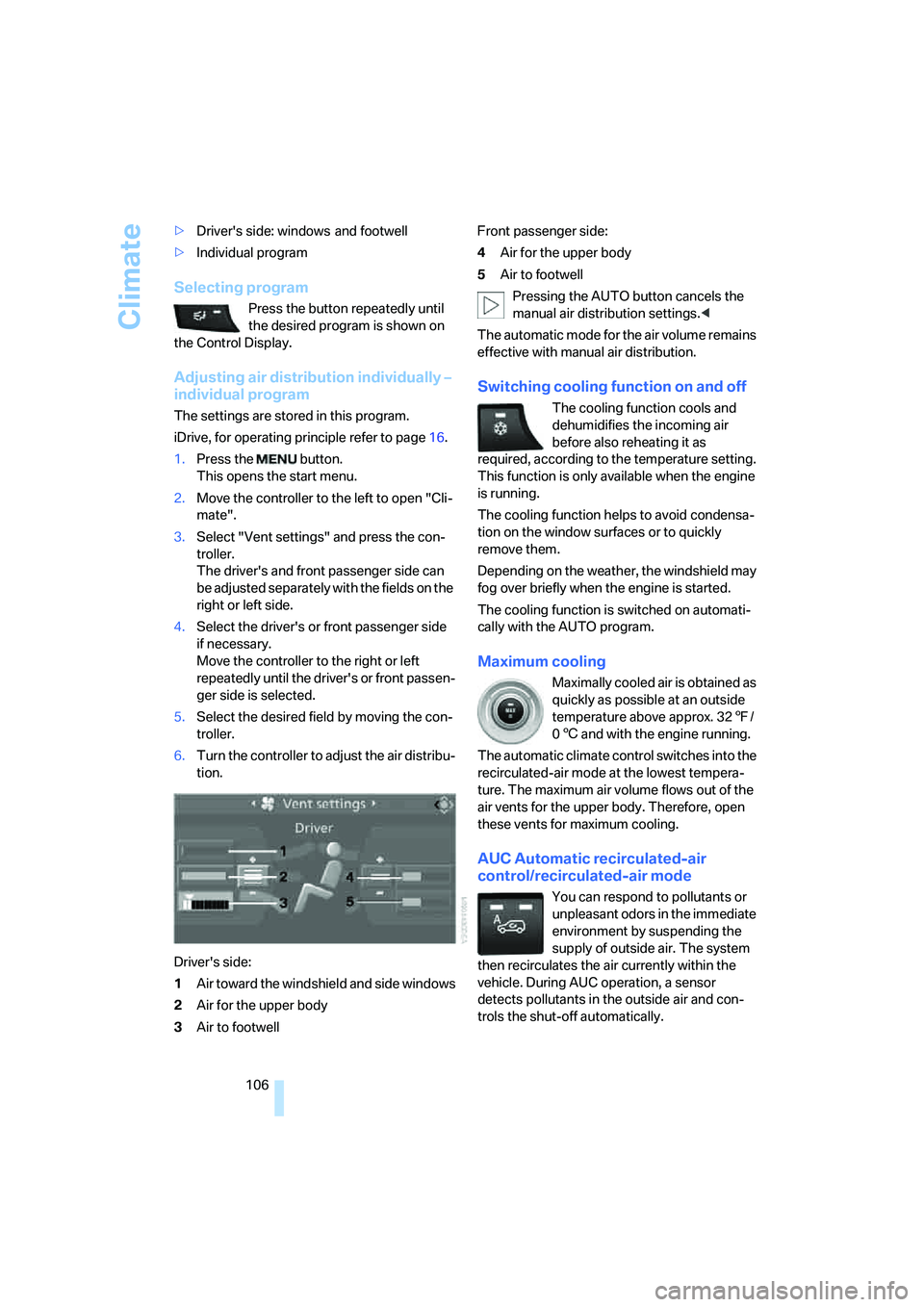
3.Select "Vent settings" and press the con-
troller.
The driver's and front passenger side can
be adjusted separately with the fields on the
right or left side.
4.Select the driver's or front passenger side
if necessary.
Move the controller to the right or left
repeatedly until the driver's or front passen-
ger side is selected.
5.Select the desired field by moving the con-
troller.
6.Turn the controller to adjust the air distribu-
tion.
Driver's side:
1Air toward the windshield and side windows
2Air for the upper body
3Air to footwellFront passenger side:
4Air for the upper body
5Air to footwell
Pressing the AUTO button cancels the
manual air distribution settings.<
The automatic mode for the air volume remains
effective with manual air distribution.
Switching cooling function on and off
The cooling function cools and
dehumidifies the incoming air
before also reheating it as
required, according to the temperature setting.
This function is only available when the engine
is running.
The cooling function helps to avoid condensa-
tion on the window surfaces or to quickly
remove them.
Depending on the weather, the windshield may
fog over briefly when the engine is started.
The cooling function is switched on automati-
cally with the AUTO program.
Maximum cooling
Maximally cooled air is obtained as
quickly as possible at an outside
temperature above approx. 327/
06 and with the engine running.
The automatic climate control switches into the
recirculated-air mode at the lowest tempera-
ture. The maximum air volume flows out of the
air vents for the upper body. Therefore, open
these vents for maximum cooling.
AUC Automatic recirculated-air
control/recirculated-air mode
You can respond to pollutants or
unpleasant odors in the immediate
environment by suspending the
supply of outside air. The system
then recirculates the air currently within the
vehicle. During AUC operation, a sensor
detects pollutants in the outside air and con-
trols the shut-off automatically.
Page 245 of 288
Mobility
243Reference
At a glance
Controls
Driving tips
Communications
Navigation
Entertainment
Maintenance
BMW maintenance system
The BMW maintenance system supports the
preservation of the traffic and operating safety
of your BMW. The service schedule also
includes operations related to the vehicle's
comfort and convenience features, such as
replacement of the filters for the inside air.
The ultimate objective is to ensure economical
maintenance by providing the ideal service for
your vehicle.
Should the day come when you decide to sell
your BMW, a complete dealer service history
will prove to be an asset of inestimable value.
CBS Condition Based Service
Sensors and special algorithms take the differ-
ent driving conditions of your BMW into
account. Condition Based Service uses this to
determine the current and future service
requirements. By letting you define a service
and maintenance regimen that reflects your
own individual requirements, the system builds
the basis for trouble-free driving.
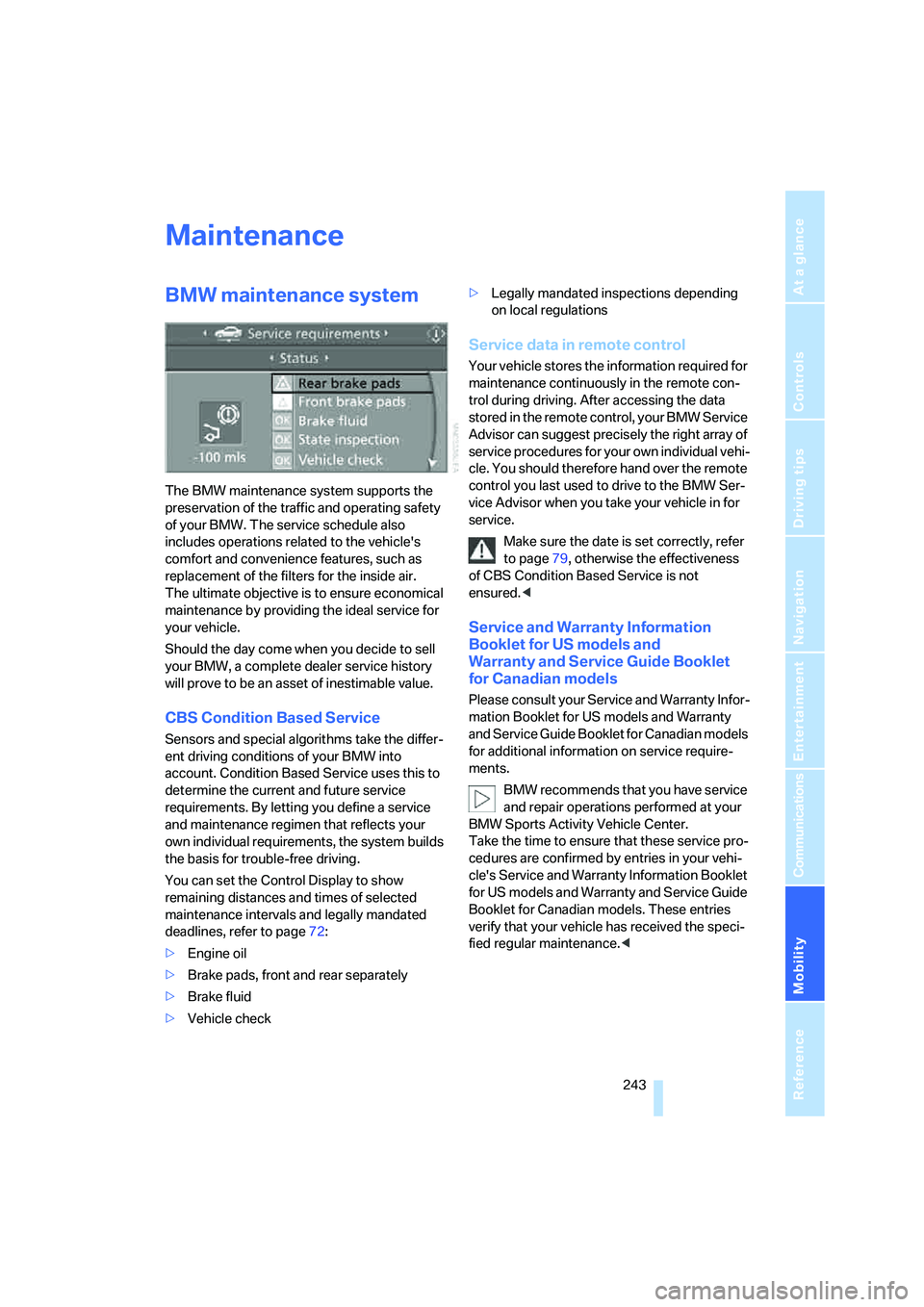
You can set the Control Display to show
remaining distances and times of selected
maintenance intervals and legally mandated
deadlines, refer to page72:
>Engine oil
>Brake pads, front and rear separately
>Brake fluid
>Vehicle check>Legally mandated inspections depending
on local regulations
Service data in remote control
Your vehicle stores the information required for
maintenance continuously in the remote con-
trol during driving. After accessing the data
stored in the remote control, your BMW Service
Advisor can suggest precisely the right array of
service procedures for your own individual vehi-
cle. You should therefore hand over the remote
control you last used to drive to the BMW Ser-
vice Advisor when you take your vehicle in for
service.
Make sure the date is set correctly, refer
to page79, otherwise the effectiveness
of CBS Condition Based Service is not
ensured.<
Service and Warranty Information
Booklet for US models and
Warranty and Service Guide Booklet
for Canadian models
Please consult your Service and Warranty Infor-
mation Booklet for US models and Warranty
and Service Guide Booklet for Canadian models
for additional information on service require-
ments.
BMW recommends that you have service
and repair operations performed at your
BMW Sports Activity Vehicle Center.
Take the time to ensure that these service pro-
cedures are confirmed by entries in your vehi-
cle's Service and Warranty Information Booklet
for US models and Warranty and Service Guide
Booklet for Canadian models. These entries
verify that your vehicle has received the speci-
fied regular maintenance.<
Page 268 of 288

Everything from A to Z
266
Everything from A to Z
Index
"..." Identifies Control Display
texts used to select
individual functions, and
indicates where to find them
in the text.
A
ABS Antilock Brake
System85
Accessories6
Acoustic signal, refer to Check
Control75
Activated-charcoal filter108
"Activation time" for parked
car ventilation110
Active seat49
Active seat ventilation48
Active steering94
– warning lamp94
Adaptive brake lamps, refer to
Brake force display94
Adaptive Drive88
Adaptive fastening
system120
Adaptive Head Light101
"Add digits" for mobile
phone214
"Address book" for
navigation144
Address for navigation
– deleting145
– entering137,144
– selecting144
– storing144
– storing current position144
"Add to destination list"139
Adjusting confirmation signals
for locking and unlocking31
Adjusting temperature with
expanded-scope automatic
climate control105Adjusting the tone during
audio operation, refer to
Tone control161
Adjusting thigh
support43,44
"After door opened"45
"After unlocking"45
Airbags95
– sitting safely42
– warning lamp96
Air distribution
– automatic104,109
– manual105
Airing, refer to Ventilation107
Air recirculation106
– AUC Automatic
recirculated-air control106
– recirculated-air mode106
"Air recirculation on / off"52
Air vents103
– refer to Ventilation107
Air vents of automatic climate
control
103
Air volume105,109
AKI, refer to Fuel
specifications231
Alarm system35
– avoiding unintentional
alarms36
– interior motion sensor36
– switching off alarm35
– switching off tilt alarm
sensor and interior motion
sensor36
– tilt alarm sensor36
"All channels" on satellite
radio171
"All doors"30
All-season tires, refer to
Winter tires238
"All stations", displaying on
radio164All-wheel drive, refer to
xDrive87
Alterations, technical, refer to
For your own safety5
"AM", reception
range161,164
"Angle of view"
– DVD changer183
– DVD system in rear195
Antenna for mobile phone206
Antifreeze
– coolant242
– washer fluid65
Antilock Brake System
ABS85
Anti-theft system
– refer to Alarm system35
– refer to Central locking
system29
Approved axle loads, refer to
Weights260
Approved engine oils241
Approved gross vehicle
weight, refer to Weights260
Armrest, refer to Center
armrest, front116
Around the center console14
Around the steering wheel10
Arrival time
– refer to Computer70
– refer to Starting destination
guidance148
"Arrow display" for
navigation149
Arrow view for navigation
system149
Ashtray
– front117
– rear117
Assist, refer to separate
operating instructions
Page 276 of 288

Everything from A to Z
274
I
IBOC, refer to High Definition
Radio167
Ice, refer to Outside
temperature warning68
Ice warning, refer to Outside
temperature warning68
ID3 tag, refer to Information on
track174
Identification, tire238
Identification mark, run-flat
tires237
iDrive16
– assistance window20
– changing language80
– changing menu page19
– changing settings78
– changing units of measure
and display type79
– confirming selection or
entry19
– controller16
– controls16
– displays, menus17
– selecting menu item19
– setting brightness79
– setting date79
– setting time78
– start menu17
– status information20
– symbols18
Ignition56
– switched off56
– switched on56
Ignition key, refer to Keys/
remote control28
Ignition key position 1, refer to
Radio readiness56
Ignition key position 2, refer to
Ignition on56
Ignition lock56
– starting engine with comfort
access37
Independent ventilation, refer
to Parked car ventilation109Indicator/warning lamps13
– active steering94
– airbags96
– DSC13,86
– DTC87
– fasten safety belt47
– Flat Tire Monitor90
– TPM Tire Pressure
Monitor92
Individual air distribution106
Individually programmable
buttons on steering
wheel51
Individual settings, refer to
Personal Profile28
Inflation pressure, refer to Tire
inflation pressure232
Inflation pressure monitoring
– refer to FTM Flat Tire
Monitor89
– refer to TPM Tire Pressure
Monitor91
Information
– on another location142
– on country142
– on current position142
– on destination location142
"Information on
destination"143
"Info sources"73
Initializing
– Flat Tire Monitor90
– refer to Power failure251
– refer to Setting date79
– refer to Setting time78
– seat, mirror and steering
wheel memory44
"Input map"141
Installation position
– DVD changer179
– mobile phone116
Instructions for navigation
system, refer to Voice
instructions151
Instrument cluster, refer to
Instrument panel12
Instrument illumination, refer
to Instrument lighting102
Instrument lighting102Instrument panel12
– refer to Cockpit10
Integrated key28
Integrated universal remote
control112
Interesting destination for
navigation142
"Interim time"77
Interior lamps102
– switching on with remote
control30
Interior motion sensor36
– switching off36
Interior rearview mirror50
– automatic dimming
feature51
– compass114
Intermittent mode of the
wipers64
J
Jacking points249
Joystick
– refer to iDrive16
– refer to Selector lever,
selecting transmission
positions61
Jumpering, refer to Jump
starting253
Jump starting253
K
Keyless-Go, refer to Comfort
access36
Keyless opening and closing,
refer to Comfort access36
Key Memory, refer to Personal
Profile28
"Keypad"216
Keys28
– key-related settings, refer to
Personal Profile28
Kick-down, automatic
transmission with
Steptronic62
Knock control231
Page 280 of 288
Everything from A to Z
278 Radio key, refer to Keys/
remote control28
Radio position, refer to Radio
readiness56
Radio readiness56
– switched off56
– switched on56
– with comfort access37
Rain sensor65
"Random"
– for DVD system in rear197
– refer to Random
sequence176
"Random all"
– for DVD system in rear198
– in audio mode176
"Random directory"
– for DVD system in rear198
– in audio mode176
Random sequence176
"RDS" Radio Data
System167
Reading lamps102
Rear automatic climate
control108
– activating on Control
Display108
– air supply109
– switching off109
"Rear climate control"108
"Rear enabled"190
Rear entertainment, refer to
DVD system in rear190
Rear lamps, refer to Tail
lamps246
– replacing bulbs246
Rear seat backrest,
folding120
Rear seats
– folding over backrest120
– heating48,49
Rear socket118
Rear ventilation108
– rear automatic climate
control108Rear view camera83
– cleaning85
– displaying85
– driver assistance
functions83
– switching off83
– switching on83
Rearview mirror49
Rear window, heating105
Rear window safety switch39
"Received calls"214
Recent numbers in mobile
phone215
Reception level of mobile
phone, refer to Status
information20
Recirculated-air mode106
– air recirculation106
– AUC Automatic
recirculated-air control106
Reclining seat, refer to
Seats43
Recording times, refer to
Stopwatch77
"Redial" for mobile phone214
Reflectors, refer to Tail
lamps246
Refueling230
Releasing
– hood239
– refer to Unlocking37
"Relock door if not
opened"32
Remaining distance, refer to
Cruising range70
Remaining distance to
destination, refer to
Computer70
Remote control28
– comfort access36
– DVD system in rear191
– garage door opener112
– liftgate30
– malfunction31,38
– replacing battery38
Removing condensation on
the windows105"Repeat"
– for DVD system in rear197
– in audio mode176
"Repeat directory"
– for DVD system in
rear196,198
– in audio mode176
"Repeat track"
– for DVD system in
rear196,198
– in audio mode176
Replacement fuses251
Replacement of tires237
– changing wheels248
– new wheels and tires237
Replacing bulbs, refer to
Lamps and bulbs245
Replacing wheels/tires, refer
to New wheels and tires237
Replacing wiper blades245
Reporting an accident, refer to
Initiating an emergency
request252
Reporting safety defects7
Reserve warning, refer to Fuel
gauge
69
"Reset"90,92
– DVD changer182
– DVD system in rear195
– sound settings163
– stopwatch77
Reset, refer to Resetting tone
settings163
"resetting FTM …"90
Residual heat107
Restraint systems
– for children53
– refer to Safety belts47
Retreaded tires237
"Return"
– DVD changer183
– DVD system in rear195
Reverse
– CD changer176
– CD player176
– DVD changer181
Page 283 of 288

Reference 281
At a glance
Controls
Driving tips
Communications
Navigation
Entertainment
Mobility
Storing current position144
Storing radio stations166
Storing sitting position, refer
to Seat, mirror and steering
wheel memory44
Storing tires238
"Street" for destination
entry138
"Subtitles" for DVD system in
rear195
Summer tires, refer to Wheels
and tires232
Switches, refer to Cockpit10
Switching cooling function on
and off106
Switching off engine57
Switching on
– audio160
– CD changer160
– CD player160
– radio160
Switching on hour signal79
Swiveling headlamps, refer to
Adaptive Head Light101
Symbols4
– indicator/warning lamps13
– navigation system154
– traffic information with
navigation system152
T
Tachometer69
"Tailgate"34
Tail lamps246
– replacing bulbs246
Tank contents, refer to
Capacities261
Target cursor for
navigation141
Technical alterations, refer to
For your own safety5
Technical data258
Telematic, refer to
TeleService,
BMW Assist221Telephone
– refer to Mobile phone206
– refer to separate operating
instructions
"Telephone list"52
TeleService223
Temperature
– adjusting in upper body
region105
– adjusting with automatic
climate control105,109
– changing units of
measure79
– refer to Coolant
temperature69
Temperature display
– outside temperature68
– setting units79
– temperature warning68
Temperature warning68
Tempomat, refer to Cruise
control66
"Terminate services"226
"Text language"80
The individual vehicle5
Third brake lamp, refer to
Center brake lamp248
Tightening torque of the lug
bolts, refer to After
mounting250
Tilt alarm sensor, switching
off36
Tilting down passenger-side
exterior mirror50
"Time"78
"Time / Date"78
"Time format"79
Timer, refer to Preselecting
activation times110
"Timer 1" for parked car
ventilation110
"Timer 2" for parked car
ventilation110
Tire inflation pressures232
– checking232
– monitoring, refer to Flat Tire
Monitor89
Tire Pressure Monitor
TPM
91Tire Quality Grading235
Tires
– age235
– air loss90,92
– breaking-in126
– changing237
– condition236
– damage236
– flat tire, refer to Changing
wheels248
– inflation pressure232
– inflation pressure
monitoring, refer to FTM
Flat Tire Monitor89
– new wheels and tires237
– pressure loss90,92
– pressure monitoring, refer to
TPM Tire Pressure
Monitor91
– replacing248
– retreaded tires237
– run-flat tires237
– size235
– tread236
– wear indicators236
– wheel/tire combination237
– winter tires238
"Title" for DVD system in
rear195
TMC station, refer to Traffic
information152
"Tone"161
– for DVD system in rear195
Tone in audio mode
– adjusting161
– middle setting163
Tools, refer to Onboard
toolkit245
"Top 8" for mobile phone214
Torque
– engine258
– lug bolts, refer to After
mounting250
Touch tone dialing216
Tow fitting254
Towing254
– tow fitting254
"Town / City" for destination
entry137
Page 285 of 288

Reference 283
At a glance
Controls
Driving tips
Communications
Navigation
Entertainment
Mobility
Voice command system23
– short commands262
Voice instructions for
navigation system151
– muting52,151
– repeating52,151
– switching on/off52,151
– volume152
Voice phone book218
Volume160
– audio sources160
– mobile phone212
– setting speed-
dependent162
– voice instructions152
Volume distribution in audio
mode
– front/rear162
– right/left162
Volume of warning tones80
W
Warning lamps, refer to
Indicator and warning
lamps13
Warning messages, refer to
Check Control75
Warning tone, volume80
Warning triangle253
Warranty and Service Guide
Booklet for Canadian
models243
Washer/wiper system64
– rain sensor65
– washer fluid65
– windshield washer
nozzles65
Washer fluid65
– capacity of the reservoir66
Washing the vehicle, also refer
to Caring for your vehicle
brochure
Water on roads, refer to
Driving through water127
Waveband for radio164
"WB"169
Wear indicators in tires, refer
to Minimum tread depth236Weather Band169
Website4
Weights260
"Welcome light"100
Wheel/tire combination, refer
to New wheels and tires237
Wheel/tire damage236
Wheelbase, refer to
Dimensions259
Wheels and tires232
Width, refer to
Dimensions259
Windows38
– convenience operation30
– convenience operation from
outside32
– convenience operation with
comfort access37
– opening, closing38
– pinch protection system39
– safety switch39
Windshield
– cleaning, refer to Washer/
wiper system64
– defrosting, refer to
Defrosting windows105
– displays, refer to Head-Up
Display97
Windshield washer system
– refer to Washer/wiper
system64
– windshield washer
nozzles65
Windshield wipers, refer to
Washer/wiper system64
– replacing wiper blades245
Winter tires238
– storage
238
"With highways" for
navigation146
Word matching principle for
navigation147
Working in the engine
compartment239
Wrenches/screwdrivers, refer
to Onboard toolkit245
X
xDrive87
Xenon light245
– bulb changing245
Z
"Zoom" for DVD system in
rear195