2008 BMW X3 3.0SI ESP
[x] Cancel search: ESPPage 60 of 140
Technology for comfort, convenience and safety
58 seat from below. Otherwise, a correct analysis
of the seat cushion is not ensured.<
Status of passenger airbags
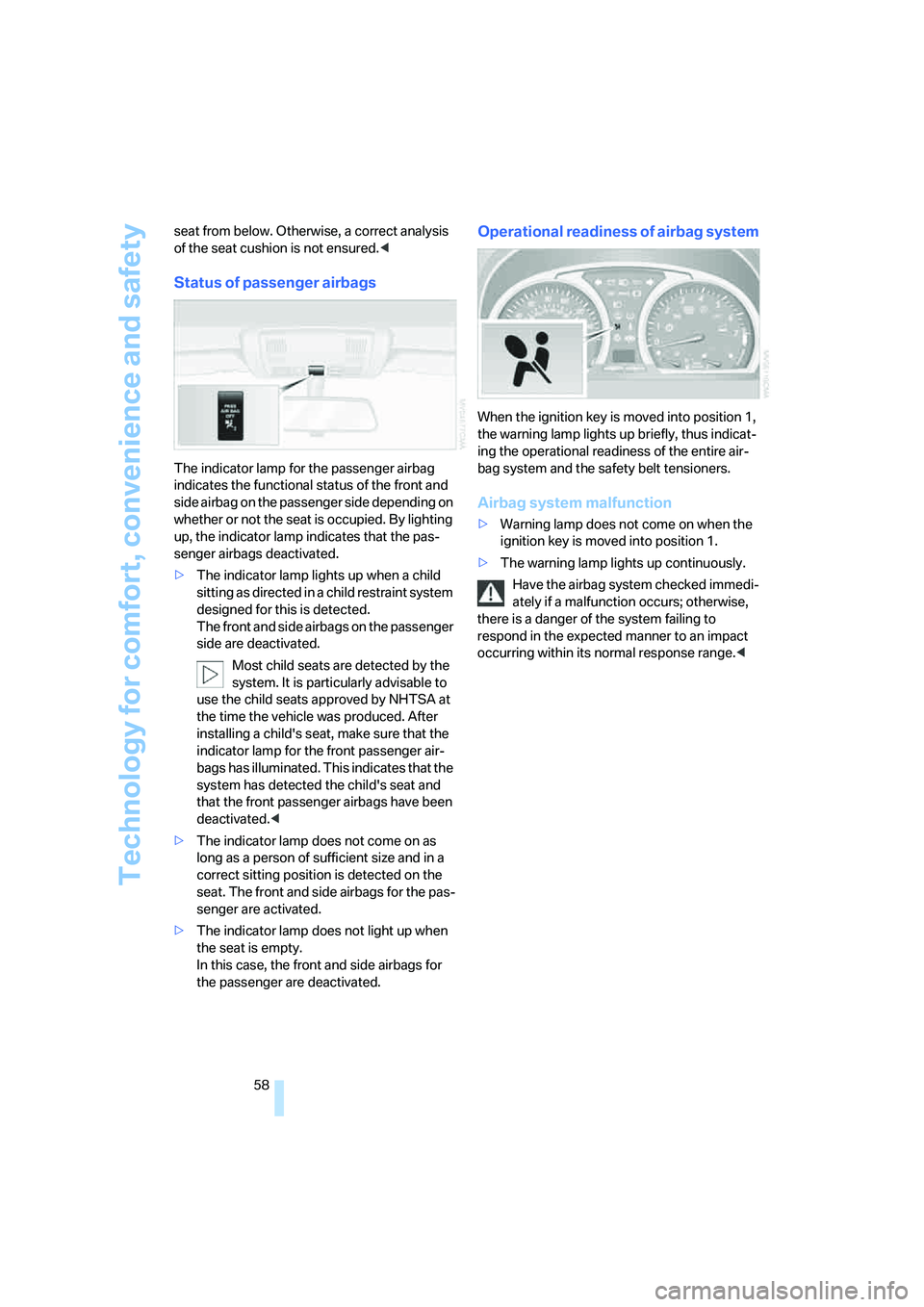
The indicator lamp for the passenger airbag
indicates the functional status of the front and
side airbag on the passenger side depending on
whether or not the seat is occupied. By lighting
up, the indicator lamp indicates that the pas-
senger airbags deactivated.
>The indicator lamp lights up when a child
sitting as directed in a child restraint system
designed for this is detected.
The front and side airbags on the passenger
side are deactivated.
Most child seats are detected by the
system. It is particularly advisable to
use the child seats approved by NHTSA at
the time the vehicle was produced. After
installing a child's seat, make sure that the
indicator lamp for the front passenger air-
bags has illuminated. This indicates that the
system has detected the child's seat and
that the front passenger airbags have been
deactivated.<
>The indicator lamp does not come on as
long as a person of sufficient size and in a
correct sitting position is detected on the
seat. The front and side airbags for the pas-
senger are activated.
>The indicator lamp does not light up when
the seat is empty.
In this case, the front and side airbags for
the passenger are deactivated.
Operational readiness of airbag system
When the ignition key is moved into position 1,
the warning lamp lights up briefly, thus indicat-
ing the operational readiness of the entire air-
bag system and the safety belt tensioners.
Airbag system malfunction
>Warning lamp does not come on when the
ignition key is moved into position 1.
>The warning lamp lights up continuously.
Have the airbag system checked immedi-
ately if a malfunction occurs; otherwise,
there is a danger of the system failing to
respond in the expected manner to an impact
occurring within its normal response range.<
Page 66 of 140

Air conditioner
64
Air volume
You can vary the air volume in
steps 1 through 4. The heating or
cooling output is more effective
with a higher air volume.
Switching system on/off
Turn air volume rotary switch to 0. This com-
pletely shuts off the blower and air conditioning
system and stops the flow of air.
To switch on the air conditioning system, set an
arbitrary air volume.
Temperature
To increase the temperature, turn
to the right, toward red.
For a lower temperature, turn the
rotary switch counterclockwise
toward blue.
Air distribution
You can direct air to flow onto the
windows , toward the upper
body and into the footwell .
Intermediate settings are possible.
Rear window defroster
The rear window heating switches
off automatically after a certain
amount of time. Depending on
your equipment package, the upper wires are
used as an antenna and are not part of the rear
window defroster.
Switching cooling function on/off
When the cooling function is on,
the air is cooled, dehumidified, and
then reheated depending on the
temperature setting.
Depending on the weather, the windshield may
fog over briefly when the engine is started.
Recirculated-air mode
You can respond to unpleasant
odors outside the vehicle by tem-
porarily suspending the supply of
outside air. The system then recirculates the air
currently within the vehicle.
If condensation starts to form on the
inside window surfaces during operation
in recirculated-air mode, you should switch it off
and increase the air supply as needed.
The recirculated-air mode should not be used
over a sustained period of time; otherwise, the
air quality inside the vehicle will steadily deteri-
orate.<
Defrosting windows and removing
condensation
1.Air volume 1 at level 4.
2.Temperature 2 toward right, red.
3.Air distribution 3 in position .
4.Deactivate recirculated-air mode 5.
5.Switch on the rear window heating 4 to
defrost the rear window.
6.Switch on cooling function.
Page 72 of 140

Practical interior accessories
70 The corresponding memory button1 is now
programmed with the signal of the original
hand-held transmitter.
You can use the system when the engine is run-
ning or when the ignition is switched on.
If the system cannot be operated after
repeated programming, check whether
the original hand-held transmitter uses an alter-
nating-code system. To do so, either read the
instructions of the original hand-held transmit-
ter or press and hold down the programmed
memory button1 of the integrated universal
remote control. If the LED2 on the integrated
universal remote control flashes rapidly for a
short time then lights up for approx. 2 seconds,
this indicates that the original hand-held trans-
mitter uses an alternating-code system. In the
case of an alternating-code system, program
the memory buttons1 as described in the sec-
tion below on alternating-code hand-held
transmitters.<
Alternating-code hand-held
transmitters
Consult the operating instructions of the unit
you wish to set when programming the univer-
sal remote control. You will find information
there on the possibilities for synchronization.
When programming hand-held transmitters
that employ an alternating code, please follow
these additional instructions:
Programming will be easier with the aid of
a second person.<
1.Park your vehicle within the range of the
remote-controlled equipment.
2.Program the integrated universal remote
control as described above in the section on
Fixed-code hand-held transmitters.
3.Locate the button on the receiver of the
equipment to be set, e.g. on its drive unit.
4.Press the button on the receiver of the
device you want to set up. After step 4, you
have approx. 30 seconds for step 5.
5.Press the programmed memory button1
of the integrated universal remote control
three times.The corresponding memory button1 is now
programmed with the signal of the original
hand-held transmitter.
If you have questions, please contact your
BMW Sports Activity Vehicle Center.<
Deleting stored programs
Press the left and right memory button1 for
approx. 20 seconds until the LED2 flashes rap-
idly:
All stored programs are deleted.
Reassigning individual programs
1.Hold the original hand-held transmitter at a
distance of approx. 4 in/10 cm to 12 in/
30 cm from the memory buttons1.
The required distance between the
hand-held transmitter and memory
buttons1 depends on the relevant system
of the original hand-held transmitter used.<
2.Press the desired memory button1 of the
integrated universal remote control.
3.When the LED 2 flashes slowly after approx.
20 seconds, press the transmit button of
the original hand-held transmitter. Release
both buttons as soon as the LED2 flashes
rapidly. If the LED2 does not flash rapidly
after approx. 15 seconds, then change the
distance and repeat the step.
Digital compass*
1Adjusting button
2Display
The display indicates the cardinal or intercardi-
nal direction in which you are currently driving.
Page 73 of 140

Reference
At a glance
Controls
Driving tips
Mobility
71
Basic operation
You can call up a number of functions by press-
ing the adjusting button with a sharp object
such as a ball-point pen or the like. The follow-
ing possible adjustments are displayed one
after another, depending on how long you press
and hold the adjusting button:>Press briefly: switches display on/off
>3 to 6 seconds: set compass zone
>6 to 9 seconds: calibrate compass
>9 to 12 seconds: set for left-hand/right-
hand drive
>12 to 15 seconds: set language
Setting compass zones
Set your vehicle to the appropriate compass
zone so that the compass functions correctly,
refer to world map with compass zones.
In order to set the compass zone, press and
hold the adjusting button for approx. 3-4 sec-
onds. The display indicates the number of the
currently set compass zone.To change the zone setting, repeatedly press
the adjusting button briefly until the number of
the compass zone that applies to your current
position is displayed.
The compass will be operational again after
approx. 10 seconds.
Calibrating digital compass
In the following situations, the digital compass
must be calibrated:
>The wrong cardinal direction appears on
the display.
>The cardinal direction displayed does not
change despite a change in the direction of
travel.
>Not all cardinal directions are displayed.
Procedure
1.Make sure that there are no large metal
objects or overhead power lines in the vicin-
ity of your vehicle and that you have enough
space to drive in a circle.
2.Input the currently applicable compass
zone.
3.Press the adjusting button for approx.
6-7 seconds in order to call up C. Then drive
in at least one complete circle at a maximum
Page 81 of 140
Reference
At a glance
Controls
Driving tips
Mobility
79
the openings in the rails. To slide the lashing
eyes, press the button.
Read and follow instructions accompany-
ing the heavy-duty cargo straps.<
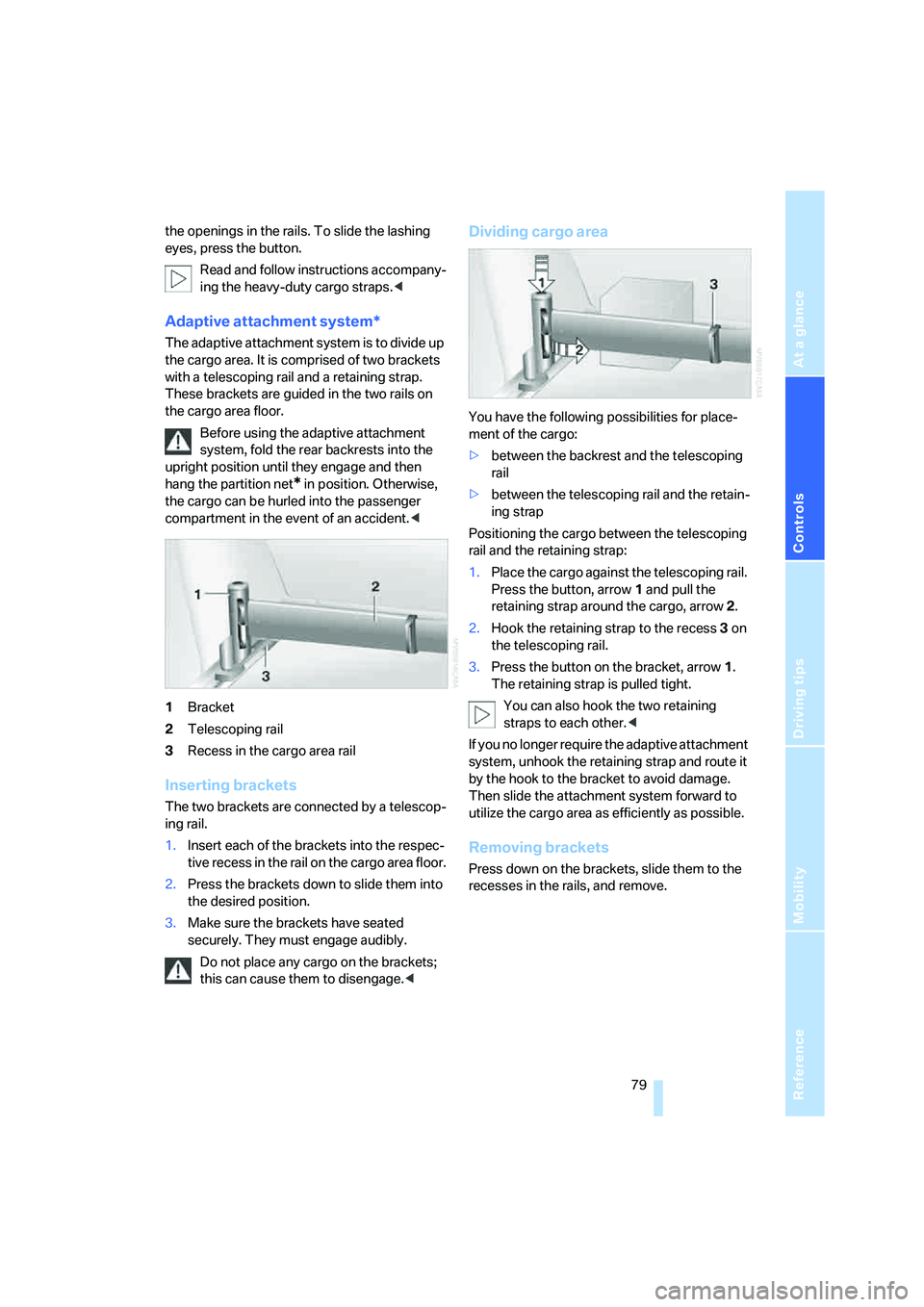
Adaptive attachment system*
The adaptive attachment system is to divide up
the cargo area. It is comprised of two brackets
with a telescoping rail and a retaining strap.
These brackets are guided in the two rails on
the cargo area floor.
Before using the adaptive attachment
system, fold the rear backrests into the
upright position until they engage and then
hang the partition net
* in position. Otherwise,
the cargo can be hurled into the passenger
compartment in the event of an accident.<
1Bracket
2Telescoping rail
3Recess in the cargo area rail
Inserting brackets
The two brackets are connected by a telescop-
ing rail.
1.Insert each of the brackets into the respec-
tive recess in the rail on the cargo area floor.
2.Press the brackets down to slide them into
the desired position.
3.Make sure the brackets have seated
securely. They must engage audibly.
Do not place any cargo on the brackets;
this can cause them to disengage.<
Dividing cargo area
You have the following possibilities for place-
ment of the cargo:
>between the backrest and the telescoping
rail
>between the telescoping rail and the retain-
ing strap
Positioning the cargo between the telescoping
rail and the retaining strap:
1.Place the cargo against the telescoping rail.
Press the button, arrow1 and pull the
retaining strap around the cargo, arrow2.
2.Hook the retaining strap to the recess3 on
the telescoping rail.
3.Press the button on the bracket, arrow1.
The retaining strap is pulled tight.
You can also hook the two retaining
straps to each other.<
If you no longer require the adaptive attachment
system, unhook the retaining strap and route it
by the hook to the bracket to avoid damage.
Then slide the attachment system forward to
utilize the cargo area as efficiently as possible.
Removing brackets
Press down on the brackets, slide them to the
recesses in the rails, and remove.
Page 85 of 140

Reference
At a glance
Controls
Driving tips
Mobility
83
Saving fuel
The fuel consumption of your vehicle is depen-
dent on various factors. You can improve your
vehicle's fuel consumption and reduce the
strain on the environment with several mea-
sures, your driving style and regular mainte-
nance.
Removing unnecessary cargo
Additional weight increases fuel consumption.
Removing attached parts following use
Remove auxiliary mirrors, roof or rear luggage
racks which are no longer required following
use. Attached parts on the vehicle impair the
aerodynamics and increase the fuel consump-
tion.
Closing windows and panorama glass
sunroof
An open panorama glass sunroof or an open
window also increases the aerodynamic drag,
and with it the fuel consumption.
Checking tire inflation pressures
regularly
Check the tire inflation pressures at least twice
a month and before starting off on a longer trip
and correct them if necessary.
An insufficient tire inflation pressure increases
the rolling resistance, therefore increasing fuel
consumption and tire wear.
Driving off immediately
Do not allow the engine to warm up by leaving it
running while the vehicle remains stationary.
Instead, drive off immediately at a moderate
engine speed. This enables a cold engine to
reach its operating temperature most rapidly.
Looking well ahead when driving
Avoid unnecessary acceleration and braking by
maintaining a corresponding distance to the
vehicle driving ahead. Driving smoothly and
looking ahead reduces fuel consumption.
Avoiding high engine speeds
Only use 1st gear when starting off. Accelerate
briskly from 2nd gear while avoiding high
engine speeds and shifting up prematurely.
When the desired speed is reached, shift into
the highest possible gear and drive at constant
speed at the lowest possible engine speed.
Always remember: driving at low engine speeds
decreases fuel consumption and reduces wear.
Using overrun conditions
When approaching a red light, take your foot off
the accelerator and allow the vehicle to coast in
the highest possible gear.
On a downhill stretch of road, take your foot off
the accelerator and allow the vehicle to coast in
the suitable gear.
The flow of fuel is interrupted in overrun.
Switching off the engine during longer
stops
Switch off the engine during longer stops, e.g.
at traffic lights, railroad crossings or in traffic
jams. You already save fuel from approx. 4 sec-
onds with the engine switched off.
Switching off functions currently not
required
Functions like the air conditioner, seat heating
or the rear-window defroster require a lot of
energy and consume additional fuel. This plays
a major role especially when driving in urban
and in stop-and-go traffic. Therefore, switch off
these functions when they are not really
required.
Having maintenance carried out
Have regular maintenance performed on the
vehicle to achieve optimum the economy and
service life of your vehicle. BMW recommends
having maintenance performed by a BMW
Sports Activity Vehicle Center. Also observe
the BMW maintenance system, refer to
page105.
Page 86 of 140

Things to remember when driving
84
General driving notes
Closing the liftgate
Operate the vehicle only when the liftgate
is completely closed; otherwise, exhaust
fumes could enter the interior of the vehicle.<
If special circumstances should make it abso-
lutely necessary to operate the vehicle with the
liftgate open:
1.Close all windows and the panorama glass
sunroof.
2.Greatly increase the air supply of the air
conditioning system or automatic climate
control, refer to page64 or67.
Hot exhaust system
High temperatures occur in the exhaust
system of every vehicle. Do not remove
the heat shields installed adjacent to various
sections of the exhaust system, and never apply
undercoating to them. When driving, standing
at idle, and parking, take care to avoid possible
contact between the hot exhaust system and
any highly flammable materials such as hay,
leaves, grass, etc. Such contact could lead to
a fire, resulting in serious personal injury and
property damage. Do not touch hot exhaust
pipe, it can cause burns.<
When the vehicle is parked
Condensation forms in the air conditioner/auto-
matic climate control system during operation,
and then exits under the vehicle. Traces of con-
densed water under the vehicle are therefore
normal.
Before driving into a car wash
Fold in the exterior mirrors, refer to page33;
otherwise, they could be damaged due to the
width of the vehicle.
Deactivate the rain sensor; otherwise, damage
could result from undesired wiper activation,
refer to page42.
Hydroplaning
When driving on wet or slushy roads,
reduce road speed. If you do not, a wedge
of water can form between tires and road sur-
face. This phenomenon is referred to as hydro-
planing, and is characterized by a partial or
complete loss of contact between tires and
road surface, ultimately undermining your abil-
ity to steer and brake the vehicle.<
The danger of hydroplaning increases as tire
tread depth decreases, also refer to Minimum
tread depth on page97.
Driving through water
Do not drive through water on the road if it
is deeper than 20 in/50 cm, and then only
at walking speed. Otherwise, the vehicle's
engine, the electrical systems, and the trans-
mission may be damaged.<
Using handbrake on inclines
Do not hold the vehicle in place on slopes
by slipping or riding the clutch, use the
handbrake instead. Otherwise, greater clutch
wear will result.<
Safe braking
Your BMW is equipped with ABS as standard
equipment. In situations in which it is required, it
is best to apply the brakes fully. Since the vehi-
cle maintains steering responsiveness, you can
nevertheless avoid possible obstacles with a
minimum of steering effort.
Pulsation at the brake pedal combined with
sounds from the hydraulic circuits indicates to
the driver that ABS is in its active mode.
Wet roads
On wet roads or in heavy rain, briefly apply light
pressure to the brake pedal every few miles.
Watch traffic conditions to ensure that this
maneuver does not endanger other road users.
The heat that is generated by the brake applica-
tions helps to dry the brake pads and rotors.
The full braking force will then be available
when you need it.
Page 87 of 140
Reference
At a glance
Controls
Driving tips
Mobility
85
Hills
To prevent overheating and reduced effi-
ciency of the brake system, drive long or
steep downhill grades in the gear in which the
least braking is required. Otherwise, even light
but continuous pressure on the brake can lead
to high temperatures, brake wear and possibly
even brake failure.<
The braking action of the engine can be further
intensified by downshifting, all the way down to
first gear if need be. This strategy helps you
avoid placing excessive loads on the brake sys-
tem. Downshifting in manual mode of automatic
transmission, refer to page41. When descend-
ing hills slowly, use HDC Hill Descent Control,
refer to page52.
Never drive with the clutch depressed,
with the transmission in neutral, or with
the engine switched off; otherwise, you will
have neither the braking action of the engine or
nor its power assistance to the brakes or steer-
ing.
Never allow floor mats, carpeting, or other arti-
cles to protrude into the area around the brake
or accelerator pedals and obstruct their move-
ment.<
Corrosion on brake rotors
When the vehicle is driven only occasionally,
during extended periods when the vehicle is not
used at all, and in operating conditions where
brake applications are less frequent, there is an
increased tendency for corrosion to form on
rotors, while contaminants accumulate on the
brake pads. This occurs because the minimal
pressure which must be exerted by the pads
during brake applications to clean the rotors is
not reached.
Should corrosion form on the brake rotors, the
brakes will tend to respond with a pulsating
effect that even extended application will fail to
cure.
Brake pads
The warning lamp lights up.
The brake pads have reached their min-imum pad thickness. Have brake pads replaced
immediately.
Cargo loading
To avoid loading the tires beyond their
approved carrying capacity, never over-
load the vehicle. Overloading can lead to over-
heating of the tire and increases the rate at
which damage develops inside the tires. The
ultimate result can assume the form of a sudden
blow-out.<
Make sure that no fluids leak in the cargo
area; as otherwise the vehicle could be
damaged.<
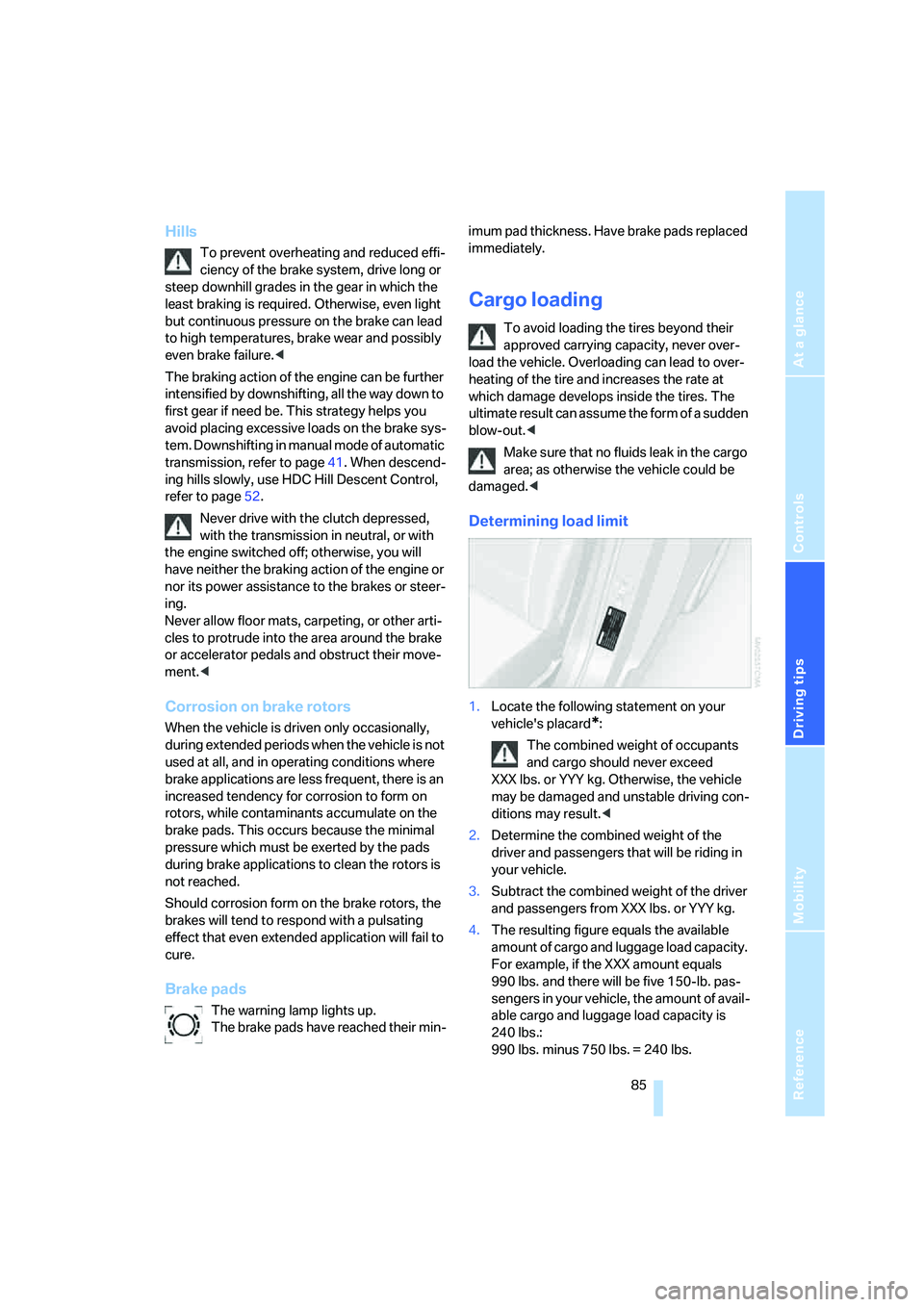
Determining load limit
1.Locate the following statement on your
vehicle's placard
*:
The combined weight of occupants
and cargo should never exceed
XXX lbs. or YYY kg. Otherwise, the vehicle
may be damaged and unstable driving con-
ditions may result.<
2.Determine the combined weight of the
driver and passengers that will be riding in
your vehicle.
3.Subtract the combined weight of the driver
and passengers from XXX lbs. or YYY kg.
4.The resulting figure equals the available
amount of cargo and luggage load capacity.
For example, if the XXX amount equals
990 lbs. and there will be five 150-lb. pas-
sengers in your vehicle, the amount of avail-
able cargo and luggage load capacity is
240 lbs.:
990 lbs. minus 750 lbs. = 240 lbs.