2008 BMW M6 belt
[x] Cancel search: beltPage 94 of 262

Technology for comfort, convenience and safety
92 But the front, knee and side airbags on the
front passenger side are still deactivated.
Operational readiness of airbag system
From radio readiness, refer to page59, the
warning lamp lights up briefly, indicating the
operational readiness of the entire airbag sys-
tem and the safety belt tensioners.
Airbag system malfunction
>Warning lamp does not light up as of radio
readiness.
>Warning lamp lights up continuously.
Have the airbag system checked immedi-
ately in case of a malfunction; otherwise,
there is a danger that the airbag system may not
respond in the expected manner in an accident
despite an impact of corresponding intensity.<
Convertible: rollover
protection system
The rollover protection system is automatically
activated in the event of an accident or a critical
driving situation, extreme inclination on the lon-
gitudinal axis, or loss of ground contact. The
rollover bars located behind the rear head
restraints are deployed within fractions of a sec-
ond.
As a supplement to the rollover bar integrated
into the windshield frame, the rollover protec-
tion system ensures that all vehicle occupants
have the necessary headroom.
Always keep the path of movement of the
rollover protection system clear.
In less severe accidents, you are protected by
the fastened safety belt and, depending on the severity of the accident, the belt tensioner and
the multistage airbag restraint system.<
Lowering
If the rollover protection system experienced no
impact after automatic activation, then it can be
lowered again. No tools are necessary for this
purpose.
1.Press the release backward and hold in that
position.
2.Press the rollover protection unit halfway
down from above.
3.Let go of the release.
4.Press the rollover protection unit down until
it snaps into place.
5.Use the same procedure for the second roll-
over protection unit.
Have the rollover protection system checked
after unexpected triggering.
Never move the convertible top when the
rollover protection system is raised.
No changes of any nature may be made to the
individual components of the rollover protec-
tion system and wiring.
Work on the rollover protection system may
only be performed at a BMW center.
Unprofessional attempts to service the system
Page 115 of 262

Controls
113Reference
At a glance
Driving tips
Communications
Navigation
Entertainment
Mobility
Securing cargo
After loading, secure the ski bag and its con-
tents. To do so, tighten the retaining belt at the
buckle.
Secure the ski bag in this way. If you fail to
do so, it could endanger vehicle occu-
pants during braking or evasive maneuvers.
To refit the filler element, insert the two tabs at
the bottom into the strip and press the filler ele-
ment back into place. Make sure that you do not
damage the rear seat upholstery.<
Page 206 of 262

Wheels and tires
204
Tire identification marks
Knowledge of the labeling on the side of the tire
makes it easier to identify and choose the right
tires.
Tire size
Speed letter
T = up to 118 mph/190 km/h
H = up to 131 mph/210 km/h
V = up to 150 mph/240 km/h
W = up to 167 mph/270 km/h
Y = up to 186 mph/300 km/h
Z = over 150 mph/240 km/h
Tire Identification Number
Tires with DOT codes meet the guidelines of
the US Department of Transportation.
DOT code:
Tire age
The tire's date of manufacture is indicated on
the sidewall:
DOT ... 3307 indicates that the tire was manu-
factured in week 33 of 2007.BMW recommends replacing all tires at least
every 6 years, even if some tires may last for
10 years. This also concerns the tire of the
spare wheel
*.
Uniform Tire Quality Grading
Quality grades can be found where applicable
on the tire sidewall between tread shoulder and
maximum section width. For example:
Tread wear 200 Traction AA
Temperature A
DOT Quality Grades
Tread wear
Traction AA A B C
Temperature A B C
All passenger car tires must conform to
Federal Safety Requirements in addition
to these grades.<
Tread wear
The tread wear grade is a comparative rating
based on the wear rate of the tire when tested
under controlled conditions on a specified gov-
ernment test course.
For example, a tire graded 150 would wear one
and one-half, 1γ, times as well on the govern-
ment course as a tire graded 100. The relative
performance of tires depends upon the actual
conditions of their use, however, and may
depart significantly from the norm due to varia-
tions in driving habits, service practices and dif-
ferences in road characteristics and climate.
Traction
The traction grades, from highest to lowest, are
AA, A, B, and C.
These grades represent the tire's ability to stop
on wet pavement as measured under controlled
conditions on specified government test sur-
faces of asphalt and concrete. A tire marked C
may have poor traction performance.
The traction grade assigned to this tire is
based on straight-ahead braking traction
tests, and does not include acceleration, cor-
nering, hydroplaning, or peak traction charac-
teristics.< e.g.
Nominal width in mm
Aspect ratio in Ξ
Belted construction – radial
Rim diameter in inches
Carrying capacity ID-code
(not in ZR tires)
Speed code letter
(in ZR tires before the R)
245/45 R 18 100 V
285/3519ZR
e.g.
Manufacturer code
for tire make
Tire size and tire design
Tire age
DOT xxxx xxx 3307
Page 223 of 262

Mobility
221Reference
At a glance
Controls
Driving tips
Communications
Navigation
Entertainment
Spare wheel*
1.Fold up the convertible top compartment
floor, refer to Convertible: increasing lug-
gage compartment capacity, page35.
2.Pull back lock1, fold open tensioning lock2
completely and loosen the belt3.
3.Remove the cover4.
4.Take the tool mounting out of the spare
wheel.
5.Remove the spare wheel.
Preparing wheel change
1.Observe the safety precautions above.
2.Prevent the vehicle from rolling:
Place the chock behind the front wheel on
the other side of the vehicle, or on inclines,
in front of this wheel. On steeply inclined
roads, always secure the vehicle against
rolling.
3.Loosen the lug bolts a half turn.
Jacking up vehicle
The jacking points for the car jack are located in
the positions shown.1.Position the vehicle jack at the jacking point
closest to the wheel so that the entire sur-
face of the jack base rests on the ground
perpendicularly beneath the jacking point.
The vehicle jack is designed for
changing wheels only. Do not attempt
to raise another vehicle model with it or to
raise any load of any kind. To do so could
cause accidents and personal injury.<
2.Guide the jack head into the rectangular
recess of the jacking point when cranking
up, refer to illustration detail.
3.Jack the vehicle up until the wheel you are
changing is raised from the ground.
Mounting a wheel
1.Unscrew the lug bolts and remove the
wheel.
2.Remove accumulations of mud or dirt from
the mounting surfaces of the wheel and
hub. Also clean the lug bolts.
3.Position the new wheel or spare wheel.
Secure the wheel by screwing at least two
lug bolts into opposite bolt holes.
When you mount wheels other than Genu-
ine BMW light-alloy wheels, different lug
bolts may also be required.
4.Screw in the remaining lug bolts. Tighten all
the bolts securely in a diagonal pattern.
5.Lower the vehicle and remove the jack from
beneath the vehicle.
Page 224 of 262
Replacing components
222
After mounting
1.Tighten the lug bolts in a diagonal pattern.
To ensure safety, always have the
lug bolts checked with a calibrated
torque wrench as soon as possible to
ensure that they are tightened to the speci-
fied torque. Otherwise, incorrectly tight-
ened lug bolts are a hidden safety risk. The
tightening torque is 88.5 lb ft/120 Nm.<
2.Check and correct the tire inflation pressure
at the earliest opportunity.
Protect valve stems with valve stem
seal caps against dirt and contamina-
tion. Dirt in valve stems is a frequent source
of gradual air loss.<
3.Initialize the Flat Tire Monitor, refer to
page86, and the Sequential Manual Trans-
mission, refer to After changing wheels/
tires on page207.
4.Replace the damaged tire as soon as possi-
ble and have the new wheel/tire balanced.
Stowing wheel and tools
Convertible: a rear wheel can only be
transported with the convertible top com-
partment floor folded up.<
1.Lay the wheel in the tool mounting.
2.Lay the cover on the mounting.
3.Coupe: center the wheel and cover relative
to the lashing eyes5.
Convertible: slide the wheel as far as possi-
ble to the left and to the rear.
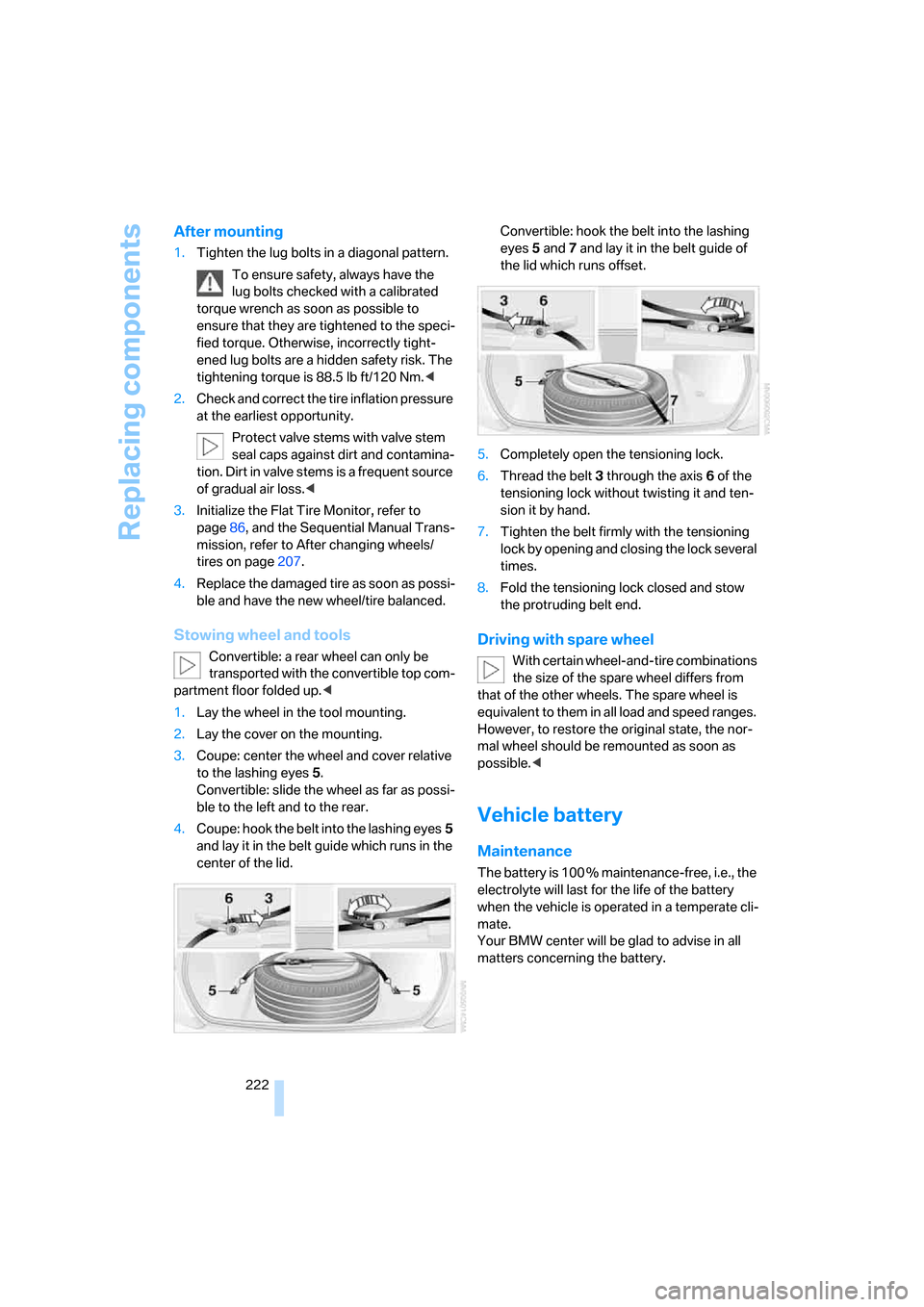
4.Coupe: hook the belt into the lashing eyes5
and lay it in the belt guide which runs in the
center of the lid.Convertible: hook the belt into the lashing
eyes5 and7 and lay it in the belt guide of
the lid which runs offset.
5.Completely open the tensioning lock.
6.Thread the belt3 through the axis6 of the
tensioning lock without twisting it and ten-
sion it by hand.
7.Tighten the belt firmly with the tensioning
lock by opening and closing the lock several
times.
8.Fold the tensioning lock closed and stow
the protruding belt end.
Driving with spare wheel
With certain wheel-and-tire combinations
the size of the spare wheel differs from
that of the other wheels. The spare wheel is
equivalent to them in all load and speed ranges.
However, to restore the original state, the nor-
mal wheel should be remounted as soon as
possible.<
Vehicle battery
Maintenance
The battery is 100 % maintenance-free, i.e., the
electrolyte will last for the life of the battery
when the vehicle is operated in a temperate cli-
mate.
Your BMW center will be glad to advise in all
matters concerning the battery.
Page 243 of 262

Reference 241
At a glance
Controls
Driving tips
Communications
Navigation
Entertainment
Mobility
"Assist. window off"21
AUC Automatic recirculated-
air control104
"Audio"151,153,158
Audio150
– controls150
– switching on/off150
– tone control151
– volume151
Audio device, external110
Automatic
– air distribution102
– air volume102
– cruise control67
– headlamp control96
– recirculated-air control
AUC104
– service notification193
– steering wheel
adjustment47
– storing stations156
Automatic car washes118
– also refer to Caring for your
vehicle brochure
Automatic climate control101
– automatic air
distribution102
– convertible program102
– switching on and off105
– ventilation with vehicle
parked106
Automatic closing of doors,
refer to Automatic soft
closing34
Automatic curb monitor52
Automatic lighting
– refer to Automatic headlamp
control96
– refer to Daytime running
lamps97
– refer to High-beam
assistant98
– refer to Interior lamps100
– refer to Pathway lighting97
– refer to Welcome lamps96
"Automatic programs"102
Automatic soft closing34Automatic station search155
"Automatic ventilation"106
AUTO program with
automatic climate
control102
"Autostore" on the
radio154,156
"AUX"150,170,
172
– in audio mode170
AUX-In connection110,170
Average fuel consumption71
– setting units79
"Avoid ferries" for navigation
system137
"Avoid highways" for
navigation system136
Avoiding freeways for
navigation136
Avoiding unintentional
alarms36
"Avoid tollroads" for
navigation system137
Axle loads, refer to
Weights235
"A - Z"184
B
Backrest contour, refer to
Lumbar support46
Backrests, refer to Seats46
Backrest width adjustment46
Backup lamps, replacing
bulbs, refer to Tail
lamps217
"Balance", refer to Tone
control152
Band-aids, refer to First-aid
kit225
Bass, refer to Tone
control151
"Bass", tone control151
Battery
– jump starting225
– refer to Vehicle battery222
Battery replacement, remote
control for comfort
access38BC button, refer to
Computer70
Being towed227
Belts, refer to Safety belts50
Beverage holder, refer to Cup
holders111
Blower, refer to Air
volume103
"Bluetooth"177
"BMW Assist"192
BMW Assist191
– activating196
– concierge service194
– contacting BMW Customer
Relations194
– displaying vehicle data197
– offered services191
– roadside assistance192
– TeleService193
– updating195
"BMW Contact"186
"BMW Contact
Numbers"186
BMW homepage4
BMW Maintenance
System214
"BMW Service settings"195
BMW website4
Bottle holder, refer to Cup
holders111
Bracket for telephone or
mobile phone, refer to Snap-
in adapter189
Brake assistant83
Brake force display90
Brake lamps
– replacing bulbs, refer to Tail
lamps217
– two-stage90
Brake rotors
– breaking-in116
– refer to Braking safely117
Page 248 of 262

Everything from A to Z
246 ESP Electronic Stability
Program, refer to DSC
Dynamic Stability
Control83
Event data recorders215
Exhaust system, refer to Hot
exhaust system117
Exterior mirrors51
– adjusting51
– automatic dimming
feature52
– automatic heating51
– folding in and out51
– tilting down passenger-side
mirror52
External audio device110
Eye for tow-starting and
towing, refer to Tow
fitting226
Eyes for lashing, refer to
Securing cargo119
F
"Fader", refer to Tone
control152
Fader, refer to Tone
control152
Failure messages, refer to
Check Control74
False alarm
– refer to Avoiding
unintentional alarms36
– refer to Switching off
alarm35
Fastening safety belts, refer to
Safety belts50
Fastest route for
navigation136
Fast forward
– CD changer168
– CD player168
"Fast route" for
navigation136
"Favorites", calling up with
radio157
Filler neck for washer fluid67Filling bottle, refer to
M Mobility System218
Filter, refer to Microfilter/
activated-charcoal filter105
Fine wood, refer to Caring for
your vehicle brochure
First aid, refer to First-aid
kit225
First-aid kit225
Flashing when locking and
unlocking, refer to Setting
confirmation signals31
Flashlight, refer to
Rechargeable flashlight110
Flat tire
– Flat Tire Monitor86
– M Mobility System218
– run-flat tires88
– spare wheel221
– Tire Pressure Monitor87
– warning lamp87,88
Flat Tire Monitor86
– false alarms86
– initializing system86
– limits of system86
– snow chains207
– warning lamp87
Floor mats, refer to Caring for
your vehicle brochure
Floor mats/carpets, refer to
Caring for your vehicle
brochure
Fluid reservoir, refer to Filler
neck for washer fluid67
"FM", reception
range150,154
FM, waveband154
Folding into raised position
convertible top
compartment floor,
Convertible35
Footbrake, refer to Braking
safely117
Footwell lighting, refer to
Interior lamps100
For specified oil grades, refer
to Approved engine oils212
For your own safety6Freeway, refer to Route
criteria136
Front airbags90
Front passenger airbags,
deactivating91
"FTM"87
FTM, refer to Flat Tire
Monitor86
Fuel
– average consumption71
– display70
– fuel specifications201
– high-quality brands201
– quality201
– specifications201
– tank contents, refer to
Capacities235
Fuel display, refer to Fuel
gauge70
Fuel filler door200
– releasing in the event of
electrical malfunction200
Fuel gauge70
Full mobile phone preparation
package176
Full screen display, refer to
Switching assistance
window off20
Fuses223
G
Garage-door opener, refer to
Integrated universal remote
control108
Gasoline
– refer to Average fuel
consumption71
– refer to Fuel
specifications201
– refer to Required fuel201
Gasoline display, refer to Fuel
gauge70
Gear changes63
Gear display, refer to Displays
in instrument cluster63
Gearshift lever, manual
transmission61
Page 250 of 262

Everything from A to Z
248 Indicator/warning lamps
– ABS Antilock Brake
System84
– airbags92
– brake system84
– DSC13,83
– DTC13
– Flat Tire Monitor87
– handbrake13,61
– MDrive13,53
– M Dynamic Mode13,83
– parking lamps/low beams13
– safety belt warning50
– TPM Tire Pressure
Monitor88
Indicator and warning lamps,
overview13
Inflation pressure, refer to Tire
inflation pressure202
Inflation pressure monitoring
– refer to Flat Tire Monitor86
– refer to Tire Pressure
Monitor87
Info menu17
Information
– on another location132
– on current position132
– on town/city of
destination132
"Information" for navigation
system132
Information menu, refer to
imenu17
"Information on
destination"133
"Info sources"73
Initializing
– Flat Tire Monitor86
– radio, refer to Storing
stations156
– refer to Power failure223
– seat, mirror and steering
wheel memory47
– time and date77
"Input map"131
Installation location
– CD changer168
– drive for navigation DVD124Instructions for navigation
system, refer to Voice
instructions141
Instrument cluster12
Instrument lighting100
Instrument panel
– refer to Cockpit10
– refer to Instrument
cluster12
Integrated key28
Integrated universal remote
control108
Interesting destination for
navigation132
"Interim time"77
Interior lamps100
– switching on with remote
control31
Interior motion sensor36
– switching off36
Interior rearview mirror,
automatic dimming
feature52
Intermittent wiper mode66
J
Jacking points221
Joystick, refer to iDrive16
Jump starting225
K
Keyless-Go, refer to Comfort
access36
Keyless opening and closing,
refer to Comfort access36
Key Memory, refer to Personal
Profile29
"Keypad"186
Keys28
– key-related settings, refer to
Personal Profile29
– spare key28
Kick-down, refer to Drive
mode63
Knee airbags90
Knock control201
L
Lamps, refer to Parking lamps/
low beams96
Lamps and bulbs216
"Language / Units"79
– for navigation
system125,141
"Languages"80
– for navigation
system125,141
Lashing eyes, refer to
Securing cargo119
Last destinations, refer to
Destination list133
"Last seat pos."48
LATCH child restraint fixing
system57
LEDs light-emitting
diodes216
Length, refer to
Dimensions233
License plate lamps, replacing
bulbs217
Light-emitting diodes
LEDs216
Lighter112
"Lighting"66,97
Lighting
– instruments100
– lamps and bulbs216
– of the vehicle, refer to
Lamps96
Light switch96
"Limit"76
Loading, refer to Cargo
loading118
Load securing equipment,
refer to Securing cargo119
"Lock after driving"33
Lock buttons in the doors,
refer to Locking33
Locking31
– confirmation signals31
– from inside33
– from outside31
– without key, refer to Comfort
access36