2008 BMW 750LI Ignition lock
[x] Cancel search: Ignition lockPage 77 of 254

Controls
75Reference
At a glance
Driving tips
Communications
Navigation
Entertainment
Mobility
Everything under control
Odometer, outside temperature display, clock
1Outside temperature display, clock
2Odometer
3Trip odometer
4Press button:
>with ignition switched on to reset trip
odometer
>with ignition switched off to briefly dis-
play odometer, outside temperature,
and time
Outside temperature display, clock,
date
The outside temperature and the time displays
are active with the ignition lock in radio ready
state or higher.
You can change the units of measure, 7/6,
in the "Settings" menu, refer to page84.
Setting the clock, refer to page84.
The date is displayed in the assistance win-
dow
*, refer to page21.
Setting date, refer to page84.
Outside temperature warning
If the display drops to +377/+36, a signal
sounds and a message appears on the Info Dis-
play. There is an increased danger of ice.
Even at temperatures above +377/
+36, ice can form. Therefore, drive care-
fully, e.g. on bridges and shaded roadways; oth-
erwise, there is an increased accident risk.<
Odometer and trip odometer
The display area is also used for the computer
and the Check Control.
Regardless of the current display, you can
briefly display the odometer for a short time by
briefly pressing button4.
Pressing the button again resets the trip odom-
eter to zero.
Check Control, refer to page80.
Computer, refer to page76.
Tachometer
The orange advance warning field, arrow, is dis-
played as a function of the engine temperature.
The segments disappear in sequence as the
engine temperature increases.
Avoid allowing the engine speed to rise as far as
the orange advance warning field whenever
possible.
Page 115 of 254
Controls
113Reference
At a glance
Driving tips
Communications
Navigation
Entertainment
Mobility
4Switching to the other side
Briefly press the corresponding button with the
ignition in radio ready state or higher.
The side window blind can not be
extended unless the side window is
closed. If the side window is open, the blind will
rise slightly prior to immediately retracting to its
original position.<
To avoid injuries, make sure that the clos-
ing region of the roller blind is clear.
Press the safety switch on the driver's door,
refer to page40. The LED must light up. This
precaution prevents children from operating
the sun blinds using the rear switches, etc.
When leaving the vehicle parked, remove the
remote control from the ignition lock and close
the doors; this precaution prevents children
from operating the roller sun blinds and injuring
themselves.<
Automatically extending and retracting
sun blinds
You can run the sun blinds up and down
together when you press and hold the button3
longer.
Glove compartment
Releasing
Press button. The glove compartment opens
automatically and the light comes on.
Closing
Fold the cover up.
To prevent injury in the event of an acci-
dent while the vehicle is being driven,
close the glove compartment immediately after
use.<
Rechargeable flashlight
The flashlight is located on the left side of the
glove compartment.
The flashlight can remain plugged in continu-
ously. Remove the flashlight from the socket
when needed.
Be sure that the flashlight is switched off
when it is inserted into its holder. Failure
to comply with this precaution could lead to
overcharging and damage.<
Front center armrest
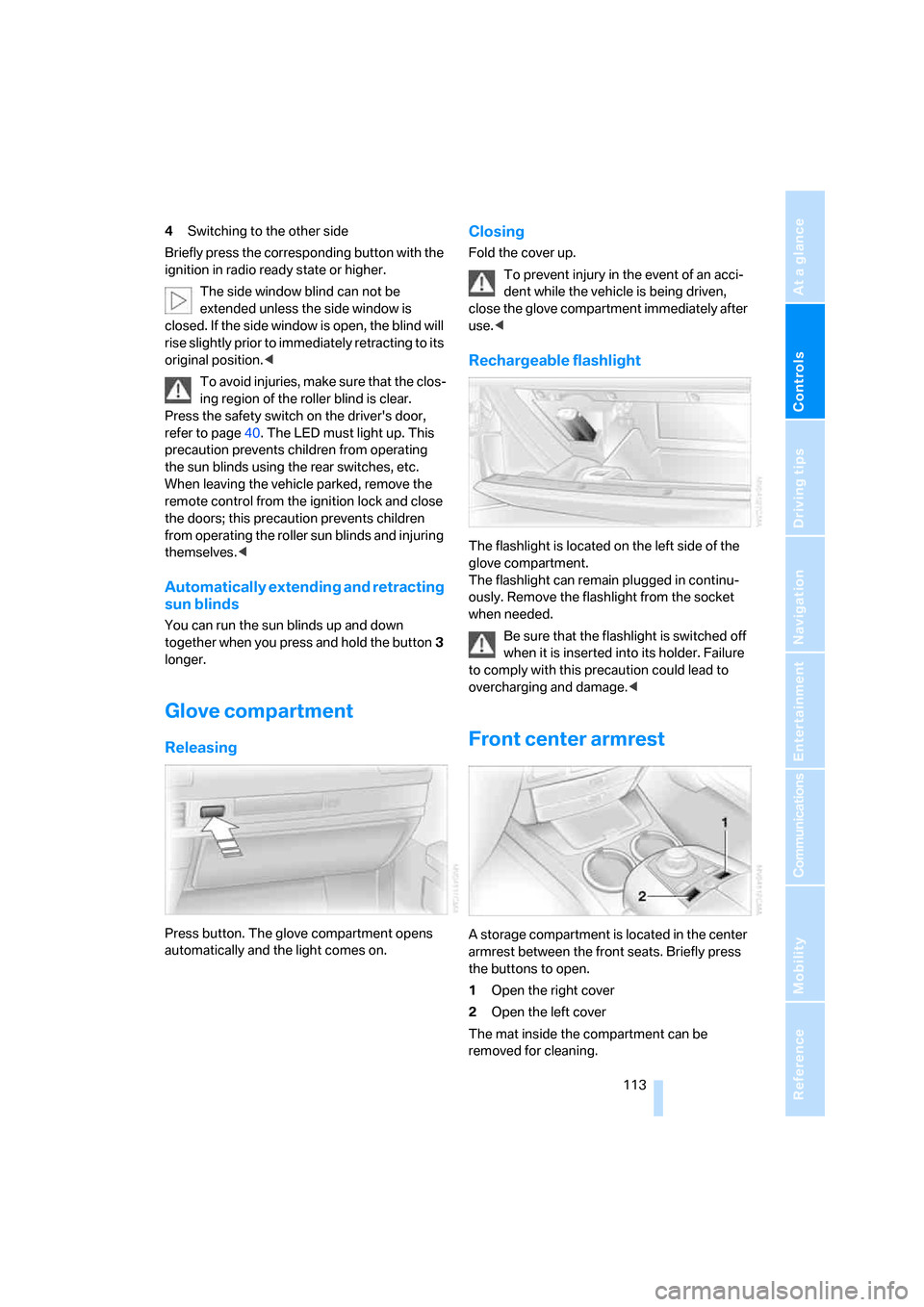
A storage compartment is located in the center
armrest between the front seats. Briefly press
the buttons to open.
1Open the right cover
2Open the left cover
The mat inside the compartment can be
removed for cleaning.
Page 195 of 254

193
Entertainment
Reference
At a glance
Controls
Driving tips Communications
Navigation
Mobility
Updating services
You will be notified of any changes in the ser-
vices offered by BMW Assist. If this occurs, you
should update the services.
iDrive, for principle details, refer to page16.
1.Press the button to open the start
menu.
2.Move the controller toward "BMW Assist".
3.Select "Status" and press the controller.
4.Select "BMW Assist" and press the control-
ler.
5.Select "UPDATE" and press the controller.
The updating process takes a few minutes.
Terminating services
When you terminate services, the connection to
BMW Assist is deactivated.
iDrive, for principle details, refer to page16.
1.Press the button to open the start
menu.
2.Move the controller toward "BMW Assist".
3.Select "Status" and press the controller.
4.Select "BMW Assist" and press the control-
ler.
5.Select "DEACTIV." and press the control-
ler.
BMW Assist is blocked from use, and your vehi-
cle's current position will not be transmitted
during an emergency call
*. To unblock the ser-
vice, reactivate BMW Assist, see below. The
contractual agreement is not affected by this.
Reactivate BMW Assist, if necessary, to log on
again.
Activating BMW Assist
BMW Assist services can only be used if BMW
Assist is activated.
Requirements
>Make sure that the vehicle can determine its
current position. Reception is best when
you have an unobstructed view of the sky.
>Leave ignition switched on while connect-
ing to the system.
Activating
iDrive, for principle details, refer to page16.
1.Press the button to open the start
menu.
2.Move the controller toward "BMW Assist".
3.Select "Status" and press the controller.
4.Select "BMW Assist" and press the control-
ler.
Page 221 of 254

Mobility
219Reference
At a glance
Controls
Driving tips
Communications
Navigation
Entertainment
Giving and receiving assistance
Emergency call*
Conditions for an emergency call:
>Full preparation package mobile phone.
This equipment package makes it possible
to initiate an emergency call even if no
mobile phone is paired with the vehicle.
>BMW Assist is activated. BMW Assist acti-
vation, refer to page193.
>Radio ready state or ignition must be
switched on.
>The BMW Assist system is logged on to a
mobile phone network.
>The emergency call system is operable.
Once your service contract for BMW Assist
expires, the BMW Assist system can be deacti-
vated by a BMW center without you having to
visit a workshop. Once the BMW Assist system
has been deactivated, emergency calls are not
possible. The BMW Assist system can be reac-
tivated by a BMW center after a new contract
has been signed.
Initiating an emergency call
1.To open the protective cover:
Briefly press the protective cover.
2.Press the emergency call button for at least
2seconds.
The LED in the button lights up. As soon as the
voice connection to the BMW Assist response
center has been established, the LED flashes.Once the BMW Assist Response Center has
received your emergency call, the BMW Assist
Response Center contacts you and takes fur-
ther steps to help you.
If circumstances permit, remain in the vehicle
until the voice connection has been estab-
lished. You will then be able to provide a
detailed description of the situation.
If the current location of your vehicle can be
determined, it will be transmitted to the
BMW Assist Response Center.
If the LED is flashing but you cannot hear the
BMW Assist Response Center over the hands-
free system, then the hands-free system may
be malfunctioning. You may, however, still be
audible to the BMW Assist Response Center.
Under certain conditions, an emergency call is
initiated automatically immediately after a
severe accident. An automatic emergency call
is not affected by the emergency call button
being pressed.
For technical reasons, the emergency call
cannot be guaranteed under unfavorable
conditions.<
In order to transmit the vehicle location, a
navigation CD/DVD must be inserted and
the system must be currently receiving a GPS
signal.
If the navigation system is inoperative, the cur-
rent position of the vehicle is not transmitted.<
Roadside Assistance*
The BMW Group's Roadside Assistance ser-
vice is there to assist you around the clock in
the event of a breakdown, including on week-
ends and public holidays.
The phone numbers of the Roadside Assis-
tance Center in your home country can be
found in the Contact brochure.
Page 241 of 254
Reference 239
At a glance
Controls
Driving tips
Communications
Navigation
Entertainment
Mobility
H
Handbrake, refer to Parking
brake58
– Automatic Hold59
– manual operation58
Hands-free system179
Hazard warning flashers15
"HD", High Definition
Radio162
Head airbags95
Headlamp control,
automatic100
Headlamp flasher65
– indicator lamp13
Headlamps100
– care, refer to Caring for your
vehicle brochure
– cleaning, refer to Wiper
system65
– replacing bulbs213
Head light, refer to Adaptive
Head Light100
Headphones22
Head restraints46
– front head restraints,
active47
– installation, front47
– removal, front46
– sitting safely43
Heating103
– exterior mirrors51
– mirrors51
– rear window, refer to Rear
window defroster107
– residual heat106
– seats49
– steering wheel52
– when parked, refer to
Residual heat106
– windshield, refer to
Defrosting windows and
removing condensation106
– windshield washer
nozzles66
Heating and ventilation103Heavy cargo, refer to Stowing
cargo124
Height, refer to
Dimensions227
Height adjustment
– seats44
– steering wheel51
"Help"
– assistance window21
– menu guidance19
"Help text", assistance
window21
Help text on Control
Display21
"Hide map icons",
navigation137
"high", automatic climate
control105
High beams101
– headlamp flasher101
– indicator lamp11
High Definition Radio162
Hills123
Holder for cups115
Home address
– selecting141
– storing140
Hood207
Horn11
Hotel function, refer to
Locking separately35
Hot exhaust system122
Hour signal activation85
"House number",
navigation134
Hydraulic brake assistant,
refer to Brake assistant87
Hydroplaning123
I
ID3 tag, refer to Displaying
track information167
iDrive16
– assistance window20
– automatic climate
control104
– changing date and time84
– changing language84
– changing settings84
– changing units of measure
and display format84
– confirming selection or
entry19
– controller16
– controls16
– displays, menus17
– menus17
– rear seat screen21
– selecting menu item19
– setting brightness85
– showing help text21
– start menu18
– status lines20
– symbols19
Ignition key30
Ignition lock57
Illuminated vanity mirror51
Imitation leather, refer to
Caring for your vehicle
brochure
"Indep. ventil.", automatic
climate control109
Indicator/warning lamps13
– airbags96
– alarm system37
– DSC88
– DTC88
– Flat Tire Monitor91
– fog lamps101
– safety belt warning48
– Tire Pressure Monitor93
Individually programmable
buttons11,52
Individual settings, refer to
Key Memory31
Page 248 of 254

Everything from A to Z
246 Shifting, for automatic
transmission with
Steptronic62
Shiftlock, refer to Selecting
transmission range62
Short commands of the voice
command system230
"Shortest route",
navigation142
"Short info", programmable
buttons52
Shoulder support
adjustment45
Side airbags95
Side-mounted turn signals,
replacing bulbs214
Side window blind, refer to
Sun blinds112
Signal horn, refer to Horn11
Sitting safely43
– with airbags43
– with head restraint43
– with safety belts43
Ski bag117
Sliding/tilt sunroof, refer to
Glass sunroof, electric41
Smokers' package, refer to
Ashtray115
Snap-in adapter181
Snow chains206
Socket
– for Onboard
Diagnostics212
– for remote control, refer to
Ignition lock57
Soft closure aid
– doors, refer to Automatic
soft closing35
– luggage compartment lid,
refer to Automatic soft
closing36
SOS, refer to Initiating an
emergency call219
Spare fuses218
Spare key30
– adapter30
Spare tire216
Spare wheel, refer to Spare
tire216Special oils, refer to Approved
engine oils209
Speed
– average77
– limit82
Speed-dependent
volume154
Speed limit82
Speedometer12
"Speed Vol.", speed-
dependent volume
control154
"Split"
– assistance window for
onboard data83
– navigation, refer to Display in
assistance window130
Split screen view, refer to
Assistance window20
"Sport", EDC Electronic
Damper Control90
Sport program
– automatic transmission with
Steptronic63
– EDC Electronic Damper
Control90
Stability control, refer to
Driving stability control
systems87
Star button, refer to
Programming button
function52
"START", BMW Assist190
"START / RESET", trip
computer78
Start/Stop button57
Starting, refer to Starting
engine57
Starting difficulties, jump
starting220
Starting engine57
"State / Province",
navigation132
"State inspection"79
Stations
– refer to Radio156
– storing for radio158
"Status", BMW
Assist191,193"Status: Resetting TPM...",
Tire Pressure Monitor92
"Status: Tire low!", Tire
Pressure Monitor93
"Status: TPM active", Tire
Pressure Monitor92
Status lines20
– in the assistance window21
Steering wheel
– adjustment51
– assistance getting in and
out52
– buttons on steering
wheel11
– heating52
– memory46
– programmable button52
– with multi-function
buttons11
Steptronic, refer to Automatic
transmission with
Steptronic63
"STOP", trip computer78
Stopwatch
– starting and stopping83
– taking an intermediate time
reading83
Storage, tires206
Storage
compartments114
,115
– refer to Center armrest,
front113
– refer to Center armrest,
rear114
"STORE", radio158
"STORE DATE", deadlines for
state vehicle inspections80
Storing current position147
Storing desired speeds, refer
to Programmable cruise
control68
Storing destination by
voice141
Storing numbers, refer to
Phone book186
Storing sitting position, refer
to Seat, mirror and steering
wheel memory46