2008 BMW 650I COUPE left
[x] Cancel search: leftPage 17 of 264
At a glance
15Reference
Controls
Driving tips
Communications
Navigation
Entertainment
Mobility
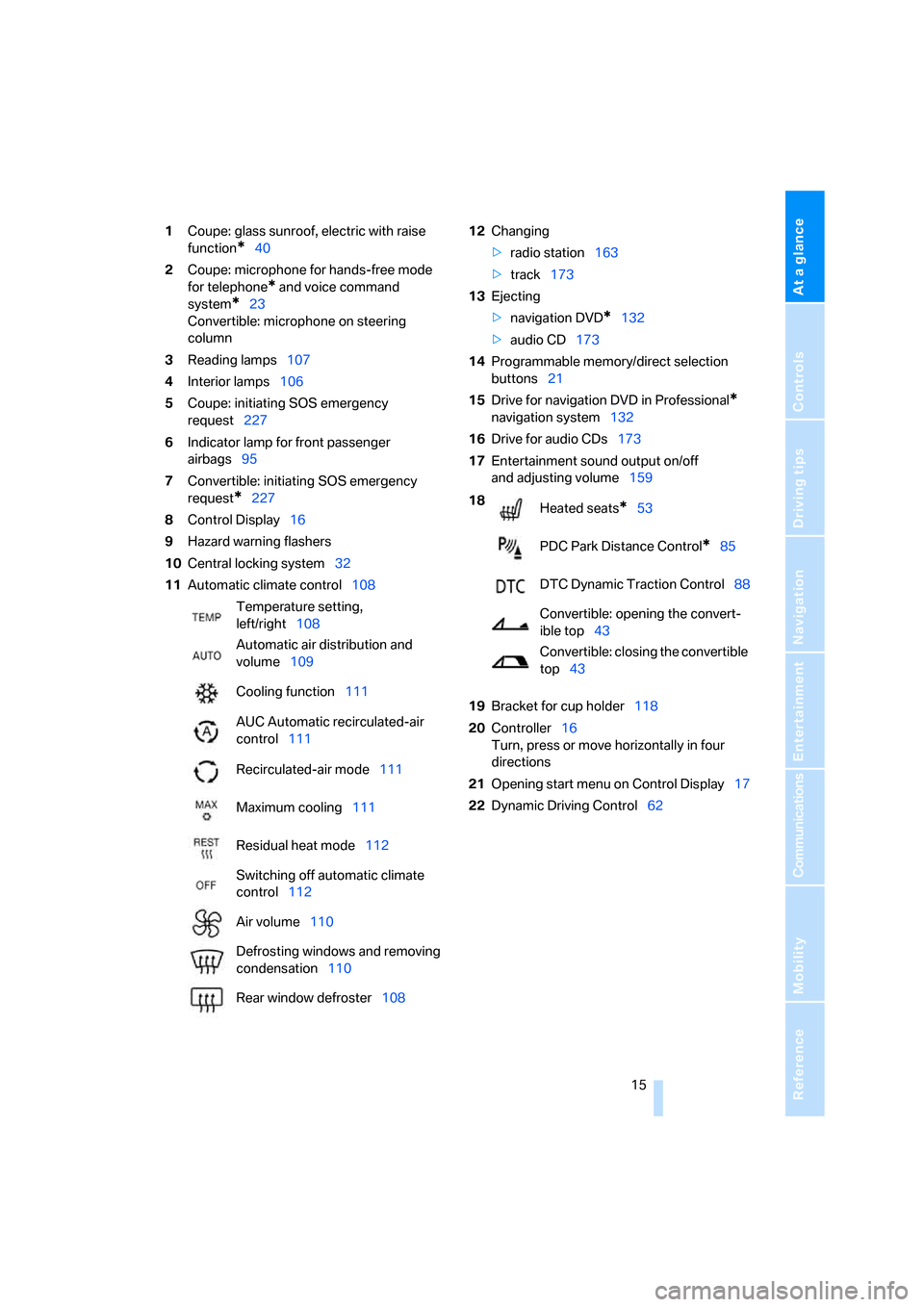
1Coupe: glass sunroof, electric with raise
function
*40
2Coupe: microphone for hands-free mode
for telephone
* and voice command
system
*23
Convertible: microphone on steering
column
3Reading lamps107
4Interior lamps106
5Coupe: initiating SOS emergency
request227
6Indicator lamp
for front passenger
airbags95
7Convertible: initiating SOS emergency
request
*227
8Control Display16
9Hazard warning flashers
10Central locking system32
11Automatic climate control10812Changing
>radio station163
>track173
13Ejecting
>navigation DVD
*132
>audio CD173
14Programmable memory/direct selection
buttons21
15Drive for navigation DVD in Professional
*
navigation system132
16Drive for audio CDs173
17Entertainment sound output on/off
and adjusting volume159
19Bracket for cup holder118
20Controller16
Turn, press or move horizontally in four
directions
21Opening start menu on Control Display17
22Dynamic Driving Control62 Temperature setting,
left/right108
Automatic air distribution and
volume109
Cooling function111
AUC Automatic recirculated-air
control111
Recirculated-air mode111
Maximum cooling111
Residual heat mode112
Switching off automatic climate
control112
Air volume110
Defrosting windows and removing
condensation110
Rear window defroster108
18
Heated seats*53
PDC Park Distance Control
*85
DTC Dynamic Traction Control88
Convertible: opening the convert-
ible top43
Convertible: closing the convertible
top43
Page 20 of 264
iDrive
18
Opening menu items of start menu
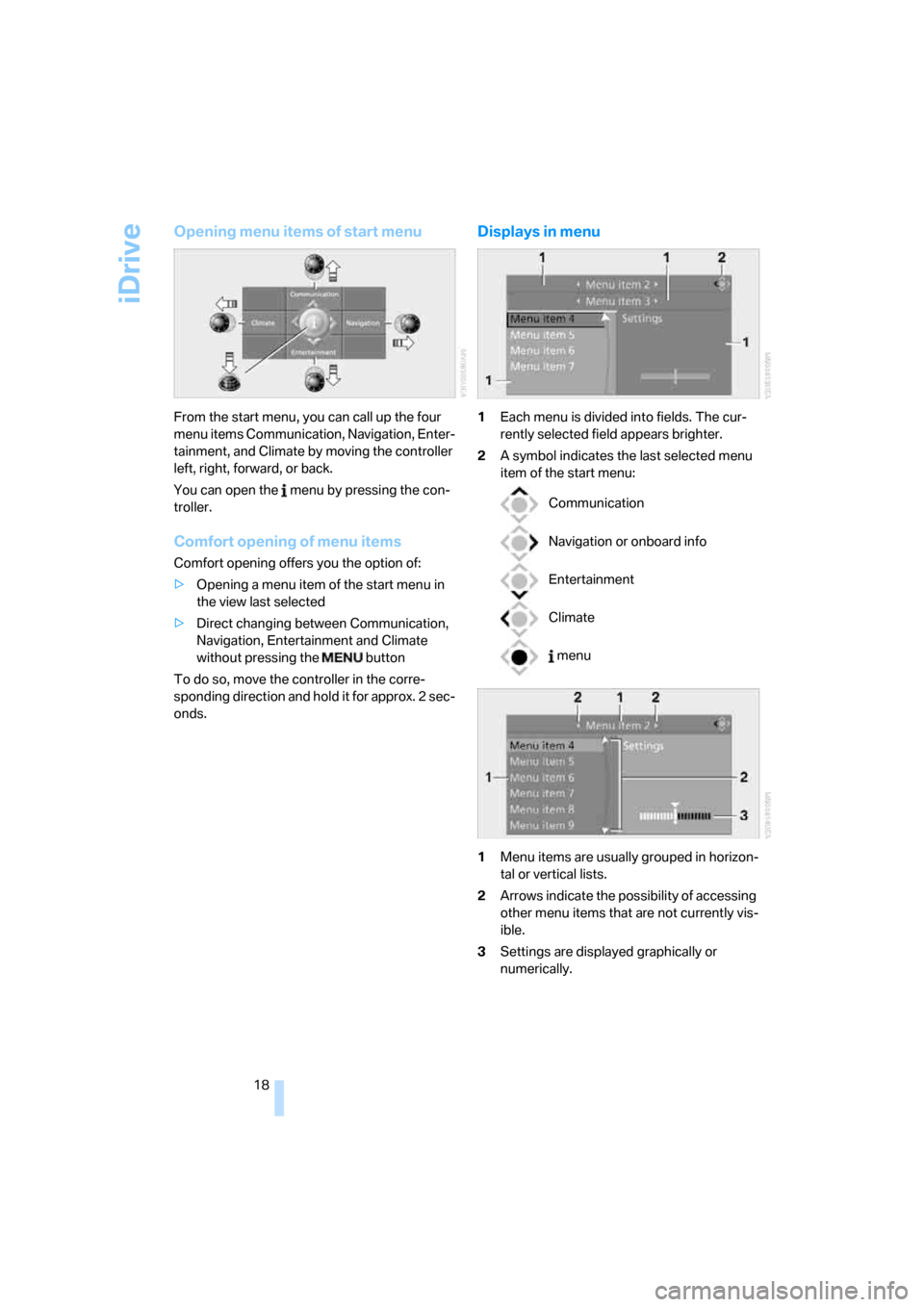
From the start menu, you can call up the four
menu items Communication, Navigation, Enter-
tainment, and Climate by moving the controller
left, right, forward, or back.
You can open the menu by pressing the con-
troller.
Comfort opening of menu items
Comfort opening offers you the option of:
>Opening a menu item of the start menu in
the view last selected
>Direct changing between Communication,
Navigation, Entertainment and Climate
without pressing the button
To do so, move the controller in the corre-
sponding direction and hold it for approx. 2 sec-
onds.
Displays in menu
1Each menu is divided into fields. The cur-
rently selected field appears brighter.
2A symbol indicates the last selected menu
item of the start menu:
1Menu items are usually grouped in horizon-
tal or vertical lists.
2Arrows indicate the possibility of accessing
other menu items that are not currently vis-
ible.
3Settings are displayed graphically or
numerically.
Communication
Navigation or onboard info
Entertainment
Climate
menu
Page 21 of 264
At a glance
19Reference
Controls
Driving tips
Communications
Navigation
Entertainment
Mobility
Operating principle at a glance
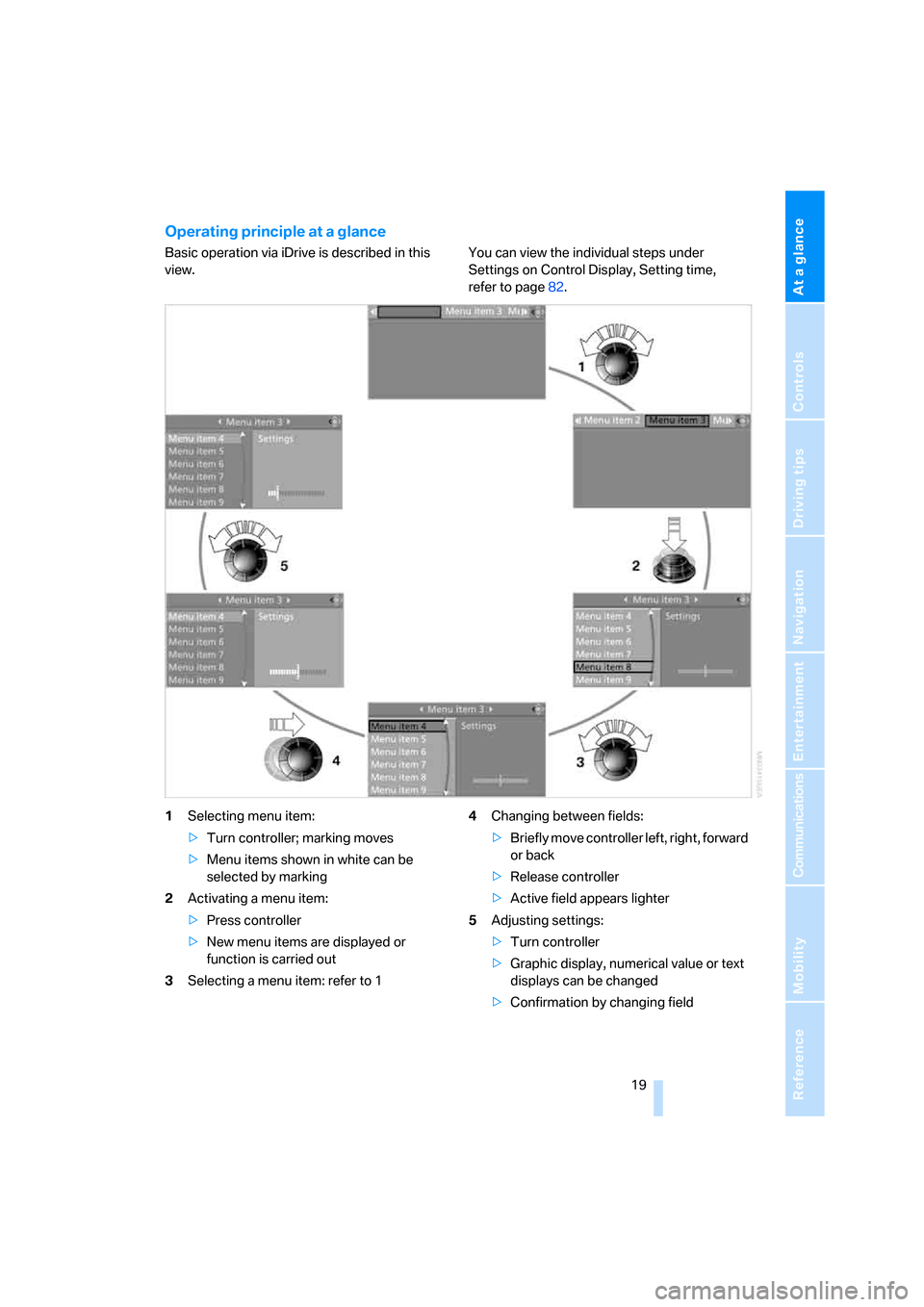
Basic operation via iDrive is described in this
view.You can view the individual steps under
Settings on Control Display, Setting time,
refer to page82.
1Selecting menu item:
>Turn controller; marking moves
>Menu items shown in white can be
selected by marking
2Activating a menu item:
>Press controller
>New menu items are displayed or
function is carried out
3Selecting a menu item: refer to 14Changing between fields:
>Briefly move controller left, right, forward
or back
>Release controller
>Active field appears lighter
5Adjusting settings:
>Turn controller
>Graphic display, numerical value or text
displays can be changed
>Confirmation by changing field
Page 32 of 264
Opening and closing
30
Central locking system
The concept
The central locking system is ready for opera-
tion whenever the driver's door is closed.
The system either locks or unlocks all of the fol-
lowing:
>Doors
>Compartment in the front center console
>Luggage compartment lid
>Fuel filler door
Operating from outside
>via the remote control
>via the door lock
>with comfort access
* via the door handles
These actions operate the anti-theft system at
the same time. It prevents the doors from being
unlocked using the lock buttons or door han-
dles. The interior lamps and the courtesy
lamps
* are also switched on and off with the
remote control. The alarm system
is armed/dis-
armed at the same time.
You can find more detailed information on the
alarm system
on page35.
Operating from inside
Via the central locking button, refer to page32.
The fuel filler door
and the compartment in the
front center console are not locked, refer to
page32.
In the event of a serious accident, the central
locking system unlocks automatically. The haz-
ard warning flashers and interior lamps are also
switched on.
Opening and closing:
Using remote control
Persons or animals left unattended in a
parked vehicle can lock the doors from
the inside. Always take along the remote control
when leaving the vehicle so that the vehicle can
then be opened from the outside.<
Unlocking
Press the button.
You can set how the vehicle is unlocked. The
setting is stored for the remote control currently
in use.
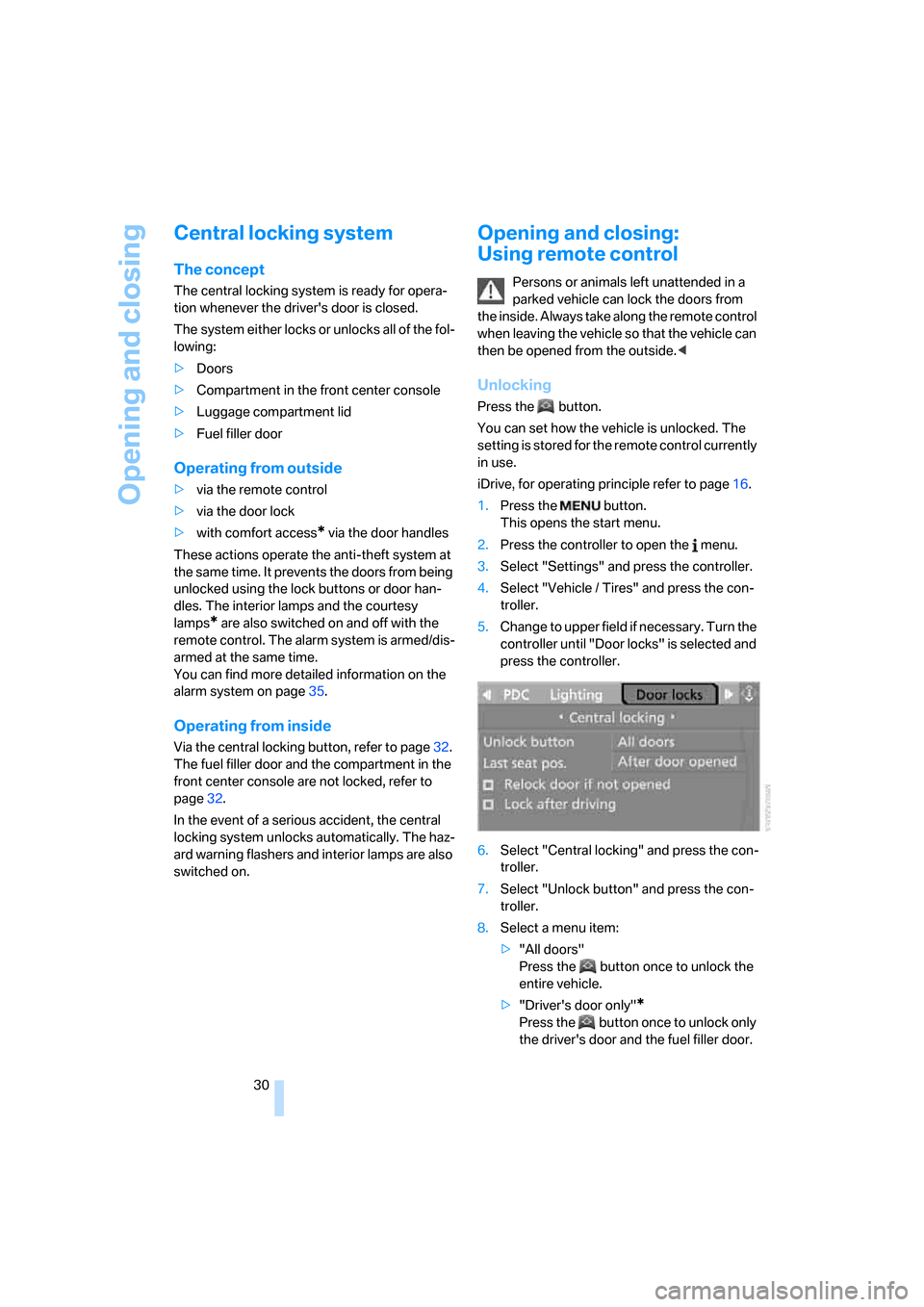
iDrive, for operating principle refer to page16.
1.Press the button.
This opens the start menu.
2.Press the controller to open the menu.
3.Select "Settings" and press the controller.
4.Select "Vehicle / Tires" and press the con-
troller.
5.Change to upper field if necessary. Turn the
controller until "Door locks" is selected and
press the controller.
6.Select "Central locking" and press the con-
troller.
7.Select "Unlock button" and press the con-
troller.
8.Select a menu item:
>"All doors"
Press the button once to unlock the
entire vehicle.
>"Driver's door only"
*
Press the button once to unlock only
the driver's door and the fuel filler door.
Page 34 of 264

Opening and closing
32 If it is no longer possible to lock the vehicle
using the remote control, then the battery is
discharged. Use this remote control during an
extended drive; this will recharge the battery,
refer to page28.
For US owners only
The transmitter and receiver units comply with
part 15 of the FCC/Federal Communication
Commission regulations. Operation is gov-
erned by the following:
FCC ID:
LX8766S
LX8766E
LX8CAS
LX8CAS2
Compliance statement:
This device complies with part 15 of the FCC
Rules. Operation is subject to the following two
conditions:
>This device may not cause harmful interfer-
ence, and
>this device must accept any interference
received, including interference that may
cause undesired operation.
Any unauthorized modifications or
changes to these devices could void the
user's authority to operate this equipment.<
Using door lock
Do not lock the vehicle from the outside if
persons are inside, as unlocking from the
inside is not possible without special knowl-
edge.<
When unlocking
1.Turning the key once unlocks the driver's
door and the fuel filler door.
2.A second turn of the key unlocks the pas-
senger door and luggage compartment lid.
Convenient operation
You can use the door lock to operate the win-
dows and the glass sunroof
* in the Coupe or to
operate the windows and the top in the Con-
vertible.
Turn and hold the key in the positions for
unlocking or locking.
Keep a close eye on the closing process
and also on the opening process of the
convertible top to be sure that no one is injured.
Releasing the key stops the operation.<
Manual operation
In the event of an electrical malfunction, you can
turn a key all the way to the right or left in the
door lock to lock or unlock the driver's door.
Opening and closing: from
inside
This button serves to unlock or lock doors and
the luggage compartment lid, but does not acti-
vate the anti-theft system. The fuel filler door
remains unlocked.
Automatic locking
iDrive, for operating principle refer to page16.
1.Press the button.
This opens the start menu.
2.Press the controller to open the menu.
Page 35 of 264

Controls
33Reference
At a glance
Driving tips
Communications
Navigation
Entertainment
Mobility
3.Select "Settings" and press the controller.
4.Select "Vehicle / Tires" and press the con-
troller.
5.Change to upper field if necessary. Turn the
controller until "Door locks" is selected and
press the controller.
6.Select "Central locking" and press the con-
troller.
7.Select a menu item:
>"Relock door if not opened"
The central locking system locks again
after a short time if no door has been
opened.
>"Lock after driving"
The central locking system locks the
vehicle as soon as you start to drive.
8.Press the controller.
The setting is selected.
The setting is stored for the remote control cur-
rently in use.
Unlocking and opening
>Either unlock both doors at the same time
with the button for the central locking sys-
tem and then pull the door handle above the
armrest or
>pull the door handle for each door twice: the
first pull unlocks the door, and the second
one opens it.
Locking
>Use the central locking button to lock both
of the doors simultaneously, or
>press down the lock button of a door.
To prevent you from being locked out, the open driver's door cannot be locked using
the lock button.
Persons or animals left unattended in a
parked vehicle can lock the doors from
the inside. Always take along the remote control
when leaving the vehicle so that the vehicle can
then be opened from the outside.<
Hotel function
The hotel function locks the compartment in
the front center console and the luggage com-
partment lid separately and disconnects them
from the central locking system. If you hand
over the remote control without the integrated
key, refer to page28, e.g. at a hotel, then this
prevents access to the luggage compartment
and to the compartment in the front center con-
sole.
Turn the key to the right, refer to illustration,
until the key slot points in the direction of travel
and then remove:
The hotel function is activated after subsequent
locking or unlocking of the vehicle. The system
locks the luggage compartment lid and the
compartment in the front center console and
disconnects them from the central locking sys-
tem.
Unlocking manually
In order to manually unlock the compartment in
the front center console in the event of an elec-
trical malfunction, turn the key all the way to the
right until it reaches the stop.
If unlocking was manual, return the lock to
the home position, i.e. all the way back to
the left, before reactivating the hotel function.<
Page 39 of 264

Controls
37Reference
At a glance
Driving tips
Communications
Navigation
Entertainment
Mobility
>The next unlocking and locking cycle is not
possible until after approx. 2 seconds.
>The engine can only be started if the vehicle
detects that the remote control is located in
the vehicle.
Comparison with ordinary remote
control
You can control the functions mentioned previ-
ously with the comfort access or by pressing
the buttons on the remote control. Before doing
so, please familiarize yourself with the informa-
tion on opening and closing, starting on
page28.
The special features when using comfort
access are described below.
Should a short delay occur when opening
or closing the windows, the glass sunroof
or the convertible top, the system is checking
whether a remote control is located in the vehi-
cle. Please repeat opening or closing if neces-
sary.<
Unlocking
Grasp a door handle fully, refer to arrow1, but
do not touch the surfaces, arrow2 or 3 when
doing so. This corresponds to pressing the
button.
Locking
>On the driver's door, touch the highlighted
surface, arrow2, with a finger for approx.
1 second, but do not grasp the door handle.
>On the front passenger door, touch the
highlighted surface, arrow3, with the back
of your hand for approx. 1 second, but do
not grasp the door handle.This corresponds to pressing the but-
ton.
Please make sure that the ignition and all
electronic systems/consumers are
switched off before locking to save the bat-
tery.<
Coupe: comfort closing
Hold a finger or the back of your hand against
the surface, arrow2 or 3, but do not grasp the
door handle while doing so.
The windows, the glass sunroof
* and the slid-
ing visor are closed.
Watch during the closing process to be
sure that no one is injured. Removing the
hand from the door handle stops the closing
process immediately.<
Convertible: window and convertible
top operation
From radio readiness switched on, the windows
can be opened and closed, and with the vehicle
stopped the convertible top, when a remote
control is located in the interior of the vehicle.
Opening luggage compartment lid
separately
Press the upper half of the BMW emblem.
This corresponds to pressing the button.
If a remote control accidentally left in the
luggage compartment is detected inside
the locked vehicle after the luggage compart-
ment lid has been closed, then the luggage
compartment lid opens again. The hazard warn-
ing flashers flash and a signal
* sounds.<
Switching on radio readiness
By pressing the Start/Stop button, you switch
on the radio readiness, refer to page58.
When doing so, do not depress the brake
or clutch pedal, otherwise the engine will
start immediately.<
Page 46 of 264
Opening and closing
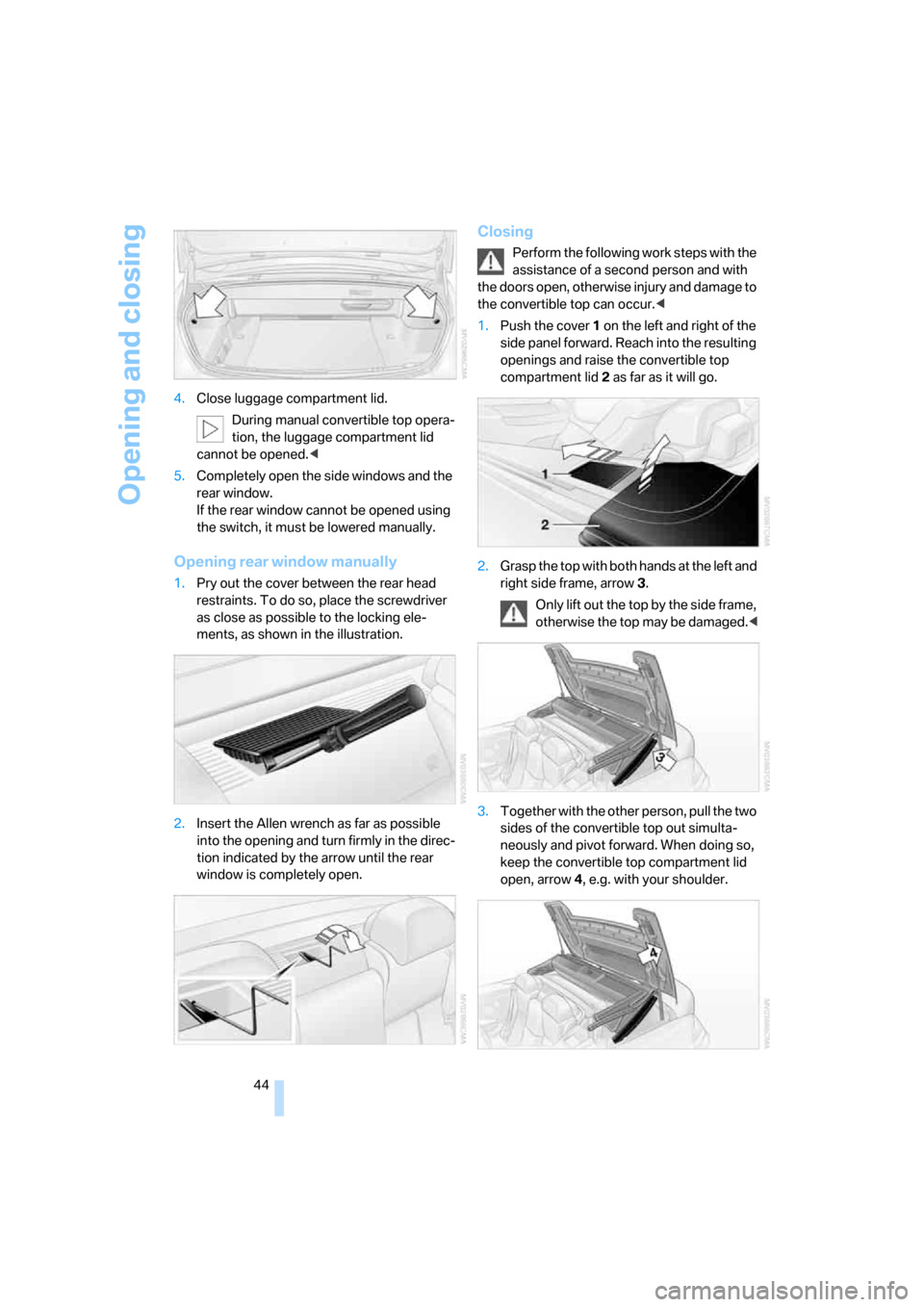
44 4.Close luggage compartment lid.
During manual convertible top opera-
tion, the luggage compartment lid
cannot be opened.<
5.Completely open the side windows and the
rear window.
If the rear window cannot be opened using
the switch, it must be lowered manually.
Opening rear window manually
1.Pry out the cover between the rear head
restraints. To do so, place the screwdriver
as close as possible to the locking ele-
ments, as shown in the illustration.
2.Insert the Allen wrench as far as possible
into the opening and turn firmly in the direc-
tion indicated by the arrow until the rear
window is completely open.
Closing
Perform the following work steps with the
assistance of a second person and with
the doors open, otherwise injury and damage to
the convertible top can occur.<
1.Push the cover 1 on the left and right of the
side panel forward. Reach into the resulting
openings and raise the convertible top
compartment lid2 as far as it will go.
2.Grasp the top with both hands at the left and
right side frame, arrow3.
Only lift out the top by the side frame,
otherwise the top may be damaged.<
3.Together with the other person, pull the two
sides of the convertible top out simulta-
neously and pivot forward. When doing so,
keep the convertible top compartment lid
open, arrow4, e.g. with your shoulder.