2008 BMW 650I COUPE engine data
[x] Cancel search: engine dataPage 186 of 264

Telephoning
184
Telephoning
The concept
Your BMW is equipped with a full mobile phone
preparation package. After a suitable mobile
phone has been paired in the vehicle once, you
can operate the mobile phone via iDrive, with
the buttons on the steering wheel and by voice.
A mobile phone that has been paired once is
automatically detected again as soon as it is
brought back inside the vehicle, provided that
the engine is running or the ignition is switched
on. The pairing data of up to four mobile phones
can be stored simultaneously. If several mobile
phones are detected simultaneously, the most
recently paired mobile phone can be operated
via the vehicle.
Using a phone in your vehicle
Using snap-in adapter*
The so-called snap-in adapter, a mobile phone
cradle, enables the battery to be charged and
the mobile phone to be connected to the exter-
nal antenna of your vehicle. This ensures
improved network reception and a consistent
voice reproduction quality. Ask your BMW cen-
ter which mobile phones snap-in adapters are
offered for.
For your safety
A car phone makes life more convenient in
many ways, and can even save lives in an emer-
gency. While you should consult your mobile
phone's separate operating instructions for a
detailed description of safety precautions and
information, we request that you direct your
particular attention to the following:
Only make entries when traffic conditions
allow you to do so. Do not hold the mobile
phone in your hand while you are driving; use
the hands-free system instead. If you do not
observe this precaution, your being distracted can endanger vehicle occupants and other road
users.<
Suitable mobile phones
Ask your BMW center which mobile phones
with a Bluetooth interface are supported by the
mobile phone preparation package or which
mobile phones will fit in the snap-in adapters
they offer. These mobile phones support the
functions described in this Owner's Manual,
provided they are running a certain software
version. Malfunctions can occur with other
mobile phones.
Care instructions
You can find what you need to know about car-
ing for your mobile phone in the separate Caring
for your vehicle brochure and in the mobile
phone operating instructions.
Operating options
You can operate the mobile phone* using:
>Buttons on steering wheel, refer to page11
>iDrive, refer to page16
>Voice commands, refer to page195
>Programmable memory/direct selection
buttons, refer to page21
Avoid operating a mobile phone detected by
the vehicle with the keypad of the mobile
phone, otherwise malfunctions can occur.
Placing phone calls with BMW Assist
system*: BMW Assist calls
You can use the BMW Assist system via the
hands-free unit for BMW Assist calls.
When the status information "BMW Assist" or
"BMW Service" is displayed in "Communica-
tion", only BMW Assist calls are possible.
*
Page 192 of 264

Telephoning
190
Adjusting volume
Turn the knob during a call to select the desired
volume.
This volume for the hands-free system is main-
tained, even if the other audio sources are set to
minimum volume.
You can also adjust the volume with the buttons
on the steering wheel, refer to page11.
The setting is stored for the remote control cur-
rently in use.
Operation via iDrive
You can operate the following functions via
iDrive:
>Accepting/rejecting a call
>Dialing phone numbers
>Dialing phone numbers from the phone
book
>Dialing stored phone numbers, e.g. from the
list of accepted calls
>Ending a call
When the ignition and radio readiness are
switched off, e.g. after removing the remote
control from the ignition lock, you can continue
an ongoing call via the hands-free system for no
more than 25 minutes.
Speech quality
If the person you are talking to cannot under-
stand you well, this may be due to excessively
loud background noises. The full mobile phone
preparation package can compensate for these
noises to a certain degree. To optimize the speech quality during a call, we
recommend that you:
>Reduce background noises, e.g. by closing
the windows, reducing the air volume of the
automatic climate control or pointing the
opened front vent outlets downward.
>Reduce the volume of the hands-free sys-
tem.
Requirements
>The pairing data of the mobile phone are
stored in the vehicle and the mobile phone
is ready to operate.
>The engine is running or the ignition is
switched on.
>The mobile phone is detected by the vehi-
cle.
Opening Communication
You operate many of the functions described in
the following via the "Communication" menu.
iDrive, for operating principle refer to page16.
1.Press the button to open the start
menu.
2.Move the controller forward to open "Com-
munication".
Receiving calls
If you have the phone number of the caller
stored in the phone book and the phone num-
ber has been transmitted, the name of the entry
is displayed.
Page 223 of 264

Mobility
221Reference
At a glance
Controls
Driving tips
Communications
Navigation
Entertainment
Maintenance
BMW Maintenance System
The BMW Maintenance System supports the
preservation of the traffic and operating safety
of your BMW. The service schedule also
includes operations related to the vehicle's
comfort and convenience features, such as
replacement of the filters for the inside air.
The ultimate objective is to ensure economical
maintenance by providing the ideal service for
your vehicle.
Should the day come when you decide to sell
your BMW, you will find that a complete dealer
service history is an asset of inestimable value.
CBS Condition Based Service
Sensors and special algorithms take the differ-
ent driving conditions of your BMW into
account. Condition Based Service uses this to
determine the current and future service
requirements. By letting you define a service
and maintenance regimen that reflects your
own individual requirements, the system builds
the basis for trouble-free driving.
You can set the Control Display to show
remaining distances and times of selected
maintenance intervals and legally mandated
deadlines, refer to page77:
>Engine oil
>Brake pads, front and rear separately
>Brake fluid>Vehicle check
>Legally required tests depending on local
regulations
Service data in remote control
Your vehicle stores the information required for
maintenance continuously in the remote con-
trol during driving. After accessing the data
stored in the remote control, your BMW Service
Advisor can suggest precisely the right array of
service procedures for your own individual vehi-
cle. For this reason, when you take your vehicle
in for service, you should give the BMW Service
Advisor the remote control last used to drive it.
Make sure the date is set correctly, refer
to page83, otherwise the effectiveness
of CBS Condition Based Service is not
ensured.<
Service and Warranty Information
Booklet for US models and
Warranty and Service Guide Booklet
for Canadian models
Please consult your Service and Warranty Infor-
mation Booklet for US models and Warranty
and Service Guide Booklet for Canadian models
for additional information on service require-
ments.
BMW recommends that you have service
and repair operations performed at your
BMW center.
Take the time to ensure that these service pro-
cedures are confirmed by entries in your vehi-
cle's Service and Warranty Information Booklet
for US models and Warranty and Service Guide
Booklet for Canadian models. These entries
verify that your vehicle has received the speci-
fied regular maintenance.<
Page 224 of 264

Maintenance
222
Socket for OBD Onboard
Diagnostics interface
Components which are decisive for the
exhaust-gas composition can be checked via
the OBD socket with a device.
This socket is located under a cover on the left
side of the driver's footwell, directly under the
instrument panel.
Exhaust-gas values
The warning lamp lights up. The
exhaust-gas values are deteriorating.
Have the vehicle checked as soon as
possible.
Display of the previously described
malfunction on Canadian models.
The lamp flashes under certain conditions. This
is a sign of excessive misfiring of the engine. In
this case, you should reduce speed and drive to
the nearest BMW center as soon as possible.
Heavy engine misfiring causes serious damage
to the emission-relevant components, espe-
cially the catalytic converter, within a short time.
If the fuel filler cap is not properly tight-
ened, the OBD system can detect the
escape of fuel vapor. This causes a display to
light up. If the cap is then tightened, the display
should go out within a few days.<
Event data recorders
Your vehicle may be equipped with one or sev-
eral measuring and diagnosis modules, or with a
device for recording or transmitting certain
vehicle data or information. If you have also sub-
scribed to BMW Assist, then certain vehicle
data can be transmitted or recorded to enable
corresponding services.
Care
Important information on care and maintenance
of your BMW is contained in the Caring for your
vehicle brochure.
Page 236 of 264
Technical data
234
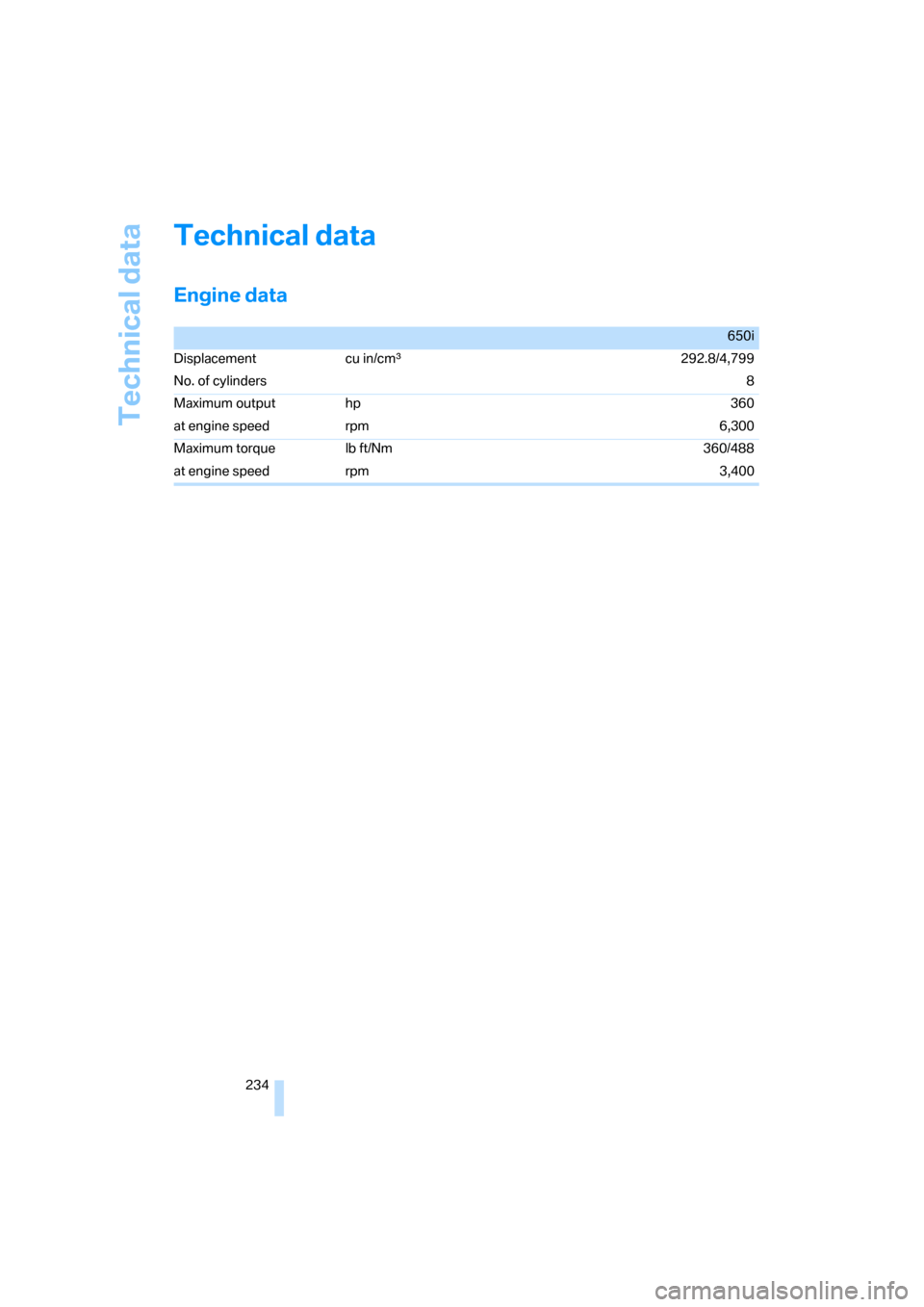
Technical data
Engine data
650i
Displacement cu in/cmμ292.8/4,799
No. of cylinders8
Maximum output hp 360
at engine speed rpm 6,300
Maximum torque lb ft/Nm 360/488
at engine speed rpm 3,400
Page 246 of 264
Everything from A to Z
244 BMW Night Vision98
– activating99
– cleaning camera100
– cleaning camera, refer to
Wiper system65
– deactivating100
– making settings100
"BMW Service settings"203
BMW website4
Bottle holder, refer to Cup
holders118
Bracket for telephone or
mobile phone, refer to Snap-
in adapter197
Brake assistant87
– adaptive87
Brake force display93
Brake lamps
– replacing bulbs, refer to Tail
lamps224
– two-stage93
Brake rotors
– breaking-in124
– refer to Braking safely126
Brakes
– ABS Antilock Brake
System86
– brake force display93
– breaking-in124
– CBC Cornering Brake
Control86
– electronic brake-force
distribution87
– handbrake60
– refer to Braking safely126
Brake system124
– brake pads124
– brake rotors126
– breaking-in124
– warning lamp13,88
Braking safely126
Breakdown services, refer to
Roadside Assistance228
Breaking-in124
Breaking-in brake pads124
Breaking-in the clutch124Breaking-in the differential,
refer to Engine and
differential124
"Brightness"84,98
– with BMW Night Vision100
Brightness of Control
Display83
Button for starting engine,
refer to Start/Stop button58
Buttons on steering wheel11
Bypassing route sections
150
C
California Proposition 65
Warning6
"Call"192,203
Call
– accepting190
– displaying accepted193
– ending191
– in absence193
– rejecting191
– starting191
Calling
– by entering phone
number191
– from phone book192
– from Top 8 list193
– redialing193
Can holder, refer to Cup
holders118
Capacities237
Car battery, refer to Vehicle
battery225
Car care, refer to Caring for
your vehicle brochure
Car-care products, refer to
Caring for your vehicle
brochure
"Car Data"76
Care222
– refer to Caring for your
vehicle brochure
Cargo loading
– securing cargo128
– stowing cargo128
– vehicle127Caring for artificial leather,
refer to Caring for your
vehicle brochure
Caring for leather, refer to
Caring for your vehicle
brochure
Caring for light-alloy wheels,
refer to Caring for your
vehicle brochure
Caring for plastic, refer to
Caring for your vehicle
brochure
Caring for the carpet, refer to
Caring for your vehicle
brochure
Caring for the vehicle finish,
refer to Caring for your
vehicle brochure
Car key, refer to Keys/remote
control28
Car phone184
– installation location, refer to
Center armrest117
– refer to Mobile phone184
– refer to separate operating
instructions
Car radio, refer to Radio162
Car wash59,127
– refer to Before driving into a
car wash127
– refer to Caring for your
vehicle brochure
– with comfort access38
Catalytic converter, refer to
Hot exhaust system125
"Categories"170
CBC Cornering Brake
Control86
CBS Condition Based
Service221
"CD"158,172
Page 248 of 264

Everything from A to Z
246 Convertible top
– care, refer to Caring for your
vehicle brochure
– closing manually43
– convenient operation32
– emergency closing43
– opening and closing43
Coolant219
– checking level220
– temperature74
Cooling, maximum111
Cooling function, automatic
climate control111
Cooling system, refer to
Coolant219
Copyright2
Cornering Brake Control
CBC86
Country of destination for
navigation135
Courtesy lamps, refer to
Interior lamps106
Cradle for telephone or mobile
phone117
Cruise control65
– active cruise control66
Cruising range75
Cup holders15,118
Curb weight, refer to
Weights237
"Current position"153
Current position
– displaying153
– entering142
– storing142
"Curve mode" with
BMW Night Vision100
"Customer
Relations"194,202
Cylinders, refer to Engine
data234
D
Dashboard, refer to
Cockpit10
Data, technical234
– capacities237
– dimensions235
– engine234
– measurements235
– weights237
"Date"83
Date74
– date format83
– setting83
"Date format"83
"Daytime running
lamps"103,106
Daytime running lamps103
– replacing bulbs224
DBC Dynamic Brake Control
– warning lamp88
"Deactivated"50
Decommissioning the vehicle,
refer to Caring for your
vehicle brochure
Defect, tires
– refer to Flat Tire Monitor89
– refer to Tire Pressure
Monitor90
Defrosting windows110
Defrosting windows and
removing condensation110
Defrosting windshield, refer to
Defrosting windows110
Defrost position, refer to
Defrosting windows110
"Delete address book" for
navigation system143
"Delete all numbers" for
mobile phone193
"Delete data" for navigation
system143
"Delete" for mobile
phone193
Destination address
– deleting143
– entering134,137Destination for navigation
– destination list141
– entering via voice137
– entry134
– home address144
– selecting from address
book142
– selecting using
information140
– storing142
Destination guidance146
– bypassing route
sections150
– canceling voice
instructions55
– changing specified
route144
– displaying route147
– distance and arrival146
– interrupting146
– starting146
– terminating/continuing146
– voice instructions149
– volume of voice
instructions150
Destination list for
navigation141
Destinations recently driven
to141
"Details" in audio
mode174,180
"Dial" for mobile phone191
"Dial number"191
"Diamond button"55
Digital clock74
Digital radio, refer to High
Definition Radio166
Dimensions
– Convertible236
– Coupe235
Directional indicators, refer to
Turn signals63
Direction instructions, refer to
Voice instructions149
Directory, refer to Phone
book192
Directory for navigation, refer
to Address book142
Page 249 of 264
Reference 247
At a glance
Controls
Driving tips
Communications
Navigation
Entertainment
Mobility
Direct selection buttons21
Displacement, refer to Engine
data234
"Display"84
Display, refer to iDrive
controls16
Display elements, refer to
Instrument cluster12
Displaying vehicle data205
Display lighting, refer to
Instrument lighting106
"Display off"21
Displays
– on Control Display, refer to
iDrive16
– refer to Instrument
cluster12
"Display settings"84,97
Displays on the windshield,
refer to Head-Up Display96
Disposal
– battery of remote control
with comfort access38
– coolant219
– vehicle battery225
Distance, refer to
Computer76
Distance control, refer to
Active cruise control66
"Distance to dest."76
Distance to destination, refer
to Computer76
Distance warning, refer to
PDC Park Distance
Control85
Door entry lighting, refer to
Interior lamps106
Door key, refer to Keys/
remote control28
Door lock32
"Door locks"30,78
Doors
– manual operation32
– remote control30,31
DOT Quality Grades212
Draft-free ventilation112
"Driver's door only"30Driving lamps, refer to Parking
lamps/low beams102
Driving route, refer to
Displaying route147
Driving stability control
systems86
Driving through water126
Driving tips, refer to General
driving notes124
Drying the air, refer to Cooling
function111
DSC Dynamic Stability
Control
87
– indicator lamp13,87
– malfunction88
DTC Dynamic Traction
Control87
– activating88
– indicator lamp13,88
DVD for navigation132
Dynamic Drive89
Dynamic Driving Control62
"Dynamic route" for
navigation145
Dynamic Stability Control
DSC87
Dynamic Traction Control
DTC87
E
Easy entry, refer to Entering
rear51
Easy entry/exit54
Eject button, refer to Buttons
on CD player158
Electrical malfunction
– convertible top43
– door lock32
– driver's door32
– fuel filler door208
– glass sunroof41
– luggage compartment lid34
– storage compartment, hotel
function33
Electric convertible top42Electric steering wheel
adjustment54
Electronic brake-force
distribution87
Electronic oil level check218
Emergency assistance, refer
to Roadside Assistance228
Emergency operation, refer to
Manual operation
– convertible top43
– door lock32
– driver's door32
– fuel filler door208
– glass sunroof41
– hotel function33
– luggage compartment lid34
– transmission lock, sport
automatic transmission62
Emergency release for
luggage compartment lid in
luggage compartment35
Emergency request227
Emergency services, refer to
Roadside Assistance228
"Enable services"205
"End call"192
Engine
– breaking-in124
– data234
– overheated, refer to Coolant
temperature74
– speed234
– starting59
– starting, comfort access36
– switching off59
– switching off when equipped
with Automatic
transmission, with comfort
access38
Engine compartment217
Engine coolant219