2008 BMW 550I SEDAN program remote
[x] Cancel search: program remotePage 177 of 288
Navigation
Entertainment
Driving tips
175Reference
At a glance
Controls
Communications
Mobility
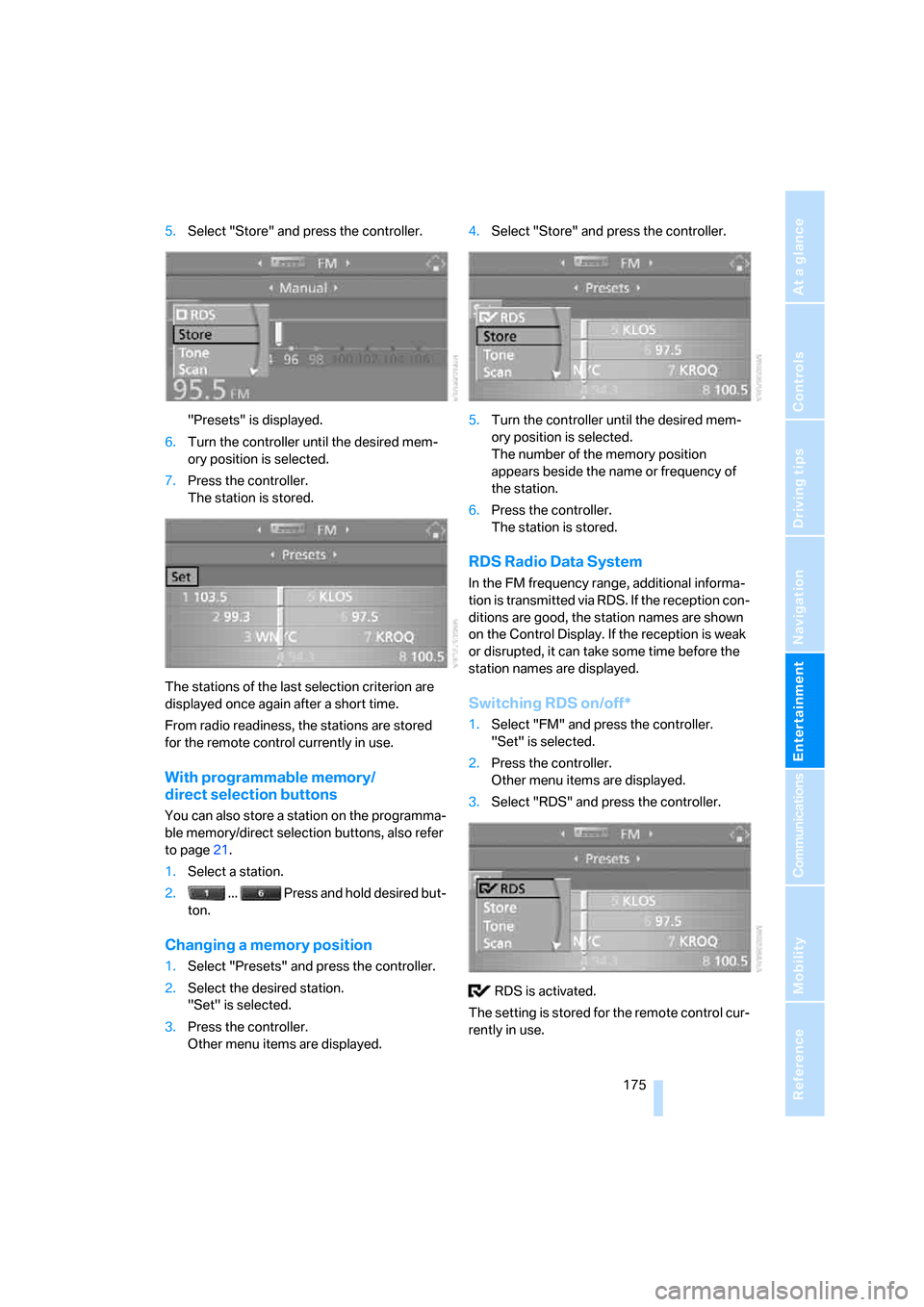
5.Select "Store" and press the controller.
"Presets" is displayed.
6.Turn the controller until the desired mem-
ory position is selected.
7.Press the controller.
The station is stored.
The stations of the last selection criterion are
displayed once again after a short time.
From radio readiness, the stations are stored
for the remote control currently in use.
With programmable memory/
direct selection buttons
You can also store a station on the programma-
ble memory/direct selection buttons, also refer
to page21.
1.Select a station.
2. ... Press and hold desired but-
ton.
Changing a memory position
1.Select "Presets" and press the controller.
2.Select the desired station.
"Set" is selected.
3.Press the controller.
Other menu items are displayed.4.Select "Store" and press the controller.
5.Turn the controller until the desired mem-
ory position is selected.
The number of the memory position
appears beside the name or frequency of
the station.
6.Press the controller.
The station is stored.
RDS Radio Data System
In the FM frequency range, additional informa-
tion is transmitted via RDS. If the reception con-
ditions are good, the station names are shown
on the Control Display. If the reception is weak
or disrupted, it can take some time before the
station names are displayed.
Switching RDS on/off*
1.Select "FM" and press the controller.
"Set" is selected.
2.Press the controller.
Other menu items are displayed.
3.Select "RDS" and press the controller.
RDS is activated.
The setting is stored for the remote control cur-
rently in use.
Page 186 of 288

CD player and CD changer
184 To change the directory:
Select the directory and press the controller.
To exit from the menu:
Select the arrow and press the controller.
You can store a certain track on the program-
mable memory/direct selection buttons, refer to
page21.
Displaying information on track*
With compressed audio files, you can display
any information stored on the current track, e.g.
the name of the artist.
1.Press the controller.
2.Select "Details" and press the controller.
The information for the current track are dis-
played.
From radio readiness, the setting is stored for
the remote control currently in use.
Sampling tracks, scan
The system automatically plays a brief sample
from each of the tracks on the current CD.
1.Select "Set" and press the controller.
Other menu items are displayed.
2.Select "Scan" and press the controller.
To end sampling:
1.Press the controller.
2.Select "Scan" and press the controller.
This cancels sampling of the tracks, and the
player remains on the current track.
Compressed audio files*
1.Select the current track and press the con-
troller.
2.Select the desired menu item:
>To sample all tracks of the current direc-
tory, select "Scan directory" and press
the controller.
>To sample all tracks of the CD, select
"Scan all" and press the controller.
Page 267 of 288
Reference 265
At a glance
Controls
Driving tips
Communications
Navigation
Entertainment
Mobility
Around the center console14
Around the steering wheel10
Arrival time
– refer to Computer80
– refer to Starting destination
guidance156
"Arrow display" for navigation
system157
"Arrow display pop-up
instructions"143
Ashtray
– front125
– rear126
Assist, refer to
BMW Assist209
Assistance systems, refer to
Driving stability control
systems91
Assistance window20
"Assist. window off"21
AUC Automatic recirculated-
air control117
"Audio"169,171,176
Audio168
– controls168
– switching on/off168
– tone control169
– volume169
Audio device, external124
Automatic
– air distribution115
– air volume115
– cruise control70
– garage door opener121
– headlamp control108
– service notification211
– steering wheel
adjustment47
– storing stations174
– tailgate operation36
Automatic car washes137
– also refer to Caring for your
vehicle brochureAutomatic climate control114
– automatic air
distribution115
– parked car ventilation118
– switching on and off118
– ventilation in rear118
Automatic closing of doors,
refer to Automatic soft
closing33
Automatic curb monitor53
Automatic lighting
– refer to Automatic headlamp
control108
– refer to Daytime running
lamps109
– refer to High-beam
assistant110
– refer to Interior lamps
112
– refer to Pathway lighting109
– refer to Welcome lamps108
Automatic low beams, refer to
High-beam assistant110
"Automatic programs"115
Automatic roll-up cover,
Sports Wagon128
Automatic soft closing33
Automatic speed reduction for
descents, refer to HDC Hill
Descent Control93
Automatic station search173
Automatic transmission with
Steptronic63
– interlock64
– kick-down64
– manually unlocking and
locking transmission lock65
– shiftlock64
– towing250
– tow-starting251
– with comfort access39
"Automatic ventilation"119
AUTO program for automatic
climate control115
"Auto Request"211
"Autostore" on the
radio172,174
"AUX"169,188,189AUX-In connection188
"AUX IN" in audio mode188
Average fuel consumption80
– setting units88
Average speed, refer to
Computer79
"Avoid ferries" for navigation
system154
"Avoid highways" for
navigation system154
Avoiding freeways for
navigation154
Avoiding unintentional
alarms38
"Avoid tollroads" for
navigation system154
Axle loads, refer to
Weights257
"A - Z"202
B
Backrest contour, refer to
Lumbar support47
Backrests, refer to Seats46
Backrest width adjustment46
Back seats, refer to Rear seats
Backup lamps, replacing
bulbs240
"Balance", refer to Tone
control170
Band-aids, refer to First-aid
kit248
Bass, refer to Tone
control169
"Bass", tone control170
Battery, refer to Vehicle
battery245
– jump starting248
Battery replacement, remote
control for comfort
access40
BC button, refer to
Computer79
Being towed250
Belts, refer to Safety belts50
Beverage holder, refer to Cup
holders125
Page 278 of 288

Everything from A to Z
276
P
Panic mode31
Panorama glass sunroof43
– moving manually44
Park Distance Control PDC90
"Parked car operation"119
"Parked car ventilation"119
Parked car ventilation118
– activating activation
time119
– LED114
– preselecting activation
times119
– switching on and off
directly119
Parking, vehicle62
Parking aid, refer to PDC Park
Distance Control90
Parking assistant, refer to
PDC Park Distance
Control90
Parking brake, refer to
Handbrake63
Parking lamps108
– replacing bulbs239
Partition net, Sports
Wagon129
Parts and accessories6
Passenger-side exterior
mirror, tilting down53
"Pathway lighting"109
Pathway lighting109
"PDC"91
"PDC display on"91
PDC Park Distance Control90
Personal Profile29
"Perspective"158
"Phone"196,198,201
Phone book200
– changing entry202
– creating and editing voice
phone book206
– deleting all entries203
– deleting entry203
– dialing phone number202Phone numbers
– deleting from phone
book203
– dialing201
– most recent numbers203
– selecting in phone book203
– Top 8203
Pinch protection system
– glass sunroof, electric42
– panorama glass sunroof43
– power windows41
Plasters, refer to First-aid
kit248
"Play" on the radio180
Plug-in unit for remote
control, refer to Ignition
lock61
Pollen, refer to Microfilter/
activated charcoal filter118
Position
– refer to Displaying current
position163
– refer to Storing current
position152
Power failure245
Power windows, refer to
Windows40
Preselecting activation times
of the parked car
ventilation119
"Presets" on the
radio172,180
Pressure, tires220
Pressure monitoring of tires,
refer to TPM Tire Pressure
Monitor97
"Profile"215
Programmable buttons on
steering wheel54
Programmable memory
buttons21
Protective function, refer to
Pinch protection system
– glass sunroof, electric42
– panorama glass sunroof43
– windows41
R
Radio
– autostore174
– controls168
– High Definition Radio176
– sampling stations173
– satellite radio179
– selecting frequency
manually173
– selecting
waveband168,172
– station search173
– station selection172
– station with the best
reception174
– storing stations174
– switching on/off168
– tone control169
– volume169
– Weather Band, refer to
Weather news flashes176
Radio key, refer to Keys/
remote control28
Radio readiness61
– switched off62
– switched on61
– with comfort access39
Radio stations, storing174
Rain sensor68
"Random", random play
sequence185
"Random all" in audio
mode186
"Random directory" in audio
mode186
"RDS"175
Reading lamps113
Rear armrest, refer to Center
armrest, rear127
Rear lamps, refer to Tail
lamps240
– replacing bulbs240
Rear seats
– adjusting head restraints50
– folding over backrest127
– heating52
– removing head restraints50
Page 281 of 288

Reference 279
At a glance
Controls
Driving tips
Communications
Navigation
Entertainment
Mobility
Shifting gears, Automatic
transmission with
Steptronic64
Shift paddles on steering
wheel66
Short commands of voice
command system259
"Short route" for
navigation154
Short route in navigation, refer
to Selecting route154
Shoulder support46
"Show current position"149
"Show destination
position"149
Shuffled, refer to Random
– CD changer185
– CD player185
Side airbags100
Side marker lamps, replacing
bulbs240
Side-mounted turn signals,
replacing bulbs240
Side window blinds, refer to
Sun blinds122
Signal horn, refer to Horn10
Sitting safely45
– with airbags45
– with head restraint45
– with safety belts45
Ski bag131
Sliding/tilt sunroof
– refer to Glass sunroof,
electric41
– refer to Panorama glass
sunroof43
Slope assistant, refer to
Starting assistant94
Snap-in adapter
– mounting/removing207
– using194
Snow chains229
Socket for Onboard
Diagnostics interface236
Socket for remote control,
refer to Ignition lock61Sockets, refer to Connecting
electrical devices126
Soft closure aid, refer to
Automatic soft closing33
Song search on CD, refer to
Sampling tracks184
SOS, refer to Initiating an
emergency request247
Sound distribution in audio
mode
– front/rear fader170
– right/left balance170
Spare
– adapter for spare key28
– fuses245
– key28
Spare wheel
– refer to Changing
wheels242
– refer to Compact wheel
244
Special oils, refer to Approved
engine oils233
Specified oil grades, refer to
Approved engine oils233
Speed
– limit85
– with compact wheel245
Speed-dependent
volume170
Speed limit warning, refer to
Speed limit85
Speedometer12
"Speed volume", tone
control170
Speed with winter tires228
Sport automatic
transmission66
– Dynamic Driving Control66
– kick-down64
– towing250
– with comfort access39
Sport program, Automatic
transmission with
Steptronic64Sports Wagon
– automatic roll-up cover128
– automatic tailgate
operation36
– compartments in cargo
bay129
– expanding cargo bay128
– opening rear window34
– opening tailgate35
– panorama glass sunroof43
– partition net129
– rear window wiper69
– rear window wiper, changing
wiper blade237
– releasing fuel filler door in
event of electrical
malfunction218
– roll-up cover128
– roll-up cover for cargo
bay128
– self-leveling suspension95
– socket in cargo bay126
– storage area package130
– tail lamps, replacing
bulbs241
Stability control, refer to
Driving stability control
systems91
"Star button"55
Star button54
Start/Stop button61
– starting the engine62
– switching off the engine62
"Start" for stopwatch86
"Start guidance"147,
156
Starting, refer to Starting
engine62
Starting assistance, refer to
Jump starting248
Starting assistant94
Starting difficulties, refer to
Jump starting248
Starting off on slopes, refer to
Starting assistant94
Start menu, iDrive17
"Start route guidance"149
"Start service"211