2008 BMW 4.8I reset
[x] Cancel search: resetPage 201 of 292
Navigation
Entertainment
Driving tips
199Reference
At a glance
Controls
Communications
Mobility
Selecting a track
Buttons on CD/DVD player
Press the button for the corresponding
direction repeatedly until you reach the desired
track.
Playback begins at the start of the track.
Via the remote control
Press the button for the corresponding
direction repeatedly or turn the knurled wheel
until you reach the desired track.
Playback begins at the start of the track.
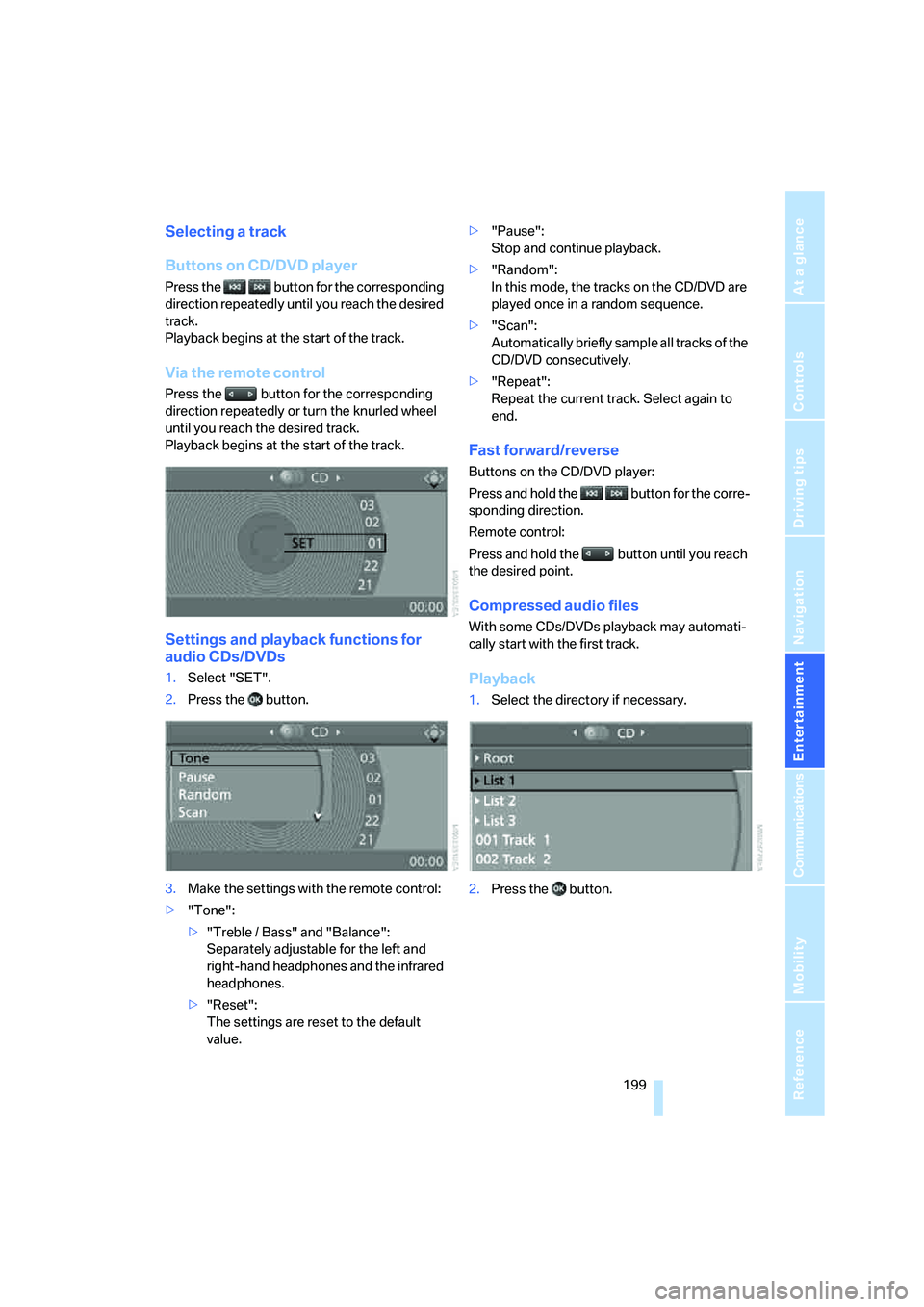
Settings and playback functions for
audio CDs/DVDs
1.Select "SET".
2.Press the button.
3.Make the settings with the remote control:
>"Tone":
>"Treble / Bass" and "Balance":
Separately adjustable for the left and
right-hand headphones and the infrared
headphones.
>"Reset":
The settings are reset to the default
value.>"Pause":
Stop and continue playback.
>"Random":
In this mode, the tracks on the CD/DVD are
played once in a random sequence.
>"Scan":
Automatically briefly sample all tracks of the
CD/DVD consecutively.
>"Repeat":
Repeat the current track. Select again to
end.
Fast forward/reverse
Buttons on the CD/DVD player:
Press and hold the button for the corre-
sponding direction.
Remote control:
Press and hold the button until you reach
the desired point.
Compressed audio files
With some CDs/DVDs playback may automati-
cally start with the first track.
Playback
1.Select the directory if necessary.
2.Press the button.
Page 202 of 292
DVD system in rear
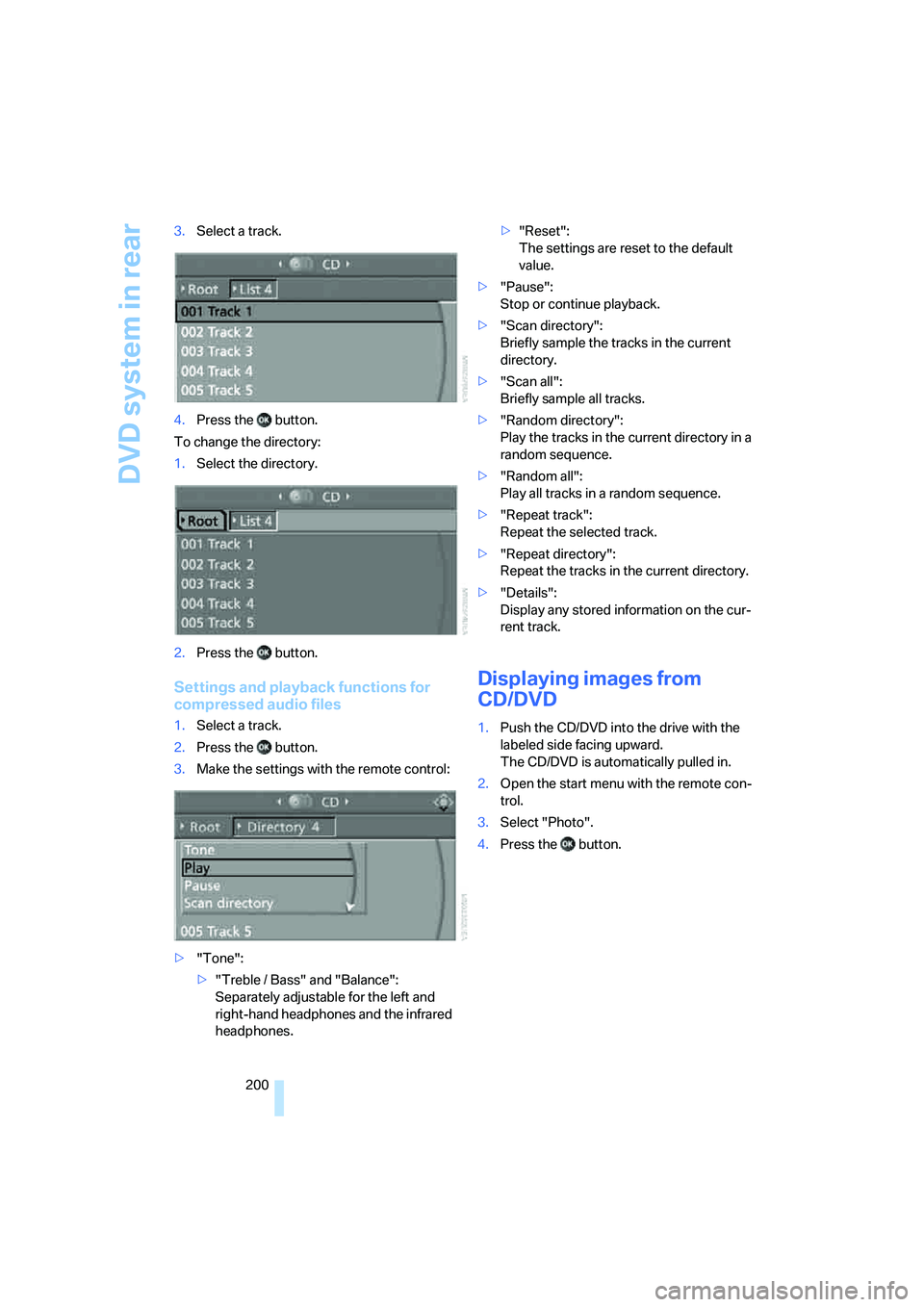
200 3.Select a track.
4.Press the button.
To change the directory:
1.Select the directory.
2.Press the button.
Settings and playback functions for
compressed audio files
1.Select a track.
2.Press the button.
3.Make the settings with the remote control:
>"Tone":
>"Treble / Bass" and "Balance":
Separately adjustable for the left and
right-hand headphones and the infrared
headphones.>"Reset":
The settings are reset to the default
value.
>"Pause":
Stop or continue playback.
>"Scan directory":
Briefly sample the tracks in the current
directory.
>"Scan all":
Briefly sample all tracks.
>"Random directory":
Play the tracks in the current directory in a
random sequence.
>"Random all":
Play all tracks in a random sequence.
>"Repeat track":
Repeat the selected track.
>"Repeat directory":
Repeat the tracks in the current directory.
>"Details":
Display any stored information on the cur-
rent track.
Displaying images from
CD/DVD
1.Push the CD/DVD into the drive with the
labeled side facing upward.
The CD/DVD is automatically pulled in.
2.Open the start menu with the remote con-
trol.
3.Select "Photo".
4.Press the button.
Page 206 of 292
DVD system in rear
204
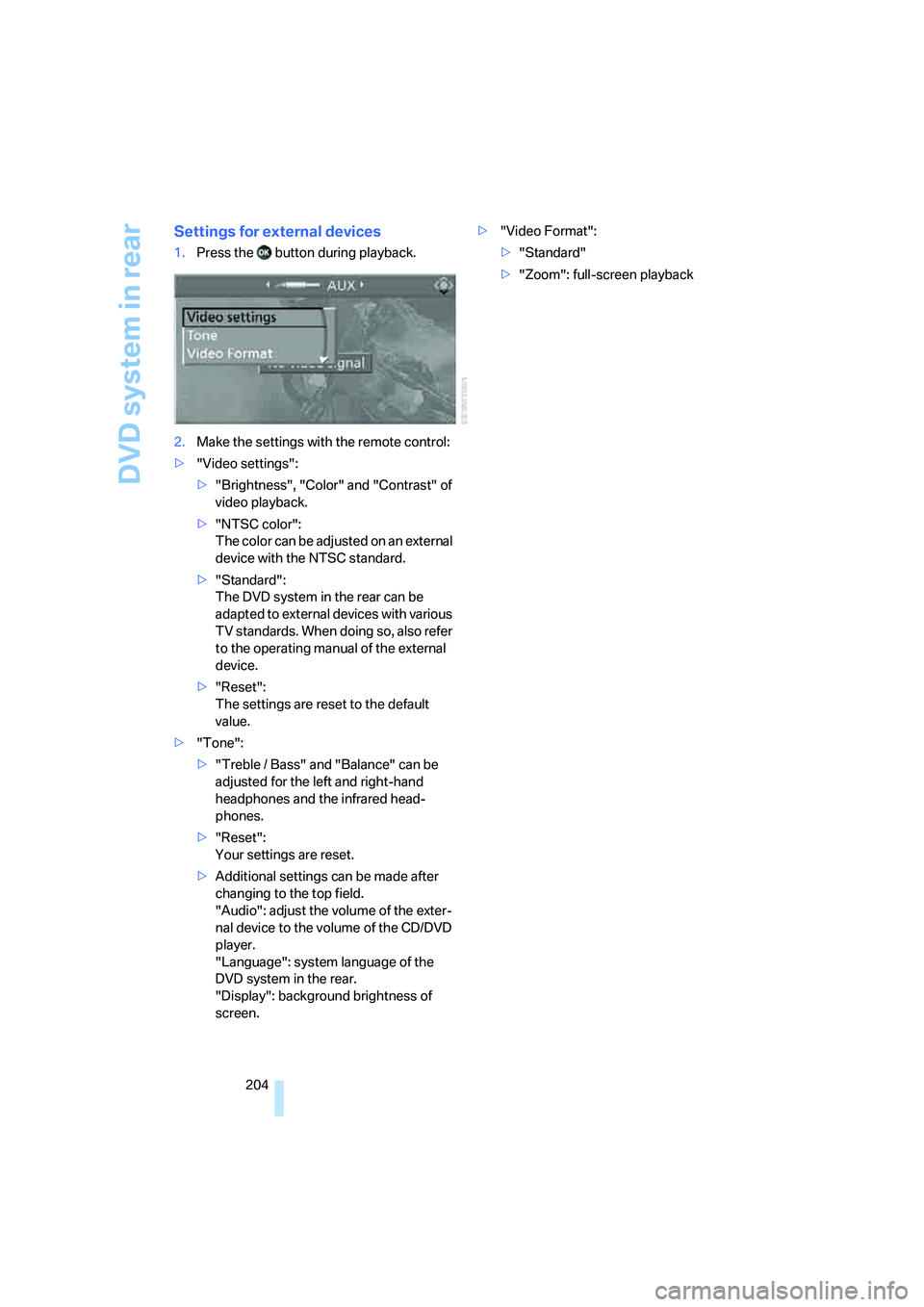
Settings for external devices
1.Press the button during playback.
2.Make the settings with the remote control:
>"Video settings":
>"Brightness", "Color" and "Contrast" of
video playback.
>"NTSC color":
The color can be adjusted on an external
device with the NTSC standard.
>"Standard":
The DVD system in the rear can be
adapted to external devices with various
TV standards. When doing so, also refer
to the operating manual of the external
device.
>"Reset":
The settings are reset to the default
value.
>"Tone":
>"Treble / Bass" and "Balance" can be
adjusted for the left and right-hand
headphones and the infrared head-
phones.
>"Reset":
Your settings are reset.
>Additional settings can be made after
changing to the top field.
"Audio": adjust the volume of the exter-
nal device to the volume of the CD/DVD
player.
"Language": system language of the
DVD system in the rear.
"Display": background brightness of
screen.>"Video Format":
>"Standard"
>"Zoom": full-screen playback
Page 211 of 292
209
Entertainment
Reference
At a glance
Controls
Driving tips Communications
Navigation
Mobility
progress. If this happens, you must log off the
mobile phone from the vehicle if you wish to
place a call with the mobile phone.
Commissioning
Logging on mobile phone on vehicle
The following prerequisites must be met:
>Suitable mobile phone: the mobile phone is
supported by the full mobile phone prepara-
tion package. Information on this subject is
also provided on the Internet at:
www.bmw.com
>The mobile phone is ready to operate.
>The Bluetooth link on the vehicle, refer to
page213, and on the mobile phone is
active.
>Depending on the mobile phone, preset-
tings on the mobile phone are necessary,
e.g. via the following menu items:
>Bluetooth activated
>Connection not with confirmation
>Reconnect
>Depending on the mobile phone model, the
setting energy saving mode can, for exam-
ple, result in vehicle failing to detect the
paired mobile phone.
>For pairing, specify any desired number as
the Bluetooth passkey, e.g. 1. This Blue-
tooth passkey is no longer required follow-
ing successful logon.
>The ignition is switched on.
Only pair the mobile phone with the vehi-
cle stopped, otherwise the passengers
and other road users can be endangered due to
a lack of attentiveness on the part of the
driver.<
Switching on ignition
1.Insert the remote control as far as possible
into the ignition lock.
2.Switch on the ignition by pressing the Start/
Stop button without depressing the brake
pedal.
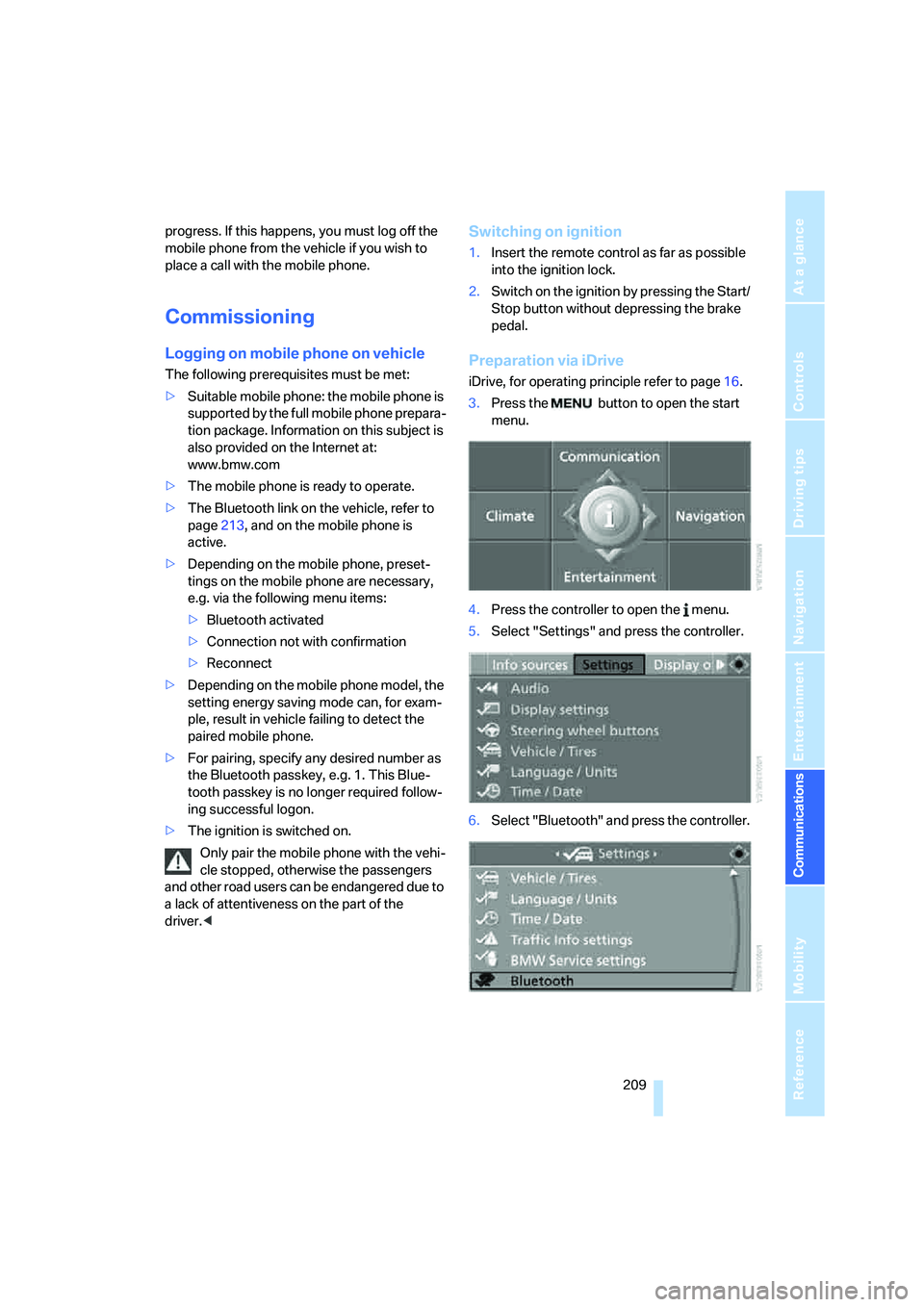
Preparation via iDrive
iDrive, for operating principle refer to page16.
3.Press the button to open the start
menu.
4.Press the controller to open the menu.
5.Select "Settings" and press the controller.
6.Select "Bluetooth" and press the controller.
Page 236 of 292
Wheels and tires
234
Wheels and tires
Tire inflation pressure
Information for your safety
The condition of the tires and the maintenance
of the specified tire pressure are crucial not only
to the tire's service life, but also to driving com-
fort and most importantly, driving safety.
Checking pressure
Only check tire inflation pressure when the tires
are cold. This means after a maximum of
1.25 miles/2 km driving or when the vehicle has
been parked for at least 2 hours. When tires are
warm, the tire inflation pressure increases.
Check the tire inflation pressure regularly
and correct it as needed, even on the
compact tire
*: at least twice a month and before
starting long trips. If you fail to observe this pre-
caution, you may be driving on tires with incor-
rect tire pressures, a condition that can not only
compromise your vehicle's driving stability, but
also lead to tire damage and the risk of an acci-
dent. Do not drive with depressurized, i.e. flat
tires, except run-flat tires. A flat tire will seri-
ously impair your vehicle's handling and braking
response. Attempts to drive on a flat tire can
lead to a loss of control over the vehicle.<
After correcting the tire inflation pressure,
reinitialize the Flat Tire Monitor, refer to
page92, or reset the Tire Pressure Monitor,
refer to page94.<
Pressure specifications
The tables below provide all the correct inflation
pressures for the specified tire sizes at ambient
temperature.
The inflation pressures apply to the tire
sizes and tire brands respectively
approved and recommended by BMW; a list of
these is available from your BMW Sports Activ-
ity Vehicle Center.
ing:
>Tire sizes of your vehicle
>Load conditions
>Maximum allowable driving speed
Tire inflation pressures for speeds
up to 100 mph/160 km/h
For normal driving up to 100 mph/160 km/h,
adjust pressures to the respective tire inflation
pressures listed on the following pages in the
column Traveling speeds up to max. of
100 mph/160 km/h to achieve optimum driving
comfort.
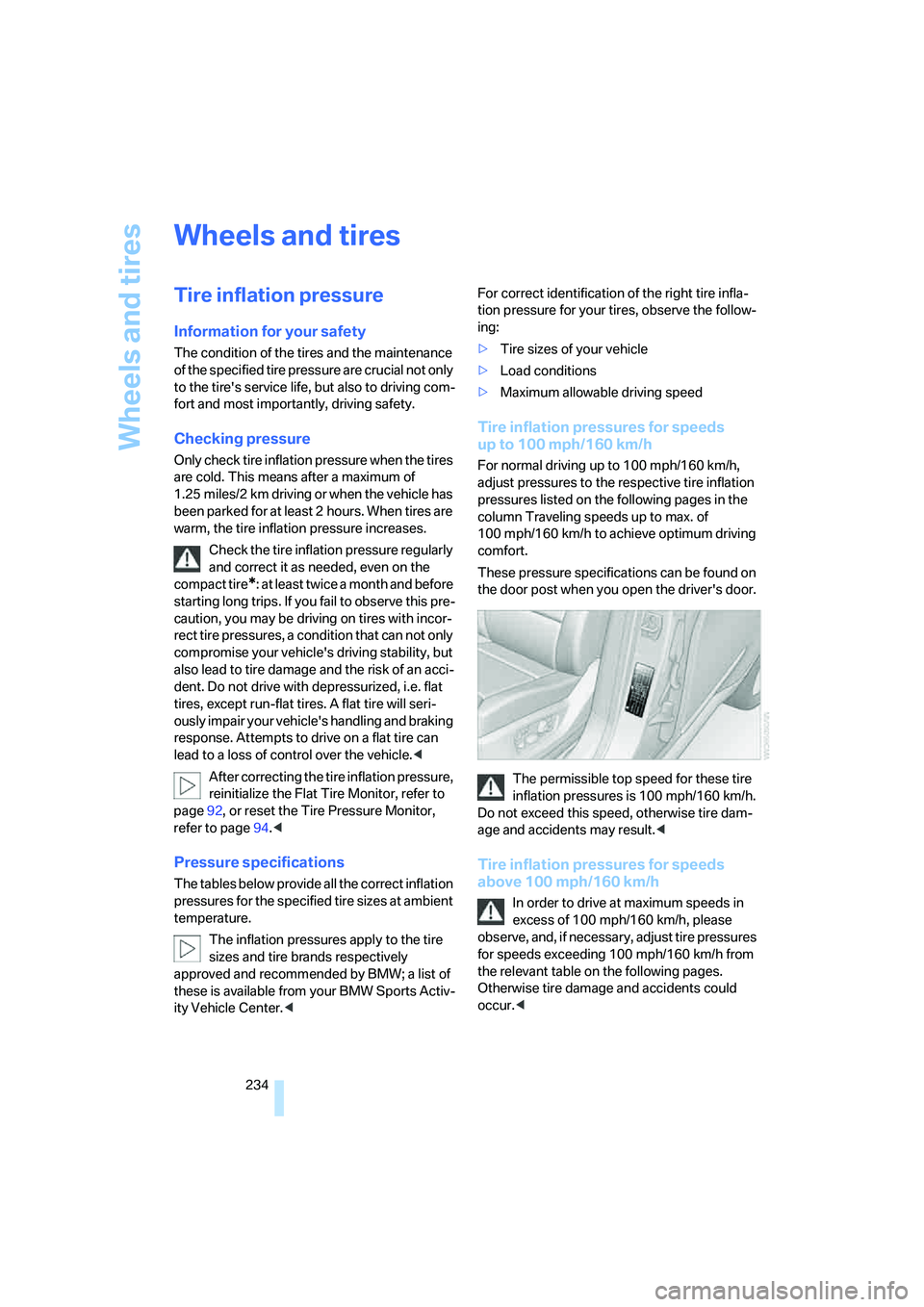
These pressure specifications can be found on
the door post when you open the driver's door.
The permissible top speed for these tire
inflation pressures is 100 mph/160 km/h.
Do not exceed this speed, otherwise tire dam-
age and accidents may result.<
Tire inflation pressures for speeds
above 100 mph/160 km/h
In order to drive at maximum speeds in
excess of 100 mph/160 km/h, please
observe, and, if necessary, adjust tire pressures
for speeds exceeding 100 mph/160 km/h from
the relevant table on the following pages.
Otherwise tire damage and accidents could
occur.<
Page 255 of 292

Mobility
253Reference
At a glance
Controls
Driving tips
Communications
Navigation
Entertainment
3.Check and correct the tire inflation pressure
at the earliest opportunity.
Protect valve stems with valve screw
caps against dirt and contamination.
Dirt in valve stems is a frequent source of
gradual air loss.<
4.Initialize the Flat Tire Monitor, refer to
page92, or reset the Tire Pressure Monitor,
refer to page94.
5.Replace the damaged tire as soon as possi-
ble and have the new wheel/tire balanced.
Driving with compact wheel
Drive reservedly and do not exceed a speed of
50 mph/80 km/h.
The driving characteristics change, for example
reduced track stability on braking, extended
braking distance, and altered self-steering
characteristics in the limit range. In conjunction
with winter tires, these characteristics are more
pronounced.
Only one compact wheel may be
mounted. Restore the wheels and tires to
their original size as quickly as possible. Failure
to do so is a safety risk.<
Vehicle battery
Battery care
The battery is 100 % maintenance-free, i.e., the
electrolyte will last for the life of the battery
when the vehicle is operated in a temperate cli-
mate. Your BMW Sports Activity Vehicle Center
will be glad to advise in all matters concerning
the battery.
Charging battery
Only charge the battery in the vehicle via the
terminals in the engine compartment with the
engine switched off. Connections, refer to
Jump starting on page256.
Disposal
Have old batteries disposed of following
replacement at your BMW Sports Activity
Vehicle Center or bring them to a collection
point. Maintain the battery in an upright position
for transport and storage. Always restrain the
battery to prevent it from tipping over during
transport.<
Power failure
After a temporary power loss, the functioning of
some equipment may be limited and require
reinitialization. Individual settings are also lost
and must be updated:
>Seat, mirror and steering wheel memory
The positions must be stored again, refer to
page44.
>Time and Date
The values must be updated, refer to
pages81, 82.
>Radio
Stations must be stored again if necessary,
refer to page168.
>Navigation system
Wait until the system starts, refer to
page159.
Fuses
Never attempt to repair a blown fuse and
do not replace a defective fuse with a sub-
stitute of another color or amperage rating, as
this could lead to a circuit overload, ultimately
resulting in a fire in the vehicle.<
Spare fuses, a pair of plastic tweezers and infor-
mation on the fuse assignment are located near
the fuses in the cargo bay.
Page 269 of 292
Reference 267
At a glance
Controls
Driving tips
Communications
Navigation
Entertainment
Mobility
Entertainment
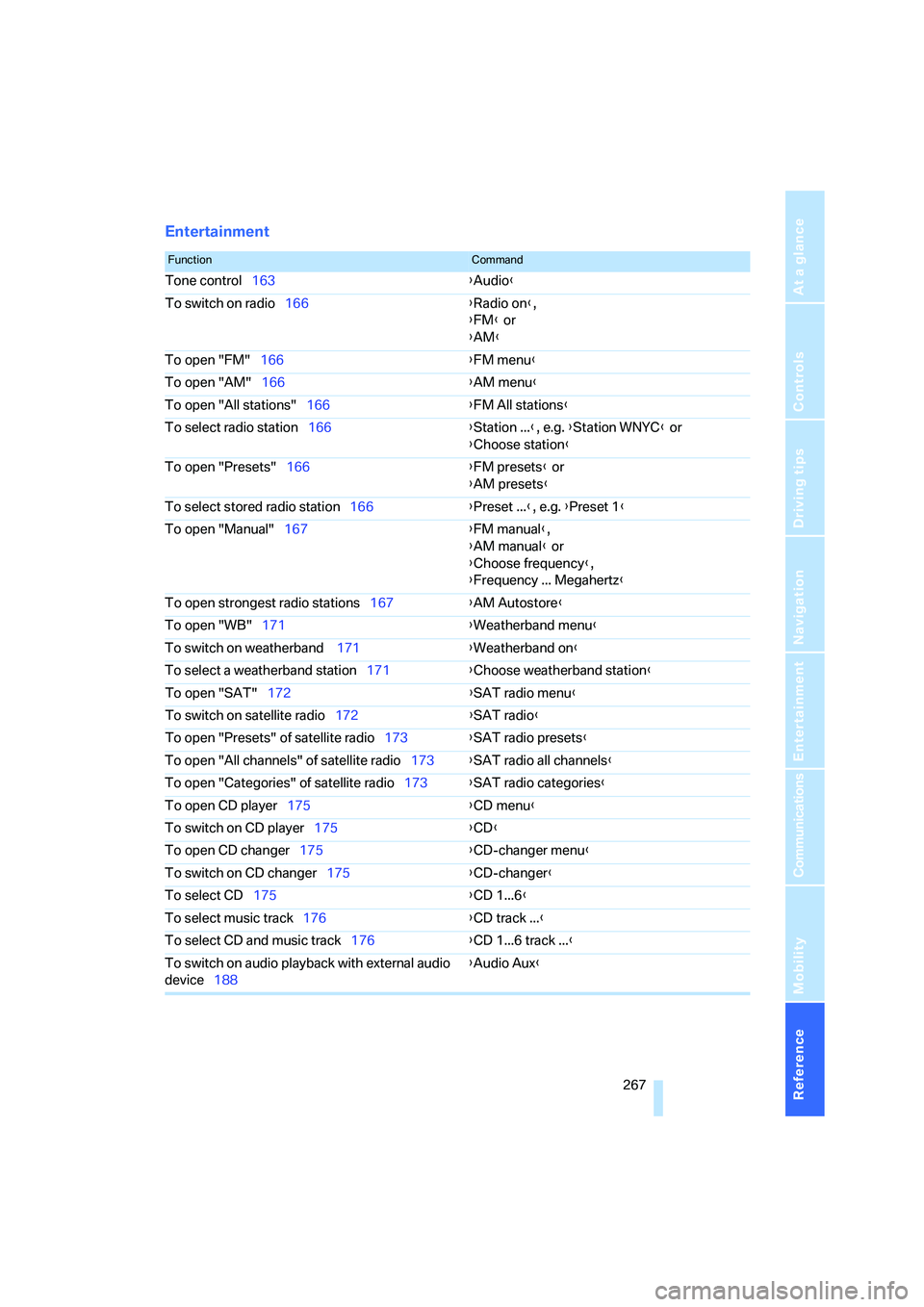
FunctionCommand
Tone control163{Audio}
To switch on radio166{Radio on},
{FM} or
{AM}
To open "FM"166{FM menu}
To open "AM"166{AM menu}
To open "All stations"166{FM All stations}
To select radio station166{Station ...}, e.g. {Station WNYC} or
{Choose station}
To open "Presets"166{FM presets} or
{AM presets}
To select stored radio station166{Preset ...}, e.g. {Preset 1}
To open "Manual"167{FM manual},
{AM manual} or
{Choose frequency},
{Frequency ... Megahertz}
To open strongest radio stations167{AM Autostore}
To open "WB"171{Weatherband menu}
To switch on weatherband 171{Weatherband on}
To select a weatherband station171{Choose weatherband station}
To open "SAT"172{SAT radio menu}
To switch on satellite radio172{SAT radio}
To open "Presets" of satellite radio173{SAT radio presets}
To open "All channels" of satellite radio173{SAT radio all channels}
To open "Categories" of satellite radio173{SAT radio categories}
To open CD player175{CD menu}
To switch on CD player175{CD}
To open CD changer175{CD-changer menu}
To switch on CD changer175{CD-changer}
To select CD175{CD 1...6}
To select music track176{CD track ...}
To select CD and music track176{CD 1...6 track ...}
To switch on audio playback with external audio
device188{Audio Aux}
Page 283 of 292
Reference 281
At a glance
Controls
Driving tips
Communications
Navigation
Entertainment
Mobility
Operation on poor roads133
"Options"227
Orientation menu, refer to
Start menu17
Outlet slits, refer to Air
vents106
Output, refer to Engine
data262
Outside air, refer to AUC
Automatic recirculated-air
control109
Outside temperature
display71
– changing unit of measure82
Outside temperature
warning71
"Overview" for DVD system in
rear201
P
Panic mode30
Panorama glass sunroof39
– moving manually40
– power failure40
– raising, opening, closing39
Park Distance Control PDC84
"Parked car operation"113
"Parked car ventilation"113
Parked car ventilation113
– activating activation
time114
– preselecting activation
times114
– switching on and off
directly113
Parking, vehicle60
Parking aid
– refer to PDC Park Distance
Control84
– refer to Rear view camera86
Parking assistant, refer to
PDC Park Distance
Control84
Parking brake60
– Automatic Hold61
– indicator lamp13
Parking lamps102Parking with Automatic
Hold62
Parts and accessories6
"Passenger's seat climate"51
Passenger-side exterior
mirror, tilting down52
"Pathway lighting"103
Pathway lighting103
"Pause" for DVD system in
rear198
Paying attention to speed240
"PDC"85
"PDC in main window only"85
PDC Park Distance Control84
Personal Profile28
"Perspective"152
Phone book214
– creating and editing voice
phone book220
Phone numbers
– deleting from phone
book217
– dialing215
– most recent numbers217
– selecting in phone book217
– Top 8217
"Photo" for DVD system in
rear194,200
Pinch protection system
– panorama glass sunroof40
– power windows38
Plasters, refer to First-aid
kit256
"Play"
– for DVD system in rear198
– with satellite radio173
Playing videos, DVD system in
rear195
Plug-in unit for remote
control, refer to Ignition
lock59
Pocket light, refer to
Flashlight119
Position
– displaying157
– storing, refer to Storing
current position146
Power failure253Power windows, refer to
Windows38
Preselecting activation times
of the parked car
ventilation114
"Presets"
– displaying with radio166
– with satellite radio173
Pressure, tires234
Pressure monitoring of tires,
refer to TPM Tire Pressure
Monitor94
"Profile"229
Programmable buttons on
steering wheel53
Programmable memory
buttons21
Protective function, refer to
Pinch protection system
– panorama glass sunroof40
– windows38
R
Radio
– Autostore167
– controls162
– High Definition Radio169
– listen to station166
– regional program169
– sampling stations167
– satellite radio172
– selecting frequency
manually167
– selecting
waveband162,166
– station search167
– station with the best
reception167
– storing stations168
– switching on/off162
– tone control163
– volume163
– Weather Band171
Radio key, refer to Keys/
remote control28
Radio position, refer to Radio
readiness59