2008 BMW 335XI key
[x] Cancel search: keyPage 187 of 274
185
Entertainment
Reference
At a glance
Controls
Driving tips Communications
Navigation
Mobility
As soon as a mobile phone is detected by the
vehicle, the phone book entries stored on the
SIM card or on your mobile phone are transmit-
ted to the vehicle. This data transfer depends
on your mobile phone and can take several min-
utes; please refer to your mobile phone's oper-
ating instructions, if necessary.
If not all phone book entries are displayed:
>Transfer all phone book entries from the
SIM card to the mobile phone, if necessary.
>Phone book entries with special characters
may not be displayed.
Up to four mobile phones can be paired, one
after the other. If a fifth mobile phone is paired,
the pairing data for the mobile phone whose
pairing data was first stored on the vehicle is
deleted.
Checks to perform if pairing is
unsuccessful
>Is the mobile phone supported by the
mobile phone preparation package? You
can obtain information on the Internet at:
www.bmw.com.
>Do the Bluetooth passkeys on the mobile
phone and vehicle match? The same Blue-
tooth passkey must be entered on the
mobile phone's display and via iDrive.
>Did it take you more than 30 seconds to
enter the Bluetooth passkey?
>Only a limited number of devices can be
connected with the mobile phone. If neces-
sary, delete connections with other devices.
>Is the mobile phone no longer responding?
Switch the mobile phone off and on or
briefly disconnect the power supply.
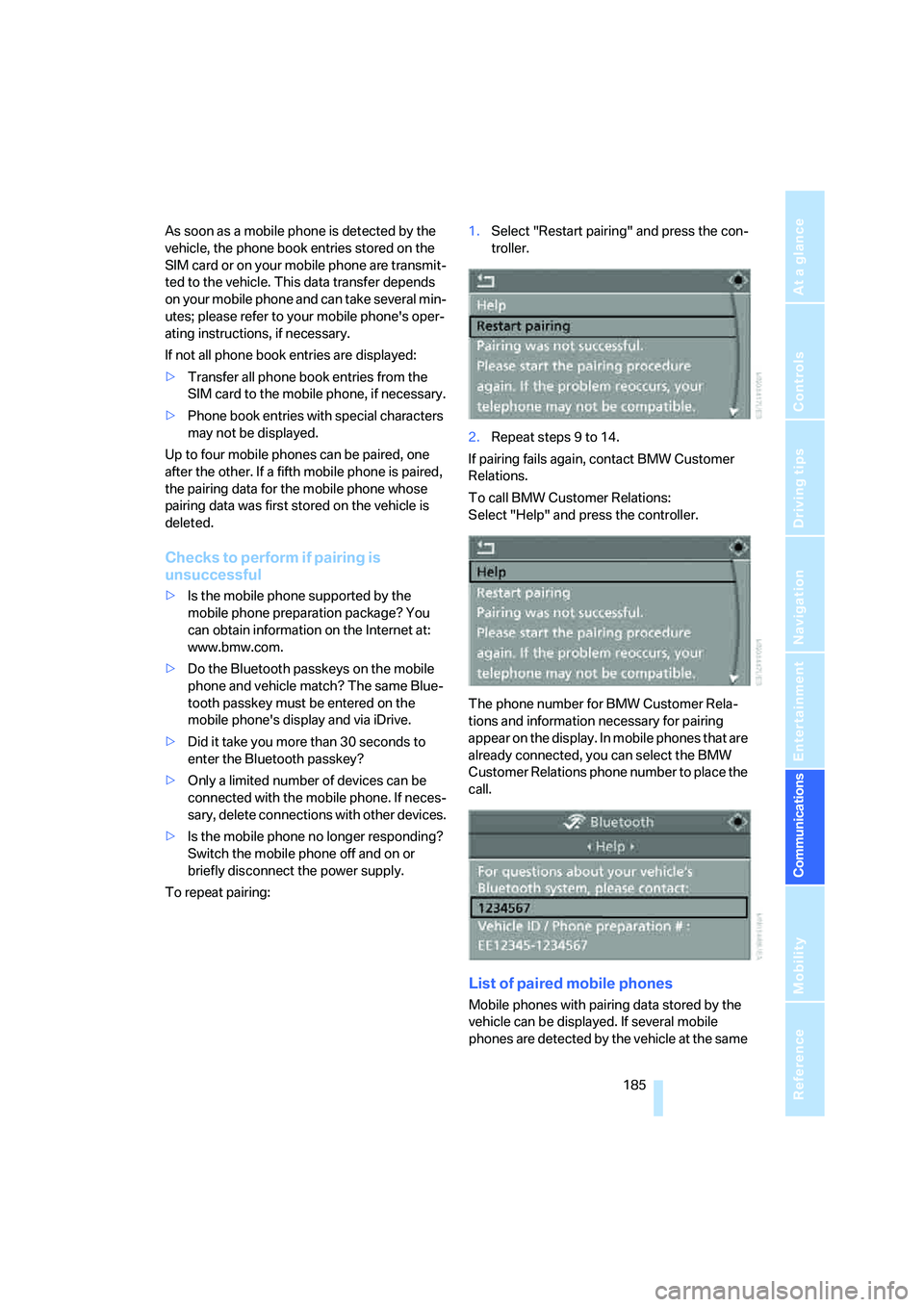
To repeat pairing:1.Select "Restart pairing" and press the con-
troller.
2.Repeat steps 9 to 14.
If pairing fails again, contact BMW Customer
Relations.
To call BMW Customer Relations:
Select "Help" and press the controller.
The phone number for BMW Customer Rela-
tions and information necessary for pairing
appear on the display. In mobile phones that are
already connected, you can select the BMW
Customer Relations phone number to place the
call.
List of paired mobile phones
Mobile phones with pairing data stored by the
vehicle can be displayed. If several mobile
phones are detected by the vehicle at the same
Page 191 of 274
189
Entertainment
Reference
At a glance
Controls
Driving tips Communications
Navigation
Mobility
Calling
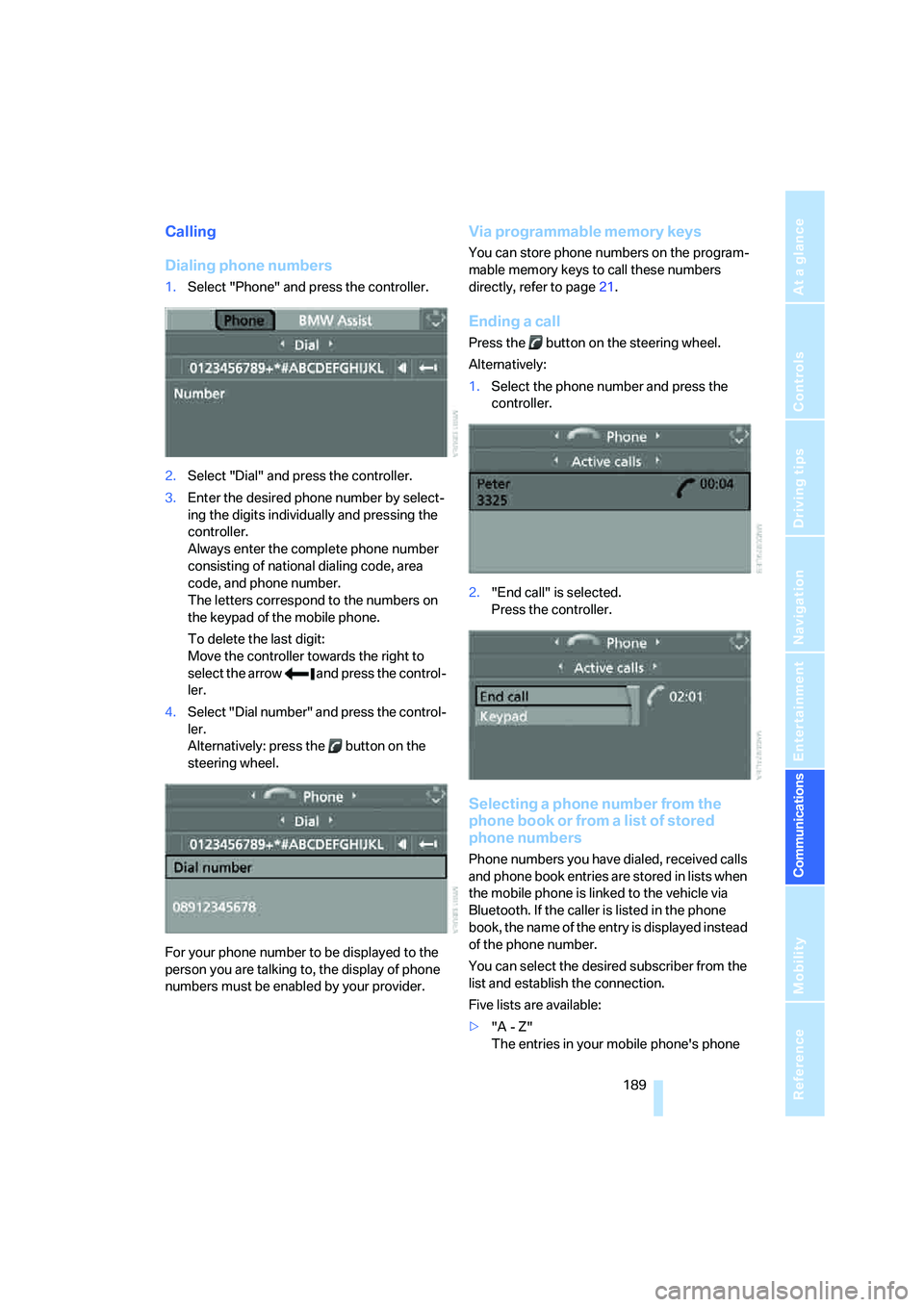
Dialing phone numbers
1.Select "Phone" and press the controller.
2.Select "Dial" and press the controller.
3.Enter the desired phone number by select-
ing the digits individually and pressing the
controller.
Always enter the complete phone number
consisting of national dialing code, area
code, and phone number.
The letters correspond to the numbers on
the keypad of the mobile phone.
To delete the last digit:
Move the controller towards the right to
select the arrow and press the control-
ler.
4.Select "Dial number" and press the control-
ler.
Alternatively: press the button on the
steering wheel.
For your phone number to be displayed to the
person you are talking to, the display of phone
numbers must be enabled by your provider.
Via programmable memory keys
You can store phone numbers on the program-
mable memory keys to call these numbers
directly, refer to page21.
Ending a call
Press the button on the steering wheel.
Alternatively:
1.Select the phone number and press the
controller.
2."End call" is selected.
Press the controller.
Selecting a phone number from the
phone book or from a list of stored
phone numbers
Phone numbers you have dialed, received calls
and phone book entries are stored in lists when
the mobile phone is linked to the vehicle via
Bluetooth. If the caller is listed in the phone
book, the name of the entry is displayed instead
of the phone number.
You can select the desired subscriber from the
list and establish the connection.
Five lists are available:
>"A - Z"
The entries in your mobile phone's phone
Page 199 of 274
197
Entertainment
Reference
At a glance
Controls
Driving tips Communications
Navigation
Mobility
BMW Assist
BMW Assist provides you with various services.
For example, the position data of your vehicle
can be transmitted to the BMW Assist
Response Center if an Emergency Request
*
has been sent.
Many BMW Assist services depend on the indi-
vidually agreed contract.
After your contract has expired, the
BMW Assist system will be deactivated by the
BMW Assist Response Center without you hav-
ing to visit a BMW center. After the BMW Assist
system has been deactivated, no BMW Assist
service will be available. The BMW Assist sys-
tem can be reactivated by a BMW center after a
new contract has been signed.
Requirements
You can use BMW Assist when the following
requirements are met:
>The installed BMW Assist system is logged
on to a mobile phone network. This network
must be capable of transmitting the ser-
vices.
>To transmit position data, the vehicle must
be able to determine the current position.
>To activate and update BMW Assist, a GPS
signal must be available.
>You have subscribed to BMW Assist with
your BMW center or with the BMW Assist
Response Center. Enabling must have
been completed.
>BMW Assist is activated, refer to page202.
Offered services
The following services are available via
BMW Assist:
>Emergency Request, refer to page235:
When you press the SOS button, a connec-
tion is established to the BMW Assist
Response Center. The BMW Assist Response Center contacts you and takes
further steps to help you.
>Automatic Collision Notification:
Under certain conditions, a connection is
established to the BMW Assist Response
Center after a serious accident. If possible,
the BMW Assist Response Center contacts
you and takes further steps to help you.
>Enhanced Roadside Assistance:
You can call BMW Roadside Assistance
*
should you require help in the event of a
breakdown. If possible, the vehicle data and
position data are transmitted during this
call.
>Customer Relations:
For all information related to your vehicle
you can be connected with BMW Customer
Relations.
>TeleService:
Data on your vehicle's service status or
required inspections are transmitted to your
BMW center either automatically before a
service due date or when you request a
BMW service appointment.
>Remote Door Unlock:
Contact the BMW Assist Response Center
if your remote control or key is not available
and you would like to have the vehicle
unlocked.
>Stolen Vehicle Recovery:
After you report your vehicle stolen with the
police, call the BMW Assist Response Cen-
ter to determine its position.
In addition, optional services can be provided to
you, such as the Concierge service or informa-
tion on directions, traffic or the weather. You
can use Critical Calling to activate a limited
number of calls via the BMW Assist Response
Center, e.g. when you do not have your mobile
phone with you.
Press the SOS button in order to contact the
BMW Assist Response Center, see below.
*
Page 256 of 274

Everything from A - Z
254 Brake system120
– BMW Maintenance
System226
– breaking in120
– disc brakes122
Breakdown services, refer to
Roadside Assistance235
Breaking in the clutch120
Breaking in the differential,
refer to Engine and
differential120
Break-in period120
Brightness of the Control
Display84
"Brightness" on the Control
Display84
Bulb changing, refer to Lamps
and bulbs229
Button for starting the engine,
refer to Start/stop button56
Buttons on the steering
wheel11
C
California Proposition 65
warning6
"Call"190,201
Call
– accepting188
– displaying accepted190
– ending189
– missed190
– starting189
Calling
– from phone book189
– from Top 8 list190
– redialing190
Can holders, refer to Cup
holders111
Capacities246
Capacity of the cargo bay245
Car battery, refer to Vehicle
battery233
Car care, refer to Caring for
your vehicle brochure
Car-care products, refer to
Caring for your vehicle
brochure"Car Data"73
Care, refer to Caring for your
vehicle brochure
Cargo, securing124
Cargo bay114
– capacity245
– convenient access37
– folding up the floor
panel116
– lamp, refer to Interior
lamps99
– opening from inside33
– opening from outside33
– partition net114
– roll-up cover114
Cargo bay lid, refer to
Luggage compartment lid/
tailgate33
Cargo bay net, refer to
Partition net114
Cargo loading
– securing cargo124
– stowing cargo123
– vehicle123
Caring for artificial leather,
refer to Caring for your
vehicle brochure
Caring for leather, refer to
Caring for your vehicle
brochure
Caring for plastic, refer to
Caring for your vehicle
brochure
Caring for the carpet, refer to
Caring for your vehicle
brochure
Caring for the vehicle finish,
refer to Caring for your
vehicle brochure
Car jack
– jacking points233
Car key, refer to Integrated
key/remote control28
Car phone182
– installation location, refer to
Center armrest110
– refer to Mobile phone182
– refer to separate Owner's
ManualCar radio, refer to Radio160
Car wash122
– also refer to Caring for your
vehicle brochure
– with convenient access37
Catalytic converter, refer to
Hot exhaust system121
"Categories" for satellite
radio167
CBS Condition Based
Service226
"CD"156,169
CD changer169
– compressed audio files169
– controls156
– fast forward/reverse173
– installation location173
– playing a track171
– random order172
– repeating a track172
– selecting a CD169
– selecting a track170
– switching on/off156
– tone control157
– volume157
CD player169
– compressed audio files169
– controls156
– fast forward/reverse173
– playing a track171
– random order172
– repeating a track172
– selecting a track170
– switching on/off156
– tone control157
– volume157
Center armrest110
Center brake lamp
– replacing bulb233
Center console, refer to
Around the center
console14
"Central locking"30
Central locking
– from inside32
– from outside29
Central locking system29
– convenient access36
– hotel function34
Page 258 of 274

Everything from A - Z
256 Dashboard lighting, refer to
Instrument lighting99
Data, technical242
– dimensions243
– engine242
– weights245
"Date"81
Date
– setting80
– setting format81
"Date format"81
"Daytime running lamps"97
Daytime running lamps97
DBC Dynamic Brake
Control86
"Deactivated"48
Deactivating front passenger
airbags94
Deadlocking, refer to
Locking30
Decommissioning the vehicle,
refer to Caring for your
vehicle brochure
Defect
– door lock31
– fuel filler door206
– glass roof40
– panorama glass roof42
"Delete address book" in
navigation140
"Delete all numbers" on the
mobile phone191
"Delete data" in
navigation140
"Delete" for mobile
phone191
Destination address
– deleting140
– entering130,134Destination for navigation
– destination list137
– entry130
– home address140
– manual entry130,134
– selecting from address
book139
– selecting using
information136
– selecting via language134
– selecting via map135
– storing138
Destination guidance143
– canceling voice
instructions51
– changing specified
route141
– displaying route144
– distance and arrival143
– starting143
– terminating/continuing143
– voice instructions146
– volume of voice
instructions147
Destination list for navigation
system137
Destinations recently driven
to137
"Details" for audio mode177
"Dial" for mobile phone189
"Dial number"189
Digital clock71
Digital compass108
Digital radio, refer to High
Definition Radio163
Dimensions243
Directional indicators, refer to
Turn signals60
Direction instructions, refer to
Voice instructions146
Directory for navigation, refer
to Address book138
Displacement, refer to Engine
data242
Display, refer to iDrive
controls16
Display lighting, refer to
Instrument lighting99
"Display off"21Displays
– on the Control Display16
Displays, refer to Instrument
cluster12
Displays and controls10
Disposal
– coolant224
– remote control battery38
– vehicle battery234
Distance control, refer to
Active cruise control64
Distance remaining to service,
refer to Service
requirements76
"Distance to dest."74
Distance warning, refer to
PDC Park Distance
Control85
Door key, refer to Remote
control with integrated
key28
Door lock31
"Door locks"30,31,32,77
Doors, emergency
operation31
DOT Quality Grades217
Draft-free ventilation103
Drinks holders, refer to Cup
holders111
Drive-off assistance, refer to
Dynamic Stability Control
DSC86
Drive-off assistant88
Driving around a traffic
congestion150
Driving lamps, refer to Parking
lamps/low beams96
Driving notes120
Driving off on hills, refer to
Drive-off assistant88
Driving route, refer to
Displaying route144
Driving stability control
systems86
Driving through water122
Driving tips, refer to Driving
notes120
Dry air, refer to Cooling
function103
Page 261 of 274

Reference 259
At a glance
Controls
Driving tips
Communications
Navigation
Entertainment
Mobility
Head restraints45
– front, removing46
– rear, removing46
– sitting safely43
Heated
– mirrors49
– rear window103
– seats47
Heating
– mirrors49
– rear window103
– residual heat103
– seats47
Heating and ventilation, refer
to Climate100
Heating while at a standstill,
refer to Using residual
heat103
Heavy loads, refer to Stowing
cargo123
Height, refer to
Dimensions243
Height adjustment
– seats44
– steering wheel50
High beams98
– headlamp flasher98
– indicator lamp13
– replacing bulbs229
High Definition Radio163
High water, refer to Driving
through water122
Highways, refer to Route
criteria141
Hill Descent Control HDC87
Hills122
Holders for cups111
Home address140
"Home address" in
navigation141
Homepage BMW4
Hood221
Hooks for shopping
bags115,116
Horn10,11
Hotel function, refer to
Locking or unlocking
separately34
Hot exhaust system121"Hour memo"80
"House number" in
destination entry133
Hydraulic brake assist, refer to
Dynamic Brake Control
DBC86
Hydroplaning121
I
IBOC, refer to High Definition
Radio163
Ice warning, refer to Outside
temperature
warning71
ID3 tag, refer to Information
about the track171
Identification marks
– Run-Flat Tires219
– tire coding217
iDrive16
– adjusting brightness84
– assistance window20
– automatic climate
control101
– changing language84
– changing units of measure
and display format76
– confirming selection or
entry19
– controls16
– displays, menus17
– menu guidance17
– operating principle16
– overview16
– selecting a menu item19
– setting the date and time79
– start menu17
– status information20
– switching menu pages19
– symbols18
iDrive operating principle16
Ignition56
– switched off56
– switched on56
Ignition key, refer to Remote
control with integrated
key28Ignition key position 1, refer to
Radio readiness56
Ignition key position 2, refer to
Ignition on56
Ignition lock56
i menu18
Imprint2
Indicator and warning
lamps13
– Tire Pressure Monitor
TPM92
Individual air distribution101
Individually programmable
buttons on steering
wheel50
Inflation pressure, refer to Tire
inflation pressure208
Inflation pressure monitoring,
refer to Tire Pressure
Monitor TPM90
Information
– on another location136
– on country136
– on current position136
– on destination location136
Information menu, refer to
i menu18
"Information on
destination"138
"Info sources"77
Initializing
– active steering93
– after power failure234
– compass, refer to
Calibrating108
– Flat Tire Monitor FTM89
– glass roof40
– panorama glass roof42
"Input map"135
Installation location
– CD changer173
– navigation DVD drive128
– telephone110
Instructions for navigation
system, refer to Voice
instructions146
Instrument cluster12
Instrument lighting99
Page 262 of 274

Everything from A - Z
260 Instrument panel, refer to
Cockpit10
Integrated key28
Integrated universal remote
control106
Interesting destination for
navigation136
"Interim time"84
Interior lamps99
– remote control30
Interior motion sensor36
Interior rearview mirror50
– automatic dimming
feature50
– compass108
Interlock, refer to Disengaging
the remote control58
Intermittent mode of the
wipers61
J
Jacking points233
Joystick, refer to iDrive16
Jumpering, refer to Jump
starting236
Jump starting236
K
Key, refer to Integrated key/
remote control28
Keyless go, refer to
Convenient access36
Keyless opening and closing,
refer to Convenient
access36
Key Memory, refer to Personal
Profile28
Kick-down59
– automatic transmission with
Steptronic59
Knock control207
L
Lamps
– automatic headlamp
control96
– parking lamps/low beams96
Lamps and bulbs, replacing
bulbs229
"Language / Units"76
"Language / Units" in
navigation129,146
"Language" on the Control
Display84
"Languages" in
navigation129,146
Lap-and-shoulder belt, refer
to Safety belts48
Lashing eyes, refer to
Securing cargo124
Last destinations, refer to
Destination list137
"Last seat pos."48
LATCH child-restraint fixing
system53
LED hand lamp110
LED Light-emitting
diodes229
Length, refer to
Dimensions243
License plate lamp, replacing
bulb233
Light-emitting diodes
LED229
Lighter111
– connecting electrical
appliances112
"Lighting"61
Lighting
– instruments99
– lamps and bulbs229
– vehicle, refer to Lamps96
Light-metal alloy wheels, care,
refer to Caring for your
vehicle brochure
Light switch96
"Limit"83
Limit, refer to Speed limit83
Load securing equipment,
refer to Securing cargo124Lock buttons, doors, refer to
Locking32
Locking
– adjusting confirmation
signal31
– from inside32
– from outside30
– without remote control, refer
to Convenient access36
Locking and unlocking doors
– confirmation signals31
– from inside32
– from outside29
Low-beam headlamps96
– automatic
96
Low beams
– replacing bulbs229
Lower back support, refer to
Lumbar support45
Luggage compartment lid33
– convenient access37
– emergency operation, refer
to Opening manually33
– emergency release34
– locking or unlocking
separately34
– opening from inside33
– opening from outside33
– opening manually33
– remote control30
Luggage rack, refer to Roof-
mounted luggage rack124
Lumbar support45
M
M+S tires, refer to Winter
tires220
Maintenance, refer to Service
Booklet
Maintenance system226
Malfunction
– automatic transmission with
Steptronic60
– luggage compartment lid/
tailgate33
– tires90
Malfunction warnings, refer to
Check Control81
Page 263 of 274
Reference 261
At a glance
Controls
Driving tips
Communications
Navigation
Entertainment
Mobility
Manual mode, automatic
transmission with
Steptronic59
"Manual" on the radio161
Manual operation
– door lock31
– driver's door31
– fuel filler door206
– glass roof40
– luggage compartment lid/
tailgate33
– panorama glass roof42
– transmission lock, automatic
transmission60
Manual transmission58
Map
– changing scale145
– destination entry135
"Map direction of travel"145
"Map facing north"145
Master key, refer to Remote
control with integrated
key28
Maximum cooling102
Maximum speed
– with winter tires220
Measurements, refer to
Dimensions243
Memory, refer to Seat and
mirror memory47
Memory keys,
programmable21
MENU button16
Menus
– Control Display17
Menus, refer to iDrive16
Message list, traffic
information148
Microfilter
– BMW Maintenance
System226
– for automatic climate
control104
Microfilter/activated-charcoal
filter
– BMW Maintenance
System226Microphone
– telephone14
– voice input14
Mirror dimming feature50
Mirrors49
– automatic curb monitor49
– exterior mirrors49
– heating49
– interior rearview mirror50
– memory, refer to Seat and
mirror memory47
"Missed calls"190
Missed calls190
Mobile phone
– accepted calls190
– adjusting volume187
– calling
189
– ending call189
– installation location, refer to
Center armrest110
– missed calls190
– operation via iDrive187
– redialing190
– refer to separate Owner's
Manual
– Top 8190
– touch tone dialing192
Mobile phone, installation
location, refer to Center
armrest110
Mobile phone, refer to the
separate Owner's Manual
Modifications, technical, refer
to For your own safety5
Monitor, refer to iDrive
controls16
Monitoring system for tire
pressures, refer to Flat Tire
Monitor89
"Monitor on / off"51
Most recent mobile phone
numbers190
MP3, refer to Compressed
audio files169
Multifunctional steering
wheel, refer to Buttons on
the steering wheel11Multifunction switch
– refer to Turn signals/
headlamp flasher60
– refer to Wiper system61
Multimedia screen, refer to
iDrive16
Music tracks, refer to
Tracks170
"Mute on / off"51
N
"Navigation"130,136
Navigation announcements,
refer to Switching voice
instructions on/off146
Navigation drive, location128
Navigation DVD128