2008 BMW 135I COUPE headlamp flasher
[x] Cancel search: headlamp flasherPage 13 of 260

At a glance
11Reference
Controls
Driving tips
Communications
Navigation
Entertainment
Mobility
7
Fog lamps*94
8
Turn signals62
High beams, headlamp flasher93
Roadside parking lamps
*93
Computer67
Settings and information about the
vehicle70
Settings and information about the
vehicle70
Instrument lighting94
9Instrument cluster12
10
Windshield wipers63
Rain sensor
*63
11Switching the ignition on/off and
starting/stopping the engine58
12Ignition lock58
13Buttons on the steering wheel
Telephone
*:
>Press: accepting and ending a
call; starting dialing
* of
selected phone number; redi-
aling if no phone number is
selected.
>Press longer: redialing
Volume
Activating/deactivating voice com-
mand system
*
Changing radio station
Selecting music track
Scrolling through phone book and
lists with stored phone numbers
Individually programmable53
Individually programmable53
14Horn: the entire surface
15Adjusting the steering wheel53
16
Cruise control
*64
17Releasing the hood209
18Opening the luggage compartment lid33
Page 15 of 260

At a glance
13Reference
Controls
Driving tips
Communications
Navigation
Entertainment
Mobility
Indicator and warning lamps
The concept
Indicator and warning lamps in the display area
can light up in a variety of combinations and col-
ors.
Some lamps are checked for proper functioning
and thus come on briefly when the engine is
started or the ignition is switched on.
Explanatory text messages
Text messages at the lower edge of the Control
Display explain the meaning of the displayed
indicator and warning lamps.
You can call up more information, e.g. on the
cause of a malfunction and on how to respond,
via Check Control, refer to page76.In urgent cases, this information will be shown
as soon as the corresponding lamp comes on.
Indicator lamps without text messages
The following indicator lamps notify you that
certain functions are active:
High beams/headlamp flasher93
Fog lamps
*94
Lamp flashes:
DSC or DTC is regulating the propul-
sive forces in order to maintain driving
stability82
Canada: parking brake applied59
Parking brake applied59
Canada: engine malfunction with
adverse effect on exhaust
emissions215
Engine malfunction with adverse
effect on exhaust emissions215
Page 64 of 260

Driving
62 >When you use the shift paddles on the
steering wheel to shift gears in automatic
mode, the transmission switches to manual
mode.
>If you do not accelerate or shift gears using
the shift paddles for a certain amount of
time, the transmission switches back to
automatic mode.
If the selector lever is in the M/S gear
plane, manual mode remains active.<
>To shift up: pull one of the shift paddles.
>To shift down: press one of the shift pad-
dles.
Upshifts and downshifts are executed only
when they will result in a plausible combination
of engine and vehicle speed; thus, for example,
a downshift that would cause the engine to
overrev will not be executed by the system. The
gear selected is briefly displayed in the instru-
ment cluster, followed by the gear actually in
use.
Overriding selector lever lock
Should the selector lever refuse to move out of
position P although the button on the selector
lever is pressed, the selector lever lock can be
overridden:1.Unclip the sleeve of the selector lever.
2.Pull the sleeve up over the selector lever
until the sleeve is inside out.
3.Using the screwdriver from the onboard
tool kit, refer to page216, press the red
lever while moving the selector lever to the
desired position.
Turn signals/
headlamp flasher
1High beams
2Headlamp flasher
3Turn signals
Using turn signals
Press the lever beyond the resistance point.
To turn off manually, press the lever to the
resistance point.
Unusually rapid flashing of the indicator
lamp and the turn signals indicates that
one of the turn signal bulbs has failed.<
Indicating a turn briefly
Press the lever as far as the resistance point for
as long as you wish to indicate a turn.
Page 94 of 260
Lamps
92 5.If necessary, move the highlight marker to
the uppermost field. Turn the controller
until "Lighting" is selected and press the
controller.
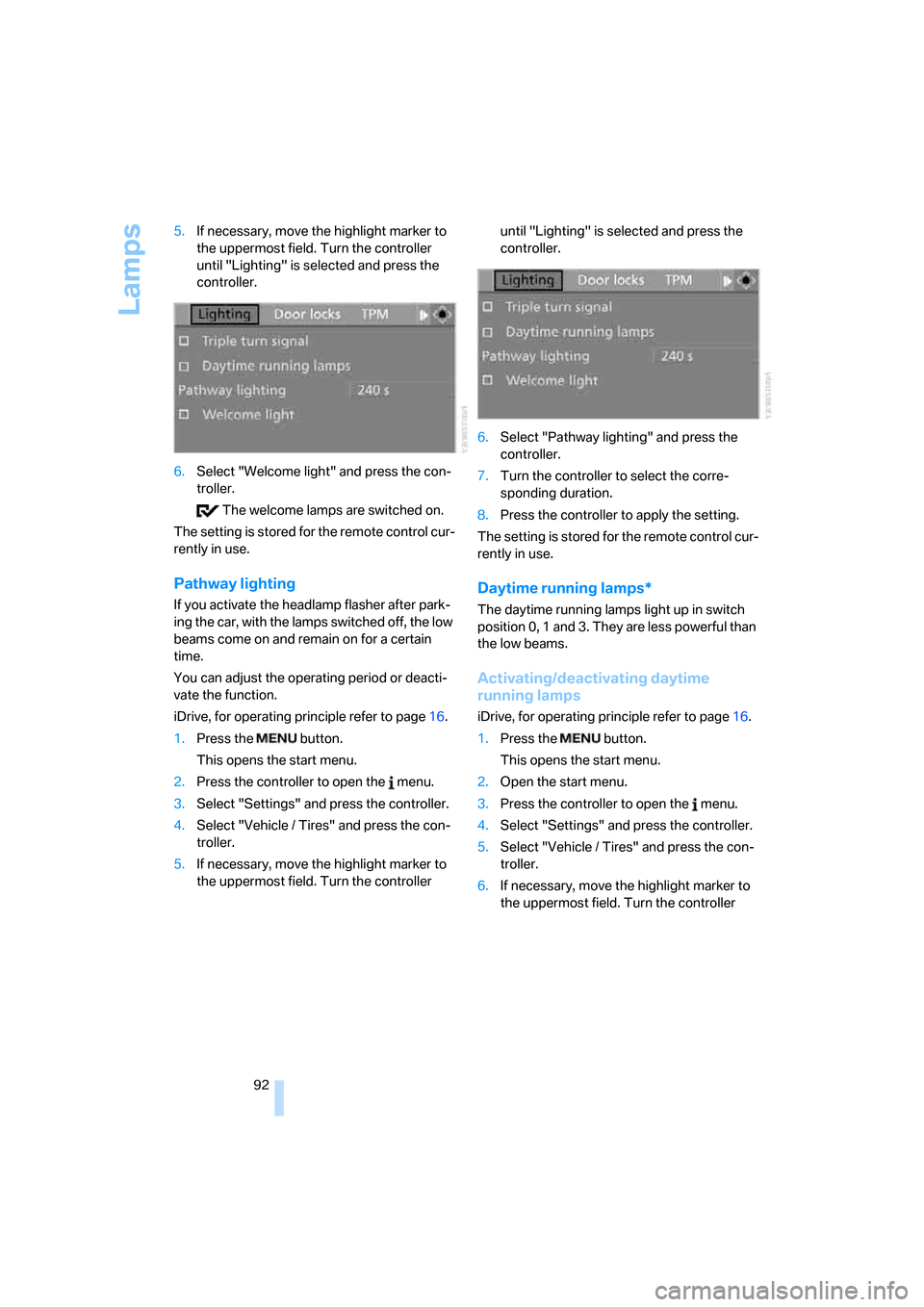
6.Select "Welcome light" and press the con-
troller.
The welcome lamps are switched on.
The setting is stored for the remote control cur-
rently in use.
Pathway lighting
If you activate the headlamp flasher after park-
ing the car, with the lamps switched off, the low
beams come on and remain on for a certain
time.
You can adjust the operating period or deacti-
vate the function.
iDrive, for operating principle refer to page16.
1.Press the button.
This opens the start menu.
2.Press the controller to open the menu.
3.Select "Settings" and press the controller.
4.Select "Vehicle / Tires" and press the con-
troller.
5.If necessary, move the highlight marker to
the uppermost field. Turn the controller until "Lighting" is selected and press the
controller.
6.Select "Pathway lighting" and press the
controller.
7.Turn the controller to select the corre-
sponding duration.
8.Press the controller to apply the setting.
The setting is stored for the remote control cur-
rently in use.
Daytime running lamps*
The daytime running lamps light up in switch
position 0, 1 and 3. They are less powerful than
the low beams.
Activating/deactivating daytime
running lamps
iDrive, for operating principle refer to page16.
1.Press the button.
This opens the start menu.
2.Open the start menu.
3.Press the controller to open the menu.
4.Select "Settings" and press the controller.
5.Select "Vehicle / Tires" and press the con-
troller.
6.If necessary, move the highlight marker to
the uppermost field. Turn the controller
Page 95 of 260
Controls
93Reference
At a glance
Driving tips
Communications
Navigation
Entertainment
Mobility
until "Lighting" is selected and press the
controller.
7.Select "Daytime running lamps" and press
the controller.
The daytime running lamps are
switched on.
The setting is stored for the remote control cur-
rently in use.
Adaptive Head Light*
The concept
Adaptive Head Light is a variable headlamp
control system that enables better illumination
of the road surface. Depending on the steering
angle and other parameters, the light from the
headlamp follows the course of the road.
In tight curves at speeds up to 40 mph/70 km/h,
e.g. on mountainous roads or when turning, an
additional, corner-illuminating lamp is switched
on that lights up the inside area of the curve.
Activating Adaptive Head Light
With the ignition switched on, turn the light
switch to position 3, refer to page91.
The corner-illuminating lamp is switched on
automatically, depending on the steering wheel
angle or turn signal indicator.
To avoid blinding oncoming traffic, the Adaptive
Head Light directs light towards the front pas-
senger side when the vehicle is at a standstill.
When you are reversing, only the corner-illumi-
nating lamps are active and switched on on
both sides.
Malfunction
The LED next to the symbol for automatic head-
lamp control flashes. Adaptive Head Light is
malfunctioning or has failed. Have the system
checked as soon as possible.
High beams/roadside parking
lamps
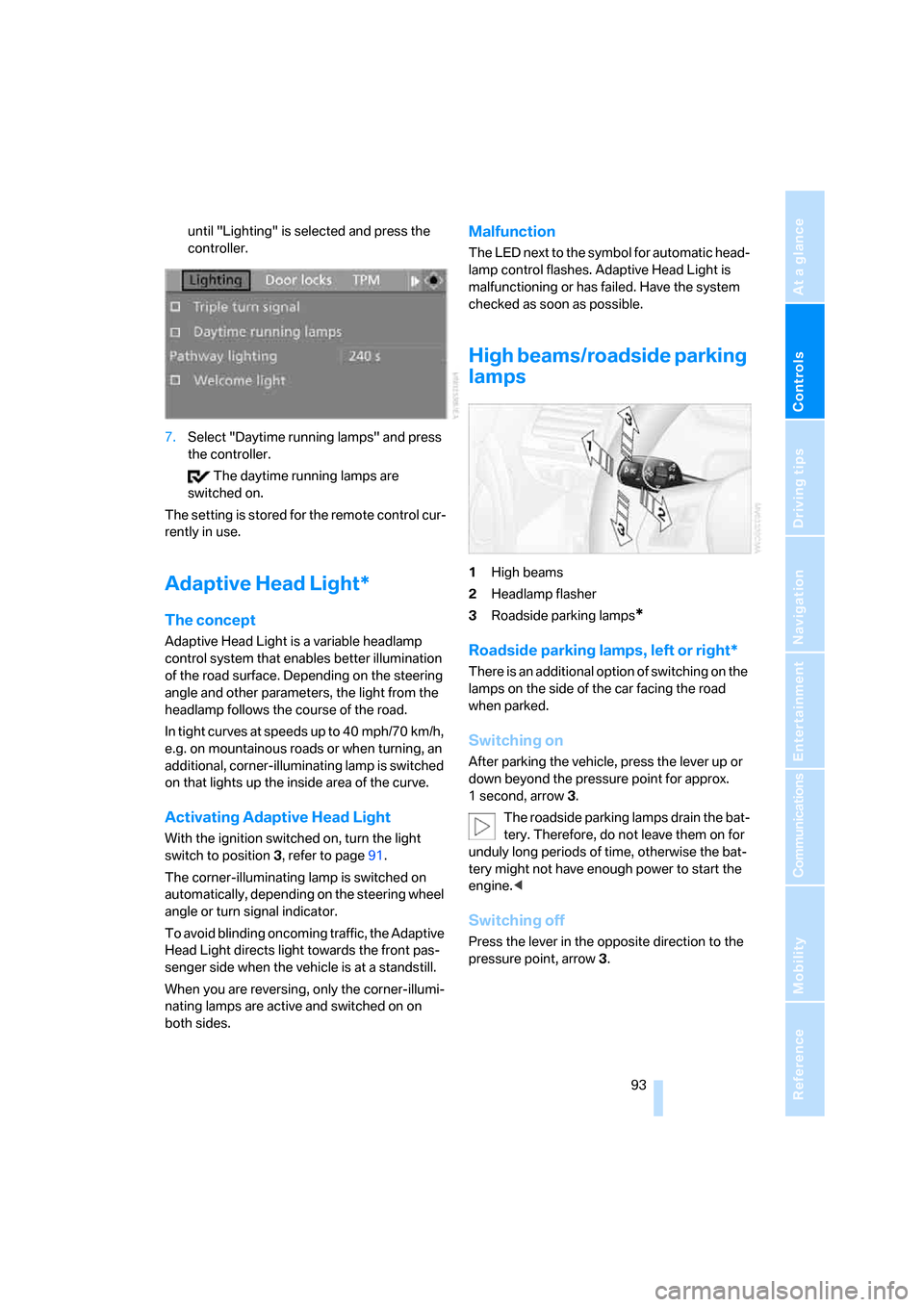
1High beams
2Headlamp flasher
3Roadside parking lamps
*
Roadside parking lamps, left or right*
There is an additional option of switching on the
lamps on the side of the car facing the road
when parked.
Switching on
After parking the vehicle, press the lever up or
down beyond the pressure point for approx.
1 second, arrow 3.
The roadside parking lamps drain the bat-
tery. Therefore, do not leave them on for
unduly long periods of time, otherwise the bat-
tery might not have enough power to start the
engine.<
Switching off
Press the lever in the opposite direction to the
pressure point, arrow 3.
Page 96 of 260

Lamps
94
Fog lamps*
To switch on/off, press the button.
The parking lamps or low beams must
be switched on for the fog lamps to
operate. The green indicator lamp in
the instrument cluster lights up whenever the
fog lamps are on.
The fog lamps are switched off while you acti-
vate the headlamp flasher or switch on the high
beams.
If the automatic headlamp control is acti-
vated, the low beams will come on auto-
matically when you switch on the fog lamps.<
Instrument lighting
You can adjust the brightness of the instrument
lighting only when the parking lamps or the low
beams are switched on.
1.Push button 1 up or down repeatedly until
the appropriate symbol appears in the dis-
play, accompanied by the brightness set-
ting and scale the word "SET".
2.Press button 2.3.Push button 1 up or down to select the
desired brightness level.
4.Press button 2.
The display again shows the outside tem-
perature and the time.
Interior lamps
The interior lamps, footwell lamps*, entry
lamps
*, cargo bay lamp and courtesy lamps*
are controlled automatically.
The LEDs for the courtesy lamps
are set in the
door handles and illuminate the ground in front
of the doors.
To avoid draining the battery, all lamps
inside the car are switched off about
8 minutes after the ignition is switched off, refer
to Start/stop button on page58.<
Switching interior lamps on/off
manually
Interior lamps, front and rear*:
To switch on and off, press the button.
To switch off the interior lamps, footwell
lamps
*, entry lamps* and courtesy lamps* per-
manently, press the button for the front interior
lamps for about 3 seconds.
Page 248 of 260
Everything from A - Z
246
G
Garage door opener, refer to
Integrated universal remote
control102
Gasoline, refer to Required
fuel200
Gasoline display, refer to Fuel
gauge67
Gear change
– with automatic
transmission61
– with manual transmission60
Gear display, with automatic
transmission60
Gearshift lever
– automatic transmission with
Steptronic61
– manual transmission60
General driving notes115
Glass roof, electric39
– closing after electrical
malfunction40
– convenient operation32
– opening, closing39
– operation with convenient
access36
– pinch protection system40
– raising39
– remote control30
Glove compartment105
GPS navigation, refer to
Navigation system122
Grills, refer to Air vents96
Gross vehicle weight, refer to
Weights233
H
Halogen lamps
– replacing bulbs217
Handbrake, refer to Parking
brake59
Hands-free system, refer to
Microphone for hands-free
mode14
Hazard warning flashers14
"HD radio"157HD radio, refer to High
Definition Radio157
Head airbags88
Headlamp control,
automatic91
Headlamp cover217
Headlamp flasher62
– indicator lamp13
Headlamps
– care, refer to Caring for your
vehicle brochure
– replacing bulbs217
Head restraints47
Heated
– seats49
Heated mirrors52
Heating
– mirrors52
– seats49
Heating, rear window99
Heating and ventilation96
Heating during a stop99
Heavy loads, refer to Stowing
cargo118
Height, refer to
Dimensions231
Height adjustment
– steering wheel53
High beams93
– indicator lamp13
– replacing bulbs217
High Definition Radio157
High water, refer to Driving
through water116
Highways, refer to Route
criteria134
Hills116
Holders for cups106
Home address133
"Home address" in
navigation134
Hood209
Hot exhaust system115
"Hour memo"75
"House number" in
destination entry126
Hydraulic brake assist, refer to
Dynamic Brake Control81
Hydroplaning115
I
IBOC, refer to High Definition
Radio157
Ice warning, refer to Outside
temperature
warning66
ID3 tag, refer to Information
about the track165
Identification marks
– tire coding205
iDrive16
– adjusting brightness79
– automatic climate control97
– changing date and time74
– changing language79
– confirming selection or
entry19
– displays, menus17
– lists19
– menu guidance17
– operating principle16
– selecting a menu item19
– status information20
– switching menu pages19
– symbols18
Ignition58
– switched off58
– switched on58
Ignition key, refer to
Integrated key/remote
control28
Ignition key position 1, refer to
Radio readiness58
Ignition key position 2, refer to
Ignition on58
Ignition lock58
Imprint2
Indicator and warning
lamps13
– Tire Pressure Monitor
TPM86
Indicator lighting, refer to
Instrument lighting94
Individually programmable
buttons on steering
wheel53
Individual settings, refer to
Personal Profile28
Page 250 of 260

Everything from A - Z
248 Maintenance, refer to
– BMW Maintenance
System214
– Service booklet
Maintenance system214
Malfunction warnings, refer to
Check Control76
"Manual" on the radio155
Manual operation
– door lock32
– fuel filler door200
– glass roof40
– luggage compartment lid33
– transmission lock, automatic
transmission62
Manual operation with
automatic transmission61
Manual transmission60
Map
– changing scale139
– destination entry128
"Map direction of travel"138
"Map facing north"138
Maximum cooling97
Maximum speed
– for winter tires208
Memory keys,
programmable21
Menus, refer to iDrive16
Message list, traffic
information142
Microfilter/activated-charcoal
filter for automatic climate
control100
Microphone for telephone14
Mirror dimming feature53
Mirrors51
– automatic curb monitor52
– exterior mirrors51
– heating52
– interior rearview mirror52
"Missed calls"184
Missed calls184Mobile phone
– accepted calls184
– adjusting volume181
– calling183
– ending call183
– missed calls184
– operation via iDrive181
– redialing184
– Top 8184
– touch tone dialing186
Mobile phone, installation
location, refer to Center
armrest106
Mobile phone, refer to the
separate Owner's Manual
Modifications, technical, refer
to For your own safety
5
Monitor, refer to iDrive16
Monitoring system for tire
pressures, refer to Flat Tire
Monitor83
"Monitor on / off"54
Most recent mobile phone
numbers184
MP3, refer to Compressed
audio files163
Multifunctional steering
wheel, refer to Buttons on
the steering wheel11
Multifunction switch
– refer to Turn signals/
headlamp flasher62
– refer to Wiper system63
Music tracks, refer to
Tracks164
"Mute on / off"54
N
"Navigation"123,129
Navigation announcements,
refer to Switching voice
instructions on/off140
Navigation drive, location122
Navigation DVD122
– drive150Navigation system122
– address book131
– changing a route141
– destination entry123
– destination list130
– displaying current
position144
– entering a destination
manually123,127
– last destinations130
– navigation DVD122
– opening123
– route display137
– route list139
– searching for a special
destination129
– selecting destination using
information129
– selecting destination via
map128
– selecting route criteria134
– starting destination
guidance136
– switching off, refer to
Terminating/continuing
destination guidance136
– terminating/continuing
destination guidance136
– voice instructions140
– volume adjustment140
"Navigation voice
instructions"139
"Navigation voice
instructions" via buttons on
steering wheel53
Neck support, refer to Head
restraints47
Nets, refer to Storage
compartments106
"New address" in
navigation132
"New destination"124,128
"New route"141
New tires207
"Next entertainment
source"54
North-facing map138
Number of cylinders, refer to
Engine data230