2008 BMW 135I COUPE flash to pass
[x] Cancel search: flash to passPage 17 of 260

At a glance
15Reference
Controls
Driving tips
Communications
Navigation
Entertainment
Mobility
1Coupe: microphone for voice command
system
* and for telephone in hands-free
mode
*
Convertible: microphone on steering col-
umn
2SOS: initiating an Emergency Request
call
*222
3Reading lamps95
4Coupe: glass roof, electric
*39
5Interior lamps94
6Passenger airbag status lamp
7Control Display16
8Dynamic Traction Control DTC82
9Hazard warning flashers
10Central locking system32
11Automatic climate control
12Ejecting audio CD15013Changing
>Radio station150
>Track150
14Selecting radio, CD and CD changer
15Selecting AM or FM waveband
16Ejecting navigation DVD
18Controller16
Can be turned, pressed, or moved horizon-
tally in four directions
19Opening start menu on Control Display17
20Drive for navigation DVD
*122
21Programmable memory keys21
22Switching entertainment audio sources on/
off and adjusting volume150
23Drive for audio CD163 Air distribution to the
windshield97
Air distribution to the upper body
area97
Air distribution to the footwell97
Automatic air distribution and flow
rate98
Cooling function99
Automatic recirculated-air control
AUC98
Recirculated-air mode98
Maximum cooling97
Residual heat mode99
Air flow rate98
Defrosting windows99
Rear window defroster99
17
Heated seats*49
Convertible: opening the convert-
ible top41
Convertible: closing the convertible
top41
Page 31 of 260

Controls
29Reference
At a glance
Driving tips
Communications
Navigation
Entertainment
Mobility
>Settings for the display on the Control Dis-
play and in the instrument cluster:
>12h/24h format of the clock, refer to
page75
>Date format, refer to page76
>Brightness of Control Display, refer to
page79
>Language of Control Display, refer to
page79
>Units of measure for fuel consumption,
distance covered/remaining distances,
and temperature, refer to page70
>Show visual warning for Park Distance Con-
trol PDC, refer to page80
>Light settings:
>Welcome lamps, refer to page91
>Pathway lighting, refer to page92
>Daytime running lamps, refer to page92
>Automatic climate control: AUTO program,
cooling function and automatic recircu-
lated-air control activation/deactivation,
temperature, air flow rate and distribution,
refer to page97
>Entertainment:
>Audio volume, refer to page151
>Tone control, refer to page151
>Speed-dependent volume control, refer
to page151
Central locking system
The concept
The central locking system is ready for opera-
tion whenever the driver's door is closed.
The system simultaneously engages and
releases the locks on the following:
>Doors
>Luggage compartment lid
>Fuel filler door
Operating from outside
>Via the remote control>Via the door lock
>In cars with convenient access
*, via the
handles on the driver's and front passen-
ger's doors
The anti-theft system is also operated at the
same time. It prevents the doors from being
unlocked using the lock buttons or door han-
dles. In addition, if the remote control is used,
the welcome lamps
*, interior lamps and the
door's courtesy lamps
* are switched on or off.
The alarm system
* is also armed or disarmed.
For further details on the alarm system
*, refer
to page34.
Operating from inside
By means of the button for central locking, refer
to page32.
In the event of a sufficiently severe accident, the
central locking system unlocks automatically. In
addition, the hazard warning flashers and inte-
rior lamps come on.
Opening and closing:
Using the remote control
Persons or animals in a parked vehicle
could lock the doors from the inside. You
should therefore take the remote control with
you when you leave the vehicle so that the latter
can be opened from outside.<
Unlocking
Press the button.
The interior lamps, the courtesy lamps
* and the
welcome lamps come on.
You can set how the vehicle is to be unlocked.
The setting is stored for the remote control cur-
rently in use.
iDrive, for operating principle refer to page16.
1.Press the button.
This opens the start menu.
2.Press the controller to open the menu.
3.Select "Settings" and press the controller.
4.Select "Vehicle / Tires" and press the con-
troller.
Page 38 of 260

Opening and closing
36
Switching off tilt alarm sensor and
interior motion sensor
Press the button on the remote control
again as soon as the vehicle is locked.
The indicator lamp lights up briefly and then
flashes continuously. The tilt alarm sensor and
the interior motion sensor are switched off until
the next time the vehicle is unlocked and subse-
quently locked again.
Convenient access*
Convenient access enables you to enter your
vehicle without needing to hold the remote con-
trol in your hand. All you need to do is wear the
remote control close to your body, e.g. in your
jacket pocket. The vehicle detects the corre-
sponding remote control within the immediate
vicinity or in the passenger compartment.
Convenient access supports the following
functions:
>Unlocking/locking the vehicle
>Unlocking the luggage compartment lid
separately
>Engine starting
>Convenient closure
Functional requirement
>The vehicle or the luggage compartment lid
can only be locked when the vehicle detects
that the remote control currently in use is
outside of the vehicle.
>The vehicle cannot be locked or unlocked
again until after approx. 2 seconds.
>The engine can only be started when the
vehicle detects that the remote control cur-
rently in use is inside the vehicle.
Comparison to the standard remote
control
In general, there is no difference between using
convenient access or pressing the buttons on
the remote control to carry out the functions
mentioned above. You should therefore first familiarize yourself with the instructions on
opening and closing starting on page28.
Special features regarding the use of conve-
nient access are described below.
If you notice a brief delay while opening or
closing windows, the glass roof or the
convertible top, the system is checking whether
a remote control is inside the vehicle. Please
repeat the opening or closing procedure, if nec-
essary.<
Unlocking
Grasp the handle on the driver's or front pas-
senger's door completely, arrow 1. This corre-
sponds to pressing the button.
Locking
Touch the surface, arrow 2, with your finger for
approx. 1 second. This corresponds to pressing
the button.
To preserve the battery, please make
sure that the ignition and all electrical
consumers are switched off before locking the
vehicle.<
Coupe: convenient closure
For convenient closure, keep your finger on the
surface, arrow 2.
Convertible: window and convertible
top operation
With the ignition at radio readiness or beyond,
you can open and close the windows and the
convertible top when a remote control is
located inside the vehicle.
Page 102 of 260
Climate
100
Microfilter/activated-charcoal filter
The microfilter traps dust and pollen in the
incoming air. The activated-charcoal filter pro-
vides additional protection by filtering gaseous
pollutants from the outside air. Your BMW cen-
ter replaces this combined filter during routine
maintenance.
Parked car ventilation*
The concept
The parked car ventilation provides ventilation
to the passenger compartment and lowers its
temperature, if necessary.
The parked car ventilation system is operated
via iDrive, refer to page16. Two different
switch-on times can be preselected.
The parked car ventilation remains switched on
for 30 minutes. The system can also be
switched on and off directly. Due to its high
power consumption, it should not be switched
on twice in a row without driving in between to
allow the battery to recharge.
The parked car ventilation system comes on if
the outside temperature is above 597/156
when the switch-on time was preselected, but
is ready for use at any temperature when the
system is switched on directly.
The air emerges from the air vents for the upper
body area in the instrument panel. The air vents
must therefore be open.
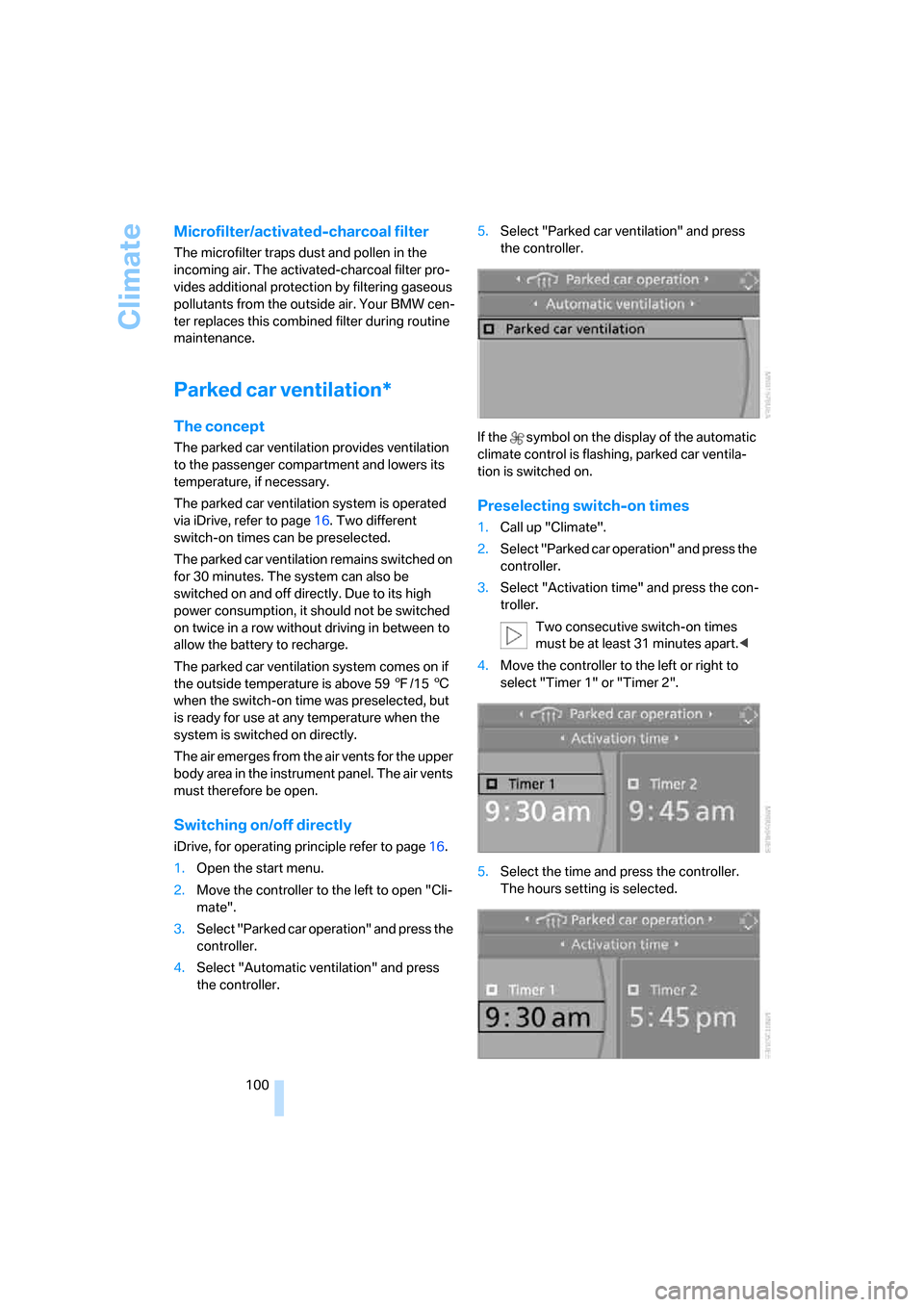
Switching on/off directly
iDrive, for operating principle refer to page16.
1.Open the start menu.
2.Move the controller to the left to open "Cli-
mate".
3.Select "Parked car operation" and press the
controller.
4.Select "Automatic ventilation" and press
the controller.5.Select "Parked car ventilation" and press
the controller.
If the symbol on the display of the automatic
climate control is flashing, parked car ventila-
tion is switched on.
Preselecting switch-on times
1.Call up "Climate".
2.Select "Parked car operation" and press the
controller.
3.Select "Activation time" and press the con-
troller.
Two consecutive switch-on times
must be at least 31 minutes apart.<
4.Move the controller to the left or right to
select "Timer 1" or "Timer 2".
5.Select the time and press the controller.
The hours setting is selected.