2008 BMW 135I COUPE automatic transmission
[x] Cancel search: automatic transmissionPage 82 of 260

Technology for driving comfort and safety
80
Technology for driving comfort and safety
Park Distance Control PDC*
The concept
The PDC assists you with maneuvering in tight
parking spaces. Acoustic signals and a visual
indicator
warn you of the presence of an object
behind your vehicle. Four ultrasonic sensors in
the bumper measure the distance.
These sensors have a range of approx. 6.5 ft/
2 m. However, an acoustic warning does not
sound until an object is approx. 24 in/60 cm
from the corner sensors, or approx. 5 ft/1.50 m
from the center sensors.
PDC is a parking aid that can indicate
objects when they are approached
slowly, as is usually the case when parking.
Avoid approaching an object at high speed, oth-
erwise physical circumstances may lead to the
system warning being issued too late.<
Switching on automatically
With the engine running or the ignition switched
on, the system is activated after approx. 1 sec-
ond when you engage reverse gear or move the
automatic transmission selector lever to
position R. Wait this short period before driving.
Switching off automatically
After approx. 55 yd/50 m of driving or above
approx. 20 mph/30 km/h, the system switches
off and the LED goes out.
Signal tones
When nearing an object, its position is indicated
correspondingly by an interval tone. As the dis-
tance between vehicle and object decreases,
the intervals between the tones become
shorter. If the distance to the nearest object
falls to below roughly 1 ft/30 cm, then a contin-
uous tone sounds.
An interval tone is interrupted after approx.
3seconds:>If you remain in front of an object that has
been detected by only one of the corner
sensors
>If you are driving parallel to a wall
Malfunction
The indicator lamp in the instrument
cluster comes on. PDC is malfunc-
tioning. A message appears on the
Control Display. Have the system checked.
To avoid this problem, keep the sensors clean
and free of ice or snow in order to ensure that
they will continue to operate effectively. When
using a high-pressure cleaner, do not direct the
jet toward the sensors for lengthy periods and
only spray from a distance of at least 4 in/10 cm.
PDC with visual warning
You can also have the system show distances
to objects on the Control Display. The contours
of distant objects are shown on the Control Dis-
play even before the acoustic signal sounds.
The setting is stored for the remote control cur-
rently in use.
iDrive, for operating principle refer to page16.
1.Press the button.
This opens the start menu.
2.Press the controller to open the menu.
3.Select "Settings" and press the controller.
4.Select "Vehicle / Tires" and press the con-
troller.
5.If necessary, move the highlight marker to
the uppermost field. Turn the controller
Page 118 of 260
Things to remember when driving
116 The risk of hydroplaning increases with declin-
ing tread depth on the tires, refer also to Mini-
mum tread depth on page206.
Driving through water
Drive through water on the road only if it is
not deeper than 1 ft/30 cm, and then only
at walking speed at the most. Otherwise, the
vehicle's engine, the electrical systems and the
transmission may be damaged.<
Use the parking brake on inclines
On inclines, do not hold the vehicle for a
lengthy period using the clutch; use the
parking brake instead. Otherwise greater clutch
wear will result.<
For more information about the drive-off assis-
tant, refer to page82.
Braking safely
Your BMW is equipped with ABS as a standard
feature. Applying the brakes fully is the most
effective way of braking in situations in which
this is necessary. Since the vehicle maintains
steering responsiveness, you can still avoid
possible obstacles with a minimum of steering
effort.
Pulsation of the brake pedal, combined with
sounds from the hydraulic circuits, indicate that
ABS is in its active mode.
Driving in wet conditions
When roads are wet or there is heavy rain,
briefly exert gentle pressure on the brake pedal
every few miles. Monitor traffic conditions to
ensure that this maneuver does not endanger
other road users. The heat generated in this
process helps dry the pads and rotors to ensure
that full braking efficiency will then be available
when you need it.
Hills
To prevent overheating and the resulting
reduced efficiency of the brake system,
drive long or steep downhill gradients in the
gear in which the least braking is required. Even
light but consistent brake pressure can lead to high temperatures, brake wear and possibly
even brake failure.<
You can increase the engine's braking effect by
shifting down, all the way to first gear if neces-
sary. This strategy helps you avoid placing
excessive loads on the brake system. Down-
shifting in manual mode of the automatic trans-
mission, refer to page61.
Never drive with the clutch held down,
with the transmission in idle or with the
engine switched off; otherwise, engine braking
action will not be present or there will be no
power assistance to the brakes or steering.
Never allow floor mats, carpets or any other
objects to protrude into the area around the
pedals, otherwise pedal function could be
impaired.<
Corrosion on brake rotors
When the vehicle is driven only occasionally,
during extended periods when the vehicle is not
used at all, and in operating conditions where
brake applications are less frequent, there is an
increased tendency for corrosion to form on
rotors, while contaminants accumulate on the
brake pads. This occurs because the minimum
pressure which must be exerted by the pads
during brake applications to clean the rotors is
not reached.
Should corrosion form on the brake rotors, the
brakes will tend to respond with a pulsating
effect that even extended application will fail to
cure.
When the vehicle is parked
Condensation forms while the automatic cli-
mate control is in operation, and then exits
under the vehicle. Traces of condensed water
under the vehicle are therefore normal.
Before driving into a car wash
For general information about taking care of
your BMW, refer to the Caring for your vehicle
brochure.
Page 119 of 260
Driving tips
117Reference
At a glance
Controls
Communications
Navigation
Entertainment
Mobility
With convenient access and automatic
transmission
Insert the remote control into the ignition
switch.
The engine can be switched off when the selec-
tor lever is in position N. Refer also to page37.
Cargo loading
To avoid loading the tires beyond their
approved carrying capacity, never over-
load the vehicle. Overloading can lead to over-
heating and increases the rate at which damage
develops inside the tires. This can ultimately
result in a sudden blow-out.<
Make sure that no liquids are spilled or
leak from their containers in the cargo
bay, as this could result in damage to the vehi-
cle.<
Determining loading limit
1.Locate the following statement on your
vehicle's placard
*:
The combined weight of occupants
and cargo should never exceed
XXX kg or YYY lbs. Otherwise, overloading
can result in damage to the vehicle and
unstable driving conditions.<
2.Determine the combined weight of the
driver and passengers that will be riding in
your vehicle.
3.Subtract the combined weight of the driver
and passengers from XXX kilograms or YYY
pounds.
4.The resulting figure equals the available
amount of cargo and luggage load capacity. For example, if the YYY amount equals
1,400 lbs. and there will be five 150-lb. pas-
sengers in your vehicle, the amount of avail-
able cargo and luggage load capacity is
650 lbs:
1,400 lbs. minus 750 lbs. = 650 lbs.
5.Determine the combined weight of luggage
and cargo being loaded on the vehicle. That
weight may not safely exceed the available
cargo and luggage load capacity calculated
in step 4.
6.If your vehicle will be towing a trailer, part of
the load from your trailer will be transferred
to your vehicle. Consult the manual for
transporting a trailer to determine how this
may reduce the available cargo and luggage
load capacity of your vehicle.
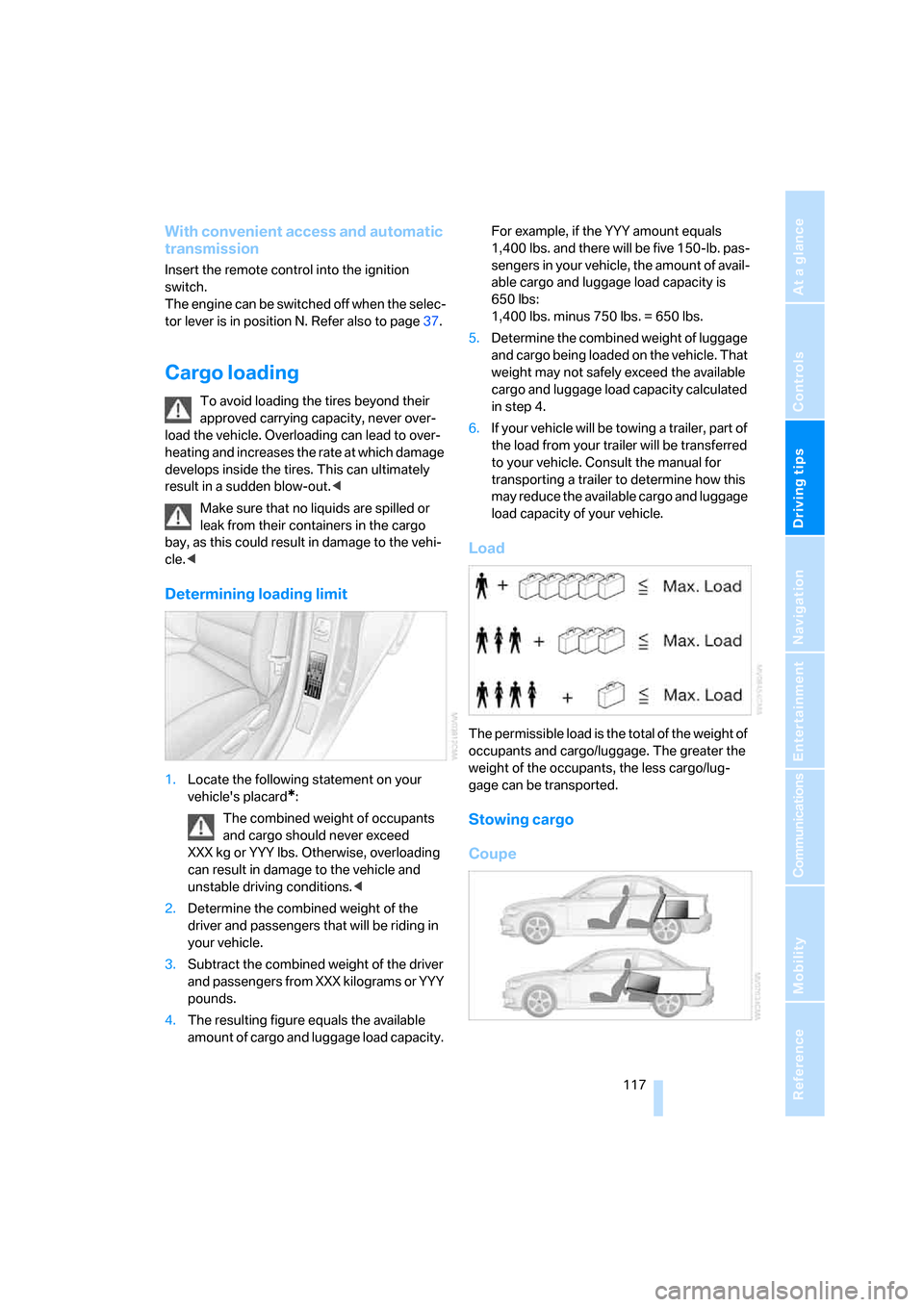
Load
The permissible load is the total of the weight of
occupants and cargo/luggage. The greater the
weight of the occupants, the less cargo/lug-
gage can be transported.
Stowing cargo
Coupe
Page 227 of 260
Mobility
225Reference
At a glance
Controls
Driving tips
Communications
Navigation
Entertainment
windshield wipers may be unavailable. Power
steering assistance is not available when the
engine is not running. Thus, braking and steer-
ing will require increased effort. Active steering
is not active and it will be necessary to turn the
steering wheel further.<
Switch on the hazard warning flashers, depend-
ing on local regulations.
Manual transmission
Gearshift lever in idle position.
Automatic transmission
Selector lever in position N.
Changing the selector lever position, refer to
page61.
Do not exceed a towing speed of 45 mph/
70 km/h and a towing distance of
90 miles/150 km, otherwise the automatic
transmission may be damaged.<
Towing methods
I n s o m e c o u n t r i e s , i t i s i l l e g a l t o t o w y o u r v e h i c l e
with a tow bar or tow rope on public highways.
Please familiarize yourself with the relevant
towing regulations for the country in which you
are driving.
With a tow bar
The towing vehicle must not be lighter
than the towed vehicle, otherwise it may
be impossible to maintain control.<
The tow fittings used should be on the same
side on both vehicles. Should it prove impossi-
ble to avoid mounting the tow bar at an angle,
please observe the following:
>Clearance and maneuvering capability will
be sharply limited during cornering.
>The tow bar will generate lateral forces if it is
attached offset.
Attach the tow bar to the tow fittings only,
as attaching it to other parts of the vehicle
could result in damage.<
With a tow rope
When starting off in the towing vehicle, make
sure that the tow rope is taut.
To avoid jerking and the associated
stresses on vehicle components when
towing, always use nylon ropes or nylon straps.
Attach the tow rope to the tow fittings only, as
attaching it to other parts of the vehicle could
result in damage.<
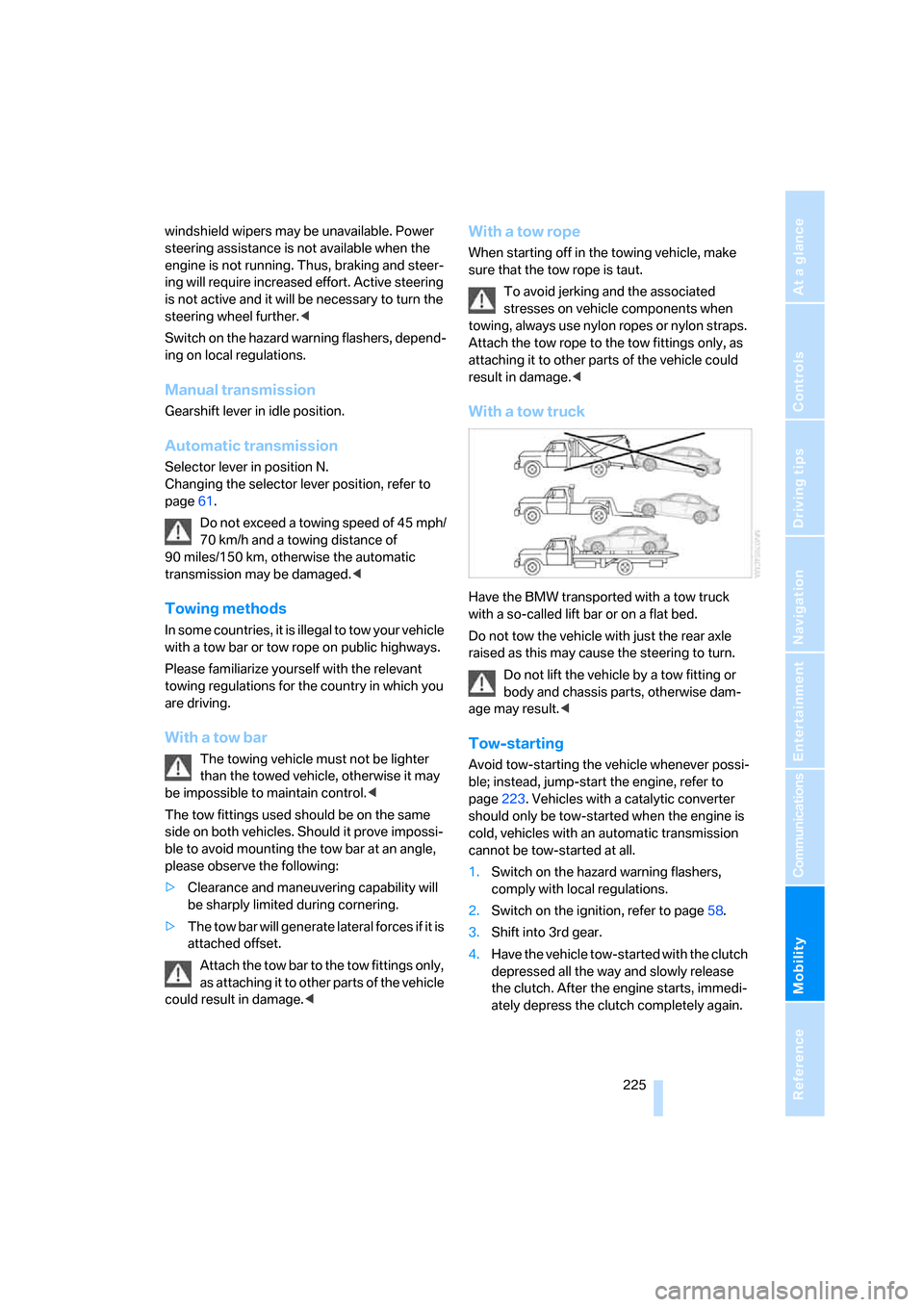
With a tow truck
Have the BMW transported with a tow truck
with a so-called lift bar or on a flat bed.
Do not tow the vehicle with just the rear axle
raised as this may cause the steering to turn.
Do not lift the vehicle by a tow fitting or
body and chassis parts, otherwise dam-
age may result.<
Tow-starting
Avoid tow-starting the vehicle whenever possi-
ble; instead, jump-start the engine, refer to
page223. Vehicles with a catalytic converter
should only be tow-started when the engine is
cold, vehicles with an automatic transmission
cannot be tow-started at all.
1.Switch on the hazard warning flashers,
comply with local regulations.
2.Switch on the ignition, refer to page58.
3.Shift into 3rd gear.
4.Have the vehicle tow-started with the clutch
depressed all the way and slowly release
the clutch. After the engine starts, immedi-
ately depress the clutch completely again.
Page 235 of 260
Reference 233
At a glance
Controls
Driving tips
Communications
Navigation
Entertainment
Mobility
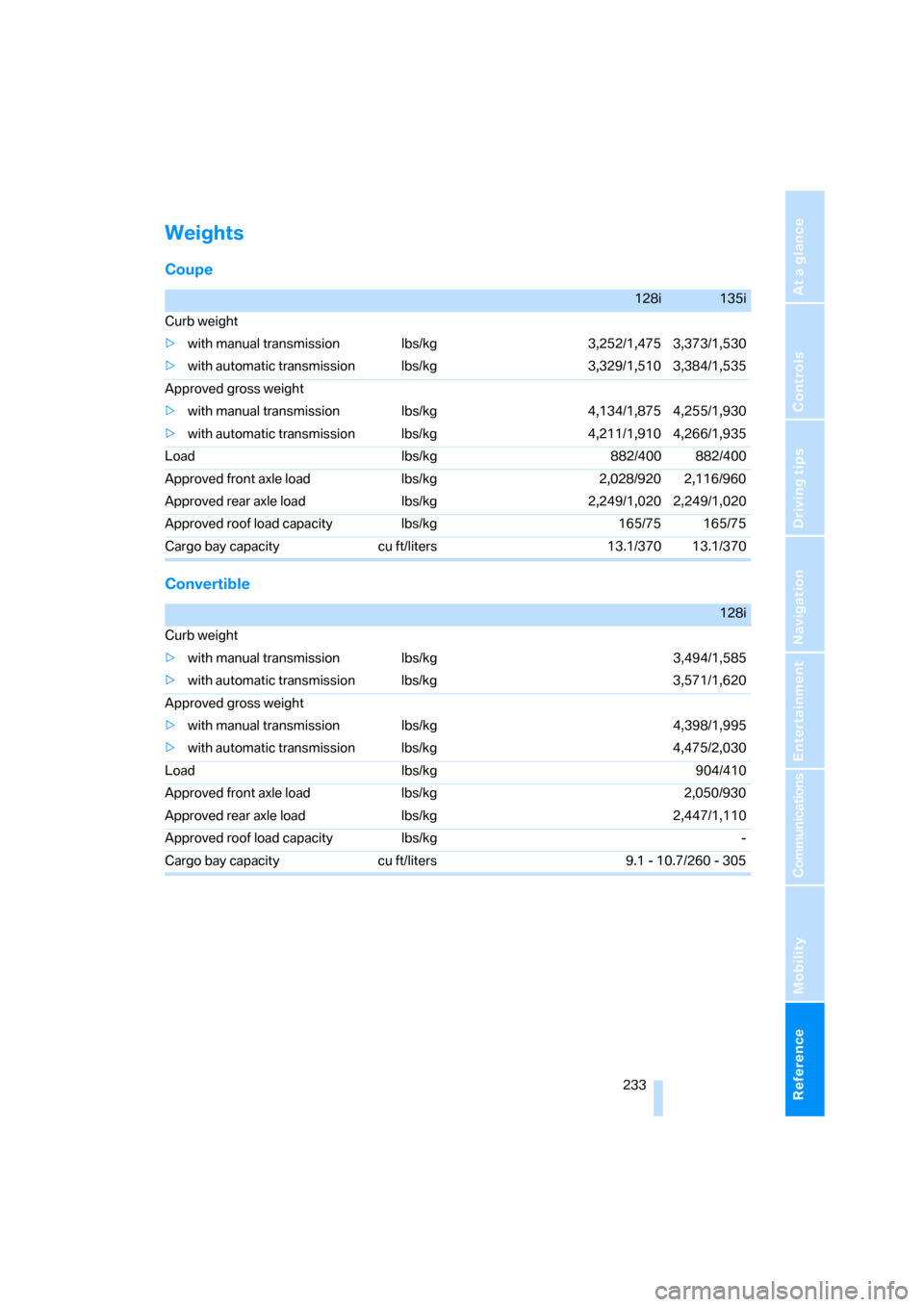
Weights
Coupe
Convertible
128i135i
Curb weight
>with manual transmission lbs/kg 3,252/1,475 3,373/1,530
>with automatic transmission lbs/kg 3,329/1,510 3,384/1,535
Approved gross weight
>with manual transmission lbs/kg 4,134/1,875 4,255/1,930
>with automatic transmission lbs/kg 4,211/1,910 4,266/1,935
Load lbs/kg 882/400 882/400
Approved front axle load lbs/kg 2,028/920 2,116/960
Approved rear axle load lbs/kg 2,249/1,020 2,249/1,020
Approved roof load capacity lbs/kg 165/75 165/75
Cargo bay capacity cu ft/liters 13.1/370 13.1/370
128i
Curb weight
>with manual transmission lbs/kg 3,494/1,585
>with automatic transmission lbs/kg 3,571/1,620
Approved gross weight
>with manual transmission lbs/kg 4,398/1,995
>with automatic transmission lbs/kg 4,475/2,030
Load lbs/kg 904/410
Approved front axle load lbs/kg 2,050/930
Approved rear axle load lbs/kg 2,447/1,110
Approved roof load capacity lbs/kg -
Cargo bay capacity cu ft/liters 9.1 - 10.7/260 - 305
Page 243 of 260

Reference 241
At a glance
Controls
Driving tips
Communications
Navigation
Entertainment
Mobility
Automatic transmission with
Steptronic60
– interlock61
– selector lever lock61
– shiftlock61
– towing224
– tow-starting224
"Automatic ventilation" for
parked car ventilation100
AUTO program for automatic
climate control98
"Auto Request"193
"Autostore"
– on the radio156
"AUX"150,169,171
– AUX-In port169
– USB-audio interface170
AUX-In port169
Average fuel consumption68
– setting the units70
Average speed68
"Avoid ferries" in
navigation134
"Avoid highways" in
navigation134
Avoid highways in
navigation134
Avoiding unintentional
alarms35
"Avoid tollroads" in
navigation134
Axle loads, refer to
Weights233
"A - Z"183,184
B
Backrests, refer to Seats46
Backrest width adjustment47
Back seats, refer to Rear seats
– adjusting head restraints48
Backup lamp, replacing
bulb219
Bag for skis, refer to Ski
bag109
Balance, tone control151
Band-aids, refer to First-aid
pouch223Bar, refer to Tow-starting,
towing away225
Bass, tone control151
Bass sounds, refer to Treble
and bass151
Battery220
– charging220
– disposal37,220
– jump starting223
– temporary power failure220
Battery renewal
– remote control for vehicle37
Being towed224
Belts, refer to Safety belts51
Belt tensioner, refer to Safety
belts51
Beverage holders, refer to
Cup holders106
Blower, refer to Air flow
rate98
"BMW Assist"192,193,194
BMW Assist
– activating196
– Concierge service194
– contacting BMW Customer
Relations194
– Roadside Assistance192
– services offered191
– TeleService193
"BMW Contact"186
"BMW Contact
Numbers"186
BMW Maintenance
System214
"BMW Service settings"197
Bottle holders, refer to Cup
holders106
Brake assist, refer to Dynamic
Brake Control81
Brake fluid
– service requirements71
Brake Force Display87
Brake lamps
– Brake Force Display87
– replacing bulb219
Brake pads, breaking in114
Brake rotors116
– brakes114
– breaking in114Brakes
– ABS81
– BMW Maintenance
System214
– braking safely116
– breaking in114
– parking brake59
– service requirements71
Brake system114
– BMW Maintenance
System214
– breaking in114
– disc brakes116
Breakdown services, refer to
Roadside Assistance222
Breaking in the clutch114
Break-in period114
"Brightness"79
Bulb changing, refer to Lamps
and bulbs216
Bulbs, changing216
Button for starting the
engine58
Buttons on the steering
wheel11
C
California Proposition 65
warning6
"Call"184,195
Call
– accepting182
– displaying accepted184
– ending183
– missed184
– starting183
Calling
– from phone book183
– from Top 8 list184
– redialing184
Can holders, refer to Cup
holders106
Capacities234
Capacity of the cargo bay233
Car battery, refer to Vehicle
battery220
Car care, refer to Caring for
your vehicle brochure
Page 246 of 260

Everything from A - Z
244 Destination for navigation
– destination list130
– entry123
– home address133
– manual entry123,127
– selecting from address
book132
– selecting using
information129
– selecting via language127
– selecting via map128
– storing131
Destination guidance136
– canceling voice
instructions54
– changing specified
route134
– displaying route137
– distance and arrival136
– starting136
– terminating/continuing136
– voice instructions140
– volume of voice
instructions140
Destination list for navigation
system130
Destinations recently driven
to130
"Details" for audio mode171
"Dial" for mobile phone183
"Dial number"183
Differential, breaking in114
Digital clock66
Digital compass104
Digital radio, refer to High
Definition Radio157
Digital Versatile Disc, refer to
– Drive for navigation DVD150
Dimensions231
Directional indicators, refer to
Turn signals62
Direction instructions, refer to
Voice instructions140
Directory for navigation, refer
to Address book131
Displacement, refer to Engine
data230
"Display"20Display, refer to Control
Display16
Display lighting, refer to
Instrument lighting94
Displays, refer to Instrument
cluster12
Displays and controls10
"Display settings"79
Disposal
– of coolant213
– remote control battery37
– vehicle battery220
Distance, refer to
Computer68
Distance remaining to service,
refer to Service
requirements71
"Distance to dest."69
Distance to destination, refer
to Computer68
Distance warning, refer to
Park Distance Control
PDC80
Door key, refer to Integrated
key/remote control28
Door lock32
Door lock, confirmation
signals31
"Door locks"30,32,72
Doors, emergency
operation32
DOT Quality Grades205
Draft-free ventilation99
Drinks holders, refer to Cup
holders106
Drive for navigation DVD150
Drive-off assistance, refer to
DSC81
Drive-off assistant82
Driving around a traffic
congestion144
Driving lamps, refer to Parking
lamps/low beams91
Driving notes114
Driving off on hills, refer to
Drive-off assistant82
Driving route, refer to
Displaying route137Driving stability control
systems81
Driving through water116
Driving tips, refer to Driving
notes114
Dry air, refer to Cooling
function99
DTC Dynamic Traction
Control82
– indicator lamps82
DVD
– drive for navigation DVD150
DVD for navigation122
Dynamic Brake Control
DBC81
"Dynamic route" in
navigation134
Dynamic Stability Control
DSC81
Dynamic Traction Control
DTC
– indicator lamps82
E
EBV Electronic brake-force
distribution81
Eject button, refer to Buttons
on the CD player150
Electrical malfunction
– door lock32
– fuel filler door200
– glass roof40
– luggage compartment lid33
Electronic brake-force
distribution EBV81
Electronic oil level check210
Electronic Stability Program
ESP, refer to Dynamic
Stability Control DSC81
Emergency operation, refer to
Manual operation
– door lock32
– fuel filler door200
– glass roof40
– transmission lock, automatic
transmission62
Emergency release, luggage
compartment lid34
Page 248 of 260
Everything from A - Z
246
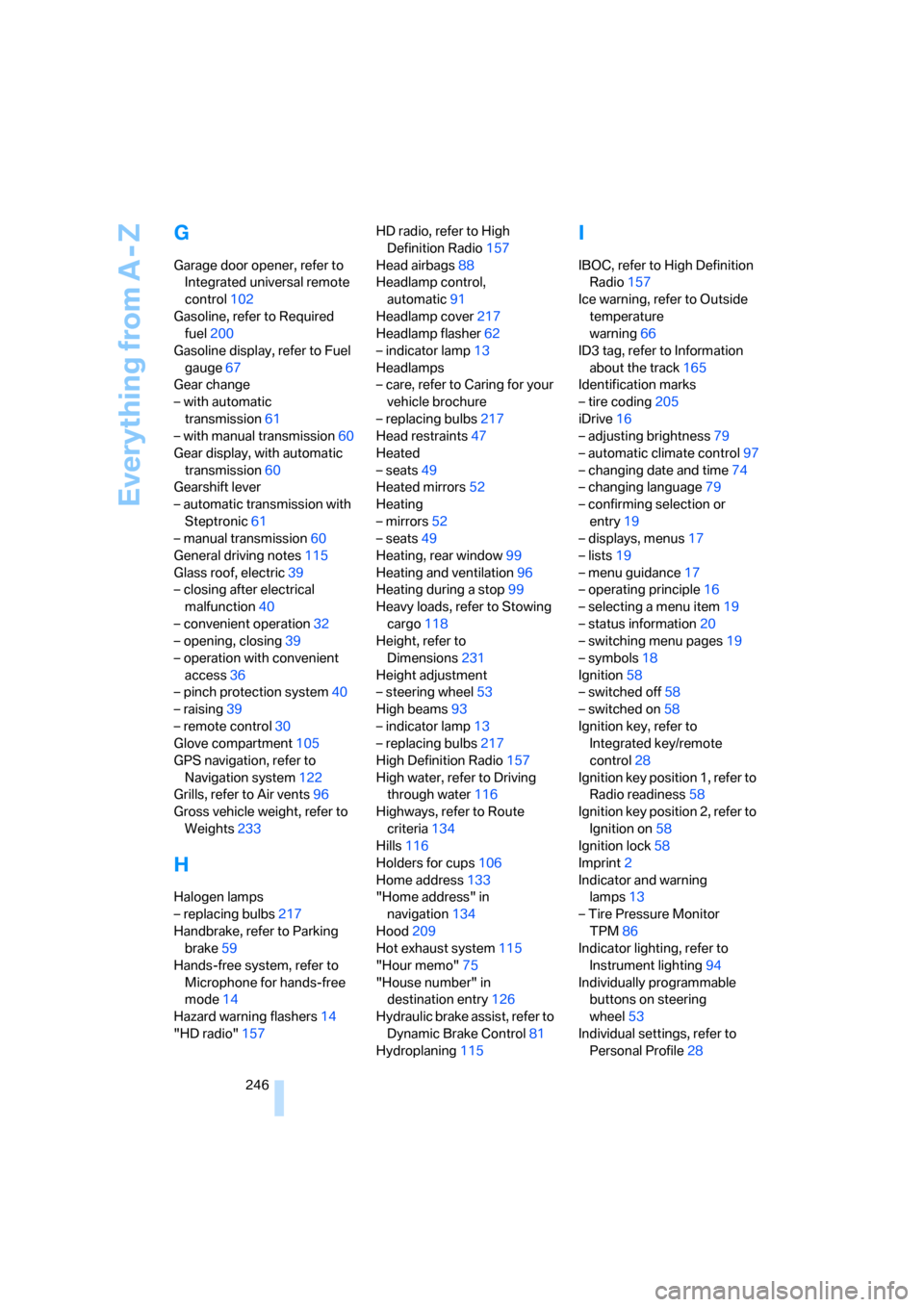
G
Garage door opener, refer to
Integrated universal remote
control102
Gasoline, refer to Required
fuel200
Gasoline display, refer to Fuel
gauge67
Gear change
– with automatic
transmission61
– with manual transmission60
Gear display, with automatic
transmission60
Gearshift lever
– automatic transmission with
Steptronic61
– manual transmission60
General driving notes115
Glass roof, electric39
– closing after electrical
malfunction40
– convenient operation32
– opening, closing39
– operation with convenient
access36
– pinch protection system40
– raising39
– remote control30
Glove compartment105
GPS navigation, refer to
Navigation system122
Grills, refer to Air vents96
Gross vehicle weight, refer to
Weights233
H
Halogen lamps
– replacing bulbs217
Handbrake, refer to Parking
brake59
Hands-free system, refer to
Microphone for hands-free
mode14
Hazard warning flashers14
"HD radio"157HD radio, refer to High
Definition Radio157
Head airbags88
Headlamp control,
automatic91
Headlamp cover217
Headlamp flasher62
– indicator lamp13
Headlamps
– care, refer to Caring for your
vehicle brochure
– replacing bulbs217
Head restraints47
Heated
– seats49
Heated mirrors52
Heating
– mirrors52
– seats49
Heating, rear window99
Heating and ventilation96
Heating during a stop99
Heavy loads, refer to Stowing
cargo118
Height, refer to
Dimensions231
Height adjustment
– steering wheel53
High beams93
– indicator lamp13
– replacing bulbs217
High Definition Radio157
High water, refer to Driving
through water116
Highways, refer to Route
criteria134
Hills116
Holders for cups106
Home address133
"Home address" in
navigation134
Hood209
Hot exhaust system115
"Hour memo"75
"House number" in
destination entry126
Hydraulic brake assist, refer to
Dynamic Brake Control81
Hydroplaning115
I
IBOC, refer to High Definition
Radio157
Ice warning, refer to Outside
temperature
warning66
ID3 tag, refer to Information
about the track165
Identification marks
– tire coding205
iDrive16
– adjusting brightness79
– automatic climate control97
– changing date and time74
– changing language79
– confirming selection or
entry19
– displays, menus17
– lists19
– menu guidance17
– operating principle16
– selecting a menu item19
– status information20
– switching menu pages19
– symbols18
Ignition58
– switched off58
– switched on58
Ignition key, refer to
Integrated key/remote
control28
Ignition key position 1, refer to
Radio readiness58
Ignition key position 2, refer to
Ignition on58
Ignition lock58
Imprint2
Indicator and warning
lamps13
– Tire Pressure Monitor
TPM86
Indicator lighting, refer to
Instrument lighting94
Individually programmable
buttons on steering
wheel53
Individual settings, refer to
Personal Profile28