2008 BMW 128I COUPE radio controls
[x] Cancel search: radio controlsPage 153 of 260
Navigation
Entertainment
Driving tips
151Reference
At a glance
Controls
Communications
Mobility
Adjusting volume
Turn knob1 on the CD player until the desired
volume is obtained.
You can also adjust the volume with buttons on
the steering wheel, refer to page11.
With the ignition at radio readiness or beyond,
the setting is stored for the remote control cur-
rently in use.
Tone control
You can alter various tone settings, e.g. treble
and bass or the speed-dependent volume
increase.
The tone settings are applied to all audio
sources.
With the ignition at radio readiness or beyond,
the settings are stored for the remote control
currently in use.
Changing tone settings
1.Press the button.
This opens the start menu.
2.Press the controller to open the menu.
3.Turn the controller until "Settings" is
selected and press the controller.
4.Select "Audio" and press the controller.
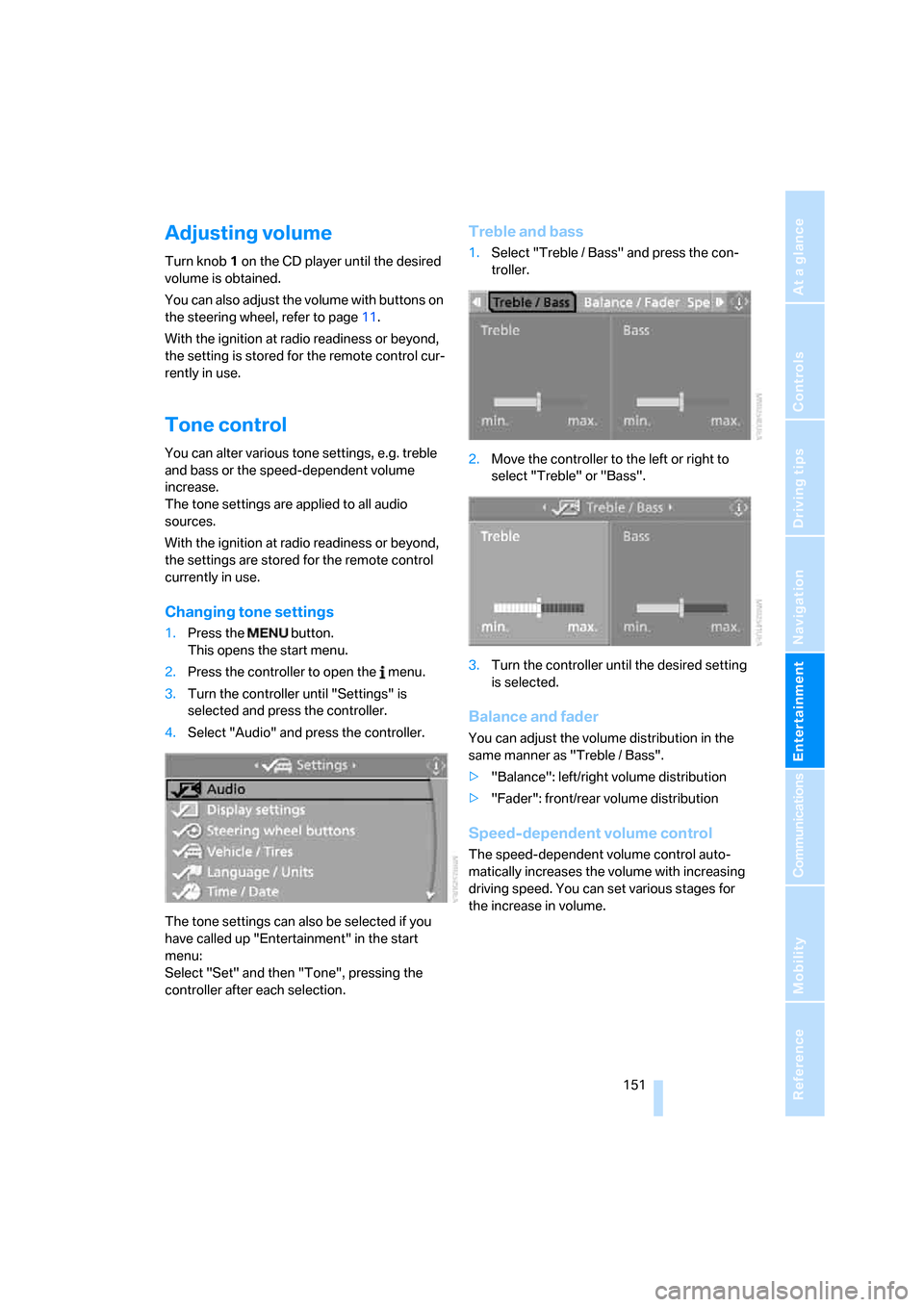
The tone settings can also be selected if you
have called up "Entertainment" in the start
menu:
Select "Set" and then "Tone", pressing the
controller after each selection.
Treble and bass
1.Select "Treble / Bass" and press the con-
troller.
2.Move the controller to the left or right to
select "Treble" or "Bass".
3.Turn the controller until the desired setting
is selected.
Balance and fader
You can adjust the volume distribution in the
same manner as "Treble / Bass".
>"Balance": left/right volume distribution
>"Fader": front/rear volume distribution
Speed-dependent volume control
The speed-dependent volume control auto-
matically increases the volume with increasing
driving speed. You can set various stages for
the increase in volume.
Page 159 of 260
Navigation
Entertainment
Driving tips
157Reference
At a glance
Controls
Communications
Mobility
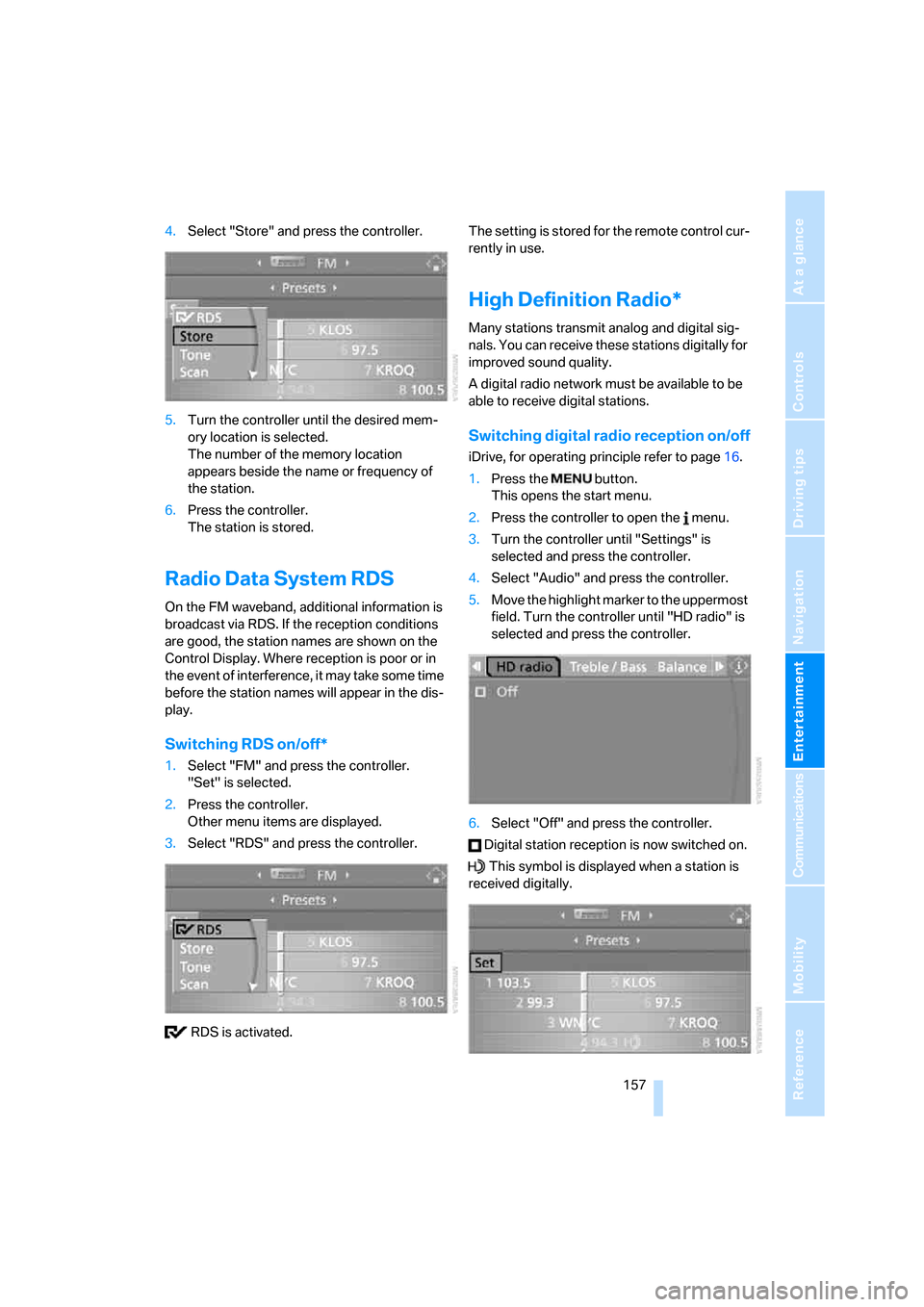
4.Select "Store" and press the controller.
5.Turn the controller until the desired mem-
ory location is selected.
The number of the memory location
appears beside the name or frequency of
the station.
6.Press the controller.
The station is stored.
Radio Data System RDS
On the FM waveband, additional information is
broadcast via RDS. If the reception conditions
are good, the station names are shown on the
Control Display. Where reception is poor or in
the event of interference, it may take some time
before the station names will appear in the dis-
play.
Switching RDS on/off*
1.Select "FM" and press the controller.
"Set" is selected.
2.Press the controller.
Other menu items are displayed.
3.Select "RDS" and press the controller.
RDS is activated.The setting is stored for the remote control cur-
rently in use.
High Definition Radio*
Many stations transmit analog and digital sig-
nals. You can receive these stations digitally for
improved sound quality.
A digital radio network must be available to be
able to receive digital stations.
Switching digital radio reception on/off
iDrive, for operating principle refer to page16.
1.Press the button.
This opens the start menu.
2.Press the controller to open the menu.
3.Turn the controller until "Settings" is
selected and press the controller.
4.Select "Audio" and press the controller.
5.Move the highlight marker to the uppermost
field. Turn the controller until "HD radio" is
selected and press the controller.
6.Select "Off" and press the controller.
Digital station reception is now switched on.
This symbol is displayed when a station is
received digitally.
Page 191 of 260
189
Entertainment
Reference
At a glance
Controls
Driving tips Communications
Navigation
Mobility
Notes
Important for voice commands
For voice commands, bear in mind the follow-
ing:
>Pronounce the commands smoothly and at
normal volume, avoiding excessive empha-
ses and pauses.
>Keep the doors, windows and glass roof
closed to prevent interference from outside
noise.
>Avoid ambient noise in the vehicle while
speaking.
Inserting/removing snap-in
adapter
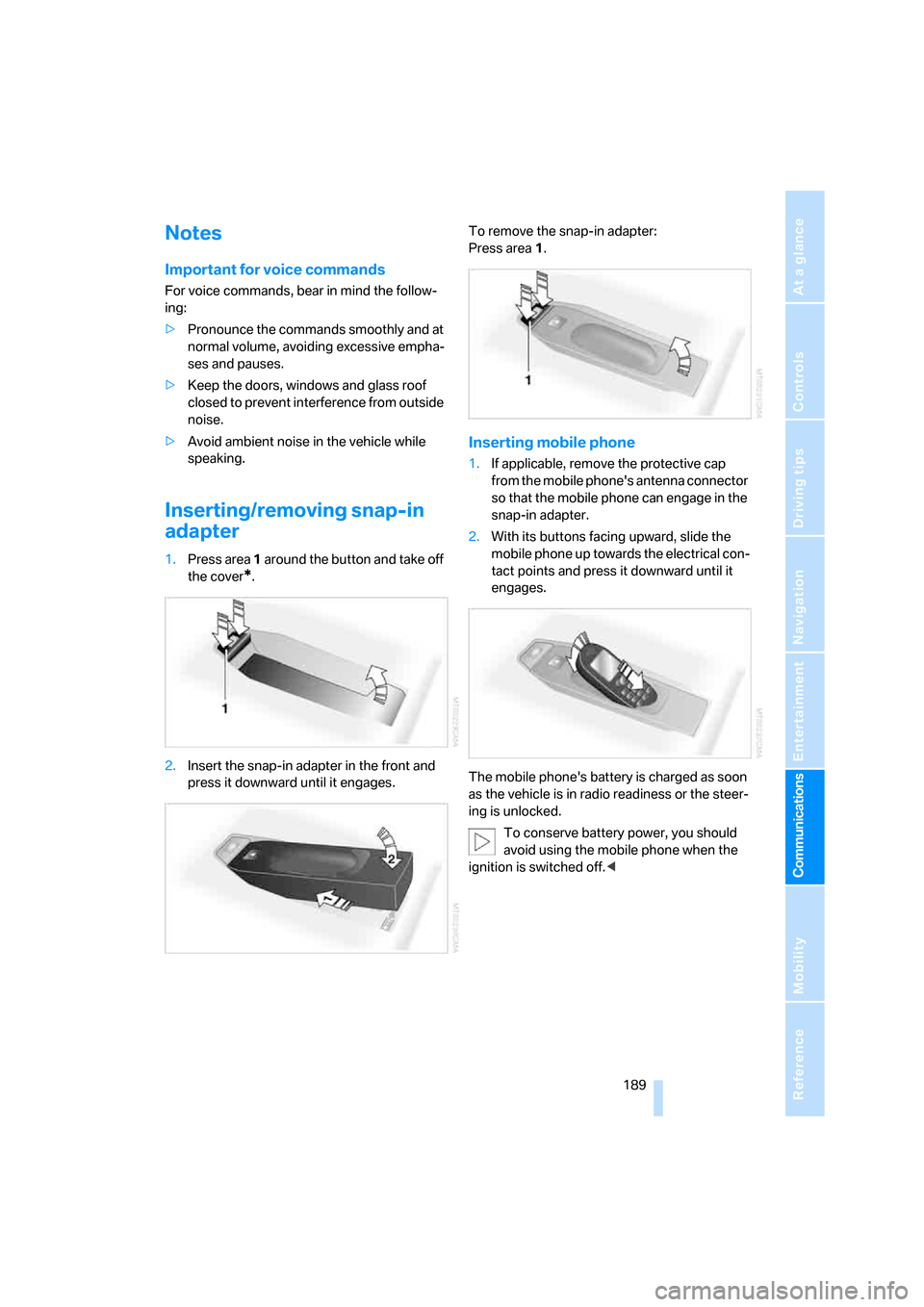
1.Press area 1 around the button and take off
the cover
*.
2.Insert the snap-in adapter in the front and
press it downward until it engages.To remove the snap-in adapter:
Press area 1.
Inserting mobile phone
1.If applicable, remove the protective cap
from the mobile phone's antenna connector
so that the mobile phone can engage in the
snap-in adapter.
2.With its buttons facing upward, slide the
mobile phone up towards the electrical con-
tact points and press it downward until it
engages.
The mobile phone's battery is charged as soon
as the vehicle is in radio readiness or the steer-
ing is unlocked.
To conserve battery power, you should
avoid using the mobile phone when the
ignition is switched off.<
Page 239 of 260
Reference 237
At a glance
Controls
Driving tips
Communications
Navigation
Entertainment
Mobility
Climate
menu
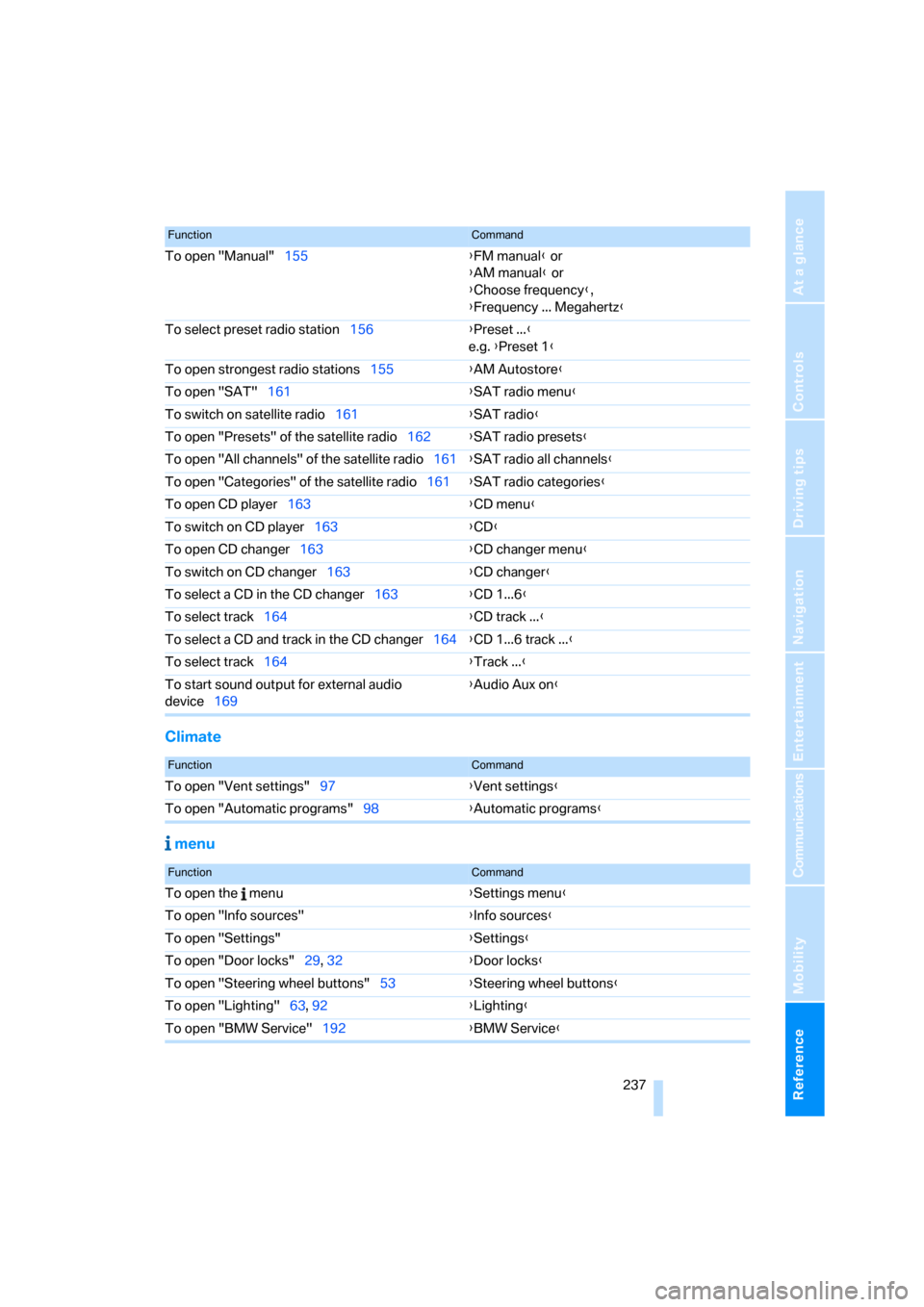
To open "Manual"155{FM manual} or
{AM manual} or
{Choose frequency},
{Frequency ... Megahertz}
To select preset radio station156{Preset ...}
e.g. {Preset 1}
To open strongest radio stations155{AM Autostore}
To open "SAT"161{SAT radio menu}
To switch on satellite radio161{SAT radio}
To open "Presets" of the satellite radio162{SAT radio presets}
To open "All channels" of the satellite radio161{SAT radio all channels}
To open "Categories" of the satellite radio161{SAT radio categories}
To open CD player163{CD menu}
To switch on CD player163{CD}
To open CD changer163{CD changer menu}
To switch on CD changer163{CD changer}
To select a CD in the CD changer163{CD 1...6}
To select track164{CD track ...}
To select a CD and track in the CD changer164{CD 1...6 track ...}
To select track164{Track ...}
To start sound output for external audio
device169{Audio Aux on
}
FunctionCommand
FunctionCommand
To open "Vent settings"97{Vent settings}
To open "Automatic programs"98{Automatic programs}
FunctionCommand
To open the menu{Settings menu}
To open "Info sources"{Info sources}
To open "Settings"{Settings}
To open "Door locks"29, 32{Door locks}
To open "Steering wheel buttons"53{Steering wheel buttons}
To open "Lighting"63, 92{Lighting}
To open "BMW Service"192{BMW Service}
Page 242 of 260

Everything from A - Z
240
Everything from A - Z
Index
"..." Identifies Control Display
texts used to select
individual functions and
refers you to the page where
these texts can be found.
A
Accessories, refer to The
individual vehicle5
Accident, reporting, refer to
Emergency Request222
Activated-charcoal filter100
"Activation time" for parked
car ventilation100
Active steering87
Adaptive Head Light93
"Add digits" on the mobile
phone184
Additives
– coolant213
– engine oil212
"Address book" in
navigation131
Address for navigation
– deleting133
– entering123,131
– selecting132
– storing131
– storing current position132
"Add to destination list"126
Airbags88
– sitting safely45
– warning lamp89
Air conditioner96
Air distribution
– automatic98
Air flow rate98
Airing, refer to Ventilation99
Air outlets, refer to Air
vents96Air pressure, checking, refer
to Tire inflation
pressure202
Air recirculation, refer to
Recirculated-air mode98
"Air recirculation on / off"53
Air vents96
AKI, refer to Fuel
specifications200
Alarm system34
– avoiding unintentional
alarms35
– interior motion sensor35
– switching off an alarm35
– tilt alarm sensor35
"All channels" for satellite
radio161
All-season tires, refer to
Winter tires208
"All stations", displaying with
the radio154
"AM", waveband150,154
Ambient air, refer to
Recirculated-air mode98
Antenna for mobile phone176
Antifreeze
– coolant213
– washer fluid64
Antilock Brake System
ABS81
Anti-theft alarm system, refer
to Alarm system34
Anti-theft system29
Approved axle loads, refer to
Weights233
Approved gross vehicle
weight, refer to Weights233
Armrest, refer to Center
armrest106
Arrival time
– computer68
Arrival time, refer to Starting
destination guidance136Arrow display for
navigation137
"Arrow display" in
navigation137
Ashtray107
Assistance systems, refer to
Dynamic Stability Control
DSC81
AUC Automatic recirculated-
air control98
"Audio"153,157
Audio150
– controls150
– switching on/off150
– tone control151
– volume151
"Audio", refer to Tone
control151
Automatic
– air distribution98
– air flow rate98
– cruise control64
– headlamp control91
– service notification193
– storing of stations155
Automatic car wash, refer to
Car wash116
Automatic climate control96
– automatic air distribution98
– settings via iDrive97
Automatic curb monitor52
Automatic lamps
– refer to Welcome lamps91
"Automatic programs" with
automatic climate control98
Automatic recirculated-air
control AUC98
Automatic station search155
Page 243 of 260

Reference 241
At a glance
Controls
Driving tips
Communications
Navigation
Entertainment
Mobility
Automatic transmission with
Steptronic60
– interlock61
– selector lever lock61
– shiftlock61
– towing224
– tow-starting224
"Automatic ventilation" for
parked car ventilation100
AUTO program for automatic
climate control98
"Auto Request"193
"Autostore"
– on the radio156
"AUX"150,169,171
– AUX-In port169
– USB-audio interface170
AUX-In port169
Average fuel consumption68
– setting the units70
Average speed68
"Avoid ferries" in
navigation134
"Avoid highways" in
navigation134
Avoid highways in
navigation134
Avoiding unintentional
alarms35
"Avoid tollroads" in
navigation134
Axle loads, refer to
Weights233
"A - Z"183,184
B
Backrests, refer to Seats46
Backrest width adjustment47
Back seats, refer to Rear seats
– adjusting head restraints48
Backup lamp, replacing
bulb219
Bag for skis, refer to Ski
bag109
Balance, tone control151
Band-aids, refer to First-aid
pouch223Bar, refer to Tow-starting,
towing away225
Bass, tone control151
Bass sounds, refer to Treble
and bass151
Battery220
– charging220
– disposal37,220
– jump starting223
– temporary power failure220
Battery renewal
– remote control for vehicle37
Being towed224
Belts, refer to Safety belts51
Belt tensioner, refer to Safety
belts51
Beverage holders, refer to
Cup holders106
Blower, refer to Air flow
rate98
"BMW Assist"192,193,194
BMW Assist
– activating196
– Concierge service194
– contacting BMW Customer
Relations194
– Roadside Assistance192
– services offered191
– TeleService193
"BMW Contact"186
"BMW Contact
Numbers"186
BMW Maintenance
System214
"BMW Service settings"197
Bottle holders, refer to Cup
holders106
Brake assist, refer to Dynamic
Brake Control81
Brake fluid
– service requirements71
Brake Force Display87
Brake lamps
– Brake Force Display87
– replacing bulb219
Brake pads, breaking in114
Brake rotors116
– brakes114
– breaking in114Brakes
– ABS81
– BMW Maintenance
System214
– braking safely116
– breaking in114
– parking brake59
– service requirements71
Brake system114
– BMW Maintenance
System214
– breaking in114
– disc brakes116
Breakdown services, refer to
Roadside Assistance222
Breaking in the clutch114
Break-in period114
"Brightness"79
Bulb changing, refer to Lamps
and bulbs216
Bulbs, changing216
Button for starting the
engine58
Buttons on the steering
wheel11
C
California Proposition 65
warning6
"Call"184,195
Call
– accepting182
– displaying accepted184
– ending183
– missed184
– starting183
Calling
– from phone book183
– from Top 8 list184
– redialing184
Can holders, refer to Cup
holders106
Capacities234
Capacity of the cargo bay233
Car battery, refer to Vehicle
battery220
Car care, refer to Caring for
your vehicle brochure
Page 244 of 260

Everything from A - Z
242 Car-care products, refer to
Caring for your vehicle
brochure
"Car Data"68
Care, refer to Caring for your
vehicle brochure
Cargo, securing118
Cargo bay
– capacity233
– convenient access37
– enlarging, refer to Through-
loading system108
– lamp, refer to Interior
lamps94
– lid, refer to Luggage
compartment lid33
– opening from outside33
Cargo bay lid, refer to
Luggage compartment
lid33
Cargo bay net, refer to
Securing cargo118
Cargo loading
– securing cargo118
– stowing cargo117
– vehicle117
Caring for artificial leather,
refer to Caring for your
vehicle brochure
Caring for leather, refer to
Caring for your vehicle
brochure
Caring for plastic, refer to
Caring for your vehicle
brochure
Caring for the carpet, refer to
Caring for your vehicle
brochure
Caring for the vehicle finish,
refer to Caring for your
vehicle brochure
Car jack
– jacking points220
Car key, refer to Integrated
key/remote control28Car phone176
– installation location, refer to
Center armrest106
– refer to Mobile phone176
– refer to separate Owner's
Manual
Car radio, refer to Radio154
Car wash116
– also refer to Caring for your
vehicle brochure
Catalytic converter, refer to
Hot exhaust system115
"Categories" for satellite
radio161
"CD"150,163
CD changer163
– compressed audio files163
– controls150
– fast forward/reverse167
– installation location167
– playing a track165
– random order166
– repeating a track166
– selecting a CD163
– selecting a track164
– switching on/off150
– tone control151
– volume151
CD player163
– compressed audio files163
– controls150
– fast forward/reverse167
– playing a track165
– random order166
– repeating a track166
– selecting a track164
– switching on/off150
– tone control151
– volume151
Center armrest106
Center brake lamp, replacing
bulb219
Center console, refer to
Around the center
console14
Central key, refer to Integrated
key/remote control28
"Central locking"30,50Central locking
– from inside32
– from outside29
Central locking system29
– convenient access36
Changes, technical, refer to
For your own safety5
Changing the language on the
Control Display79
Changing the measurement
units on the Control
Display70,78
Changing wheels219
Chassis number, refer to
Engine compartment210
Check Control76
"Check Control
messages"77
Checking oil level210
Child-restraint fixing system
LATCH56
Child-restraint systems55
Child seats55
Chrome parts, care, refer to
Caring for your vehicle
brochure
Cigarette lighter107
Cleaning, refer to Caring for
your vehicle brochure
Cleaning headlamps64
– washer fluid64
"Climate"97
Clock66
– 12h/24h format75
– setting time74
Closing
– from inside32
– from outside29
Clothes hooks106
Cold start, refer to Starting the
engine59
Combination instrument, refer
to Instrument cluster12
Comfort access, refer to
Convenient access36
Comfort area, refer to Around
the center console14
"Communication"182,192,1
93,194
Page 246 of 260

Everything from A - Z
244 Destination for navigation
– destination list130
– entry123
– home address133
– manual entry123,127
– selecting from address
book132
– selecting using
information129
– selecting via language127
– selecting via map128
– storing131
Destination guidance136
– canceling voice
instructions54
– changing specified
route134
– displaying route137
– distance and arrival136
– starting136
– terminating/continuing136
– voice instructions140
– volume of voice
instructions140
Destination list for navigation
system130
Destinations recently driven
to130
"Details" for audio mode171
"Dial" for mobile phone183
"Dial number"183
Differential, breaking in114
Digital clock66
Digital compass104
Digital radio, refer to High
Definition Radio157
Digital Versatile Disc, refer to
– Drive for navigation DVD150
Dimensions231
Directional indicators, refer to
Turn signals62
Direction instructions, refer to
Voice instructions140
Directory for navigation, refer
to Address book131
Displacement, refer to Engine
data230
"Display"20Display, refer to Control
Display16
Display lighting, refer to
Instrument lighting94
Displays, refer to Instrument
cluster12
Displays and controls10
"Display settings"79
Disposal
– of coolant213
– remote control battery37
– vehicle battery220
Distance, refer to
Computer68
Distance remaining to service,
refer to Service
requirements71
"Distance to dest."69
Distance to destination, refer
to Computer68
Distance warning, refer to
Park Distance Control
PDC80
Door key, refer to Integrated
key/remote control28
Door lock32
Door lock, confirmation
signals31
"Door locks"30,32,72
Doors, emergency
operation32
DOT Quality Grades205
Draft-free ventilation99
Drinks holders, refer to Cup
holders106
Drive for navigation DVD150
Drive-off assistance, refer to
DSC81
Drive-off assistant82
Driving around a traffic
congestion144
Driving lamps, refer to Parking
lamps/low beams91
Driving notes114
Driving off on hills, refer to
Drive-off assistant82
Driving route, refer to
Displaying route137Driving stability control
systems81
Driving through water116
Driving tips, refer to Driving
notes114
Dry air, refer to Cooling
function99
DTC Dynamic Traction
Control82
– indicator lamps82
DVD
– drive for navigation DVD150
DVD for navigation122
Dynamic Brake Control
DBC81
"Dynamic route" in
navigation134
Dynamic Stability Control
DSC81
Dynamic Traction Control
DTC
– indicator lamps82
E
EBV Electronic brake-force
distribution81
Eject button, refer to Buttons
on the CD player150
Electrical malfunction
– door lock32
– fuel filler door200
– glass roof40
– luggage compartment lid33
Electronic brake-force
distribution EBV81
Electronic oil level check210
Electronic Stability Program
ESP, refer to Dynamic
Stability Control DSC81
Emergency operation, refer to
Manual operation
– door lock32
– fuel filler door200
– glass roof40
– transmission lock, automatic
transmission62
Emergency release, luggage
compartment lid34