2008 AUDI S5 phone
[x] Cancel search: phonePage 3 of 294
Downloaded from www.Manualslib.com manuals search engine ForewordThank you for choosing the Audi S5.
The new Audi S5 combines the latest technology with numerous features for your comfort and
convenience. To help you get the best out of these features in everyday use, we recommend that
you read this Manual carefully so you can quickly become familiar with your vehicle in detail.
As well as information on how to use the controls and equipment, the Owner's Manual contains
important notes on care and maintenance. These are relevant to your safety and will help preserve
your car's value. The Manual also offers useful driving tips and advice, together with some sugges-
tions on how to drive your car with minimum impact on the environment.
In addition to this Owner's Manual, the Service Wallet also includes the Service Schedule for your
vehicle. This booklet contains important information on Audi service requirements and lists the
vehicle's fuel consumption figures. The Service Wallet also includes operating manuals for
optional on-board systems such as the radio, navigation and telephone. We recommend that you
keep the Service Wallet in the car at all times.
Should you have any further questions regarding your car or if you suspect that your owner's liter-
ature is not complete, please contact your Audi dealer or importer. They are always glad to answer
your queries and note any suggestions you may have.
We wish you safe and enjoyable motoring with your Audi S5.
AUDI AG
document_0900452a81793dcc.book Seite 1 Mittwoch, 21. März 2007 5:42 17
Page 11 of 294
Downloaded from www.Manualslib.com manuals search engine Controls and displays9
Controls
Safety
Driving tips
General maintenance
Self-help
Technical data
Controls and displaysOverview
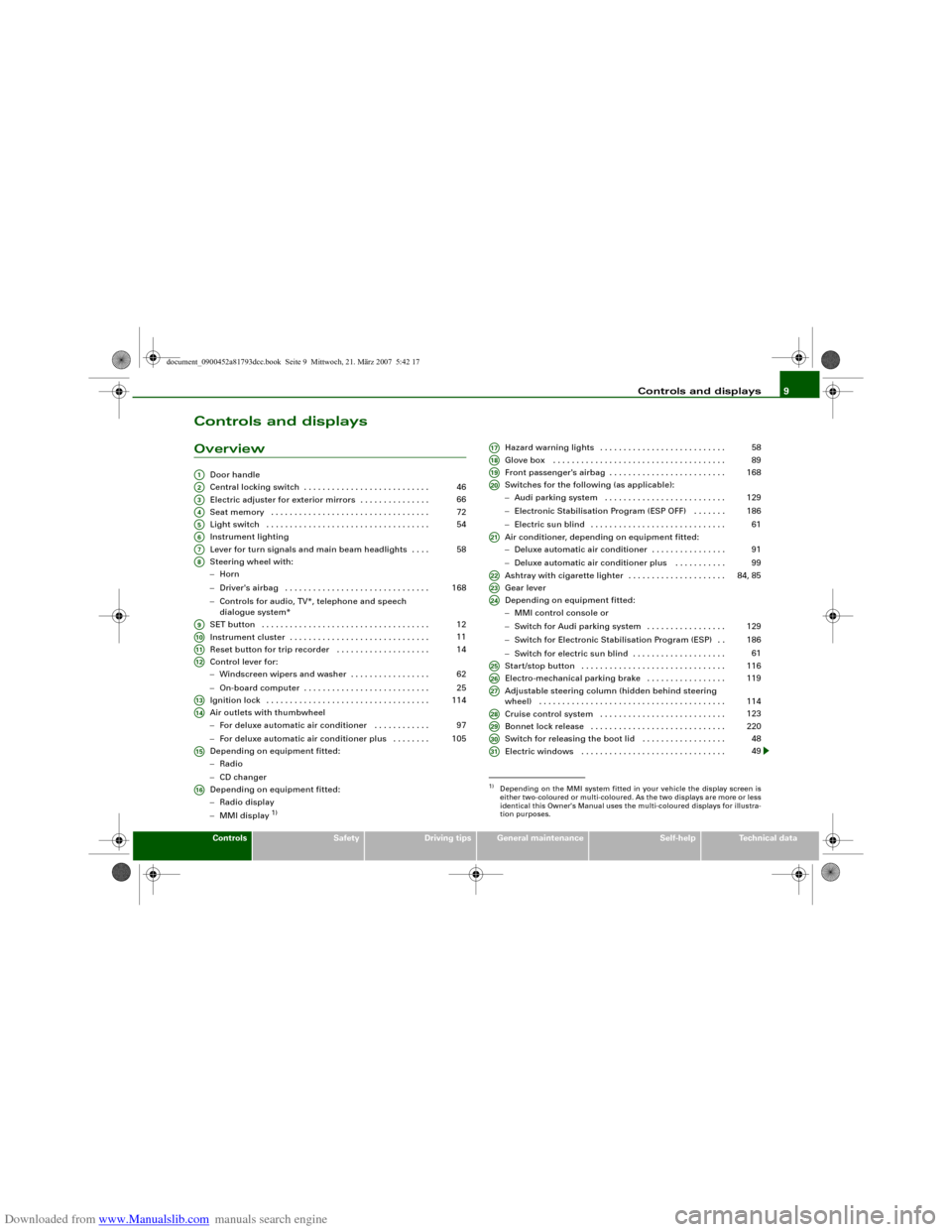
Door handle
Central locking switch . . . . . . . . . . . . . . . . . . . . . . . . . . .
Electric adjuster for exterior mirrors . . . . . . . . . . . . . . .
Seat memory . . . . . . . . . . . . . . . . . . . . . . . . . . . . . . . . . .
Light switch . . . . . . . . . . . . . . . . . . . . . . . . . . . . . . . . . . .
Instrument lighting
Lever for turn signals and main beam headlights . . . .
Steering wheel with:
−Horn
−Driver's airbag . . . . . . . . . . . . . . . . . . . . . . . . . . . . . . .
−Controls for audio, TV*, telephone and speech
dialogue system*
SET button . . . . . . . . . . . . . . . . . . . . . . . . . . . . . . . . . . . .
Instrument cluster . . . . . . . . . . . . . . . . . . . . . . . . . . . . . .
Reset button for trip recorder . . . . . . . . . . . . . . . . . . . .
Control lever for:
−Windscreen wipers and washer . . . . . . . . . . . . . . . . .
−On-board computer . . . . . . . . . . . . . . . . . . . . . . . . . . .
Ignition lock . . . . . . . . . . . . . . . . . . . . . . . . . . . . . . . . . . .
Air outlets with thumbwheel
−For deluxe automatic air conditioner . . . . . . . . . . . .
−For deluxe automatic air conditioner plus . . . . . . . .
Depending on equipment fitted:
−Radio
−CD changer
Depending on equipment fitted:
−Radio display
−MMI display
1)
Hazard warning lights . . . . . . . . . . . . . . . . . . . . . . . . . . .
Glove box . . . . . . . . . . . . . . . . . . . . . . . . . . . . . . . . . . . . .
Front passenger's airbag . . . . . . . . . . . . . . . . . . . . . . . . .
Switches for the following (as applicable):
−Audi parking system . . . . . . . . . . . . . . . . . . . . . . . . . .
−Electronic Stabilisation Program (ESP OFF) . . . . . . .
−Electric sun blind . . . . . . . . . . . . . . . . . . . . . . . . . . . . .
Air conditioner, depending on equipment fitted:
−Deluxe automatic air conditioner . . . . . . . . . . . . . . . .
−Deluxe automatic air conditioner plus . . . . . . . . . . .
Ashtray with cigarette lighter . . . . . . . . . . . . . . . . . . . . .
Gear lever
Depending on equipment fitted:
−MMI control console or
−Switch for Audi parking system . . . . . . . . . . . . . . . . .
−Switch for Electronic Stabilisation Program (ESP) . .
−Switch for electric sun blind . . . . . . . . . . . . . . . . . . . .
Start/stop button . . . . . . . . . . . . . . . . . . . . . . . . . . . . . . .
Electro-mechanical parking brake . . . . . . . . . . . . . . . . .
Adjustable steering column (hidden behind steering
wheel) . . . . . . . . . . . . . . . . . . . . . . . . . . . . . . . . . . . . . . . .
Cruise control system . . . . . . . . . . . . . . . . . . . . . . . . . . .
Bonnet lock release . . . . . . . . . . . . . . . . . . . . . . . . . . . . .
Switch for releasing the boot lid . . . . . . . . . . . . . . . . . .
Electric windows . . . . . . . . . . . . . . . . . . . . . . . . . . . . . . .
A1A2
46
A3
66
A4
72
A5
54
A6A7
58
A8
168
A9
12
A10
11
A11
14
A12
62
25
A13
114
A14
97
105
A15A16
1)Depending on the MMI system fitted in your vehicle the display screen is
either two-coloured or multi-coloured. As the two displays are more or less
identical this Owner's Manual uses the multi-coloured displays for illustra-
tion purposes.A17
58
A18
89
A19
168
A20
129
186
61
A21
91
99
A22
84, 85
A23A24
129
186
61
A25
116
A26
119
A27
114
A28
123
A29
220
A30
48
A31
49
document_0900452a81793dcc.book Seite 9 Mittwoch, 21. März 2007 5:42 17
Page 41 of 294
Downloaded from www.Manualslib.com manuals search engine Doors and windows39
Controls
Safety
Driving tips
General maintenance
Self-help
Technical data
WARNING
•
Always switch off the ignition and take the key with you when
leaving the vehicle - even if you only intend to be gone for a short
time. This is especially important if children are left in the car. They
might otherwise be able to start the engine or use power-operated
equipment such as the electric windows - this could lead to inju-
ries.
•
Wait for the vehicle to come to a standstill before removing the
ignition key from the lock. Otherwise the steering lock could
engage suddenly, causing an accident.Note
The function of the remote control key may be impaired by interfer-
ence from other nearby radio signals (for example from a mobile
telephone or TV transmitter) if these are in the same frequency
range.Indicator lamp on remote control key
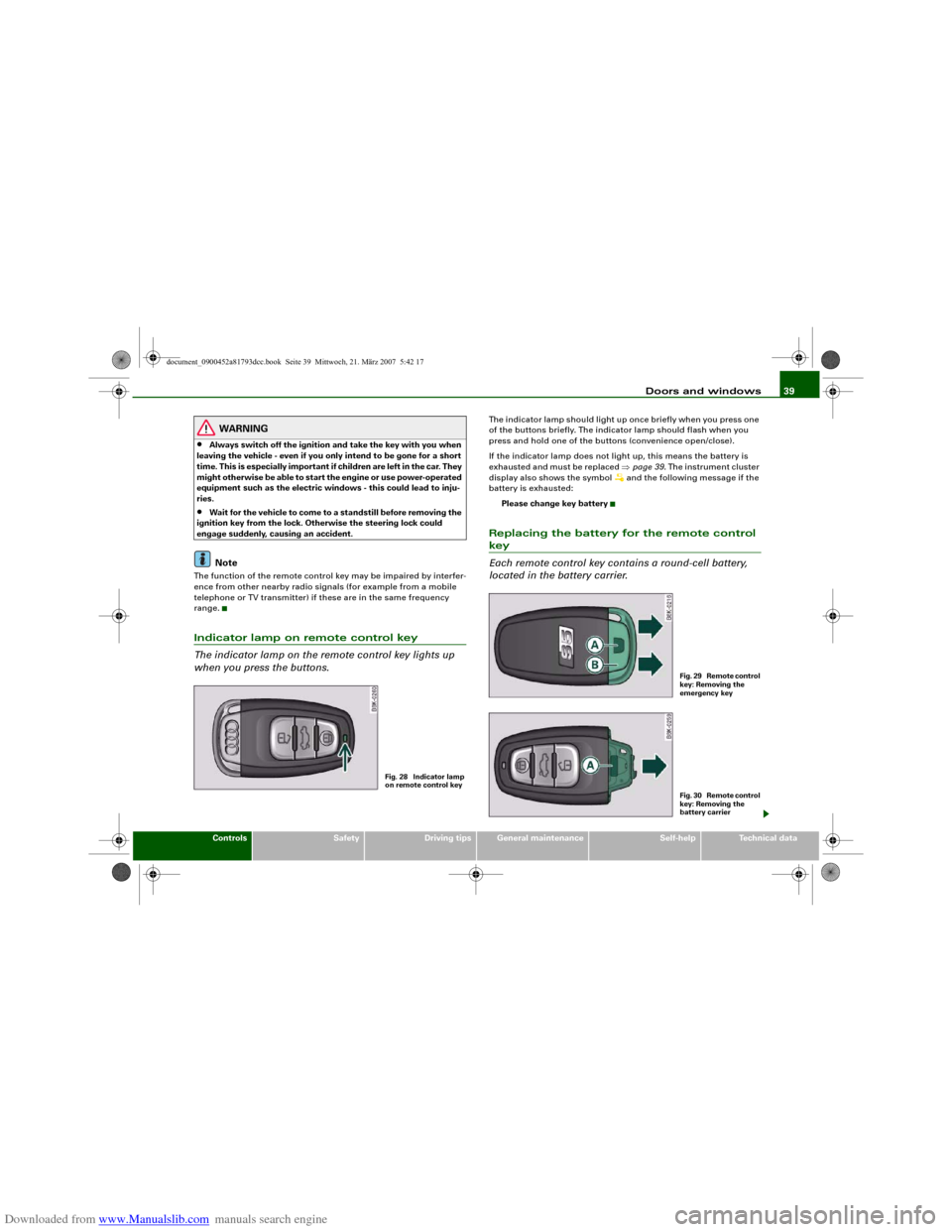
The indicator lamp on the remote control key lights up
when you press the buttons.
The indicator lamp should light up once briefly when you press one
of the buttons briefly. The indicator lamp should flash when you
press and hold one of the buttons (convenience open/close).
If the indicator lamp does not light up, this means the battery is
exhausted and must be replaced ⇒page 39. The instrument cluster
display also shows the symbol
and the following message if the
battery is exhausted:
Please change key battery
Replacing the battery for the remote control key
Each remote control key contains a round-cell battery,
located in the battery carrier.
Fig. 28 Indicator lamp
on remote control key
F i g . 2 9 R e m o t e c o n t r o l
key: Removing the
emergency keyF i g . 3 0 R e m o t e c o n t r o l
key: Removing the
battery carrier
document_0900452a81793dcc.book Seite 39 Mittwoch, 21. März 2007 5:42 17
Page 119 of 294
Downloaded from www.Manualslib.com manuals search engine Driving117
Controls
Safety
Driving tips
General maintenance
Self-help
Technical data If the engine fails to start straight-away, switch off the starter after
about 10 seconds and try again after about half a minute.
When starting from cold the engine may be a little noisy for the first
few seconds until oil pressure has built up in the hydraulic tappets.
This is quite normal and no cause for concern.
Driving away from a standstill
On some vehicles, the engine revs are automatically increased
slightly as soon as you release the clutch. This helps you drive off
more smoothly.
Driver message in the instrument cluster display
No key identified
This message appears when you press the Start/Stop button if there
is no remote control key inside the vehicle or if the system cannot
detect or identify the key. This can happen, for example, if the radio
signal from the key is obstructed by a metal briefcase or similar.
Electronic equipment, such as mobile phones, can also interfere
with the radio signal from the key.
Press brake pedal to start engine
This message appears on automatic vehicles if you press the
Start/Stop button to start the engine without first pressing the
brake pedal. The engine will only start if you press the brake pedal.
Press clutch pedal to start engine
This message appears on manual vehicles if you press the
Start/Stop button to start the engine without first pressing the
clutch pedal. The engine will only start if you press the clutch pedal.
Engage N or P to start engine
This message will appear if you try to start the engine when the
selector lever of the automatic gearbox is not in P or N. The engine
can only be started if the selector lever is in one of these positions. Key not in vehicle
This message will appear together with the symbol
if the remote
control key is removed from the vehicle while the engine is running.
This is to remind you not to continue driving without the key (for
example if you change drivers).
If the remote control key is not in the vehicle you will not be able to
switch on the ignition or restart the engine after it has been
switched off. Without the key, you will also not be able to lock the
vehicle from the outside.
Shift to P, otherwise vehicle can roll away. Doors do not lock if lever
is not in P. or Please move selector lever to position P. Vehicle
cannot be locked.
For safety reasons, this message will appear and a warning buzzer
will sound if the selector lever of the automatic gearbox is not in
position P when you switch off the ignition with the Start/Stop
button. Put the selector lever in position P; otherwise the vehicle
can roll away. If the lever is not in position P you will not be able to
lock the vehicle using the exterior locking switch on the door handle
or the remote control key.
Advanced key defective! Use ignition lock
This message appears if the vehicle has to be started with the igni-
tion key instead of the Start/Stop button.
Steering lock
The steering is locked if the key is not in the ignition and the driver
door has been opened. The steering lock acts as a theft deterrent.
WARNING
Never run the engine in confined spaces. The exhaust gases are
toxic.•
Never switch off the engine until the vehicle is stationary.
•
The brake servo and the power steering system work only
when the engine is running. You need more strength to steer and
document_0900452a81793dcc.book Seite 117 Mittwoch, 21. März 2007 5:42 17
Page 155 of 294
Downloaded from www.Manualslib.com manuals search engine Safe driving153
Controls
Safety
Driving tips
General maintenance
Self-help
Technical data
– Make sure that all lights and turn signals are working
properly.
– Check the tyre pressures.
– Make sure that all windows are clean and give good visi-
bility to the outside.
– Secure all luggage and other items carefully ⇒page 75.
– Make sure that no objects can interfere with the pedals.
– Adjust the front seat, head restraint and mirrors
correctly.
– Make sure that the head restraints for all passengers are
adjusted to the correct position.
– Make sure that children are protected with suitable
safety seats and properly worn seat belts ⇒page 175.
– Sit in the correct position in your seat and make sure that
your passengers do the same. ⇒page 70.
– Fasten your seat belt correctly. Make sure that your
passengers do the same ⇒page 160.What affects driving safety?
Safety on the road is directly related to how you drive, and
can also be affected by the passengers in the vehicle.The driver is responsible for the safety of the vehicle and all
its occupants. If your ability to drive is impaired in any way,
you endanger yourself and other road users ⇒. There-
fore:
– Do not let yourself be distracted by passengers or by
using a mobile phone, etc.– Never drive when your driving ability is impaired (by
medication, alcohol, drugs, etc.).
– Obey all traffic regulations and speed limits and always
maintain a safe distance to the vehicle in front.
– Always adjust your speed to suit the road, traffic and
weather conditions.
– Take frequent breaks on long trips. Do not drive for more
than two hours without a stop.
– If possible, avoid driving when you are tired or stressed.
WARNING
•
Distractions while driving or any kind of impairment to your
driving ability increase the risk of accident and injury.
•
Do not store loose objects on the dashboard. These objects
could fly around the interior when the vehicle is moving (under
acceleration or whilst cornering) and distract the driver – this
could lead to an accident.
document_0900452a81793dcc.book Seite 153 Mittwoch, 21. März 2007 5:42 17
Page 171 of 294
Downloaded from www.Manualslib.com manuals search engine Airbag system169
Controls
Safety
Driving tips
General maintenance
Self-help
Technical data
Important safety notes on the front airbag system
There are a number of safety points concerning the airbag
system which you should remember. This will help to
reduce the risk of injury in an accident.
WARNING
•
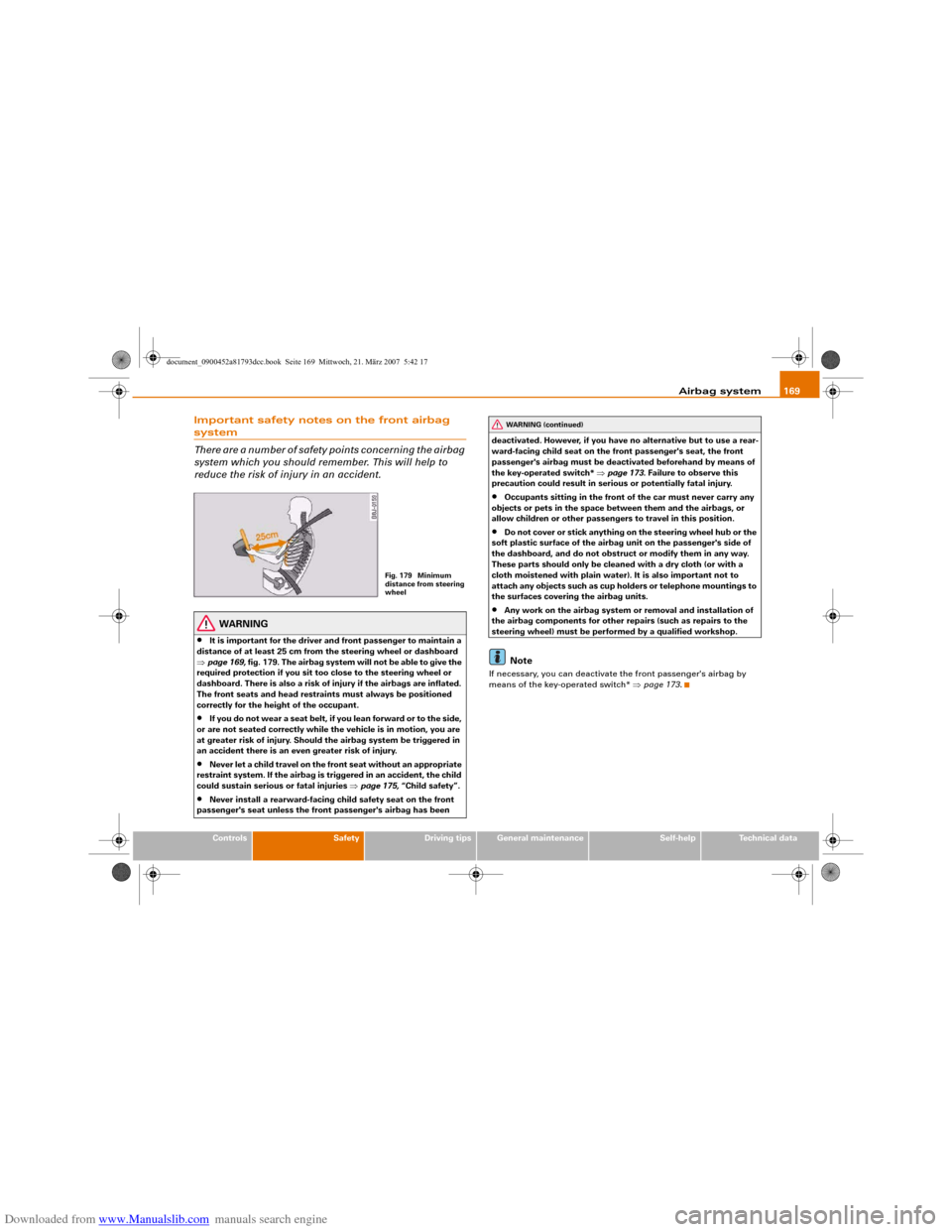
It is important for the driver and front passenger to maintain a
distance of at least 25 cm from the steering wheel or dashboard
⇒page 169, fig. 179. The airbag system will not be able to give the
required protection if you sit too close to the steering wheel or
dashboard. There is also a risk of injury if the airbags are inflated.
The front seats and head restraints must always be positioned
correctly for the height of the occupant.
•
If you do not wear a seat belt, if you lean forward or to the side,
or are not seated correctly while the vehicle is in motion, you are
at greater risk of injury. Should the airbag system be triggered in
an accident there is an even greater risk of injury.
•
Never let a child travel on the front seat without an appropriate
restraint system. If the airbag is triggered in an accident, the child
could sustain serious or fatal injuries ⇒page 175, “Child safety”.
•
Never install a rearward-facing child safety seat on the front
passenger's seat unless the front passenger's airbag has been deactivated. However, if you have no alternative but to use a rear-
ward-facing child seat on the front passenger's seat, the front
passenger's airbag must be deactivated beforehand by means of
the key-operated switch* ⇒page 173. Failure to observe this
precaution could result in serious or potentially fatal injury.
•
Occupants sitting in the front of the car must never carry any
objects or pets in the space between them and the airbags, or
allow children or other passengers to travel in this position.
•
Do not cover or stick anything on the steering wheel hub or the
soft plastic surface of the airbag unit on the passenger's side of
the dashboard, and do not obstruct or modify them in any way.
These parts should only be cleaned with a dry cloth (or with a
cloth moistened with plain water). It is also important not to
attach any objects such as cup holders or telephone mountings to
the surfaces covering the airbag units.
•
Any work on the airbag system or removal and installation of
the airbag components for other repairs (such as repairs to the
steering wheel) must be performed by a qualified workshop.Note
If necessary, you can deactivate the front passenger's airbag by
means of the key-operated switch* ⇒page 173.
Fig. 179 Minimum
distance from steering
wheel
WARNING (continued)
document_0900452a81793dcc.book Seite 169 Mittwoch, 21. März 2007 5:42 17
Page 241 of 294
Downloaded from www.Manualslib.com manuals search engine Accessories and modifications to the vehicle239
Controls
Safety
Driving tips
General maintenance
Self-help
Technical data
Accessories and modifications to the vehicleAccessories and replacement partsAlways ask your dealer or specialist retailer for advice
before purchasing accessories and replacement parts.Your car is designed to offer a high standard of active and passive
safety. For this reason, we recommend that you ask an Audi dealer
for advice before fitting accessories or replacement parts. Audi
dealers have the latest information from the manufacturer and can
recommend accessories and replacement parts which are suitable
for your requirements. They can also answer any questions you
might have regarding official regulations.
We recommend you to use only Audi accessories and Audi Genuine
parts
®. Audi has tested these parts and accessories for suitability,
reliability and safety. Audi dealers have the necessary experience
and facilities to ensure that the parts are installed properly.
Although the market is constantly scrutinised, Audi cannot judge or
assume responsibility for the reliability, safety and suitability of
non-genuine products - even though in some instances, these parts
may have been approved by an officially recognised technical
testing authority or accompanied by an official approval certificate.
Any retro-fitted equipment which has a direct effect on the vehicle
and/or the way it is driven (e.g. cruise control system or electroni-
cally-controlled suspension) must be approved for use in your
vehicle and bear the e mark (the European Union's approval
symbol).
If any additional electrical components are fitted which do not serve
to control the vehicle itself (for instance a refrigerator box, laptop or
ventilator fan, etc.), these must bear the CE mark (manufacturer
conformity declaration in the European Union).
WARNING
Never attach accessories (such as cup holders or telephone
brackets) to the surfaces covering the airbag units or the areas
around the airbags: this could cause injury if the airbag is
triggered.ModificationsModifications must always be carried out according to
our specifications.Unauthorised modifications to the electronic components or soft-
ware in the vehicle may cause malfunctioning. Due to the way the
electronic components are linked together in networks, other
systems may be affected by the faults. This can seriously impair
safety, lead to excessive wear of components, and also invalidate
the type approval for your vehicle.
You will appreciate that your Audi dealer cannot be held liable for
any damage caused by modifications and/or work performed incor-
rectly.
We recommend that all work should be performed by an Audi work-
shop using Audi Genuine parts
®.
WARNING
Incorrectly performed modifications or other work on your vehicle
can lead to malfunctions and cause accidents.
document_0900452a81793dcc.book Seite 239 Mittwoch, 21. März 2007 5:42 17
Page 242 of 294
Downloaded from www.Manualslib.com manuals search engine Accessories and modifications to the vehicle 240Radio transmitters and business equipmentRadio transmitters (fixed installation)
Retrofit installations of radio transmitters in the vehicle are subject
to official approval. Audi generally authorises in-vehicle installa-
tions of approved types of radio transmitters provided that:•
the aerial is installed correctly,
•
the aerial is not installed in the interior of the vehicle (and
screened cables are used together with non-reflective aerial trim-
ming),
•
the effective transmitting power does not exceed 10 Watts at the
aerial base.
Audi dealers and specialist retailers will be able to inform you about
options for installing and operating radio transmitters with a higher
transmitting power.
Mobile radio transmitters
When using commercial mobile telephones or radio equipment it is
possible that they might interfere with the electronics of your
vehicle and cause malfunctions. The reasons could be:
•
no external aerial
•
external aerial incorrectly installed
•
transmitting power more than 10 W.
Therefore you must not operate portable mobile telephones or radio
equipment inside the vehicle without a correctly installed external
aerial ⇒.
Please note also that the maximum range of the equipment can only
be achieved with an external aerial.
Business equipment
Retrofit installation of business or other equipment in the vehicle is
permitted, provided the equipment cannot interfere with the driver's immediate control of the vehicle. Any such equipment must
carry the CE mark. Any retrofit equipment that could influence the
driver's control of the vehicle must have a type approval for your
vehicle and must carry the e mark.
WARNING
Mobile telephones or radio equipment which are operated inside
the vehicle without a correctly installed external aerial can create
excessive magnetic fields that could cause a health hazard.
Note
•
Any retrofit installation of electrical or electronic equipment in
the vehicle will affect its type approval. In extreme cases this could
mean that you might lose the type approval for your vehicle.
•
Please refer to the mobile telephone/radio operating
instructions.
document_0900452a81793dcc.book Seite 240 Mittwoch, 21. März 2007 5:42 17