Page 88 of 137
88Navigation System
Edit Waypoint Search Area
When driving on route to your
destination, you can select a temporary
destination “waypoint” (marked with a
small flag on the map) along your route
for gas, a restaurant, or other POI. When
you resume your trip from the
“waypoint,” the system continues the
trip to your original destination. To use
this feature, see Waypoints on page61.
This Setup item allows you to select the
distance from your highlighted route
line (on either side of your route), that
the system will search for a “waypoint.”
From the Routing & Guidance screen,
select Edit for “Edit Waypoint Search
Area,” and then choose the desired
search distance for either “On
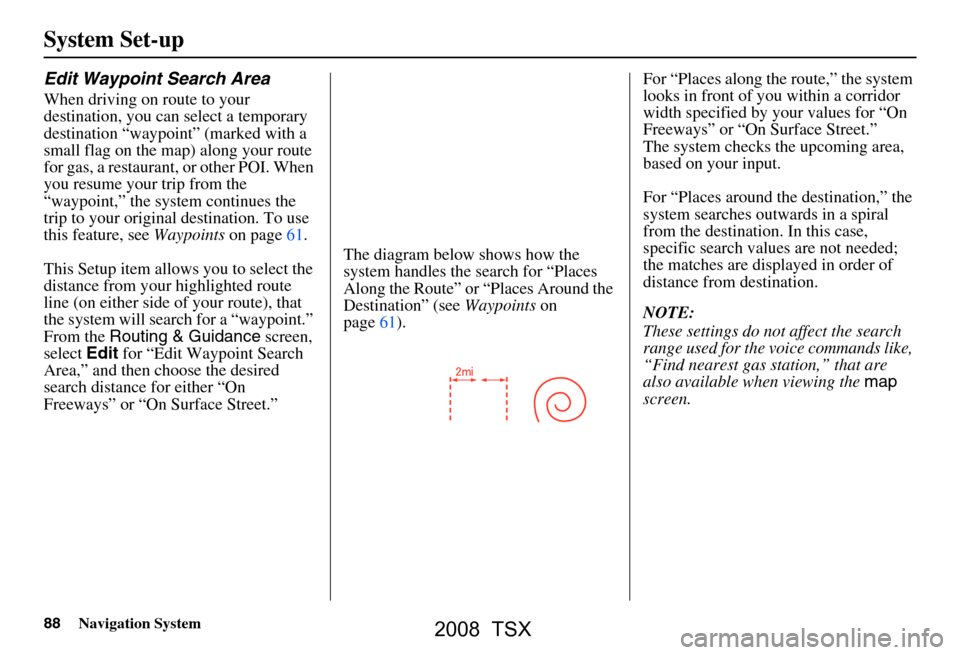
Freeways” or “On Surface Street.” The diagram below shows how the
system handles the search for “Places
Along the Route” or
“Places Around the
Destination” (see Waypoints on
page61). For “Places along the route,” the system
looks in front of you within a corridor
width specified by your values for “On
Freeways” or “On Surface Street.”
The system checks the upcoming area,
based on your input.
For “Places around the destination,” the
system searches outwards in a spiral
from the destination. In this case,
specific search values are not needed;
the matches are displayed in order of
distance from destination.
NOTE:
These settings do not affect the search
range used for the
voice commands like,
“Find nearest gas station,” that are
also available when viewing the map
screen.
System Set-up
2008 TSX
Page 106 of 137

106Navigation System
Coverage Areas
MississippiBiloxi/Gulfport
Jackson
Missouri Branson
Columbia
Kansas City (KS-MO) Metro -
including Platte County
St Louis Metro (IL-MO) - including
additional cities in Jefferson County
Montana Billings
Nebraska Lincoln (Lancaster County)
Omaha
Nevada Las Vegas Metro
Reno/Lake Tahoe
New Hampshire Manchester
Nashua
New Jersey Southern New Jersey - including
Atlantic City/Cape May/Cumberland
Metro
Camden Metro
Newark Metro
Trenton Metro - including Ocean and
Hunterdon Counties New Mexico
Albuquerque
Santa Fe
Taos Ski Resorts
New York The Adirondack
Binghamton
Buffalo - including Erie and Niagara
Counties
Cooperstown
Eastern New York - including New
York City Metro, Albany, Glen Falls,
Schenectady, Troy
Ithaca
Lake Placid
Oneonta
Rochester - including cities in
Monroe County
Syracuse
Utica
North Carolina Asheville
Charlotte Metro
Hickory
Morgantown
Raleigh-Durham Metro
Wilmington
Winston-Salem/Greensboro Metro
North Dakota Fargo Metro Ohio
Akron
Columbus/Marysville Metro
Cincinnati Metro - including Butler
County
Cleveland Metro - including Geauga
County
Dayton
Toledo (Lucas County)
Oklahoma Oklahoma City
Tulsa
Oregon Bend
Eugene
Portland/Salem Metro
Pennsylvania Allentown
Erie
Gettysburg
Harrisburg
Lancaster
Philadelphia Metro
Pittsburgh Metro - including
Washington County
Reading
State College/University Park
Wilkes-Barre/Scranton
York
2008 TSX
Page 123 of 137
Navigation System123
Glossary
Vehicle Speed Sensor - Provides speed
signal to the navigation system for
moving the VP icon on the map.
Verified Streets - These streets consist
of the detailed metropolitan coverage
areas, and all other inter-town
connection roads. These roads are
shown in black on the map.
Voice Control - See VR.
VP - Vehicle Position. When in map
mode, this circular icon shows the
vehicle position on the map. Touch
this icon to show the latitude,
longitude, and elevation of your
current position.
VR - Voice Recognition. This allows
voice control of many of the
navigation functions. The hardware
consists of the microphone, voice
control switch ( NAVI TALK/NAVI
BACK buttons), and the front
speakers.
Waypoint - A temporary destination
you may enter on route (e.g., a gas
station, ATM, etc.). See page61. Yaw Rate Sensor -
Senses when the
vehicle makes a turn, which makes
the VP change direction on the map
as you turn.
Zagat Ratings - Restaurant ratings
information prov ided by Zagat
Survey. See the Information screen
on page70 for an explanation of the
ratings.
2008 TSX
Page 125 of 137
Navigation System125
Navigation Display
Commands
The system accepts these commands on
a map/guidance screen.
Display current location
Display north up
Display heading up
Display zoom in
Display zoom out
Display: (the selected scale)
1/20 mile (80 m) scale
1/8 mile (200 m) scale
1/4 mile (400 m) scale
1/2 mile (800 m) scale
1 mile (1600 m) scale
2 mile (3 km) scale
5 mile (8 km) scale
15 mile (24 km) scale
50 mile (80 km) scale
150 mile (240 km) scale
350 mile (560 km) scale Max zoom in
Max zoom out
Go home
Display:
(display the selected icon on
the screen)
ATM
gas station
restaurant
post office
grocery store
lodging (hotel, motel)
parking garage
parking lot
school
hospital
freeway exit information Hide:
(hide the selected icon from the
screen)
ATM
gas station
restaurant
post office
grocery store
lodging (hotel, motel)
parking garage
parking lot
school
hospital
freeway exit information
Voice Command Index
2008 TSX
Page 126 of 137

126Navigation System
Voice Command Index
Find Place Commands
The system accepts these commands on
a map/guidance screen.
Find nearest: (find the nearest
selection)
ACURA dealers
HONDA dealers
gas station
hydrogen station
ATM
bank
post office
hospital
police station
hotel
tourist attraction
shopping (all shopping types)
parking garage
parking lot
other car dealers
auto parts & electronics
auto repair & maintenance
car wash & detailing motorcycle dealers
roadside assistance
check cashing
currency exchange
veterinarian
business
civic center
convention center
library
school
city hall
court house
higher education
amusement park
golf course
historical monument
marina
movie theater
museum
park
performing arts
sports complex
bed & breakfast
accessory store
book store
clothing store
grocery store
home improvement store
mall
office supply store
pharmacy
pet food store
sewing store
shoe store
sporting goods store
toy store
airport
automobile club
bus station
camping
commuter rail station
ferry terminal
named place
park & ride
2008 TSX
