Page 232 of 500

To replay the current track
continuously, use the interf ace
selector to scroll down, select
TRACK REPEAT, and press ENTER
on the interf ace selector. As a
reminder, you will see REPEAT next
to TRACK on the screen. To turn
this feature off, highlight TRACK
REPEAT (if not already highlighted),
andpressENTERontheinterface
selector again.To replay the current disc
continuously, use the interf ace
selector to scroll down, select DISC
REPEAT, and press ENTER on the
interf ace selector. As a reminder,
you will see REPEAT next to DISC
on the screen. To turn this f eature
of f , highlight DISC REPEAT (if not
already highlighted), and press
ENTER on the interf ace selector
again.To play the tracks of the current disc
in random order, use the interf ace
selector to scroll down, select
TRACK RANDOM, and press
ENTER on the interf ace selector. As
a reminder, you will see RANDOM
next to TRACK on the screen. To
turn this feature off, highlight
TRACK RANDOM (if not already
highlighted), and press ENTER on
the interf ace selector again.
T rack Repeat Disc Repeat Random Play
Audio System
Features
229
REPEAT ICON
REPEAT ICON
RANDOM ICON
TRACK REPEAT ICON DISC REPEAT ICON
TRACK RANDOM ICON
�\f���—�\f���—�
���y�\f����
����
���y���
�(���������\f�y�\f�������y
2008 RL
Page 235 of 500
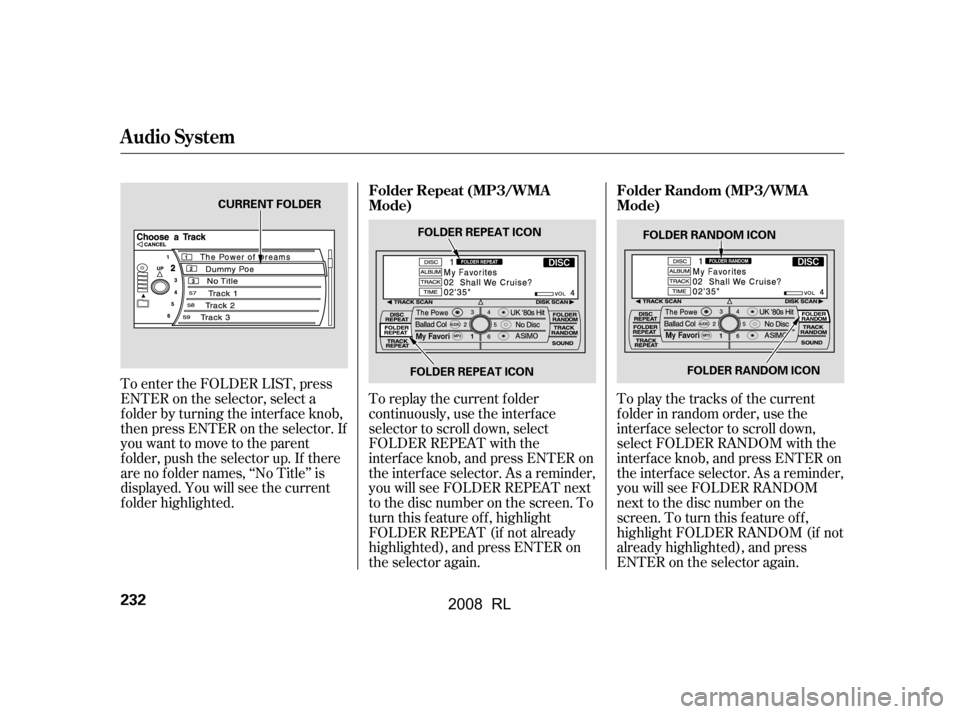
To play the tracks of the current
f older in random order, use the
interf ace selector to scroll down,
select FOLDER RANDOM with the
interf ace knob, and press ENTER on
the interf ace selector. As a reminder,
you will see FOLDER RANDOM
next to the disc number on the
screen. To turn this f eature of f ,
highlight FOLDER RANDOM (if not
already highlighted), and press
ENTER on the selector again.
To replay the current f older
continuously, use the interf ace
selector to scroll down, select
FOLDER REPEAT with the
interf ace knob, and press ENTER on
the interf ace selector. As a reminder,
you will see FOLDER REPEAT next
to the disc number on the screen. To
turn this feature off, highlight
FOLDER REPEAT (if not already
highlighted), and press ENTER on
the selector again.
To enter the FOLDER LIST, press
ENTER on the selector, select a
f older by turning the interf ace knob,
then press ENTER on the selector. If
youwanttomovetotheparent
f older, push the selector up. If there
are no f older names, ‘‘No Title’’ is
displayed. You will see the current
f older highlighted.
Audio System
Folder Repeat (MP3/WMA
Mode)
Folder Random (MP3/WMA
Mode)
232
FOLDER RANDOM ICON
FOLDER RANDOM ICON
CURRENT FOLDER
FOLDER REPEAT ICONFOLDER REPEAT ICON
�\f���—�\f���—�
���y�\f����
��������y���
�(���������\f�y�\f�������y
2008 RL
Page 238 of 500

When using CD-R or CD-RW discs,
use only high quality discs labeled
f or audio use.
When recording a CD-R or
CD-RW, the recording must be
closedforittobeusedbythedisc
changer.When a disc is not being played,
store it in its case to protect it f rom
dust and other contamination. To
prevent warpage, keep discs out of
direct sunlight and extreme heat.
A new disc may be rough on the
inner and outer edges. The small
plastic pieces causing this roughness
can f lake of f and f all on the
recording surf ace of the disc,
causing skipping or other problems.
Remove these pieces by rubbing the
inner and outer edges with the side
of a pencil or pen.
Never try to insert f oreign objects in
the disc changer. Handle a disc by its edges; never
touch either surf ace. Do not place
stabilizer rings or labels on the disc.
These, along with contamination
f rom f inger prints, liquids, and f elt-
tip pens, can cause the disc to not
play properly, or possibly jam in the
drive.
To clean a disc, use a clean sof t cloth.
Wipe across the disc f rom the center
to the outside edge.
Play only standard, round, 5-inch
(12 cm) discs. Smaller or odd-
shaped discs may jam in the drive
or cause other problems.
Handle your discs properly to
prevent damage and skipping.
General Inf ormation Protecting Discs
Protecting Your Discs
Features
235
�\f���—�\f���—�
���y�\f����
������
�y���
�(���������\f�y�\f�����\f�y
2008 RL
Page 246 of 500

Press this button to cancel the
current screen and return to the
previous screen.
This button switches the display
between day mode, night mode, and
of f (see page ).
Press the button to display the set up
screen (see page ) to change and
update inf ormation in the system.
Press this button to display thescreen (see page ).
Most f unctions of the compass
system can be accessed with the
interf ace dial. The interf ace dial has
two parts: a knob and a selector.
The knob turns lef t and right. Use it
to make selections or adjustments to
a list or menu on the screen.
The selector can be pushed lef t,
right, up, down, and in. Use the
selector to scroll through lists, to select menus, and to highlight menu
items. When you make a selection,
push the center of the selector in
(ENTER)togotothatselection.
All selections and instructions are
displayed on the screen.
In almost all cases, you can enter a
selection into the system by pushing
in on the interf ace selector.
Clean the screen with a sof t damp
cloth. You may use a mild cleanser
intended f or use on liquid crystal
displays (LCDs). Harsher chemicals
may damage the screen.
Shows the radio band, f requency,
volume, the climate control status,
and the time.
249
254
258
Int erf ace Dial
Cancel But t on (Display Mode) But t on
Set Up But t on
Trip Button
Screen
Upper Display
Trip
Computer
Compass System (U.S. model without navigation system)
Features
243
KNOB
ENTER
SELECTOR
�\f���—�\f���—�
���y�\f������
��\f�
�y���
�(���������\f�y�\f�������y
2008 RL
Page 251 of 500

The voice command help screen
displays several topics that help you
to understand your vehicle’s voice
control system. To go to the voice
command help screen, say or select
‘‘Voice command help.’’ Then select
a topic by saying either the topic
name or its line number.Tousethevoicecommandtutorial,
say or select ‘‘Getting started.’’ The
display changes to the Getting
started screen.
When you say ‘‘Display menu’’ or
press the MENU button, the display
changes to the screen.
To select a menu item, turn the
interf ace knob to highlight the item,
then press the interf ace selector.
If some items appear grayed
out and cannot be selected, the
vehicle does not sense the driver’s
IDof theremote(seepage). Select the line number of the tutorial
you want to view, and the tutorial will
automatically be read out. To stop
the system from reading the tutorial,
move the interface knob to the right.
170
Main Menu
Main menu
Voice Command Help
Compass System (U.S. model without navigation system)
248
NOTE:
�\f���—�\f���—�
���y�\f������
������y���
�(���������\f�y�\f�������y
2008 RL
Page 256 of 500
When you say or select ‘‘Calculator,’’
the display changes to thescreen.
Enter the digits and operation
symbols with the interf ace selector. Use the interface selector to control
the calculator, and calculator
‘‘conversion’’ f eature.
To convert a unit of measurement,
do this:
Enter a numeric value to be
converted (f or example, 100).
Push the interf ace selector down
to select Unit conversion. The
screen above appears. Turn the interface knob until the
conversion you want is highlighted
(weight, for example), then push
the selector in to select it. The
screen f or that conversion type
appears (see illustration in step 4).
1.
2. 3.
CONT INUED
Calculat or Convert
Calculator
Compass System (U.S. model without navigation system)
Features
253
�\f���—�\f���—�
���y�\f���������\f�\f�y���
�(���������\f�y�\f�������y
2008 RL
Page 257 of 500
Turn the interf ace knob until the
unit you want to convert f rom is
highlighted (kilogram, f or
example), then push the selector
in to select it as it the example
above.The set-up f unctions consist of three
dif f erent screens that allow you to
change and update inf ormation in
the system. To display the
, say ‘‘Set up’’ or press the
SET UP button, and then select an
item. To select more setup items, say
‘‘More,’’ or select MORE at the top
right corner of the screen.
The f irst setup screen allows you to
change the system’s brightness,
contrast, black level, volume, and
interf ace dial f eedback. To select a
setup item, turn the interface knob
until it is highlighted, then push the
interf ace selector in to select it.
4. System Set-up
set up
screen
Compass System (U.S. model without navigation system)
First Set up Screen
254
�\f���—�\f���—�
���y�\f���������\f���y���
�(���������\f�y�\f�������y
2008 RL
Page 258 of 500
�µ
�µ
CONT INUED
Brightness Black Level Volume If you are having trouble viewing
the screen in bright lighting conditions, try increasing the brightness.
Contrast
There are 11 possible brightness
settings. To change the brightness,
say ‘‘Brightness up’’ or ‘‘Brightness
down.’’ You can also select and change the setting
by turning the interf ace knob. There are 11 possible black level
settings. To change the black level,
say ‘‘Black level up’’ or ‘‘Black level
down.’’ You can also select
and change the setting by
turning the Interf ace knob. Changes
tothedisplayareverysubtle this
is normal. Say ‘‘Volume up’’ or ‘‘Volume down.’’
There are 11 possible contrast
settings. To adjust the contrast, say
‘‘Contrast up’’ or ‘‘Contrast down.’’
You can also select and
change the setting by turning the
interf ace knob. Changes to the
display are very subtle this is
normal. You can have separate
daytime and nighttime settings f or
brightness, contrast, and black level.
Adjust each setting when the display
is in either daytime or nighttime
mode. Use the Display mode button
(see page ) to select daytime or
nighttime mode. Toadjustthevolumeof thesystem
voice, do one of these actions:
Select volume off. If youturnthevolumeoff,
you will not hear voice command
conf irmations. Select , then change the
setting by turning the interface
knob.
243
Brightness
Black
Level
Contrast Volume
Tip:
Compass System (U.S. model without navigation system)
Features
255
NOTE:
NOTE:
�\f���—�\f���—�
���y�\f�������������y���
�(���������\f�y�\f�����\f�y
2008 RL

