Page 300 of 500

Make sure you have properly
completed the ‘‘Training
HomeLink’’ procedure.
Find the ‘‘learn’’ button on your
garage door opener unit. The
location will vary, depending on
the manufacturer.
Pressthelearnbuttononthe
garage door opener unit until the
indicator next to the button comes
on. The indicator may blink, or
comeonandstayon.Youthenhave approximately 30 seconds to
complete the following steps.
Press and hold the button on
HomeLink f or 3 to 4 seconds.
Press the HomeLink button again
f or about 1 second. It should
operate the garage door.
Repeat these steps to train the
other two HomeLink buttons to
operate any other compatible
remotely controlled devices
around your home (lighting,
automatic gate, security system,
etc.).
The ‘‘Training HomeLink’’
procedure trains HomeLink to the
proper garage door opener code.
The f ollowing procedure
synchronizes HomeLink to the
garage door opener so it sends and
receives the correct codes.
For security purposes, newer garage
door opening systems use a ‘‘rolling’’
or variable code. Information from
the remote control and the garage
door opener is needed bef ore
HomeLink can operate the garage
door opener. 2.
4.
5.
1.
3.
6.
HomeL inkUniversal Transceiver
T raining With a Rolling Code
System
Features
297
LEARN BUTTON
�\f���—�\f���—�
���y�\f������\f������y���
�(���������\f�y�\f���\f���y
2008 RL
Page 316 of 500

The HFL response continues ‘‘A
security option is available to lock
the hands f ree system. Each time
the vehicle is turned on, a
passcode would be required to use
this system. Would you like this
security option turned on?’’
Press and release the Talk button.
If you say ‘‘Yes’’ af ter the beep, the
HFL system response is, ‘‘Would
you like the notification to be a
ring tone or a prompt?’’ If you say
‘‘No’’ af ter the beep, the HFL
system returns to its main menu.
Saying ‘‘No’’ will result in no ring
tone or prompt playback during an
incoming call. The audio system
will be mute, and a message will
be displayed.
Press and release the Talk button.
Af ter the beep, say ‘‘Ring tone’’ or
‘‘Prompt.’’ The HFL system
response is ‘‘A ring tone will be
used.’’ or ‘‘An incoming call
prompt will be used.’’
If you choose ‘‘Ring tone,’’ you will
hear a ring tone through the audio
speakers to announce an incoming
call. If you choose ‘‘Prompt,’’ you
will hear this message to
announce an incoming call: ‘‘You
have an incoming call.’’
Thevoiceof theHFLcanbesetto
male or f emale (U.S. models only).
Also, the incoming notif ication can
be set to a ring tone, a prompt, or no
notification.
Press and release the Talk button.
Af ter the beep, say ‘‘System.’’ The
HFL response is, ‘‘System options
are setup and clear.’’
Press and release the Talk button.
Af ter the beep, say ‘‘Setup.’’ The
HFL response is ‘‘Would you like
male or f emale prompts?’’
Press and release the Talk button.
Af ter the beep, say ‘‘Male’’ or
‘‘Female,’’ depending on the
system voice you want. The HFL
response is, ‘‘Male (Female)
prompts have been selected.
Would you like an audible
notif ication of an incoming call?’’ Press and release the Talk button.
If you say ‘‘No’’ af ter the beep, the
HFL system response is, ‘‘Security
willnotbeused.Thesystemsetup
is complete.’’
If you say ‘‘Yes,’’ you can set your
passcode. Ref er to the setting
procedure in the next column.
4.
5.
6.
7.
1.
2.
3.
To set up the system, do this:
Setting Up the System
BluetoothHandsFreeL ink
Features
313
�\f���—�\f���—�
���y�\f�������������y���
�(���������\f�y�\f���
���y
2008 RL
Page 317 of 500

The HFL will accept a numeric, f our-
digit passcode that you can use f or
security purposes.Follow the system setup
procedure as described previously.
Press and release the Talk button.
Af ter the beep, say ‘‘Yes.’’
The HFL response is ‘‘What is the
f our-digit number you would like
to set as your passcode?’’
Press and release the Talk button.
Af ter the beep, say the f our-digit
passcode you want to use. For
example,say‘‘1,2,3,4.’’TheHFL
responseis‘‘1,2,3,4.Isthis
correct?’’ Press and release the Talk button.
Af ter the beep, say ‘‘Yes.’’ The
HFL response is ‘‘Security is on.
Each time the vehicle is turned on,
the passcode will be required to
use the system. The system setup
is complete. Returning to the main
menu.’’
Press and release the Talk button.
If you say ‘‘No.’’ af ter the beep, the
HFL response is ‘‘Security will not
be used. The system setup is
complete.’’
Once a passcode is set, you can lock
the HFL so it only operates after the
passcode is entered. The HFL will prompt you f or your
passcode each time the ignition
switch is turned to the ON (II)
position and you press the Talk
button. You will only be asked f or
the passcode once per ignition cycle. If the passcode is set, its
response is ‘‘The system is locked.
What is the f our-digit passcode?’’
Press and release the Talk button.
Af ter the beep, say your f our-digit
passcode.Forexample,say‘‘1,2,3,
4.’’
If thepasscodeiscorrect,theHFL
response is ‘‘Main menu.’’ If the
passcode is not correct, the HFL
response is ‘‘1,2,3,4 is incorrect.
Pleasetryagain.’’Gobacktothe
step 2.
If you f orget your passcode and you
cannot activate the HFL, consult
your dealer to cancel the passcode.
1.
2.
3.
4. 5.
6.
1.2.
3.
To set your passcode, do this:
To enter your passcode, do this;
Setting Your Passcode
BluetoothHandsFreeL ink
314
�\f���—�\f���—�
���y�\f���������\f���y���
�(���������\f�y�\f���
���y
2008 RL
Page 335 of 500
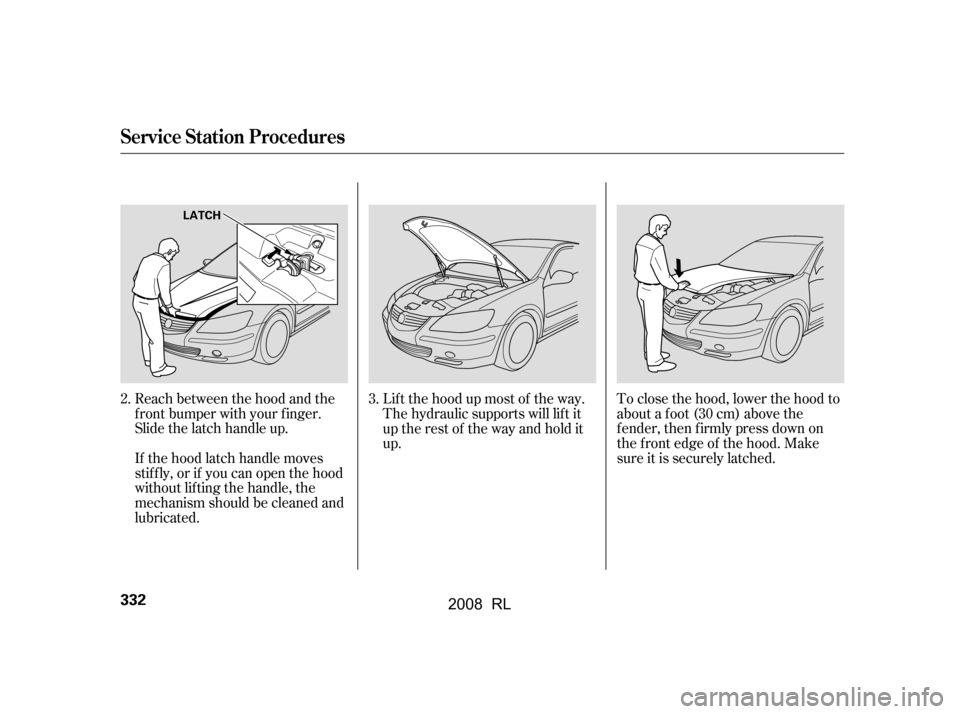
Lif t the hood up most of the way.
The hydraulic supports will lif t it
uptherestof thewayandholdit
up.
If the hood latch handle moves
stif f ly, or if you can open the hood
without lifting the handle, the
mechanism should be cleaned and
lubricated.
Reach between the hood and the
f ront bumper with your f inger.
Slide the latch handle up. To close the hood, lower the hood to
about a f oot (30 cm) above the
f ender, then f irmly press down on
the f ront edge of the hood. Make
sure it is securely latched.
3.
2.
Service Station Procedures
332
LATCH
�\f���—�\f���—�
���y�\f�������������y���
�(���������\f�y�\f�������y
2008 RL
Page 345 of 500

Store or secure all items that could
be thrown around and hurt
someone during a crash.
Do not put any items on top of the
rear shelf . They can block your
view and be thrown around the
vehicle during a crash.
Be sure items placed on the f loor
behind the f ront seats cannot roll
under the seats and interf ere with
the pedals or seat operation.
Keep the glove box closed while
driving. If it is open, a passenger
could injure their knees during a
crash or sudden stop.Distribute cargo evenly on the
f loor of the trunk, placing the
heaviest items on the bottom and
as far forward as possible.
If you carry large items that
prevent you f rom closing the trunk
lid, exhaust gas can enter the
passenger area. To avoid the
possibility of
, f ollow the instructions
on page .
If you carry any items on a roof
rack, be sure the total weight of
the rack and the items does not
exceed the maximum allowable
weight. Please contact your dealer
for further information. If you carry any items extending
through the trunk pass-through,
tie down or secure all items that
could be thrown around the
vehicle and hurt someone during a
crash or sudden stop.
56 carbon monoxide
poisoning
Carrying Items in the Passenger
Compartment
Carrying Cargo in the T runk or on
a Roof Rack
Carrying Cargo
342
�\f���—�\f���—�
���y�\f�����������\f�y���
�(���������\f�y�\f�������y
2008 RL
Page 346 of 500
The cargo f loor hooks can also be
used to tie down and secure items on
the f loor.
There are hooks on the f loor and
both sides of the trunk. They can be
used to install the cargo net f or
securing items. The side cargo
hooks are designed to hold light
items (maximum load: 6 lbs or 3 kgs
for each hook). Heavy objects may
damage the side hooks.
Cargo Hooks
Carrying Cargo
Bef ore Driving
343
SIDE CARGO HOOKS CARGO FLOOR HOOKS
�\f���—�\f���—�
���y�\f�������������y���
�(���������\f�y�\f�������y
2008 RL
Page 349 of 500

Make sure all windows, mirrors,
and outside lights are clean and
unobstructed. Remove f rost, snow,
or ice.
Check that the hood is f ully closed.
Check that any items you may be
carrying are stored properly or
f astened down securely.Check the seat adjustment (see
page ).
Check the steering wheel
adjustment (see page ).
Make sure the doors and the
trunk are securely closed and
locked.
Fasten your seat belt. Check that
your passengers have f astened
their seat belts (see page ).
Youshoulddothefollowingchecks
and adjustments bef ore you drive
your vehicle.
When you start the engine, check
the gauges and indicators in the
instrument panel, and the
messages on the multi-inf ormation
display (see pages , and).
Visually check the tires. If a tire
looks low, use a gauge to check its
pressure (see page ).
Check the adjustment of the
inside and outside mirrors (see
page ).
1.
2.
3.
4. 5.
6.
7.
8.
9.
10. 17
78 155
147
61 70
159
420
Preparing to Drive
346
�����—�����—�
���y���������������y���
�(�����������y�������
�y
2008 RL
Page 360 of 500

If the SH-AWD indicator on the
instrument panel stays on, and the
multi-inf ormation display shows an
SH-AWD message, there is a
problem with the system. Your
vehicle still has normal f ront-wheel
drive with vehicle stability assist
(VSA), but does not have the
advantages of SH-AWD. Have your
vehicle checked by a dealer as soon
as possible.Check the indicator on the
instrument panel to verif y that the
security system is set.
If the vehicle is f acing downhill,
turn the front wheels toward the
curb.
If the vehicle is f acing uphill, turn
the front wheels away from the
curb.
Never park over dry leaves, tall
grass, or other f lammable
materials. The hot three way
catalytic converter could cause
these materials to catch on fire.
Make sure the parking brake is
f ully released bef ore driving away.
Driving with the parking brake
partially set can overheat or
damage the rear brakes.
Set the parking brake bef ore you put
the transmission in Park. This keeps
the vehicle from moving and putting
pressure on the parking mechanism
in the transmission.
Make sure the moonroof and the
windows are closed.
Turn of f the lights.
Place any packages, valuables, etc.,
in the trunk or take them with you.
Lock the doors.
Always use the parking brake when
you park your vehicle. Make sure
the parking brake is set f irmly or
your vehicle may roll if it is on an
incline.
Parking
Parking T ips
Super Handling-A ll Wheel Drive (SH-A WD) System, Parking
Driving
357
�\f���—�\f���—�
���y�\f���������\f���y���
�(���������\f�y�\f�������y
2008 RL