Page 338 of 500

�µ�µ�µ �µ
�µ �µ
�µ
Aggressive driving (hard
acceleration and braking)
Excessive idling, accelerating and
braking in stop-and-go traf f ic
Cold engine operation (engines
aremoreefficientwhenwarmed
up)
Driving with a heavy load or the
air conditioner running
Improperly inf lated tires
An under-inf lated tire increases
‘‘rolling resistance,’’ which reduces
f uel economy.
It puts a heavier
load on the engine, increasing f uel
consumption. In
particular, a build-up of snow or
mud on your vehicle’s underside
adds weight and rolling resistance.
Frequent cleaning helps your f uel
economy.
The f ollowing f actors can lower your
vehicle’s f uel economy:
A properly maintained vehicle
maximizes f uel economy. Poor
maintenance can signif icantly reduce
f uel economy. Always maintain your
vehicle according to the maintenance
messages displayed on the multi-
inf ormation display (see
on page ).
For example: Idling
results in 0 miles per gallon. If your vehicle has a
manual transmission, you can
boost your f uel economy by up
shif ting as early as possible.
Aerodynamic drag has a big ef f ect
on f uel mileage at speeds above 45
mph (75 km/h). Reduce your
speed and you reduce the drag.
Trailers, car top carriers, roof
racks and bike racks are also big
contributors to increased drag.
Rapid
acceleration, abrupt cornering,
and hard braking increase fuel
consumption.
394
Fuel Economy
Fuel Economy Factors Use the recommended viscosity motor oil, displaying the A PI
Certif ication Seal (see page
).
Maintain proper tire inf lation
A void carrying excess weight in
your vehicle
K eep your vehicle clean
Improving Fuel Economy
Owner’s
Maintenance Checks Avoid excessive idling
Always drive in the highest gear
possible
Observe the speed limit
Drive moderately 399
Drive Ef f icient ly
Vehicle Maint enance
Bef ore Driving
335
�\f���—�\f���—�
���y�\f�������������y���
�(���������\f�y�\f�����\f�y
2008 RL
Page 352 of 500

These indicators on the instrument
panel show which position the shif t
lever is in. In the Sequential
SportShif t Mode, the ‘‘M’’ indicator
next to the ‘‘D’’ indicator comes on,
and the illuminated number under
the low oil pressure indicator shows
you the gear you have selected.To shif t f rom Park to any position,
press firmly on the brake pedal and
slide the lever along the guide on the
console. You cannot shif t out of Park
when the ignition switch is in the
LOCK (0) or the ACCESSORY (I)
position.
The ‘‘D’’ indicator comes on f or a
f ew seconds when you turn the
ignition switch to the ON (II)
position. If it f lashes while driving (in
any shif t position), it indicates a
possible problem in the transmission.
If the malf unction indicator lamp
comes on along with the ‘‘D’’
indicator, there is a problem with the
automatic transmission control
system. Avoid rapid acceleration, and
have the transmission checked by
your dealer as soon as possible.
When the ‘‘D’’ indicator warns of a
possible problem with the
transmission, you will see a ‘‘CHECK
TRANSMISSION’’ message on the
multi-inf ormation display (see page
).
78
CONT INUED
Shif t L ever Position Indicators Shif ting
Automatic Transmission
Driving
349
�����—�����—�
���y���������������y���
�(�����������y���������y
2008 RL
Page 388 of 500

This section explains why it is
important to keep your vehicle well
maintained and how to f ollow basic
maintenance saf ety precautions.
If you have the skills and tools to
perf orm more complex maintenance
tasks on your vehicle, you may want
to purchase the service manual. See
page f or inf ormation on how to
obtain a copy, or see your dealer.
This section also includes
instructions on how to read the
maintenance minder messages on
the multi-information display, and
instructions f or simple maintenance
tasks you may want to take care of
yourself .......................
Maintenance Saf ety .386
....................
Maintenance Minder .387
..............................
Fluid Locations .397
......
Engine Compartment Covers .398
........................
Adding Engine Oil .399
Changing the Engine Oil and
...........................................
Filter .400
..............................
Engine Coolant .402
....................
Windshield Washers .404
....
Automatic Transmission Fluid .404
....................................
Brake Fluid .406
....................
Power Steering Fluid .406
....................................
Timing Belt .407
.............................................
Lights .408
..................
DustandPollenFilter .415
................
Cleaning the Seat Belts .415
.....................................
Floor Mats .416
.................................
Wiper Blades .417
...........................................
Wheels .419
...............................................
Tires .419
...................
Checking the Battery .427
.............................
Vehicle Storage .429
481
Maintenance
Maint enance
385
�\f���—�\f���—�
���y�\f�������������y���
�(���������\f�y�\f�����\f�y
2008 RL
Page 390 of 500

�µ
�µ
�µ
�µ
�µ
�µ
�µ
�µ
�µ
�µ�µ
�µ
One of the most convenient and
important f eatures of the multi-
inf ormation display on your vehicle
is the maintenance minder.
Based on engine operating
conditions and accumulated engine
revolutions, the onboard computer in
your vehicle calculates the remaining
engine oil lif e.
The system also displays the code
f or other scheduled maintenance
items needing service.
To see the remaining engine oil lif e
displayed on the lower right corner
on the multi-information display as a
percentage, turn the ignition switch
to the ON (II) position, and press the
SEL/RESET button on the steering
wheel repeatedly until the engine oil
lifeappears(seepage ).The remaining engine oil lif e is
displayed according to the table
shown below.
Calculated Engine Oil Lif e (%)
100% 91% 90% 81%
80% 71%
70% 61%
60% 51%
50% 41%
40% 31%
30% 21%
20% 16%
15% 11%
10% 6% 5% 1% 0% Displayed
Engine Oil Lif e (%)
100% 90%
80%
70%
60%
50%
40%
30%
20%
15%
10%
5%
0%
73
CONT INUED
Maintenance Minder
Engine Oil L if e Display
Maint enance
387
REMAINING ENGINE OIL LIFE
�\f���—�\f���—�
���y�\f���������
���y���
�(���������\f�y�\f�������y
2008 RL
Page 391 of 500
�Ý�Û�Ý�Û
The message will be canceled if the
or buttononthesteeringwheel
is pressed. Press the or button
to see the message again.
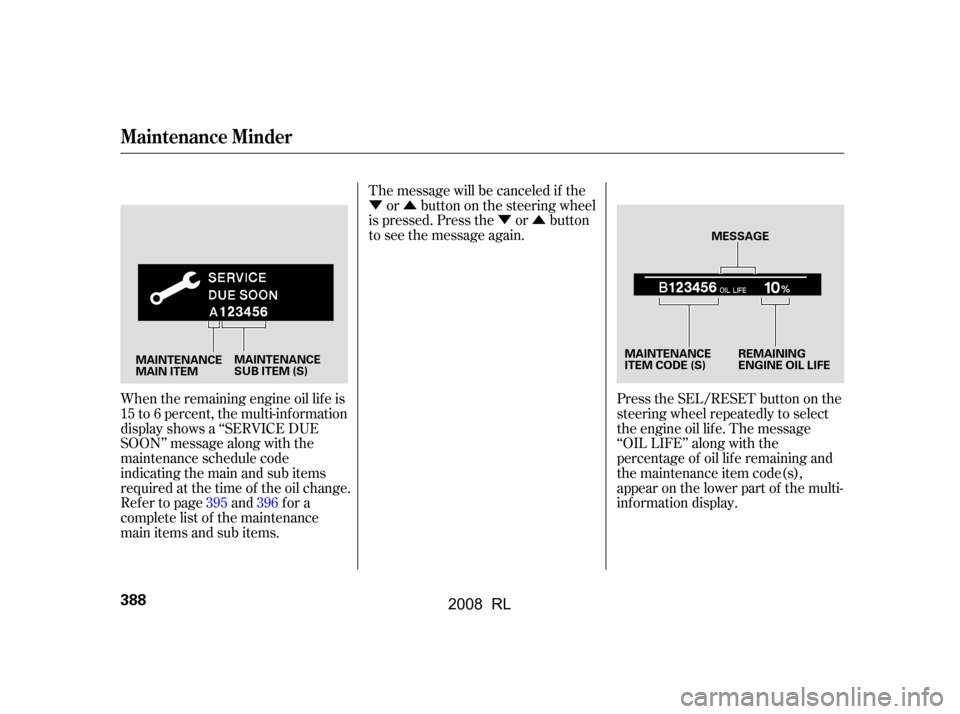
When the remaining engine oil lif e is
15 to 6 percent, the multi-inf ormation
display shows a ‘‘SERVICE DUE
SOON’’ message along with the
maintenance schedule code
indicating the main and sub items
required at the time of the oil change.
Refer to page and for a
complete list of the maintenance
main items and sub items. Press the SEL/RESET button on the
steering wheel repeatedly to select
the engine oil lif e. The message
‘‘OIL LIFE’’ along with the
percentage of oil lif e remaining and
the maintenance item code(s),
appear on the lower part of the multi-
inf ormation display.
395 396
Maintenance Minder
388
MESSAGE
MAINTENANCE
MAIN ITEM REMAINING
ENGINE OIL LIFE
MAINTENANCE
ITEM CODE (S)
MAINTENANCE
SUB ITEM (S)
�����—�����—�
���y�������������
�y���
�(�����������y���������y
2008 RL
Page 392 of 500
�Ý�Û�Ý�Û
The message will be canceled if the
or buttononthesteeringwheel
is pressed. Press the or button
to see the message again.
When the remaining engine oil lif e is
1 to 5 percent, the multi-information
display shows a ‘‘SERVICE DUE
NOW’’ message with the
maintenance items. When you see
this message have the indicated
maintenance perf ormed as soon as
possible. Press the SEL/RESET button on the
steering wheel repeatedly to select
the engine oil lif e. The message
‘‘SERVICE OIL LIFE’’, along with
‘‘5%’’, and the maintenance item
code(s) are displayed on the lower
part of the multi-inf ormation display
when the calculated engine oil lif e is
1 to 5 percent (see page ).
387
CONT INUED
Maintenance Minder
Maint enance
389
�\f���—�\f���—�
���y�\f�������������y���
�(���������\f�y�\f�������y
2008 RL
Page 393 of 500

�Ý�Û�Û�Ý
Press and hold the SEL/RESET
button on the steering wheel f or
more than 10 seconds. The
remaining engine oil lif e reset
mode will be shown on the multi-
inf ormation display.
To reset the engine oil lif e, press
the or button on the steering
wheel to select RESET on the
display, and press the SEL/
RESET button. To cancel resetting the oil life,
press the or button on the
steering wheel to select CANCEL
on the display, and press the SEL/
RESET button.
If you do not complete the reset
procedure within 30 seconds af ter
selecting the reset mode, the mode
will be canceled automatically.
Your dealer will reset the display
af ter completing the required
maintenance service. You will see
‘‘OIL LIFE 100%’’ on the display the
next time you turn the ignition
switch to the ON (II) position.
If maintenance service is done by
someone other than your dealer,
reset the maintenance minder as
f ollows:
If the oil lif e minder is not
displayed, press the SEL/RESET
buttononthesteeringwheel
repeatedly until it is.
Turn the ignition switch to the ON
(II) position.
The maintenance item code or codes
indicate the main and sub items
required at the time of the oil change
(see page ).
1.
2.
3.
395
Maintenance Minder
390
U.S.
CANADA
�\f���—�\f���—�
���y�\f�������������y���
�(���������\f�y�\f�������y
2008 RL
Page 394 of 500

�Ý�Û�Ý�Û
Immediately have the service
perf ormed, and make sure to reset
the oil lif e minder as previously
described.
The message will be canceled if the
or buttononthesteeringwheel
is pressed. Press the or button
to see the message again.
If the indicated maintenance service
is not done and the remaining engine
oil lif e reaches 0 %, the multi-
inf ormation display will show the
message ‘‘SERVICE PAST DUE’’
and the maintenance item code(s).
This message is displayed when the
total mileage is less than 10 miles
(f or U.S. models) or 10 km (f or
Canadian models) af ter the engine
oillifebecame0%. Press the SEL/RESET button on the
steering wheel repeatedly to select
the engine oil lif e minder. The
message ‘‘SERVICE OIL LIFE’’,
along with ‘‘0%’’, and the
maintenance item code are displayed
on the lower part of the multi-
inf ormation display when the
calculated engine oil lif e is 0 percent.
CONT INUED
Maintenance Minder
Maint enance
391
�\f���—�\f���—�
���y�\f�������������y���
�(���������\f�y�\f�������y
2008 RL