Page 192 of 433

ChangethehourbypressingtheH
(preset 4) side of the preset bar until
the numbers advance to the desired
time. Change the minute by pressing
the M (preset 5) side of the bar until
the numbers advance to the desired
time.
To set the time, press the SOUND/
CLOCK button until you hear a beep,
then release the button. The
displayed time begins to blink.
You can quickly set the time to the
nearest hour. If the displayed time is
bef ore the half hour, pressing the
SOUND/CLOCK button until you
hear a beep, then pressing the R
(preset 6) side of the preset bar sets
the clock back to the previous hour.
If the displayed time is after the half
hour, the clock sets f orward to the
beginning of the next hour.When you are f inished, press the
SOUND/CLOCK button again to set
the time.
On RDX model
Setting the Clock
Audio System
188
SOUND/CLOCK BUTTON
CLOCK
PRESET 5 (M)
PRESET 4 (H) PRESET 6 (R)
U.S. model is shown.
�\f���—�\f���—�\f�
�y�
�������������y���
�(�)� ���
�\f�y�\f�
�����y
2008 RDX
Page 196 of 433

�µTo tune with the interf ace dial, press
the AUDIO button to view the audio
control display, then push the
selector down, and turn the dial to
TUNE. Then press ENTER on the
selector, and turn the dial to the
desired f requency. To exit the
TUNE mode, press ENTER again.
XM satellite radio inf ormation is
available on page .
You can use any of f ive methods to
f ind radio stations on the selected
band: TUNE, SEEK, SCAN, the
preset buttons or icons, and AUTO
SELECT.
Use the TUNE/FOLDER
bar to tune the radio to a desired
f requency. Press the side of the
bar to tune to a higher f requency,
and the side of the bar to tune
to a lower f requency.
If youpressandholdthe or
side of the bar, the f requency
will begin to change rapidly. It will
stop when you release it.
The ignition switch must be in the
ACCESSORY (I) or the ON (II)
position. Press the AUDIO button to
view the audio control display. Turn
the system on by pressing the PWR/
VOL knob or the AM/FM button.
Adjust the volume by turning the
PWR/VOL knob.
The band and f requency the radio
waslasttunedtoareshownonthe
upper display. To change bands,
press the AM/FM button. You can
also change bands with the interf ace
dial. Press the AUDIO button to view
the audio control display and the
band changes to FM1, FM2, or AM
each time you push the selector up.
On the FM bands, ‘‘STEREO’’ will be
shown on the audio control display.
‘‘ST’’ will also appear on the upper
display if the station is broadcasting
in stereo. Stereo reproduction on AM
is not available. 211
Audio System
To Select a Station
TUNE
192
TUNE ICON
�\f���—�\f���—�\f�
�y�
�������������y���
�(�)� ���
�\f�y�\f�
�����y
2008 RDX
Page 203 of 433

To load multiple discs in one
operation:Press and hold the LOAD button
on the changer unit until you hear
a beep. You will see ‘‘BUSY’’ on
the upper display, and the disc
load indicator turns red and starts
blinking.
Insert the disc into the disc slot
when the disc load indicator turns
green and ‘‘LOAD’’ appears in the
upper display at the same time.
Insert it only half way; the drive
will pull it in the rest of the way.
You will see ‘‘BUSY’’ on the upper
display, and the disc load indicator
turns red again and blinks as the
CD is loaded.
When the disc load indicator turns
green and ‘‘LOAD’’ appears on the
upper display again, insert the
next CD in the slot. Repeat steps 1 through 3 until all
six positions are loaded. If you are
not loading all six positions, press
the LOAD button again after the
last CD has loaded. ‘‘DISC READ’’
appears on the upper display, then
the system begins playing the last
loaded.
If you stop loading discs bef ore all
six positions are f illed, the system
will wait f or 10 seconds, stop the load
operation, and begin playing the last
disc loaded.
To load a single disc: Press and release the LOAD
button on the changer unit. You
will see ‘‘BUSY’’ on the upper
display, and the disc load indicator
turns red and starts blinking. Insert a disc into the disc slot
when the disc load indicator turns
green, and ‘‘LOAD’’ appears on
the upper display at the same time.
Insert the disc only about half way;
the drive will pull it in the rest of
the way. You will see the disc
number blinking on the upper
display, and the disc load indicator
turns red again and blinks as the
CD is loaded.
Do not try to insert a disc until
‘‘LOAD’’ appears. You could
damage the audio unit.
Youwillsee‘‘DISCREAD’’onthe
upper display, then the system
begins to play the CD.
Do not try to insert a disc until
‘‘LOAD’’ appears. You could
damage the audio unit.
1.
2.
3. 4.
1.
3.
2.
CONT INUED
L oading CDs in the Changer
Audio System
Features
199
�\f���—�\f���—�\f�
�y�
�������������y���
�(�)� ���
�\f�y�\f���\f���y
2008 RDX
Page 205 of 433
�µ
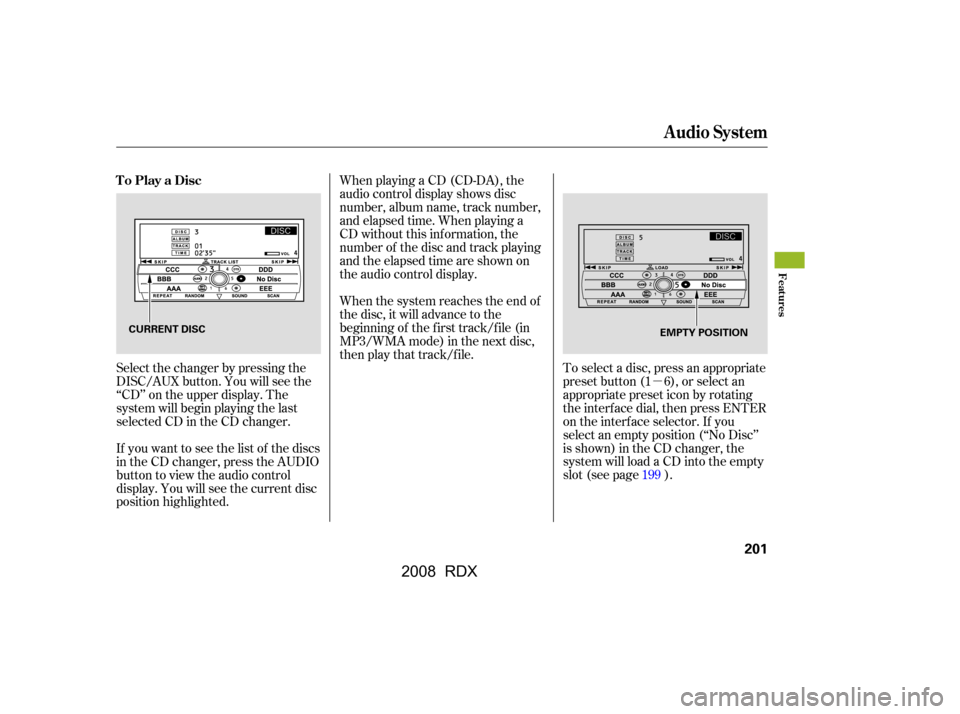
When playing a CD (CD-DA), the
audio control display shows disc
number, album name, track number,
and elapsed time. When playing a
CD without this inf ormation, the
number of the disc and track playing
andtheelapsedtimeareshownon
the audio control display.
If you want to see the list of the discs
in the CD changer, press the AUDIO
button to view the audio control
display. You will see the current disc
position highlighted.
Select the changer by pressing the
DISC/AUX button. You will see the
‘‘CD’’ on the upper display. The
system will begin playing the last
selected CD in the CD changer. To select a disc, press an appropriate
preset button (1 6), or select an
appropriate preset icon by rotating
the interf ace dial, then press ENTER
on the interf ace selector. If you
select an empty position (‘‘No Disc’’
is shown) in the CD changer, the
system will load a CD into the empty
slot (see page ).
When the system reaches the end of
the disc, it will advance to the
beginning of the f irst track/f ile (in
MP3/WMA mode) in the next disc,
then play that track/file.
199
To Play a Disc
Audio System
Features
201
CURRENT DISC
EMPTY POSITION
�\f���—�\f���—�\f�
�y�
���������
�
�y���
�(�)� ���
�\f�y�\f���\f���y
2008 RDX
Page 206 of 433

The CD changer can also play CD-Rs
andCD-RWscompressedinMP3
and WMA format. When playing a
disc in MP3 or WMA, you will see
‘‘MP3’’ or ‘‘WMA’’ on the upper
display. A disc can support more
than 99 folders, and each folder can
hold up to 255 playable f iles.The specif ications of the compatible
WMA f ile are:
Sampling f requency: 32/44.1/48 kHz
Bit rate: 48/64/80/96/128/160/192
kbps
Compatible with variable bit rate and
multi-session.
Maximum layers (including ROOT):
8 layers
If the disc has a complex structure, it
will take a while to read the disc
before the system begins to play it.
When there are more than 99 f olders
in a disc, the upper display only
shows two digits.
WhenplayingaCDcompressedin
MP3/WMA format, the audio
control display shows disc number,
f older name, f ile number, and
elapsed time. When playing a CD
without this inf ormation, the disc
number, track number, and the
elapsedtimeareshownontheaudio
control display. The specif ications of the compatible
MP3 f ile are:
Sampling f requency: 32/44.1/48 kHz
(MPEG1), 24, 22.05, 16 kHz
(MPEG2)
Bit rate: 32/40/48/56/64/80/96/
112/128/160/192/224/256/320 kbps
(MPEG1), 8/16/24/32/40/48/56/
64/80/96/112/128/160 kbps
(MPEG2)
Compatible with variable bit rate and
multi-session.
Maximum layers
(including ROOT): 8 layers
Playing an MP3/WMA Disc
Audio System
202
�\f���—�\f���—�\f�
�y�
���������
���y���
�(�)� ���
�\f�y�\f���\f���y
2008 RDX
Page 207 of 433
�µ
While a disc is playing you can use
the SEEK/SKIP bar to select
passages and change tracks (f iles in
MP3/WMA mode).
In MP3/WMA mode, use the
TUNE/FOLDER bar to select
f olders in the disc, and use the
SEEK/SKIP bar to change f iles. Each time you
press and release the side of
the SEEK/SKIP bar, the system
skips forward to the beginning of the
next track (f ile in MP3/WMA mode).
Press and release the side of
the bar to skip backward to the
beginning of the current track/f ile.
Press it again to skip to the
beginning of the previous track/f ile.
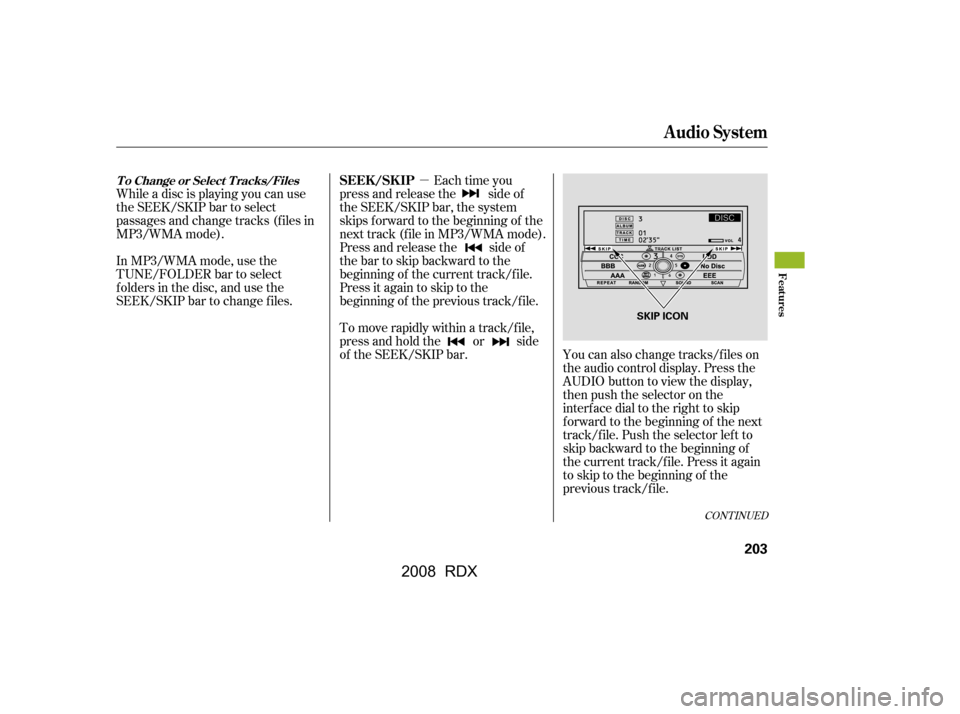
You can also change tracks/files on
the audio control display. Press the
AUDIO button to view the display,
then push the selector on the
interf ace dial to the right to skip
f orward to the beginning of the next
track/f ile. Push the selector lef t to
skip backward to the beginning of
the current track/file. Press it again
to skip to the beginning of the
previous track/f ile.
To move rapidly within a track/f ile,
press and hold the or side
of the SEEK/SKIP bar.
CONT INUED
T o Change or Select T racks/FilesSEEK /SK IP
Audio System
Features
203
SKIP ICON
�\f���—�\f���—�\f�
�y�
�������������y���
�(�)� ���
�\f�y�\f���\f���y
2008 RDX
Page 211 of 433

�µ�µ
In MP3/WMA mode
The folder scan
f unction samples the f irst f ile of each
f older in the current disc in the order
they are compressed in MP3/WMA.
To activate this feature, press the
SCAN button twice. The f irst f ile of
each f older plays f or about 10
seconds. You will see ‘‘FOLDER
SCAN’’ next to disc number on the
audio control display. You will also
see ‘‘SCAN’’ and the f older number
blinking on the upper display. To
hear the rest of the f ile in the f older
currently scanning, press and hold
the SCAN button for more than 2
seconds. If you don’t, the system advances to
the next f older, plays about 10
seconds of it, and continues through
the rest of the f olders the same way.
When the system f inishes scanning
all the f olders of the current disc, the
system returns to the f older it
started scanning with, f older scan is
canceled and the system begins to
play that folder normally. The disc scan
f unction samples the f irst track/f ile
(in MP3/WMA mode) of each disc
within the changer in numerical
order. To activate this f eature, press
the SCAN button twice. In the MP3/
WMA mode, press the SCAN button
three times. The f irst track/f ile of
each disc plays f or about 10 seconds.
You will see ‘‘SCAN’’ next to the
DISC icon on the audio control
display. You will also see ‘‘SCAN’’
and the disc number blinking on the
upper display. To hear the rest of the
track/f ile in the disc currently
scanning, press and hold the SCAN
button for more than 2 seconds.
CONT INUED
FOLDER SCAN DISC SCAN
Audio System
Features
207
FOLDER SCAN INDICATOR
�\f���—�\f���—�\f�
�y�
�������������y���
�(�)� ���
�\f�y�\f���
���y
2008 RDX
Page 212 of 433

�µ
If you don’t, the system advances to
the next disc, plays about 10 seconds
of it, and continues through the rest
of thediscsthesameway.Whenthe
system f inishes scanning all the
discs, disc scan is canceled and the
system begins to play the f irst track/
f ile of that disc normally. You will see ‘‘RANDOM’’ next to the
TRACK/FILE icon on the audio
display. To turn of f this f eature,
select random, then press ENTER
again.
Each time you press and release the
SCAN button, the mode changes
f rom scan to f older scan, disc scan
then to normal playing.
This f eature plays the
tracks (all f iles in each f older in
MP3/WMA mode) within a disc in
random order. To activate random
play, press the AUDIO button to
view the audio control display, then
push down the selector on the
interface dial. Rotate the interface
dial to select random. Press ENTER
on the selector to enter your
selection.
Audio System
RANDOM (Random within a
disc)
208
SCAN INDICATOR RANDOM INDICATOR
TRACK RANDOM ICON
DISC SCAN ICON
�\f���—�\f���—�\f�
�y�
���������\f���y���
�(�)� ���
�\f�y�\f���
���y
2008 RDX