Page 196 of 433

�µTo tune with the interf ace dial, press
the AUDIO button to view the audio
control display, then push the
selector down, and turn the dial to
TUNE. Then press ENTER on the
selector, and turn the dial to the
desired f requency. To exit the
TUNE mode, press ENTER again.
XM satellite radio inf ormation is
available on page .
You can use any of f ive methods to
f ind radio stations on the selected
band: TUNE, SEEK, SCAN, the
preset buttons or icons, and AUTO
SELECT.
Use the TUNE/FOLDER
bar to tune the radio to a desired
f requency. Press the side of the
bar to tune to a higher f requency,
and the side of the bar to tune
to a lower f requency.
If youpressandholdthe or
side of the bar, the f requency
will begin to change rapidly. It will
stop when you release it.
The ignition switch must be in the
ACCESSORY (I) or the ON (II)
position. Press the AUDIO button to
view the audio control display. Turn
the system on by pressing the PWR/
VOL knob or the AM/FM button.
Adjust the volume by turning the
PWR/VOL knob.
The band and f requency the radio
waslasttunedtoareshownonthe
upper display. To change bands,
press the AM/FM button. You can
also change bands with the interf ace
dial. Press the AUDIO button to view
the audio control display and the
band changes to FM1, FM2, or AM
each time you push the selector up.
On the FM bands, ‘‘STEREO’’ will be
shown on the audio control display.
‘‘ST’’ will also appear on the upper
display if the station is broadcasting
in stereo. Stereo reproduction on AM
is not available. 211
Audio System
To Select a Station
TUNE
192
TUNE ICON
�\f���—�\f���—�\f�
�y�
�������������y���
�(�)� ���
�\f�y�\f�
�����y
2008 RDX
Page 197 of 433

�µ�µThe SEEK f unction
searches up and down from the
current f requency to f ind a station
with a strong signal. To activate it,
press the or side of the
SEEK/SKIP bar, then release it. The SCAN f unction
samples all stations with strong
signals on the selected band. To
activate it, press the SCAN button,
then release it. You will see ‘‘SCAN’’
on the upper display. To activate the scan function with
the interf ace dial, press the AUDIO
button to view the audio control
display, then push down the selector
on the interf ace dial, and push the
selector to the right. You will see
‘‘SCAN’’ on the audio control display.
The system will scan f or a station
with a strong signal. When it f inds
one, it will stop and play that station
f or about 10 seconds. If you do
nothing, the system will then scan
f or the next strong station and play it
f or 10 seconds. When it plays a
station that you want to listen to,
press the SCAN button again, or
push the interface selector to the
right again.
To activate the seek function with
the interf ace dial, press the AUDIO
button to view the audio control
display, then push the selector on
the interface dial to the right or left.
CONT INUED
SEEK SCA N
Audio System
Features
193
SEEK ICONS SCAN INDICATORSCAN ICON
�\f���—�\f���—�\f�
�y�
���������\f���y���
�(�)� ���
�\f�y�\f�
�����y
2008 RDX
Page 198 of 433
�µ�µ
Each preset button/icon
can store one f requency on AM and
two f requencies on FM. To view the
preset icons on the audio control
display, push the AUDIO button. Select the desired band, AM or
FM. FM1 and FM2 let you store
twosetsof FMfrequencieswith
the preset buttons (on-screen
icons).
To store the f requency on a preset
icon, turn the interf ace dial to
select a desired preset icon. The
selected preset icon will be
highlighted. Press and hold
ENTER on the selector f or more
than 2 seconds to store the
f requency.
Repeat steps 1 through 3 to store a
total of six stations on AM and
twelve stations on FM.
UsetheTUNE,SEEK,orSCAN
function to tune the radio to a
desired station.
Pick a preset number (1 6), you
want for that station. Press the
preset button, and hold it until you
hear a beep.
1.
2.
3.
4.
Audio System
Preset
194
PRESET ICONS
�\f���—�\f���—�\f�
�y�
���������
���y���
�(�)� ���
�\f�y�\f�
�����y
2008 RDX
Page 199 of 433
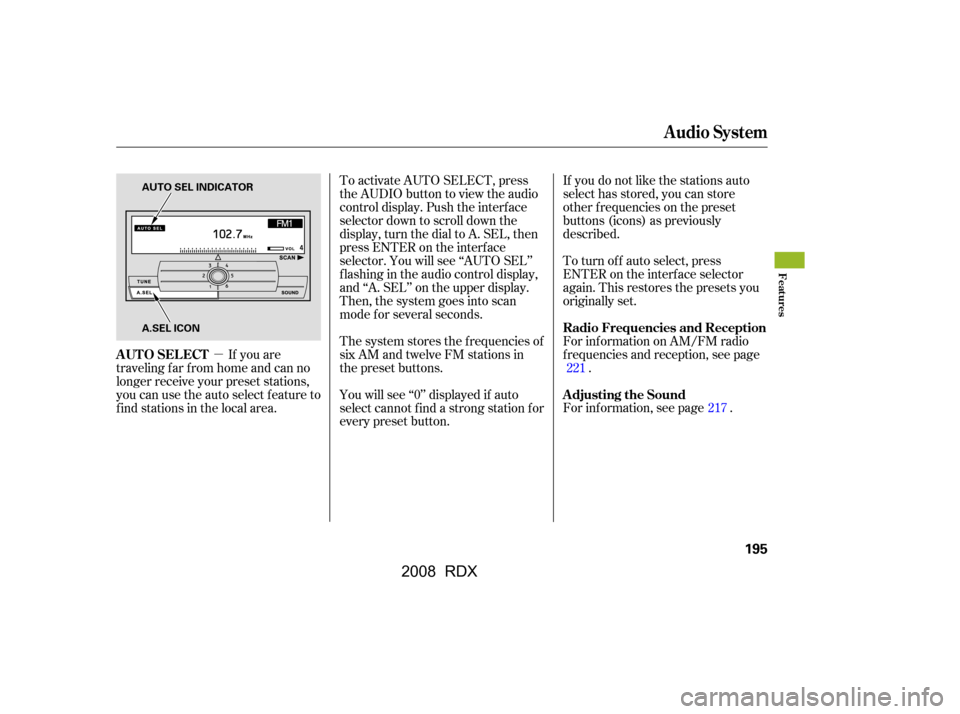
�µTo activate AUTO SELECT, press
the AUDIO button to view the audio
control display. Push the interf ace
selector down to scroll down the
display, turn the dial to A. SEL, then
press ENTER on the interf ace
selector. You will see ‘‘AUTO SEL’’
f lashing in the audio control display,
and ‘‘A. SEL’’ on the upper display.
Then, the system goes into scan
mode f or several seconds.
If you are
traveling far from home and can no
longer receive your preset stations,
you can use the auto select feature to
find stations in the local area. If you do not like the stations auto
select has stored, you can store
other f requencies on the preset
buttons (icons) as previously
described.
The system stores the f requencies of
six AM and twelve FM stations in
the preset buttons. To turn of f auto select, press
ENTER on the interf ace selector
again. This restores the presets you
originally set.
You will see ‘‘0’’ displayed if auto
select cannot f ind a strong station f or
every preset button. For inf ormation on AM/FM radio
f requencies and reception, see page
.
For inf ormation, see page . 221
217
Audio System
AUTO SELECT Radio Frequencies and Reception
Adjusting the Sound
Features
195
AUTO SEL INDICATOR
A.SEL ICON
�\f���—�\f���—�\f�
�y�
�����������\f�y���
�(�)� ���
�\f�y�\f���\f�\f�y
2008 RDX
Page 200 of 433
On RDX with Technology Package model
Audio System
Operating the CD Changer
196
Normal mode MP3/WMA modeSCAN INDICATORFOLDER NUMBER
WMA MODE INDICATOR
MP3 MODE INDICATOR
U.S. model is shown. DISC NUMBER
TRACK NUMBER
SCAN INDICATOR
�\f���—�\f���—�\f�
�y�
�������������y���
�(�)� ���
�\f�y�\f���\f�
�y
2008 RDX
Page 201 of 433
CONT INUED
Audio System
Features
197
INTERFACE DIAL
AUDIO BUTTON
LOAD BUTTON
SCAN BUTTON DISP/MODE BUTTON
EJECT BUTTON
TUNE/FOLDER BAR
DISC/AUX BUTTON
DISC LOAD INDICATOR
PRESET BUTTONS
DISC SLOT PWR/VOL KNOB
U.S. model is shown.
SEEK/SKIP BAR
�\f���—�\f���—�\f�
�y�
�������������y���
�(�)� ���
�\f�y�\f���\f���y
2008 RDX
Page 202 of 433
Your vehicle’s audio system has an
in-dash disc changer with the same
controls used f or the radio. To
operate the disc changer, the ignition
switch must be in the ACCESSORY
(I) or the ON (II) position.
The disc changer can play these disc
formats:CD (CD-DA)
CD-R/RW
DVD-A
DTS
The disc packages or jackets should
have one of these marks. DVD-A discs not meeting DVD
verification standards may not be
playable.
The changer cannot play DVD-V or
DVD-R/RW f ormats.
Some CD-DA and CD-ROM mixed
discs are not playable.
‘‘DTS’’ and ‘‘DTS Digital Surround’’
are registered trademarks of Digital
Theater Systems, Inc.
You cannot load and play 3-inch
(8-cm)discsinthissystem.
The changer can also play MP3 or
WMA format (see page ).
202
Audio System
198
TM
Do not use discs with adhesive labels.
The label can curl up and cause the
disc to jam in the unit.
�\f���—�\f���—�\f�
�y�
�������������y���
�(�)� ���
�\f�y�\f���\f���y
2008 RDX
Page 203 of 433

To load multiple discs in one
operation:Press and hold the LOAD button
on the changer unit until you hear
a beep. You will see ‘‘BUSY’’ on
the upper display, and the disc
load indicator turns red and starts
blinking.
Insert the disc into the disc slot
when the disc load indicator turns
green and ‘‘LOAD’’ appears in the
upper display at the same time.
Insert it only half way; the drive
will pull it in the rest of the way.
You will see ‘‘BUSY’’ on the upper
display, and the disc load indicator
turns red again and blinks as the
CD is loaded.
When the disc load indicator turns
green and ‘‘LOAD’’ appears on the
upper display again, insert the
next CD in the slot. Repeat steps 1 through 3 until all
six positions are loaded. If you are
not loading all six positions, press
the LOAD button again after the
last CD has loaded. ‘‘DISC READ’’
appears on the upper display, then
the system begins playing the last
loaded.
If you stop loading discs bef ore all
six positions are f illed, the system
will wait f or 10 seconds, stop the load
operation, and begin playing the last
disc loaded.
To load a single disc: Press and release the LOAD
button on the changer unit. You
will see ‘‘BUSY’’ on the upper
display, and the disc load indicator
turns red and starts blinking. Insert a disc into the disc slot
when the disc load indicator turns
green, and ‘‘LOAD’’ appears on
the upper display at the same time.
Insert the disc only about half way;
the drive will pull it in the rest of
the way. You will see the disc
number blinking on the upper
display, and the disc load indicator
turns red again and blinks as the
CD is loaded.
Do not try to insert a disc until
‘‘LOAD’’ appears. You could
damage the audio unit.
Youwillsee‘‘DISCREAD’’onthe
upper display, then the system
begins to play the CD.
Do not try to insert a disc until
‘‘LOAD’’ appears. You could
damage the audio unit.
1.
2.
3. 4.
1.
3.
2.
CONT INUED
L oading CDs in the Changer
Audio System
Features
199
�\f���—�\f���—�\f�
�y�
�������������y���
�(�)� ���
�\f�y�\f���\f���y
2008 RDX


