Page 19 of 84
EAU38620
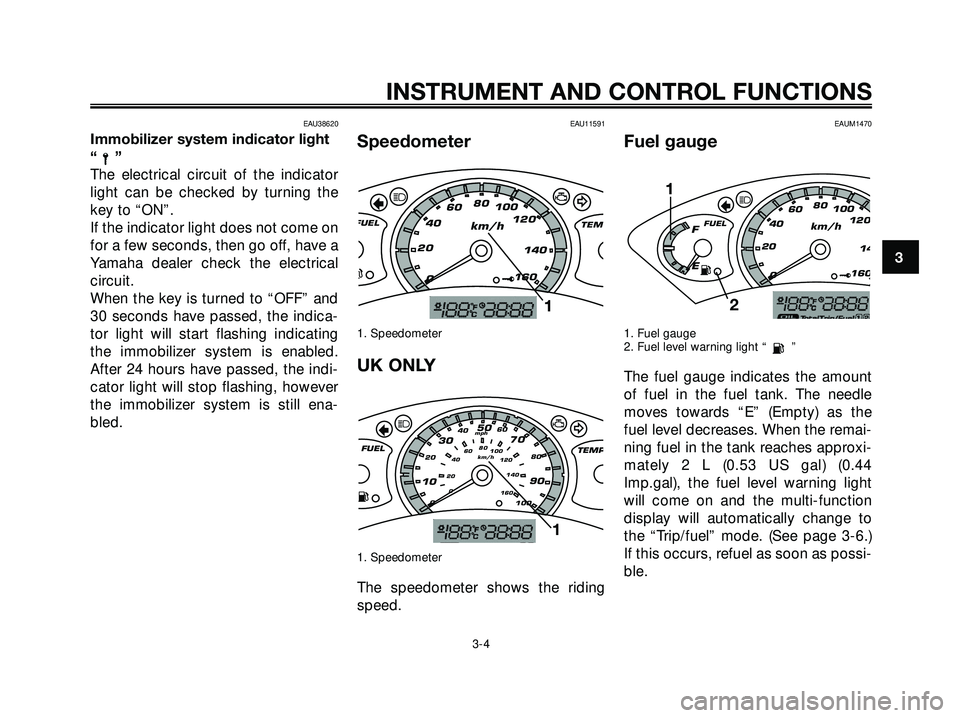
Immobilizer system indicator light
“”
The electrical circuit of the indicator
light can be checked by turning the
key to “ON”.
If the indicator light does not come on
for a few seconds, then go off, have a
Yamaha dealer check the electrical
circuit.
When the key is turned to “OFF” and
30 seconds have passed, the indica-
tor light will start flashing indicating
the immobilizer system is enabled.
After 24 hours have passed, the indi-
cator light will stop flashing, however
the immobilizer system is still ena-
bled.
EAU11591
Speedometer
1. Speedometer
UK ONLY
1. Speedometer
The speedometer shows the riding
speed.
EAUM1470
Fuel gauge
1. Fuel gauge
2. Fuel level warning light “ ”
The fuel gauge indicates the amount
of fuel in the fuel tank. The needle
moves towards “E” (Empty) as the
fuel level decreases. When the remai-
ning fuel in the tank reaches approxi-
mately 2 L (0.53 US gal) (0.44
Imp.gal), the fuel level warning light
will come on and the multi-function
display will automatically change to
the “Trip/fuel” mode. (See page 3-6.)
If this occurs, refuel as soon as possi-
ble.
2
20406080
100
120
14
160
km/h
0
FFUEL
E
cj1
103050
70
90
204060
80
100 0
20406080
100
120
140
160 0km/h mph
FUEL
TEMPcjd
1
20406080
100
120
140
160
km/h
0
FUEL
TEM
cjd
1
INSTRUMENT AND CONTROL FUNCTIONS
3-4
3
1C0-F8199-E3.qxd 2/11/06 20:46 Página 7
Page 20 of 84

NOTE:
Do not allow the fuel tank to empty
itself completely.EAU12171
Coolant temperature gauge
1. Coolant temperature gauge
With the key in the “ON” position, the
coolant temperature gauge indicates
the temperature of the coolant. The
coolant temperature varies with chan-
ges in the weather and engine load. If
the needle reaches or enters the red
zone, stop the vehicle and let the
engine cool. (See page 6-31.)
ECA10020
CAUTION:
Do not operate the engine if it is
overheated.
EAUM2050
Multi-function display
1. “MODE” button
2. Multi-function display
3. “SET” button
The multi-function display is equip-
ped with the following:
�an odometer (which shows the
total distance traveled)
�two tripmeters (which show the
distance traveled since they were
last set to zero, the time passed
since the tripmeters were set to
zero, and the average speed tra-
veled during this time)
�a fuel reserve tripmeter (which
shows the distance traveled sin-
ce the fuel level warning light
came on)
0406080
100
120
140
160
km/h
0
H
CTEMP
y
d
1
INSTRUMENT AND CONTROL FUNCTIONS
3-5
3
1C0-F8199-E3.qxd 2/11/06 20:46 Página 8
Page 21 of 84

�a clock
�an ambient temperature display
�an oil change indicator (which
comes on when the engine oil
should be changed)
NOTE:
�For the UK, the distance traveled
is displayed in miles and the tem-
perature reading is displayed in
°F.
�For other countries, the distance
traveled is displayed in kilome-
ters and the temperature reading
is displayed in °C.
1. Total
2. Trip 1
3. Trip 2
4. Trip/Fuel
Odometer and tripmeter modes
Pushing the “MODE” button switches
the display between the odometer
mode “Total” and the tripmeter
modes “Trip” in the following order:
Total
�Trip 1 �Trip 2 �Trip/fuel
�Total
1. Distance
2. Time
3. Average speed
NOTE:
�The Trip/fuel odometer is only
activated if the fuel level warning
light comes on.
�The Trip 2 odometer is automati-
cally reset after turning the key to
“OFF” and two hours have pas-
sed.
Pushing the “SET” button when in the
tripmeter mode switches the display
between the different tripmeter func-
tions in the following order:
Trip 1 or Trip 2
�Time 1 or 2 �Ave-
rage speed 1 or 2
�Trip 1 or Trip 2
If the fuel level warning light comes on
(See page 3-3.), the display will auto-
matically change to the fuel reserve
tripmeter mode “Trip/fuel” and start
counting the distance traveled from
that point. In that case, pushing the
“MODE” button switches the display
between the various tripmeter and
odometer modes in the following
order:
Trip/Fuel
�Trip 1 �Trip 2 �Total
�Trip/fuel
INSTRUMENT AND CONTROL FUNCTIONS
3-6
3
1C0-F8199-E3.qxd 2/11/06 20:46 Página 9
Page 24 of 84

EAU12347
Handlebar switches
1. Dimmer switch “j/k”
2. Pass switch “PASSING”
3. Turn signal switch “
c/d”
4. Horn switch “a”
1. Start switch “
g”
2. Hazard switch“”
EAUS1020
Dimmer switch “j/k”
Set this switch to “
j” for the high
beam and to “
k” for the low beam.
With the headlight on low beam,
press this switch downwards to flash
the headlight.
EAU12460
Turn signal switch “c/d”
To signal a right-hand turn, push this
switch to “
d”. To signal a left-hand
turn, push this switch to “
c”. When
released, the switch returns to the
center position. To cancel the turn
signal lights, push the switch in after it
has returned to the center position.
EAU12500
Horn switch “a”
Press this switch to sound the horn.
EAU12720
Start switch “g”
With the sidestand up, push this
switch while applying the front or rear
brake to crank the engine with the
starter.
ECA10050
CAUTION:
See page 5-1 for starting instruc-
tions prior to starting the engine.
EAUM1990
Hazard switch “ ”, “h”
With the key in the “ON” position, set
this switch to “ ” to turn on the
hazard lighting (simultaneous flashing
of all turn signal lights). To turn off the
hazard lighting, set this switch to “h”
and, then turn the key to “OFF”.
NOTE:
Even if the key is turned from “ON” to
“OFF” with the hazard lighting on, the
hazard lighting will continue to flash
regardless of the hazard switch posi-
tion. To cancel the hazard lighting, the
key must be turned to “ON” and the
hazard switch must be set to the “h”
position.
The hazard lighting is used in case of
an emergency or to warn other drivers
when your scooter is stopped where
it might be a traffic hazard.
12
1
2
3
4
INSTRUMENT AND CONTROL FUNCTIONS
3-9
3
1C0-F8199-E3.qxd 2/11/06 20:46 Página 12
Page 25 of 84
ECA10060
CAUTION:
Do not use the hazard light for an
extended length of time, otherwise
the battery may discharge.
EAU12900
Front brake lever
1. Front brake lever
The front brake lever is located on the
right handlebar grip. To apply the
front brake, pull this lever toward the
handlebar grip.
EAU12950
Rear brake lever
1. Rear brake lever
The rear brake lever is located on the
left handlebar grip. To apply the rear
brake, pull this lever toward the hand-
lebar grip.
11
INSTRUMENT AND CONTROL FUNCTIONS
3-10
3
1C0-F8199-E3.qxd 2/11/06 20:46 Página 13
Page 33 of 84

EWA10240
s s
WARNING
The vehicle must not be ridden with
the sidestand down, or if the sides-
tand cannot be properly moved up
(or does not stay up), otherwise the
sidestand could contact the ground
and distract the operator, resulting
in a possible loss of control. Yama-
ha’s ignition circuit cut-off system
has been designed to assist the
operator in fulfilling the responsibi-
lity of raising the sidestand before
starting off. Therefore, check this
system regularly as described
below and have a Yamaha dealer
repair it if it does not function pro-
perly.
EAU15371
Ignition circuit cut-off
system
The ignition circuit cut-off system
(comprising the sidestand switch and
brake light switches) has the following
functions.
�It prevents starting when the
sidestand is up, but neither brake
is applied.
�It prevents starting when either
brake is applied, but the sides-
tand is still down.
�It cuts the running engine when
the sidestand is moved down.
Periodically check the operation of
the ignition circuit cut-off system
according to the following procedure.
EWA10250
s s
WARNING
If a malfunction is noted, have a
Yamaha dealer check the system
before riding.
INSTRUMENT AND CONTROL FUNCTIONS
3-18
3
1C0-F8199-E3.qxd 2/11/06 20:46 Página 21
Page 37 of 84
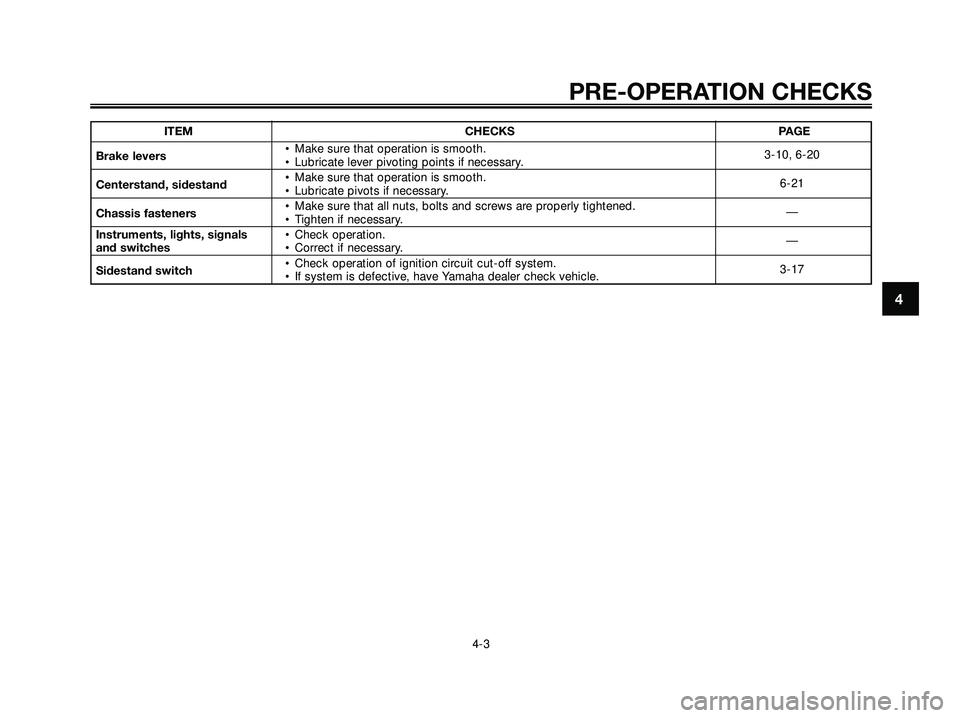
ITEM CHECKS PAGE
Brake levers• Make sure that operation is smooth.
• Lubricate lever pivoting points if necessary.3-10, 6-20
Centerstand, sidestand• Make sure that operation is smooth.
• Lubricate pivots if necessary.6-21
Chassis fasteners• Make sure that all nuts, bolts and screws are properly tightened.
• Tighten if necessary.—
Instruments, lights, signals • Check operation.
and switches• Correct if necessary.—
Sidestand switch• Check operation of ignition circuit cut-off system.
• If system is defective, have Yamaha dealer check vehicle.3-17
PRE-OPERATION CHECKS
4-3
4
1C0-F8199-E3.qxd 2/11/06 20:46 Página 3
Page 40 of 84

EAU16792
Braking
1. Close the throttle completely.
2. Apply both front and rear brakes
simultaneously while gradually
increasing the pressure.
EWA10300
s s
WARNING
�Avoid braking hard or suddenly
(especially when leaning over
to one side), otherwise the sco-
oter may skid or overturn.
�Railroad crossings, streetcar
rails, iron plates on road cons-
truction sites, and manhole
covers become extremely slip-
pery when wet. Therefore, slow
down when approaching suchareas and cross them with cau-
tion.
�Keep in mind that braking on a
wet road is much more difficult.
�Ride slowly down a hill, as bra-
king downhill can be very diffi-
cult.
EAU16820
Tips for reducing fuel
consumption
Fuel consumption depends largely on
your riding style. Consider the follo-
wing tips to reduce fuel consumption:
�Avoid high engine speeds during
acceleration.
�Avoid high engine speeds with no
load on the engine.
�Turn the engine off instead of let-
ting it idle for an extended length
of time (e.g., in traffic jams, at
traffic lights or at railroad cros-
sings).
OPERATION AND IMPORTANT RIDING POINTS
5-3
5
1C0-F8199-E3.qxd 2/11/06 20:46 Página 6