2007 VOLVO S80 steering wheel
[x] Cancel search: steering wheelPage 126 of 251
Navigating the disc and playing tracks
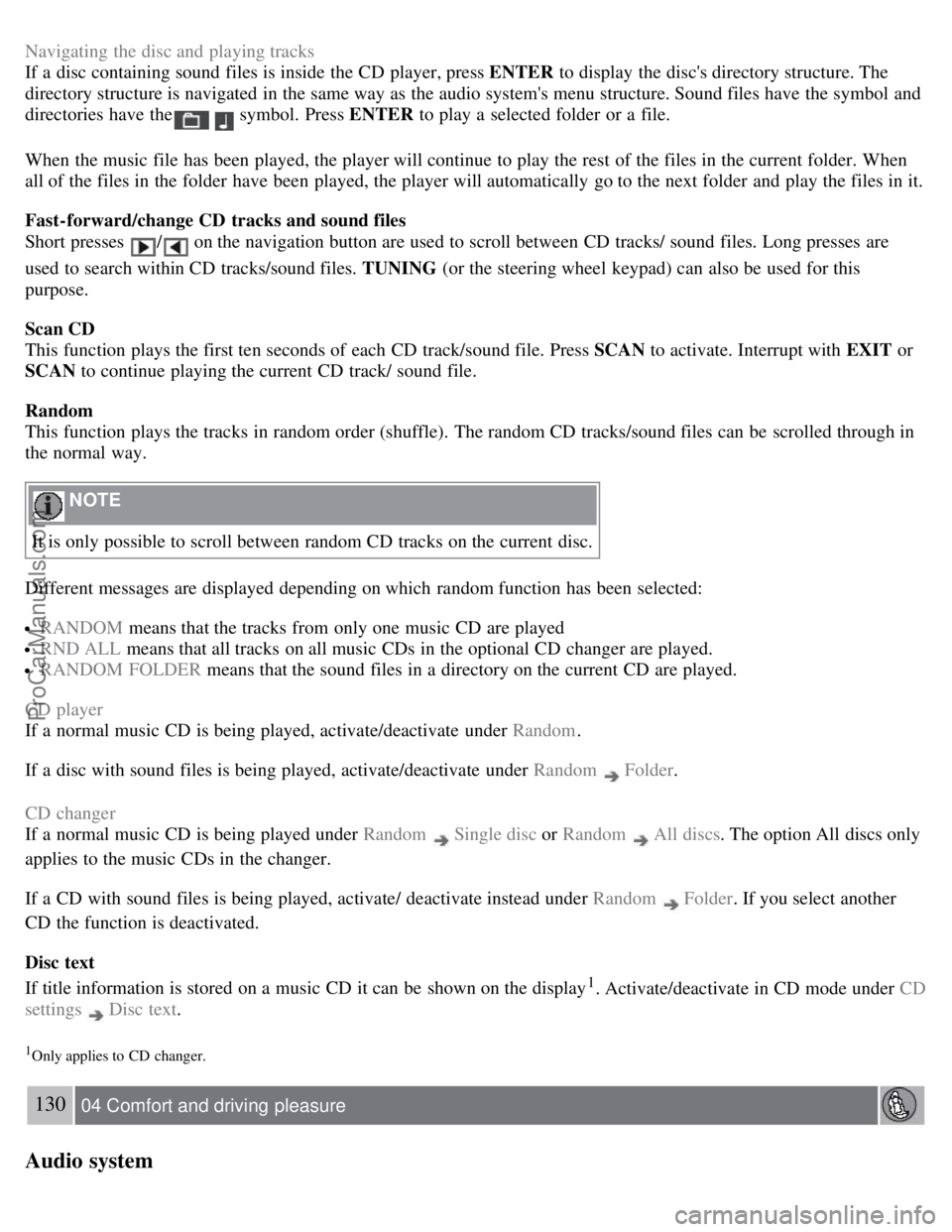
If a disc containing sound files is inside the CD player, press ENTER to display the disc's directory structure. The
directory structure is navigated in the same way as the audio system's menu structure. Sound files have the symbol and
directories have the
symbol. Press ENTER to play a selected folder or a file.
When the music file has been played, the player will continue to play the rest of the files in the current folder. When
all of the files in the folder have been played, the player will automatically go to the next folder and play the files in it.
Fast-forward/change CD tracks and sound files
Short presses
/ on the navigation button are used to scroll between CD tracks/ sound files. Long presses are
used to search within CD tracks/sound files. TUNING (or the steering wheel keypad) can also be used for this
purpose.
Scan CD
This function plays the first ten seconds of each CD track/sound file. Press SCAN to activate. Interrupt with EXIT or
SCAN to continue playing the current CD track/ sound file.
Random
This function plays the tracks in random order (shuffle). The random CD tracks/sound files can be scrolled through in
the normal way.
NOTE
It is only possible to scroll between random CD tracks on the current disc.
Different messages are displayed depending on which random function has been selected:
RANDOM means that the tracks from only one music CD are played
RND ALL means that all tracks on all music CDs in the optional CD changer are played.
RANDOM FOLDER means that the sound files in a directory on the current CD are played.
CD player
If a normal music CD is being played, activate/deactivate under Random .
If a disc with sound files is being played, activate/deactivate under Random
Folder .
CD changer
If a normal music CD is being played under Random
Single disc or Random All discs. The option All discs only
applies to the music CDs in the changer.
If a CD with sound files is being played, activate/ deactivate instead under Random
Folder . If you select another
CD the function is deactivated.
Disc text
If title information is stored on a music CD it can be shown on the display
1. Activate/deactivate in CD mode under CD
settings
Disc text.
1Only applies to CD changer.
130 04 Comfort and driving pleasure
Audio system
ProCarManuals.com
Page 148 of 251

Visual warning signal, collision risk
Sensor
The radar sensor detects vehicles ahead that are moving in the same direction as your vehicle. In the event of a
collision risk, you will be alerted by a red warning light and an audible warning signal.
If the risk of collision increases after the warning, brake support is activated.
The brake support prepares the brake system for rapid braking and the brakes are applied gently, which may be
noticeable. If the brake pedal is depressed quickly then braking is implemented with full brake function, even if the
force on the pedal is light.
151 04 Comfort and driving pleasure
Collision warning system (option)
The collision warning system is active at speeds above approximately 5 mph (7 km/h).
Limitations
The visual warning signal may be difficult to see in strong sunlight or when sunglasses are being worn. For this reason
always activate the audible warning signal in such conditions.
NOTE
The visual warning signal may be temporarily disengaged in the event of high passenger compartment temperature
due to strong sunlight, etc. If this occurs, the audible warning signal will be used, even if it has been deactivated in
the menu system.
Warnings may not appear if the distance to the vehicle ahead is very small or if steering wheel and pedal movements
are large, for example, due to a very active driving style.
The collision warning system uses the same radar sensors as adaptive cruise control. For more information on the radar
sensor and its limitations, see page 146
.
WARNING
In certain situations, the system cannot provide warnings, the warning may be delayed, or false warnings may be
given if traffic conditions make it impossible for the radar sensor to detect the vehicle ahead.
If no warning is given, no brake support is provided.
ProCarManuals.com
Page 159 of 251
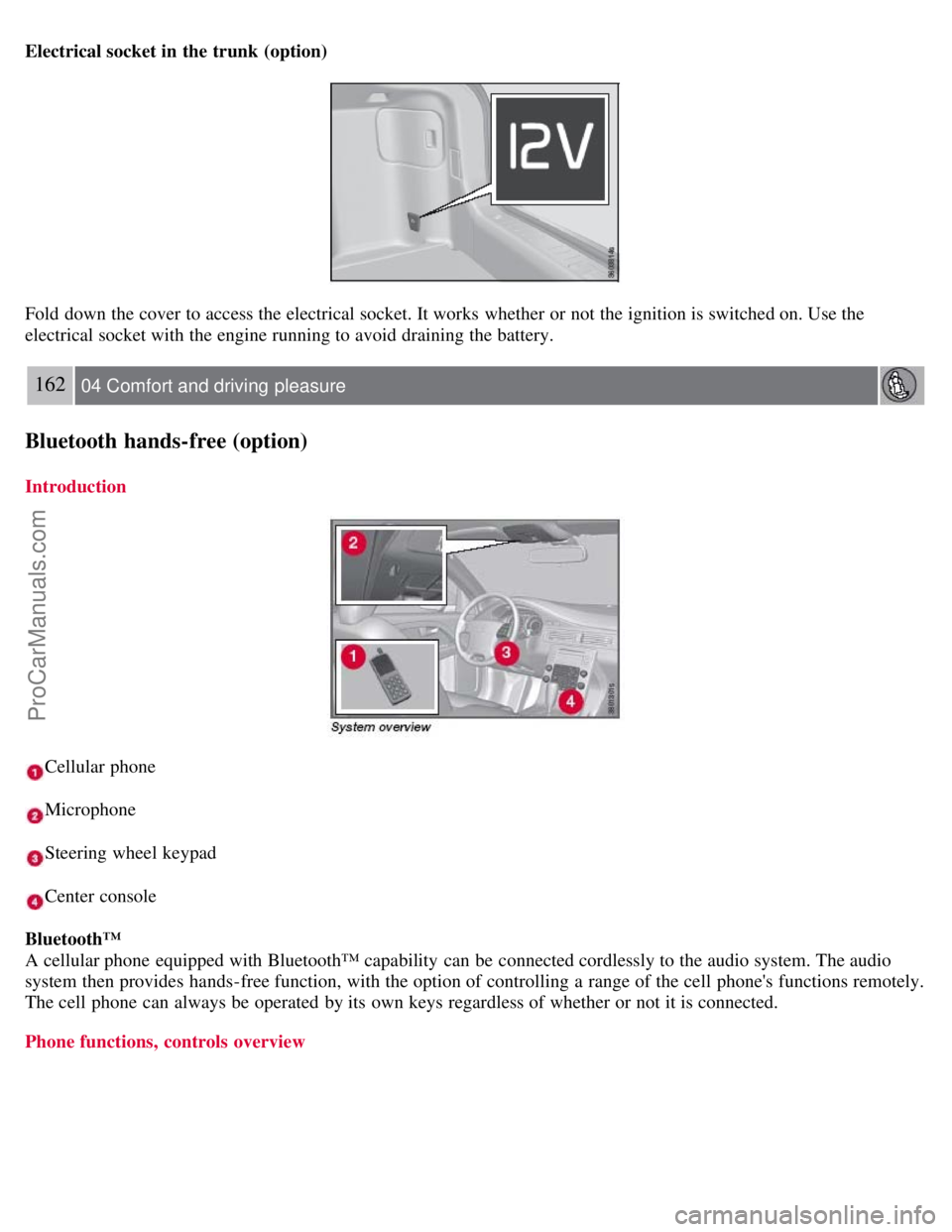
Electrical socket in the trunk (option)
Fold down the cover to access the electrical socket. It works whether or not the ignition is switched on. Use the
electrical socket with the engine running to avoid draining the battery.
162 04 Comfort and driving pleasure
Bluetooth hands-free (option)
Introduction
Cellular phone
Microphone
Steering wheel keypad
Center console
Bluetooth™
A cellular phone equipped with Bluetooth™ capability can be connected cordlessly to the audio system. The audio
system then provides hands-free function, with the option of controlling a range of the cell phone's functions remotely.
The cell phone can always be operated by its own keys regardless of whether or not it is connected.
Phone functions, controls overview
ProCarManuals.com
Page 160 of 251
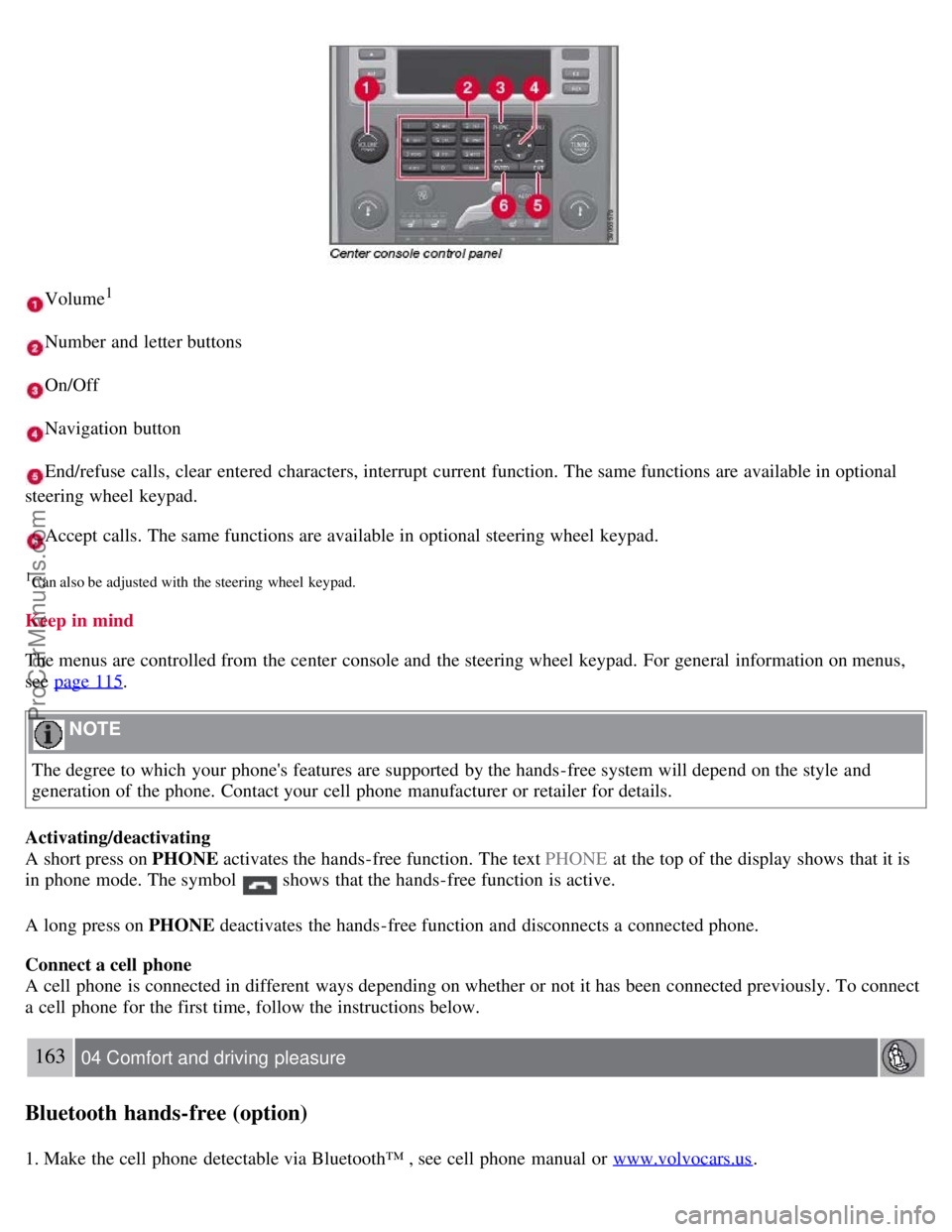
Volume1
Number and letter buttons
On/Off
Navigation button
End/refuse calls, clear entered characters, interrupt current function. The same functions are available in optional
steering wheel keypad.
Accept calls. The same functions are available in optional steering wheel keypad.
1Can also be adjusted with the steering wheel keypad.
Keep in mind
The menus are controlled from the center console and the steering wheel keypad. For general information on menus,
see page 115
.
NOTE
The degree to which your phone's features are supported by the hands-free system will depend on the style and
generation of the phone. Contact your cell phone manufacturer or retailer for details.
Activating/deactivating
A short press on PHONE activates the hands-free function. The text PHONE at the top of the display shows that it is
in phone mode. The symbol
shows that the hands-free function is active.
A long press on PHONE deactivates the hands-free function and disconnects a connected phone.
Connect a cell phone
A cell phone is connected in different ways depending on whether or not it has been connected previously. To connect
a cell phone for the first time, follow the instructions below.
163 04 Comfort and driving pleasure
Bluetooth hands-free (option)
1. Make the cell phone detectable via Bluetooth™ , see cell phone manual or www.volvocars.us.
ProCarManuals.com
Page 161 of 251
2. Activate the hands-free function with PHONE.
The menu option Add phone is shown in the display. If one or more cell phones have already been registered, these
phones will also be displayed.
3. Select Add phone .
The audio system searches for cell phones in the vicinity. The search takes approximately 30 seconds. The cell phones
detected are specified with their respective Bluetooth™ name in the display. The hands-free function's device name
( My Car ) is shown in the cell phone's display.
4. Choose one of the cell phones in the audio system display.
5. Enter the number series shown in the audio system display via the cell phone keypad.
The cell phone is registered and connected automatically to the audio system while the text Synchronizing is shown in
the display. For more information on how cell phones are registered, see page 165
.
When the connection is established the symbol
is shown and the cell phone Bluetooth™ name is shown in the
display. The cell phone can now be controlled from the audio system and the steering wheel keypad.
To call
1. Make sure that the text PHONE is shown at the top of the display and that the
symbol is visible.
2. Dial the number or use the phone book, see page 165
.
3. Press ENTER .
The call can be interrupted with EXIT .
Disconnect and connect cell phone
Automatic disconnection takes place if the cell phone moves out of the audio system's range. When the cell phone
returns within range it is connected automatically. For more information on connection, see page 165
.
Manual disconnection takes place by deactivating the hands-free function with one long press on PHONE . The hands-
free function is also deactivated when the engine is switched off or when a door is opened
1.
When the cell phone has been disconnected an ongoing call can be continued with the cell phone's built-in
microphone and speaker.
1Only Keyless Drive
NOTE
Some cell phones require that the changeover from hands-free is confirmed from the phone's keypad.
164 04 Comfort and driving pleasure
Bluetooth hands-free (option)
Making and receiving calls
ProCarManuals.com
Page 162 of 251
Incoming calls
In manual answer mode, calls are accepted by pressing ENTER. Calls can be accepted even if the audio system is in
CD or FM mode. Pressing ENTER will mute the audio system. You may press EXIT to refuse or terminate a call.
Auto answer
The auto answer function means that calls are accepted automatically. Activate/deactivate under Phone settings
Call
options
Automatic answer .
Call menu
Press MENU or ENTER during an ongoing call to access the following functions:
Mute - the hands-free system microphone is muted.
Privacy - the call is transferred to the cell phone.
NOTE
With certain cell phones the connection is terminated when the privacy function is used. This is normal.The hands-
free function asks if you want to reconnect.
Phone book - searching in the phone book.
NOTE
A new call cannot be started during an ongoing call.
Audio settings
Call volume
The call volume can be regulated when the hands-free function is in phone mode. Use the steering wheel keypad or
VOLUME.
Audio system volume
Providing there is no ongoing call taking place, the audio system volume is controlled as usual with VOLUME. In
order to control audio system volume during an ongoing call, it is necessary to switch to one of the audio sources.
The audio source can be automatically muted for incoming calls under Phone settings
Sounds and volume Mute
radio .
Ring volume
Go to Phone settings
Sounds and volume Ring volume and adjust with / on the navigation button.
Ring signals
The hands-free function has integrated ring signals that can be selected under Phone settings
Sounds and volume
Ring signals Ring signal 1, 2, 3 etc.
165 04 Comfort and driving pleasure
Bluetooth hands-free (option)
NOTE
ProCarManuals.com
Page 164 of 251
If the phone book contains a caller's contact information, this is shown in the display.
Searching for entries in phone book The easiest way to search in the phone book is with long presses on the keys 2 to
9. This starts a search in the phone book based on the key's first letter.
The phone book can also be reached with
on the navigation button or with on the steering wheel keypad.
166 04 Comfort and driving pleasure
Bluetooth hands-free (option)
The search can also be performed from the phone book's Search menu under Phone book Search:
1. Enter the first few letters of the entry and press ENTER , or simply press ENTER.
2. Scroll to an entry and press ENTER to call.
Voice recognition
If the cell phone supports voice dialing, this function can be used by holding in ENTER .
Voice mailbox
The number to your voice mailbox can be changed in Phone settings
Voice mail number . If no number has been
stored, this menu can be accessed by an extended press on 1. Use the stored number by pressing 1 for several seconds.
Call lists
The call lists are copied to the hands-free function at each new connection and are then updated during the connection.
Press ENTER to show the last dialled. Other call lists are available under Call list .
NOTE
Certain cell phones show a list of the last dialled calls in reverse order.
Entering text
Input text using the keypad in the center console. Press once for the key's first character, twice for the second
character, etc. Continue pressing for more characters, see the table below.
A short press on EXIT deletes an entered characters. One long press on EXIT clears all entered characters.
/ on
the navigation button scrolls between the characters.
ProCarManuals.com
Page 167 of 251
At highway driving speeds, fuel consumption will be lower with the air conditioning on and the windows closed
than with the air conditioning off and the windows open.
Using the onboard trip computer's fuel consumption modes can help you learn how to drive more economically.
Other factors that decrease gas mileage are:
Dirty air cleaner
Dirty engine oil and clogged oil filter
Dragging brakes
Incorrect front end alignment
Some of the above mentioned items and others are checked at the standard maintenance intervals.
WARNING
Driving with the trunk open : Driving with the trunk open could lead to poisonous exhaust gases entering the
passenger compartment. If the trunk must be kept open for any reason, proceed as follows:
Close the windows
Set the ventilation system control to air flow to floor, windshield and side windows and the blower control to its
highest setting.
Weight distribution affects handling
At the specified curb weight your vehicle has a tendency to understeer, which means that the steering wheel has to be
turned more than might seem appropriate for the curvature of a bend. This ensures good stability and reduces the risk
of rear wheel skid. Remember that these properties can alter with the vehicle load. The heavier the load in the cargo
area, the less the tendency to understeer.
Handling, roadholding
Vehicle load, tire design and inflation pressure all affect vehicle handling. Therefore, check that the tires are inflated to
the recommended pressure according to the vehicle load. See the "Tire pressure" section. Loads should be distributed
so that capacity weight
171 05 During your trip
Driving recommendations
or maximum permissible axle loads are not exceeded.
Driving through water
The vehicle can be driven through water up to a depth of approximately 9 in. (25 cm), at a maximum speed of 6 mph
(10 km/h).
Take particular care when driving through flowing water.
Clean the electrical connections for trailer wiring after driving in mud or water
When driving through water, maintain low speed and do not stop in the water.
WARNING
After driving through water, press lightly on the brake pedal to ensure that the brakes are functioning normally.
Water or mud can make the brake linings slippery, resulting in delayed braking effect.
ProCarManuals.com