2007 VOLVO S80 ECO mode
[x] Cancel search: ECO modePage 128 of 251
1. Select a wave band using FM or AM.
2. Hold in AUTO until Autostoring... appears on the display.
Once Autostoring... disappears from the display, the stations are stored. The radio continues in Auto mode and Auto
appears on the display. The automatically stored presets can now be selected using the preset buttons. Automatic
preset storage can be cancelled using EXIT .
Auto mode is cancelled by pressing for example AUTO or FM.
Returning to Auto mode provides access to the autostored presets:
1. Press AUTO .
Auto appears on the display.
2. Press a preset button.
Scan
The function automatically searches the current wave band for strong stations. When a station is found, it is played for
approx. eight seconds before scanning is resumed. While the station is playing it can be stored as a preset as usual.
1. Select a wave band using AM or FM.
2. Press SCAN .
SCAN appears on the display. Close using SCAN or EXIT.
131 04 Comfort and driving pleasure
Audio system
Radio text
Some stations transmit information on program content, artists, etc. This information can be shown on the display.
Activate/deactivate in FM mode under Radio text.
132 04 Comfort and driving pleasure
Audio system
Sirius satellite radio (option)
Listening to satellite radio
The Sirius satellite system consists of a number of high elevation satellites in geosynchronous orbit.
NOTE
The digital signals from the Sirius satellites are line-of-sight, which means that physical obstructions such as bridges,
tunnels, etc, may temporarily interfere with signal reception.
Selecting Sirius radio mode
ProCarManuals.com
Page 134 of 251
Current speed in mph (Canadian models only)
This function provides the driver with an instantaneous conversion of the car's current speed from km/h to mph.
Current fuel consumption (Instantaneous)
Current fuel consumption is calculated every second. The information on the display is updated every few seconds.
When the vehicle is stationary, "----" appears on the display.
Average fuel consumption
The average fuel consumption since the last reset. Reset using RESET.
Driving distance on current fuel reserve
The calculation is based on the average fuel consumption over the last 20 miles (30 km) and the remaining fuel in the
tank. This shows the approximate distance that can be driven with the fuel quantity remaining in the tank. When the
driving distance on the current fuel reserve is less than 12 miles (20 km), "----" is shown on the display.
Resetting
1. Select Average speed or Average fuel consumption.
2. Press and hold RESET for approx. 1 second to reset the selected function. If RESET is kept depressed for at 3 three
seconds, Average speed and Average fuel consumption are reset simultaneously.
137 04 Comfort and driving pleasure
Compass
Operation
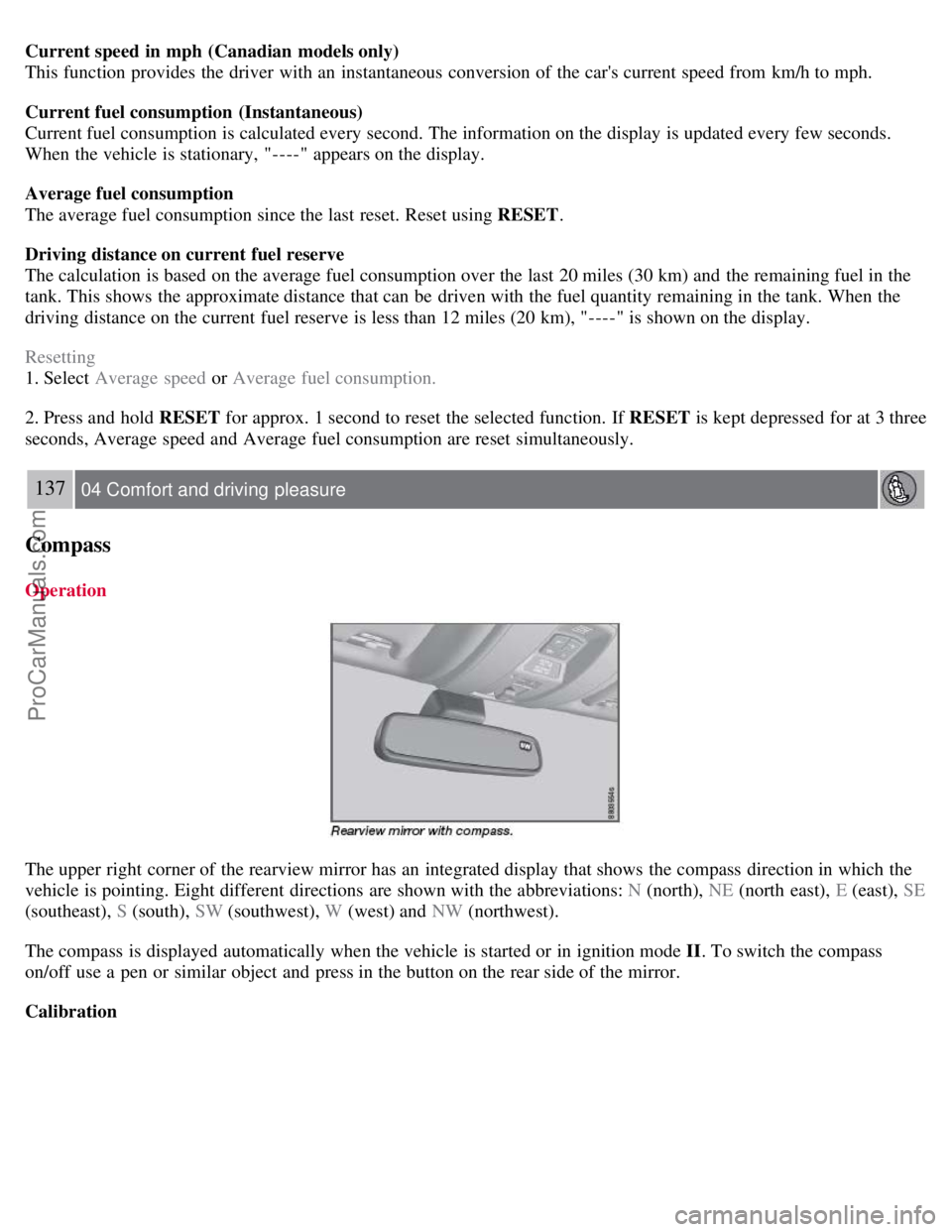
The upper right corner of the rearview mirror has an integrated display that shows the compass direction in which the
vehicle is pointing. Eight different directions are shown with the abbreviations: N (north), NE (north east), E (east), SE
(southeast), S (south), SW (southwest), W (west) and NW (northwest).
The compass is displayed automatically when the vehicle is started or in ignition mode II . To switch the compass
on/off use a pen or similar object and press in the button on the rear side of the mirror.
Calibration
ProCarManuals.com
Page 135 of 251
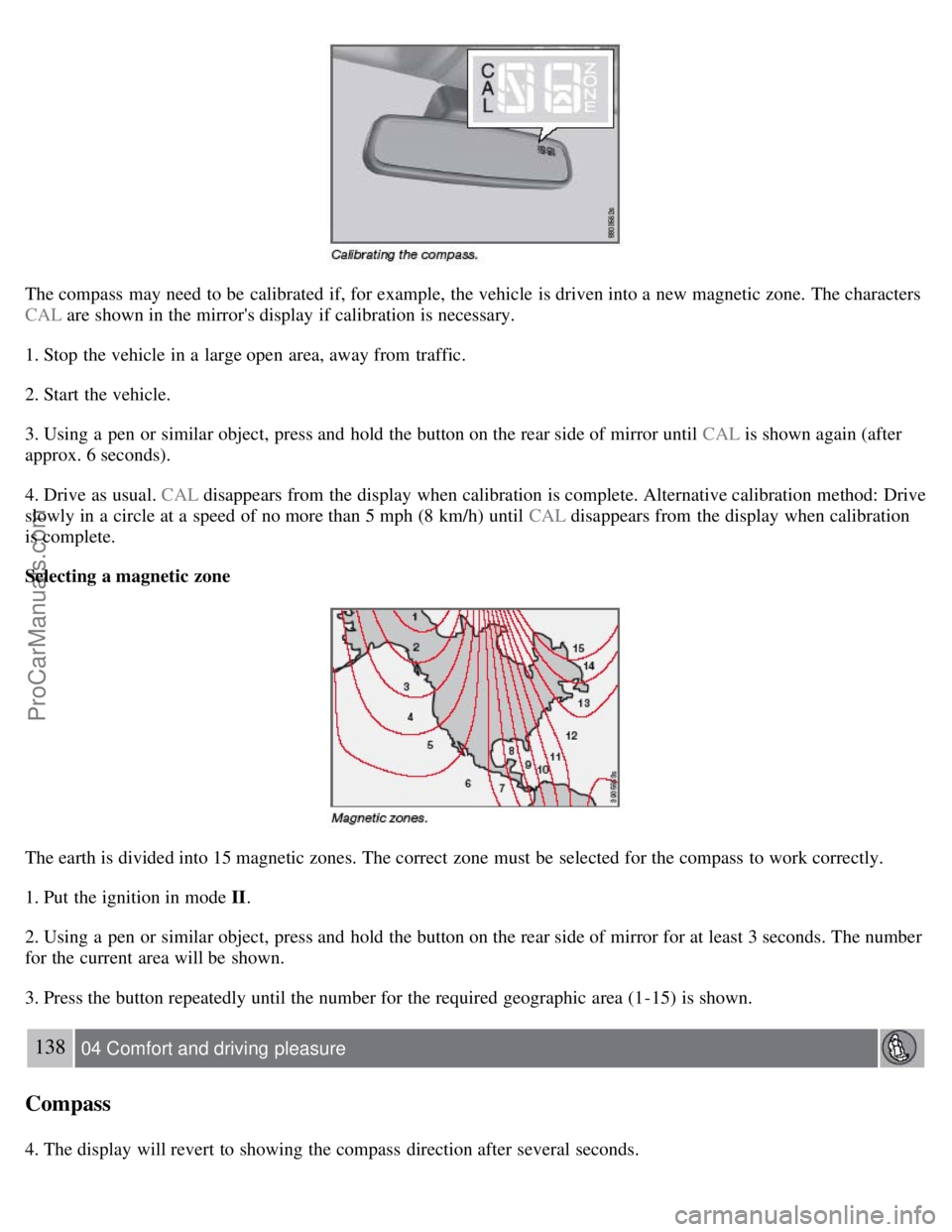
The compass may need to be calibrated if, for example, the vehicle is driven into a new magnetic zone. The characters
CAL are shown in the mirror's display if calibration is necessary.
1. Stop the vehicle in a large open area, away from traffic.
2. Start the vehicle.
3. Using a pen or similar object, press and hold the button on the rear side of mirror until CAL is shown again (after
approx. 6 seconds).
4. Drive as usual. CAL disappears from the display when calibration is complete. Alternative calibration method: Drive
slowly in a circle at a speed of no more than 5 mph (8 km/h) until CAL disappears from the display when calibration
is complete.
Selecting a magnetic zone
The earth is divided into 15 magnetic zones. The correct zone must be selected for the compass to work correctly.
1. Put the ignition in mode II.
2. Using a pen or similar object, press and hold the button on the rear side of mirror for at least 3 seconds. The number
for the current area will be shown.
3. Press the button repeatedly until the number for the required geographic area (1-15) is shown.
138 04 Comfort and driving pleasure
Compass
4. The display will revert to showing the compass direction after several seconds.
ProCarManuals.com
Page 137 of 251
2. Hold down the RESET button to toggle between DSTC SPIN CONTROL ON or OFF.
Messages in the information display
DSTC Temporarily OFF - system function has been temporarily reduced due to high brake disc temperature. The
function is activated automatically when the brakes have cooled.
DSTC Service required - the system has been disabled due to a fault. If this occurs:
140 04 Comfort and driving pleasure
Stability system
1. Stop the vehicle in a safe place and turn off the engine.
2. Restart the engine.
If the message remains when the engine is restarted, drive to an authorized Volvo workshop to have the system
inspected.
Symbols in the instrument panel
If the symbols
and are displayed at the same time, read the message in the information display.
If the symbol
appears alone, it may appear as follows:
If the symbol flashes, this indicates that the stability system is actively functioning to help counteract wheel spin
and/or a skid.
If the symbol remains on for approximately 2 seconds after the engine has been started, this indicates that the system
is performing a self -diagnostic test.
WARNING
The stability system is intended to help improve driving safety. It supplements, but can never replace, the driver's
judgment and responsibility when operating the vehicle. Speed and driving style should always be adapted to traffic
and road conditions.
141 04 Comfort and driving pleasure
Active chassis system-Four C
Active chassis (Four C)-option
Active chassis, Four-C (Continuously Controlled Chassis Concept), regulates the characteristics of the shock absorbers
so that the car's driving characteristics can be adjusted. There are three settings: Comfort, Sport and Advanced.
Comfort
The Comfort mode chassis setting offers the greatest amount of shock absorption and the softest ride. This mode is
recommended for long-distance driving, or when driving in slippery conditions. The indicator light in the button will
be on when this mode is selected.
Sport
In this mode, shock absorption is stiffer to reduce the vehicle's body sway during cornering and to provide more
ProCarManuals.com
Page 145 of 251
Adaptive cruise control is disengaged (goes into standby mode):
If the speed drops below approximately 20 mph (30 km/h).
When the brake pedal is depressed.
If the gear selector is moved to position N.
During wheel spin or wheel lock-up.
If the vehicle's speed is increased by using the accelerator pedal for more than 1 minute.
NOTE
If the accelerator pedal is depressed for a short period, such as when passing another vehicle, adaptive cruise control
is temporarily disengaged and re-engages when the accelerator pedal is released.
When ACC is disengaged, the driver must assume full control of the vehicle.
Engaging the cruise control function
Before ACC can be used, it must first be put in standby mode.
To do so, press
. The set time interval is briefly shown in the display.
Setting a speed
Use the
or buttons to store (set) the vehicle's current speed. The set speed is shown in the display.
NOTE
Adaptive cruise control cannot be engaged at speeds below 20 mph (30 km/h).
148 04 Comfort and driving pleasure
Adaptive Cruise Control-ACC
Adjusting the set speed
After a speed has been set, it can be increased or decreased by using the
or buttons.
Press and hold down or to increase or decrease the set speed. This will become the set speed when the button
is released.
Press or for approximately a half second and release the button to increase or decrease the set speed by
approximately 5 mph (8 km/h)
When the system is in active mode, the button has the same function as , but results in a smaller increase in
speed.
NOTE
If adaptive cruise control does not react to activation, this may be because the set time interval to the closest
vehicle prevents an increase in speed.
In some situations cruise control cannot be activated. Cruise Control Unavailable is shown in the display, see page
149.
Setting a time interval
ProCarManuals.com
Page 146 of 251
The set time interval to vehicles ahead is increased with and decreased with . The current time interval is
shown briefly in the display following adjustment.
Five different time intervals can be selected.
A longer time interval results in smoother speed control. The recommended time interval is three to five.
Time intervals one and two are primarily intended for driving in queues in heavy traffic, in which case you must
intervene more often.
WARNING
Only use the time interval that is permitted by local traffic regulations.
Deactivating and resuming settings
Cruise control is deactivated, either with a short press on
, or by action taken by the driver, such as braking, etc.
The set speed is then shown in parentheses. Speed and time interval are resumed with one press on
.
WARNING
There may be a significant increase in speed after the
button has been pressed.
A short press on
in standby mode or a long press in active mode deactivates cruise control. The set speed is then
cleared and cannot be resumed.
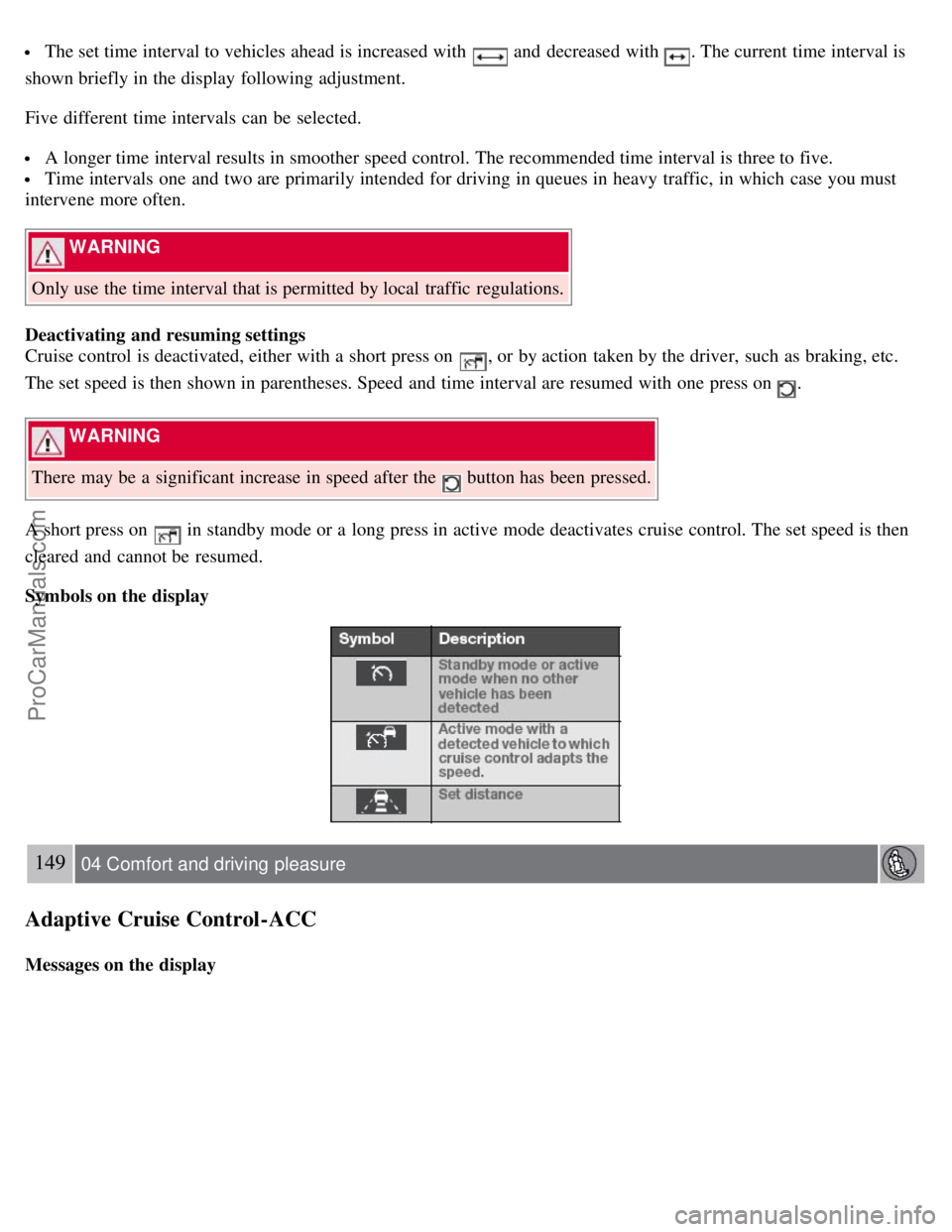
Symbols on the display
149 04 Comfort and driving pleasure
Adaptive Cruise Control-ACC
Messages on the display
ProCarManuals.com
Page 162 of 251
Incoming calls
In manual answer mode, calls are accepted by pressing ENTER. Calls can be accepted even if the audio system is in
CD or FM mode. Pressing ENTER will mute the audio system. You may press EXIT to refuse or terminate a call.
Auto answer
The auto answer function means that calls are accepted automatically. Activate/deactivate under Phone settings
Call
options
Automatic answer .
Call menu
Press MENU or ENTER during an ongoing call to access the following functions:
Mute - the hands-free system microphone is muted.
Privacy - the call is transferred to the cell phone.
NOTE
With certain cell phones the connection is terminated when the privacy function is used. This is normal.The hands-
free function asks if you want to reconnect.
Phone book - searching in the phone book.
NOTE
A new call cannot be started during an ongoing call.
Audio settings
Call volume
The call volume can be regulated when the hands-free function is in phone mode. Use the steering wheel keypad or
VOLUME.
Audio system volume
Providing there is no ongoing call taking place, the audio system volume is controlled as usual with VOLUME. In
order to control audio system volume during an ongoing call, it is necessary to switch to one of the audio sources.
The audio source can be automatically muted for incoming calls under Phone settings
Sounds and volume Mute
radio .
Ring volume
Go to Phone settings
Sounds and volume Ring volume and adjust with / on the navigation button.
Ring signals
The hands-free function has integrated ring signals that can be selected under Phone settings
Sounds and volume
Ring signals Ring signal 1, 2, 3 etc.
165 04 Comfort and driving pleasure
Bluetooth hands-free (option)
NOTE
ProCarManuals.com
Page 167 of 251
At highway driving speeds, fuel consumption will be lower with the air conditioning on and the windows closed
than with the air conditioning off and the windows open.
Using the onboard trip computer's fuel consumption modes can help you learn how to drive more economically.
Other factors that decrease gas mileage are:
Dirty air cleaner
Dirty engine oil and clogged oil filter
Dragging brakes
Incorrect front end alignment
Some of the above mentioned items and others are checked at the standard maintenance intervals.
WARNING
Driving with the trunk open : Driving with the trunk open could lead to poisonous exhaust gases entering the
passenger compartment. If the trunk must be kept open for any reason, proceed as follows:
Close the windows
Set the ventilation system control to air flow to floor, windshield and side windows and the blower control to its
highest setting.
Weight distribution affects handling
At the specified curb weight your vehicle has a tendency to understeer, which means that the steering wheel has to be
turned more than might seem appropriate for the curvature of a bend. This ensures good stability and reduces the risk
of rear wheel skid. Remember that these properties can alter with the vehicle load. The heavier the load in the cargo
area, the less the tendency to understeer.
Handling, roadholding
Vehicle load, tire design and inflation pressure all affect vehicle handling. Therefore, check that the tires are inflated to
the recommended pressure according to the vehicle load. See the "Tire pressure" section. Loads should be distributed
so that capacity weight
171 05 During your trip
Driving recommendations
or maximum permissible axle loads are not exceeded.
Driving through water
The vehicle can be driven through water up to a depth of approximately 9 in. (25 cm), at a maximum speed of 6 mph
(10 km/h).
Take particular care when driving through flowing water.
Clean the electrical connections for trailer wiring after driving in mud or water
When driving through water, maintain low speed and do not stop in the water.
WARNING
After driving through water, press lightly on the brake pedal to ensure that the brakes are functioning normally.
Water or mud can make the brake linings slippery, resulting in delayed braking effect.
ProCarManuals.com