2007 VOLVO S40 engine
[x] Cancel search: enginePage 48 of 208

6. Generator warning light
If the light comes on while the engine is running, have the charging system checked by an authorized Volvo workshop.
1 On certain engines, this symbol is not used to indicate low oil pressure. Instead, a text warning is provided in the information display, see also
page 190
.
54 02 Instruments and controls
Symbols - instrument panel
7. Brake failure warning light
If this light comes on while driving or braking, stop the car as quickly as possible in a safe place, open the hood, and
check the brake fluid level in the reservoir. See page 188
for the location of the reservoir.
NOTE
Canadian models are equipped with the second symbol.
WARNING
If the fluid level is below the MIN mark in the reservoir or if a "Brake failure - Service urgent" message is displayed
in the information display: DO NOT DRIVE . Have the car towed to a trained and qualified Volvo service technician
and have the brake system inspected.
If the BRAKE and ABS warning lights come on at the same time, this could indicate a fault in the brake system.
In this case:
1. Stop the car in a suitable place and switch off the engine.
2. Restart the engine.
3. If both warning lights go off, no further action is required and the car can be driven.
4. If both lights remain on after the engine has been restarted, switch off the engine again and check the brake fluid
level. See page 188
for the location of the reservoir.
Door open warning
The driver will be alerted if one of the doors, the hood, or the trunk lid are open or ajar.
At low speeds
If the car is moving at a speed of less than approximately 4 m.p.h. (7 km/h), the Information symbol in the instrument
ProCarManuals.com
Page 55 of 208

Controls
The trip computer functions can be accessed by twisting INFO (B) one step at a time in either direction. Twisting a
final time returns you to the original function.
The trip computer can be reset (average fuel consumption and average speed will be erased from system memory) by
pressing RESET (C) for at least five seconds.
MILES TO EMPTY TANK
This function shows the approximate distance that can be driven on the fuel remaining in the tank. This calculation is
based on average fuel consumption during the last 20 miles (30 km) of driving and the amount of fuel remaining in the
tank when the reading was taken. When the driving distance on current fuel reserve is less than 12 miles (20 km), "----
" will be displayed in the information display.
AVERAGE
This value indicates fuel consumption since the last time the trip computer was reset (by pressing RESET, button C).
When the engine is switched off, information on fuel consumption is stored and remains in system memory until the
RESET (button C) is pressed again.
INSTANTANEOUS
This value indicates the current fuel consumption, based on readings taken once per second. When the car is not
moving, "----" will be displayed.
AVERAGE SPEED
This value indicates average speed since the last time the trip computer was reset (by pressing RESET, button C).
When the engine is switched off, information on average speed is stored and remains in system memory until the
RESET (button C) is pressed again.
62 02 Instruments and controls
Trip computer
ACTUAL SPEED (Canadian models only)
This function provides the driver with an instantaneous conversion of the car's current speed from km/h to m.p.h.
NOTE
Trip computer readings may vary slightly depending on the circumference of the tires on the car, tire inflation, or
driving style.
63 02 Instruments and controls
Cruise control
Engaging the cruise control function
ProCarManuals.com
Page 62 of 208
Pull up the parking brake lever up firmly to its full extent.
Ashtrays/cigarette lighter
The auxiliary sockets can also be used for cigarette lighters. Ashtrays and lighters are available as accessories. Please
contact your Volvo retailer.
68 02 Instruments and controls
Power windows
Operation
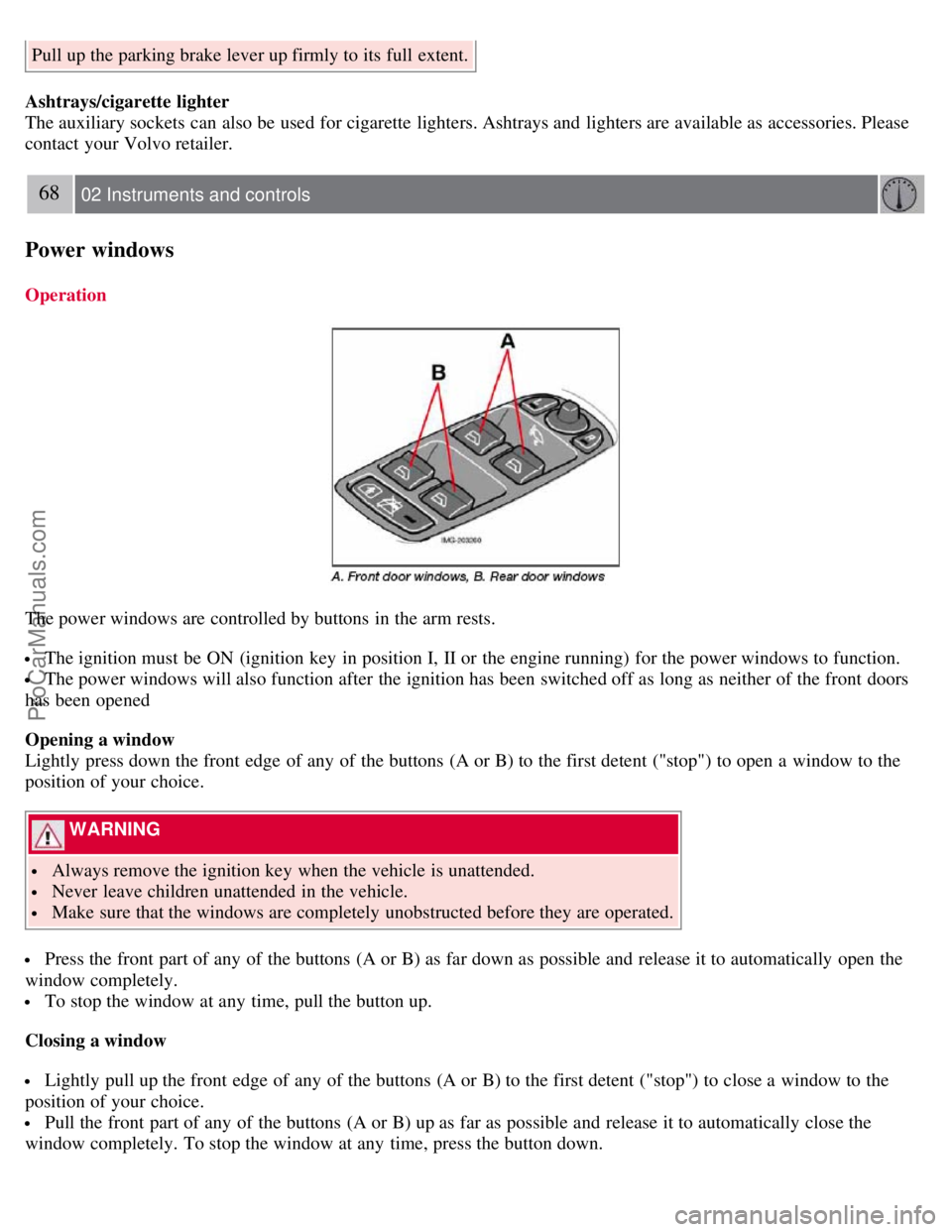
The power windows are controlled by buttons in the arm rests.
The ignition must be ON (ignition key in position I, II or the engine running) for the power windows to function.
The power windows will also function after the ignition has been switched off as long as neither of the front doors
has been opened
Opening a window
Lightly press down the front edge of any of the buttons (A or B) to the first detent ("stop") to open a window to the
position of your choice.
WARNING
Always remove the ignition key when the vehicle is unattended.
Never leave children unattended in the vehicle.
Make sure that the windows are completely unobstructed before they are operated.
Press the front part of any of the buttons (A or B) as far down as possible and release it to automatically open the
window completely.
To stop the window at any time, pull the button up.
Closing a window
Lightly pull up the front edge of any of the buttons (A or B) to the first detent ("stop") to close a window to the
position of your choice.
Pull the front part of any of the buttons (A or B) up as far as possible and release it to automatically close the
window completely. To stop the window at any time, press the button down.
ProCarManuals.com
Page 67 of 208

mirrors will automatically move to the position that they were in when the doors were most recently locked with the
same remote control.
WARNING
The mirrors should always be adjusted prior to driving. Objects seen in the passenger's side wide -angle door mirror
are closer than they appear to be.
72 02 Instruments and controls
Power moonroof (option)
Operating the moonroof
To operate the moonroof, the ignition key must first be turned to the intermediate or drive position (position I, II or the
engine running). The moonroof can be opened in two ways:
A. Tilt position
B. Sliding moonroof
1. Auto open
2. Manual open
3. Manual close
ProCarManuals.com
Page 87 of 208

Front seats
Power seats (option)
The power driver's seat can be adjusted:
If the ignition key is in position I or II.
During a 10 minute period after the doors have been unlocked if the door remains open.
If the door is closed and the ignition key is not yet in the ignition, or if the key is in position 0, the seat can be
adjusted or during a period of 40 seconds. The power passenger's seat can only be adjusted if the ignition key is in
position I or II, or if the engine is running.
Adjusting the seat
Seat adjustment controls 1, 2, 3, and 4 on the side of the seat can be used to move the seat to the position of your
choice.
1. Move this section of the control up or down to raise/lower the front section of the seat cushion.
2. Move the control forward/rearward to move the seat forward or rearward.
3. Move this section of the control up or down to raise/lower the rear section of the seat cushion.
4. Backrest tilt.
NOTE
The power seats have an overload protector that activates if a seat is blocked by any object. If this occurs, switch off
the ignition (key in position 0) and wait for approximately 20 seconds before operating the seat again.
Emergency stop
If the seat inadvertently begins to move, press any of the buttons to stop the seat.
Programming the seat memory, driver's seat only (option)
ProCarManuals.com
Page 89 of 208

Because the driver's seat can be adjusted with the ignition off, children should never be left unattended in the car.
Movement of the seat can be STOPPED at any time by pressing any button on the power seat control panel.
Do not adjust the seat while driving. The seat should be adjusted so that the brake pedal can be depressed fully. In
addition, position the seat as far rearward as comfort and control allow.
The seat rails on the floor must not be obstructed in any way when the seat is in motion.
97 04 Interior
Interior lighting
Interior lighting
1. Front driver's side reading light, on/off
2. Courtesy lighting
3. Front passenger's side reading light, on/off
The front and rear reading lights can be activated when the ignition key is position I or II, or when the engine is
running. The front reading lights are switched on and off by pressing buttons 1 or 3.
The courtesy lighting (2) can be set to three positions:
Press the left side of the button: the interior courtesy lighting turns on.
Neutral position: the interior courtesy lighting comes on when a door is opened, and is switched off 10 seconds after
the door is closed.
Press the right side of the button: the interior courtesy lighting stays off.
Courtesy lighting - automatic function
The interior lighting has a built-in automatic function that switches on the courtesy lighting for 30 seconds when:
the car is unlocked from the outside using the key or remote control
the engine is switched off and the ignition key is turned to the 0 position.
The courtesy lighting lights up or remains on for 5 minutes when:
one of the doors is opened and left open.
the courtesy lighting has not been switched off (the right side of button 2 depressed).
ProCarManuals.com
Page 90 of 208

The automatic lighting goes out when:
the engine is started
the car is locked from the outside using the key or remote control.
If the courtesy lighting is not switched off manually, it will be turned off automatically 5 minutes after the engine has
been switched off.
Rear reading lights
4. Rear driver's side reading light, on/off
5. Rear passenger's side reading light, on/off
The rear reading lights can be switched on or off by pressing the respective buttons, and function if the ignition key is
in positions I, II, or if the engine is running.
The courtesy lighting can be switched on or off within 30 minutes after the engine has been switched off, or after a
door has been opened or closed.
These lights switch off automatically 5 minutes after the engine has been switched off.
98 04 Interior
Interior lighting
Vanity mirror
ProCarManuals.com
Page 100 of 208

110 05 Locks and alarm
Valet locking
Valet locking
By utilizing the remote control with the key blade removed, the valet locking feature enables you to block access to the
trunk and glove compartment for e.g. valet parking or when the car is brought to the retailer for service.
With the valet locking function activated:
The vehicle's doors can be locked or unlocked
The engine can be started
The glove compartment cannot be unlocked
Access to the trunk is blocked (the trunk lid cannot be unlocked or opened, and the rear seat backrests are locked in the
upright position)
Activating the valet locking function
1. Remove the key blade from the remote control.
2. Turn the key blade 180° clockwise in the glove compartment lock to lock the glove compartment and disconnect the
trunk lock from the central locking system (a message appears in the information display).
3. Lock the rear seat backrests in the upright position by inserting the key blade into the locks located on the upper
outboard edge of the backrests.
Passenger's side : Turn the key counterclockwise to lock the backrest.
Driver's side : Turn the key clockwise to lock the backrest.
4. Give the parking attendant or service personnel only the remote control (with the key blade removed).
Deactivating the valet locking function
Turn the key blade 180° counterclockwise in the glove compartment lock to deactivate
111 05 Locks and alarm
Valet locking
ProCarManuals.com