Page 312 of 611
3032007 TUNDRA from Jul. ’07 Prod. (OM34463U)
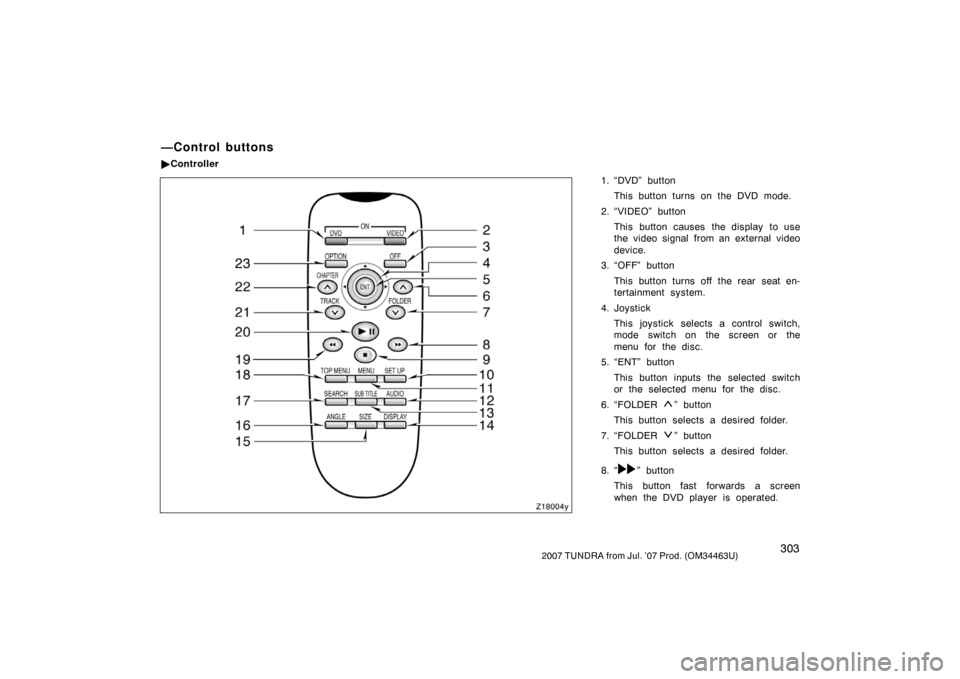
1. “DVD” buttonThis button turns on the DVD mode.
2. “VIDEO” button This button causes the display to use
the video signal from an external video
device.
3. “OFF” button
This button turns off the rear seat en-
tertainment system.
4. Joystick This joystick selects a control switch,
mode switch on the screen or the
menu for the disc.
5. “ENT” button
This button inputs the selected switch
or the selected menu for the disc.
6. “FOLDER
” button
This button selects a desired folder.
7. “FOLDER
” button
This button selects a desired folder.
8. “
” button
This button fast forwards a screen
when the DVD player is operated.
—Control buttons
� Controller
Z18004y
Page 313 of 611
3042007 TUNDRA from Jul. ’07 Prod. (OM34463U)
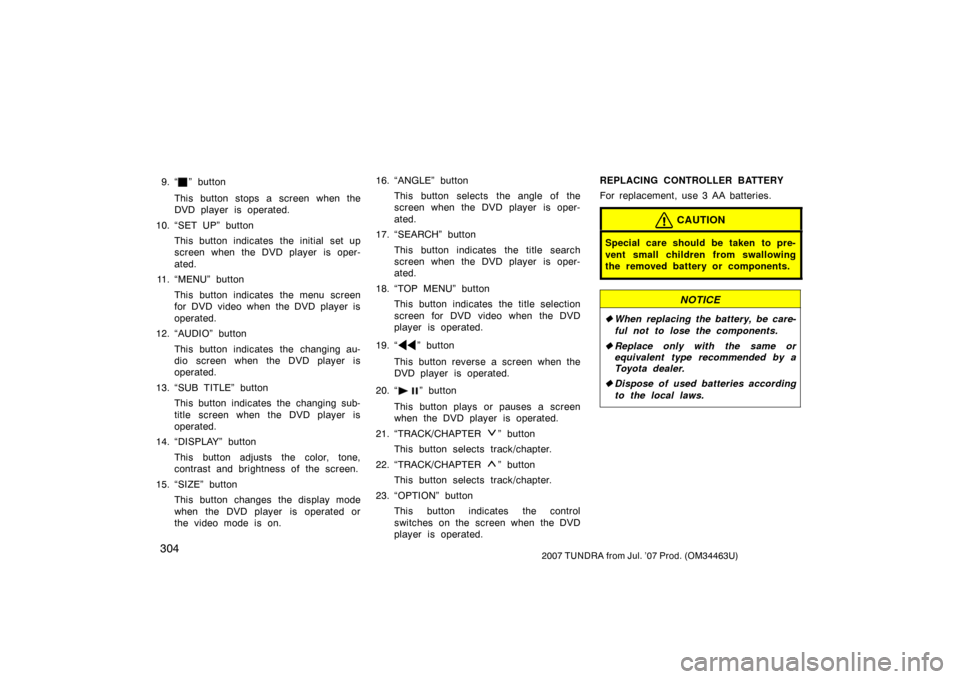
9. “” button
This button stops a screen when the
DVD player is operated.
10. “SET UP” button This button indicates the initial set up
screen when the DVD player is oper-
ated.
11. “MENU” button
This button indicates the menu screen
for DVD video when the DVD player is
operated.
12. “AUDIO” button
This button indicates the changing au-
dio screen when the DVD player is
operated.
13. “SUB TITLE” button This button indicates the changing sub-
title screen when the DVD player is
operated.
14. “DISPLAY” button
This button adjusts the color, tone,
contrast and brightness of the screen.
15. “SIZE” button This button changes the display mode
when the DVD player is operated or
the video mode is on. 16. “ANGLE” button
This button selects the angle of the
screen when the DVD player is oper-
ated.
17. “SEARCH” button
This button indicates the title search
screen when the DVD player is oper-
ated.
18. “TOP MENU” button This button indicates the title selection
screen for DVD video when the DVD
player is operated.
19. “
” button
This button reverse a screen when the
DVD player is operated.
20. “
” button
This button plays or pauses a screen
when the DVD player is operated.
21. “TRACK/CHAPTER
” button
This button selects track/chapter.
22. “TRACK/CHAPTER
” button
This button selects track/chapter.
23. “OPTION” button This button indicates the control
switches on the screen when the DVD
player is operated. REPLACING CONTROLLER BATTERY
For replacement, use 3 AA batteries.
CAUTION
Special care should be taken to pre-
vent small children from swallowing
the removed battery or components.
NOTICE
�
When replacing the battery, be care-
ful not to lose the components.
� Replace only with the same or
equivalent type recommended by a
Toyota dealer.
� Dispose of used batteries according
to the local laws.
Page 315 of 611
3062007 TUNDRA from Jul. ’07 Prod. (OM34463U)
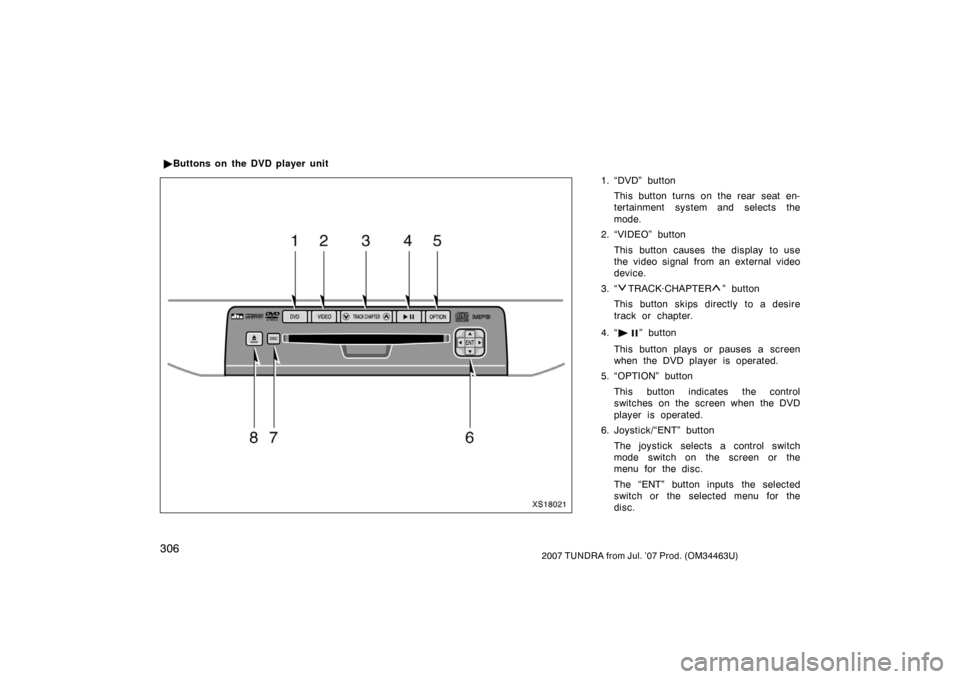
1. “DVD” buttonThis button turns on the rear seat en-
tertainment system and selects the
mode.
2. “VIDEO” button
This button causes the display to use
the video signal from an external video
device.
3. “
TRACK·CHAPTER” button
This button skips directly to a desire
track or chapter.
4. “
” button
This button plays or pauses a screen
when the DVD player is operated.
5. “OPTION” button
This button indicates the control
switches on the screen when the DVD
player is operated.
6. Joystick/“ENT” button
The joystick selects a control switch
mode switch on the screen or the
menu for the disc.
The “ENT” button inputs the selected
switch or the selected menu for the
disc.
�
Buttons on the DVD player unit
XS18021
Page 316 of 611
3072007 TUNDRA from Jul. ’07 Prod. (OM34463U)
7. “DISC” indicator lightThis light indicates that the disc is
loaded.
8. “
” button
This button ejects a disc.
Z17453
Controller
XS18022
DVD player unit
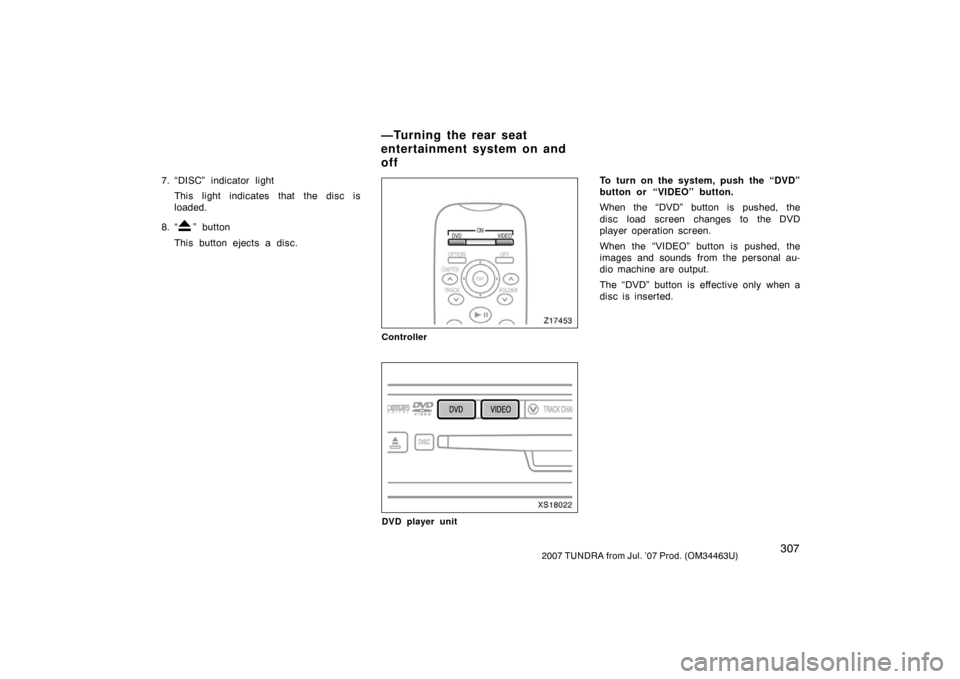
To turn on the system, push the “DVD”
button or “VIDEO” button.
When the “DVD” button is pushed, the
disc load screen changes to the DVD
player operation screen.
When the “VIDEO” button is pushed, the
images and sounds from the personal au-
dio machine are output.
The “DVD” button is effective only when a
disc is inserted.
—Turning the rear seat
entertainment system on and
off
Page 317 of 611
3082007 TUNDRA from Jul. ’07 Prod. (OM34463U)
Z17455
To turn off the system, push the “OFF”
button.
When the front audio system is turned off,
the rear audio system and the DVD player
will be turned off simultaneously.
Z18033
Vehicles with navigation system—The rear
seat entertainment system can be
switched ON and OFF by pushing the
“Rear” switch on the front audio system.The rear DVD player can be operated
through the front audio system.
—Front audio system
operation
Page 319 of 611
3102007 TUNDRA from Jul. ’07 Prod. (OM34463U)
The DVD player can play audio CDs/
MP3 CDs, DVD video discs, CD texts,
dtsCDs and video CDs.
For appropriate discs for this player, see
“Audio/video system operating hints” on
page 339 in this Section.
The DVD player works when the ignition
switch is in the “ACC” or “ON” position.
To turn on the DVD player, a disc must
be loaded in the player.
To turn off the player, eject the disc.
Error messages
If the player malfunctions, your audio sys-
tem will display following error messages.
If “DISC CHECK” appears on the
screen: It indicates that the disc is dirty,
damaged or it was inserted upside down.
Clean the disc or insert it correctly.
If “REGION ERROR” appears on the
screen: It indicates that the DVD region
code is not set properly.
If “DVD ERROR” appears on the
screen: There is a problem inside the
player. Eject the disc. Set the disc again.
If the malfunction still exists, take your
vehicle to your Toyota dealer.
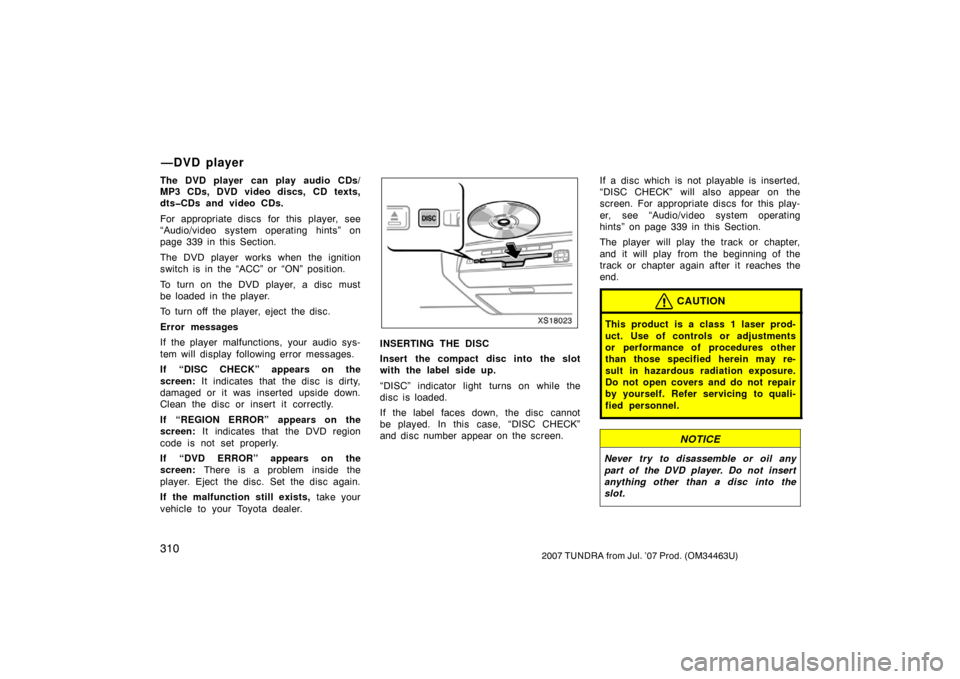
XS18023
INSERTING THE DISC
Insert the compact disc into the slot
with the label side up.
“DISC” indicator light turns on while the
disc is loaded.
If the label faces down, the disc cannot
be played. In this case, “DISC CHECK”
and disc number appear on the screen. If a disc which is not playable is inserted,
“DISC CHECK” will also appear on the
screen. For appropriate discs for this play-
er, see “Audio/video system operating
hints” on page 339 in this Section.
The player will play the track or chapter,
and it will play from the beginning of the
track or chapter again after it reaches the
end.
CAUTION
This product is a class 1 laser prod-
uct. Use of controls or adjustments
or performance of procedures other
than those specified herein may re-
sult in hazardous radiation exposure.
Do not open covers and do not repair
by yourself. Refer servicing to quali-
fied personnel.
NOTICE
Never try to disassemble or oil any
part of the DVD player. Do not insert
anything other than a disc into the
slot.
—DVD player
Page 320 of 611
3112007 TUNDRA from Jul. ’07 Prod. (OM34463U)
8 cm (3 in.) compact disc singles
Your compact disc player needs an adap-
tor to play compact disc singles. Compact
disc singles are about 8 cm (3 in.) in di-
ameter−smaller than standard di scs.
XS18024
EJECTING THE DISC
Push the “
” button.
Z17461
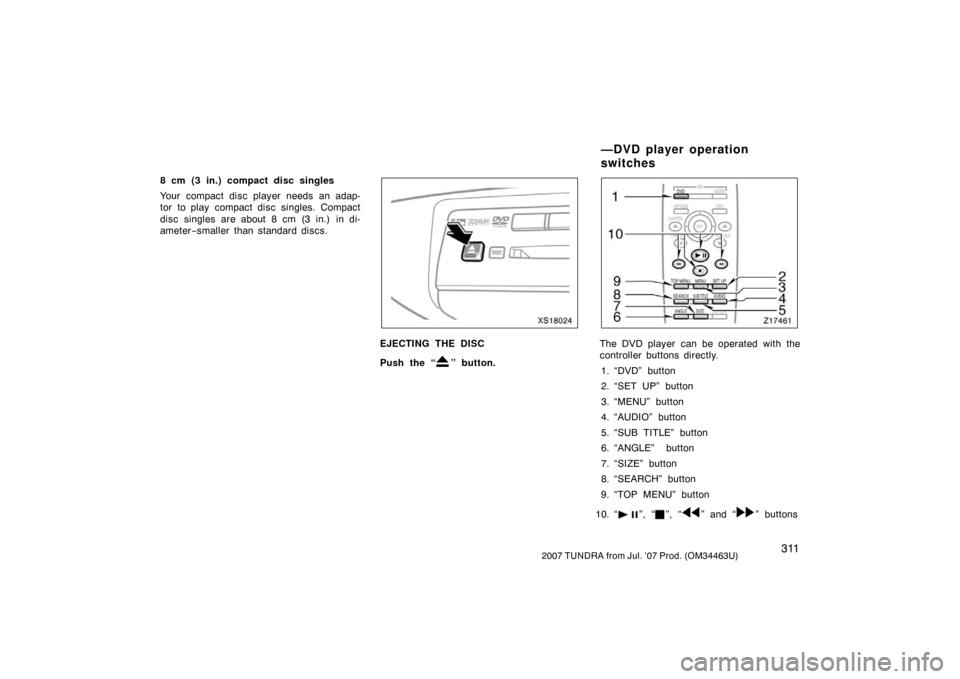
The DVD player can be operated with the
controller buttons directly.
1. “DVD” button
2. “SET UP” button
3. “MENU” button
4. “AUDIO” button
5. “SUB TITLE” button
6. “ANGLE” button
7. “SIZE” button
8. “SEARCH” button
9. “TOP MENU” button
10. “
”, “”, “” and “” buttons
—DVD player operation
switches
Page 321 of 611
3122007 TUNDRA from Jul. ’07 Prod. (OM34463U)
Z17456
Controller
XS18025
DVD player unit
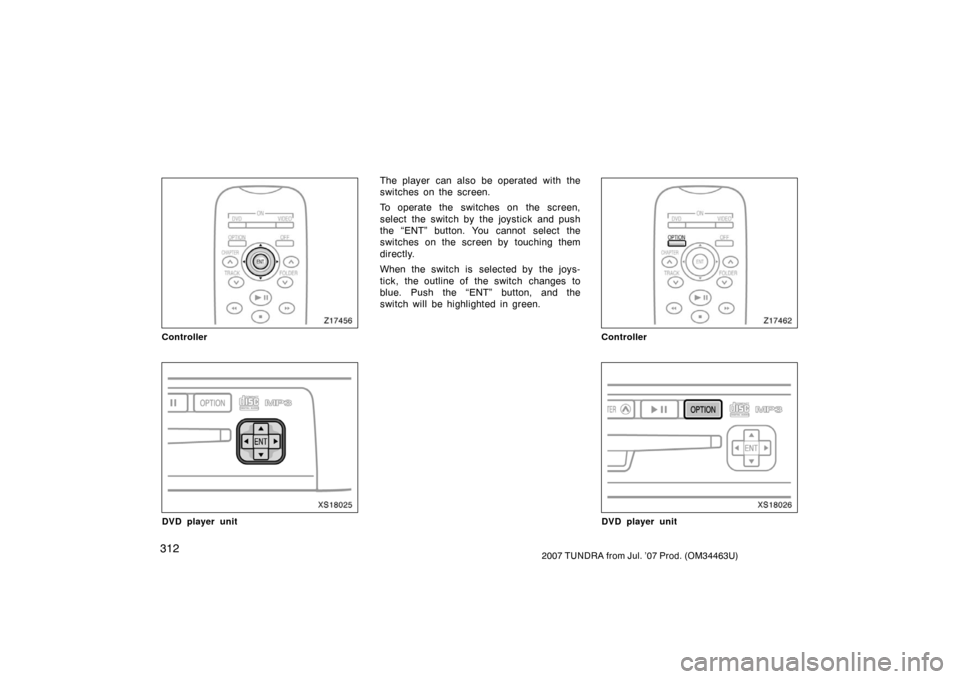
The player can also be operated with the
switches on the screen.
To operate the switches on the screen,
select the switch by the joystick and push
the “ENT” button. You cannot select the
switches on the screen by touching them
directly.
When the switch is selected by the joys-
tick, the outline of the switch changes to
blue. Push the “ENT” button, and the
switch will be highlighted in green.
Z17462
Controller
XS18026
DVD player unit