Page 186 of 534
07 SIENNA_U (L/O 0612)
178
2007 SIENNA from Oct. ’06 Prod. (OM45437U)
NOTICE
To prevent the battery from being dis-
charged, do not leave the switch on
longer than necessary when the en-
gine is not running.
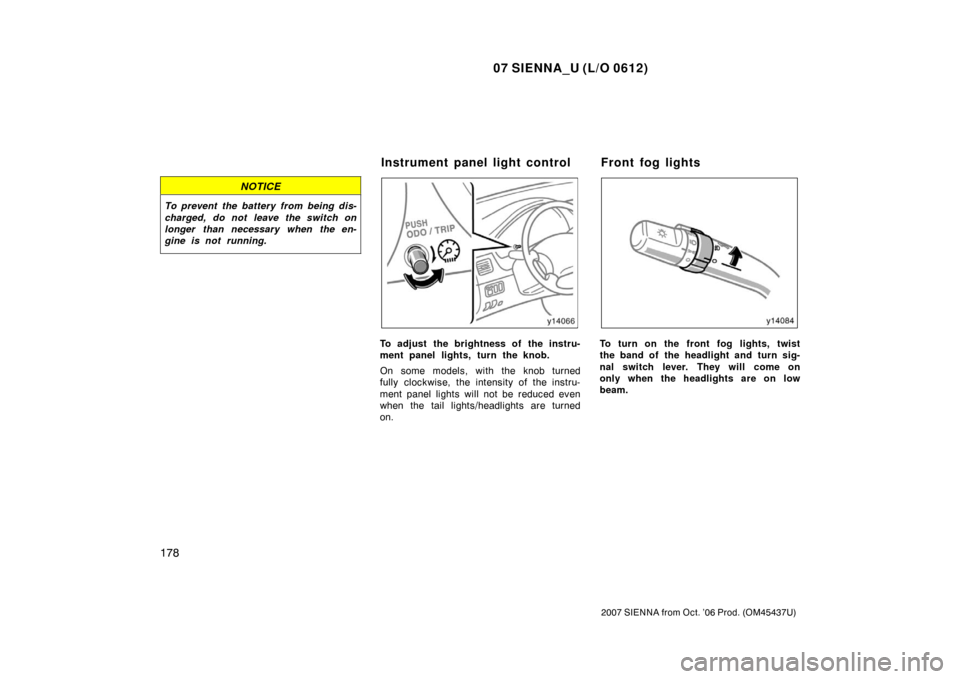
To adjust the brightness of the instru-
ment panel lights, turn the knob.
On some models, with the knob turned
fully clockwise, the intensity of the instru-
ment panel lights will not be reduced even
when the tail lights/headlights are turned
on.To turn on the front fog lights, twist
the band of the headlight and turn sig-
nal switch lever. They will come on
only when the headlights are on low
beam.
Instrument panel light control Front fog lights
Page 187 of 534
07 SIENNA_U (L/O 0612)
179
2007 SIENNA from Oct. ’06 Prod. (OM45437U)
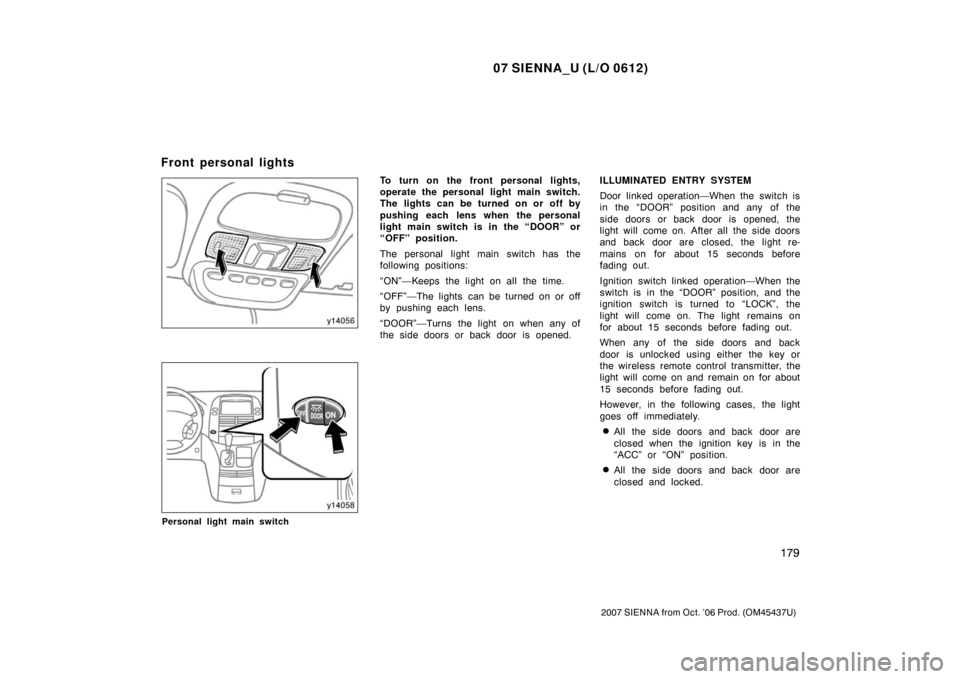
Personal light main switch
To turn on the front personal lights,
operate the personal light main switch.
The lights can be turned on or off by
pushing each lens when the personal
light main switch is in the “DOOR” or
“OFF” position.
The personal light main switch has the
following positions:
“ON”—Keeps the light on all the time.
“OFF”—The lights can be turned on or off
by pushing each lens.
“DOOR”—Turns the light on when any of
the side doors or back door is opened.ILLUMINATED ENTRY SYSTEM
Door linked operation—When the switch is
in the “DOOR” position and any of the
side doors or back door is opened, the
light will come on. After all the side doors
and back door are closed, the light re-
mains on for about 15 seconds before
fading out.
Ignition switch linked operation—When the
switch is in the “DOOR” position, and the
ignition switch is turned to “LOCK”, the
light will come on. The light remains on
for about 15 seconds before fading out.
When any of the side doors and back
door is unlocked using either the key or
the wireless remote control transmitter, the
light will come on and remain on for about
15 seconds before fading out.
However, in the following cases, the light
goes off immediately.
�All the side doors and back door are
closed when the ignition key is in the
“ACC” or “ON” position.
�All the side doors and back door are
closed and locked.
Front personal lights
Page 188 of 534
07 SIENNA_U (L/O 0612)
180
2007 SIENNA from Oct. ’06 Prod. (OM45437U)
The following adjustments can be made in
this system. For details, contact your
Toyota dealer.
�Cancelling the door key or the wireless
remote control transmitter linked opera-
tion
�Cancelling the ignition switch linked op-
eration.
�Changing the duration of lighting
To prevent the battery being discharged,
the lights will automatically turn off when
the key is removed and the door is left
opened with the switch at the “DOOR”
position for 20 minutes or more.
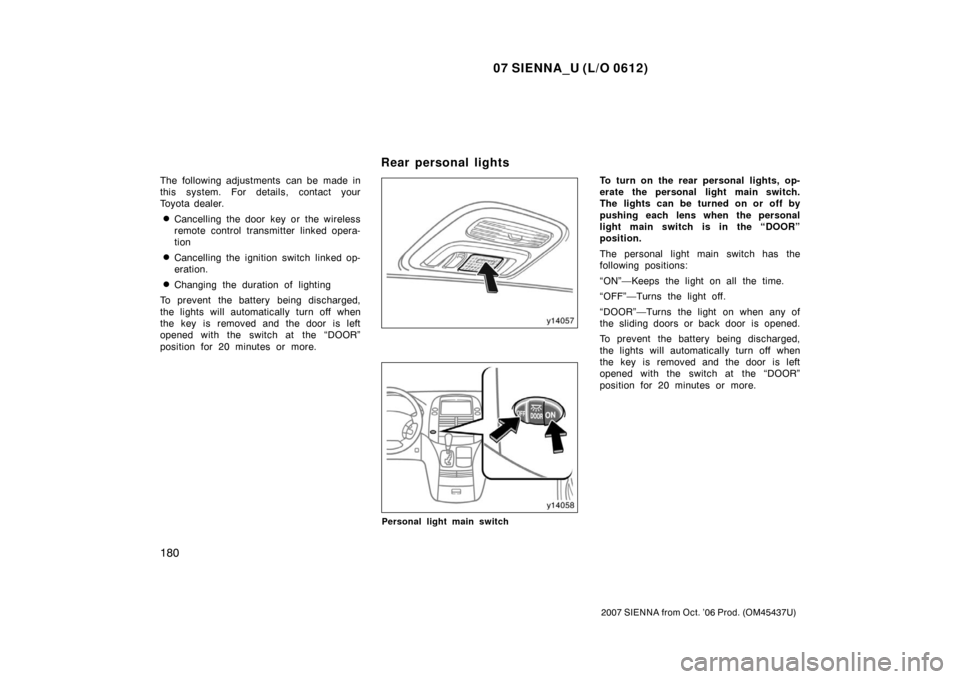
Personal light main switch
To turn on the rear personal lights, op-
erate the personal light main switch.
The lights can be turned on or off by
pushing each lens when the personal
light main switch is in the “DOOR”
position.
The personal light main switch has the
following positions:
“ON”—Keeps the light on all the time.
“OFF”—Turns the light off.
“DOOR”—Turns the light on when any of
the sliding doors or back door is opened.
To prevent the battery being discharged,
the lights will automatically turn off when
the key is removed and the door is left
opened with the switch at the “DOOR”
position for 20 minutes or more.
Rear personal lights
Page 189 of 534
07 SIENNA_U (L/O 0612)
181
2007 SIENNA from Oct. ’06 Prod. (OM45437U)
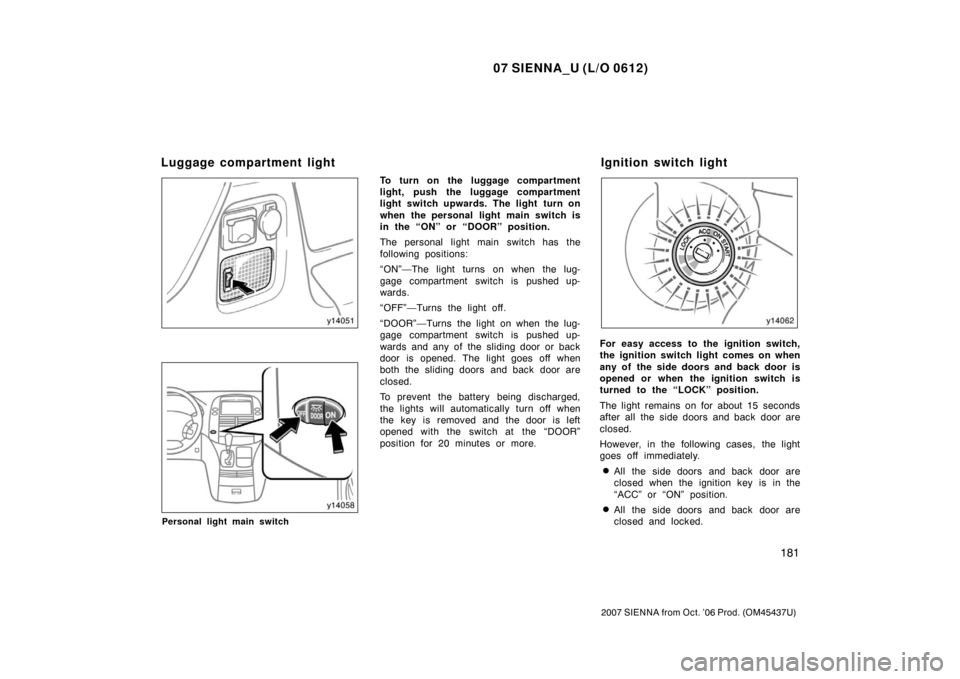
Personal light main switch
To turn on the luggage compartment
light, push the luggage compartment
light switch upwards. The light turn on
when the personal light main switch is
in the “ON” or “DOOR” position.
The personal light main switch has the
following positions:
“ON”—The light turns on when the lug-
gage compartment switch is pushed up-
wards.
“OFF”—Turns the light off.
“DOOR”—Turns the light on when the lug-
gage compartment switch is pushed up-
wards and any of the sliding door or back
door is opened. The light goes off when
both the sliding doors and back door are
closed.
To prevent the battery being discharged,
the lights will automatically turn off when
the key is removed and the door is left
opened with the switch at the “DOOR”
position for 20 minutes or more.
For easy access to the ignition switch,
the ignition switch light comes on when
any of the side doors and back door is
opened or when the ignition switch is
turned to the “LOCK” position.
The light remains on for about 15 seconds
after all the side doors and back door are
closed.
However, in the following cases, the light
goes off immediately.
�All the side doors and back door are
closed when the ignition key is in the
“ACC” or “ON” position.
�All the side doors and back door are
closed and locked.
Luggage compartment lightIgnition switch light
Page 190 of 534
07 SIENNA_U (L/O 0612)
182
2007 SIENNA from Oct. ’06 Prod. (OM45437U)
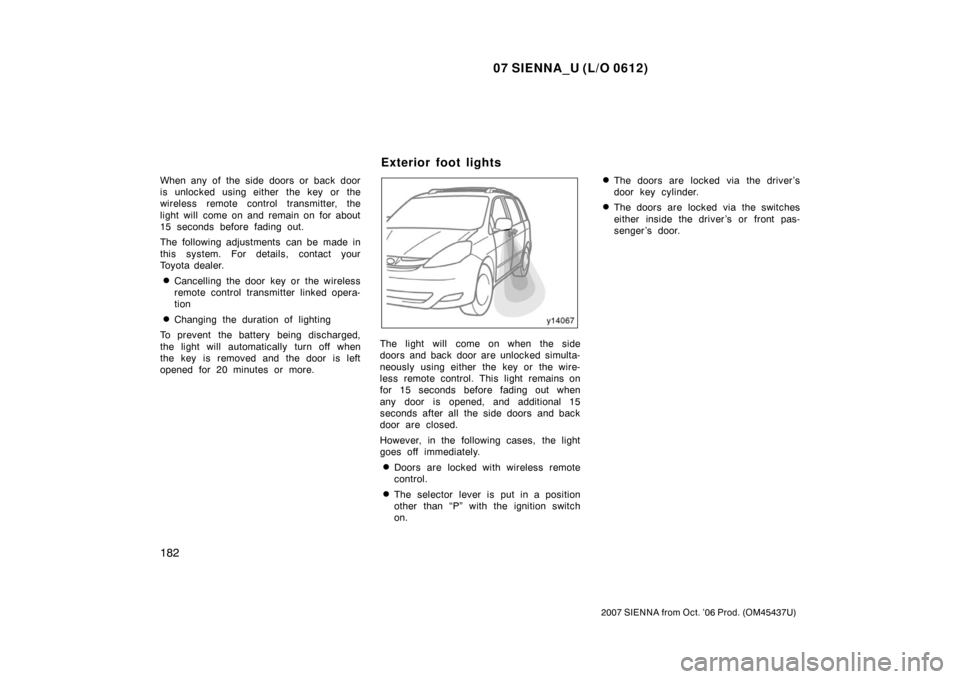
When any of the side doors or back door
is unlocked using either the key or the
wireless remote control transmitter, the
light will come on and remain on for about
15 seconds before fading out.
The following adjustments can be made in
this system. For details, contact your
Toyota dealer.
�Cancelling the door key or the wireless
remote control transmitter linked opera-
tion
�Changing the duration of lighting
To prevent the battery being discharged,
the light will automatically turn off when
the key is removed and the door is left
opened for 20 minutes or more.
The light will come on when the side
doors and back door are unlocked simulta-
neously using either the key or the wire-
less remote control. This light remains on
for 15 seconds before fading out when
any door is opened, and additional 15
seconds after all the side doors and back
door are closed.
However, in the following cases, the light
goes off immediately.
�Doors are locked with wireless remote
control.
�The selector lever is put in a position
other than “P” with the ignition switch
on.
�The doors are locked via the driver’s
door key cylinder.
�The doors are locked via the switches
either inside the driver ’s or front pas-
senger ’s door.
Exterior foot lights
Page 206 of 534
07 SIENNA_U (L/O 0612)
198
2007 SIENNA from Oct. ’06 Prod. (OM45437U)
If either of the following conditions
occurs, this indicates a malfunction
somewhere in the components moni-
tored by the warning light system. Con-
tact your Toyota dealer as soon as
possible to service the vehicle.
�The light does not come on when the
ignition key is turned to the “ON” posi-
tion, or remains on.
�The light comes on while you are driv-
ing.
A warning light turning on briefly during
operation does not indicate a problem.
CAUTION
If the “ABS” warning light remains on
together with the brake system warn-
ing light, immediately stop your ve-
hicle at a safe place and contact your
Toyota dealer.
In this case, not only the antilock
brake system will fail but also the
vehicle will become extremely unsta-
ble during braking.
(i) Open Door Warning Light
This light remains on until all the doors
are completely closed.
(j) SRS Warning Light
This indicator comes on when the igni-
tion key is turned to the “ON” position.
It goes off after about 6 seconds. This
means the SRS airbags and seat belt
pretensioners are operating properly.
The warning light system monitors the air-
bag sensor assembly, front airbag sen-
sors, side and curtain shield airbag sensor
assemblies, curtain shield airbag sensor
assemblies, driver ’s seat position sensor,
driver’s seat belt buckle switch, front pas-
senger occupant classification system,
“AIRBAG ON” indicator light, “AIRBAG
OFF” indicator light, front passenger ’s seat
belt buckle switch, seat belt pretensioner
assemblies, inflators, interconnecting wir-
ing and power sources.
If any of the following conditions occurs,
this indicates a malfunction of the airbags
or seat belt pretensioners. Contact your
Toyota dealer as soon as possible.�The light does not come on when the
ignition key is turned to the “ON” posi-
tion or remains on for more than 6
seconds or flashes.
�The light comes on or starts flashing
while driving.
If the light stays on, it indicates that the
SRS driver and front passenger airbag
system and/or front passenger occupant
classification system and “AIRBAG ON”
and “AIRBAG OFF” indicator lights have a
problem. If the light flashes, the SRS side
airbag system and/or curtain shield airbag
system have a problem.
The SRS warning light and “AIRBAG OFF”
indicator light will come on if there is a
malfunction in the front passenger occu-
pant classification system.
Page 209 of 534

07 SIENNA_U (L/O 0612)
201
2007 SIENNA from Oct. ’06 Prod. (OM45437U)
CHECKING SERVICE REMINDER
INDICATORS (except the low fuel level
warning light and low windshield
washer fluid level warning light)
1. Apply the parking brake.
2. Open one of the doors. The open door warning light should
come on.
3. Close the door. The open door warning light should go
off.
4. Turn the ignition key to “ON”, but do not start the engine.
All the service reminder indicators ex-
cept the open door warning light should
come on. The “ABS” and “VSC” warn-
ing lights, low tire pressure warning
light, dynamic laser cruise master
warning light and engine oil replace-
ment reminder light go off after a few
seconds. The SRS warning light goes
off after about 6 seconds. (“TRAC
OFF”, “READY” (dynamic laser cruise
ready mode) indicator lights and slip
indicator light also comes on and go
off after a few seconds.)
If any service reminder indicator or warn-
ing buzzer does not function as described
above, have it checked by your Toyota
dealer as soon as possible.
Page 238 of 534
07 SIENNA_U (L/O 0612)
230
2007 SIENNA from Oct. ’06 Prod. (OM45437U)
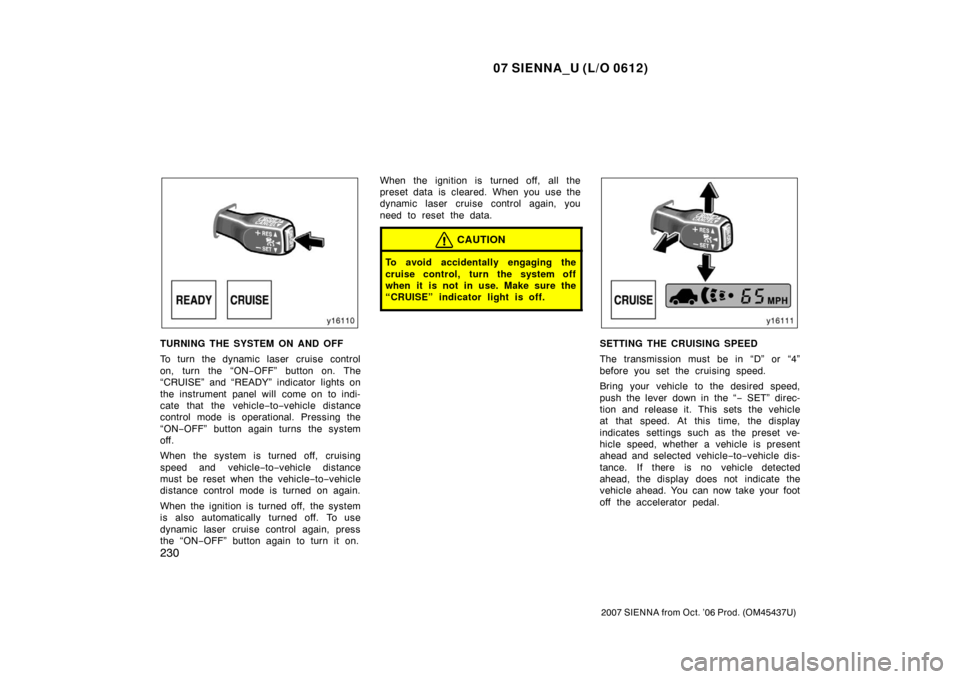
TURNING THE SYSTEM ON AND OFF
To turn the dynamic laser cruise control
on, turn the “ON−OFF” button on. The
“CRUISE” and “READY” indicator lights on
the instrument panel will come on to indi-
cate that the vehicle− to−vehicle distance
control mode is operational. Pressing the
“ON −OFF” button again turns the system
off.
When the system is turned off, cruising
speed and vehicle −to −vehicle distance
must be reset when the vehicle −to −vehicle
distance control mode is turned on again.
When the ignition is turned off, the system
is also automatically turned off. To use
dynamic laser cruise control again, press
the “ON −OFF” button again to turn it on. When the ignition is turned off, all the
preset data is cleared. When you use the
dynamic laser cruise control again, you
need to reset the data.
CAUTION
To avoid accidentally engaging the
cruise control, turn the system off
when it is not in use. Make sure the
“CRUISE” indicator light is off.
SETTING THE CRUISING SPEED
The transmission must be in “D” or “4”
before you set the cruising speed.
Bring your vehicle to the desired speed,
push the lever down in the “
− SET” direc-
tion and release it. This sets the vehicle
at that speed. At this time, the display
indicates settings such as the preset ve-
hicle speed, whether a vehicle is present
ahead and selected vehicle −to −vehicle dis-
tance. If there is no vehicle detected
ahead, the display does not indicate the
vehicle ahead. You can now take your foot
off the accelerator pedal.