Page 169 of 534
07 SIENNA_U (L/O 0612)
161
2007 SIENNA from Oct. ’06 Prod. (OM45437U)
Canada only
Ty p e B
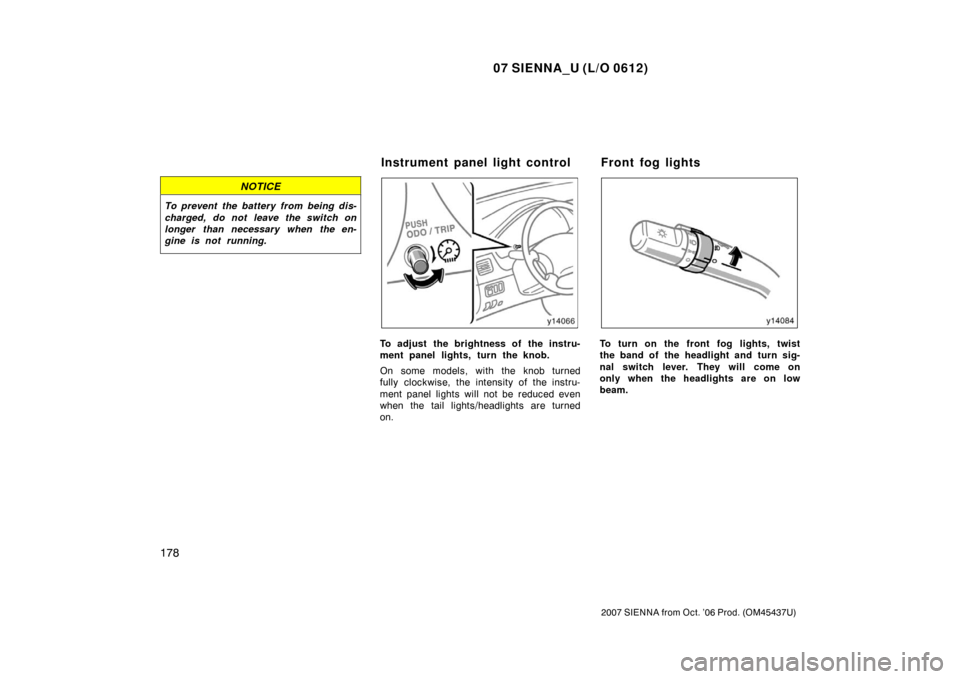
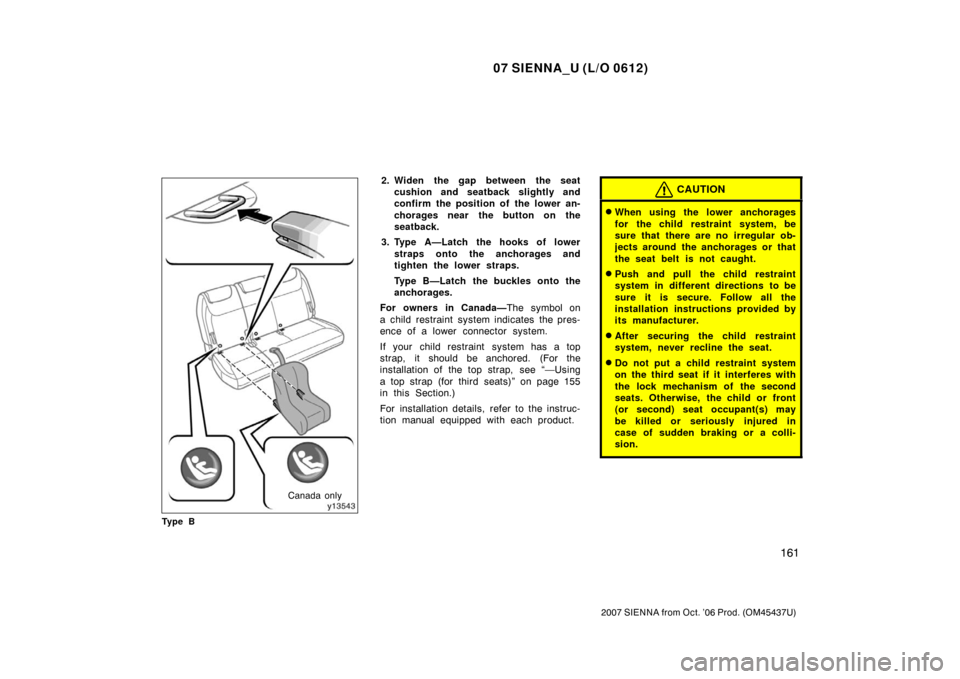
2. Widen the gap between the seat cushion and seatback slightly and
confirm the position of the lower an-
chorages near the button on the
seatback.
3. Type A—Latch the hooks of lower straps onto the anchorages and
tighten the lower straps.
Type B—Latch the buckles onto the
anchorages.
For owners in Canada— The symbol on
a child restraint system indicates the pres-
ence of a lower connector system.
If your child restraint system has a top
strap, it should be anchored. (For the
installation of the top strap, see “—Using
a top strap (for third seats)” on page 155
in this Section.)
For installation details, refer to the instruc-
tion manual equipped with each product.CAUTION
�When using the lower anchorages
for the child restraint system, be
sure that there are no irregular ob-
jects around the anchorages or that
the seat belt is not caught.
�Push and pull the child restraint
system in different directions to be
sure it is secure. Follow all the
installation instructions provided by
its manufacturer.
�After securing the child restraint
system, never recline the seat.
�Do not put a child restraint system
on the third seat if it interferes with
the lock mechanism of the second
seats. Otherwise, the child or front
(or second) seat occupant(s) may
be killed or seriously injured in
case of sudden braking or a colli-
sion.
Page 172 of 534
07 SIENNA_U (L/O 0612)
164
2007 SIENNA from Oct. ’06 Prod. (OM45437U)
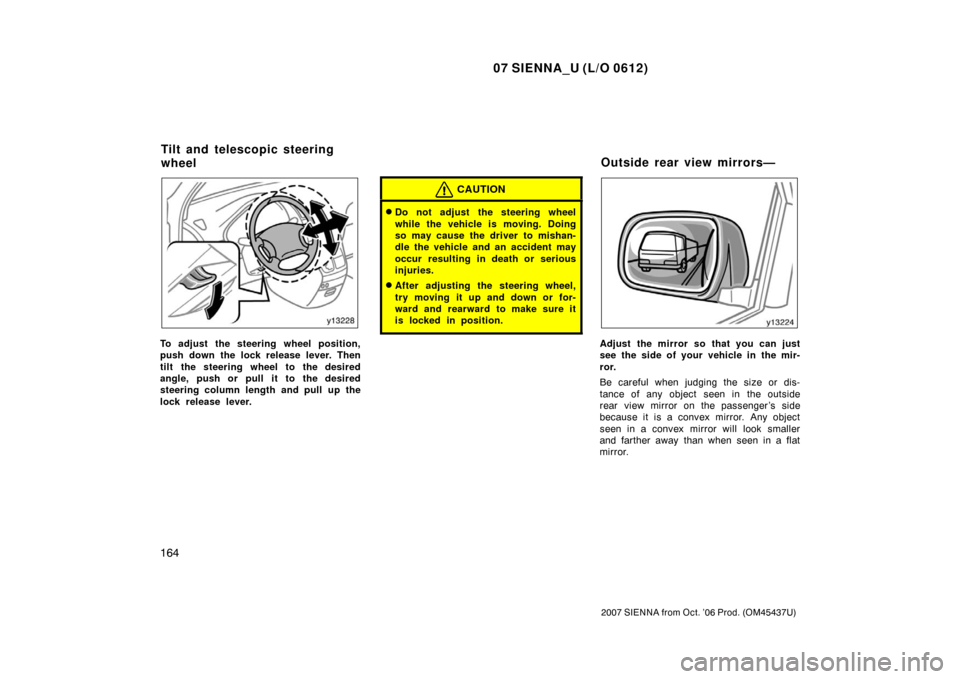
To adjust the steering wheel position,
push down the lock release lever. Then
tilt the steering wheel to the desired
angle, push or pull it to the desired
steering column length and pull up the
lock release lever.
CAUTION
�Do not adjust the steering wheel
while the vehicle is moving. Doing
so may cause the driver to mishan-
dle the vehicle and an accident may
occur resulting in death or serious
injuries.
�After adjusting the steering wheel,
try moving it up and down or for-
ward and rearward to make sure it
is locked in position.
Adjust the mirror so that you can just
see the side of your vehicle in the mir-
ror.
Be careful when judging the size or dis-
tance of any object seen in the outside
rear view mirror on the passenger ’s side
because it is a convex mirror. Any object
seen in a convex mirror will look smaller
and farther away than when seen in a flat
mirror.
Tilt and telescopic steering
wheelOutside rear view mirrors—
Page 177 of 534
07 SIENNA_U (L/O 0612)
169
2007 SIENNA from Oct. ’06 Prod. (OM45437U)
You can cancel the cut off operation by:
�Turning the key to the “ACC” position.
�Opening or closing any of front and
sliding doors.
�Turning off all the “ON” lights.
All the lights are cut off when all the side
doors and back door are locked by key or
wireless remote control transmitter.
The ignition switch must be turned off.
Page 180 of 534
07 SIENNA_U (L/O 0612)
172
2007 SIENNA from Oct. ’06 Prod. (OM45437U)
For the U.S.A.
For Canada
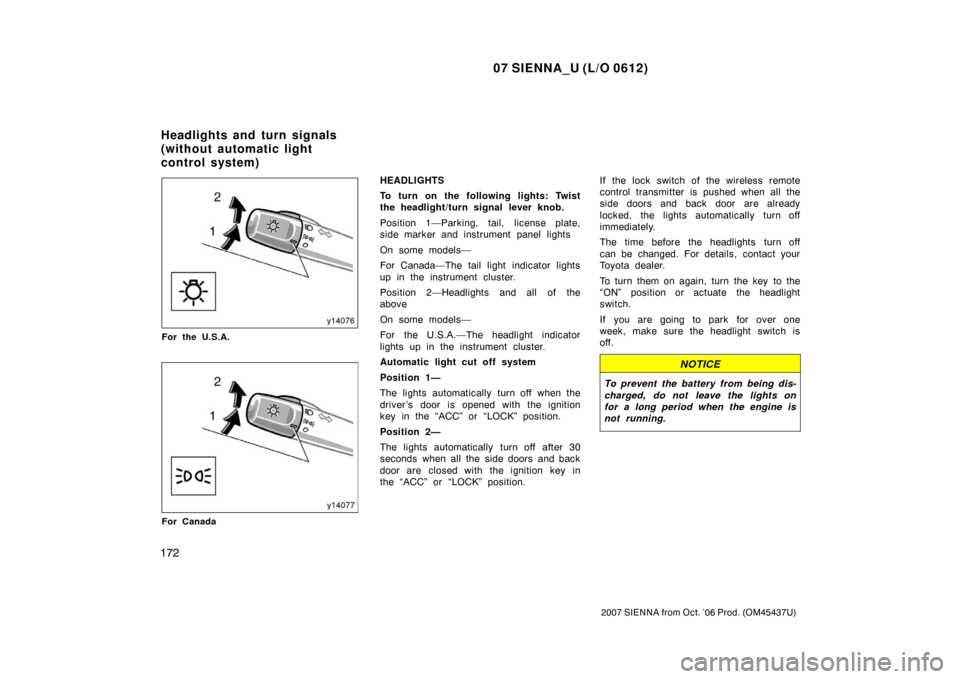
HEADLIGHTS
To turn on the following lights: Twist
the headlight/turn signal lever knob.
Position 1—Parking, tail, license plate,
side marker and instrument panel lights
On some models—
For Canada—The tail light indicator lights
up in the instrument cluster.
Position 2—Headlights and all of the
above
On some models—
For the U.S.A.—The headlight indicator
lights up in the instrument cluster.
Automatic light cut off system
Position 1—
The lights automatically turn off when the
driver ’s door is opened with the ignition
key in the “ACC” or “LOCK” position.
Position 2—
The lights automatically turn off after 30
seconds when all the side doors and back
door are closed with the ignition key in
the “ACC” or “LOCK” position.If the lock switch of the wireless remote
control transmitter is pushed when all the
side doors and back door are already
locked, the lights automatically turn off
immediately.
The time before the headlights turn off
can be changed. For details, contact your
Toyota dealer.
To turn them on again, turn the key to the
“ON” position or actuate the headlight
switch.
If you are going to park for over one
week, make sure the headlight switch is
off.
NOTICE
To prevent the battery from being dis-
charged, do not leave the lights on
for a long period when the engine is
not running.
Headlights and turn signals
(without automatic light
control system)
Page 182 of 534
07 SIENNA_U (L/O 0612)
174
2007 SIENNA from Oct. ’06 Prod. (OM45437U)
For the U.S.A.
For Canada
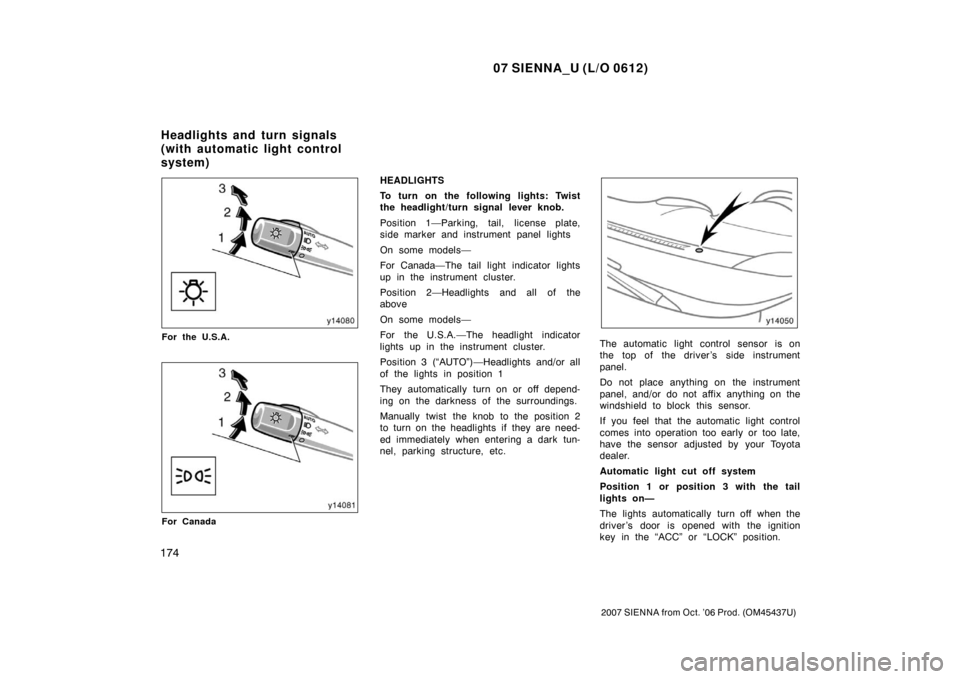
HEADLIGHTS
To turn on the following lights: Twist
the headlight/turn signal lever knob.
Position 1—Parking, tail, license plate,
side marker and instrument panel lights
On some models—
For Canada—The tail light indicator lights
up in the instrument cluster.
Position 2—Headlights and all of the
above
On some models—
For the U.S.A.—The headlight indicator
lights up in the instrument cluster.
Position 3 (“AUTO”)—Headlights and/or all
of the lights in position 1
They automatically turn on or off depend-
ing on the darkness of the surroundings.
Manually twist the knob to the position 2
to turn on the headlights if they are need-
ed immediately when entering a dark tun-
nel, parking structure, etc.
The automatic light control sensor is on
the top of the driver’s side instrument
panel.
Do not place anything on the instrument
panel, and/or do not affix anything on the
windshield to block this sensor.
If you feel that the automatic light control
comes into operation too early or too late,
have the sensor adjusted by your Toyota
dealer.
Automatic light cut off system
Position 1 or position 3 with the tail
lights on—
The lights automatically turn off when the
driver ’s door is opened with the ignition
key in the “ACC” or “LOCK” position.
Headlights and turn signals
(with automatic light control
system)
Page 183 of 534
07 SIENNA_U (L/O 0612)
175
2007 SIENNA from Oct. ’06 Prod. (OM45437U)
Position 2 or 3 with the headlights on—
The lights automatically turn off after 30
seconds when all the side doors and back
door are closed with the ignition key in
the “ACC” or “LOCK” position.
If the lock switch of the wireless remote
control transmitter is pushed when all the
side doors and back door are already
locked, the lights automatically turn off
immediately.
The time before the headlights turn off
can be changed. For details, contact your
Toyota dealer.
To turn them on again, turn the key to the
“ON” position or actuate the headlight
switch.
If you are going to park for over one
week, make sure the headlight switch is
off.
NOTICE
To prevent the battery from being dis-
charged, do not leave the lights on
for a long period when the engine is
not running.
Daytime Running Light (DRL) system
(all models sold in Canada and some
models sold in U.S.A.)
The Daytime Running Light (DRL) system
can make it easier for others to see the
front of your vehicle during the day. The
DRL system can be helpful in many differ-
ent driving conditions, but they can be
especially helpful in the short periods after
dawn and before sunset.
The DRL system will make the headlights
come on when:
�The ignition is on with the engine run-
ning.
�The knob is in the “OFF” position,
position 1 or position 3 with the tail
lights on.
�The parking brake is released.
To turn off the DRL system, twist the knob
to position 2 or position 3 with the head-
lights on, or turn the ignition switch off.
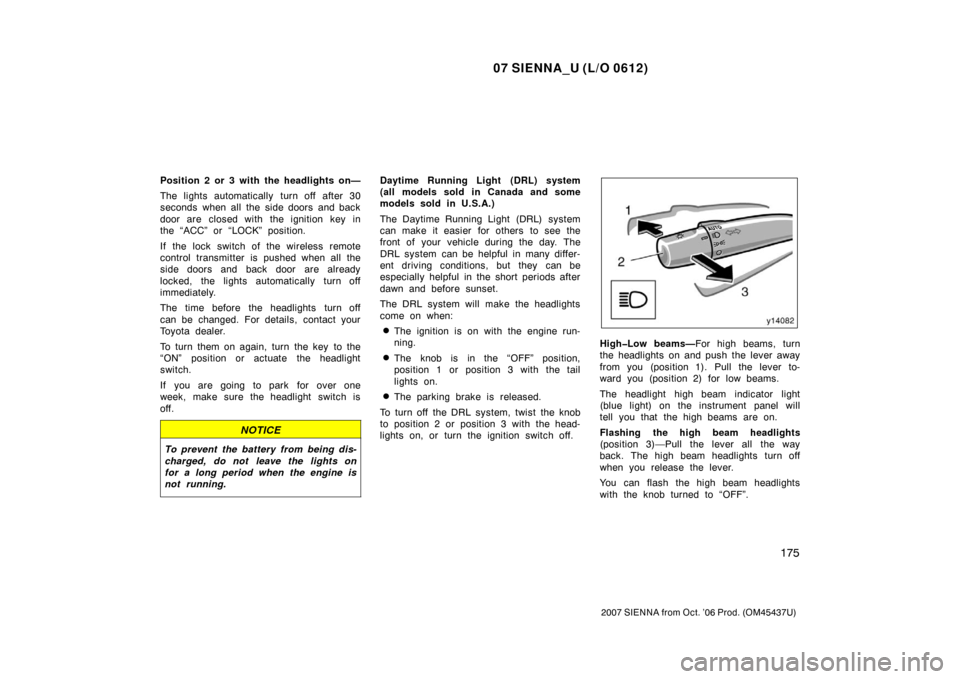
HighLow beams— For high beams, turn
the headlights on and push the lever away
from you (position 1). Pull the lever to-
ward you (position 2) for low beams.
The headlight high beam indicator light
(blue light) on the instrument panel will
tell you that the high beams are on.
Flashing the high beam headlights
(position 3)—Pull the lever all the way
back. The high beam headlights turn off
when you release the lever.
You can flash the high beam headlights
with the knob turned to “OFF”.
Page 186 of 534
07 SIENNA_U (L/O 0612)
178
2007 SIENNA from Oct. ’06 Prod. (OM45437U)
NOTICE
To prevent the battery from being dis-
charged, do not leave the switch on
longer than necessary when the en-
gine is not running.
To adjust the brightness of the instru-
ment panel lights, turn the knob.
On some models, with the knob turned
fully clockwise, the intensity of the instru-
ment panel lights will not be reduced even
when the tail lights/headlights are turned
on.To turn on the front fog lights, twist
the band of the headlight and turn sig-
nal switch lever. They will come on
only when the headlights are on low
beam.
Instrument panel light control Front fog lights
Page 187 of 534
07 SIENNA_U (L/O 0612)
179
2007 SIENNA from Oct. ’06 Prod. (OM45437U)
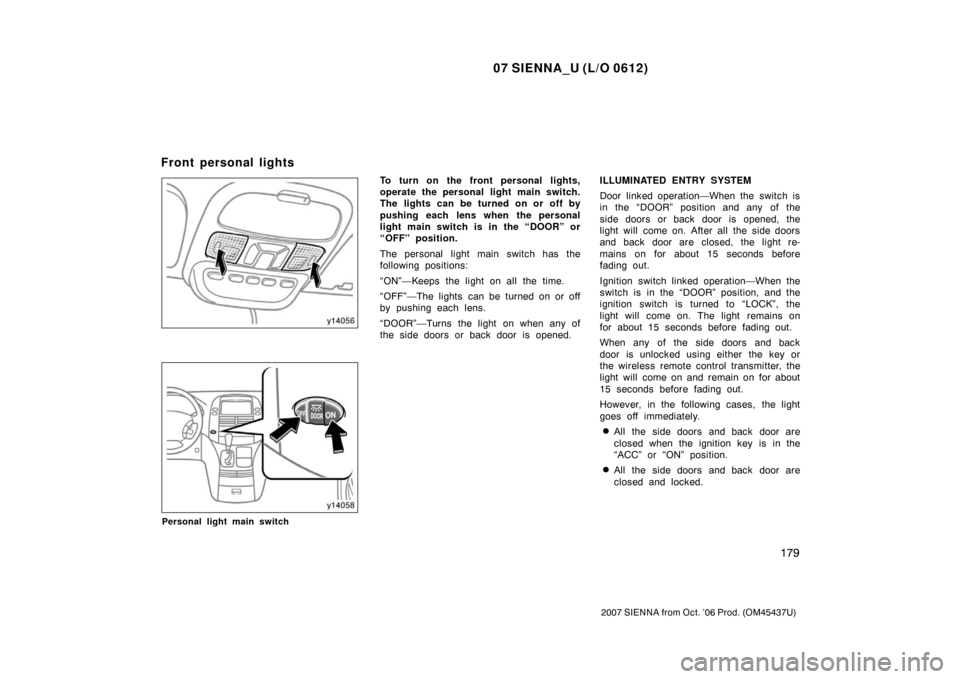
Personal light main switch
To turn on the front personal lights,
operate the personal light main switch.
The lights can be turned on or off by
pushing each lens when the personal
light main switch is in the “DOOR” or
“OFF” position.
The personal light main switch has the
following positions:
“ON”—Keeps the light on all the time.
“OFF”—The lights can be turned on or off
by pushing each lens.
“DOOR”—Turns the light on when any of
the side doors or back door is opened.ILLUMINATED ENTRY SYSTEM
Door linked operation—When the switch is
in the “DOOR” position and any of the
side doors or back door is opened, the
light will come on. After all the side doors
and back door are closed, the light re-
mains on for about 15 seconds before
fading out.
Ignition switch linked operation—When the
switch is in the “DOOR” position, and the
ignition switch is turned to “LOCK”, the
light will come on. The light remains on
for about 15 seconds before fading out.
When any of the side doors and back
door is unlocked using either the key or
the wireless remote control transmitter, the
light will come on and remain on for about
15 seconds before fading out.
However, in the following cases, the light
goes off immediately.
�All the side doors and back door are
closed when the ignition key is in the
“ACC” or “ON” position.
�All the side doors and back door are
closed and locked.
Front personal lights