Page 161 of 485

1522007 SEQUOIA from Aug. ’07 Prod. (OM34462U)
u14019
Without electric moon roof
u14027
With electric moon roof
CENTER INTERIOR LIGHT
To turn on the interior light, slide the
switch.
The interior light switch has the following
positions:
“ON”—Keeps the light on all the time.
“OFF”—Turns the light off.
“DOOR”—Turns the light on when any of
the side doors is opened. The light re-
mains on when all the side doors are
closed.
ILLUMINATED ENTRY SYSTEM
When the switch is in the “DOOR” posi-
tion and any of the side doors is opened,
the light will come on. After all the side
doors are closed, the light remains on for
a certain time before fading out.
However, in the following cases, the light
goes out immediately:
�All the side doors are closed when the
ignition key is in the “ACC” or “ON”
position.
�The ignition key is turned to the “ACC”,
“ON” or “START” position after all the
side doors are closed.
�All the doors are locked when the light
is still on.When all the doors are unlocked using
either the key or the wireless remote con-
trol transmitter simultaneously, the light
come on for about 15 seconds before fad-
ing out.
The following adjustments can be made in
this system. For details, contact your
Toyota dealer.
�Cancelling the door key or wireless re-
mote control transmitter linked opera-
tion
�Changing the timing for the light turn-
ing off
To prevent the battery being discharged,
the light will automatically turn off when
the key is removed and the door is left
opened with the switch in “DOOR” position
for 20 minutes or more.
CENTER PERSONAL LIGHTS
To turn on the center personal light,
push the switch. To turn the light off,
push the switch once again.
Center interior and personal
lights
Page 162 of 485

1532007 SEQUOIA from Aug. ’07 Prod. (OM34462U)
u14022
The interior lights operate separately
with each outer switch.
To turn on the light, push the switch.
To turn the light off, push the switch
once again.
The interior light switch has the following
positions:
“DOOR”—Turns the light on when any of
the side doors is opened. The light re-
mains on when all the side doors are
closed.
“OFF”—The lights are off unless you oper-
ate either outside switch.ILLUMINATED ENTRY SYSTEM
When the switch is in the “DOOR” posi-
tion and any of the side doors is opened,
the light will come on. After all the side
doors are closed, the light remains on for
a certain time before fading out.
However, in the following cases, the light
goes out immediately:
�All the side doors are closed when the
ignition key is in the “ACC” or “ON”
position.
�The ignition key is turned to the “ACC”,
“ON” or “START” position after all the
side doors are closed.
�All the side doors are locked when the
light is still on.
When all the doors are unlocked using
either the key or the wireless remote con-
trol transmitter simultaneously, the light
come on for about 15 seconds before fad-
ing out.
The following adjustments can be made in
this system. For details, contact your
Toyota dealer.
�Cancelling the door key or wireless re-
mote control transmitter linked opera-
tion
�Changing the timing for the light turn-
ing off To prevent the battery being discharged,
the light will automatically turn off when
the key is removed and the door is left
opened with the switch in “DOOR” position
for 20 minutes or more.
Center interior light
Page 164 of 485

1552007 SEQUOIA from Aug. ’07 Prod. (OM34462U)
When all the doors are unlocked using
either the key or the wireless remote con-
trol transmitter simultaneously, the ignition
switch light will come on and remain on
for about 15 seconds before fading out.
To prevent the battery being discharged,
the light will automatically turn off when
the key is removed and the door is left
opened for 20 minutes or more.
The following adjustments can be made in
this system. For details, contact your
Toyota dealer.
�Cancelling the door key or wireless re-
mote control transmitter linked opera-
tion
�Changing the timing for the light turn-
ing off
u14025
To turn on the windshield wipers, move
the lever to the desired setting.
The key must be in the “ON” position.Lever position
Speed setting
Position 1Intermittent
Position 2Slow
Position 3Fast
The “INT” band lets you adjust the wiping
time interval when the wiper lever is in
the intermittent position (position 1). Twist
the band upward to increase the time be-
tween sweeps, and downward to decrease
it. To squirt washer fluid, pull the lever
toward you.
If the windshield wipers are off, they will
operate a couple of times after the washer
squirts.
For instructions on adding washer fluid,
see “Adding washer fluid” on page 452 in
Section 7
−3.
In freezing weather, warm the windshield
with the defroster before using the washer.
This will help prevent the washer fluid
from freezing on your windshield, which
can block your vision.
NOTICE
Do not operate the wipers if the wind-
shield is dry. It may scratch the
glass.
Windshield wipers and washer
Page 166 of 485
1572007 SEQUOIA from Aug. ’07 Prod. (OM34462U)
Make sure you turn the defoggers off
when the surfaces are clear. Leaving the
defoggers on for a long time could cause
the battery to discharge, especially during
stop−and− go driving. The defoggers are
not designed for drying rain water or for
melting snow.
CAUTION
On some models, since the mirror
surfaces can get hot, do not touch
them when the defogger switch is on.
NOTICE
When cleaning the inside of the back
window, be careful not to scratch or
damage the heater wires or connec-
tors.
If the back window is not fully closed, the
back window defogger will not work. Make
sure the back window is fully closed when
using the back window defogger. If the back window is opened while the
defogger is working, the defogger will au-
tomatically turn off. Even if the back win-
dow is fully closed after that, the defogger
will not automatically turn on.
Page 171 of 485

1622007 SEQUOIA from Aug. ’07 Prod. (OM34462U)
u15015
The voltmeter tells whether the battery
is charged or discharged. Check it
while the engine is running—the needle
should always indicate as shown above.
If the needle reads below or above the
normal range while the engine is running,
it indicates the charging system needs im-
mediate repair.
However, it is normal for the needle to
drop below the normal range during en-
gine starting.
u15016
The tachometer indicates engine speed
in thousands of rpm (revolutions per
minute). Use it while driving to select
correct shift points and to prevent en-
gine lugging and overrevving.
Driving with the engine running too fast
causes excessive engine wear and poor
fuel economy. Remember, in most cases
the slower the engine speed, the greater
the fuel economy.
NOTICE
Do not let the indicator needle get
into the red zone. This may cause
severe engine damage.
u15017
This meter displays the odometer and
two trip meters.1. Odometer—Shows the total distance the vehicle has been driven.
2. Two trip meters—Show two different distances independently driven since
the last time each trip meter was set
to zero.
You can use one trip meter to calculate
the fuel economy and the other to
measure the distance on each trip. All
trip meter data is cancelled if the elec-
trical power source is disconnected.
3. Trip meter reset knob—Resets the two trip meters to zero, and also change
the meter display.
Voltmeter TachometerOdometer and two trip meters
Page 183 of 485
1742007 SEQUOIA from Aug. ’07 Prod. (OM34462U)
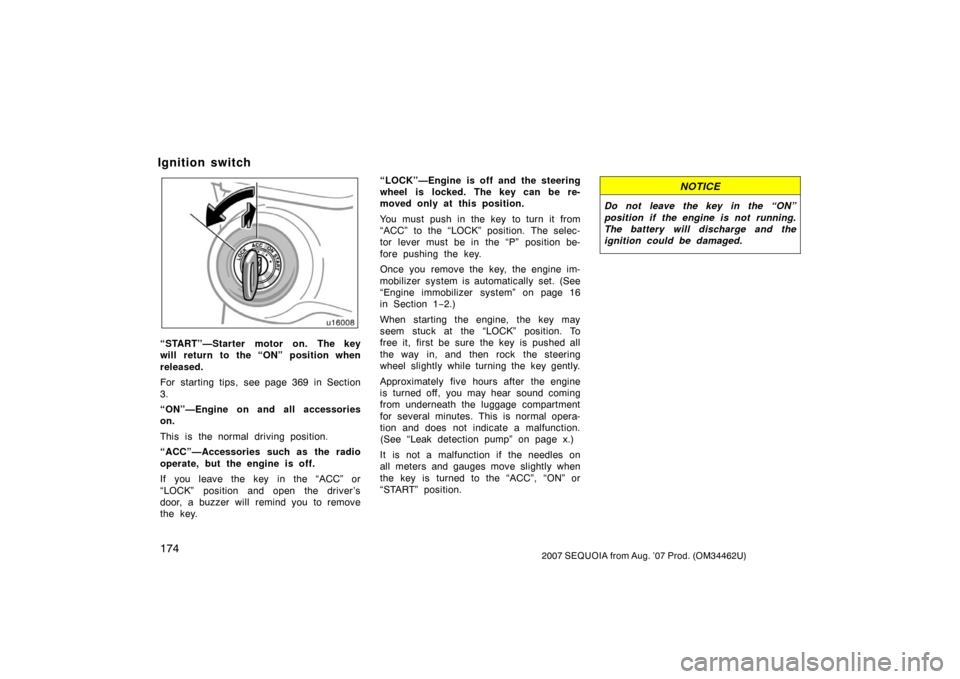
u16008
“START”—Starter motor on. The key
will return to the “ON” position when
released.
For starting tips, see page 369 in Section
3.
“ON”—Engine on and all accessories
on.
This is the normal driving position.
“ACC”—Accessories such as the radio
operate, but the engine is off.
If you leave the key in the “ACC” or
“LOCK” position and open the driver’s
door, a buzzer will remind you to remove
the key.“LOCK”—Engine is off and the steering
wheel is locked. The key can be re-
moved only at this position.
You must push in the key to turn it from
“ACC” to the “LOCK” position. The selec-
tor lever must be in the “P” position be-
fore pushing the key.
Once you remove the key, the engine im-
mobilizer system is automatically set. (See
“Engine immobilizer system” on page 16
in Section 1−
2.)
When starting the engine, the key may
seem stuck at the “LOCK” position. To
free it, first be sure the key is pushed all
the way in, and then rock the steering
wheel slightly while turning the key gently.
Approximately five hours after the engine
is turned off, you may hear sound coming
from underneath the luggage compartment
for several minutes. This is normal opera-
tion and does not indicate a malfunction.
(See “Leak detection pump” on page x.)
It is not a malfunction if the needles on
all meters and gauges move slightly when
the key is turned to the “ACC”, “ON” or
“START” position.
NOTICE
Do not leave the key in the “ON”
position if the engine is not running.
The battery will discharge and the
ignition could be damaged.
Ignition switch
Page 240 of 485
2312007 SEQUOIA from Aug. ’07 Prod. (OM34462U)
u17217
The rear seat audio system consists of
following components.1. Front audio system
2. Rear seat audio system display
3. Rear seat audio system controller
4. Headphone volume control dials
5. Headphone jacks
6. Controller holder The rear seat audio system can be oper-
ated with the rear seat audio system con-
troller.
CAUTION
Do not disassemble or modify the
controller. It may cause an accident,
fire or electric shock.
NOTICE
Keep the controller away from direct
sunlight, high heat and high humidity.
These conditions could cause the
case to deform or the battery to ex-
plode or leak.
—Rear seat audio system
controller
Page 241 of 485

2322007 SEQUOIA from Aug. ’07 Prod. (OM34462U)
u17006
BEFORE USING THE CONTROLLER
(for new vehicle owners)
A battery is already set in the control-
ler with an insulating sheet, which pre-
vents the battery from being dis-
charged. Before using the controller,
remove the insulating sheet.u17023
USING THE CONTROLLER
To use the rear seat audio system con-
troller, direct the signal output portion
of the controller to the signal reception
portion of the rear seat audio system
display.
The rear seat audio system controller can
be operated when the ignition switch is in
the “ACC” or “ON” position.
The controller does not operate properly
when the signal reception portion of the
display is exposed to direct sunlight.
Block the display from direct sunlight.
Details of specific buttons, controls, and
features of the controller, see
“CONTROLLER FEATURES” on page 234
in this Section.
NOTICE
Observe the followings, otherwise the
controller may be damaged.
�Do not drop or strongly knock the
controller against hard objects.
� Do not sit on or place heavy ob-
jects on the controller.

