Page 167 of 203
clvii
7wlc002a
Push the “AM”, “FM”, “TAPE” or “DISC”
button to turn on that mode. The selected
mode turns on directly.
Push these buttons if you want to switch
from one mode to another.
If the tape or disc is not set, the cassette
player or compact disc player does not turn
on.
You can turn off the cassette player by eject-
ing the cassette tape. If the audio system
was previously off, then the entire audio sys-
tem will be turned off when you eject the cas-
sette tape. If another function was previous-
ly playing, it will come on again.
lxb001a
lxb006a
lxb008a
The switches for radio, cassette tape and
disc player operation are displayed on
the liquid crystal display. Touch them
lightly and directly on the screen.
The selected switch is highlighted in green.
Page 168 of 203
clviii
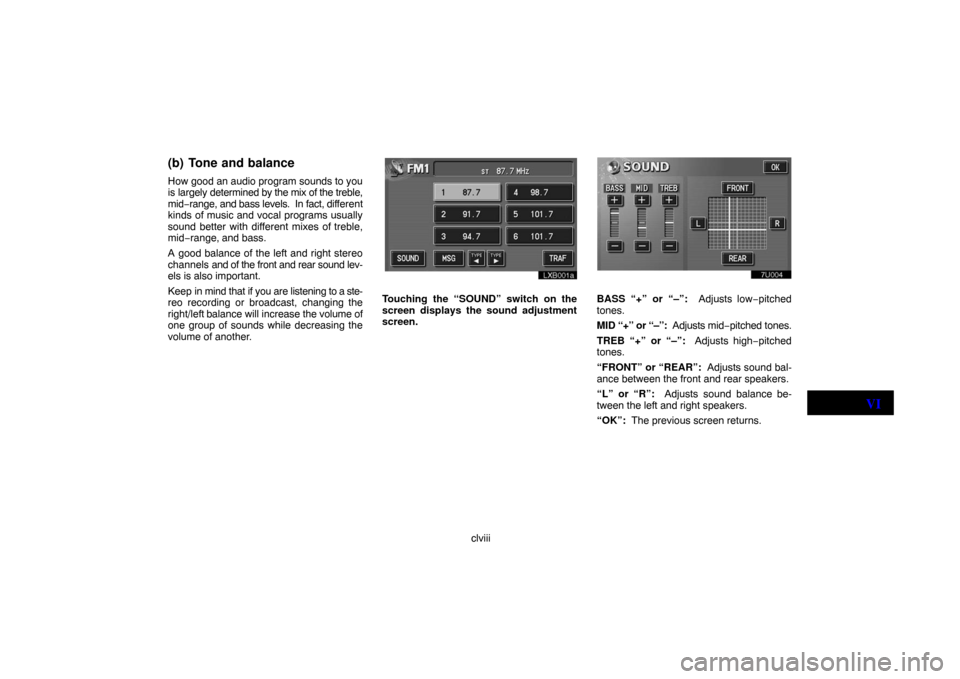
(b) Tone and balance
How good an audio program sounds to you
is largely determined by the mix of the treble,
mid−range, and bass levels. In fact, different
kinds of music and vocal programs usually
sound better with different mixes of treble,
mid−range, and bass.
A good balance of the left and right stereo
channels and of the front and rear sound lev-
els is also important.
Keep in mind that if you are listening to a ste-
reo recording or broadcast, changing the
right/left balance will increase the volume of
one group of sounds while decreasing the
volume of another.
lxb001a
Touching the “SOUND” switch on the
screen displays the sound adjustment
screen.BASS “+” or “–”: Adjusts low−pitched
tones.
MID “+” or “–”: Adjusts mid−pitched tones.
TREB “+” or “–”: Adjusts high−pitched
tones.
“FRONT” or “REAR”: Adjusts sound bal-
ance between the front and rear speakers.
“L” or “R”: Adjusts sound balance be-
tween the left and right speakers.
“OK”: The previous screen returns.
VI
Page 169 of 203
clix
(c) Your radio antenna
The antenna automatically extends when
the radio is on or the radio system is on, and
retracts when the radio mode is off.
UNX602
To adjust the height of the antenna manu-
ally, push “
” or “” side of the above
button.
Clean the antenna mast periodically with a
clean dry cloth.
CAUTION
Before extending the antenna, confirm
that no one is close enough to get
injured.
NOTICE
�To prevent damage to the antenna,
make sure it is retracted before
driving your vehicle through an
automatic car wash.
�Antenna mast have to be extended
higher than 100 mm (3.94 in.) length
when the audio is on. Extend the an-
tenna mast when the radio signal is
weak.
(d) Your cassette player
When you insert a cassette, the exposed
tape should be to the right.
NOTICE
Do not oil any part of the cassette
player, and do not insert anything
except a cassette tape into the slot.
Page 178 of 203

clxviii
(h) If the satellite radio tuner malfunctions
When problems occur with the XM� tuner, a message will appear on the display. Referring to the table below to identify the problem, take the
suggested corrective action.
ANTENNA
The XM� antenna is not connected. Check whether the XM� antenna cable is attached securely.
A short−circuit occurs in the antenna or the surrounding antenna cable. See a Toyota certified dealer.
UPDATING
You have not subscribed to the XM� satellite radio. The radio is being updated with the latest encryp-
tion code. Contact the XM� satellite radio for subscription information. When a contact is canceled,
you can choose the “CH000” and all free−to−air channels.
The premium channel you selected is not authorized. Wait for about 2 seconds until the radio returns
to the previous channel or “CH001”. If it does not change automatically, select another channel. If you
want to listen to the premium channel, contact the XM� satellite radio.
NO SIGNALThe XM� signal is too weak at the current location. Wait until your vehicle reaches a location with a
stronger signal.
LOADINGThe unit is acquiring audio or program information. Wait until the unit has received the information.
OFF AIRThe channel you selected is not broadcasting any programming. Select another channel.
−−−−−There is no song/program title or artist name/feature associated with the channel at that time. No ac-
tion needed.
−−−The channel you selected is no longer available. Wait for about 2 seconds until the radio returns to the
previous channel or “CH001”. If it does not change automatically, select another channel.
The XM� Listener Care Center is also available on the phone, please call (800) 967−2346 during the following hours:
Monday – Saturday: 7 a.m. – 1 a.m. Sunday: 12 p.m – 12 a.m.
VI
Page 179 of 203

clxix
NOTICE
This equipment has been tested and
found to comply with the limits for a
class B digital device, pursuant to
Part 15 of the FCC Rules. These limits
are designed to provide reasonable
protection against harmful interfer-
ence in a residential installation. This
equipment generates, uses and can
radiate radio frequency energy and, if
not installed and used in accordance
with the instructions, may cause
harmful interference to radio commu-
nications. However, there is no guar-
antee that interference will not occur
in a particular installation.
If this equipment does cause harmful
interference to radio or television re-
ception, which can be determined by
turning the equipment off and on, the
user is encouraged to try to correct
the interference by one or more of the
following measures:
– Reorient or relocate the receiving
antenna.
– Increase the separation between
the equipment and receiver.
– Connect the equipment into an out-
let on a circuit different from that to
which the receiver is connected.
– Consult the dealer or an experi-
enced radio/TV technician for help.
Information to user
Alternation or modifications carried
out without appropriate authorization
may invalidate the user’s right to op-
erate the equipment.NOTICE
This XM� tuner supports “Audio Ser-
vices” (Music and Talk) of only XM�
satellite radio and “Text Informa-
tion”, linked to the respective “Audio
Services”.
*Text Information includes, Station
Name, (Artist) Name, (Song) Title and
Category Name.
Page 182 of 203

clxxii
7ulc010a
“Automatic program selection” button:
The automatic program selection feature al-
lows you to program your cassette player to
skip forward or backward to locate the song
you want to hear. You can skip up to 9 pro-
grams at a time.
Push this button on the upper side to skip for-
ward. “FF” and the number will appear on
the display. Push the button until the number
you want to skip appears on the display. Af-
ter that, the player will automatically skip for-
ward.
When the end of the tape is reached, the
player automatically reverses sides and re-
sumes normal play.
Push this button on the lower side to skip
backward. Push the button until “REW” and
the number you want to skip appear on the
display.
�If you set “REW 1”, the player will rewind
to the beginning of the current program.
�When counting the number of programs
you want to rewind, remember to count the
current program as well. For example, if you
want to rewind to a song that is two before
the song you are listening to, push this but-
ton until “REW 3” appears on the display.
When the beginning of the tape is reached,
the player automatically resumes normal
play.
There must be at least 5 seconds of blank
space between programs for this feature to
work correctly.
“RPT”, “SKIP” or “Automatic program
selection” features: These features may
not work well with some spoken word, live or
classical recordings.
DVD player operation
The DVD player can play audio CDs, DVD
video discs and video CDs.
For appropriate discs for this paper, see “Car
audio/video system operating hints” on page
clxxxix.
For safety reasons, you can enjoy DVD vid-
eo discs and video CDs only when the ve-
hicle is completely stopped with the ignition
switch in the “ACC” or “ON” position and the
parking brake applied. While you are driving,
you can hear audio alone even in the DVD
video or video CD mode.
The DVD player can play the discs labeled
as shown below.
VI
Page 183 of 203
clxxiii
(a) Inserting discs
unx604
1. Pull the lock release lever and open
the console box.
unx605
2. Push this button to eject the maga-
zine.
unx606
3. Pull out the tray while pushing the
lock release button.
unx607
4. Put a disc on the tray with its label face
up and push the tray back into the maga-
zine.If the label faces down, the disc cannot be
played. In this case, “DISC CHECK” and
disc number appears on the display.
If a disc which is not playable is inserted,
“DISC CHECK” will also appear on the
screen. For appropriate discs for this player,
see “Car audio/video system operating
hints” on page clxxxix.
unx608a
5. Insert the magazine into the player as
indicated by the arrow ahead on the mag-
azine, close the door and console box.
Page 184 of 203

clxxiv When the magazine is set completely, the
system will be in a “Load” cycle for approxi-
mately 30 seconds while the system
searches for discs in the magazine. Upon
completion of this cycle, the DVD player unit
will be ready to play. If the “DISC” button is
pushed during the “Load” cycle, “LOAD” ap-
pears on the display until the system has
completed the load cycle, after which the
system will begin normal play.
CAUTION
To reduce the chance of injury in case
of an accident or a sudden stop, always
keep the console box closed while
driving.
(b) Playing a disc
ung627
Push the “DISC” button if the magazine is
already loaded in the player.
The “DVD CHANGER” screen appears on
the display.
The discs set in the magazine are played
continuously, starting with disc number 1.
The disc number of the disc currently being
played, the track number and the time from
the beginning of the program are shown on
the display.
(c) Selecting a desired disc
On the screen: Touch the desired disc
number.
The selected disc number is highlighted in
green.
The player will start playing the selected disc
from the first track.
On the audio panel: Push the “
” or “”
side of the “DISC” button.
When you release the button, the player will
start playing the selected disc from the first
track.VI


